Dive into PyOpenCL
John Hu / Kilik Kuo
Outline
1. What's GPU computing ?
2. What's OpenCL ?
3. How to use OpenCL via Python ? (PyOpenCL)
4. Examples : The power of PyOpenCL
GPU Computing
CPU v.s. GPU
What’s the difference ?
現行的運算平台是 -
異質(Heterogeneous) 世界
Graphics & Memory
Control Hub
I/O Control Hub
CPU
GPU
RAM
處理器設計目的
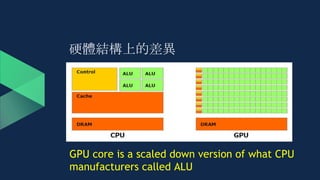
硬體結構上的差異
GPU core is a scaled down version of what CPU
manufacturers called ALU
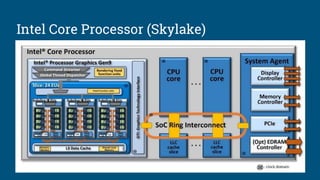
微處理器的趨勢
24 cores
IBM
Power9
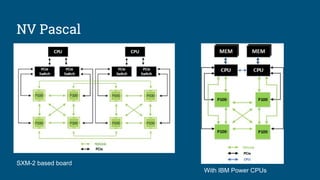
NV Pascal
GP1003840 CUDA
cores (60
SMs)
AMD
Radeon Vega3584~4096
cores
24 EUs
(7 threads each EU)
~= 168 cores
Intel Skylake
(Gen 9)
● 利用 Graphics Processing Units 進行 general-purpose 的科學或工程計
算
● 2007 - nVidia 首先提出概念與框架
○ Compute Unified Device Architecture
● 2008 - Open Computing Language, 由 Apple 開發並與 AMD, IBM, Intel,
nVidia 合作下初步完善, 並移交給 Khronos Group.
So, GPU Computing is ...
OpenCL
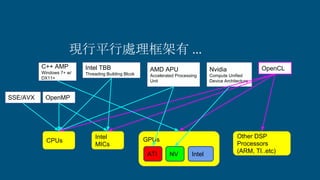
現行平行處理框架有 ...
CPUs
Intel
MICs
Other DSP
Processors
(ARM, TI..etc)
OpenCLNvidia
Compute Unified
Device Architecture
OpenMPSSE/AVX
Intel TBB
Threading Building Blcok
AMD APU
Accelerated Processing
Unit
GPUs
ATI NV Intel
C++ AMP
Windows 7+ w/
DX11+
Open Computing Language
● 開放
● 免權利金
● 跨異質平台上的平行編程標準
OpenCL
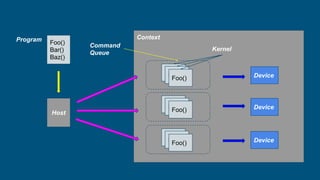
Platform Model
Context
Foo()
Bar()
Baz()
Host
Device
Device
Device
Baz()Baz()Foo()
Baz()Baz()Foo()
Baz()Baz()Foo()
Program
Kernel
Command
Queue
Dealer
- Host
Deck of Cards
- Program
Card Table
- Context
Cards
- Kernels
Players’ Hand
- Command Queue
Player
- Device
Host
Program
Context
Device
Command Queue
Kernel
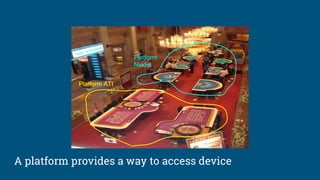
Platform ATI
Platform
Nvidia
A platform provides a way to access device
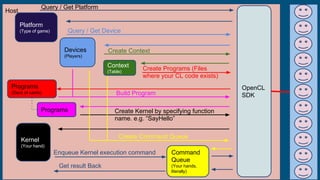
Host
Platform
(Type of game)
Devices
(Players)
Context
(Table)
Programs
(Deck of cards)
Kernel
(Your hand)
Command
Queue
(Your hands,
literally)
Query / Get Platform
OpenCL
SDK
Query / Get Device
Create Context
Create Programs (Files
where your CL code exists)
Programs
Build Program
Create Kernel by specifying function
name. e.g. “SayHello”
Create Command Queue
Enqueue Kernel execution command
Get result Back
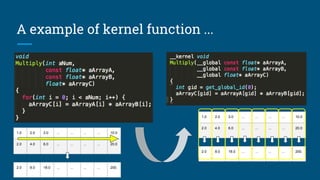
A Kernel is
● 能在單一 core 上被執行的函式 (Data Parallel 或 Task Parallel)
A example of kernel function ...
1.0 2.0 3.0 ... ... ... ... 10.0
2.0 4.0 6.0 ... ... ... ... 20.0
2.0 8.0 18.0 ... ... ... ... 200.
1.0 2.0 3.0 ... ... ... ... 10.0
2.0 4.0 6.0 ... ... ... ... 20.0
2.0 8.0 18.0 ... ... ... ... 200.
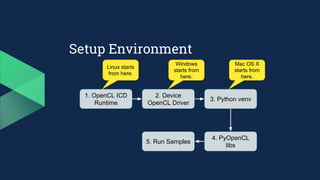
Setup Environment
1. OpenCL ICD
Runtime
2. Device
OpenCL Driver
3. Python venv
4. PyOpenCL
libs
5. Run Samples
Windows
starts from
here.
Mac OS X
starts from
here.
Linux starts
from here.
Installable Client
Driver
● 從 OpenCL 1.2 開始, Khronos 提供
一個 ICD loader extension
(cl_khr_icd), 可以讓不同廠商的
OpenCL Driver 實作共同存在於一個
主機.
● Host ⇒ ICD loader ⇒ Vender ICD ⇒
Vender OpenCL implementation
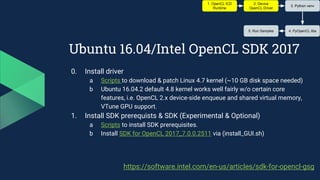
Ubuntu 16.04/Intel OpenCL SDK 2017
0. Install driver
a Scripts to download & patch Linux 4.7 kernel (~10 GB disk space needed)
b Ubuntu 16.04.2 default 4.8 kernel works well fairly w/o certain core
features, i.e. OpenCL 2.x device-side enqueue and shared virtual memory,
VTune GPU support.
1. Install SDK prerequists & SDK (Experimental & Optional)
a Scripts to install SDK prerequisites.
b Install SDK for OpenCL 2017_7.0.0.2511 via (install_GUI.sh)
1. OpenCL ICD
Runtime
2. Device
OpenCL Driver
3. Python venv
4. PyOpenCL libs5. Run Samples
https://software.intel.com/en-us/articles/sdk-for-opencl-gsg
Windows 10 / Intel OpenCL
2. Download and install the SDK:
○ https://software.intel.com/en-us/intel-opencl/download
1. OpenCL ICD
Runtime
2. Device
OpenCL Driver
3. Python venv
4. PyOpenCL libs5. Run Samples
Windows 10 / Nvidia OpenCL
2. Download and install the Nvidia driver from offcial website:
○ http://www.nvidia.com/Download/index.aspx
○ For some old models, we need to install CUDA toolkits
■ https://developer.nvidia.com/cuda-downloads
1. OpenCL ICD
Runtime
2. Device
OpenCL Driver
3. Python venv
4. PyOpenCL libs5. Run Samples
Windows 10 / AMD OpenCL
2. 安裝 AMD APP SDK
○ http://developer.amd.com/amd-accelerated-parallel-processing-app-sdk/
1. OpenCL ICD
Runtime
2. Device
OpenCL Driver
3. Python venv
4. PyOpenCL libs5. Run Samples
Windows
3. Prepare venv
○ $> python3 -m venv [NameOfEnv]
○ $> NameOfEnvScriptsactivate.bat
○ <NameOfEnv>$> pip3 install --upgrade pip
4. Download and install the pre-built python modules:
○ http://www.lfd.uci.edu/~gohlke/pythonlibs/#numpy
■ pip install "numpy‑1.13.1+mkl‑cp36‑cp36m‑win_amd64.whl"
○ http://www.lfd.uci.edu/~gohlke/pythonlibs/#pyopencl
■ pip install "pyopencl‑2017.2+cl12‑cp36‑cp36m‑win_amd64.whl”
■ pip install "pyopencl‑2017.2+cl21‑cp36‑cp36m‑win_amd64.whl"
1. OpenCL ICD
Runtime
2. Device
OpenCL Driver
3. Python venv
4. PyOpenCL libs5. Run Samples
Mac OS X / Ubuntu
3. Prepare venv
○ $> python3 -m venv [NameOfEnv]
○ $> source ./NameOfEnv/bin/activate
○ <NameOfEnv>$> pip3 install --upgrade pip
4. Install Python modules:
○ <NameOfEnv>$> pip3 install numpy
○ <NameOfEnv>$> pip3 install pyopencl
1. OpenCL ICD
Runtime
2. Device
OpenCL Driver
3. Python venv
4. PyOpenCL libs5. Run Samples
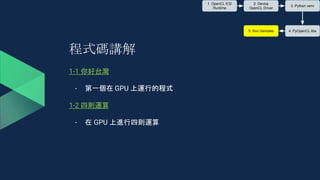
程式碼講解
1-1 你好台灣
- 第一個在 GPU 上運行的程式
1-2 四則運算
- 在 GPU 上進行四則運算
1. OpenCL ICD
Runtime
2. Device
OpenCL Driver
3. Python venv
4. PyOpenCL libs5. Run Samples
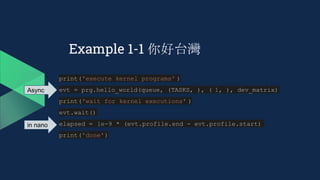
Example 1-1 你好台灣
● 啟動 PyOpenCL
● 建立 OpenCL 所需元件: Context, Queue, Kernel, etc.
● 由 OpenCL kernel 印出你好台灣.......
(For Mac Users)
● 沒有參數的 kernel 在 Mac OS X 的 OpenCL driver 被視為不存在的
kernel (see hellow_world_broken.cl)
Example 1-1 你好台灣
print('execute kernel programs' )
evt = prg.hello_world(queue, (TASKS, ), ( 1, ), dev_matrix)
print('wait for kernel executions' )
evt.wait()
elapsed = 1e-9 * (evt.profile.end - evt.profile.start)
print('done')
Async
in nano
Example 1-2 四則運算
● 目的:替學生加分==> 開根號乘以十
● 使用 Numpy 建立內容
matrix = numpy.random.randint( low=1, high=101,
dtype =numpy.int32, size=TASKS)
# prepare memory for final answer from OpenCL
final = numpy.zeros(TASKS, dtype=numpy.int32)
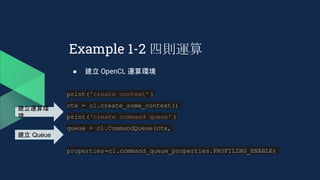
Example 1-2 四則運算
● 建立 OpenCL 運算環境
print('create context' )
ctx = cl.create_some_context()
print('create command queue' )
queue = cl.CommandQueue(ctx,
properties=cl.command_queue_properties.PROFILING_ENABLE)
建立運算環
境
建立 Queue
Example 1-2 四則運算
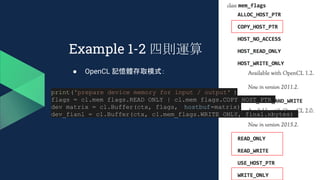
● OpenCL 記憶體存取模式:
print('prepare device memory for input / output' )
flags = cl.mem_flags.READ_ONLY | cl.mem_flags.COPY_HOST_PTR
dev_matrix = cl.Buffer(ctx, flags, hostbuf=matrix)
dev_fianl = cl.Buffer(ctx, cl.mem_flags.WRITE_ONLY, final.nbytes)
Example 1-2 四則運算
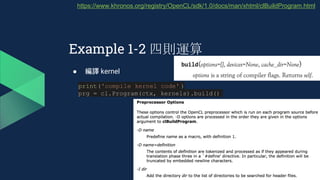
● 編譯 kernel
print('compile kernel code' )
prg = cl.Program(ctx, kernels).build()
https://www.khronos.org/registry/OpenCL/sdk/1.0/docs/man/xhtml/clBuildProgram.html
Example 1-2 四則運算
● 執行 kernel
print('execute kernel programs' )
evt = prg.adjust_score(queue, (TASKS, ), ( 1, ),
dev_matrix, dev_fianl)
print('wait for kernel executions' )
evt.wait()
elapsed = 1e-9 * (evt.profile.end - evt.profile.start)
Example 1-2 四則運算
● 取回結果
cl.enqueue_read_buffer(queue, dev_fianl, final).wait()
Example 1-2 四則運算
● kernel code
__kernel void adjust_score(__global int* values,
__global int* final)
{
int global_id = get_global_id(0);
final[global_id] =
convert_int(sqrt(convert_float(values[global_id])) * 10);
}
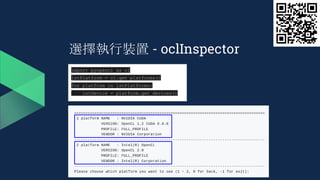
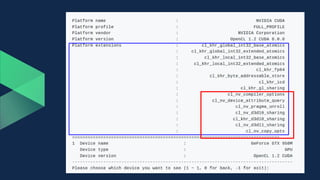
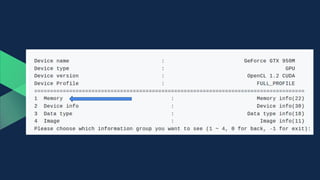
選擇執行裝置 - oclInspector
import pyopencl as cl
lstPlatform = cl.get_platforms()
for platform in lstPlatforms:
lstDevice = platform.get_devices()
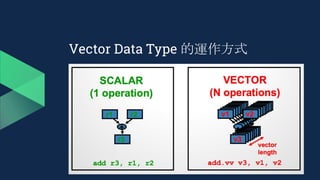
OpenCL Vector Data Type
● 透過編譯, 讓 Hardware 有機會透過指令集對資料從記憶體作整批的load
/ store.
● 對效能提昇 (尤其是 CPU 裝置) 有幫助.
Vector Data Type 的運作方式
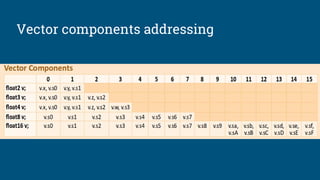
Vector components addressing
程式碼講解
● 2-1 四則運算加速版
○ int v.s. int4
● 2-2 影像灰階處理
○ uchar v.s. uchar4
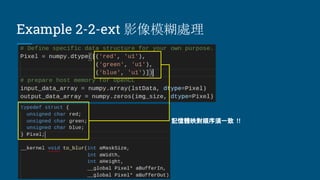
● 2-2-ext 影像模糊處理
○ 自訂資料結構
Example 2-1 四則運算加速版
● int v.s. int4
__kernel void adjust_score(__global int4* values,
__global int4* final) {
int global_id = get_global_id(0);
final[global_id] =
convert_int4(sqrt(convert_float4 (values[global_id])) * 10);
}
Example 2-1 四則運算加速版
__kernel void adjust_score(__global int4* values, __global int4* final)
{
int global_id = get_global_id(0);
// convert int4 to float4 with implicit data type conversion
float4 float_value = (float4) (values[global_id]. x,
values[global_id]. y,
values[global_id]. z,
values[global_id]. w);
// do calculation
float4 float_final = sqrt(float_value) * 10;
// convert float4 to int4 with implicit data type conversion
final[global_id] = (int4) (float_final. x,
float_final. y,
float_final. z,
float_final. w);
}
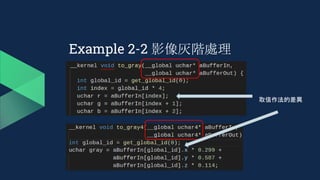
Example 2-2 影像灰階處理
● 灰階
- 直覺上 ⇒ (R+G+B) / 3
- 人眼對綠色亮度的變化感知最大;對藍色亮度的變化感知最小
- Gray = 0.299 * Red + 0.587 * Green + 0.114 * Blue
Example 2-2 影像灰階處理
lstData = [(1,2,3,4), (5,6,7,8), ...]
image_size = 1920 * 1080
# prepare host memory for OpenCL
if strChoice == '1':
pixel_type = numpy.dtype(( 'B', 1))
input_data_array = numpy.array(lstData, dtype=pixel_type)
output_data_array = numpy.zeros(img_size * 4,
dtype =pixel_type)
else:
pixel_type = numpy.dtype(( 'B', 4))
input_data_array = numpy.array(lstData, dtype=pixel_type)
output_data_array = numpy.zeros(img_size, dtype=pixel_type)
Example 2-2 影像灰階處理
取值作法的差異
● 原理
○ 用 N x N 的遮罩將影像每一個 Pixel 作加權平均值
○ 減少/淡化突兀之噪點
Example 2-2-ext 影像模糊處理
1/9 1/9 1/9
1/9 1/9 1/9
1/9 1/9 1/9
Example 2-2-ext 影像模糊處理
記憶體映對順序須一致 !!
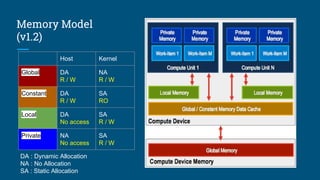
OpenCL
Device Memory Model
Memory Model
(v1.2)
Host Kernel
Global DA
R / W
NA
R / W
Constant DA
R / W
SA
RO
Local DA
No access
SA
R / W
Private NA
No access
SA
R / W
DA : Dynamic Allocation
NA : No Allocation
SA : Static Allocation
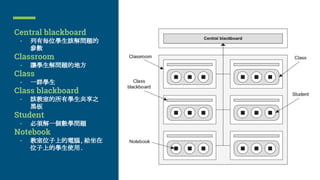
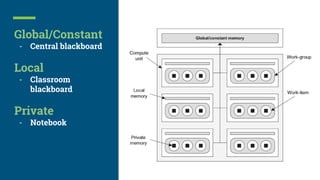
Central blackboard
- 列有每位學生該解問題的
參數
Classroom
- 讓學生解問題的地方
Class
- 一群學生
Class blackboard
- 該教室的所有學生共享之
黑板
Student
- 必須解一個數學問題
Notebook
- 教室位子上的電腦, 給坐在
位子上的學生使用.
Global/Constant
- Central blackboard
Local
- Classroom
blackboard
Private
- Notebook
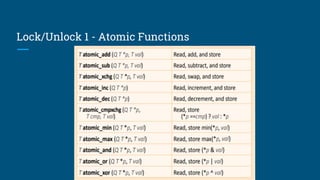
Lock/Unlock 1 - Atomic Functions
程式碼講解
● 3-1 影像模糊處理
○ 搭配 Image2d data type
● 3-2 計算 Histogram
○ global memory, atomic_add
Example 3-1 影像模糊 (Image2d)
● Note: CL_DEVICE_IMAGE_SUPPORT = True
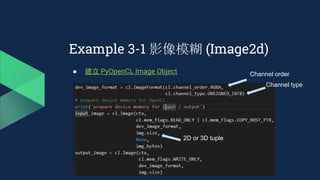
Example 3-1 影像模糊 (Image2d)
● 建立 PyOpenCL Image Object Channel order
Channel type
2D or 3D tuple
Example 3-1 影像模糊 (Image2d)
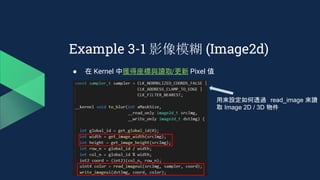
● 在 Kernel 中獲得座標與讀取/更新 Pixel 值
用來設定如何透過 read_image 來讀
取 Image 2D / 3D 物件
Example 3-1 影像模糊 (Image2d)
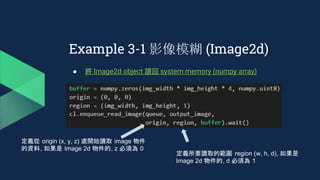
● 將 Image2d object 讀回 system memory (numpy array)
定義從 origin (x, y, z) 處開始讀取 image 物件
的資料, 如果是 Image 2d 物件的, z 必須為 0
定義所要讀取的範圍 region (w, h, d), 如果是
Image 2d 物件的, d 必須為 1
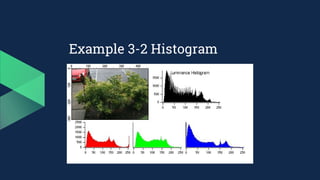
Example 3-2 Histogram
● 圖片直方圖的計算方法:
○ R, G, B 分開處理
○ 對其值從 0 ~ 255 進行統計,以得出每個 值的分佈情況
__kernel void histogram(__global Pixel* pixels,
volatile __global unsigned int* result)
{
unsigned int gid = get_global_id(0);
atomic_inc(result + pixels[gid]. red);
atomic_inc(result + pixels[gid]. green + 256);
atomic_inc(result + pixels[gid]. blue + 512);
}
OpenCL
Execution Model
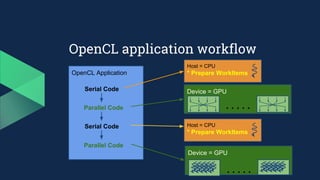
OpenCL Application
Serial Code
Parallel Code
Serial Code
Parallel Code
OpenCL application workflow
Device = GPU
Device = GPU
Host = CPU
* Prepare WorkItems
Host = CPU
* Prepare WorkItems
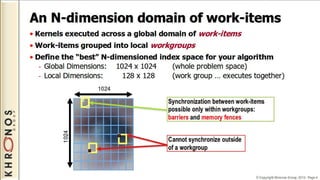
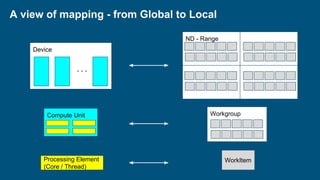
Processing Element
(Core / Thread)
Compute Unit
ND - Range
Device
Workgroup
WorkItem
A view of mapping - from Global to Local
Lock/Unlock 2 -
Barrier/Fence
在 mem_fence 之前的 loads
and stores 的記憶體位置的
值都會被 commit.
Example
● 4-1 Global / Local work items & Work groups.
● 4-1-ext - Global / Local worksize 對效能的影響.
● 4-2 Histogram 加速版
○ Global : 7680 * 4320,
○ Local : 64, 1
● 4-3 k-means 分群
Example 4-1 Define Work Groups
● Global : 3, 2
● Local : 2, 1
● Offset : None
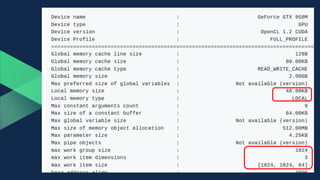
重要 : 確認所切割出的work group size 與 每一 dimension 的 work item
size 不會超過裝置限制!!
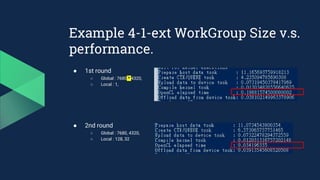
Example 4-1-ext WorkGroup Size v.s.
performance.
● 1st round
○ Global : 7680 * 4320,
○ Local : 1,
● 2nd round
○ Global : 7680, 4320,
○ Local : 128, 32
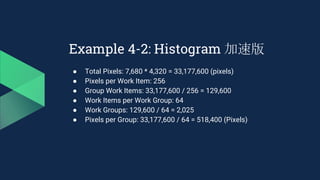
Example 4-2: Histogram 加速版
64 work items per group
Example 4-2: Histogram 加速版
● Total Pixels: 7,680 * 4,320 = 33,177,600 (pixels)
● Pixels per Work Item: 256
● Group Work Items: 33,177,600 / 256 = 129,600
● Work Items per Work Group: 64
● Work Groups: 129,600 / 64 = 2,025
● Pixels per Group: 33,177,600 / 64 = 518,400 (Pixels)
● 流程
○ 利用第一個 Work Item 清除 local memory
○ 利用 Global ID 計算出每個 Work Item 的開始 Pixel 與結束 Pixel
○ 利用第一個 Work Item 將 local memory 複製到 global memory
Example 4-2: Histogram 加速版
unsigned int pixel_start_index = gid * PIXELS_PER_ITEM;
unsigned int pixel_end_index = pixel_start_index + PIXELS_PER_ITEM;
Example 4-3 分群
● k-means 演算法 (k 為使用者指定)
● 所有資料點 xj
到其對應群中心 ui
的距離總合是最小的
○ 找到最佳的群中心 ui
及 xj
所屬的群來符合上面的要求
Example 4-3 分群
● 資料設計
○ 所有點的座標
○ 所有點被分群後所在的群組資訊
○ 群中心的座標
X1 X2 X3 X4 X5 ... ... ... ... ... ... ...
Y1 Y2 Y3 Y4 Y5 ... ... ... ... ... ... ...
0 1 3 2 3 ... ... ... ... ... ... ...
X1’ X2’ X3’ X4’
Y1’ Y2’ Y3’ Y4’
Point_X
Point_Y
Point_Cluster_Id
Cluster_X
Cluster_Y
Example 4-3 分群
● 演算法設計
○ do_clustering
■ Per work item
● 計算單一個點與所分群之中心距離 ,
● 選擇具有最短距離之群 , 並將點分配至該群.
■ 任務總維度 : 點的個數
○ calc_centroid
■ Per work item
● 計算屬於同一個群的所有點之幾何重心
● 將重心更新至群之中心座標
■ 任務總維度 : 群的個數
Example 4-3 分群
● 10000 點 / 10 群
Thanks.
Appendix
Intel Core Processor (Skylake)
AMD GPU (Vega)
NV Pascal
With IBM Power CPUs
SXM-2 based board

開放運算&GPU技術研究班

  • 1.
  • 2.
    Outline 1. What's GPUcomputing ? 2. What's OpenCL ? 3. How to use OpenCL via Python ? (PyOpenCL) 4. Examples : The power of PyOpenCL
  • 3.
  • 4.
    CPU v.s. GPU What’sthe difference ?
  • 5.
    現行的運算平台是 - 異質(Heterogeneous) 世界 Graphics& Memory Control Hub I/O Control Hub CPU GPU RAM
  • 6.
  • 7.
    硬體結構上的差異 GPU core isa scaled down version of what CPU manufacturers called ALU
  • 8.
    微處理器的趨勢 24 cores IBM Power9 NV Pascal GP1003840CUDA cores (60 SMs) AMD Radeon Vega3584~4096 cores 24 EUs (7 threads each EU) ~= 168 cores Intel Skylake (Gen 9)
  • 9.
    ● 利用 GraphicsProcessing Units 進行 general-purpose 的科學或工程計 算 ● 2007 - nVidia 首先提出概念與框架 ○ Compute Unified Device Architecture ● 2008 - Open Computing Language, 由 Apple 開發並與 AMD, IBM, Intel, nVidia 合作下初步完善, 並移交給 Khronos Group. So, GPU Computing is ...
  • 10.
  • 11.
    現行平行處理框架有 ... CPUs Intel MICs Other DSP Processors (ARM,TI..etc) OpenCLNvidia Compute Unified Device Architecture OpenMPSSE/AVX Intel TBB Threading Building Blcok AMD APU Accelerated Processing Unit GPUs ATI NV Intel C++ AMP Windows 7+ w/ DX11+
  • 12.
    Open Computing Language ●開放 ● 免權利金 ● 跨異質平台上的平行編程標準
  • 13.
  • 14.
  • 15.
    Dealer - Host Deck ofCards - Program Card Table - Context Cards - Kernels Players’ Hand - Command Queue Player - Device Host Program Context Device Command Queue Kernel
  • 16.
    Platform ATI Platform Nvidia A platformprovides a way to access device
  • 17.
    Host Platform (Type of game) Devices (Players) Context (Table) Programs (Deckof cards) Kernel (Your hand) Command Queue (Your hands, literally) Query / Get Platform OpenCL SDK Query / Get Device Create Context Create Programs (Files where your CL code exists) Programs Build Program Create Kernel by specifying function name. e.g. “SayHello” Create Command Queue Enqueue Kernel execution command Get result Back
  • 18.
    A Kernel is ●能在單一 core 上被執行的函式 (Data Parallel 或 Task Parallel)
  • 19.
    A example ofkernel function ... 1.0 2.0 3.0 ... ... ... ... 10.0 2.0 4.0 6.0 ... ... ... ... 20.0 2.0 8.0 18.0 ... ... ... ... 200. 1.0 2.0 3.0 ... ... ... ... 10.0 2.0 4.0 6.0 ... ... ... ... 20.0 2.0 8.0 18.0 ... ... ... ... 200.
  • 20.
    Setup Environment 1. OpenCLICD Runtime 2. Device OpenCL Driver 3. Python venv 4. PyOpenCL libs 5. Run Samples Windows starts from here. Mac OS X starts from here. Linux starts from here.
  • 21.
    Installable Client Driver ● 從OpenCL 1.2 開始, Khronos 提供 一個 ICD loader extension (cl_khr_icd), 可以讓不同廠商的 OpenCL Driver 實作共同存在於一個 主機. ● Host ⇒ ICD loader ⇒ Vender ICD ⇒ Vender OpenCL implementation
  • 22.
    Ubuntu 16.04/Intel OpenCLSDK 2017 0. Install driver a Scripts to download & patch Linux 4.7 kernel (~10 GB disk space needed) b Ubuntu 16.04.2 default 4.8 kernel works well fairly w/o certain core features, i.e. OpenCL 2.x device-side enqueue and shared virtual memory, VTune GPU support. 1. Install SDK prerequists & SDK (Experimental & Optional) a Scripts to install SDK prerequisites. b Install SDK for OpenCL 2017_7.0.0.2511 via (install_GUI.sh) 1. OpenCL ICD Runtime 2. Device OpenCL Driver 3. Python venv 4. PyOpenCL libs5. Run Samples https://software.intel.com/en-us/articles/sdk-for-opencl-gsg
  • 23.
    Windows 10 /Intel OpenCL 2. Download and install the SDK: ○ https://software.intel.com/en-us/intel-opencl/download 1. OpenCL ICD Runtime 2. Device OpenCL Driver 3. Python venv 4. PyOpenCL libs5. Run Samples
  • 24.
    Windows 10 /Nvidia OpenCL 2. Download and install the Nvidia driver from offcial website: ○ http://www.nvidia.com/Download/index.aspx ○ For some old models, we need to install CUDA toolkits ■ https://developer.nvidia.com/cuda-downloads 1. OpenCL ICD Runtime 2. Device OpenCL Driver 3. Python venv 4. PyOpenCL libs5. Run Samples
  • 25.
    Windows 10 /AMD OpenCL 2. 安裝 AMD APP SDK ○ http://developer.amd.com/amd-accelerated-parallel-processing-app-sdk/ 1. OpenCL ICD Runtime 2. Device OpenCL Driver 3. Python venv 4. PyOpenCL libs5. Run Samples
  • 26.
    Windows 3. Prepare venv ○$> python3 -m venv [NameOfEnv] ○ $> NameOfEnvScriptsactivate.bat ○ <NameOfEnv>$> pip3 install --upgrade pip 4. Download and install the pre-built python modules: ○ http://www.lfd.uci.edu/~gohlke/pythonlibs/#numpy ■ pip install "numpy‑1.13.1+mkl‑cp36‑cp36m‑win_amd64.whl" ○ http://www.lfd.uci.edu/~gohlke/pythonlibs/#pyopencl ■ pip install "pyopencl‑2017.2+cl12‑cp36‑cp36m‑win_amd64.whl” ■ pip install "pyopencl‑2017.2+cl21‑cp36‑cp36m‑win_amd64.whl" 1. OpenCL ICD Runtime 2. Device OpenCL Driver 3. Python venv 4. PyOpenCL libs5. Run Samples
  • 27.
    Mac OS X/ Ubuntu 3. Prepare venv ○ $> python3 -m venv [NameOfEnv] ○ $> source ./NameOfEnv/bin/activate ○ <NameOfEnv>$> pip3 install --upgrade pip 4. Install Python modules: ○ <NameOfEnv>$> pip3 install numpy ○ <NameOfEnv>$> pip3 install pyopencl 1. OpenCL ICD Runtime 2. Device OpenCL Driver 3. Python venv 4. PyOpenCL libs5. Run Samples
  • 28.
    程式碼講解 1-1 你好台灣 - 第一個在GPU 上運行的程式 1-2 四則運算 - 在 GPU 上進行四則運算 1. OpenCL ICD Runtime 2. Device OpenCL Driver 3. Python venv 4. PyOpenCL libs5. Run Samples
  • 29.
    Example 1-1 你好台灣 ●啟動 PyOpenCL ● 建立 OpenCL 所需元件: Context, Queue, Kernel, etc. ● 由 OpenCL kernel 印出你好台灣....... (For Mac Users) ● 沒有參數的 kernel 在 Mac OS X 的 OpenCL driver 被視為不存在的 kernel (see hellow_world_broken.cl)
  • 30.
    Example 1-1 你好台灣 print('executekernel programs' ) evt = prg.hello_world(queue, (TASKS, ), ( 1, ), dev_matrix) print('wait for kernel executions' ) evt.wait() elapsed = 1e-9 * (evt.profile.end - evt.profile.start) print('done') Async in nano
  • 31.
    Example 1-2 四則運算 ●目的:替學生加分==> 開根號乘以十 ● 使用 Numpy 建立內容 matrix = numpy.random.randint( low=1, high=101, dtype =numpy.int32, size=TASKS) # prepare memory for final answer from OpenCL final = numpy.zeros(TASKS, dtype=numpy.int32)
  • 32.
    Example 1-2 四則運算 ●建立 OpenCL 運算環境 print('create context' ) ctx = cl.create_some_context() print('create command queue' ) queue = cl.CommandQueue(ctx, properties=cl.command_queue_properties.PROFILING_ENABLE) 建立運算環 境 建立 Queue
  • 33.
    Example 1-2 四則運算 ●OpenCL 記憶體存取模式: print('prepare device memory for input / output' ) flags = cl.mem_flags.READ_ONLY | cl.mem_flags.COPY_HOST_PTR dev_matrix = cl.Buffer(ctx, flags, hostbuf=matrix) dev_fianl = cl.Buffer(ctx, cl.mem_flags.WRITE_ONLY, final.nbytes)
  • 34.
    Example 1-2 四則運算 ●編譯 kernel print('compile kernel code' ) prg = cl.Program(ctx, kernels).build() https://www.khronos.org/registry/OpenCL/sdk/1.0/docs/man/xhtml/clBuildProgram.html
  • 35.
    Example 1-2 四則運算 ●執行 kernel print('execute kernel programs' ) evt = prg.adjust_score(queue, (TASKS, ), ( 1, ), dev_matrix, dev_fianl) print('wait for kernel executions' ) evt.wait() elapsed = 1e-9 * (evt.profile.end - evt.profile.start)
  • 36.
    Example 1-2 四則運算 ●取回結果 cl.enqueue_read_buffer(queue, dev_fianl, final).wait()
  • 37.
    Example 1-2 四則運算 ●kernel code __kernel void adjust_score(__global int* values, __global int* final) { int global_id = get_global_id(0); final[global_id] = convert_int(sqrt(convert_float(values[global_id])) * 10); }
  • 38.
    選擇執行裝置 - oclInspector importpyopencl as cl lstPlatform = cl.get_platforms() for platform in lstPlatforms: lstDevice = platform.get_devices()
  • 42.
    OpenCL Vector DataType ● 透過編譯, 讓 Hardware 有機會透過指令集對資料從記憶體作整批的load / store. ● 對效能提昇 (尤其是 CPU 裝置) 有幫助.
  • 43.
    Vector Data Type的運作方式
  • 44.
  • 45.
    程式碼講解 ● 2-1 四則運算加速版 ○int v.s. int4 ● 2-2 影像灰階處理 ○ uchar v.s. uchar4 ● 2-2-ext 影像模糊處理 ○ 自訂資料結構
  • 46.
    Example 2-1 四則運算加速版 ●int v.s. int4 __kernel void adjust_score(__global int4* values, __global int4* final) { int global_id = get_global_id(0); final[global_id] = convert_int4(sqrt(convert_float4 (values[global_id])) * 10); }
  • 47.
    Example 2-1 四則運算加速版 __kernelvoid adjust_score(__global int4* values, __global int4* final) { int global_id = get_global_id(0); // convert int4 to float4 with implicit data type conversion float4 float_value = (float4) (values[global_id]. x, values[global_id]. y, values[global_id]. z, values[global_id]. w); // do calculation float4 float_final = sqrt(float_value) * 10; // convert float4 to int4 with implicit data type conversion final[global_id] = (int4) (float_final. x, float_final. y, float_final. z, float_final. w); }
  • 48.
    Example 2-2 影像灰階處理 ●灰階 - 直覺上 ⇒ (R+G+B) / 3 - 人眼對綠色亮度的變化感知最大;對藍色亮度的變化感知最小 - Gray = 0.299 * Red + 0.587 * Green + 0.114 * Blue
  • 49.
    Example 2-2 影像灰階處理 lstData= [(1,2,3,4), (5,6,7,8), ...] image_size = 1920 * 1080 # prepare host memory for OpenCL if strChoice == '1': pixel_type = numpy.dtype(( 'B', 1)) input_data_array = numpy.array(lstData, dtype=pixel_type) output_data_array = numpy.zeros(img_size * 4, dtype =pixel_type) else: pixel_type = numpy.dtype(( 'B', 4)) input_data_array = numpy.array(lstData, dtype=pixel_type) output_data_array = numpy.zeros(img_size, dtype=pixel_type)
  • 50.
  • 51.
    ● 原理 ○ 用N x N 的遮罩將影像每一個 Pixel 作加權平均值 ○ 減少/淡化突兀之噪點 Example 2-2-ext 影像模糊處理 1/9 1/9 1/9 1/9 1/9 1/9 1/9 1/9 1/9
  • 52.
  • 53.
  • 54.
    Memory Model (v1.2) Host Kernel GlobalDA R / W NA R / W Constant DA R / W SA RO Local DA No access SA R / W Private NA No access SA R / W DA : Dynamic Allocation NA : No Allocation SA : Static Allocation
  • 55.
    Central blackboard - 列有每位學生該解問題的 參數 Classroom -讓學生解問題的地方 Class - 一群學生 Class blackboard - 該教室的所有學生共享之 黑板 Student - 必須解一個數學問題 Notebook - 教室位子上的電腦, 給坐在 位子上的學生使用.
  • 56.
    Global/Constant - Central blackboard Local -Classroom blackboard Private - Notebook
  • 57.
    Lock/Unlock 1 -Atomic Functions
  • 58.
    程式碼講解 ● 3-1 影像模糊處理 ○搭配 Image2d data type ● 3-2 計算 Histogram ○ global memory, atomic_add
  • 59.
    Example 3-1 影像模糊(Image2d) ● Note: CL_DEVICE_IMAGE_SUPPORT = True
  • 60.
    Example 3-1 影像模糊(Image2d) ● 建立 PyOpenCL Image Object Channel order Channel type 2D or 3D tuple
  • 61.
    Example 3-1 影像模糊(Image2d) ● 在 Kernel 中獲得座標與讀取/更新 Pixel 值 用來設定如何透過 read_image 來讀 取 Image 2D / 3D 物件
  • 62.
    Example 3-1 影像模糊(Image2d) ● 將 Image2d object 讀回 system memory (numpy array) 定義從 origin (x, y, z) 處開始讀取 image 物件 的資料, 如果是 Image 2d 物件的, z 必須為 0 定義所要讀取的範圍 region (w, h, d), 如果是 Image 2d 物件的, d 必須為 1
  • 63.
  • 64.
    Example 3-2 Histogram ●圖片直方圖的計算方法: ○ R, G, B 分開處理 ○ 對其值從 0 ~ 255 進行統計,以得出每個 值的分佈情況 __kernel void histogram(__global Pixel* pixels, volatile __global unsigned int* result) { unsigned int gid = get_global_id(0); atomic_inc(result + pixels[gid]. red); atomic_inc(result + pixels[gid]. green + 256); atomic_inc(result + pixels[gid]. blue + 512); }
  • 65.
  • 66.
    OpenCL Application Serial Code ParallelCode Serial Code Parallel Code OpenCL application workflow Device = GPU Device = GPU Host = CPU * Prepare WorkItems Host = CPU * Prepare WorkItems
  • 68.
    Processing Element (Core /Thread) Compute Unit ND - Range Device Workgroup WorkItem A view of mapping - from Global to Local
  • 70.
    Lock/Unlock 2 - Barrier/Fence 在mem_fence 之前的 loads and stores 的記憶體位置的 值都會被 commit.
  • 71.
    Example ● 4-1 Global/ Local work items & Work groups. ● 4-1-ext - Global / Local worksize 對效能的影響. ● 4-2 Histogram 加速版 ○ Global : 7680 * 4320, ○ Local : 64, 1 ● 4-3 k-means 分群
  • 72.
    Example 4-1 DefineWork Groups ● Global : 3, 2 ● Local : 2, 1 ● Offset : None 重要 : 確認所切割出的work group size 與 每一 dimension 的 work item size 不會超過裝置限制!!
  • 73.
    Example 4-1-ext WorkGroupSize v.s. performance. ● 1st round ○ Global : 7680 * 4320, ○ Local : 1, ● 2nd round ○ Global : 7680, 4320, ○ Local : 128, 32
  • 74.
    Example 4-2: Histogram加速版 64 work items per group 64 work items per group 64 work items per group 64 work items per group 64 work items per group
  • 75.
    Example 4-2: Histogram加速版 ● Total Pixels: 7,680 * 4,320 = 33,177,600 (pixels) ● Pixels per Work Item: 256 ● Group Work Items: 33,177,600 / 256 = 129,600 ● Work Items per Work Group: 64 ● Work Groups: 129,600 / 64 = 2,025 ● Pixels per Group: 33,177,600 / 64 = 518,400 (Pixels)
  • 76.
    ● 流程 ○ 利用第一個Work Item 清除 local memory ○ 利用 Global ID 計算出每個 Work Item 的開始 Pixel 與結束 Pixel ○ 利用第一個 Work Item 將 local memory 複製到 global memory Example 4-2: Histogram 加速版 unsigned int pixel_start_index = gid * PIXELS_PER_ITEM; unsigned int pixel_end_index = pixel_start_index + PIXELS_PER_ITEM;
  • 77.
    Example 4-3 分群 ●k-means 演算法 (k 為使用者指定) ● 所有資料點 xj 到其對應群中心 ui 的距離總合是最小的 ○ 找到最佳的群中心 ui 及 xj 所屬的群來符合上面的要求
  • 78.
    Example 4-3 分群 ●資料設計 ○ 所有點的座標 ○ 所有點被分群後所在的群組資訊 ○ 群中心的座標 X1 X2 X3 X4 X5 ... ... ... ... ... ... ... Y1 Y2 Y3 Y4 Y5 ... ... ... ... ... ... ... 0 1 3 2 3 ... ... ... ... ... ... ... X1’ X2’ X3’ X4’ Y1’ Y2’ Y3’ Y4’ Point_X Point_Y Point_Cluster_Id Cluster_X Cluster_Y
  • 79.
    Example 4-3 分群 ●演算法設計 ○ do_clustering ■ Per work item ● 計算單一個點與所分群之中心距離 , ● 選擇具有最短距離之群 , 並將點分配至該群. ■ 任務總維度 : 點的個數 ○ calc_centroid ■ Per work item ● 計算屬於同一個群的所有點之幾何重心 ● 將重心更新至群之中心座標 ■ 任務總維度 : 群的個數
  • 80.
    Example 4-3 分群 ●10000 點 / 10 群
  • 81.
  • 82.
  • 83.
  • 84.
  • 85.
    NV Pascal With IBMPower CPUs SXM-2 based board