CONSOLE I/O OPERATIONS Console I/O functions perform input from standard input devices and gives output to the standard output device of a system. Generally,  keyboard   is standard input device And  monitor  is standard output device
Header files and their purpose Certain functions in C++ are available in C++ header files. Header file is included in the program using a preprocessor directive #include. Preprocessor directive means it is an instruction for the compiler that it is to be carried out in the preprocessing stage. Preprocessing stage means before the actual compilation of the program code.
#include directive Instructs the compiler to read and include the header file under the current file. After including the specified file, the compiler compiles the total code ( i.e code of included file as well as current file ).
SINGLE CHARACTER FUNCTIONS getchar()  and  putchar() Header file –  stdio.h Function is buffered i.e. Character typed by the user is not passed to the variable until the user hits the Enter key. Since Enter key is itself a character and gets stored in the buffer. To clear the input buffer  fflush(stdin)  function is to be used. Putchar() is used to send single character to the output device. It is also buffered , therefore to clean the output buffer function  fflush(stdout)  is used.
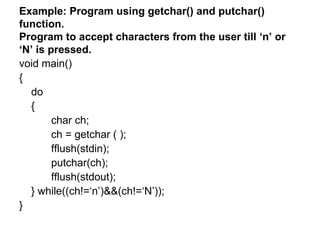
Example: Program using getchar() and putchar() function. Program to accept characters from the user till ‘n’ or ‘N’ is pressed. void main() { do { char ch; ch = getchar ( ); fflush(stdin); putchar(ch); fflush(stdout); } while((ch!=‘n’)&&(ch!=‘N’)); }
getc()  and  putc( )  functions Header file:  stdio.h Mainly used with files getc( stdin )  : Same as getchar( ) except that getchar( ) reads a character from the keyboard by default whereas stdin of function getc(stdin) make it read from a file represented by a standard input device. putc(ch, stdout)  : sends the character stored in ‘ch’ variable to standard output device.
getche( ) and putch( ) Header file:  conio.h This function does not wait fro the enter key to be pressed Displays the input character ch e stands for echo Different from getch( )  function since getch()  does not display the input character.
The classes  istream  (input stream ) and  ostream  (output stream) defined under iostream.h define some functions to handle character and string input/output operations. get( ) When >> operator is used with cin, it cannot accept spaces and newline  characters. When cin.get(ch) is used, it reads spaces and newline character as well. put( ) cout.put(ch)
STRING BASED FUNCTIONS gets( ) and puts( ) Header file –  stdio.h Reads a string from standard input device Also  buffered , therefore need to press enter key Therefore, fflush needs to be used to clear IP buffer Can accept spaces Different from cin  function because  cin cannot accept spaces.
getline( ) function Reads a line of text Syntax: cin.getline( var name, size) Size is the total no. of characters including one null character : ‘\0’

Console Io Operations

  • 1.
    CONSOLE I/O OPERATIONSConsole I/O functions perform input from standard input devices and gives output to the standard output device of a system. Generally, keyboard is standard input device And monitor is standard output device
  • 2.
    Header files andtheir purpose Certain functions in C++ are available in C++ header files. Header file is included in the program using a preprocessor directive #include. Preprocessor directive means it is an instruction for the compiler that it is to be carried out in the preprocessing stage. Preprocessing stage means before the actual compilation of the program code.
  • 3.
    #include directive Instructsthe compiler to read and include the header file under the current file. After including the specified file, the compiler compiles the total code ( i.e code of included file as well as current file ).
  • 4.
    SINGLE CHARACTER FUNCTIONSgetchar() and putchar() Header file – stdio.h Function is buffered i.e. Character typed by the user is not passed to the variable until the user hits the Enter key. Since Enter key is itself a character and gets stored in the buffer. To clear the input buffer fflush(stdin) function is to be used. Putchar() is used to send single character to the output device. It is also buffered , therefore to clean the output buffer function fflush(stdout) is used.
  • 5.
    Example: Program usinggetchar() and putchar() function. Program to accept characters from the user till ‘n’ or ‘N’ is pressed. void main() { do { char ch; ch = getchar ( ); fflush(stdin); putchar(ch); fflush(stdout); } while((ch!=‘n’)&&(ch!=‘N’)); }
  • 6.
    getc() and putc( ) functions Header file: stdio.h Mainly used with files getc( stdin ) : Same as getchar( ) except that getchar( ) reads a character from the keyboard by default whereas stdin of function getc(stdin) make it read from a file represented by a standard input device. putc(ch, stdout) : sends the character stored in ‘ch’ variable to standard output device.
  • 7.
    getche( ) andputch( ) Header file: conio.h This function does not wait fro the enter key to be pressed Displays the input character ch e stands for echo Different from getch( ) function since getch() does not display the input character.
  • 8.
    The classes istream (input stream ) and ostream (output stream) defined under iostream.h define some functions to handle character and string input/output operations. get( ) When >> operator is used with cin, it cannot accept spaces and newline characters. When cin.get(ch) is used, it reads spaces and newline character as well. put( ) cout.put(ch)
  • 9.
    STRING BASED FUNCTIONSgets( ) and puts( ) Header file – stdio.h Reads a string from standard input device Also buffered , therefore need to press enter key Therefore, fflush needs to be used to clear IP buffer Can accept spaces Different from cin function because cin cannot accept spaces.
  • 10.
    getline( ) functionReads a line of text Syntax: cin.getline( var name, size) Size is the total no. of characters including one null character : ‘\0’