


Does Google love or hateyourwebsite?Sylvie de Meeûs
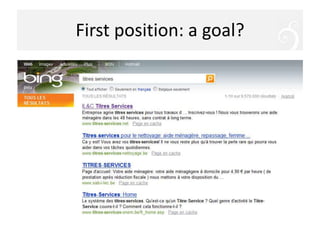
First position: a goal?
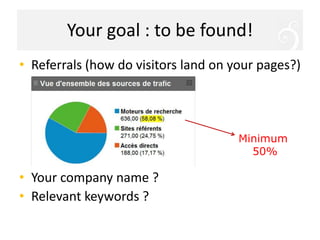
Your goal : to befound!Referrals (how do visitors land on your pages?)Yourcompanyname ?Relevant keywords ?Minimum 50%
Workshop objectivesUnderstand how searchenginesworkEvaluateyourwebsiteContentsLinksAccessibilityBlockingfactorsAnalyse yourstats
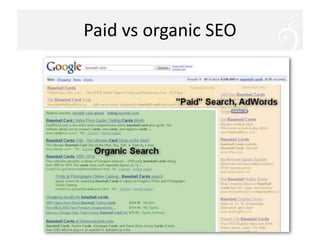
Paid vs organic SEO
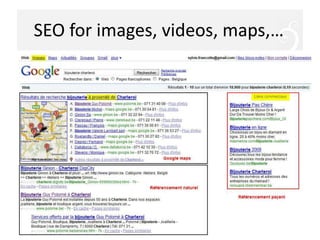
SEO for images, videos, maps,…
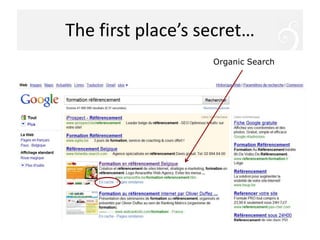
The first place’s secret…OrganicSearch
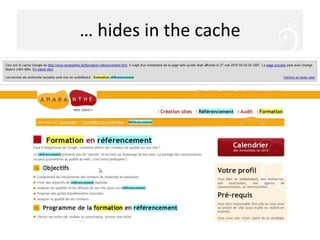
… hides in the cache
How does Google work?« The ultimate search engine would basically understand everything in the world, and it would always give you the right thing  »Larry Page, co-fondateur de GoogleRelevantcontent
How does Google work?« PageRank », « TrustRank », « algorithm »… make the differencebetweensimilarwebsitesIncoming links = votes for your contentPopularwebsite
How does Google work?« Createyour web pages for yourvisitors, NOT for searchengines »« Don’tbeevil »Don’tfool Google!
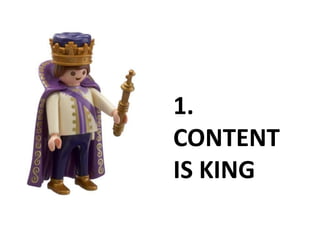
1. CONTENT IS KING
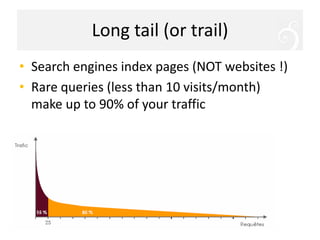
Long tail (or trail)Search engines index pages (NOT websites !)Rare queries (less than 10 visits/month) make up to 90% of your traffic
Choose the right keywordsGood news : eachpage of yourwebsitecanbe 1st for (a) specific keyword(s)Each keyword  one content pageEach page  one or keyword (or keyphrase)Choosing the right keyword makes the differenceRecruitment  or Humanresources ?Books or book ?
Choose the right keywordsTalk your customers’ languageTry a search: accurate results?Try a search: how many results?Useful tip : check « allintitle: keyword»Target smaller nichesYour services + townToys + age, renting, gift lists,…Choose between synonymshttps://adwords.google.fr/select/KeywordToolExternal
ReinforcerelevancyFor each page: Keyword in <title>Keyword in the links to the pageKeyword in titleKeyword in URLKeyword at the beginning of the textBreadcrumbs (You are here: Home > … > Keyword)Title tags <H1>, <H2>,…Read « Google search engine optimization starter guide  »  http://www.google.com/webmasters/docs/search-engine-optimization-starter-guide.pdf
Influence of the global siteNumber of pages (with real content!)Pages on similartopicsNumber of pages increased graduallyUpdate frequency linked to the type of content (news, blog, shop)<title> and <description> tags ≠ in each pageSimple URL* (directories and pages)Links betweenrelated pages
Remember…Carefullyconsideryour keywordsConsider SEO beforecreatingyour site structure One theme per pagePerfer (original) textual contentBring value to your visitorsDon’t think (too much) about Google!
A small tip…Write a new page every monthInformative and original contentExamples :Product descriptionCase studyTips and advicesVideos, etc.
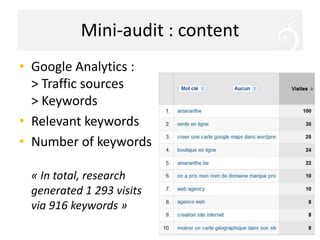
Mini-audit : contentGoogle Analytics : > Traffic sources> KeywordsRelevant keywordsNumber of keywords« In total, researchgenerated 1 293 visits via 916 keywords »
2. MAKE LINKS
Incoming linksIndicate your site popularity “Hard” link* (no redirection or javascript or « nofollow » tag)Link on a page indexed by GoogleLink on a site covering the same themePrefer few good links to many links without link (= spamdexing*)Avoid paid links and reciprocal  linksAvoid outgoing links
Importance of the link textLink text: underlined text that links to another pageExamples :… for more information, click here… on http://www.amaranthe.be… information about our e-marketing trainingsPlace your keywords:in links on your sitein links from other sites
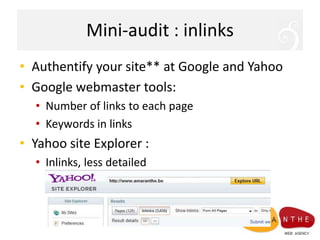
Mini-audit : inlinksAuthentifyyour site** at Google and YahooGoogle webmaster tools:Number of links to each pageKeywords in linksYahoo site Explorer :Inlinks, lessdetailed
3. MAKE YOUR SITE ROBOT-FRIENDLYThe spider that visits your site is blind, deaf and has no hand
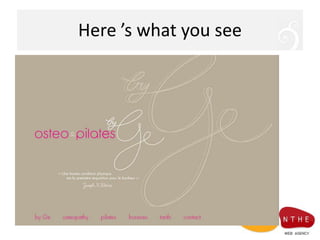
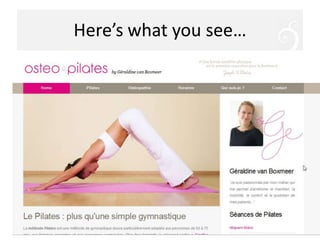
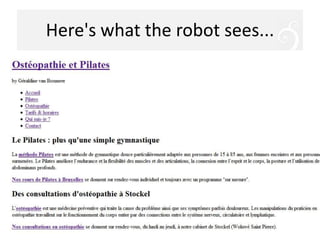
Mini-audit : accessibilityIs my content "readable" by a robot?Deactivate CSS and images (Web Developer extension for Firefox)Scapture.com (see your site in Lynx)Spider-simulator.com (explore your site with the eyes of a spider)Doesmy content appear :Totally? In the right order?Is navigation visible? Understandable?Do images have a textual alternative?
Here ’s whatyousee
Here'swhat the robot sees...
Here’swhatyousee…
Here'swhat the robot sees...
Remember…Textual content on the home pageLinks to internal pages in the text« Text » menusNo text in imagesTextual alternative to each imageXML Sitemap
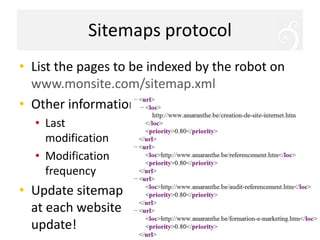
SitemapsprotocolList the pages to be indexed by the robot on www.monsite.com/sitemap.xmlOther informationLastmodificationModification frequencyUpdate sitemapateachwebsiteupdate!
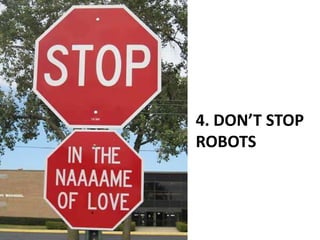
4. DON’T STOP ROBOTS
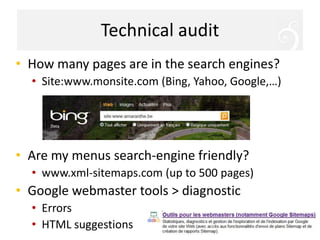
Technical auditHow many pages are in the search engines?Site:www.monsite.com (Bing, Yahoo, Google,…)Are my menus search-enginefriendly?www.xml-sitemaps.com (up to 500 pages)Google webmaster tools > diagnosticErrorsHTML suggestions
BlockingfactorsHome without content ("Splash page")Script on the homepage (ex: browser detection)Redirections (beware of yourhosting!)Frames, iframes,… Menu in Flash or javascript (« roll-over ») Programming or CMS generating « exotic » URL’swith « ? », « id »,… Techniques  aiming to "cheat"
Now, let’s practice !Install Google AnalyticstodayTackle all technicalisuesAméliorez la relevance of your pagesDevelopyour contentsIf you have no websiteyet… start it now !
Further informationhttp://www.amaranthe.be/blogInstaller Google Analytics vite… et bienOutils Google, Bing et Yahoo pour webmastersPourquoi utiliser une sitemap en XML ?Quelques conseils pour bien choisir son nom de domaineLancement d’un site : 12 choses à ne pas oublierRefaire son site sans pénaliser son référencementSite en panne : conséquences sur votre référencementComment figurer sur les cartes de Google ?Duplicate content et plagiat sur le web
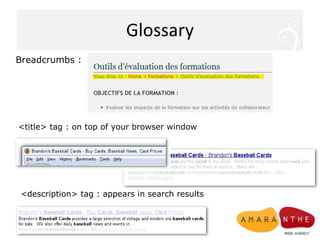
GlossaryBreadcrumbs : <title> tag : on top of your browser window<description> tag : appears in searchresults
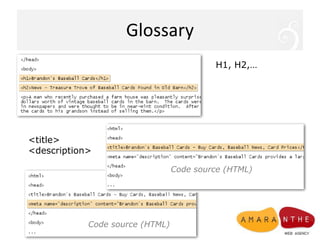
GlossaryH1, H2,… <title><description> Code source (HTML)Code source (HTML)
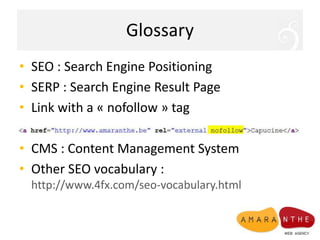
GlossarySEO : SearchEnginePositioningSERP : SearchEngineResult PageLink with a « nofollow » tagCMS : Content Management SystemOther SEO vocabulary : http://www.4fx.com/seo-vocabulary.html
Amaranthe Web AgencySylvie de Meeûs (info@amaranthe.be)I like:E-mailingSocial networksEfficient webdesignSearch engine strategyFollow me:Twitter @AmaranteHFacebook.com/amarantehwww.amaranthe.be/blog

SEO Workshop : "Does Google love or hate your website"

  • 1.
    Does Google loveor hateyourwebsite?Sylvie de Meeûs
  • 2.
  • 3.
    Your goal :to befound!Referrals (how do visitors land on your pages?)Yourcompanyname ?Relevant keywords ?Minimum 50%
  • 4.
    Workshop objectivesUnderstand howsearchenginesworkEvaluateyourwebsiteContentsLinksAccessibilityBlockingfactorsAnalyse yourstats
  • 5.
  • 6.
    SEO for images,videos, maps,…
  • 7.
    The first place’ssecret…OrganicSearch
  • 8.
    … hides inthe cache
  • 9.
    How does Googlework?« The ultimate search engine would basically understand everything in the world, and it would always give you the right thing  »Larry Page, co-fondateur de GoogleRelevantcontent
  • 10.
    How does Googlework?« PageRank », « TrustRank », « algorithm »… make the differencebetweensimilarwebsitesIncoming links = votes for your contentPopularwebsite
  • 11.
    How does Googlework?« Createyour web pages for yourvisitors, NOT for searchengines »« Don’tbeevil »Don’tfool Google!
  • 12.
  • 13.
    Long tail (ortrail)Search engines index pages (NOT websites !)Rare queries (less than 10 visits/month) make up to 90% of your traffic
  • 14.
    Choose the rightkeywordsGood news : eachpage of yourwebsitecanbe 1st for (a) specific keyword(s)Each keyword  one content pageEach page  one or keyword (or keyphrase)Choosing the right keyword makes the differenceRecruitment or Humanresources ?Books or book ?
  • 15.
    Choose the rightkeywordsTalk your customers’ languageTry a search: accurate results?Try a search: how many results?Useful tip : check « allintitle: keyword»Target smaller nichesYour services + townToys + age, renting, gift lists,…Choose between synonymshttps://adwords.google.fr/select/KeywordToolExternal
  • 16.
    ReinforcerelevancyFor each page:Keyword in <title>Keyword in the links to the pageKeyword in titleKeyword in URLKeyword at the beginning of the textBreadcrumbs (You are here: Home > … > Keyword)Title tags <H1>, <H2>,…Read « Google search engine optimization starter guide  » http://www.google.com/webmasters/docs/search-engine-optimization-starter-guide.pdf
  • 17.
    Influence of theglobal siteNumber of pages (with real content!)Pages on similartopicsNumber of pages increased graduallyUpdate frequency linked to the type of content (news, blog, shop)<title> and <description> tags ≠ in each pageSimple URL* (directories and pages)Links betweenrelated pages
  • 18.
    Remember…Carefullyconsideryour keywordsConsider SEObeforecreatingyour site structure One theme per pagePerfer (original) textual contentBring value to your visitorsDon’t think (too much) about Google!
  • 19.
    A small tip…Writea new page every monthInformative and original contentExamples :Product descriptionCase studyTips and advicesVideos, etc.
  • 20.
    Mini-audit : contentGoogleAnalytics : > Traffic sources> KeywordsRelevant keywordsNumber of keywords« In total, researchgenerated 1 293 visits via 916 keywords »
  • 21.
  • 22.
    Incoming linksIndicate yoursite popularity “Hard” link* (no redirection or javascript or « nofollow » tag)Link on a page indexed by GoogleLink on a site covering the same themePrefer few good links to many links without link (= spamdexing*)Avoid paid links and reciprocal  linksAvoid outgoing links
  • 23.
    Importance of thelink textLink text: underlined text that links to another pageExamples :… for more information, click here… on http://www.amaranthe.be… information about our e-marketing trainingsPlace your keywords:in links on your sitein links from other sites
  • 24.
    Mini-audit : inlinksAuthentifyyoursite** at Google and YahooGoogle webmaster tools:Number of links to each pageKeywords in linksYahoo site Explorer :Inlinks, lessdetailed
  • 25.
    3. MAKE YOURSITE ROBOT-FRIENDLYThe spider that visits your site is blind, deaf and has no hand
  • 26.
    Mini-audit : accessibilityIsmy content "readable" by a robot?Deactivate CSS and images (Web Developer extension for Firefox)Scapture.com (see your site in Lynx)Spider-simulator.com (explore your site with the eyes of a spider)Doesmy content appear :Totally? In the right order?Is navigation visible? Understandable?Do images have a textual alternative?
  • 27.
  • 28.
  • 29.
  • 30.
  • 31.
    Remember…Textual content onthe home pageLinks to internal pages in the text« Text » menusNo text in imagesTextual alternative to each imageXML Sitemap
  • 32.
    SitemapsprotocolList the pagesto be indexed by the robot on www.monsite.com/sitemap.xmlOther informationLastmodificationModification frequencyUpdate sitemapateachwebsiteupdate!
  • 33.
  • 34.
    Technical auditHow manypages are in the search engines?Site:www.monsite.com (Bing, Yahoo, Google,…)Are my menus search-enginefriendly?www.xml-sitemaps.com (up to 500 pages)Google webmaster tools > diagnosticErrorsHTML suggestions
  • 35.
    BlockingfactorsHome without content("Splash page")Script on the homepage (ex: browser detection)Redirections (beware of yourhosting!)Frames, iframes,… Menu in Flash or javascript (« roll-over ») Programming or CMS generating « exotic » URL’swith « ? », « id »,… Techniques aiming to "cheat"
  • 36.
    Now, let’s practice!Install Google AnalyticstodayTackle all technicalisuesAméliorez la relevance of your pagesDevelopyour contentsIf you have no websiteyet… start it now !
  • 37.
    Further informationhttp://www.amaranthe.be/blogInstaller GoogleAnalytics vite… et bienOutils Google, Bing et Yahoo pour webmastersPourquoi utiliser une sitemap en XML ?Quelques conseils pour bien choisir son nom de domaineLancement d’un site : 12 choses à ne pas oublierRefaire son site sans pénaliser son référencementSite en panne : conséquences sur votre référencementComment figurer sur les cartes de Google ?Duplicate content et plagiat sur le web
  • 38.
    GlossaryBreadcrumbs : <title>tag : on top of your browser window<description> tag : appears in searchresults
  • 39.
    GlossaryH1, H2,… <title><description>Code source (HTML)Code source (HTML)
  • 40.
    GlossarySEO : SearchEnginePositioningSERP: SearchEngineResult PageLink with a « nofollow » tagCMS : Content Management SystemOther SEO vocabulary : http://www.4fx.com/seo-vocabulary.html
  • 41.
    Amaranthe Web AgencySylviede Meeûs (info@amaranthe.be)I like:E-mailingSocial networksEfficient webdesignSearch engine strategyFollow me:Twitter @AmaranteHFacebook.com/amarantehwww.amaranthe.be/blog