
Presented By: Haider Ali Malik
Department of Botany
University of Sargodha
 Today, people rely on computers to create,
store, and manage critical information.
 A computer security risk is any event or
action that could cause a loss of or damage
to computer hardware, software, data,
information, or processing capability.
 Any illegal act involving a computer is
referred to as a computer crime.
 The term cybercrime refers to online or
Internet-based illegal acts.
 Software used by cybercriminals sometimes
is called crimeware.
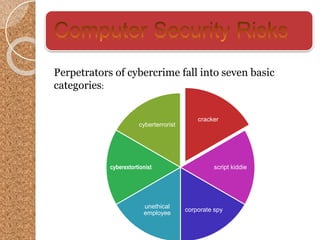
cracker
script kiddie
corporate spy
unethical
employee
cyberextortionist
cyberterrorist
Perpetrators of cybercrime fall into seven basic
categories:
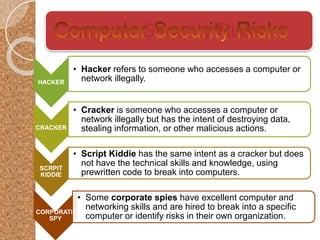
Computer Security Risks
HACKER
• Hacker refers to someone who accesses a computer or
network illegally.
CRACKER
• Cracker is someone who accesses a computer or
network illegally but has the intent of destroying data,
stealing information, or other malicious actions.
SCRPIT
KIDDIE
• Script Kiddie has the same intent as a cracker but does
not have the technical skills and knowledge, using
prewritten code to break into computers.
CORPORATE
SPY
• Some corporate spies have excellent computer and
networking skills and are hired to break into a specific
computer or identify risks in their own organization.
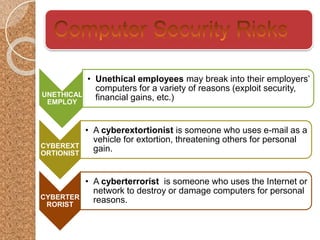
UNETHICAL
EMPLOY
• Unethical employees may break into their employers’
computers for a variety of reasons (exploit security,
financial gains, etc.)
CYBEREXT
ORTIONIST
• A cyberextortionist is someone who uses e-mail as a
vehicle for extortion, threatening others for personal
gain.
CYBERTER
RORIST
• A cyberterrorist is someone who uses the Internet or
network to destroy or damage computers for personal
reasons.
There are many techniques used for creating
security risks. Most of the used attacks are:
 Botnets
 DOS Attacks
 Backdoors
 Spoofing
TECHNIQUES FOR
CYBER ATTACKS
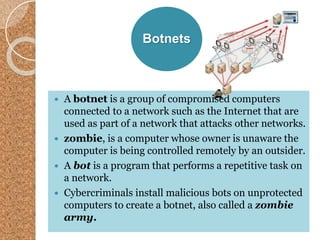
Botnets
 A botnet is a group of compromised computers
connected to a network such as the Internet that are
used as part of a network that attacks other networks.
 zombie, is a computer whose owner is unaware the
computer is being controlled remotely by an outsider.
 A bot is a program that performs a repetitive task on
a network.
 Cybercriminals install malicious bots on unprotected
computers to create a botnet, also called a zombie
army.
Denial of
Service
Attacks
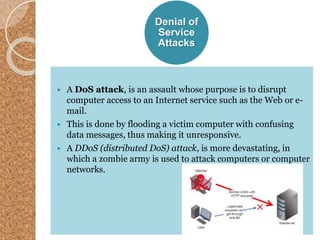
 A DoS attack, is an assault whose purpose is to disrupt
computer access to an Internet service such as the Web or e-
mail.
 This is done by flooding a victim computer with confusing
data messages, thus making it unresponsive.
 A DDoS (distributed DoS) attack, is more devastating, in
which a zombie army is used to attack computers or computer
networks.
Back
Doors
 A back door is a program or set of instructions
in a program that allow users to bypass security
controls when accessing a program, computer, or
network.
 Some malware will install a back door once it
infects the victim computer.
Spoofing
Spoofing is a technique intruders use to
make their network or Internet transmission
appear legitimate to a victim computer or
network.
• E-mail spoofing occurs when the sender’s
address or other components of the e-mail header
are altered so that it appears the e-mail originated
from a different sender.
• IP spoofing occurs when an intruder computer
fools a network into believing its IP address is
associated with a trusted source.
 Some of the latest antivirus programs include
provisions to protect a computer form DoS and
DDoS attacks.
 Users can also implement firewall solutions, install
intrusion detection software, and set up honeypots.
Firewalls
 A firewall is a hardware and/or software that
protects a network’s resources from intrusion by
users on another network such as the Internet.
 A personal firewall is a utility program that
detects and protects a personal computer and its
data from unauthorized intrusions.
Intrusion
Detection
Software
 Intrusion detection software automatically
analyzes all network traffic, assesses system
vulnerabilities, identifies any unauthorized
intrusions, and notifies network admins.
Honeypot
s
 A honeypot is a vulnerable computer that is
set up to entice an intruder to break into it.
 They appear real to the intruder but are
separated from the organization’s network.
 They are used to learn how intruders are
exploiting their network.
 Encryption is a process of converting
readable data into unreadable
characters to prevent unauthorized
access.
 To read the data, the recipient must
decrypt, or decipher, it into a readable
form.
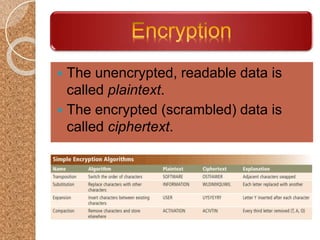
 The unencrypted, readable data is
called plaintext.
 The encrypted (scrambled) data is
called ciphertext.
Encryption
 Some operating systems and e-mail
programs allow you to encrypt the contents
of files.
 A digital signature is an encrypted code
that a person, Web site, or organization
attaches to an electronic message to verify
the identity of the message sender.
 Many Web browsers offer 40-bit, 128-bit, and
even 1024-bit encryption, which are even
higher levels of protection since they have
longer keys.
 A Web site that uses encryption techniques is
known as a secure site, which use digital
certificates along with a security protocol.
Digital
Certificates
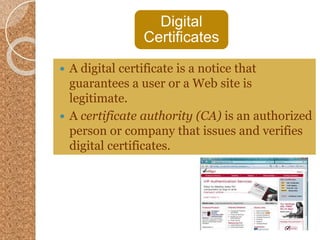
 A digital certificate is a notice that
guarantees a user or a Web site is
legitimate.
 A certificate authority (CA) is an authorized
person or company that issues and verifies
digital certificates.
Transport
Layer Security
 Transport Layer Security (TLS) a successor to
Secure Sockets Layer (SSL), provides encryption of
all data that passes between a client and an
Internet server.
 Both ends require a certificate and prevents
perpetrators from accessing or tampering with
communications
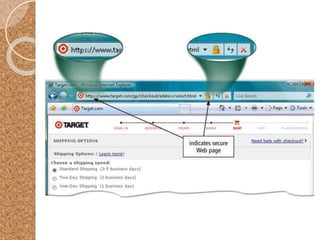
 TLS protected websites typically begin with https,
instead of http.
Secure
HTTP
 Secure HTTP (S-HTTP) allows users
to choose an encryption scheme for
data that passes between a client and
server.
 It is more difficult than TLS to use, but
it is also more secure.
VPN
 When a mobile user connects to a main
office using a standard Internet connection,
a virtual private network (VPN) provides the
mobile user with a secure connection to the
company network server, as if the user has
a private line.
 They help ensure that data is safe from
being intercepted by unauthorized people
by encrypting.
Computer security and privacy

Computer security and privacy

  • 1.
    Presented By: HaiderAli Malik Department of Botany University of Sargodha
  • 2.
     Today, peoplerely on computers to create, store, and manage critical information.  A computer security risk is any event or action that could cause a loss of or damage to computer hardware, software, data, information, or processing capability.
  • 3.
     Any illegalact involving a computer is referred to as a computer crime.  The term cybercrime refers to online or Internet-based illegal acts.  Software used by cybercriminals sometimes is called crimeware.
  • 4.
  • 5.
    Computer Security Risks HACKER •Hacker refers to someone who accesses a computer or network illegally. CRACKER • Cracker is someone who accesses a computer or network illegally but has the intent of destroying data, stealing information, or other malicious actions. SCRPIT KIDDIE • Script Kiddie has the same intent as a cracker but does not have the technical skills and knowledge, using prewritten code to break into computers. CORPORATE SPY • Some corporate spies have excellent computer and networking skills and are hired to break into a specific computer or identify risks in their own organization.
  • 6.
    UNETHICAL EMPLOY • Unethical employeesmay break into their employers’ computers for a variety of reasons (exploit security, financial gains, etc.) CYBEREXT ORTIONIST • A cyberextortionist is someone who uses e-mail as a vehicle for extortion, threatening others for personal gain. CYBERTER RORIST • A cyberterrorist is someone who uses the Internet or network to destroy or damage computers for personal reasons.
  • 7.
    There are manytechniques used for creating security risks. Most of the used attacks are:  Botnets  DOS Attacks  Backdoors  Spoofing TECHNIQUES FOR CYBER ATTACKS
  • 8.
    Botnets  A botnetis a group of compromised computers connected to a network such as the Internet that are used as part of a network that attacks other networks.  zombie, is a computer whose owner is unaware the computer is being controlled remotely by an outsider.  A bot is a program that performs a repetitive task on a network.  Cybercriminals install malicious bots on unprotected computers to create a botnet, also called a zombie army.
  • 9.
    Denial of Service Attacks  ADoS attack, is an assault whose purpose is to disrupt computer access to an Internet service such as the Web or e- mail.  This is done by flooding a victim computer with confusing data messages, thus making it unresponsive.  A DDoS (distributed DoS) attack, is more devastating, in which a zombie army is used to attack computers or computer networks.
  • 10.
    Back Doors  A backdoor is a program or set of instructions in a program that allow users to bypass security controls when accessing a program, computer, or network.  Some malware will install a back door once it infects the victim computer.
  • 11.
    Spoofing Spoofing is atechnique intruders use to make their network or Internet transmission appear legitimate to a victim computer or network. • E-mail spoofing occurs when the sender’s address or other components of the e-mail header are altered so that it appears the e-mail originated from a different sender. • IP spoofing occurs when an intruder computer fools a network into believing its IP address is associated with a trusted source.
  • 12.
     Some ofthe latest antivirus programs include provisions to protect a computer form DoS and DDoS attacks.  Users can also implement firewall solutions, install intrusion detection software, and set up honeypots.
  • 13.
    Firewalls  A firewallis a hardware and/or software that protects a network’s resources from intrusion by users on another network such as the Internet.  A personal firewall is a utility program that detects and protects a personal computer and its data from unauthorized intrusions.
  • 14.
    Intrusion Detection Software  Intrusion detectionsoftware automatically analyzes all network traffic, assesses system vulnerabilities, identifies any unauthorized intrusions, and notifies network admins.
  • 15.
    Honeypot s  A honeypotis a vulnerable computer that is set up to entice an intruder to break into it.  They appear real to the intruder but are separated from the organization’s network.  They are used to learn how intruders are exploiting their network.
  • 16.
     Encryption isa process of converting readable data into unreadable characters to prevent unauthorized access.  To read the data, the recipient must decrypt, or decipher, it into a readable form.
  • 17.
     The unencrypted,readable data is called plaintext.  The encrypted (scrambled) data is called ciphertext.
  • 18.
    Encryption  Some operatingsystems and e-mail programs allow you to encrypt the contents of files.  A digital signature is an encrypted code that a person, Web site, or organization attaches to an electronic message to verify the identity of the message sender.
  • 19.
     Many Webbrowsers offer 40-bit, 128-bit, and even 1024-bit encryption, which are even higher levels of protection since they have longer keys.  A Web site that uses encryption techniques is known as a secure site, which use digital certificates along with a security protocol.
  • 20.
    Digital Certificates  A digitalcertificate is a notice that guarantees a user or a Web site is legitimate.  A certificate authority (CA) is an authorized person or company that issues and verifies digital certificates.
  • 21.
    Transport Layer Security  TransportLayer Security (TLS) a successor to Secure Sockets Layer (SSL), provides encryption of all data that passes between a client and an Internet server.  Both ends require a certificate and prevents perpetrators from accessing or tampering with communications  TLS protected websites typically begin with https, instead of http.
  • 23.
    Secure HTTP  Secure HTTP(S-HTTP) allows users to choose an encryption scheme for data that passes between a client and server.  It is more difficult than TLS to use, but it is also more secure.
  • 24.
    VPN  When amobile user connects to a main office using a standard Internet connection, a virtual private network (VPN) provides the mobile user with a secure connection to the company network server, as if the user has a private line.  They help ensure that data is safe from being intercepted by unauthorized people by encrypting.