6.1
66
ComputerComputer
NetworksNetworks
Foundations of Computer Science © Cengage
Learning
6.2
 Describe network criteria, physical structures and categories
of networks.
 Describe the TCP/IP protocol suite as the network model in
the Internet.
 Define the layers in the TCP/IP protocol suite and their
relationship.
 Discuss the client-server architecture of the Internet.
 Describe the three early applications of the Internet:
 Understand the World Wide Web as the most common
application of the Internet and its components.
 Distinguish between three Internet document types: static,
dynamic and active.
ObjectivesObjectives
After studying this chapter, the student should be ableAfter studying this chapter, the student should be able
to:to:
6.3
6-1 INTRODUCTION6-1 INTRODUCTION
• AA networknetwork is a combination of hardware and softwareis a combination of hardware and software
that sends data from one location to another.that sends data from one location to another.
• The hardware consists of the physical equipment thatThe hardware consists of the physical equipment that
carries signals from one point in the network to another.carries signals from one point in the network to another.
• The software consists of instructions that make theThe software consists of instructions that make the
services that we expect from a network possible.services that we expect from a network possible.
6.4
Network criteria
A network must be able to meet a number of criteria:
1.Performance can be measured in many ways, including
transit time and response time. It depends on a number
factors, including the number of users, the type of
transmission medium, H/W capabilities, and S/W efficiency
2.Reliability is measured by the frequency of failure, the
time it takes to recover from a failure, and the network’s
robustness in a catastrophe.
3.Network security includes protecting data from
unauthorized access, damage and change, and implementing
policies and procedures for recovery from breaches and data
losses.
6.5
Physical Structures
Types of Connection:
• A network consists of two or more devices connected through links.
• A link is a communication pathway that transfers data from one
device to another.
• For communication to occur, two devices must be connected in some
way to the same link at the same time
•There are two possible types of connections: point-to-point and
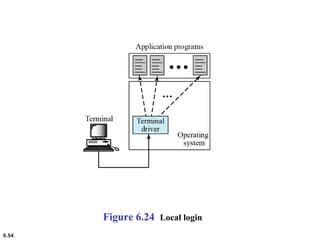
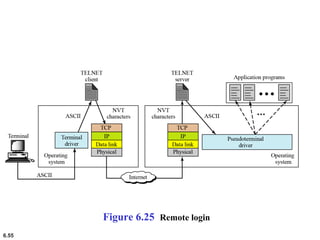
multipoint.
6.6
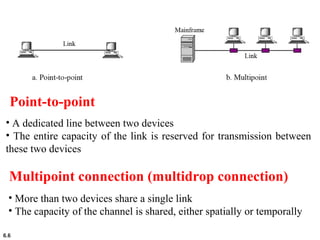
Point-to-point
Multipoint connection (multidrop connection)
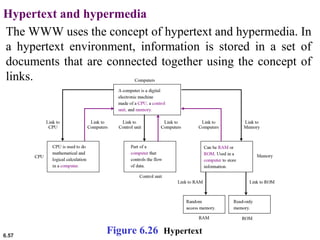
• A dedicated line between two devices
• The entire capacity of the link is reserved for transmission between
these two devices
• More than two devices share a single link
• The capacity of the channel is shared, either spatially or temporally
6.7
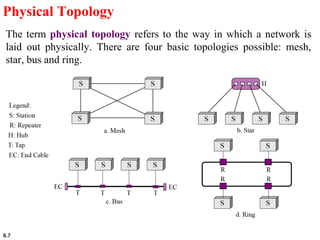
The term physical topology refers to the way in which a network is
laid out physically. There are four basic topologies possible: mesh,
star, bus and ring.
Physical Topology
6.8
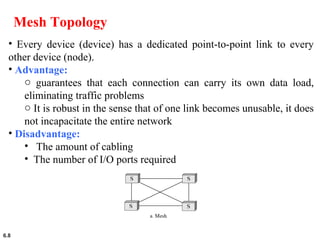
Mesh Topology
• Every device (device) has a dedicated point-to-point link to every
other device (node).
• Advantage:
o guarantees that each connection can carry its own data load,
eliminating traffic problems
o It is robust in the sense that of one link becomes unusable, it does
not incapacitate the entire network
• Disadvantage:
• The amount of cabling
• The number of I/O ports required
6.9
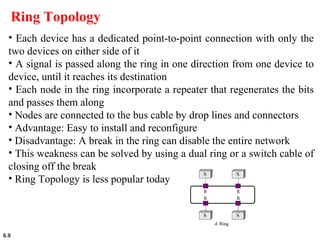
Ring Topology
• Each device has a dedicated point-to-point connection with only the
two devices on either side of it
• A signal is passed along the ring in one direction from one device to
device, until it reaches its destination
• Each node in the ring incorporate a repeater that regenerates the bits
and passes them along
• Nodes are connected to the bus cable by drop lines and connectors
• Advantage: Easy to install and reconfigure
• Disadvantage: A break in the ring can disable the entire network
• This weakness can be solved by using a dual ring or a switch cable of
closing off the break
• Ring Topology is less popular today
6.10
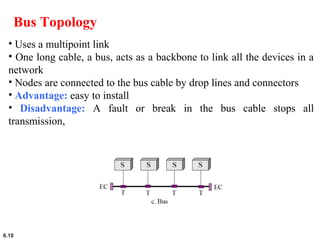
Bus Topology
• Uses a multipoint link
• One long cable, a bus, acts as a backbone to link all the devices in a
network
• Nodes are connected to the bus cable by drop lines and connectors
• Advantage: easy to install
• Disadvantage: A fault or break in the bus cable stops all
transmission,
6.11
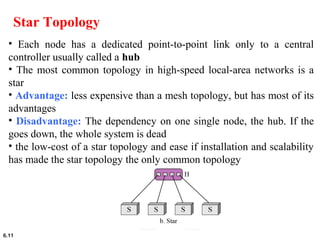
Star Topology
• Each node has a dedicated point-to-point link only to a central
controller usually called a hub
• The most common topology in high-speed local-area networks is a
star
• Advantage: less expensive than a mesh topology, but has most of its
advantages
• Disadvantage: The dependency on one single node, the hub. If the
goes down, the whole system is dead
• the low-cost of a star topology and ease if installation and scalability
has made the star topology the only common topology
6.12
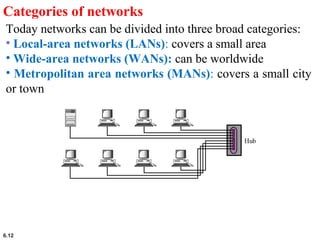
Categories of networks
Today networks can be divided into three broad categories:
• Local-area networks (LANs): covers a small area
• Wide-area networks (WANs): can be worldwide
• Metropolitan area networks (MANs): covers a small city
or town
6.13
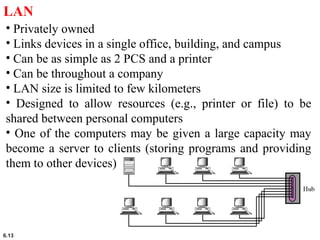
LAN
• Privately owned
• Links devices in a single office, building, and campus
• Can be as simple as 2 PCS and a printer
• Can be throughout a company
• LAN size is limited to few kilometers
• Designed to allow resources (e.g., printer or file) to be
shared between personal computers
• One of the computers may be given a large capacity may
become a server to clients (storing programs and providing
them to other devices)
6.14
WAN
• Provides log distance transmission of data over large
geographic area that may comprise a country, a continent, or
even the whole world
• Can be as complex as the backbone the connect the internet
• Can be as simple as the dial-up line that connects a home
computer to the Internet
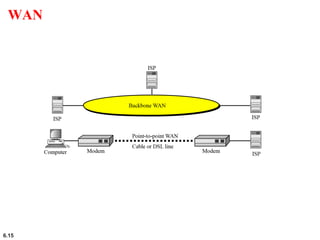
• A backbone WAN is a complex network operated by a
service provider and normally connect Internet Servie
Provides (ISPs)
• A pint-to-point WAN is a single line connection between
two devices such as the dial-up line or the cable line
6.15
WAN
6.16
• Provides log distance transmission of data over large
geographic area that may comprise a country, a continent, or
even the whole world
• Can be as complex as the backbone the connect the internet
• Can be as simple as the dial-up line that connects a home
computer to the Internet
• A backbone WAN is a complex network operated by a
service provider and normally connect Internet Servie
Provides (ISPs)
• A pint-to-point WAN is a single line connection between
two devices such as the dial-up line or the cable line
6.17
MAN
• A network with a size between a LAN and a WAN
• It normally covers the area inside a town or city
• Designed for customers who need high-speed connectivity
to the Internet, and have end points spread over a city or art
of city
• Examples:
o The part of a telephone company that can provide a
high-speed DSL line
o The network cable originally designed for TV, but
today used for high-speed data connection to the Internet
6.18
An internet
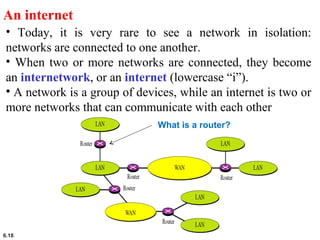
• Today, it is very rare to see a network in isolation:
networks are connected to one another.
• When two or more networks are connected, they become
an internetwork, or an internet (lowercase “i”).
• A network is a group of devices, while an internet is two or
more networks that can communicate with each other
What is a router?
6.19
The Internet
• The most notable internet is the Internet (uppercase “I”),
• A collaboration of hundreds of thousands of interconnected
networks.
• Private individuals, as well as various organizations such as
government agencies, schools, research facilities,
corporations and libraries in more than 100 countries use the
Internet.
• It is difficult to give an accurate representation of the
Internet, because it is continually changing (networks are
added and removed)
• Today, most end users who want an Internet connection use
the services of Internet service providers (ISPs).
6.20
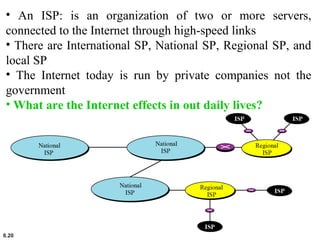
• An ISP: is an organization of two or more servers,
connected to the Internet through high-speed links
• There are International SP, National SP, Regional SP, and
local SP
• The Internet today is run by private companies not the
government
• What are the Internet effects in out daily lives?
6.21
6-2 TCP/IP PROTOCOL SUITE6-2 TCP/IP PROTOCOL SUITE
• To divide the services required to perform a task, theTo divide the services required to perform a task, the
Internet has created a set of rules called protocols.Internet has created a set of rules called protocols.
• These protocols allow different local and wide areaThese protocols allow different local and wide area
networks, using different technologies, to be connectednetworks, using different technologies, to be connected
together and carry a message from one point to another.together and carry a message from one point to another.
• The set, or suite, of protocols that controls the InternetThe set, or suite, of protocols that controls the Internet
today is referred to as thetoday is referred to as the TCP/IP protocol suiteTCP/IP protocol suite..
• TCP/IP is the abbreviation of (Transmission ControlTCP/IP is the abbreviation of (Transmission Control
Protocol/Internet Protocol )Protocol/Internet Protocol )
6.22
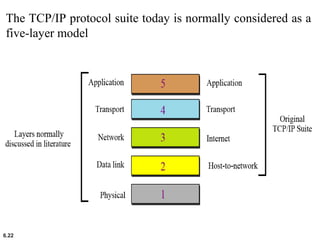
The TCP/IP protocol suite today is normally considered as a
five-layer model
6.23
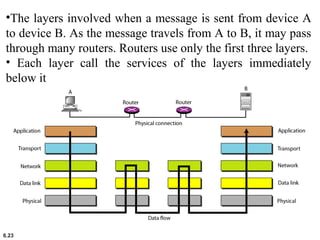
•The layers involved when a message is sent from device A
to device B. As the message travels from A to B, it may pass
through many routers. Routers use only the first three layers.
• Each layer call the services of the layers immediately
below it
6.24
6-3 LAYERS6-3 LAYERS
This section briefly describes the function of eachThis section briefly describes the function of each layerlayer
in the TCP/IP protocol suite. We show how a messagein the TCP/IP protocol suite. We show how a message
travels through the different layers until it reaches thetravels through the different layers until it reaches the
physical layer and is sent by the transmission media.physical layer and is sent by the transmission media.
6.25
Application layer
The application layer enables a user, whether human or
software, to access the network. It provides support for
services such as electronic mail, remote file access and
transfer, browsing the World Wide Web, and so on.
The application layer is responsible for providing
services to the user.
i
6.26
Client-server architecture
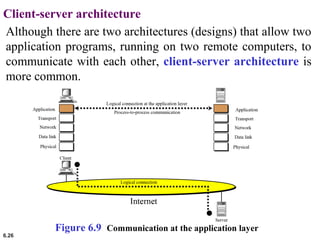
Although there are two architectures (designs) that allow two
application programs, running on two remote computers, to
communicate with each other, client-server architecture is
more common.
Figure 6.9 Communication at the application layer
6.27
Application-layer address
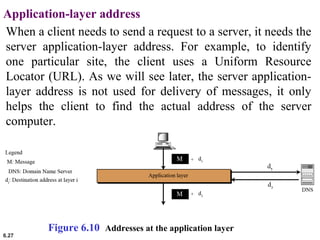
When a client needs to send a request to a server, it needs the
server application-layer address. For example, to identify
one particular site, the client uses a Uniform Resource
Locator (URL). As we will see later, the server application-
layer address is not used for delivery of messages, it only
helps the client to find the actual address of the server
computer.
Figure 6.10 Addresses at the application layer
6.28
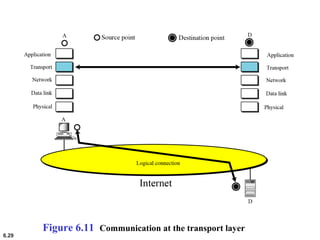
Transport layer
The transport layer is responsible for process-to-process
delivery of the entire message: logical communication is
created between the transport layer of the client and the
server computer. In other words, although physical
communication is between two physical layers (through
many possible links and routers), the two application layers
consider the transport layer as the agent that takes
responsibility for delivering the messages.
The transport layer is responsible for the logical
delivery of a message between
client and server processes.
i
6.29
Figure 6.11 Communication at the transport layer
6.30
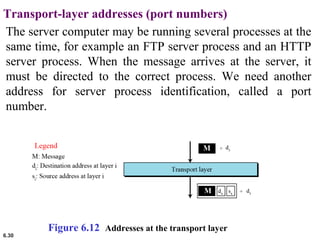
Transport-layer addresses (port numbers)
The server computer may be running several processes at the
same time, for example an FTP server process and an HTTP
server process. When the message arrives at the server, it
must be directed to the correct process. We need another
address for server process identification, called a port
number.
Figure 6.12 Addresses at the transport layer
6.31
Transport-layer protocols
During the life of the TCP/IP protocol suite three transport
layer protocols have been designed: UDP, TCP and SCTP.
The User Datagram Protocol (UDP) is the simplest of all
three protocols. UDP does multiplexing and de-multiplexing
It also does a type of error control by adding a checksum to
the packet.
Transmission Control Protocol (TCP) is a protocol that
supports all the duties of a transport layer. However, it is not
as fast and as efficient as UDP. TCP uses sequence numbers,
acknowledgment numbers and checksums. It also uses
buffers at the sender’s site. This combination of provisions
provides multiplexing, de-multiplexing, flow control,
congestion control and error control.
6.32
Stream Control Transmission Protocol (SCTP) is a new
protocol that is designed for new services expected from the
Internet, such as Internet telephony and video streaming.
This protocol combines the advantages of both UDP and
TCP. Like UDP, it is suitable for real-time transmission of
audio and video, but like TCP, it provides error and flow
control.
6.33
The network layer
The network layer is responsible for the source-to-
destination (computer-to-computer or host-to-host) delivery
of a packet, possibly across multiple networks (links). The
network layer ensures that each packet gets from its point of
origin to its final destination.
The network layer is responsible for the delivery of
individual packets from the source host to the
destination host.
i
6.34
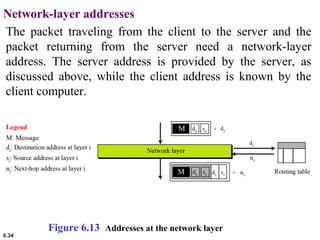
Network-layer addresses
The packet traveling from the client to the server and the
packet returning from the server need a network-layer
address. The server address is provided by the server, as
discussed above, while the client address is known by the
client computer.
Figure 6.13 Addresses at the network layer
6.35
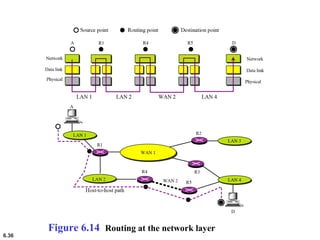
Routing
The network layer has a specific duty: routing. Routing
means determination of the partial or total path of a packet.
As the Internet is a collection of networks (LANs, WANs,
and MANs), the delivery of a packet from its source to its
destination may be a combination of several deliveries: a
source-to-router delivery, several router-to-router delivery,
and finally a router-to-destination delivery.
6.36
Figure 6.14 Routing at the network layer
6.37
Network-layer protocols
The TCP/IP protocol suite supports one main protocol (IP)
and several auxiliary protocols to help IP to perform its
duties.
In the TCP/IP protocol suite, the main protocol at the
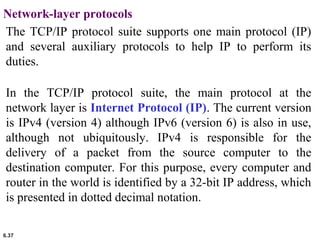
network layer is Internet Protocol (IP). The current version
is IPv4 (version 4) although IPv6 (version 6) is also in use,
although not ubiquitously. IPv4 is responsible for the
delivery of a packet from the source computer to the
destination computer. For this purpose, every computer and
router in the world is identified by a 32-bit IP address, which
is presented in dotted decimal notation.
6.38
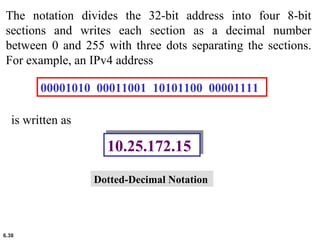
The notation divides the 32-bit address into four 8-bit
sections and writes each section as a decimal number
between 0 and 255 with three dots separating the sections.
For example, an IPv4 address
00001010 00011001 10101100 00001111
is written as
10.25.172.1510.25.172.15
Dotted-Decimal Notation
6.39
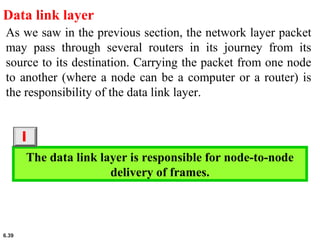
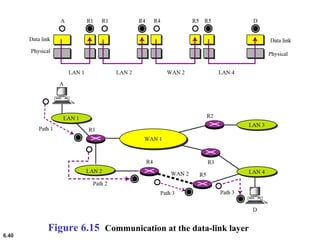
Data link layer
As we saw in the previous section, the network layer packet
may pass through several routers in its journey from its
source to its destination. Carrying the packet from one node
to another (where a node can be a computer or a router) is
the responsibility of the data link layer.
The data link layer is responsible for node-to-node
delivery of frames.
i
6.40
Figure 6.15 Communication at the data-link layer
6.41
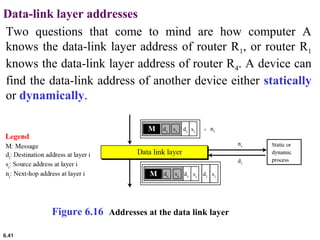
Data-link layer addresses
Two questions that come to mind are how computer A
knows the data-link layer address of router R1, or router R1
knows the data-link layer address of router R4. A device can
find the data-link address of another device either statically
or dynamically.
Figure 6.16 Addresses at the data link layer
6.42
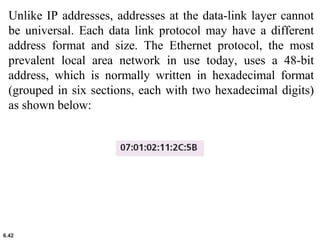
Unlike IP addresses, addresses at the data-link layer cannot
be universal. Each data link protocol may have a different
address format and size. The Ethernet protocol, the most
prevalent local area network in use today, uses a 48-bit
address, which is normally written in hexadecimal format
(grouped in six sections, each with two hexadecimal digits)
as shown below:
6.43
Physical layer
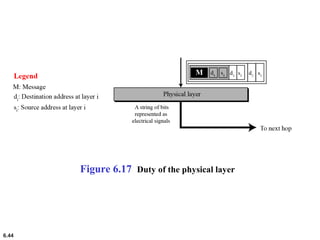
The physical layer coordinates the functions required to
carry a bit stream over a physical medium. Although the data
link layer is responsible for moving a frame from one node
to another, the physical layer is responsible for moving the
individual bits that make up the frame to the next node. In
other words, the unit of transfer in the data link layer is a
frame, while the unit of transfer in the physical layer is
a bit.
The physical layer is responsible for node-to-node
delivery of bits
i
6.44
Figure 6.17 Duty of the physical layer
6.45
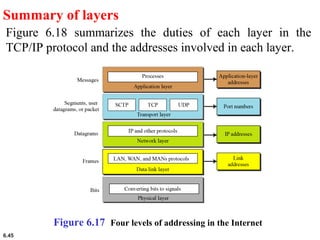
Summary of layers
Figure 6.18 summarizes the duties of each layer in the
TCP/IP protocol and the addresses involved in each layer.
Figure 6.17 Four levels of addressing in the Internet
6.46
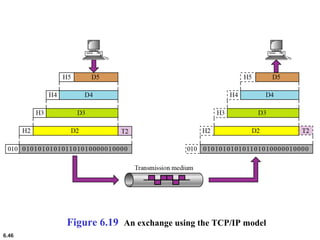
Figure 6.19 An exchange using the TCP/IP model
6.47
6-4 INTERNET APPLICATIONS6-4 INTERNET APPLICATIONS
The main task of the Internet is to provide services forThe main task of the Internet is to provide services for
users. Among the most popular applications areusers. Among the most popular applications are
electronic mailelectronic mail,, remote loginremote login,, file transferfile transfer andand
accessing theaccessing the World Wide Web (WWW)World Wide Web (WWW). We briefly. We briefly
discuss these applications in this section.discuss these applications in this section.
6.48
Electronic-mail
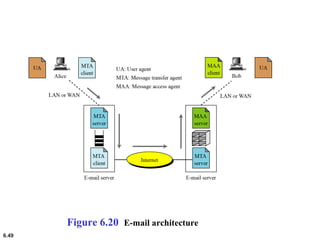
Let us first discuss electronic mail (e-mail). Ironically, this
first application that we discuss in this section cannot be
supported by one client process and one server
process. The reason is that e-mail is exchange of messages
between two entities. Although the sender of the e-mail can
be a client program, the receiver cannot be the corresponding
server, because that implies that the receiver must let their
computer run all the time, as they do not know when an e-
mail will arrive. For this purpose, e-mail architecture is
designed as shown in Figure 6.20.
6.49
Figure 6.20 E-mail architecture
6.50
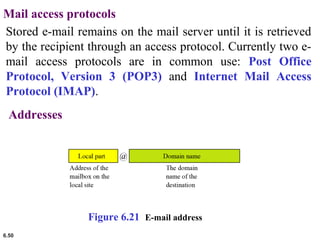
Mail access protocols
Stored e-mail remains on the mail server until it is retrieved
by the recipient through an access protocol. Currently two e-
mail access protocols are in common use: Post Office
Protocol, Version 3 (POP3) and Internet Mail Access
Protocol (IMAP).
Figure 6.21 E-mail address
Addresses
6.51
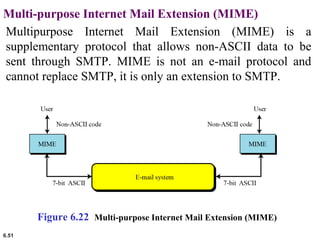
Multi-purpose Internet Mail Extension (MIME)
Multipurpose Internet Mail Extension (MIME) is a
supplementary protocol that allows non-ASCII data to be
sent through SMTP. MIME is not an e-mail protocol and
cannot replace SMTP, it is only an extension to SMTP.
Figure 6.22 Multi-purpose Internet Mail Extension (MIME)
6.52
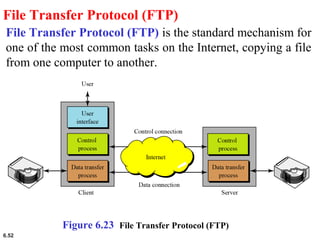
File Transfer Protocol (FTP)
File Transfer Protocol (FTP) is the standard mechanism for
one of the most common tasks on the Internet, copying a file
from one computer to another.
Figure 6.23 File Transfer Protocol (FTP)
6.53
Remote login – TELNET
The main task of the application layer is to provide services
for users. One way to satisfy these demands is to create
different client-server application programs for each desired
service. Programs such as file transfer programs (FTP and
SMTP), and so on are already available. However, it would
be impossible to write a client-server program for each
specific application.
TELNET is a general-purpose client-server program
that lets a user access any application program on a remote
computer. In other words, it allows the user to log onto a
remote computer. After logging on, a user can use the
services available on the remote computer and transfer the
results back to the local computer.
6.54
Figure 6.24 Local login
6.55
Figure 6.25 Remote login
6.56
The World Wide Web (WWW)
The World Wide Web (WWW), or just “the Web”, is a
repository of linked information spread all over the world.
The WWW has a unique combination of flexibility,
portability and user-friendly features that distinguish it from
other services provided by the Internet. The WWW today is
a distributed client-server service in which a client using a
browser can access a service using a server. However, the
service provided is distributed over many locations, called
web sites.
6.57
Hypertext and hypermedia
The WWW uses the concept of hypertext and hypermedia. In
a hypertext environment, information is stored in a set of
documents that are connected together using the concept of
links.
Figure 6.26 Hypertext
6.58
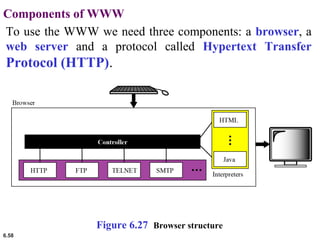
Components of WWW
To use the WWW we need three components: a browser, a
web server and a protocol called Hypertext Transfer
Protocol (HTTP).
Figure 6.27 Browser structure
6.59
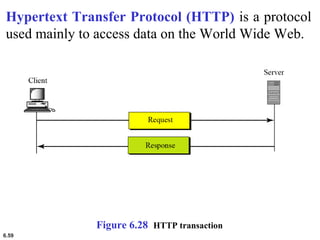
Figure 6.28 HTTP transaction
Hypertext Transfer Protocol (HTTP) is a protocol
used mainly to access data on the World Wide Web.
6.60
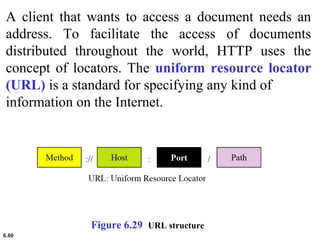
Figure 6.29 URL structure
A client that wants to access a document needs an
address. To facilitate the access of documents
distributed throughout the world, HTTP uses the
concept of locators. The uniform resource locator
(URL) is a standard for specifying any kind of
information on the Internet.
6.61
Static documents
The documents on the WWW can be grouped into three
broad categories: static, dynamic and active. This
categorization is based on the time at which the contents of
the document are determined. Static documents are fixed-
content documents that are created and stored on a server.
6.62
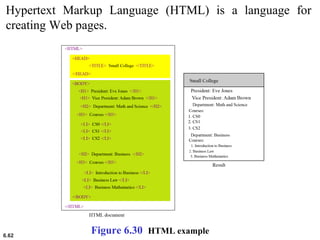
Hypertext Markup Language (HTML) is a language for
creating Web pages.
Figure 6.30 HTML example
6.63
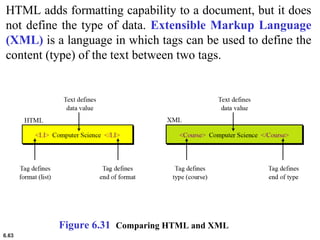
HTML adds formatting capability to a document, but it does
not define the type of data. Extensible Markup Language
(XML) is a language in which tags can be used to define the
content (type) of the text between two tags.
Figure 6.31 Comparing HTML and XML
6.64
Dynamic documents
A dynamic document is created by a Web server whenever a
browser requests the document. When a request arrives, the
Web server runs an application program that creates the
dynamic document. The server returns the output of the
program as a response to the browser that requested the
document.
6.65
Active documents
For many applications we need to be able to run a program
or a script at the client site. These are called active
documents. For example, suppose we want to run a program
that creates animated graphics on the screen, or a program
that interacts with the user. The program definitely needs to
be run on the client computer where the animation or
interaction takes place. When a browser requests an active
document, the server sends a copy of the document or a
script. The document is then run under the control of the
client’s browser.
6.66
Other Internet applications
During the last decade other applications have been
developed on the Internet. These applications are not as
popular as those discussed above, but they are gaining
ground. We discuss a few of them here.
6.67
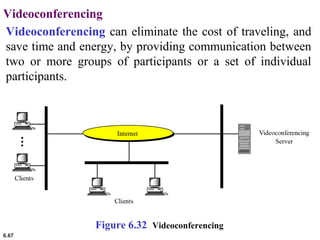
Videoconferencing
Videoconferencing can eliminate the cost of traveling, and
save time and energy, by providing communication between
two or more groups of participants or a set of individual
participants.
Figure 6.32 Videoconferencing
6.68
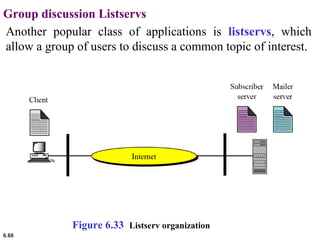
Group discussion Listservs
Another popular class of applications is listservs, which
allow a group of users to discuss a common topic of interest.
Figure 6.33 Listserv organization
6.69
Chat
Another popular class of Internet application is chat. This is
a real-time application like videoconferencing, in which two
or more parties are involved in an exchange of text and
optionally audio and video. The two parties can send text to
each other, talk to each other (the same way as they might
talk on the phone), and even see each other with suitable
cameras.

computer networks

  • 1.
  • 2.
    6.2  Describe networkcriteria, physical structures and categories of networks.  Describe the TCP/IP protocol suite as the network model in the Internet.  Define the layers in the TCP/IP protocol suite and their relationship.  Discuss the client-server architecture of the Internet.  Describe the three early applications of the Internet:  Understand the World Wide Web as the most common application of the Internet and its components.  Distinguish between three Internet document types: static, dynamic and active. ObjectivesObjectives After studying this chapter, the student should be ableAfter studying this chapter, the student should be able to:to:
  • 3.
    6.3 6-1 INTRODUCTION6-1 INTRODUCTION •AA networknetwork is a combination of hardware and softwareis a combination of hardware and software that sends data from one location to another.that sends data from one location to another. • The hardware consists of the physical equipment thatThe hardware consists of the physical equipment that carries signals from one point in the network to another.carries signals from one point in the network to another. • The software consists of instructions that make theThe software consists of instructions that make the services that we expect from a network possible.services that we expect from a network possible.
  • 4.
    6.4 Network criteria A networkmust be able to meet a number of criteria: 1.Performance can be measured in many ways, including transit time and response time. It depends on a number factors, including the number of users, the type of transmission medium, H/W capabilities, and S/W efficiency 2.Reliability is measured by the frequency of failure, the time it takes to recover from a failure, and the network’s robustness in a catastrophe. 3.Network security includes protecting data from unauthorized access, damage and change, and implementing policies and procedures for recovery from breaches and data losses.
  • 5.
    6.5 Physical Structures Types ofConnection: • A network consists of two or more devices connected through links. • A link is a communication pathway that transfers data from one device to another. • For communication to occur, two devices must be connected in some way to the same link at the same time •There are two possible types of connections: point-to-point and multipoint.
  • 6.
    6.6 Point-to-point Multipoint connection (multidropconnection) • A dedicated line between two devices • The entire capacity of the link is reserved for transmission between these two devices • More than two devices share a single link • The capacity of the channel is shared, either spatially or temporally
  • 7.
    6.7 The term physicaltopology refers to the way in which a network is laid out physically. There are four basic topologies possible: mesh, star, bus and ring. Physical Topology
  • 8.
    6.8 Mesh Topology • Everydevice (device) has a dedicated point-to-point link to every other device (node). • Advantage: o guarantees that each connection can carry its own data load, eliminating traffic problems o It is robust in the sense that of one link becomes unusable, it does not incapacitate the entire network • Disadvantage: • The amount of cabling • The number of I/O ports required
  • 9.
    6.9 Ring Topology • Eachdevice has a dedicated point-to-point connection with only the two devices on either side of it • A signal is passed along the ring in one direction from one device to device, until it reaches its destination • Each node in the ring incorporate a repeater that regenerates the bits and passes them along • Nodes are connected to the bus cable by drop lines and connectors • Advantage: Easy to install and reconfigure • Disadvantage: A break in the ring can disable the entire network • This weakness can be solved by using a dual ring or a switch cable of closing off the break • Ring Topology is less popular today
  • 10.
    6.10 Bus Topology • Usesa multipoint link • One long cable, a bus, acts as a backbone to link all the devices in a network • Nodes are connected to the bus cable by drop lines and connectors • Advantage: easy to install • Disadvantage: A fault or break in the bus cable stops all transmission,
  • 11.
    6.11 Star Topology • Eachnode has a dedicated point-to-point link only to a central controller usually called a hub • The most common topology in high-speed local-area networks is a star • Advantage: less expensive than a mesh topology, but has most of its advantages • Disadvantage: The dependency on one single node, the hub. If the goes down, the whole system is dead • the low-cost of a star topology and ease if installation and scalability has made the star topology the only common topology
  • 12.
    6.12 Categories of networks Todaynetworks can be divided into three broad categories: • Local-area networks (LANs): covers a small area • Wide-area networks (WANs): can be worldwide • Metropolitan area networks (MANs): covers a small city or town
  • 13.
    6.13 LAN • Privately owned •Links devices in a single office, building, and campus • Can be as simple as 2 PCS and a printer • Can be throughout a company • LAN size is limited to few kilometers • Designed to allow resources (e.g., printer or file) to be shared between personal computers • One of the computers may be given a large capacity may become a server to clients (storing programs and providing them to other devices)
  • 14.
    6.14 WAN • Provides logdistance transmission of data over large geographic area that may comprise a country, a continent, or even the whole world • Can be as complex as the backbone the connect the internet • Can be as simple as the dial-up line that connects a home computer to the Internet • A backbone WAN is a complex network operated by a service provider and normally connect Internet Servie Provides (ISPs) • A pint-to-point WAN is a single line connection between two devices such as the dial-up line or the cable line
  • 15.
  • 16.
    6.16 • Provides logdistance transmission of data over large geographic area that may comprise a country, a continent, or even the whole world • Can be as complex as the backbone the connect the internet • Can be as simple as the dial-up line that connects a home computer to the Internet • A backbone WAN is a complex network operated by a service provider and normally connect Internet Servie Provides (ISPs) • A pint-to-point WAN is a single line connection between two devices such as the dial-up line or the cable line
  • 17.
    6.17 MAN • A networkwith a size between a LAN and a WAN • It normally covers the area inside a town or city • Designed for customers who need high-speed connectivity to the Internet, and have end points spread over a city or art of city • Examples: o The part of a telephone company that can provide a high-speed DSL line o The network cable originally designed for TV, but today used for high-speed data connection to the Internet
  • 18.
    6.18 An internet • Today,it is very rare to see a network in isolation: networks are connected to one another. • When two or more networks are connected, they become an internetwork, or an internet (lowercase “i”). • A network is a group of devices, while an internet is two or more networks that can communicate with each other What is a router?
  • 19.
    6.19 The Internet • Themost notable internet is the Internet (uppercase “I”), • A collaboration of hundreds of thousands of interconnected networks. • Private individuals, as well as various organizations such as government agencies, schools, research facilities, corporations and libraries in more than 100 countries use the Internet. • It is difficult to give an accurate representation of the Internet, because it is continually changing (networks are added and removed) • Today, most end users who want an Internet connection use the services of Internet service providers (ISPs).
  • 20.
    6.20 • An ISP:is an organization of two or more servers, connected to the Internet through high-speed links • There are International SP, National SP, Regional SP, and local SP • The Internet today is run by private companies not the government • What are the Internet effects in out daily lives?
  • 21.
    6.21 6-2 TCP/IP PROTOCOLSUITE6-2 TCP/IP PROTOCOL SUITE • To divide the services required to perform a task, theTo divide the services required to perform a task, the Internet has created a set of rules called protocols.Internet has created a set of rules called protocols. • These protocols allow different local and wide areaThese protocols allow different local and wide area networks, using different technologies, to be connectednetworks, using different technologies, to be connected together and carry a message from one point to another.together and carry a message from one point to another. • The set, or suite, of protocols that controls the InternetThe set, or suite, of protocols that controls the Internet today is referred to as thetoday is referred to as the TCP/IP protocol suiteTCP/IP protocol suite.. • TCP/IP is the abbreviation of (Transmission ControlTCP/IP is the abbreviation of (Transmission Control Protocol/Internet Protocol )Protocol/Internet Protocol )
  • 22.
    6.22 The TCP/IP protocolsuite today is normally considered as a five-layer model
  • 23.
    6.23 •The layers involvedwhen a message is sent from device A to device B. As the message travels from A to B, it may pass through many routers. Routers use only the first three layers. • Each layer call the services of the layers immediately below it
  • 24.
    6.24 6-3 LAYERS6-3 LAYERS Thissection briefly describes the function of eachThis section briefly describes the function of each layerlayer in the TCP/IP protocol suite. We show how a messagein the TCP/IP protocol suite. We show how a message travels through the different layers until it reaches thetravels through the different layers until it reaches the physical layer and is sent by the transmission media.physical layer and is sent by the transmission media.
  • 25.
    6.25 Application layer The applicationlayer enables a user, whether human or software, to access the network. It provides support for services such as electronic mail, remote file access and transfer, browsing the World Wide Web, and so on. The application layer is responsible for providing services to the user. i
  • 26.
    6.26 Client-server architecture Although thereare two architectures (designs) that allow two application programs, running on two remote computers, to communicate with each other, client-server architecture is more common. Figure 6.9 Communication at the application layer
  • 27.
    6.27 Application-layer address When aclient needs to send a request to a server, it needs the server application-layer address. For example, to identify one particular site, the client uses a Uniform Resource Locator (URL). As we will see later, the server application- layer address is not used for delivery of messages, it only helps the client to find the actual address of the server computer. Figure 6.10 Addresses at the application layer
  • 28.
    6.28 Transport layer The transportlayer is responsible for process-to-process delivery of the entire message: logical communication is created between the transport layer of the client and the server computer. In other words, although physical communication is between two physical layers (through many possible links and routers), the two application layers consider the transport layer as the agent that takes responsibility for delivering the messages. The transport layer is responsible for the logical delivery of a message between client and server processes. i
  • 29.
    6.29 Figure 6.11 Communicationat the transport layer
  • 30.
    6.30 Transport-layer addresses (portnumbers) The server computer may be running several processes at the same time, for example an FTP server process and an HTTP server process. When the message arrives at the server, it must be directed to the correct process. We need another address for server process identification, called a port number. Figure 6.12 Addresses at the transport layer
  • 31.
    6.31 Transport-layer protocols During thelife of the TCP/IP protocol suite three transport layer protocols have been designed: UDP, TCP and SCTP. The User Datagram Protocol (UDP) is the simplest of all three protocols. UDP does multiplexing and de-multiplexing It also does a type of error control by adding a checksum to the packet. Transmission Control Protocol (TCP) is a protocol that supports all the duties of a transport layer. However, it is not as fast and as efficient as UDP. TCP uses sequence numbers, acknowledgment numbers and checksums. It also uses buffers at the sender’s site. This combination of provisions provides multiplexing, de-multiplexing, flow control, congestion control and error control.
  • 32.
    6.32 Stream Control TransmissionProtocol (SCTP) is a new protocol that is designed for new services expected from the Internet, such as Internet telephony and video streaming. This protocol combines the advantages of both UDP and TCP. Like UDP, it is suitable for real-time transmission of audio and video, but like TCP, it provides error and flow control.
  • 33.
    6.33 The network layer Thenetwork layer is responsible for the source-to- destination (computer-to-computer or host-to-host) delivery of a packet, possibly across multiple networks (links). The network layer ensures that each packet gets from its point of origin to its final destination. The network layer is responsible for the delivery of individual packets from the source host to the destination host. i
  • 34.
    6.34 Network-layer addresses The packettraveling from the client to the server and the packet returning from the server need a network-layer address. The server address is provided by the server, as discussed above, while the client address is known by the client computer. Figure 6.13 Addresses at the network layer
  • 35.
    6.35 Routing The network layerhas a specific duty: routing. Routing means determination of the partial or total path of a packet. As the Internet is a collection of networks (LANs, WANs, and MANs), the delivery of a packet from its source to its destination may be a combination of several deliveries: a source-to-router delivery, several router-to-router delivery, and finally a router-to-destination delivery.
  • 36.
    6.36 Figure 6.14 Routingat the network layer
  • 37.
    6.37 Network-layer protocols The TCP/IPprotocol suite supports one main protocol (IP) and several auxiliary protocols to help IP to perform its duties. In the TCP/IP protocol suite, the main protocol at the network layer is Internet Protocol (IP). The current version is IPv4 (version 4) although IPv6 (version 6) is also in use, although not ubiquitously. IPv4 is responsible for the delivery of a packet from the source computer to the destination computer. For this purpose, every computer and router in the world is identified by a 32-bit IP address, which is presented in dotted decimal notation.
  • 38.
    6.38 The notation dividesthe 32-bit address into four 8-bit sections and writes each section as a decimal number between 0 and 255 with three dots separating the sections. For example, an IPv4 address 00001010 00011001 10101100 00001111 is written as 10.25.172.1510.25.172.15 Dotted-Decimal Notation
  • 39.
    6.39 Data link layer Aswe saw in the previous section, the network layer packet may pass through several routers in its journey from its source to its destination. Carrying the packet from one node to another (where a node can be a computer or a router) is the responsibility of the data link layer. The data link layer is responsible for node-to-node delivery of frames. i
  • 40.
    6.40 Figure 6.15 Communicationat the data-link layer
  • 41.
    6.41 Data-link layer addresses Twoquestions that come to mind are how computer A knows the data-link layer address of router R1, or router R1 knows the data-link layer address of router R4. A device can find the data-link address of another device either statically or dynamically. Figure 6.16 Addresses at the data link layer
  • 42.
    6.42 Unlike IP addresses,addresses at the data-link layer cannot be universal. Each data link protocol may have a different address format and size. The Ethernet protocol, the most prevalent local area network in use today, uses a 48-bit address, which is normally written in hexadecimal format (grouped in six sections, each with two hexadecimal digits) as shown below:
  • 43.
    6.43 Physical layer The physicallayer coordinates the functions required to carry a bit stream over a physical medium. Although the data link layer is responsible for moving a frame from one node to another, the physical layer is responsible for moving the individual bits that make up the frame to the next node. In other words, the unit of transfer in the data link layer is a frame, while the unit of transfer in the physical layer is a bit. The physical layer is responsible for node-to-node delivery of bits i
  • 44.
    6.44 Figure 6.17 Dutyof the physical layer
  • 45.
    6.45 Summary of layers Figure6.18 summarizes the duties of each layer in the TCP/IP protocol and the addresses involved in each layer. Figure 6.17 Four levels of addressing in the Internet
  • 46.
    6.46 Figure 6.19 Anexchange using the TCP/IP model
  • 47.
    6.47 6-4 INTERNET APPLICATIONS6-4INTERNET APPLICATIONS The main task of the Internet is to provide services forThe main task of the Internet is to provide services for users. Among the most popular applications areusers. Among the most popular applications are electronic mailelectronic mail,, remote loginremote login,, file transferfile transfer andand accessing theaccessing the World Wide Web (WWW)World Wide Web (WWW). We briefly. We briefly discuss these applications in this section.discuss these applications in this section.
  • 48.
    6.48 Electronic-mail Let us firstdiscuss electronic mail (e-mail). Ironically, this first application that we discuss in this section cannot be supported by one client process and one server process. The reason is that e-mail is exchange of messages between two entities. Although the sender of the e-mail can be a client program, the receiver cannot be the corresponding server, because that implies that the receiver must let their computer run all the time, as they do not know when an e- mail will arrive. For this purpose, e-mail architecture is designed as shown in Figure 6.20.
  • 49.
  • 50.
    6.50 Mail access protocols Storede-mail remains on the mail server until it is retrieved by the recipient through an access protocol. Currently two e- mail access protocols are in common use: Post Office Protocol, Version 3 (POP3) and Internet Mail Access Protocol (IMAP). Figure 6.21 E-mail address Addresses
  • 51.
    6.51 Multi-purpose Internet MailExtension (MIME) Multipurpose Internet Mail Extension (MIME) is a supplementary protocol that allows non-ASCII data to be sent through SMTP. MIME is not an e-mail protocol and cannot replace SMTP, it is only an extension to SMTP. Figure 6.22 Multi-purpose Internet Mail Extension (MIME)
  • 52.
    6.52 File Transfer Protocol(FTP) File Transfer Protocol (FTP) is the standard mechanism for one of the most common tasks on the Internet, copying a file from one computer to another. Figure 6.23 File Transfer Protocol (FTP)
  • 53.
    6.53 Remote login –TELNET The main task of the application layer is to provide services for users. One way to satisfy these demands is to create different client-server application programs for each desired service. Programs such as file transfer programs (FTP and SMTP), and so on are already available. However, it would be impossible to write a client-server program for each specific application. TELNET is a general-purpose client-server program that lets a user access any application program on a remote computer. In other words, it allows the user to log onto a remote computer. After logging on, a user can use the services available on the remote computer and transfer the results back to the local computer.
  • 54.
  • 55.
  • 56.
    6.56 The World WideWeb (WWW) The World Wide Web (WWW), or just “the Web”, is a repository of linked information spread all over the world. The WWW has a unique combination of flexibility, portability and user-friendly features that distinguish it from other services provided by the Internet. The WWW today is a distributed client-server service in which a client using a browser can access a service using a server. However, the service provided is distributed over many locations, called web sites.
  • 57.
    6.57 Hypertext and hypermedia TheWWW uses the concept of hypertext and hypermedia. In a hypertext environment, information is stored in a set of documents that are connected together using the concept of links. Figure 6.26 Hypertext
  • 58.
    6.58 Components of WWW Touse the WWW we need three components: a browser, a web server and a protocol called Hypertext Transfer Protocol (HTTP). Figure 6.27 Browser structure
  • 59.
    6.59 Figure 6.28 HTTPtransaction Hypertext Transfer Protocol (HTTP) is a protocol used mainly to access data on the World Wide Web.
  • 60.
    6.60 Figure 6.29 URLstructure A client that wants to access a document needs an address. To facilitate the access of documents distributed throughout the world, HTTP uses the concept of locators. The uniform resource locator (URL) is a standard for specifying any kind of information on the Internet.
  • 61.
    6.61 Static documents The documentson the WWW can be grouped into three broad categories: static, dynamic and active. This categorization is based on the time at which the contents of the document are determined. Static documents are fixed- content documents that are created and stored on a server.
  • 62.
    6.62 Hypertext Markup Language(HTML) is a language for creating Web pages. Figure 6.30 HTML example
  • 63.
    6.63 HTML adds formattingcapability to a document, but it does not define the type of data. Extensible Markup Language (XML) is a language in which tags can be used to define the content (type) of the text between two tags. Figure 6.31 Comparing HTML and XML
  • 64.
    6.64 Dynamic documents A dynamicdocument is created by a Web server whenever a browser requests the document. When a request arrives, the Web server runs an application program that creates the dynamic document. The server returns the output of the program as a response to the browser that requested the document.
  • 65.
    6.65 Active documents For manyapplications we need to be able to run a program or a script at the client site. These are called active documents. For example, suppose we want to run a program that creates animated graphics on the screen, or a program that interacts with the user. The program definitely needs to be run on the client computer where the animation or interaction takes place. When a browser requests an active document, the server sends a copy of the document or a script. The document is then run under the control of the client’s browser.
  • 66.
    6.66 Other Internet applications Duringthe last decade other applications have been developed on the Internet. These applications are not as popular as those discussed above, but they are gaining ground. We discuss a few of them here.
  • 67.
    6.67 Videoconferencing Videoconferencing can eliminatethe cost of traveling, and save time and energy, by providing communication between two or more groups of participants or a set of individual participants. Figure 6.32 Videoconferencing
  • 68.
    6.68 Group discussion Listservs Anotherpopular class of applications is listservs, which allow a group of users to discuss a common topic of interest. Figure 6.33 Listserv organization
  • 69.
    6.69 Chat Another popular classof Internet application is chat. This is a real-time application like videoconferencing, in which two or more parties are involved in an exchange of text and optionally audio and video. The two parties can send text to each other, talk to each other (the same way as they might talk on the phone), and even see each other with suitable cameras.