A GUEST LECTURE
on
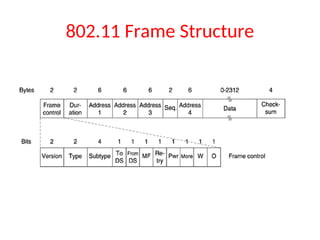
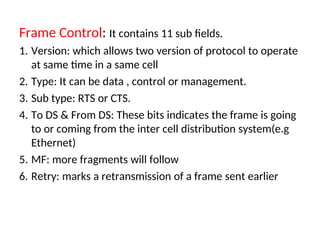
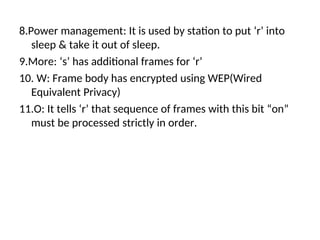
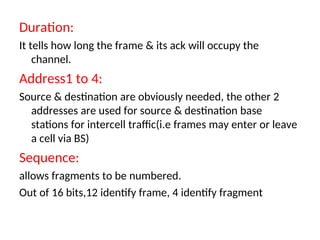
COMPUTER NETWORKS
for
III YEAR B.TECH(CSE) – I SEM
BY
DR. K. KRANTHI KUMAR
Associate Professor, Dept of IT,
Sreenidhi Institute of science and technology, Hyderabad,
drkkranthikumar@gmail.com, 9848624931
JAWAHARLAL NEHRU TECHNOLOGICAL UNIVERSITY HYDERABAD
UNIVERSITY COLLEGE OF ENGINEERING RAJANNA SIRCILLA
Agraharam, Rajanna Sircilla District, Telangana State, India. Pin Code: 505302
COMPUTER NETWORKS SYLLABUS
UNIT - I
Network hardware, Network software, OSI, TCP/IP Reference models, Example
Networks: ARPANET, Internet. Physical Layer: Guided Transmission media:
twisted pairs, coaxial cable, fiber optics, Wireless Transmission. Data link layer:
Design issues, framing, Error detection and correction.
UNIT - II
Elementary data link protocols: simplex protocol, A simplex stop and wait protocol
for an error-free channel, A simplex stop and wait protocol for noisy channel.
Sliding Window protocols: A one-bit sliding window protocol, A protocol using Go-
Back-N, A protocol using Selective Repeat, Example data link protocols.
Medium Access sub layer: The channel allocation problem, Multiple access
protocols: ALOHA, Carrier sense multiple access protocols, collision free
protocols. Wireless LANs, Data link layer switching.
UNIT - III
Network Layer: Design issues, Routing algorithms: shortest path routing,
Flooding, Hierarchical routing, Broadcast, Multicast, distance vector
routing, Congestion Control Algorithms, Quality of Service,
Internetworking, The Network layer in the internet.
UNIT - IV
Transport Layer: Transport Services, Elements of Transport protocols,
Connection management, TCP and UDP protocols.
UNIT - V
Application Layer –Domain name system, SNMP, Electronic Mail; the
World WEB, HTTP, Streaming audio and video.
TEXT BOOK:
1. Computer Networks -- Andrew S Tanenbaum, David. j. Wetherall, 5th
Edition. Pearson Education/PHI .
Introduction
Unit-1
What is Computer Network
• A collection of Autonomous computers
interconnected by any media.
• Two computers are said to be interconnected
if they are able to exchange information.
• The connection may be via a copper wire/
fiber optics/microwaves/infrared/ satellites.
Why people are interested in
Computer Networks
• Resource sharing:
To make all physical resources such as printers, scanners,
equipment, etc., available to anyone on the network without
regard to the physical location of the resource and the user.
• Information sharing:
Allowing users to access relevant information and documents,
i.e data available to any one on the network instantly without
regard to the location of the data and the user accessing it.
Uses of Computer Networks
• Business Applications
• Home Applications
• Mobile Users
• Social Issues
Types of transmission technology
• Broadcast links
• Point-to-point links
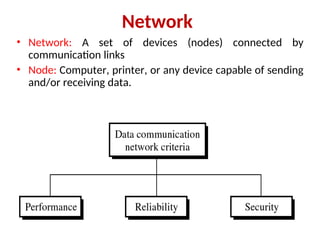
Network
• Network: A set of devices (nodes) connected by
communication links
• Node: Computer, printer, or any device capable of sending
and/or receiving data.
Type of Connection
Type of Connection
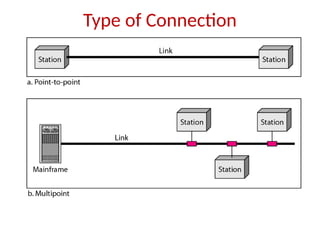
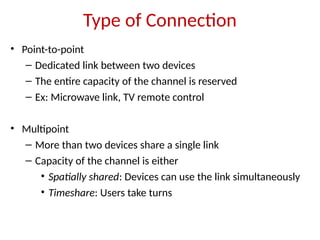
• Point-to-point
– Dedicated link between two devices
– The entire capacity of the channel is reserved
– Ex: Microwave link, TV remote control
• Multipoint
– More than two devices share a single link
– Capacity of the channel is either
• Spatially shared: Devices can use the link simultaneously
• Timeshare: Users take turns
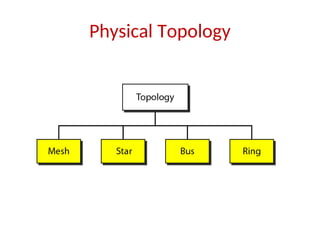
Physical Topology
Mesh Topology
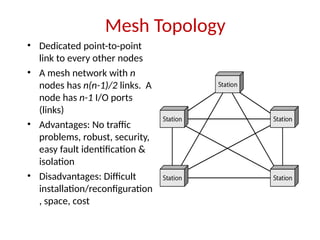
• Dedicated point-to-point
link to every other nodes
• A mesh network with n
nodes has n(n-1)/2 links. A
node has n-1 I/O ports
(links)
• Advantages: No traffic
problems, robust, security,
easy fault identification &
isolation
• Disadvantages: Difficult
installation/reconfiguration
, space, cost
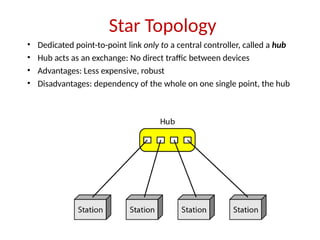
Star Topology
• Dedicated point-to-point link only to a central controller, called a hub
• Hub acts as an exchange: No direct traffic between devices
• Advantages: Less expensive, robust
• Disadvantages: dependency of the whole on one single point, the hub
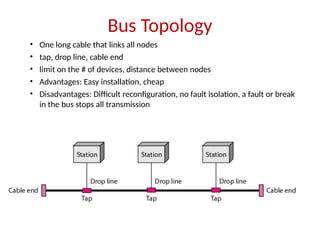
Bus Topology
• One long cable that links all nodes
• tap, drop line, cable end
• limit on the # of devices, distance between nodes
• Advantages: Easy installation, cheap
• Disadvantages: Difficult reconfiguration, no fault isolation, a fault or break
in the bus stops all transmission
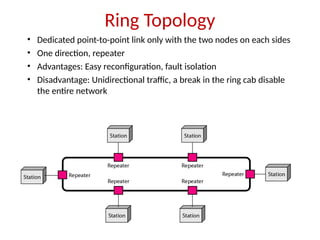
Ring Topology
• Dedicated point-to-point link only with the two nodes on each sides
• One direction, repeater
• Advantages: Easy reconfiguration, fault isolation
• Disadvantage: Unidirectional traffic, a break in the ring cab disable
the entire network
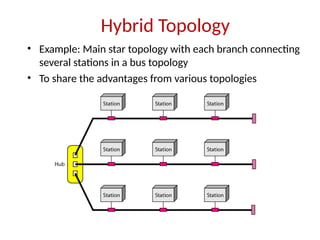
Hybrid Topology
• Example: Main star topology with each branch connecting
several stations in a bus topology
• To share the advantages from various topologies
Types of Network
• Local Area Networks
• Metropolitan Area Networks
• Wide Area Networks
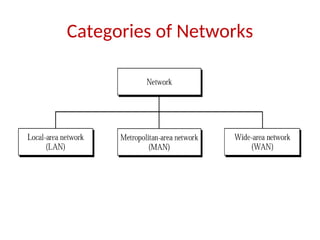
Categories of Networks
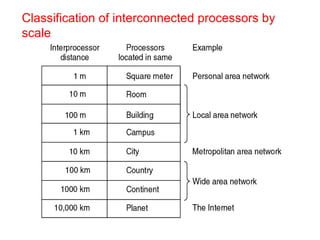
Classification of interconnected processors by
scale
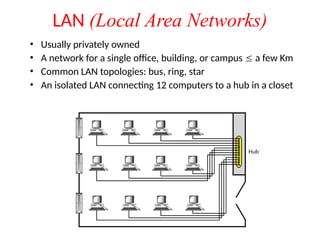
LAN (Local Area Networks)
• Usually privately owned
• A network for a single office, building, or campus  a few Km
• Common LAN topologies: bus, ring, star
• An isolated LAN connecting 12 computers to a hub in a closet
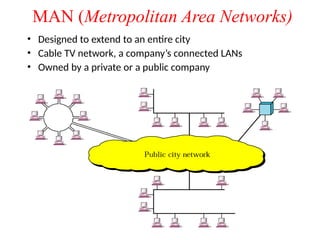
MAN (Metropolitan Area Networks)
• Designed to extend to an entire city
• Cable TV network, a company’s connected LANs
• Owned by a private or a public company
MAN (contd…)
 It is a bigger version of LAN
 It supports 802.6( IEEE standard) called DQDB
(Distributed Queue Dual Bus)
 DQDB consists of two unidirectional buses(cables) to
which all computers are connected.
 A metropolitan area network (MAN) is a network that
interconnects users with computer resources in a geographic
area or region larger than that covered by even a large local
area network (LAN) but smaller than the area covered by a
wide area network (WAN).
 city-10km
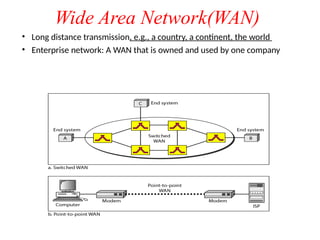
Wide Area Network(WAN)
• Long distance transmission, e.g., a country, a continent, the world
• Enterprise network: A WAN that is owned and used by one company
WAN contd…
 Network spread geographically ( country or across
globe) is called WAN.
 WAN contain hosts these are connected by a
communication subnet.
 The job of the subnet is to carry messages from host to
host.
 Ex: The telephone system carries words from speaker
to listener.
 Relation between hosts and the subnet
 Country : 100 km and 1,000 km
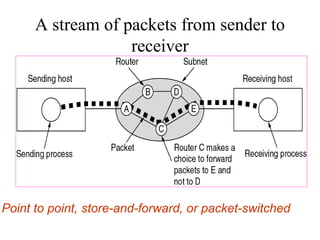
A stream of packets from sender to
receiver
Point to point, store-and-forward, or packet-switched
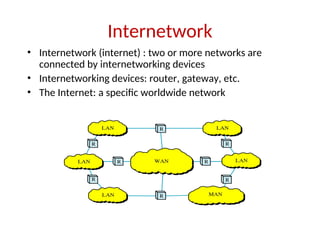
Internetwork
• Internetwork (internet) : two or more networks are
connected by internetworking devices
• Internetworking devices: router, gateway, etc.
• The Internet: a specific worldwide network
Internetwork Example
• A heterogeneous network : four WANs and two LANs
Network Software
• Protocol Hierarchies
• Design Issues for the Layers
• Connection-Oriented and Connectionless Services
• Service Primitives
• The Relationship of Services to Protocols
29
Protocol Hierarchies
• To reduce the design complexity, most networks are
organized as a stack of layers or levels, each one built upon
the one below it.
• The number of layers, name of the layers, function of the
layers differ from one network to other.
• Each Layer is to offer certain services to the higher layers.
• Each layer shields the details of how the offered services to
the higher layers.
Technical words
Protocol : The rules and conventions used in the
conversation between layer n on one machine to layer n
on another machine.
A Protocol is an agreement between the communicating
parties on how communication is to proceed.
Interface: Between each pair of adjacent layers is an
interface. The interface defines which primitive
operations and services the lower layer makes available
to the upper one.
Network Architecture: A set of layers and protocols is
called a network architecture.
Protocol stack: A list of protocols used by a certain
system, one protocol per layer, is called a protocol stack.
Layered Model: Sending a Letter
Network Software
Protocol Hierarchies
Layers, protocols, and interfaces.
Protocol Hierarchies
Example information flow supporting virtual communication in layer 5.
34
Design Issues for the Layers
• Addressing
• Rules for data transfer
• Error Control
• Flow Control
• Disassembly and Reassembly
• Multiplexing
• Routing
35
Connection-Oriented and Connectionless
Services
Six different types of service.
36
Service Primitives
• A service is specified by a set of primitives(operations) available to a user
process to access the service.
• Five service primitives for implementing a simple connection-oriented
service.
Services to Protocols Relationship
• The relationship between a service and a
protocol.
Reference Models
• The OSI Reference Model
• The TCP/IP Reference Model
• A Comparison of OSI and TCP/IP
• A Critique of the OSI Model and Protocols
• A Critique of the TCP/IP Reference Model
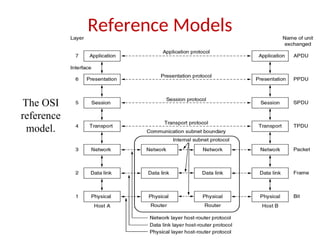
Reference Models
The OSI
reference
model.
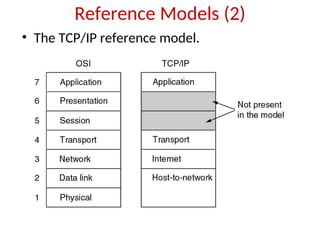
Reference Models (2)
• The TCP/IP reference model.
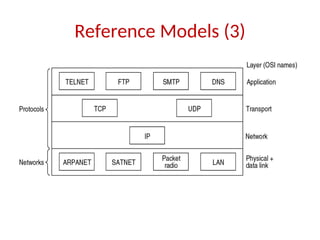
Reference Models (3)
• Protocols and networks in the TCP/IP model
initially.
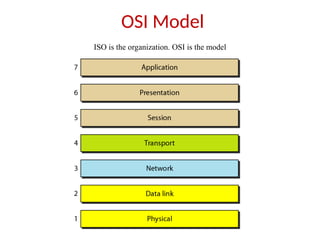
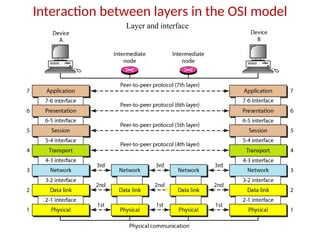
OSI Model
ISO is the organization. OSI is the model
Interaction between layers in the OSI model
Layer and interface
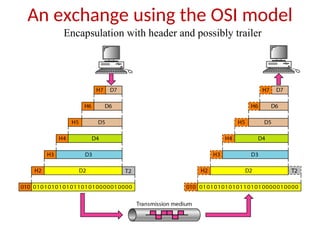
An exchange using the OSI model
Encapsulation with header and possibly trailer
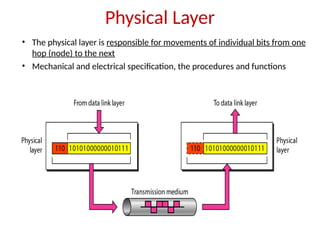
Physical Layer
• The physical layer is responsible for movements of individual bits from one
hop (node) to the next
• Mechanical and electrical specification, the procedures and functions
2-47
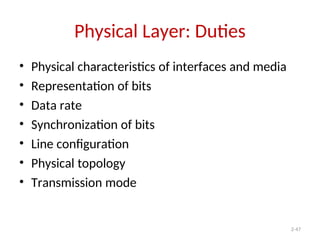
Physical Layer: Duties
• Physical characteristics of interfaces and media
• Representation of bits
• Data rate
• Synchronization of bits
• Line configuration
• Physical topology
• Transmission mode
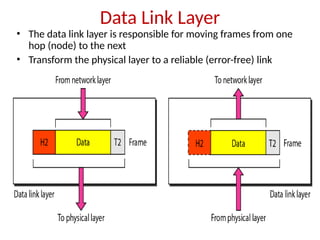
Data Link Layer
• The data link layer is responsible for moving frames from one
hop (node) to the next
• Transform the physical layer to a reliable (error-free) link
2-49
Data Link Layer: Duties
• Framing
• Physical addressing
• Flow control
• Error control
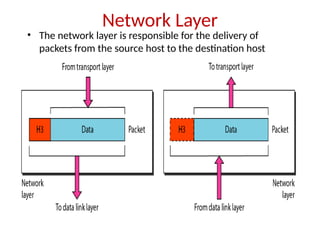
Network Layer
• The network layer is responsible for the delivery of
packets from the source host to the destination host
2-51
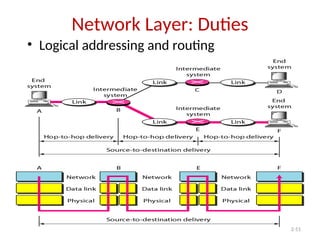
Network Layer: Duties
• Logical addressing and routing
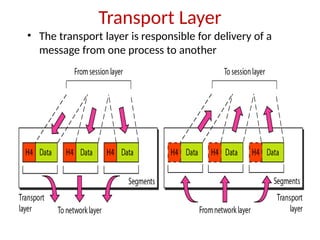
Transport Layer
• The transport layer is responsible for delivery of a
message from one process to another
2-53
Transport Layer: Duties
• Service-point (port) addressing
• Segmentation and reassembly
• Connection control
• Flow control
• Error control
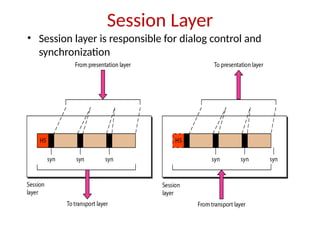
Session Layer
• Session layer is responsible for dialog control and
synchronization
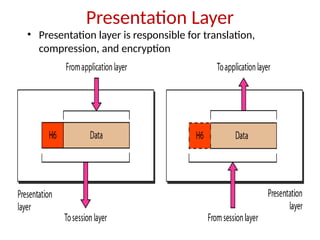
Presentation Layer
• Presentation layer is responsible for translation,
compression, and encryption
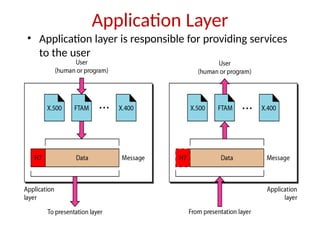
Application Layer
• Application layer is responsible for providing services
to the user
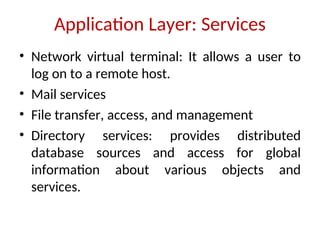
Application Layer: Services
• Network virtual terminal: It allows a user to
log on to a remote host.
• Mail services
• File transfer, access, and management
• Directory services: provides distributed
database sources and access for global
information about various objects and
services.
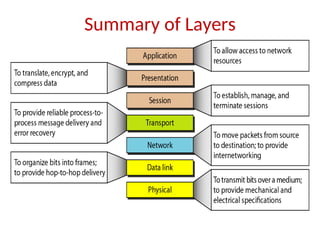
Summary of Layers
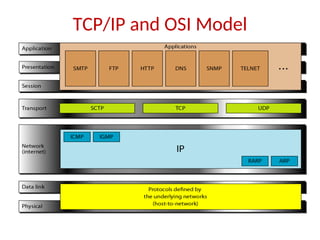
TCP/IP and OSI Model
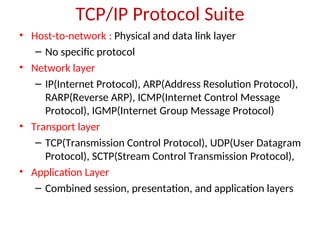
TCP/IP Protocol Suite
• Host-to-network : Physical and data link layer
– No specific protocol
• Network layer
– IP(Internet Protocol), ARP(Address Resolution Protocol),
RARP(Reverse ARP), ICMP(Internet Control Message
Protocol), IGMP(Internet Group Message Protocol)
• Transport layer
– TCP(Transmission Control Protocol), UDP(User Datagram
Protocol), SCTP(Stream Control Transmission Protocol),
• Application Layer
– Combined session, presentation, and application layers
2-61
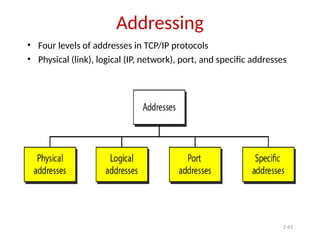
Addressing
• Four levels of addresses in TCP/IP protocols
• Physical (link), logical (IP, network), port, and specific addresses
2-62
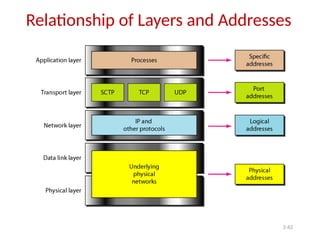
Relationship of Layers and Addresses
2-63
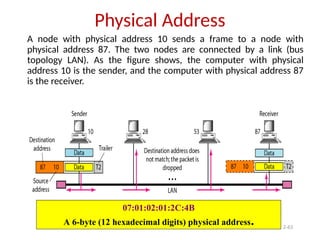
Physical Address
A node with physical address 10 sends a frame to a node with
physical address 87. The two nodes are connected by a link (bus
topology LAN). As the figure shows, the computer with physical
address 10 is the sender, and the computer with physical address 87
is the receiver.
07:01:02:01:2C:4B
A 6-byte (12 hexadecimal digits) physical address.
2-64
Logical (IP) Address
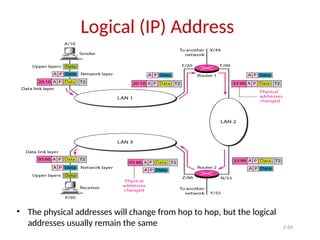
• The physical addresses will change from hop to hop, but the logical
addresses usually remain the same
2-65
Port Address
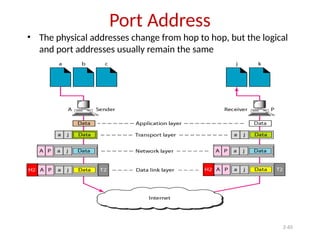
• The physical addresses change from hop to hop, but the logical
and port addresses usually remain the same
The physical layer
Physical Layer
The purpose of the physical layer is to transport a raw bit
stream from one machine to another.
Various physical media can be used for the actual
transmission.
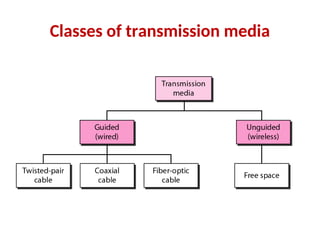
Transmission Media:
Media are grouped into guided media and unguided
media.
Guided media means waves are guided along solid
medium.
Ex: copper wire, fiber optics.
Unguided media is a media doesn't use any physical
connectors between the two devices communicating.
Usually the transmission is send through the atmosphere.
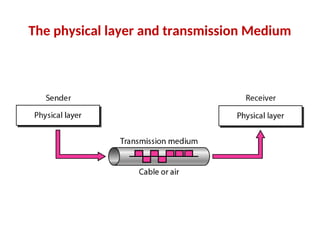
The physical layer and transmission Medium
Classes of transmission media
Guided Transmission Data
• Magnetic Media
• Twisted Pair
• Coaxial Cable
• Fiber Optics
Magnetic Media
• One of the common way to transport data from
one computer to another is to write them on to
magnetic tape or removable media (DVD)
physically transport the tape or DVD to the
destination machine and read them.
• The tape densities are increasing.
• It is not suitable in applications, where on-line
connection is needed
Twisted Pair
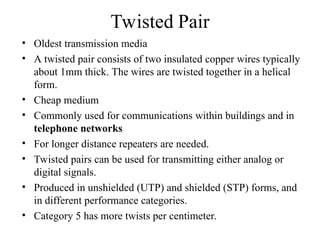
• Oldest transmission media
• A twisted pair consists of two insulated copper wires typically
about 1mm thick. The wires are twisted together in a helical
form.
• Cheap medium
• Commonly used for communications within buildings and in
telephone networks
• For longer distance repeaters are needed.
• Twisted pairs can be used for transmitting either analog or
digital signals.
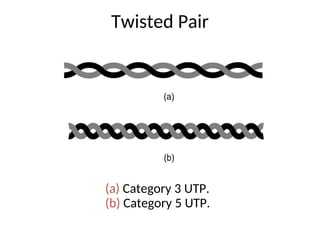
• Produced in unshielded (UTP) and shielded (STP) forms, and
in different performance categories.
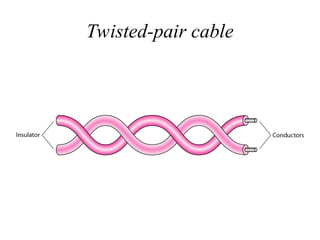
• Category 5 has more twists per centimeter.
Twisted-pair cable
Twisted Pair
(a) Category 3 UTP.
(b) Category 5 UTP.
UTP and STP cables
• It has better shielding than twisted pair
• Offers longer distances and better speeds than twisted pair, due to
better shielding.
• Used for cable TV and local-area networks. Had been widely used in
telephone systems, but optical fiber is now assuming this task.
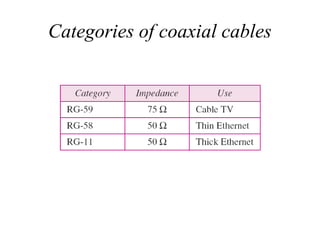
• Baseband Coaxial Cable 50-ohm cable, commonly used for digital
transmission. Broadband Coaxial Cable 75-ohm cable, commonly
used for analog transmission.
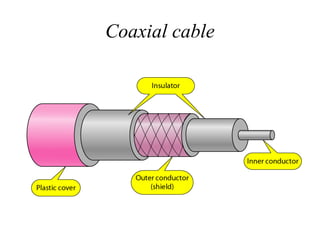
• A coaxial cable consists of a stiff copper wire as the core, surrounded
by an insulating material. The insulator is encased by a cylindrical
conductor, often as a closely woven braided mesh. The outer conductor
is covered in a protective plastic sheath.
• Good combination of high bandwidth and excellent noise immunity.
• It is widely used for cable television and metropolitan networks.
Coaxial Cable
Coaxial cable
Categories of coaxial cables
Fiber optic cable
• Fiber optic cables are similar to coax, except
without the braid.
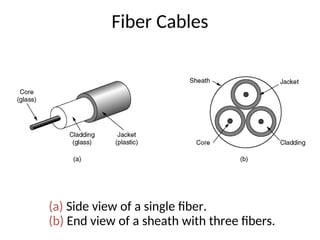
• At the center is the glass core through which
the light propagates.
• Multimode fiber, the core is typically 50
microns
• Single mode fiber, the core is 8 to 10 microns.
• The core is surrounded by a glass cladding, to
keep all the light in the core.
• Next comes a thin plastic jacket to protect the
cladding.
• Fibers are typically grouped in bundles,
protected by an outer sheath.
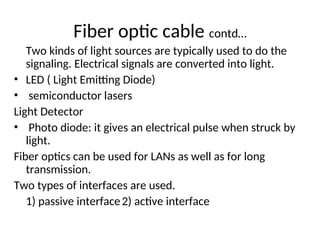
Two kinds of light sources are typically used to do the
signaling. Electrical signals are converted into light.
• LED ( Light Emitting Diode)
• semiconductor lasers
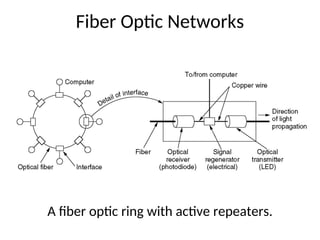
Light Detector
• Photo diode: it gives an electrical pulse when struck by
light.
Fiber optics can be used for LANs as well as for long
transmission.
Two types of interfaces are used.
1) passive interface2) active interface
Fiber optic cable contd…
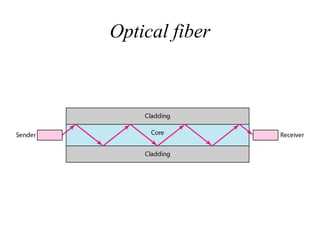
Optical fiber
Fiber Cables
(a) Side view of a single fiber.
(b) End view of a sheath with three fibers.
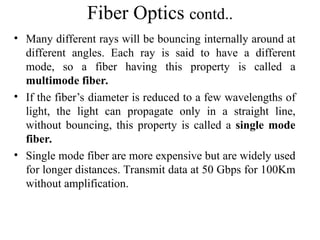
Fiber Optics contd..
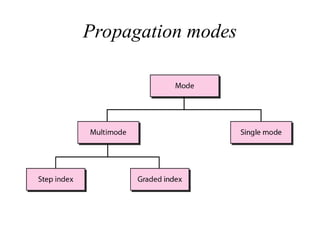
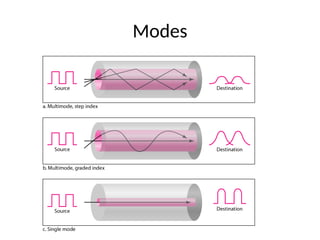
• Many different rays will be bouncing internally around at
different angles. Each ray is said to have a different
mode, so a fiber having this property is called a
multimode fiber.
• If the fiber’s diameter is reduced to a few wavelengths of
light, the light can propagate only in a straight line,
without bouncing, this property is called a single mode
fiber.
• Single mode fiber are more expensive but are widely used
for longer distances. Transmit data at 50 Gbps for 100Km
without amplification.
Propagation modes
Modes
Fiber Optic Networks
A fiber optic ring with active repeaters.
Wireless Transmission
• The Electromagnetic Spectrum
• Radio Transmission
• Microwave Transmission
• Infrared and Millimeter Waves
• Lightwave Transmission
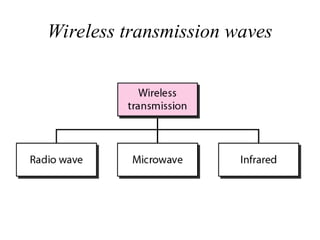
Wireless transmission waves
Wireless transmission
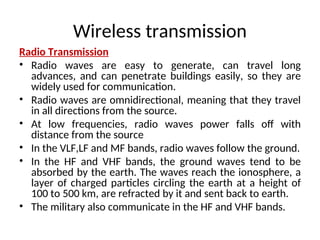
Radio Transmission
• Radio waves are easy to generate, can travel long
advances, and can penetrate buildings easily, so they are
widely used for communication.
• Radio waves are omnidirectional, meaning that they travel
in all directions from the source.
• At low frequencies, radio waves power falls off with
distance from the source
• In the VLF,LF and MF bands, radio waves follow the ground.
• In the HF and VHF bands, the ground waves tend to be
absorbed by the earth. The waves reach the ionosphere, a
layer of charged particles circling the earth at a height of
100 to 500 km, are refracted by it and sent back to earth.
• The military also communicate in the HF and VHF bands.
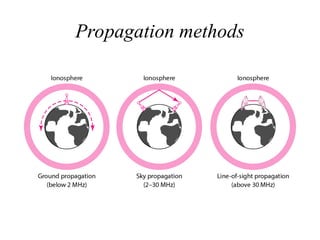
Propagation methods
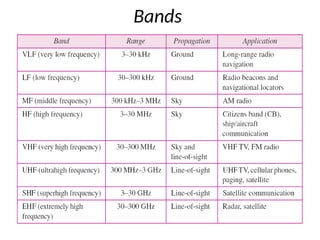
Bands
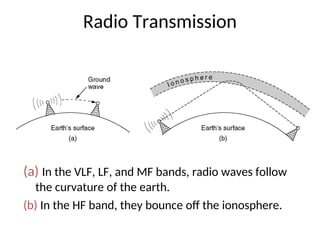
Radio Transmission
(a) In the VLF, LF, and MF bands, radio waves follow
the curvature of the earth.
(b) In the HF band, they bounce off the ionosphere.
Wireless transmission
• Radio waves are used for multicast
communications, such as radio and television,
and paging systems.
• Microwaves are used for uni-cast
communication such as cellular telephones,
satellite networks and wireless LANs.
• Infrared signals can be used for short-range
communication in a closed area using line-of-
sight propagation.
DATA LINK LAYER
Data link layer:
 DATA LINK LAYER DESIGN ISSUES:
 Data link layer has a number of specific functions to carry out. These
functions include
 Provides a well-defined service interface to the network
layer.
 Determines how the bits of the physical layer are
grouped into frames (framing).
 Deals with transmission errors (CRC and ARQ).
 Systems which automatically request the retransmission of
missing packets or packets with errors are called Automatic
Repeat reQuest (ARQ)
 Regulates the flow of frames.
Data-Link Layer has responsibility of transferring frames
from one node to adjacent node over a link
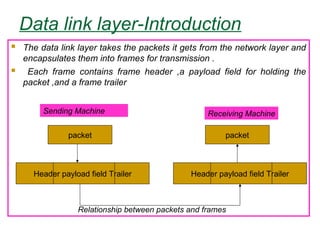
Data link layer-Introduction
 The data link layer takes the packets it gets from the network layer and
encapsulates them into frames for transmission .
 Each frame contains frame header ,a payload field for holding the
packet ,and a frame trailer
packet
Header payload field Trailer
packet
Header payload field Trailer
Relationship between packets and frames
Sending Machine Receiving Machine
Data link layer-Introduction
 Services Provided to the Network layer:
 The function of the data link layer is to provide services to the network
layer
 The principal service is transferring data from the network layer on the
source machine to the network layer on the destination machine.
(a) Virtual Communication (b)Actual communication
Types of services provided to the Network
Layer
 Unacknowledged Connectionless service
 Acknowledged Connectionless service
 Acknowledged Connection-Oriented
service
Unacknowledged Connectionless service:
 It consists of having the source machine send
independent frames to the destination machine
without having the destination acknowledge them.
 No connection is established beforehand or released
afterward
 If a frame is lost due to noise on the line, no attempt
is made to recover it in the data link layer.
 Appropriate for voice, where delay is worse than bad
data.
 Most of the LANs use unacknowledged connection
less service in the data link layer
 Acknowledged Connectionless service
 when this service is offered, there are still no
logical connections used, but each frame sent is
individually acknowledged.
 In this way ,the sender knows whether a frame
has arrived correctly.
 If it has not arrived within a specified time interval
it can be sent again.
 This service is used over unreliable
channels ,such as wireless systems.
Acknowledged Connection-Oriented service
 The most sophisticated service the data link layer can
provide to the network layer is connection-oriented service.
 The source and destination machines establish a
connection before any data are transferred
 Each frame sent over the connection is numbered ,and the
data link layer guarantees that each frame is received
exactly once and that all frames are received in the right
order
 When connection oriented service is used ,transfers go
through three distinct phases.
1) Connection established
2) Data transferred
3) connection Released
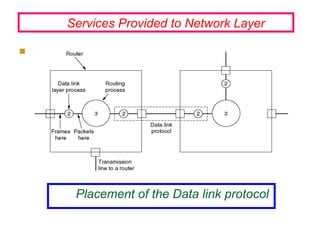
Placement of the Data link protocol

Services Provided to Network Layer
Framing
 In order to provide service to the network layer the data
link layer must use the service provided to it by the
physical layer.
 Physical layer is used to accept the raw bit stream and
attempt to deliver it to the destination
 The bit stream is not guaranteed to be error free
 The number of bits received may be less than ,equal
to ,or more than the number of bits transmitted, and they
may have different values
 It is up to the data link layer to detect and if
necessary ,correct errors.
 The usual approach is for the data link layer to break the
bit stream up into discrete frames and compute the
checksum for each frame.
Framing
 When a frame arrives at the destination ,the checksum is
recomputed.
 If the newly computed checksum is different from the
one contained in the frame, the data link layer knows that
an error has occurred and take steps to deal with it.
 e.g., discarding the bad frame and possibly also
sending back an error report
 Breaking the bit stream up into frames is more difficult
than it at first appears, One way to achieve this framing
is to insert time gaps between frames, much like the
spaces between words in ordinary text.
Methods:
1) Character Count
2) Flag bytes with Byte Stuffing/Character Stuffing
3) starting and ending flags, with Bit Stuffing
4)Physical Layer Coding Violations
Character count:
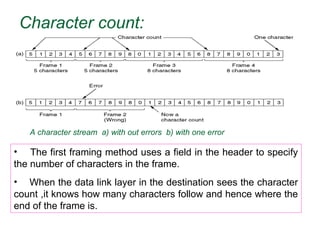
• The first framing method uses a field in the header to specify
the number of characters in the frame.
• When the data link layer in the destination sees the character
count ,it knows how many characters follow and hence where the
end of the frame is.
A character stream a) with out errors b) with one error
Character count:
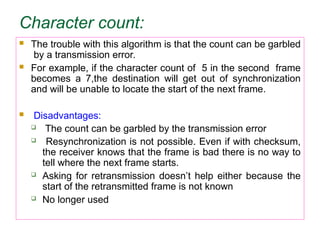
 The trouble with this algorithm is that the count can be garbled
by a transmission error.
 For example, if the character count of 5 in the second frame
becomes a 7,the destination will get out of synchronization
and will be unable to locate the start of the next frame.
 Disadvantages:
 The count can be garbled by the transmission error
 Resynchronization is not possible. Even if with checksum,
the receiver knows that the frame is bad there is no way to
tell where the next frame starts.
 Asking for retransmission doesn’t help either because the
start of the retransmitted frame is not known
 No longer used
 The second transmission method gets around
the problem of Resynchronization called
character stuffing.
 Most protocols used the same byte ,called flag
byte, as both the starting and ending delimiter as
FLAG.
 Two consecutive flag bytes indicate the end of
one frame and start of the next one.
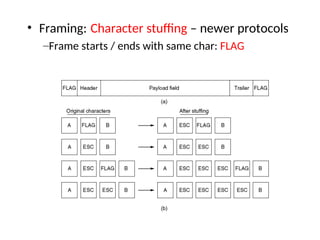
• Framing: Character stuffing – newer protocols
–Frame starts / ends with same char: FLAG
Byte Stuffing
[HDLC Example]
• Also referred to as character stuffing.
• ASCII characters are used as framing delimiters
(e.g. DLE STX and DLE ETX)
• The problem occurs when these character
patterns occur within the “transparent” data.
Solution: sender stuffs an extra DLE into the data
stream just before each occurrence of an
“accidental” DLE in the data stream.
The data link layer on the receiving end unstuffs the
DLE before giving the data to the network layer.
DLE STX DLE ETX
Transparent Data
DLE STX DLE ETX
A B DLE H W
DLE STX DLE ETX
A B DLE H W
DLE
DLE STX DLE ETX
A B DLE H W
Stuffed
Unstuffed
Before
Byte Stuffing
[HDLC Example]
Computer Networks: Bit and Byte Stuffing 112
Bit Stuffing
• Each frame begins and ends with a special bit
pattern called a flag byte [01111110]. {Note this is
7E in hex}
• Whenever sender data link layer encounters five
consecutive ones in the data stream, it
automatically stuffs a 0 bit into the outgoing
stream.
• When the receiver sees five consecutive incoming
ones followed by a 0 bit, it automatically destuffs
the 0 bit before sending the data to the network
layer.
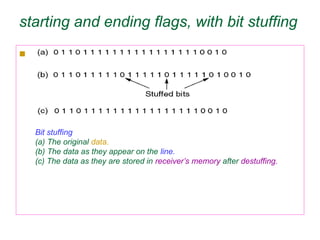
starting and ending flags, with bit stuffing
 This new technique allows data frames to contain an
arbitrary number of bits and allow character codes with
an arbitrary number of bits per character.
 Each frame begins and ends with a special bit
pattern,01111110 called a flag byte.
 whenever the senders data link layer encounters six
consecutive ones in the data , it automatically stuffs a 0
bit into the outgoing bit stream.
 whenever the receiver sees five consecutive incoming 1
bits, followed by a 0 bit ,it automatically destuffs (i.e
deletes) the 0 bit.
 If the flag pattern 01111110,this flag is transmitted as
011111010 but stored in the receiver memory as
01111110.
starting and ending flags, with bit stuffing

Bit stuffing
(a) The original data.
(b) The data as they appear on the line.
(c) The data as they are stored in receiver’s memory after destuffing.
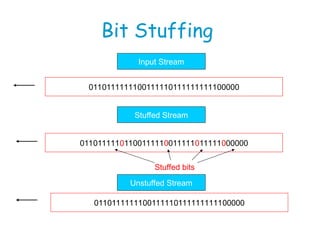
Input Stream
Stuffed Stream
Unstuffed Stream
0110111111100111110111111111100000
01101111101100111110011111011111000000
0110111111100111110111111111100000
Stuffed bits
Bit Stuffing
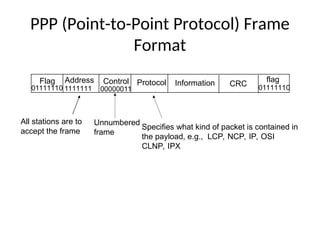
Flag flag
Address Control Information CRC
Protocol
01111110 01111110
1111111 00000011
Unnumbered
frame
Specifies what kind of packet is contained in
the payload, e.g., LCP, NCP, IP, OSI
CLNP, IPX
All stations are to
accept the frame
PPP (Point-to-Point Protocol) Frame
Format
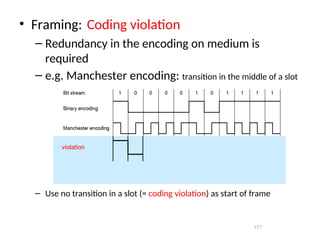
117
• Framing: Coding violation
– Redundancy in the encoding on medium is
required
– e.g. Manchester encoding: transition in the middle of a slot
– Use no transition in a slot (= coding violation) as start of frame
violation
Error Control:
 Next problem: How to make sure all frames are
eventually delivered to the network layer at the
destination, and in the proper order.
 The usual way to ensure reliable delivery is to provide
the sender with some feedback about what is happening
at the other end of the line.
 The protocol calls for the receiver to send back special
control frames bearing positive and negative
acknowledgements about the incoming frames
Error Control
 If the sender receives a positive acknowledgement about
a frame ,it knows the frame has arrived safely.
 on the other hand, a negative acknowledgement means
that something has gone wrong, and the frame must be
transmitted again.
 An additional complication comes from hardware
troubles.
 Managing the Timers and sequence numbers so as to
ensure that each frame is ultimately passed to the network
layer at the destination exactly once.
Error Control:
 Maintaining Timers for Error Control: When a sender
transmits a frame, it generally also starts a timer .
 The timer is set to expire after an interval long enough for
the frame to reach the destination, be processed there ,and
have the acknowledgement to propagate back to the sender.
 Normally, the frame will be correctly received and the
acknowledgement will get back before the timer runs out ,in
which case the timer will be cancelled.
 However, if either the frame or the acknowledgement is
lost ,the timer will go off ,alerting the sender to a potential
problem .the obvious solution is to just transmit the frame
again.
 Sequence number is used to recognize the duplicate packet.
Flow control
 A sender that systematically wants to transmit frames faster
than the receiver can accept them..
 When the sender is running on a fast (or lightly loaded)
computer and the receiver is running on a slow (or heavily
loaded machine)
 The sender keeps pumping the frames out at a higher rate
until the receiver is completely swamped.
 Even if the transmission is error free ,at a certain point the
receiver will simply be unable to handle the frames as they
arrive and will start to lose someone
 To prevent this situation Feedback- based flow control & Rate-
based flow control mechanisms are used.
 Feedback- based flow control ,the receiver sends back
information to the sender giving it permission to send more
data .
 Rate based :Has built in mechanism with out feedback.
Error Detection and correction
 In some cases it is sufficient to detect an error and in
some, it requires the errors to be corrected also.
 For e.g.
 On a reliable medium : Error Detection is sufficient
where the error rate is low and asking for
retransmission after Error Detection would work
efficiently
 In contrast, on an unreliable medium : Retransmission
after Error Detection may result in another error and
still another and so on. Hence Error Correction is
desirable.
Error Detection and Correction
• Types of Errors
• Error-Correcting Codes
• Error-Detecting Codes
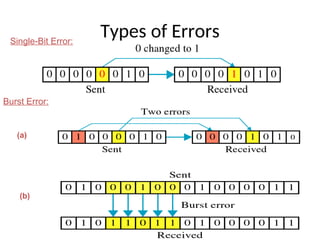
Types of Errors
Single-Bit Error:
Burst Error:
(a)
(b)
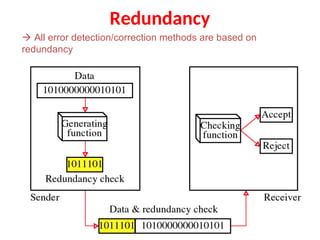
Redundancy
 All error detection/correction methods are based on
redundancy
Error detecting Codes
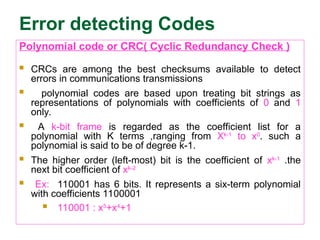
Polynomial code or CRC( Cyclic Redundancy Check )
 CRCs are among the best checksums available to detect
errors in communications transmissions
 polynomial codes are based upon treating bit strings as
representations of polynomials with coefficients of 0 and 1
only.
 A k-bit frame is regarded as the coefficient list for a
polynomial with K terms ,ranging from Xk-1
to x0
. such a
polynomial is said to be of degree k-1.
 The higher order (left-most) bit is the coefficient of xk-1
.the
next bit coefficient of xk-2
 Ex: 110001 has 6 bits. It represents a six-term polynomial
with coefficients 1100001
 110001 : x5
+x4
+1
CRC
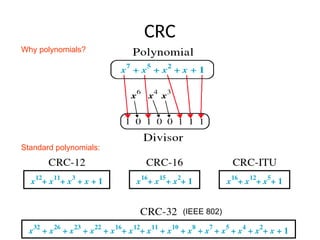
Why polynomials?
Standard polynomials:
(IEEE 802)
CRC
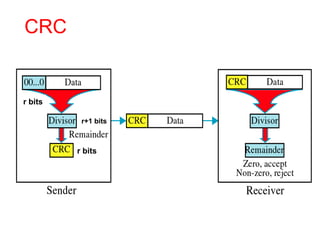
r bits
r bits
r+1 bits
Error detecting Codes
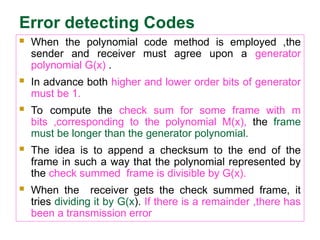
 When the polynomial code method is employed ,the
sender and receiver must agree upon a generator
polynomial G(x) .
 In advance both higher and lower order bits of generator
must be 1.
 To compute the check sum for some frame with m
bits ,corresponding to the polynomial M(x), the frame
must be longer than the generator polynomial.
 The idea is to append a checksum to the end of the
frame in such a way that the polynomial represented by
the check summed frame is divisible by G(x).
 When the receiver gets the check summed frame, it
tries dividing it by G(x). If there is a remainder ,there has
been a transmission error
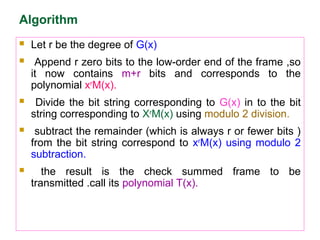
Algorithm
 Let r be the degree of G(x)
 Append r zero bits to the low-order end of the frame ,so
it now contains m+r bits and corresponds to the
polynomial xr
M(x).
 Divide the bit string corresponding to G(x) in to the bit
string corresponding to Xr
M(x) using modulo 2 division.
 subtract the remainder (which is always r or fewer bits )
from the bit string correspond to xr
M(x) using modulo 2
subtraction.
 the result is the check summed frame to be
transmitted .call its polynomial T(x).

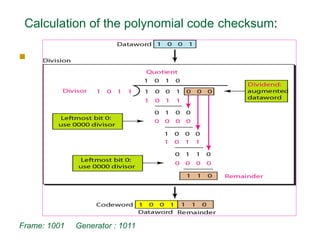
Calculation of the polynomial code checksum:
Frame: 1001 Generator : 1011
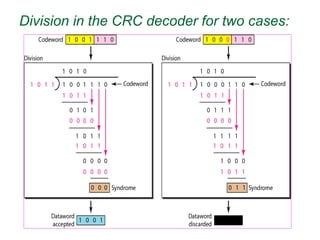
Division in the CRC decoder for two cases:
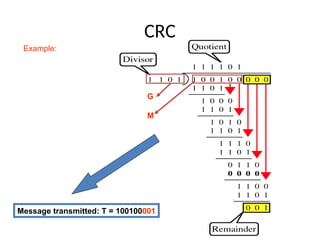
CRC
G
M
Message transmitted: T = 100100001
Example:
Error Detection:
Parity Check
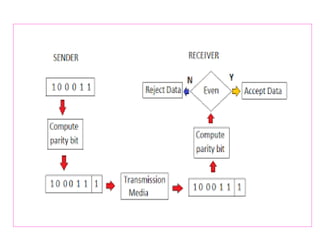
Simple Parity check :
• Blocks of data from the source are subjected to a
check bit or parity bit generator form, where a parity of
1 is added to the block if it contains odd number of 1’s
and 0 is added if it contains even number of 1’s
•This scheme makes the total number of 1’s even, that
is why it is called even parity checking.
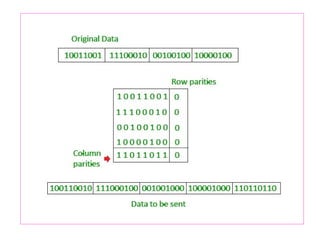
Two Dimensional Parity check :
• Parity check bits are calculated for each row,
which is equivalent to a simple parity check bit.
•Parity Check bits are also calculated for all
columns, then both are sent along with the data.
•At receiving end these are compared with the
parity bits calculated on the received data
Error correcting codes:
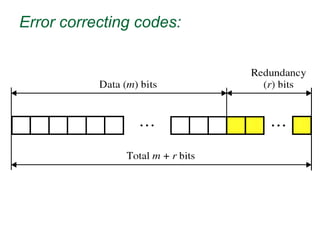
 A frame consists of m data (i.e,message ) bits and r
redundant, or check bits.
 Let the total length be n (i.e., n=m+r).an n-bit unit containing
data and check bits is often referred to as an n-bit codeword.
 Given any two code words ,say,10001001 and 10110001,it is
possible to define how many bits differ .In this case 3 bits
differ. To determine how many bits differ ,just EXCLUSIVE
OR the two code words ,and count the number of 1 bits in the
result. The number of bit positions in which two code words
differ is called the Hamming distance.
 Its significance is that if two code words are a hamming
distance d a apart, it will require d single-bit errors to convert
one into another.
Hamming Distance
 The Hamming distance between two words of same size is
the no.of differences between corresponding bits.
 The Hamming distance can be found if we apply XOR
operation on the two words and count no.of 1’s in the result.
 d(000,011) is 2 because (000)XOR(011)=011(two 1s)
 When a code word is corrupted during transmission, the
hamming distance between sent and received code words is
the number of bits affected by the error.
 For e.g. if the codeword 00000 is sent and 01101 is received,
3 bits are in error and the Hamming distance between the two
is d(00000,01101)=3.
Error correcting codes:
 Forward Error Correction: FEC is the only error
correction scheme that actually detects and corrects
transmission errors at the receive end with out calling for
retransmission.
 Ex: Hamming code
 No of bits in hamming code is dependent on the no. of
bits in the data character by using the relation.
 2n
>=m+n+1
 Where n=no. of hamming bits
 m= no. of bits in the data character
Error correcting codes:
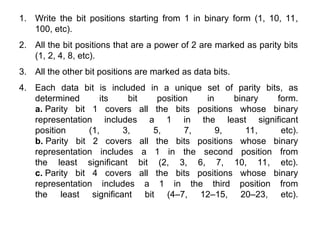
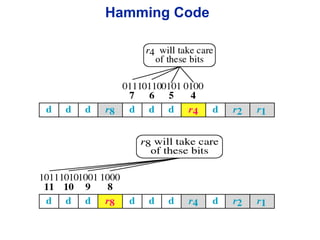
1. Write the bit positions starting from 1 in binary form (1, 10, 11,
100, etc).
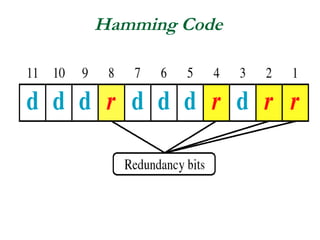
2. All the bit positions that are a power of 2 are marked as parity bits
(1, 2, 4, 8, etc).
3. All the other bit positions are marked as data bits.
4. Each data bit is included in a unique set of parity bits, as
determined its bit position in binary form.
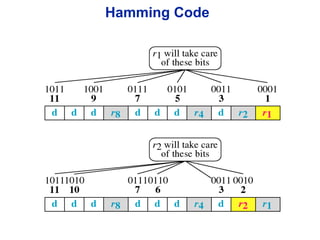
a. Parity bit 1 covers all the bits positions whose binary
representation includes a 1 in the least significant
position (1, 3, 5, 7, 9, 11, etc).
b. Parity bit 2 covers all the bits positions whose binary
representation includes a 1 in the second position from
the least significant bit (2, 3, 6, 7, 10, 11, etc).
c. Parity bit 4 covers all the bits positions whose binary
representation includes a 1 in the third position from
the least significant bit (4–7, 12–15, 20–23, etc).
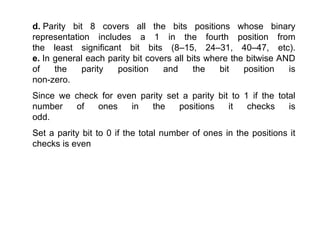
d. Parity bit 8 covers all the bits positions whose binary
representation includes a 1 in the fourth position from
the least significant bit bits (8–15, 24–31, 40–47, etc).
e. In general each parity bit covers all bits where the bitwise AND
of the parity position and the bit position is
non-zero.
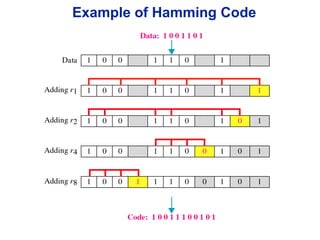
Since we check for even parity set a parity bit to 1 if the total
number of ones in the positions it checks is
odd.
Set a parity bit to 0 if the total number of ones in the positions it
checks is even
Hamming Code
Hamming Code
Hamming Code
Example of Hamming Code
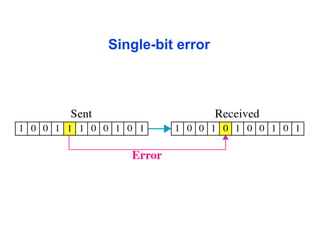
Single-bit error
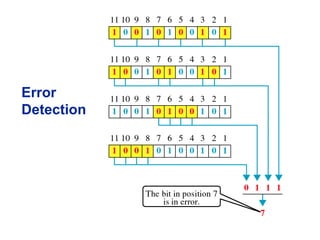
Error
Detection
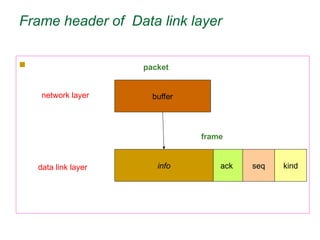
Frame header of Data link layer

ack seq kind
info
buffer
frame
packet
network layer
data link layer
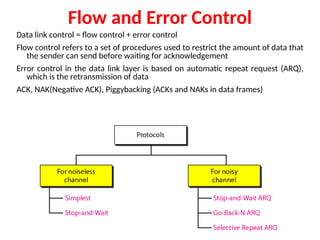
Flow and Error Control
Data link control = flow control + error control
Flow control refers to a set of procedures used to restrict the amount of data that
the sender can send before waiting for acknowledgement
Error control in the data link layer is based on automatic repeat request (ARQ),
which is the retransmission of data
ACK, NAK(Negative ACK), Piggybacking (ACKs and NAKs in data frames)
Elementary Data link Protocols:
 Protocols:
1) unrestricted simplex protocol
2) A simplex stop-and-wait protocol
3) A simplex protocol for a Noisy Channel
unrestricted simplex protocol
 Data are transmitted in one direction only.
 Both the transmitting and receiving network layers are always
ready
 processing time can be ignored
 Infinite buffer space is available
 The protocol consists of two distinct procedures, a sender and
a receiver. The sender runs in the data link layer of the source
machine and the receiver runs in the data link layer of the
destination machine.
 MAX-SEQ is not used because No sequence numbers and
Acknowledgements are used here.
 The only event type possible is frame-arrival (i.e. an arrival of
undamaged frame)
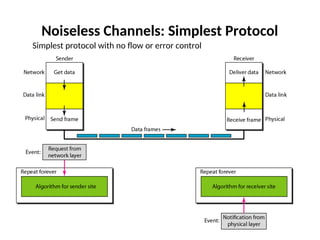
Noiseless Channels: Simplest Protocol
Simplest protocol with no flow or error control
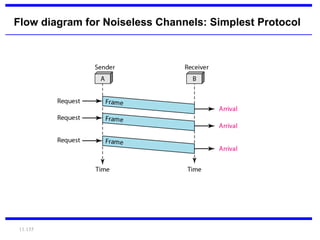
11.155
Flow diagram for Noiseless Channels: Simplest Protocol
A simplex stop-and-wait protocol:
 If data frames arrives at the receiver side faster
than they can be processed, the frames must be
stored until their use
 Normally ,the receiver does not have enough
storage space ,especially if it is receiving data
from many sources
 This may result in the discarding frames
 To prevent this there must be feedback from the
receiver to the sender.
A simplex stop-and-wait protocol:
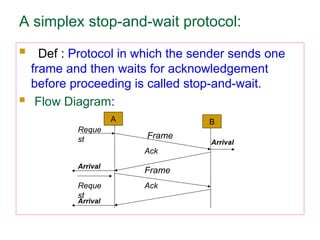
 Def : Protocol in which the sender sends one
frame and then waits for acknowledgement
before proceeding is called stop-and-wait.
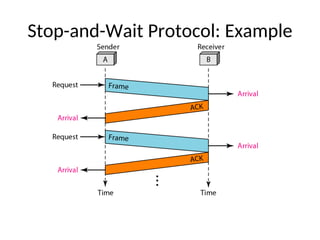
 Flow Diagram:
B
A
Reque
st
Frame
Ack
Frame
Ack
Arrival
Reque
st
Arrival
Arrival
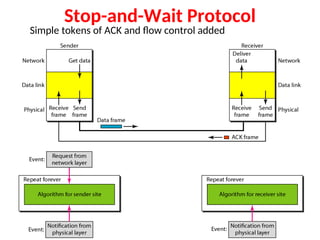
Stop-and-Wait Protocol
Simple tokens of ACK and flow control added
Stop-and-Wait Protocol: Example
A simplex stop-and-wait protocol:
 Receiver 2 is that after delivering a packet to the network
layer, receiver 2 sends an acknowledgement frame back to
the sender before entering the wait loop again. because the
only arrival of the frame back at the sender is important. the
receiver need not put any particular information on it.
 points:
 1) sender start out fetching a packet from the network
layer, using it to construct a frame and sending it on its
way.
 2)sender must wait until an acknowledgement frame
arrives before looping back and fetching the next packet
from the network layer
A simplex protocol for a Noisy Channel
 The channel is noisy, frames may be damaged or lost
 Good scene : data frame reaches intact, ack sent back and
received, next frame sent
 Bad scene :
 Data frame damaged or lost ..hence no ack – sender times
out and resends .. No problems
 Data frame reaches intact but Ack lost .. Times
out ..resends.. Receiver receives duplicate frames.
Problem
 Solution :Keep a sequence number for each frame to
distinguish between the new frame and a duplicate frame
A simplex protocol for a Noisy Channel
 What should be minimum number of bits required for the
sequence number?
 The only ambiguity in this protocol is between a frame,m.and
its direct successor,m+1.If a frame m is lost or damaged ,the
receiver will not acknowledge it ,so the sender will keep
trying to send it. Once it has been correctly received ,the
receiver will send an ack back to the sender. Depending
upon whether the acknowledgement frame gets back to the
sender correctly or not ,the sender may try to send m or
m+1.the event triggers the sender to start sending m+2 is the
arrival of an acknowledgement m+1.
 Protocols in which the sender waits for a positive
acknowledgement before advancing to the next data item are
often called (PAR-Positive acknowledgement retransmission
or ARQ- Automatic Repeat Request)
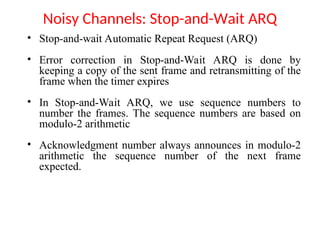
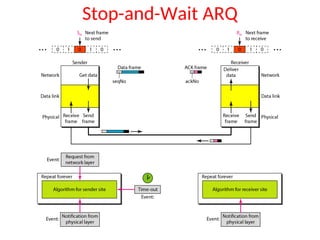
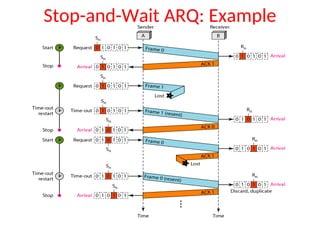
Noisy Channels: Stop-and-Wait ARQ
• Stop-and-wait Automatic Repeat Request (ARQ)
• Error correction in Stop-and-Wait ARQ is done by
keeping a copy of the sent frame and retransmitting of the
frame when the timer expires
• In Stop-and-Wait ARQ, we use sequence numbers to
number the frames. The sequence numbers are based on
modulo-2 arithmetic
• Acknowledgment number always announces in modulo-2
arithmetic the sequence number of the next frame
expected.
Stop-and-Wait ARQ
Stop-and-Wait ARQ: Example
Contd..
• The Stop-and-Wait ARQ is very inefficient if
our channel has a large bandwidth and long
round-trip delay.
• There is no Pipelining in this protocol because
we need to wait for a frame to reach the
destination and be acknowledged before the
next frame is sent.
Sliding window protocols
 Must be able to transmit data in both directions.
 Choices for utilization of the reverse channel:
 mix DATA frames with ACK frames.
 Piggyback the ACK
 Receiver waits for DATA traffic in the opposite direction.
 Use the ACK field in the frame header to send sequence
number of frame being ACKed.
  better use of the channel capacity.
Sliding window protocols:
 In the Previous protocols ,Data frames were transmitted in
one direction only.
 In most practical situations ,there is a need for transmitting
data in both directions.
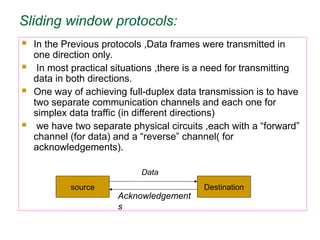
 One way of achieving full-duplex data transmission is to have
two separate communication channels and each one for
simplex data traffic (in different directions)
 we have two separate physical circuits ,each with a “forward”
channel (for data) and a “reverse” channel( for
acknowledgements).
source Destination
Data
Acknowledgement
s
Sliding window protocols:
 Disadvantage: The bandwidth of the reverse channel is
almost entirely wasted.
 A better idea is to use the same circuits for data in both
directions
 In this model the data frames from A and B are
intermixed with the acknowledgement frames from A to
B.
 Kind: kind field in the header of an incoming frame, the
receiver can tell whether the frame is data or
acknowledgements.
Sliding window protocols:
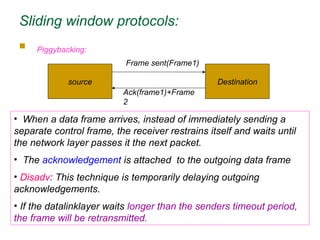
 Piggybacking:
source Destination
Frame sent(Frame1)
Ack(frame1)+Frame
2
• When a data frame arrives, instead of immediately sending a
separate control frame, the receiver restrains itself and waits until
the network layer passes it the next packet.
• The acknowledgement is attached to the outgoing data frame
• Disadv: This technique is temporarily delaying outgoing
acknowledgements.
• If the datalinklayer waits longer than the senders timeout period,
the frame will be retransmitted.
Sliding window protocols:
 Rule: sender waiting a fixed number of milliseconds. If a new
packet arrives quickly the acknowledgement is piggybacked
onto it. other wise if no new packet has arrived by the end of
this time period ,the data link layer just sends a separate
acknowledgement frame.
 In sliding window protocol each frame contains a sequence
number ranging from 0 up to some maximum.
 The maximum is usually 2n
-1 so the sequence number fits
nicely in an n-bit field.
 The stop-and-wait sliding window protocol uses n=1
restricting the sequence numbers 0 and 1.
 The sender must keep all these frames in its memory for
possible retransmission
Sliding window protocols:
 Thus if the maximum window size is n, the sender needs n
buffers to hold the unacknowledged frames
 3 bit field -000
001
010..etc
here n=3 i.e. 23
-1=7
window size is 0 to 7
Sliding window :: sender has a window of frames and maintains a list
of consecutive sequence numbers for frames that it is permitted to
send without waiting for ACKs.
receiver has a window that is a list of frame sequence numbers it is
permitted to accept.
Note – sending and receiving windows do NOT have to be the same
size.
Sliding window protocols:
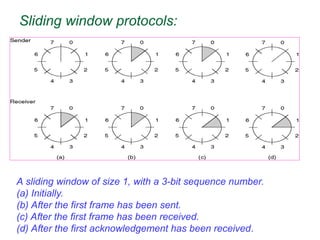
A sliding window of size 1, with a 3-bit sequence number.
(a) Initially.
(b) After the first frame has been sent.
(c) After the first frame has been received.
(d) After the first acknowledgement has been received.
Sliding window protocols:
 Sliding window protocols: 3 methods
 1) 1-bit sliding window protocol
 2) Go –Back N
 3) Selective Repeat
 1-bit sliding window protocol:
 Window size 1.
 Stop-and-wait.
 Must get ack before can send next frame.
 Both machines are sending and receiving.
1-bit sliding protocol :
 Example:
 A trying to send its frame 0 to B.
B trying to send its frame 0 to A.
 Imagine A's timeout is too short. A repeatedly times out and
sends multiple copies to B, all with seq=0, ack=1.
When first one of these gets to B, it is accepted. Set
expected=1. B sends its frame, seq=0, ack=0.
All subsequent copies of A's frame rejected since seq=0
not equal to expected. All these also have ack=1.
B repeatedly sends its frame, seq=0, ack=0. But A not
getting it because it is timing out too soon.
Eventually, A gets one of these frames. A has its ack now
(and B's frame). A sends next frame and acks B's frame.
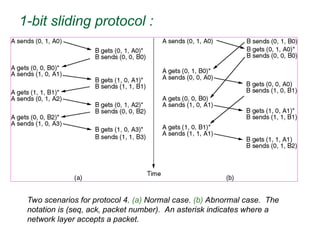
1-bit sliding protocol :

Two scenarios for protocol 4. (a) Normal case. (b) Abnormal case. The
notation is (seq, ack, packet number). An asterisk indicates where a
network layer accepts a packet.
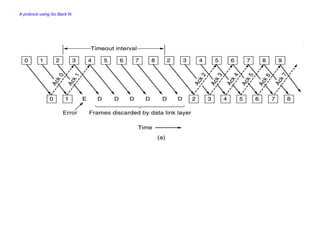
A protocol using Go Back N:
Go Back n, is for the receiver simply to discard all subsequent
frames, sending no acknowledgements for the discarded frames.
This strategy corresponds to a receive window of size 1.
The data link layer refuses to accept any frame except the next
one it must give to the network layer.
Points: fig ( a)
1) frame 0 and 1 correctly received and Acknowledged
2) Frame 2 is damaged or lost ,The sender continuous to send
frames until the timer for frame 2 expires.
3) Then it backs up to frame 2 and starts all over with it ,sending
2,3,4 etc. all over again.
A protocol using Go Back N:
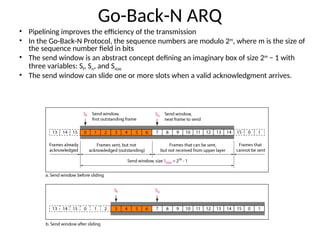
Go-Back-N ARQ
• Pipelining improves the efficiency of the transmission
• In the Go-Back-N Protocol, the sequence numbers are modulo 2m
, where m is the size of
the sequence number field in bits
• The send window is an abstract concept defining an imaginary box of size 2m
− 1 with
three variables: Sf, Sn, and Ssize
• The send window can slide one or more slots when a valid acknowledgment arrives.
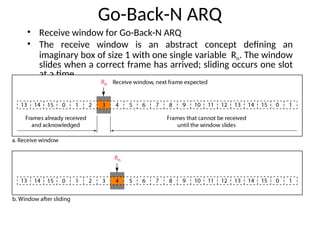
Go-Back-N ARQ
• Receive window for Go-Back-N ARQ
• The receive window is an abstract concept defining an
imaginary box of size 1 with one single variable Rn. The window
slides when a correct frame has arrived; sliding occurs one slot
at a time.
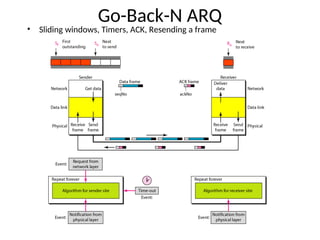
Go-Back-N ARQ
• Sliding windows, Timers, ACK, Resending a frame
Go-Back-N ARQ: Send Window Size
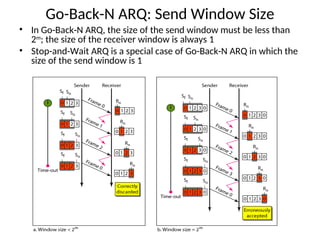
• In Go-Back-N ARQ, the size of the send window must be less than
2m
; the size of the receiver window is always 1
• Stop-and-Wait ARQ is a special case of Go-Back-N ARQ in which the
size of the send window is 1
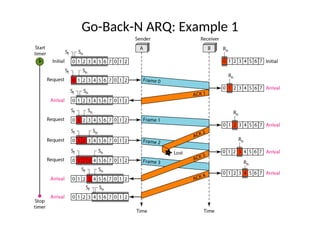
Go-Back-N ARQ: Example 1
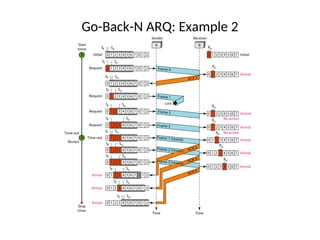
Go-Back-N ARQ: Example 2
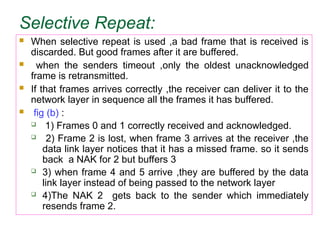
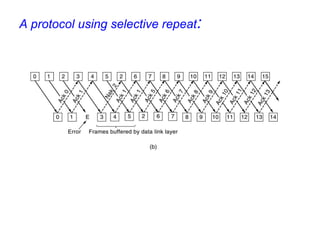
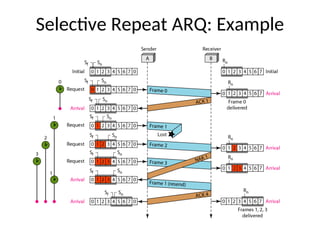
Selective Repeat:
 When selective repeat is used ,a bad frame that is received is
discarded. But good frames after it are buffered.
 when the senders timeout ,only the oldest unacknowledged
frame is retransmitted.
 If that frames arrives correctly ,the receiver can deliver it to the
network layer in sequence all the frames it has buffered.
 fig (b) :
 1) Frames 0 and 1 correctly received and acknowledged.
 2) Frame 2 is lost, when frame 3 arrives at the receiver ,the
data link layer notices that it has a missed frame. so it sends
back a NAK for 2 but buffers 3
 3) when frame 4 and 5 arrive ,they are buffered by the data
link layer instead of being passed to the network layer
 4)The NAK 2 gets back to the sender which immediately
resends frame 2.
A protocol using selective repeat:
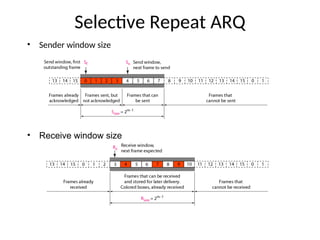
Selective Repeat ARQ
• Sender window size
• Receive window size
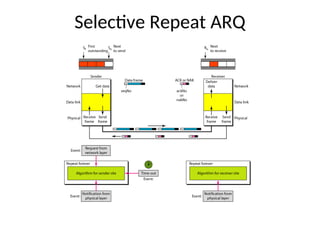
Selective Repeat ARQ
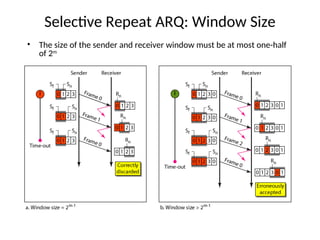
Selective Repeat ARQ: Window Size
• The size of the sender and receiver window must be at most one-half
of 2m
Selective Repeat ARQ: Example
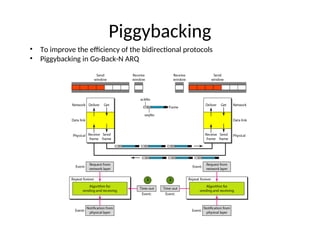
Piggybacking
• To improve the efficiency of the bidirectional protocols
• Piggybacking in Go-Back-N ARQ
Example Data Link Protocols:
The Data Link Layer in the Internet - LANs use broadcast
protocols (Ethernet) to connect many hosts but
interconnection of LANs into larger networks is primary
done through routers running a point-to-point protocol. In
the case of the Internet, point-to-point protocol is also used
to connect host to router in the form of an Internet Service
Provider. Two point-to-point protocols widely used on the
Internet are SLIP and PPP.
SLIP – Serial Line Internet Protocol- Designed to connect
hosts to the internet over serial communications.
SLIP – Serial Line Internet Protocol
 Designed to connect hosts to the Internet over serial
communications.
 Send raw IP packets over serial (possibly modem) line with
C0 hex at end for framing, if occurs in IP packet uses
character stuffing.
 Recent versions use TCP and IP header compression by
omitting when multiple packets going to same destination.
 No error detection/correction, responsibility of higher layers.
 Supports only IP.
 No authentication (though could be handled by higher
layers).
 Fixed IPs, both must know each others in advance (not a
problem if yours and ISP never change).
Drawbacks of SLIP
 SLIP does not do error detection and
correction
 SLIP supports only IP
 Each side must know others IP address in
advance
 SLIP does not provide any form of
authentication
 SLIP is not approved as internet standard
PPP - Point-to-Point Protocol
 Fixes many of SLIPs problems and is an official Internet
protocol
 Used in Dial-up connection between residential host and ISP
 Framing
 Byte stuffing
 Connection oriented
 Error detection by checksum.
 Permits authentication.
 LCP: It is responsible for establishing the connection and
releasing the connection
 NCP: Network Control Protocol – It provides all the services of
Network layer
 Overcomes all deficiencies of SLIP.
 A better framing method.
 Frame format supports error detection.
 Provide with a Link Control protocol (LCP), for
bringing lines up, testing them, negotiating options,
and bringing then down back.
 Have different NCP (Network Control Protocol) for
each different network protocol.
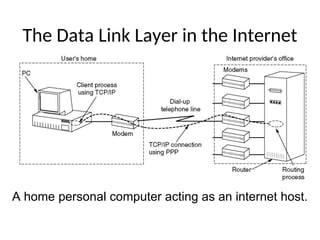
The Data Link Layer in the Internet
A home personal computer acting as an internet
host.
A home personal computer acting as an internet host.
PPP operation
 PC calls the provider’s router via a modem.
 After establishment of the connection PC sends a series of
LCP packets.
 Then a series of NCP packets are sent to configure the
network layer.
 Now PC is ready to send and receive IP packets.
 After finishing again NCP packets are sent to tear down
the network layer connections.
 Finally LCP packets are used to shutdown the
connection.
 PC releases the physical connection via the modem.
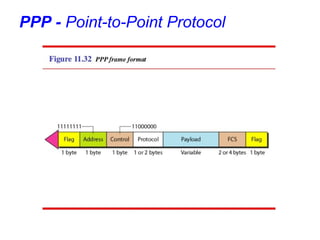
PPP - Point-to-Point Protocol
• Flag: A PPP frame starts and ends with a 1-byte flag with the bit
pattern 01111110.It is a byte-oriented protocol. The flag is treated as
a byte.
• Address: It is a constant value and is set to 11111111(broadcast
address).During negotiation, the two parties may agree to omit this
byte.
• Control:11000000(imitating U-frame in HDLC).PPP does not
provide any flow control. Error control is also limited to error
detection.
• Protocol: It defines what is being carried in the data field: either user
data or other information.
• Payload field: It carries either the user data or other information. The
default of max..1500 bytes.
• FCS: 2-bytes or 4-bytes standard CRC.
Byte Stuffing:
• PPP is a byte oriented protocol.
• The flag in PPP is a byte and needs to be escaped whenever it
appears in the data section of the frame.
• The esc byte is 01111101,means that every time the flag like pattern
appears in the data, this extra byte is stuffed to tell the receiver that
the next byte is not a flag.
PPP – Point to Point Protocol
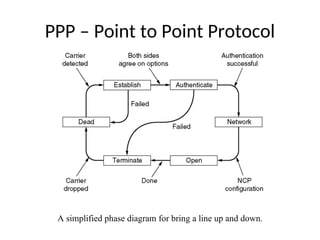
A simplified phase diagram for bring a line up and down.
l
PPP – Point to Point Protocol
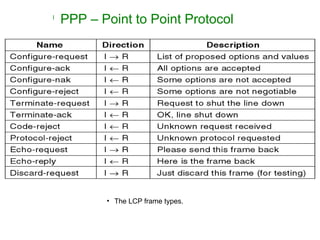
• The LCP frame types.
Medium Access Sub Layer
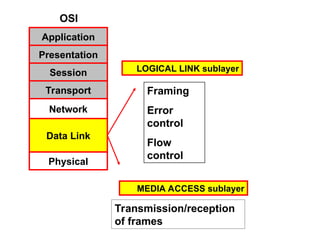
OSI
Application
Presentation
Session
Transport
Network
Data Link
Physical
Framing
Error
control
Flow
control
Transmission/reception
of frames
MEDIA ACCESS sublayer
LOGICAL LINK sublayer
BROADCAST NETWORKS AND
THEIR PROTOCOLS
The Medium Access Sub layer
deals with
Broadcast channels are sometimes referred to as multi-access
channels or random access channels.
Topics
 Introduction
 Channel Allocation problem
 Multiple Access Protocols
 IEEE Standard 802 for LANs
 Wireless LAN
 Bridges & its types.
Introduction
 Medium Access Control (MAC) sub layer is
part of Data Link layer.
 In fact, it is the bottom part of DLL
(interfacing with the physical layer)
 Deals with broadcast networks
The Channel Allocation Problem
1. Static Channel Allocation in LANs and MANs
2. Dynamic Channel Allocation in LANs and
MANs
Channel Allocation problem
Static Channel Allocation in LANs and MANs
 FDM & TDM
FDM: Frequency Division Multiplexing
1.The traditional way of allocating a single channel, among
multiple competing users is Frequency division
multiplexing(FDM).
2. If there are N users, the bandwidth is divided into N equal-sized
portions, each user being assigned one portion.
3. Here each user has a private frequency band, there is no
interference between users.
4.When there is only a small and constant number of users, each
of which has heavy load of traffic, FDM is simple and
efficient.
5. When number of senders is large and continuously varying,
FDM presents few problems.
6.If spectrum is cut up into N regions and <N users are interested
in communication, the spectrum is wasted.
7.If more than N users want to communicate, some of them will
be denied permission for lack of bandwidth.
8. Assuming that the number of users be held constant at N,
dividing the channel into sub-channels is inefficient.
9.The basic problem is, when some users are quiet their
bandwidth is simply lost. They are not using it, and no one
else is allowed to use it either.
TDM: Time Division Multiplexing
• The same arguments that apply to FDM also apply to TDM.
• Each user is statically allocated every Nth
time slot. If a user
does not use the allocated slot, it just lies fallow.
• The same holds if we split up the network physically.
Note: None of the traditional static channel allocation methods
work well with bursty traffic.
Dynamic Channel Allocation in LANs and MANs
 Station Model.
 Single Channel Assumption.
 Collision Assumption.
 (a) Continuous Time.
(b) Slotted Time.
 (a) Carrier Sense.(LAN)
(b) No Carrier Sense.(SATELLITE)
1.Station Model:
• The model consists of N independent Stations, each with a
program or user that generates frames for transmission.
Stations are called Terminals.
• The probability of a frame being generated in an interval of
length Δt is λΔt, where λ is a constant(arrival rate of new
frames).
• Once a frame is generated the station is blocked and does
nothing until the frame has been successfully transmitted.
2. Single Channel Assumption:
• A single channel is available for all communication.
• All stations can transmit on it and all can receive from it.
3. Collision Assumption:
• If two frames are transmitted simultaneously, they overlap in
time and the resulting signal is garbled. This event is called a
Collision.
• All stations can detect collisions.
• A collided frame must be transmitted again later.
4a. Continuous Time:
• Frame transmission can begin at any instant.
• There is no master clock dividing time into discrete intervals.
4b.Slotted Time:
• Time is divided into slots. Frame transmission always begins
at the start of a slot.
• A slot can have 0,1, or more frames, corresponding to an idle
slot, a successful transmission, or a collision respectively.
5a. Carrier Sense:
• Stations can tell if the channel is in use before trying to use it.
• If the channel is sensed as a busy, no station will attempt to
use it until it goes idle.
5b. No Carrier Sense:
• Stations cannot sense the channel before trying to use it.
• They just go ahead and transmit. Only later can they determine
whether the transmission was successful.
Multiple Access Protocols
• ALOHA
• Carrier Sense Multiple Access Protocols
• Collision-Free Protocols
• Limited-Contention Protocols
• Wavelength Division Multiple Access Protocols
• Wireless LAN Protocols
Medium Access Sub Layer
ALOHA
 Pure ALOHA (Mr. Norman Abramson in 1970s)
 Slotted ALOHA (Mr.Roberts in 1972)
ALOHA system used to ground based radio broadcasting.
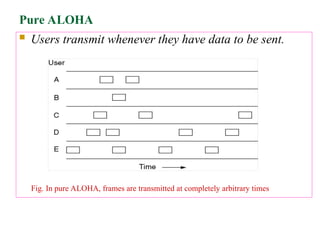
Pure ALOHA
 Users transmit whenever they have data to be sent.
Fig. In pure ALOHA, frames are transmitted at completely arbitrary times
• Systems in which multiple users share a common channel in a
way that can lead to conflicts are widely known as contention
system.
• The frame size is fixed because the throughput of ALOHA
systems is maximized.
• We need to resend the frames that have been destroyed during
transmission.
• A collision involves two or more stations. If all these try to
resend their frames after the time-out, the frames will collide
again.
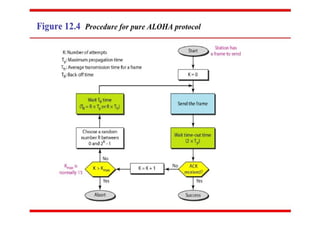
• Pure ALOHA states that when the time-out period passes, each
station waits a random amount of time before resending its
frame(TB).
• Pure ALOHA has a second method to prevent congesting the
channel with retransmitted frames. After a maximum no.of
retransmission attempts Kmax, a station must give up and try
later.
• The time-out period is equal to maximum possible round-trip
propagation delay, which is twice the amount of the time
required to send a frame between the two most widely
separated stations(2 * Tp ).
• The back-off time TB is a random value that depends on K.
(binary exponential back-off )
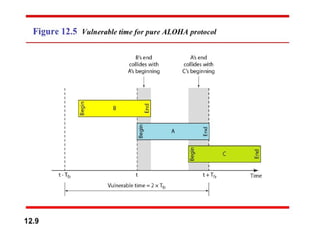
 Whenever two frames try to occupy the channel at the
same time, there will be a collision and both will be
garbled.
 If the first bit of the new frame overlaps with the last bit
of a frame almost finished , both frames will be totally
destroyed, and both will be retransmitted later.
 Throughput for pure ALOHA decreases.
Pure ALOHA
Disadvantage
 More number of users share common channels in a
way that can lead to conflicts.
 More number of collisions occur.
 Collision detected: stations waits a random amount of
time.
Pure ALOHA
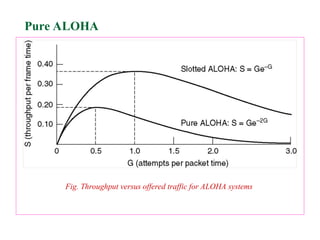
Fig. Throughput versus offered traffic for ALOHA systems
Pure ALOHA
Slotted ALOHA
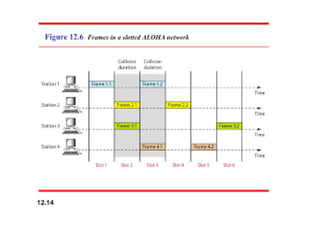
 Slotted ALOHA: Divide the time into discrete intervals(slots)
of Tfr s, and force the station to send only at the beginning of
the time slot..
 Obviously, there may be a special signal needed to
synchronize the clocks at all stations.
 Because a station is allowed to send only at the beginning of
synchronized time slot, if a station misses this, it must wait
until the beginning of next time slot.
 This means that the station which started at the beginning of
this slot has already finished sending its frame.
 Of course, there is still the possibility of collision if two
stations try to send at the beginning of the same slot.
 However, the vulnerable time is now reduced to one-half,
equal to Tfr.
 It can be proved that the average number of successful
transmission for the slotted ALOHA is S=G * e-G
 Maximum throughput occurs at G=1, S=1/e or 0.368. This is
twice that of pure ALOHA protocol.
 In other words, if a frame is generated during one frame
transmission time, then 36.8 % of these frames reach their
destination successfully. This result is expected because
vulnerable time is equal to the frame transmission time.
 Therefore, if a station generates only one frame in this
vulnerable time(and no other station generates a frame during
this time), the frame will be reach its destination successfully.
Slotted ALOHA
Divides the time into discrete intervals
A B C D E
Disadvantage: collisions Throughput for slotted ALOHA
increases.
Differences Between Pure ALOHA and Slotted
ALOHA
• Transmission
• In Pure ALOHA when a frame first arrives, the node
immediately transmits the frame in its entirely into the
Broadcast Channel.
• In Slotted ALOHA when a node has a fresh frame to send, it
waits until the beginning of the next slot and transmits the
entire frame in the slot.
• Timing
• In Pure ALOHA Nodes can transmit frames at Random
Times.
• In Slotted ALOHA Nodes can transmit frames in their
respective slot boundaries only at the beginning of the Slot.
Differences Between Pure ALOHA and Slotted
ALOHA
 Synchronization
 Pure ALOHA does not require Synchronization of
slots of any nodes.
 Slotted ALOHA requires synchronization between
slots of nodes.
 Mode of Transfer
 In Pure ALOHA the Mode of Transfer is
Continuous.
 In Slotted ALOHA the mode of transfer is Discrete
Differences Between Pure ALOHA and Slotted
ALOHA
 Collision
 In Pure ALOHA If a Collision Occurs the nodes will then
immediately retransmit the frame with probability P or the
frame transmission time for retransmitting the frame.
 In Slotted ALOHA, if a collision occurs, the node detects
the collision before the end of the slot the node retransmits
its frame in each subsequent slot with probability P until the
frame transmitted without a collision.
 Efficiency
 In Pure ALOHA Efficiency is Half of Slotted ALOHA.
 In Slotted ALOHA efficiency is more than that of Pure
ALOHA.
CSMA: Carrier Sense Multiple Access
 Protocols in which stations listen for a carrier (i.e.,
transmission) and act accordingly are called carrier sense
protocols.
Adv:
 To minimize the chance of collision
 Increases the performance.
 CSMA principle is “sense before transmit” or “listen
before talk”.
CSMA Methods
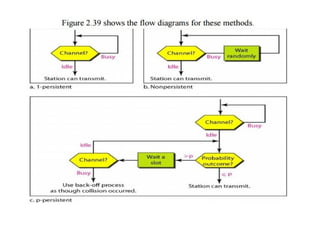
1. 1-persistent CSMA- constant length packets.
2. non-persistent CSMA- to sense the channel.
3. p-persistent CSMA
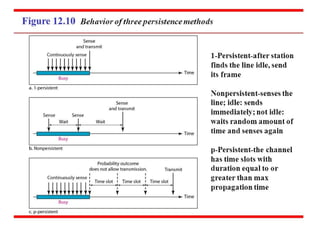
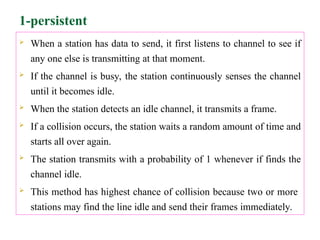
1-persistent
 When a station has data to send, it first listens to channel to see if
any one else is transmitting at that moment.
 If the channel is busy, the station continuously senses the channel
until it becomes idle.
 When the station detects an idle channel, it transmits a frame.
 If a collision occurs, the station waits a random amount of time and
starts all over again.
 The station transmits with a probability of 1 whenever if finds the
channel idle.
 This method has highest chance of collision because two or more
stations may find the line idle and send their frames immediately.
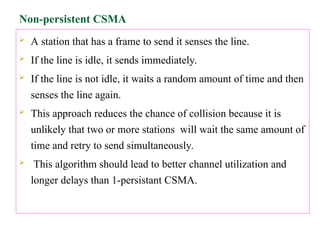
Non-persistent CSMA
 A station that has a frame to send it senses the line.
 If the line is idle, it sends immediately.
 If the line is not idle, it waits a random amount of time and then
senses the line again.
 This approach reduces the chance of collision because it is
unlikely that two or more stations will wait the same amount of
time and retry to send simultaneously.
 This algorithm should lead to better channel utilization and
longer delays than 1-persistant CSMA.
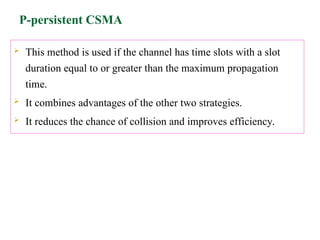
P-persistent CSMA
 This method is used if the channel has time slots with a slot
duration equal to or greater than the maximum propagation
time.
 It combines advantages of the other two strategies.
 It reduces the chance of collision and improves efficiency.
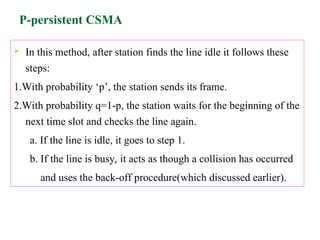
P-persistent CSMA
 In this method, after station finds the line idle it follows these
steps:
1.With probability ‘p’, the station sends its frame.
2.With probability q=1-p, the station waits for the beginning of the
next time slot and checks the line again.
a. If the line is idle, it goes to step 1.
b. If the line is busy, it acts as though a collision has occurred
and uses the back-off procedure(which discussed earlier).
Carrier Sense Multiple Access with
Collision Detection(CSMA/CD)
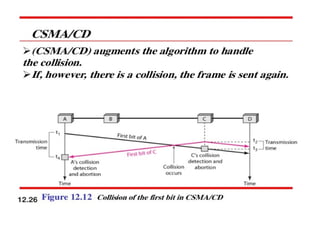
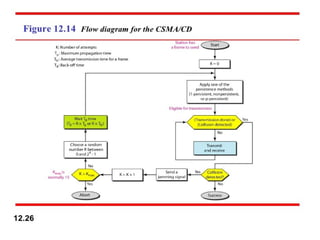
• In this method, a station monitors the medium after it sends a
frame to see if the transmission was successful. If so, the
station is finished. If, however, there is a collision, the frame
is sent again.
Minimum Frame Size
• For CSMA/CD to work, we need restriction on the frame size.
• Therefore, the frame transmission time Tfr must be at least
two times the maximum propagation time Tp.
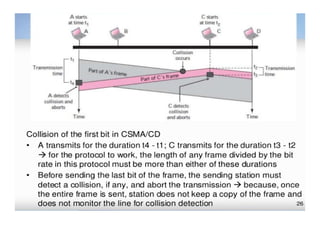
• To understand the reason, let us think about worst-case
scenario. If two stations involved in a collision are the
maximum distance apart, the signal from the first takes Tp to
reach the second, and the effect of the collision takes another
Tp to reach the first.
• So the requirement is that the first station must still be
transmitting after 2Tp
IEEE Standards
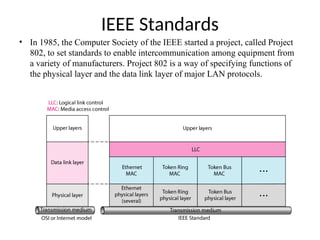
• In 1985, the Computer Society of the IEEE started a project, called Project
802, to set standards to enable intercommunication among equipment from
a variety of manufacturers. Project 802 is a way of specifying functions of
the physical layer and the data link layer of major LAN protocols.
IEEE 802 Working Group
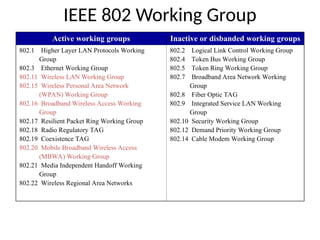
Active working groups Inactive or disbanded working groups
802.1 Higher Layer LAN Protocols Working
Group
802.3 Ethernet Working Group
802.11 Wireless LAN Working Group
802.15 Wireless Personal Area Network
(WPAN) Working Group
802.16 Broadband Wireless Access Working
Group
802.17 Resilient Packet Ring Working Group
802.18 Radio Regulatory TAG
802.19 Coexistence TAG
802.20 Mobile Broadband Wireless Access
(MBWA) Working Group
802.21 Media Independent Handoff Working
Group
802.22 Wireless Regional Area Networks
802.2 Logical Link Control Working Group
802.4 Token Bus Working Group
802.5 Token Ring Working Group
802.7 Broadband Area Network Working
Group
802.8 Fiber Optic TAG
802.9 Integrated Service LAN Working
Group
802.10 Security Working Group
802.12 Demand Priority Working Group
802.14 Cable Modem Working Group
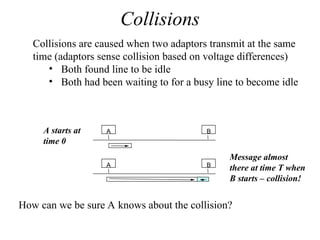
Collisions
A B
A B
Collisions are caused when two adaptors transmit at the same
time (adaptors sense collision based on voltage differences)
• Both found line to be idle
• Both had been waiting to for a busy line to become idle
A starts at
time 0
Message almost
there at time T when
B starts – collision!
How can we be sure A knows about the collision?
Collision Detection
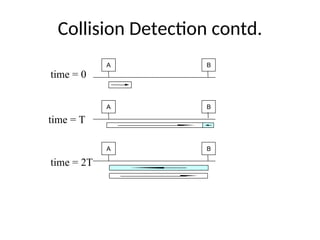
 How can A know that a collision has taken place?
• There must be a mechanism to insure retransmission on collision
• A’s message reaches B at time T
• B’s message reaches A at time 2T
• So, A must still be transmitting at 2T
 IEEE 802.3 specifies max value of 2T to be 51.2us
• This relates to maximum distance of 2500m between hosts
• At 10Mbps it takes 0.1us to transmit one bit so 512 bits (64B) take
51.2us to send
• So, Ethernet frames must be at least 64B long
 14B header, 46B data, 4B CRC
 Padding is used if data is less than 46B
 Send jamming signal after collision is detected to insure all hosts see
collision
• 48 bit signal
Collision Detection contd.
A B
A B
A B
time = 0
time = T
time = 2T
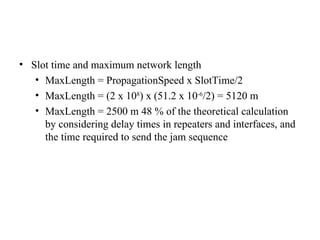
• Slot time and maximum network length
• MaxLength = PropagationSpeed x SlotTime/2
• MaxLength = (2 x 10⁸
) x (51.2 x 10⁻⁶
/2) = 5120 m
• MaxLength = 2500 m 48 % of the theoretical calculation
by considering delay times in repeaters and interfaces, and
the time required to send the jam sequence
Wireless
Local Area Networks
Wireless Local Area Networks
• The proliferation of laptop computers and
other mobile devices (PDAs and cell phones)
created an obvious application level demand
for wireless local area networking.
• Companies jumped in, quickly developing
incompatible wireless products in the 1990’s.
• Industry decided to entrust standardization to
IEEE committee that dealt with wired LANS –
namely, the IEEE 802 committee!!
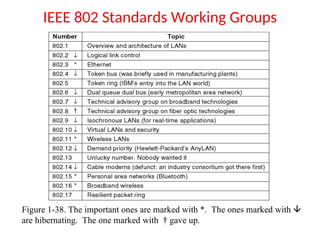
IEEE 802 Standards Working Groups
Figure 1-38. The important ones are marked with *. The ones marked with 
are hibernating. The one marked with † gave up.
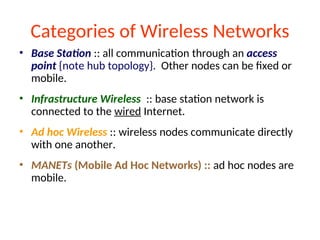
Categories of Wireless Networks
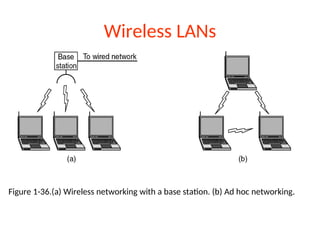
• Base Station :: all communication through an access
point {note hub topology}. Other nodes can be fixed or
mobile.
• Infrastructure Wireless :: base station network is
connected to the wired Internet.
• Ad hoc Wireless :: wireless nodes communicate directly
with one another.
• MANETs (Mobile Ad Hoc Networks) :: ad hoc nodes are
mobile.
Wireless LANs
Figure 1-36.(a) Wireless networking with a base station. (b) Ad hoc networking.
The 802.11 Protocol Stack
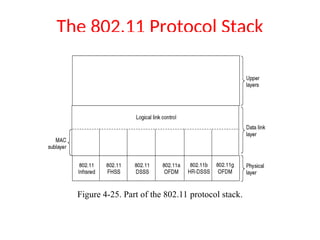
Figure 4-25. Part of the 802.11 protocol stack.
Wireless Physical Layer
• Physical layer conforms to OSI (five options)
– 1997: 802.11 infrared, FHSS, DHSS
– 1999: 802.11a OFDM and 802.11b HR-DSSS
– 2001: 802.11g OFDM
• 802.11 Infrared
– Two capacities 1 Mbps or 2 Mbps.
– Range is 10 to 20 meters and cannot penetrate walls.
– Does not work outdoors.
• 802.11 FHSS (Frequence Hopping Spread Spectrum)
– The main issue is multipath fading.
– 79 non-overlapping channels, each 1 Mhz wide at low end of 2.4
GHz ISM band.
– Same pseudo-random number generator used by all stations.
– Dwell time: min. time on channel before hopping (400msec).
Wireless Physical Layer
• 802.11 DSSS (Direct Sequence Spread Spectrum)
– Spreads signal over entire spectrum using pseudo-random
sequence (similar to CDMA see Tanenbaum sec. 2.6.2).
– Each bit transmitted using an 11 chips Barker sequence, PSK at
1Mbaud.
– 1 or 2 Mbps.
• 802.11a OFDM (Orthogonal Frequency Divisional Multiplexing)
– Compatible with European HiperLan2.
– 54Mbps in wider 5.5 GHz band  transmission range is limited.
– Uses 52 FDM channels (48 for data; 4 for synchronization).
– Encoding is complex ( PSM up to 18 Mbps and QAM above this
capacity).
– E.g., at 54Mbps 216 data bits encoded into into 288-bit symbols.
– More difficulty penetrating walls.
Wireless Physical Layer
• 802.11b HR-DSSS (High Rate Direct Sequence Spread
Spectrum)
– 11a and 11b shows a split in the standards committee.
– 11b approved and hit the market before 11a.
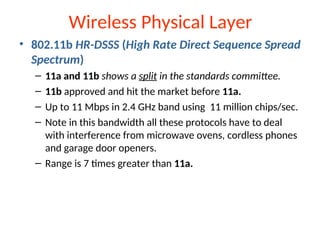
– Up to 11 Mbps in 2.4 GHz band using 11 million chips/sec.
– Note in this bandwidth all these protocols have to deal
with interference from microwave ovens, cordless phones
and garage door openers.
– Range is 7 times greater than 11a.
Wireless Physical Layer
• 802.11g OFDM(Orthogonal Frequency Division
Multiplexing)
– An attempt to combine the best of both 802.11a and
802.11b.
– Supports bandwidths up to 54 MBps.
– Uses 2.4 GHz frequency for greater range.
– Is backward compatible with 802.11b.
802.11 MAC Sublayer Protocol
• In 802.11 wireless LANs, “seizing channel” does not
exist as in 802.3 wired Ethernet.
• Two additional problems:
– Hidden Terminal Problem
– Exposed Station Problem
• To deal with these two problems 802.11 supports
two modes of operation DCF (Distributed
Coordination Function) and PCF (Point Coordination
Function).
• All implementations must support DCF, but PCF is
optional.
Figure 4-26.(a)The hidden station problem. (b) The exposed station problem.
The Hidden Terminal Problem
• Wireless stations have transmission ranges
and not all stations are within radio range of
each other.
• Simple CSMA will not work!
• C transmits to B.
• If A “senses” the channel, it will not hear C’s
transmission and falsely conclude that A can
begin a transmission to B.
The Exposed Station Problem
• This is the inverse problem.
• B wants to send to C and listens to the
channel.
• When B hears A’s transmission, B falsely
assumes that it cannot send to C.
Wireless LAN Protocols
• MACA protocol solved hidden, exposed terminal:
– Send Ready-to-Send (RTS) and Clear-to-Send
(CTS) first
– RTS, CTS helps determine who else is in range or
busy (Collision avoidance).
– Can a collision still occur?
Wireless LAN Protocols
• MACAW added ACKs and CSMA (no RTS at same
time)
(a) A sending an RTS to B.(b) B responding with a CTS to A.
802.11 Frame Structure
Frame Control: It contains 11 sub fields.
1. Version: which allows two version of protocol to operate
at same time in a same cell
2. Type: It can be data , control or management.
3. Sub type: RTS or CTS.
4. To DS & From DS: These bits indicates the frame is going
to or coming from the inter cell distribution system(e.g
Ethernet)
5. MF: more fragments will follow
6. Retry: marks a retransmission of a frame sent earlier
8.Power management: It is used by station to put ‘r’ into
sleep & take it out of sleep.
9.More: ‘s’ has additional frames for ‘r’
10. W: Frame body has encrypted using WEP(Wired
Equivalent Privacy)
11.O: It tells ‘r’ that sequence of frames with this bit “on”
must be processed strictly in order.
Duration:
It tells how long the frame & its ack will occupy the
channel.
Address1 to 4:
Source & destination are obviously needed, the other 2
addresses are used for source & destination base
stations for intercell traffic(i.e frames may enter or leave
a cell via BS)
Sequence:
allows fragments to be numbered.
Out of 16 bits,12 identify frame, 4 identify fragment
• Data field contains payload upto 2312 bytes followed by
checksum.
• Management frames have same format as that of data
frames, except without one of BS addresses because
management frames are restricted to single cell.
• Control fields will have only one or two addresses, no
data field, no sequence field. The key information is in
sub-type field, usually RTS, CTS, or ACK.
Services of 802.11
The five distribution services are provided by the Base station
and deals with station mobility as ther enter and leave cells.
They are:
1.Association:
•This is used by MS to connect themselves to BS.
When MS moves within the radio range of BS, it announces
it’s identity and capabilities(data rates supported, need for PCF
service, power management requirements).
The BS may accept or reject the MS. If the MS is accepted, it
must then authenticate itself.
2. Disassociation:
 Either the station or BS may disassociate, thus breaking the
relationship.
 A station should use this service before shutting down or
leaving, but the BS may also use it before going down for
maintenance.
3. Reassociation:
A station may change its preferred BS using this service.
This facility is useful for MSs moving from one cell to another

JNTUHS-11-12-2024.ppt computer networks notes

  • 1.
    A GUEST LECTURE on COMPUTERNETWORKS for III YEAR B.TECH(CSE) – I SEM BY DR. K. KRANTHI KUMAR Associate Professor, Dept of IT, Sreenidhi Institute of science and technology, Hyderabad, drkkranthikumar@gmail.com, 9848624931 JAWAHARLAL NEHRU TECHNOLOGICAL UNIVERSITY HYDERABAD UNIVERSITY COLLEGE OF ENGINEERING RAJANNA SIRCILLA Agraharam, Rajanna Sircilla District, Telangana State, India. Pin Code: 505302
  • 2.
    COMPUTER NETWORKS SYLLABUS UNIT- I Network hardware, Network software, OSI, TCP/IP Reference models, Example Networks: ARPANET, Internet. Physical Layer: Guided Transmission media: twisted pairs, coaxial cable, fiber optics, Wireless Transmission. Data link layer: Design issues, framing, Error detection and correction. UNIT - II Elementary data link protocols: simplex protocol, A simplex stop and wait protocol for an error-free channel, A simplex stop and wait protocol for noisy channel. Sliding Window protocols: A one-bit sliding window protocol, A protocol using Go- Back-N, A protocol using Selective Repeat, Example data link protocols. Medium Access sub layer: The channel allocation problem, Multiple access protocols: ALOHA, Carrier sense multiple access protocols, collision free protocols. Wireless LANs, Data link layer switching.
  • 3.
    UNIT - III NetworkLayer: Design issues, Routing algorithms: shortest path routing, Flooding, Hierarchical routing, Broadcast, Multicast, distance vector routing, Congestion Control Algorithms, Quality of Service, Internetworking, The Network layer in the internet. UNIT - IV Transport Layer: Transport Services, Elements of Transport protocols, Connection management, TCP and UDP protocols. UNIT - V Application Layer –Domain name system, SNMP, Electronic Mail; the World WEB, HTTP, Streaming audio and video. TEXT BOOK: 1. Computer Networks -- Andrew S Tanenbaum, David. j. Wetherall, 5th Edition. Pearson Education/PHI .
  • 4.
  • 5.
    What is ComputerNetwork • A collection of Autonomous computers interconnected by any media. • Two computers are said to be interconnected if they are able to exchange information. • The connection may be via a copper wire/ fiber optics/microwaves/infrared/ satellites.
  • 6.
    Why people areinterested in Computer Networks • Resource sharing: To make all physical resources such as printers, scanners, equipment, etc., available to anyone on the network without regard to the physical location of the resource and the user. • Information sharing: Allowing users to access relevant information and documents, i.e data available to any one on the network instantly without regard to the location of the data and the user accessing it.
  • 7.
    Uses of ComputerNetworks • Business Applications • Home Applications • Mobile Users • Social Issues
  • 8.
    Types of transmissiontechnology • Broadcast links • Point-to-point links
  • 9.
    Network • Network: Aset of devices (nodes) connected by communication links • Node: Computer, printer, or any device capable of sending and/or receiving data.
  • 10.
  • 11.
    Type of Connection •Point-to-point – Dedicated link between two devices – The entire capacity of the channel is reserved – Ex: Microwave link, TV remote control • Multipoint – More than two devices share a single link – Capacity of the channel is either • Spatially shared: Devices can use the link simultaneously • Timeshare: Users take turns
  • 12.
  • 13.
    Mesh Topology • Dedicatedpoint-to-point link to every other nodes • A mesh network with n nodes has n(n-1)/2 links. A node has n-1 I/O ports (links) • Advantages: No traffic problems, robust, security, easy fault identification & isolation • Disadvantages: Difficult installation/reconfiguration , space, cost
  • 14.
    Star Topology • Dedicatedpoint-to-point link only to a central controller, called a hub • Hub acts as an exchange: No direct traffic between devices • Advantages: Less expensive, robust • Disadvantages: dependency of the whole on one single point, the hub
  • 15.
    Bus Topology • Onelong cable that links all nodes • tap, drop line, cable end • limit on the # of devices, distance between nodes • Advantages: Easy installation, cheap • Disadvantages: Difficult reconfiguration, no fault isolation, a fault or break in the bus stops all transmission
  • 16.
    Ring Topology • Dedicatedpoint-to-point link only with the two nodes on each sides • One direction, repeater • Advantages: Easy reconfiguration, fault isolation • Disadvantage: Unidirectional traffic, a break in the ring cab disable the entire network
  • 17.
    Hybrid Topology • Example:Main star topology with each branch connecting several stations in a bus topology • To share the advantages from various topologies
  • 18.
    Types of Network •Local Area Networks • Metropolitan Area Networks • Wide Area Networks
  • 19.
  • 20.
  • 21.
    LAN (Local AreaNetworks) • Usually privately owned • A network for a single office, building, or campus  a few Km • Common LAN topologies: bus, ring, star • An isolated LAN connecting 12 computers to a hub in a closet
  • 22.
    MAN (Metropolitan AreaNetworks) • Designed to extend to an entire city • Cable TV network, a company’s connected LANs • Owned by a private or a public company
  • 23.
    MAN (contd…)  Itis a bigger version of LAN  It supports 802.6( IEEE standard) called DQDB (Distributed Queue Dual Bus)  DQDB consists of two unidirectional buses(cables) to which all computers are connected.  A metropolitan area network (MAN) is a network that interconnects users with computer resources in a geographic area or region larger than that covered by even a large local area network (LAN) but smaller than the area covered by a wide area network (WAN).  city-10km
  • 24.
    Wide Area Network(WAN) •Long distance transmission, e.g., a country, a continent, the world • Enterprise network: A WAN that is owned and used by one company
  • 25.
    WAN contd…  Networkspread geographically ( country or across globe) is called WAN.  WAN contain hosts these are connected by a communication subnet.  The job of the subnet is to carry messages from host to host.  Ex: The telephone system carries words from speaker to listener.  Relation between hosts and the subnet  Country : 100 km and 1,000 km
  • 26.
    A stream ofpackets from sender to receiver Point to point, store-and-forward, or packet-switched
  • 27.
    Internetwork • Internetwork (internet): two or more networks are connected by internetworking devices • Internetworking devices: router, gateway, etc. • The Internet: a specific worldwide network
  • 28.
    Internetwork Example • Aheterogeneous network : four WANs and two LANs
  • 29.
    Network Software • ProtocolHierarchies • Design Issues for the Layers • Connection-Oriented and Connectionless Services • Service Primitives • The Relationship of Services to Protocols 29
  • 30.
    Protocol Hierarchies • Toreduce the design complexity, most networks are organized as a stack of layers or levels, each one built upon the one below it. • The number of layers, name of the layers, function of the layers differ from one network to other. • Each Layer is to offer certain services to the higher layers. • Each layer shields the details of how the offered services to the higher layers.
  • 31.
    Technical words Protocol :The rules and conventions used in the conversation between layer n on one machine to layer n on another machine. A Protocol is an agreement between the communicating parties on how communication is to proceed. Interface: Between each pair of adjacent layers is an interface. The interface defines which primitive operations and services the lower layer makes available to the upper one. Network Architecture: A set of layers and protocols is called a network architecture. Protocol stack: A list of protocols used by a certain system, one protocol per layer, is called a protocol stack.
  • 32.
  • 33.
  • 34.
    Protocol Hierarchies Example informationflow supporting virtual communication in layer 5. 34
  • 35.
    Design Issues forthe Layers • Addressing • Rules for data transfer • Error Control • Flow Control • Disassembly and Reassembly • Multiplexing • Routing 35
  • 36.
  • 37.
    Service Primitives • Aservice is specified by a set of primitives(operations) available to a user process to access the service. • Five service primitives for implementing a simple connection-oriented service.
  • 38.
    Services to ProtocolsRelationship • The relationship between a service and a protocol.
  • 39.
    Reference Models • TheOSI Reference Model • The TCP/IP Reference Model • A Comparison of OSI and TCP/IP • A Critique of the OSI Model and Protocols • A Critique of the TCP/IP Reference Model
  • 40.
  • 41.
    Reference Models (2) •The TCP/IP reference model.
  • 42.
    Reference Models (3) •Protocols and networks in the TCP/IP model initially.
  • 43.
    OSI Model ISO isthe organization. OSI is the model
  • 44.
    Interaction between layersin the OSI model Layer and interface
  • 45.
    An exchange usingthe OSI model Encapsulation with header and possibly trailer
  • 46.
    Physical Layer • Thephysical layer is responsible for movements of individual bits from one hop (node) to the next • Mechanical and electrical specification, the procedures and functions
  • 47.
    2-47 Physical Layer: Duties •Physical characteristics of interfaces and media • Representation of bits • Data rate • Synchronization of bits • Line configuration • Physical topology • Transmission mode
  • 48.
    Data Link Layer •The data link layer is responsible for moving frames from one hop (node) to the next • Transform the physical layer to a reliable (error-free) link
  • 49.
    2-49 Data Link Layer:Duties • Framing • Physical addressing • Flow control • Error control
  • 50.
    Network Layer • Thenetwork layer is responsible for the delivery of packets from the source host to the destination host
  • 51.
    2-51 Network Layer: Duties •Logical addressing and routing
  • 52.
    Transport Layer • Thetransport layer is responsible for delivery of a message from one process to another
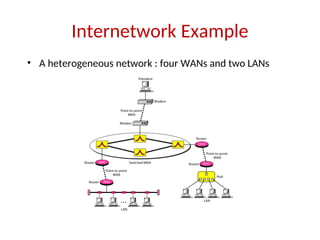
  • 53.
    2-53 Transport Layer: Duties •Service-point (port) addressing • Segmentation and reassembly • Connection control • Flow control • Error control
  • 54.
    Session Layer • Sessionlayer is responsible for dialog control and synchronization
  • 55.
    Presentation Layer • Presentationlayer is responsible for translation, compression, and encryption
  • 56.
    Application Layer • Applicationlayer is responsible for providing services to the user
  • 57.
    Application Layer: Services •Network virtual terminal: It allows a user to log on to a remote host. • Mail services • File transfer, access, and management • Directory services: provides distributed database sources and access for global information about various objects and services.
  • 58.
  • 59.
  • 60.
    TCP/IP Protocol Suite •Host-to-network : Physical and data link layer – No specific protocol • Network layer – IP(Internet Protocol), ARP(Address Resolution Protocol), RARP(Reverse ARP), ICMP(Internet Control Message Protocol), IGMP(Internet Group Message Protocol) • Transport layer – TCP(Transmission Control Protocol), UDP(User Datagram Protocol), SCTP(Stream Control Transmission Protocol), • Application Layer – Combined session, presentation, and application layers
  • 61.
    2-61 Addressing • Four levelsof addresses in TCP/IP protocols • Physical (link), logical (IP, network), port, and specific addresses
  • 62.
  • 63.
    2-63 Physical Address A nodewith physical address 10 sends a frame to a node with physical address 87. The two nodes are connected by a link (bus topology LAN). As the figure shows, the computer with physical address 10 is the sender, and the computer with physical address 87 is the receiver. 07:01:02:01:2C:4B A 6-byte (12 hexadecimal digits) physical address.
  • 64.
    2-64 Logical (IP) Address •The physical addresses will change from hop to hop, but the logical addresses usually remain the same
  • 65.
    2-65 Port Address • Thephysical addresses change from hop to hop, but the logical and port addresses usually remain the same
  • 66.
  • 67.
    Physical Layer The purposeof the physical layer is to transport a raw bit stream from one machine to another. Various physical media can be used for the actual transmission. Transmission Media: Media are grouped into guided media and unguided media. Guided media means waves are guided along solid medium. Ex: copper wire, fiber optics. Unguided media is a media doesn't use any physical connectors between the two devices communicating. Usually the transmission is send through the atmosphere.
  • 68.
    The physical layerand transmission Medium
  • 69.
  • 70.
    Guided Transmission Data •Magnetic Media • Twisted Pair • Coaxial Cable • Fiber Optics
  • 71.
    Magnetic Media • Oneof the common way to transport data from one computer to another is to write them on to magnetic tape or removable media (DVD) physically transport the tape or DVD to the destination machine and read them. • The tape densities are increasing. • It is not suitable in applications, where on-line connection is needed
  • 72.
    Twisted Pair • Oldesttransmission media • A twisted pair consists of two insulated copper wires typically about 1mm thick. The wires are twisted together in a helical form. • Cheap medium • Commonly used for communications within buildings and in telephone networks • For longer distance repeaters are needed. • Twisted pairs can be used for transmitting either analog or digital signals. • Produced in unshielded (UTP) and shielded (STP) forms, and in different performance categories. • Category 5 has more twists per centimeter.
  • 73.
  • 74.
    Twisted Pair (a) Category3 UTP. (b) Category 5 UTP.
  • 75.
  • 76.
    • It hasbetter shielding than twisted pair • Offers longer distances and better speeds than twisted pair, due to better shielding. • Used for cable TV and local-area networks. Had been widely used in telephone systems, but optical fiber is now assuming this task. • Baseband Coaxial Cable 50-ohm cable, commonly used for digital transmission. Broadband Coaxial Cable 75-ohm cable, commonly used for analog transmission. • A coaxial cable consists of a stiff copper wire as the core, surrounded by an insulating material. The insulator is encased by a cylindrical conductor, often as a closely woven braided mesh. The outer conductor is covered in a protective plastic sheath. • Good combination of high bandwidth and excellent noise immunity. • It is widely used for cable television and metropolitan networks. Coaxial Cable
  • 77.
  • 78.
  • 79.
    Fiber optic cable •Fiber optic cables are similar to coax, except without the braid. • At the center is the glass core through which the light propagates. • Multimode fiber, the core is typically 50 microns • Single mode fiber, the core is 8 to 10 microns. • The core is surrounded by a glass cladding, to keep all the light in the core. • Next comes a thin plastic jacket to protect the cladding. • Fibers are typically grouped in bundles, protected by an outer sheath.
  • 80.
    Two kinds oflight sources are typically used to do the signaling. Electrical signals are converted into light. • LED ( Light Emitting Diode) • semiconductor lasers Light Detector • Photo diode: it gives an electrical pulse when struck by light. Fiber optics can be used for LANs as well as for long transmission. Two types of interfaces are used. 1) passive interface2) active interface Fiber optic cable contd…
  • 81.
  • 82.
    Fiber Cables (a) Sideview of a single fiber. (b) End view of a sheath with three fibers.
  • 83.
    Fiber Optics contd.. •Many different rays will be bouncing internally around at different angles. Each ray is said to have a different mode, so a fiber having this property is called a multimode fiber. • If the fiber’s diameter is reduced to a few wavelengths of light, the light can propagate only in a straight line, without bouncing, this property is called a single mode fiber. • Single mode fiber are more expensive but are widely used for longer distances. Transmit data at 50 Gbps for 100Km without amplification.
  • 84.
  • 85.
  • 86.
    Fiber Optic Networks Afiber optic ring with active repeaters.
  • 87.
    Wireless Transmission • TheElectromagnetic Spectrum • Radio Transmission • Microwave Transmission • Infrared and Millimeter Waves • Lightwave Transmission
  • 88.
  • 89.
    Wireless transmission Radio Transmission •Radio waves are easy to generate, can travel long advances, and can penetrate buildings easily, so they are widely used for communication. • Radio waves are omnidirectional, meaning that they travel in all directions from the source. • At low frequencies, radio waves power falls off with distance from the source • In the VLF,LF and MF bands, radio waves follow the ground. • In the HF and VHF bands, the ground waves tend to be absorbed by the earth. The waves reach the ionosphere, a layer of charged particles circling the earth at a height of 100 to 500 km, are refracted by it and sent back to earth. • The military also communicate in the HF and VHF bands.
  • 90.
  • 91.
  • 92.
    Radio Transmission (a) Inthe VLF, LF, and MF bands, radio waves follow the curvature of the earth. (b) In the HF band, they bounce off the ionosphere.
  • 93.
    Wireless transmission • Radiowaves are used for multicast communications, such as radio and television, and paging systems. • Microwaves are used for uni-cast communication such as cellular telephones, satellite networks and wireless LANs. • Infrared signals can be used for short-range communication in a closed area using line-of- sight propagation.
  • 94.
  • 95.
    Data link layer: DATA LINK LAYER DESIGN ISSUES:  Data link layer has a number of specific functions to carry out. These functions include  Provides a well-defined service interface to the network layer.  Determines how the bits of the physical layer are grouped into frames (framing).  Deals with transmission errors (CRC and ARQ).  Systems which automatically request the retransmission of missing packets or packets with errors are called Automatic Repeat reQuest (ARQ)  Regulates the flow of frames. Data-Link Layer has responsibility of transferring frames from one node to adjacent node over a link
  • 96.
    Data link layer-Introduction The data link layer takes the packets it gets from the network layer and encapsulates them into frames for transmission .  Each frame contains frame header ,a payload field for holding the packet ,and a frame trailer packet Header payload field Trailer packet Header payload field Trailer Relationship between packets and frames Sending Machine Receiving Machine
  • 97.
    Data link layer-Introduction Services Provided to the Network layer:  The function of the data link layer is to provide services to the network layer  The principal service is transferring data from the network layer on the source machine to the network layer on the destination machine. (a) Virtual Communication (b)Actual communication
  • 98.
    Types of servicesprovided to the Network Layer  Unacknowledged Connectionless service  Acknowledged Connectionless service  Acknowledged Connection-Oriented service
  • 99.
    Unacknowledged Connectionless service: It consists of having the source machine send independent frames to the destination machine without having the destination acknowledge them.  No connection is established beforehand or released afterward  If a frame is lost due to noise on the line, no attempt is made to recover it in the data link layer.  Appropriate for voice, where delay is worse than bad data.  Most of the LANs use unacknowledged connection less service in the data link layer
  • 100.
     Acknowledged Connectionlessservice  when this service is offered, there are still no logical connections used, but each frame sent is individually acknowledged.  In this way ,the sender knows whether a frame has arrived correctly.  If it has not arrived within a specified time interval it can be sent again.  This service is used over unreliable channels ,such as wireless systems.
  • 101.
    Acknowledged Connection-Oriented service The most sophisticated service the data link layer can provide to the network layer is connection-oriented service.  The source and destination machines establish a connection before any data are transferred  Each frame sent over the connection is numbered ,and the data link layer guarantees that each frame is received exactly once and that all frames are received in the right order  When connection oriented service is used ,transfers go through three distinct phases. 1) Connection established 2) Data transferred 3) connection Released
  • 102.
    Placement of theData link protocol  Services Provided to Network Layer
  • 103.
    Framing  In orderto provide service to the network layer the data link layer must use the service provided to it by the physical layer.  Physical layer is used to accept the raw bit stream and attempt to deliver it to the destination  The bit stream is not guaranteed to be error free  The number of bits received may be less than ,equal to ,or more than the number of bits transmitted, and they may have different values  It is up to the data link layer to detect and if necessary ,correct errors.  The usual approach is for the data link layer to break the bit stream up into discrete frames and compute the checksum for each frame.
  • 104.
    Framing  When aframe arrives at the destination ,the checksum is recomputed.  If the newly computed checksum is different from the one contained in the frame, the data link layer knows that an error has occurred and take steps to deal with it.  e.g., discarding the bad frame and possibly also sending back an error report  Breaking the bit stream up into frames is more difficult than it at first appears, One way to achieve this framing is to insert time gaps between frames, much like the spaces between words in ordinary text.
  • 105.
    Methods: 1) Character Count 2)Flag bytes with Byte Stuffing/Character Stuffing 3) starting and ending flags, with Bit Stuffing 4)Physical Layer Coding Violations
  • 106.
    Character count: • Thefirst framing method uses a field in the header to specify the number of characters in the frame. • When the data link layer in the destination sees the character count ,it knows how many characters follow and hence where the end of the frame is. A character stream a) with out errors b) with one error
  • 107.
    Character count:  Thetrouble with this algorithm is that the count can be garbled by a transmission error.  For example, if the character count of 5 in the second frame becomes a 7,the destination will get out of synchronization and will be unable to locate the start of the next frame.  Disadvantages:  The count can be garbled by the transmission error  Resynchronization is not possible. Even if with checksum, the receiver knows that the frame is bad there is no way to tell where the next frame starts.  Asking for retransmission doesn’t help either because the start of the retransmitted frame is not known  No longer used
  • 108.
     The secondtransmission method gets around the problem of Resynchronization called character stuffing.  Most protocols used the same byte ,called flag byte, as both the starting and ending delimiter as FLAG.  Two consecutive flag bytes indicate the end of one frame and start of the next one.
  • 109.
    • Framing: Characterstuffing – newer protocols –Frame starts / ends with same char: FLAG
  • 110.
    Byte Stuffing [HDLC Example] •Also referred to as character stuffing. • ASCII characters are used as framing delimiters (e.g. DLE STX and DLE ETX) • The problem occurs when these character patterns occur within the “transparent” data. Solution: sender stuffs an extra DLE into the data stream just before each occurrence of an “accidental” DLE in the data stream. The data link layer on the receiving end unstuffs the DLE before giving the data to the network layer.
  • 111.
    DLE STX DLEETX Transparent Data DLE STX DLE ETX A B DLE H W DLE STX DLE ETX A B DLE H W DLE DLE STX DLE ETX A B DLE H W Stuffed Unstuffed Before Byte Stuffing [HDLC Example]
  • 112.
    Computer Networks: Bitand Byte Stuffing 112 Bit Stuffing • Each frame begins and ends with a special bit pattern called a flag byte [01111110]. {Note this is 7E in hex} • Whenever sender data link layer encounters five consecutive ones in the data stream, it automatically stuffs a 0 bit into the outgoing stream. • When the receiver sees five consecutive incoming ones followed by a 0 bit, it automatically destuffs the 0 bit before sending the data to the network layer.
  • 113.
    starting and endingflags, with bit stuffing  This new technique allows data frames to contain an arbitrary number of bits and allow character codes with an arbitrary number of bits per character.  Each frame begins and ends with a special bit pattern,01111110 called a flag byte.  whenever the senders data link layer encounters six consecutive ones in the data , it automatically stuffs a 0 bit into the outgoing bit stream.  whenever the receiver sees five consecutive incoming 1 bits, followed by a 0 bit ,it automatically destuffs (i.e deletes) the 0 bit.  If the flag pattern 01111110,this flag is transmitted as 011111010 but stored in the receiver memory as 01111110.
  • 114.
    starting and endingflags, with bit stuffing  Bit stuffing (a) The original data. (b) The data as they appear on the line. (c) The data as they are stored in receiver’s memory after destuffing.
  • 115.
    Input Stream Stuffed Stream UnstuffedStream 0110111111100111110111111111100000 01101111101100111110011111011111000000 0110111111100111110111111111100000 Stuffed bits Bit Stuffing
  • 116.
    Flag flag Address ControlInformation CRC Protocol 01111110 01111110 1111111 00000011 Unnumbered frame Specifies what kind of packet is contained in the payload, e.g., LCP, NCP, IP, OSI CLNP, IPX All stations are to accept the frame PPP (Point-to-Point Protocol) Frame Format
  • 117.
    117 • Framing: Codingviolation – Redundancy in the encoding on medium is required – e.g. Manchester encoding: transition in the middle of a slot – Use no transition in a slot (= coding violation) as start of frame violation
  • 118.
    Error Control:  Nextproblem: How to make sure all frames are eventually delivered to the network layer at the destination, and in the proper order.  The usual way to ensure reliable delivery is to provide the sender with some feedback about what is happening at the other end of the line.  The protocol calls for the receiver to send back special control frames bearing positive and negative acknowledgements about the incoming frames
  • 119.
    Error Control  Ifthe sender receives a positive acknowledgement about a frame ,it knows the frame has arrived safely.  on the other hand, a negative acknowledgement means that something has gone wrong, and the frame must be transmitted again.  An additional complication comes from hardware troubles.  Managing the Timers and sequence numbers so as to ensure that each frame is ultimately passed to the network layer at the destination exactly once.
  • 120.
    Error Control:  MaintainingTimers for Error Control: When a sender transmits a frame, it generally also starts a timer .  The timer is set to expire after an interval long enough for the frame to reach the destination, be processed there ,and have the acknowledgement to propagate back to the sender.  Normally, the frame will be correctly received and the acknowledgement will get back before the timer runs out ,in which case the timer will be cancelled.  However, if either the frame or the acknowledgement is lost ,the timer will go off ,alerting the sender to a potential problem .the obvious solution is to just transmit the frame again.  Sequence number is used to recognize the duplicate packet.
  • 121.
    Flow control  Asender that systematically wants to transmit frames faster than the receiver can accept them..  When the sender is running on a fast (or lightly loaded) computer and the receiver is running on a slow (or heavily loaded machine)  The sender keeps pumping the frames out at a higher rate until the receiver is completely swamped.  Even if the transmission is error free ,at a certain point the receiver will simply be unable to handle the frames as they arrive and will start to lose someone  To prevent this situation Feedback- based flow control & Rate- based flow control mechanisms are used.  Feedback- based flow control ,the receiver sends back information to the sender giving it permission to send more data .  Rate based :Has built in mechanism with out feedback.
  • 122.
    Error Detection andcorrection  In some cases it is sufficient to detect an error and in some, it requires the errors to be corrected also.  For e.g.  On a reliable medium : Error Detection is sufficient where the error rate is low and asking for retransmission after Error Detection would work efficiently  In contrast, on an unreliable medium : Retransmission after Error Detection may result in another error and still another and so on. Hence Error Correction is desirable.
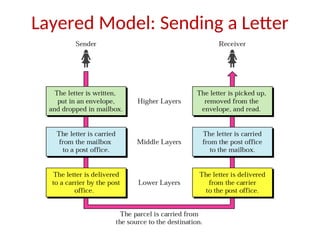
  • 123.
    Error Detection andCorrection • Types of Errors • Error-Correcting Codes • Error-Detecting Codes
  • 124.
    Types of Errors Single-BitError: Burst Error: (a) (b)
  • 125.
    Redundancy  All errordetection/correction methods are based on redundancy
  • 126.
    Error detecting Codes Polynomialcode or CRC( Cyclic Redundancy Check )  CRCs are among the best checksums available to detect errors in communications transmissions  polynomial codes are based upon treating bit strings as representations of polynomials with coefficients of 0 and 1 only.  A k-bit frame is regarded as the coefficient list for a polynomial with K terms ,ranging from Xk-1 to x0 . such a polynomial is said to be of degree k-1.  The higher order (left-most) bit is the coefficient of xk-1 .the next bit coefficient of xk-2  Ex: 110001 has 6 bits. It represents a six-term polynomial with coefficients 1100001  110001 : x5 +x4 +1
  • 127.
  • 128.
  • 129.
    Error detecting Codes When the polynomial code method is employed ,the sender and receiver must agree upon a generator polynomial G(x) .  In advance both higher and lower order bits of generator must be 1.  To compute the check sum for some frame with m bits ,corresponding to the polynomial M(x), the frame must be longer than the generator polynomial.  The idea is to append a checksum to the end of the frame in such a way that the polynomial represented by the check summed frame is divisible by G(x).  When the receiver gets the check summed frame, it tries dividing it by G(x). If there is a remainder ,there has been a transmission error
  • 130.
    Algorithm  Let rbe the degree of G(x)  Append r zero bits to the low-order end of the frame ,so it now contains m+r bits and corresponds to the polynomial xr M(x).  Divide the bit string corresponding to G(x) in to the bit string corresponding to Xr M(x) using modulo 2 division.  subtract the remainder (which is always r or fewer bits ) from the bit string correspond to xr M(x) using modulo 2 subtraction.  the result is the check summed frame to be transmitted .call its polynomial T(x).
  • 131.
     Calculation of thepolynomial code checksum: Frame: 1001 Generator : 1011
  • 132.
    Division in theCRC decoder for two cases:
  • 133.
    CRC G M Message transmitted: T= 100100001 Example:
  • 134.
    Error Detection: Parity Check SimpleParity check : • Blocks of data from the source are subjected to a check bit or parity bit generator form, where a parity of 1 is added to the block if it contains odd number of 1’s and 0 is added if it contains even number of 1’s •This scheme makes the total number of 1’s even, that is why it is called even parity checking.
  • 136.
    Two Dimensional Paritycheck : • Parity check bits are calculated for each row, which is equivalent to a simple parity check bit. •Parity Check bits are also calculated for all columns, then both are sent along with the data. •At receiving end these are compared with the parity bits calculated on the received data
  • 138.
    Error correcting codes: A frame consists of m data (i.e,message ) bits and r redundant, or check bits.  Let the total length be n (i.e., n=m+r).an n-bit unit containing data and check bits is often referred to as an n-bit codeword.  Given any two code words ,say,10001001 and 10110001,it is possible to define how many bits differ .In this case 3 bits differ. To determine how many bits differ ,just EXCLUSIVE OR the two code words ,and count the number of 1 bits in the result. The number of bit positions in which two code words differ is called the Hamming distance.  Its significance is that if two code words are a hamming distance d a apart, it will require d single-bit errors to convert one into another.
  • 139.
    Hamming Distance  TheHamming distance between two words of same size is the no.of differences between corresponding bits.  The Hamming distance can be found if we apply XOR operation on the two words and count no.of 1’s in the result.  d(000,011) is 2 because (000)XOR(011)=011(two 1s)  When a code word is corrupted during transmission, the hamming distance between sent and received code words is the number of bits affected by the error.  For e.g. if the codeword 00000 is sent and 01101 is received, 3 bits are in error and the Hamming distance between the two is d(00000,01101)=3.
  • 140.
    Error correcting codes: Forward Error Correction: FEC is the only error correction scheme that actually detects and corrects transmission errors at the receive end with out calling for retransmission.  Ex: Hamming code  No of bits in hamming code is dependent on the no. of bits in the data character by using the relation.  2n >=m+n+1  Where n=no. of hamming bits  m= no. of bits in the data character
  • 141.
  • 142.
    1. Write thebit positions starting from 1 in binary form (1, 10, 11, 100, etc). 2. All the bit positions that are a power of 2 are marked as parity bits (1, 2, 4, 8, etc). 3. All the other bit positions are marked as data bits. 4. Each data bit is included in a unique set of parity bits, as determined its bit position in binary form. a. Parity bit 1 covers all the bits positions whose binary representation includes a 1 in the least significant position (1, 3, 5, 7, 9, 11, etc). b. Parity bit 2 covers all the bits positions whose binary representation includes a 1 in the second position from the least significant bit (2, 3, 6, 7, 10, 11, etc). c. Parity bit 4 covers all the bits positions whose binary representation includes a 1 in the third position from the least significant bit (4–7, 12–15, 20–23, etc).
  • 143.
    d. Parity bit8 covers all the bits positions whose binary representation includes a 1 in the fourth position from the least significant bit bits (8–15, 24–31, 40–47, etc). e. In general each parity bit covers all bits where the bitwise AND of the parity position and the bit position is non-zero. Since we check for even parity set a parity bit to 1 if the total number of ones in the positions it checks is odd. Set a parity bit to 0 if the total number of ones in the positions it checks is even
  • 144.
  • 145.
  • 146.
  • 147.
  • 148.
  • 149.
  • 150.
    Frame header ofData link layer  ack seq kind info buffer frame packet network layer data link layer
  • 151.
    Flow and ErrorControl Data link control = flow control + error control Flow control refers to a set of procedures used to restrict the amount of data that the sender can send before waiting for acknowledgement Error control in the data link layer is based on automatic repeat request (ARQ), which is the retransmission of data ACK, NAK(Negative ACK), Piggybacking (ACKs and NAKs in data frames)
  • 152.
    Elementary Data linkProtocols:  Protocols: 1) unrestricted simplex protocol 2) A simplex stop-and-wait protocol 3) A simplex protocol for a Noisy Channel
  • 153.
    unrestricted simplex protocol Data are transmitted in one direction only.  Both the transmitting and receiving network layers are always ready  processing time can be ignored  Infinite buffer space is available  The protocol consists of two distinct procedures, a sender and a receiver. The sender runs in the data link layer of the source machine and the receiver runs in the data link layer of the destination machine.  MAX-SEQ is not used because No sequence numbers and Acknowledgements are used here.  The only event type possible is frame-arrival (i.e. an arrival of undamaged frame)
  • 154.
    Noiseless Channels: SimplestProtocol Simplest protocol with no flow or error control
  • 155.
    11.155 Flow diagram forNoiseless Channels: Simplest Protocol
  • 156.
    A simplex stop-and-waitprotocol:  If data frames arrives at the receiver side faster than they can be processed, the frames must be stored until their use  Normally ,the receiver does not have enough storage space ,especially if it is receiving data from many sources  This may result in the discarding frames  To prevent this there must be feedback from the receiver to the sender.
  • 157.
    A simplex stop-and-waitprotocol:  Def : Protocol in which the sender sends one frame and then waits for acknowledgement before proceeding is called stop-and-wait.  Flow Diagram: B A Reque st Frame Ack Frame Ack Arrival Reque st Arrival Arrival
  • 158.
    Stop-and-Wait Protocol Simple tokensof ACK and flow control added
  • 159.
  • 160.
    A simplex stop-and-waitprotocol:  Receiver 2 is that after delivering a packet to the network layer, receiver 2 sends an acknowledgement frame back to the sender before entering the wait loop again. because the only arrival of the frame back at the sender is important. the receiver need not put any particular information on it.  points:  1) sender start out fetching a packet from the network layer, using it to construct a frame and sending it on its way.  2)sender must wait until an acknowledgement frame arrives before looping back and fetching the next packet from the network layer
  • 161.
    A simplex protocolfor a Noisy Channel  The channel is noisy, frames may be damaged or lost  Good scene : data frame reaches intact, ack sent back and received, next frame sent  Bad scene :  Data frame damaged or lost ..hence no ack – sender times out and resends .. No problems  Data frame reaches intact but Ack lost .. Times out ..resends.. Receiver receives duplicate frames. Problem  Solution :Keep a sequence number for each frame to distinguish between the new frame and a duplicate frame
  • 162.
    A simplex protocolfor a Noisy Channel  What should be minimum number of bits required for the sequence number?  The only ambiguity in this protocol is between a frame,m.and its direct successor,m+1.If a frame m is lost or damaged ,the receiver will not acknowledge it ,so the sender will keep trying to send it. Once it has been correctly received ,the receiver will send an ack back to the sender. Depending upon whether the acknowledgement frame gets back to the sender correctly or not ,the sender may try to send m or m+1.the event triggers the sender to start sending m+2 is the arrival of an acknowledgement m+1.  Protocols in which the sender waits for a positive acknowledgement before advancing to the next data item are often called (PAR-Positive acknowledgement retransmission or ARQ- Automatic Repeat Request)
  • 163.
    Noisy Channels: Stop-and-WaitARQ • Stop-and-wait Automatic Repeat Request (ARQ) • Error correction in Stop-and-Wait ARQ is done by keeping a copy of the sent frame and retransmitting of the frame when the timer expires • In Stop-and-Wait ARQ, we use sequence numbers to number the frames. The sequence numbers are based on modulo-2 arithmetic • Acknowledgment number always announces in modulo-2 arithmetic the sequence number of the next frame expected.
  • 164.
  • 165.
  • 166.
    Contd.. • The Stop-and-WaitARQ is very inefficient if our channel has a large bandwidth and long round-trip delay. • There is no Pipelining in this protocol because we need to wait for a frame to reach the destination and be acknowledged before the next frame is sent.
  • 167.
    Sliding window protocols Must be able to transmit data in both directions.  Choices for utilization of the reverse channel:  mix DATA frames with ACK frames.  Piggyback the ACK  Receiver waits for DATA traffic in the opposite direction.  Use the ACK field in the frame header to send sequence number of frame being ACKed.   better use of the channel capacity.
  • 168.
    Sliding window protocols: In the Previous protocols ,Data frames were transmitted in one direction only.  In most practical situations ,there is a need for transmitting data in both directions.  One way of achieving full-duplex data transmission is to have two separate communication channels and each one for simplex data traffic (in different directions)  we have two separate physical circuits ,each with a “forward” channel (for data) and a “reverse” channel( for acknowledgements). source Destination Data Acknowledgement s
  • 169.
    Sliding window protocols: Disadvantage: The bandwidth of the reverse channel is almost entirely wasted.  A better idea is to use the same circuits for data in both directions  In this model the data frames from A and B are intermixed with the acknowledgement frames from A to B.  Kind: kind field in the header of an incoming frame, the receiver can tell whether the frame is data or acknowledgements.
  • 170.
    Sliding window protocols: Piggybacking: source Destination Frame sent(Frame1) Ack(frame1)+Frame 2 • When a data frame arrives, instead of immediately sending a separate control frame, the receiver restrains itself and waits until the network layer passes it the next packet. • The acknowledgement is attached to the outgoing data frame • Disadv: This technique is temporarily delaying outgoing acknowledgements. • If the datalinklayer waits longer than the senders timeout period, the frame will be retransmitted.
  • 171.
    Sliding window protocols: Rule: sender waiting a fixed number of milliseconds. If a new packet arrives quickly the acknowledgement is piggybacked onto it. other wise if no new packet has arrived by the end of this time period ,the data link layer just sends a separate acknowledgement frame.  In sliding window protocol each frame contains a sequence number ranging from 0 up to some maximum.  The maximum is usually 2n -1 so the sequence number fits nicely in an n-bit field.  The stop-and-wait sliding window protocol uses n=1 restricting the sequence numbers 0 and 1.  The sender must keep all these frames in its memory for possible retransmission
  • 172.
    Sliding window protocols: Thus if the maximum window size is n, the sender needs n buffers to hold the unacknowledged frames  3 bit field -000 001 010..etc here n=3 i.e. 23 -1=7 window size is 0 to 7 Sliding window :: sender has a window of frames and maintains a list of consecutive sequence numbers for frames that it is permitted to send without waiting for ACKs. receiver has a window that is a list of frame sequence numbers it is permitted to accept. Note – sending and receiving windows do NOT have to be the same size.
  • 173.
    Sliding window protocols: Asliding window of size 1, with a 3-bit sequence number. (a) Initially. (b) After the first frame has been sent. (c) After the first frame has been received. (d) After the first acknowledgement has been received.
  • 174.
    Sliding window protocols: Sliding window protocols: 3 methods  1) 1-bit sliding window protocol  2) Go –Back N  3) Selective Repeat  1-bit sliding window protocol:  Window size 1.  Stop-and-wait.  Must get ack before can send next frame.  Both machines are sending and receiving.
  • 175.
    1-bit sliding protocol:  Example:  A trying to send its frame 0 to B. B trying to send its frame 0 to A.  Imagine A's timeout is too short. A repeatedly times out and sends multiple copies to B, all with seq=0, ack=1. When first one of these gets to B, it is accepted. Set expected=1. B sends its frame, seq=0, ack=0. All subsequent copies of A's frame rejected since seq=0 not equal to expected. All these also have ack=1. B repeatedly sends its frame, seq=0, ack=0. But A not getting it because it is timing out too soon. Eventually, A gets one of these frames. A has its ack now (and B's frame). A sends next frame and acks B's frame.
  • 176.
    1-bit sliding protocol:  Two scenarios for protocol 4. (a) Normal case. (b) Abnormal case. The notation is (seq, ack, packet number). An asterisk indicates where a network layer accepts a packet.
  • 177.
    A protocol usingGo Back N: Go Back n, is for the receiver simply to discard all subsequent frames, sending no acknowledgements for the discarded frames. This strategy corresponds to a receive window of size 1. The data link layer refuses to accept any frame except the next one it must give to the network layer. Points: fig ( a) 1) frame 0 and 1 correctly received and Acknowledged 2) Frame 2 is damaged or lost ,The sender continuous to send frames until the timer for frame 2 expires. 3) Then it backs up to frame 2 and starts all over with it ,sending 2,3,4 etc. all over again.
  • 178.
    A protocol usingGo Back N:
  • 179.
    Go-Back-N ARQ • Pipeliningimproves the efficiency of the transmission • In the Go-Back-N Protocol, the sequence numbers are modulo 2m , where m is the size of the sequence number field in bits • The send window is an abstract concept defining an imaginary box of size 2m − 1 with three variables: Sf, Sn, and Ssize • The send window can slide one or more slots when a valid acknowledgment arrives.
  • 180.
    Go-Back-N ARQ • Receivewindow for Go-Back-N ARQ • The receive window is an abstract concept defining an imaginary box of size 1 with one single variable Rn. The window slides when a correct frame has arrived; sliding occurs one slot at a time.
  • 181.
    Go-Back-N ARQ • Slidingwindows, Timers, ACK, Resending a frame
  • 182.
    Go-Back-N ARQ: SendWindow Size • In Go-Back-N ARQ, the size of the send window must be less than 2m ; the size of the receiver window is always 1 • Stop-and-Wait ARQ is a special case of Go-Back-N ARQ in which the size of the send window is 1
  • 183.
  • 184.
  • 185.
    Selective Repeat:  Whenselective repeat is used ,a bad frame that is received is discarded. But good frames after it are buffered.  when the senders timeout ,only the oldest unacknowledged frame is retransmitted.  If that frames arrives correctly ,the receiver can deliver it to the network layer in sequence all the frames it has buffered.  fig (b) :  1) Frames 0 and 1 correctly received and acknowledged.  2) Frame 2 is lost, when frame 3 arrives at the receiver ,the data link layer notices that it has a missed frame. so it sends back a NAK for 2 but buffers 3  3) when frame 4 and 5 arrive ,they are buffered by the data link layer instead of being passed to the network layer  4)The NAK 2 gets back to the sender which immediately resends frame 2.
  • 186.
    A protocol usingselective repeat:
  • 187.
    Selective Repeat ARQ •Sender window size • Receive window size
  • 188.
  • 189.
    Selective Repeat ARQ:Window Size • The size of the sender and receiver window must be at most one-half of 2m
  • 190.
  • 191.
    Piggybacking • To improvethe efficiency of the bidirectional protocols • Piggybacking in Go-Back-N ARQ
  • 192.
    Example Data LinkProtocols: The Data Link Layer in the Internet - LANs use broadcast protocols (Ethernet) to connect many hosts but interconnection of LANs into larger networks is primary done through routers running a point-to-point protocol. In the case of the Internet, point-to-point protocol is also used to connect host to router in the form of an Internet Service Provider. Two point-to-point protocols widely used on the Internet are SLIP and PPP. SLIP – Serial Line Internet Protocol- Designed to connect hosts to the internet over serial communications.
  • 193.
    SLIP – SerialLine Internet Protocol  Designed to connect hosts to the Internet over serial communications.  Send raw IP packets over serial (possibly modem) line with C0 hex at end for framing, if occurs in IP packet uses character stuffing.  Recent versions use TCP and IP header compression by omitting when multiple packets going to same destination.  No error detection/correction, responsibility of higher layers.  Supports only IP.  No authentication (though could be handled by higher layers).  Fixed IPs, both must know each others in advance (not a problem if yours and ISP never change).
  • 194.
    Drawbacks of SLIP SLIP does not do error detection and correction  SLIP supports only IP  Each side must know others IP address in advance  SLIP does not provide any form of authentication  SLIP is not approved as internet standard
  • 195.
    PPP - Point-to-PointProtocol  Fixes many of SLIPs problems and is an official Internet protocol  Used in Dial-up connection between residential host and ISP  Framing  Byte stuffing  Connection oriented  Error detection by checksum.  Permits authentication.  LCP: It is responsible for establishing the connection and releasing the connection  NCP: Network Control Protocol – It provides all the services of Network layer
  • 196.
     Overcomes alldeficiencies of SLIP.  A better framing method.  Frame format supports error detection.  Provide with a Link Control protocol (LCP), for bringing lines up, testing them, negotiating options, and bringing then down back.  Have different NCP (Network Control Protocol) for each different network protocol.
  • 197.
    The Data LinkLayer in the Internet A home personal computer acting as an internet host. A home personal computer acting as an internet host.
  • 198.
    PPP operation  PCcalls the provider’s router via a modem.  After establishment of the connection PC sends a series of LCP packets.  Then a series of NCP packets are sent to configure the network layer.  Now PC is ready to send and receive IP packets.  After finishing again NCP packets are sent to tear down the network layer connections.  Finally LCP packets are used to shutdown the connection.  PC releases the physical connection via the modem.
  • 199.
  • 200.
    • Flag: APPP frame starts and ends with a 1-byte flag with the bit pattern 01111110.It is a byte-oriented protocol. The flag is treated as a byte. • Address: It is a constant value and is set to 11111111(broadcast address).During negotiation, the two parties may agree to omit this byte. • Control:11000000(imitating U-frame in HDLC).PPP does not provide any flow control. Error control is also limited to error detection. • Protocol: It defines what is being carried in the data field: either user data or other information. • Payload field: It carries either the user data or other information. The default of max..1500 bytes. • FCS: 2-bytes or 4-bytes standard CRC.
  • 201.
    Byte Stuffing: • PPPis a byte oriented protocol. • The flag in PPP is a byte and needs to be escaped whenever it appears in the data section of the frame. • The esc byte is 01111101,means that every time the flag like pattern appears in the data, this extra byte is stuffed to tell the receiver that the next byte is not a flag.
  • 202.
    PPP – Pointto Point Protocol A simplified phase diagram for bring a line up and down.
  • 203.
    l PPP – Pointto Point Protocol • The LCP frame types.
  • 204.
  • 205.
  • 206.
    BROADCAST NETWORKS AND THEIRPROTOCOLS The Medium Access Sub layer deals with Broadcast channels are sometimes referred to as multi-access channels or random access channels.
  • 207.
    Topics  Introduction  ChannelAllocation problem  Multiple Access Protocols  IEEE Standard 802 for LANs  Wireless LAN  Bridges & its types.
  • 208.
    Introduction  Medium AccessControl (MAC) sub layer is part of Data Link layer.  In fact, it is the bottom part of DLL (interfacing with the physical layer)  Deals with broadcast networks
  • 209.
    The Channel AllocationProblem 1. Static Channel Allocation in LANs and MANs 2. Dynamic Channel Allocation in LANs and MANs
  • 210.
    Channel Allocation problem StaticChannel Allocation in LANs and MANs  FDM & TDM FDM: Frequency Division Multiplexing 1.The traditional way of allocating a single channel, among multiple competing users is Frequency division multiplexing(FDM). 2. If there are N users, the bandwidth is divided into N equal-sized portions, each user being assigned one portion. 3. Here each user has a private frequency band, there is no interference between users.
  • 211.
    4.When there isonly a small and constant number of users, each of which has heavy load of traffic, FDM is simple and efficient. 5. When number of senders is large and continuously varying, FDM presents few problems. 6.If spectrum is cut up into N regions and <N users are interested in communication, the spectrum is wasted. 7.If more than N users want to communicate, some of them will be denied permission for lack of bandwidth. 8. Assuming that the number of users be held constant at N, dividing the channel into sub-channels is inefficient. 9.The basic problem is, when some users are quiet their bandwidth is simply lost. They are not using it, and no one else is allowed to use it either.
  • 212.
    TDM: Time DivisionMultiplexing • The same arguments that apply to FDM also apply to TDM. • Each user is statically allocated every Nth time slot. If a user does not use the allocated slot, it just lies fallow. • The same holds if we split up the network physically. Note: None of the traditional static channel allocation methods work well with bursty traffic.
  • 213.
    Dynamic Channel Allocationin LANs and MANs  Station Model.  Single Channel Assumption.  Collision Assumption.  (a) Continuous Time. (b) Slotted Time.  (a) Carrier Sense.(LAN) (b) No Carrier Sense.(SATELLITE)
  • 214.
    1.Station Model: • Themodel consists of N independent Stations, each with a program or user that generates frames for transmission. Stations are called Terminals. • The probability of a frame being generated in an interval of length Δt is λΔt, where λ is a constant(arrival rate of new frames). • Once a frame is generated the station is blocked and does nothing until the frame has been successfully transmitted.
  • 215.
    2. Single ChannelAssumption: • A single channel is available for all communication. • All stations can transmit on it and all can receive from it. 3. Collision Assumption: • If two frames are transmitted simultaneously, they overlap in time and the resulting signal is garbled. This event is called a Collision. • All stations can detect collisions. • A collided frame must be transmitted again later.
  • 216.
    4a. Continuous Time: •Frame transmission can begin at any instant. • There is no master clock dividing time into discrete intervals. 4b.Slotted Time: • Time is divided into slots. Frame transmission always begins at the start of a slot. • A slot can have 0,1, or more frames, corresponding to an idle slot, a successful transmission, or a collision respectively.
  • 217.
    5a. Carrier Sense: •Stations can tell if the channel is in use before trying to use it. • If the channel is sensed as a busy, no station will attempt to use it until it goes idle. 5b. No Carrier Sense: • Stations cannot sense the channel before trying to use it. • They just go ahead and transmit. Only later can they determine whether the transmission was successful.
  • 218.
    Multiple Access Protocols •ALOHA • Carrier Sense Multiple Access Protocols • Collision-Free Protocols • Limited-Contention Protocols • Wavelength Division Multiple Access Protocols • Wireless LAN Protocols
  • 219.
    Medium Access SubLayer ALOHA  Pure ALOHA (Mr. Norman Abramson in 1970s)  Slotted ALOHA (Mr.Roberts in 1972) ALOHA system used to ground based radio broadcasting.
  • 220.
    Pure ALOHA  Userstransmit whenever they have data to be sent. Fig. In pure ALOHA, frames are transmitted at completely arbitrary times
  • 221.
    • Systems inwhich multiple users share a common channel in a way that can lead to conflicts are widely known as contention system. • The frame size is fixed because the throughput of ALOHA systems is maximized. • We need to resend the frames that have been destroyed during transmission. • A collision involves two or more stations. If all these try to resend their frames after the time-out, the frames will collide again. • Pure ALOHA states that when the time-out period passes, each station waits a random amount of time before resending its frame(TB).
  • 222.
    • Pure ALOHAhas a second method to prevent congesting the channel with retransmitted frames. After a maximum no.of retransmission attempts Kmax, a station must give up and try later. • The time-out period is equal to maximum possible round-trip propagation delay, which is twice the amount of the time required to send a frame between the two most widely separated stations(2 * Tp ). • The back-off time TB is a random value that depends on K. (binary exponential back-off )
  • 225.
     Whenever twoframes try to occupy the channel at the same time, there will be a collision and both will be garbled.  If the first bit of the new frame overlaps with the last bit of a frame almost finished , both frames will be totally destroyed, and both will be retransmitted later.  Throughput for pure ALOHA decreases. Pure ALOHA
  • 226.
    Disadvantage  More numberof users share common channels in a way that can lead to conflicts.  More number of collisions occur.  Collision detected: stations waits a random amount of time. Pure ALOHA
  • 227.
    Fig. Throughput versusoffered traffic for ALOHA systems Pure ALOHA
  • 228.
    Slotted ALOHA  SlottedALOHA: Divide the time into discrete intervals(slots) of Tfr s, and force the station to send only at the beginning of the time slot..  Obviously, there may be a special signal needed to synchronize the clocks at all stations.  Because a station is allowed to send only at the beginning of synchronized time slot, if a station misses this, it must wait until the beginning of next time slot.  This means that the station which started at the beginning of this slot has already finished sending its frame.  Of course, there is still the possibility of collision if two stations try to send at the beginning of the same slot.
  • 230.
     However, thevulnerable time is now reduced to one-half, equal to Tfr.  It can be proved that the average number of successful transmission for the slotted ALOHA is S=G * e-G  Maximum throughput occurs at G=1, S=1/e or 0.368. This is twice that of pure ALOHA protocol.  In other words, if a frame is generated during one frame transmission time, then 36.8 % of these frames reach their destination successfully. This result is expected because vulnerable time is equal to the frame transmission time.  Therefore, if a station generates only one frame in this vulnerable time(and no other station generates a frame during this time), the frame will be reach its destination successfully.
  • 231.
    Slotted ALOHA Divides thetime into discrete intervals A B C D E Disadvantage: collisions Throughput for slotted ALOHA increases.
  • 232.
    Differences Between PureALOHA and Slotted ALOHA • Transmission • In Pure ALOHA when a frame first arrives, the node immediately transmits the frame in its entirely into the Broadcast Channel. • In Slotted ALOHA when a node has a fresh frame to send, it waits until the beginning of the next slot and transmits the entire frame in the slot. • Timing • In Pure ALOHA Nodes can transmit frames at Random Times. • In Slotted ALOHA Nodes can transmit frames in their respective slot boundaries only at the beginning of the Slot.
  • 233.
    Differences Between PureALOHA and Slotted ALOHA  Synchronization  Pure ALOHA does not require Synchronization of slots of any nodes.  Slotted ALOHA requires synchronization between slots of nodes.  Mode of Transfer  In Pure ALOHA the Mode of Transfer is Continuous.  In Slotted ALOHA the mode of transfer is Discrete
  • 234.
    Differences Between PureALOHA and Slotted ALOHA  Collision  In Pure ALOHA If a Collision Occurs the nodes will then immediately retransmit the frame with probability P or the frame transmission time for retransmitting the frame.  In Slotted ALOHA, if a collision occurs, the node detects the collision before the end of the slot the node retransmits its frame in each subsequent slot with probability P until the frame transmitted without a collision.  Efficiency  In Pure ALOHA Efficiency is Half of Slotted ALOHA.  In Slotted ALOHA efficiency is more than that of Pure ALOHA.
  • 235.
    CSMA: Carrier SenseMultiple Access  Protocols in which stations listen for a carrier (i.e., transmission) and act accordingly are called carrier sense protocols. Adv:  To minimize the chance of collision  Increases the performance.  CSMA principle is “sense before transmit” or “listen before talk”.
  • 236.
    CSMA Methods 1. 1-persistentCSMA- constant length packets. 2. non-persistent CSMA- to sense the channel. 3. p-persistent CSMA
  • 238.
    1-persistent  When astation has data to send, it first listens to channel to see if any one else is transmitting at that moment.  If the channel is busy, the station continuously senses the channel until it becomes idle.  When the station detects an idle channel, it transmits a frame.  If a collision occurs, the station waits a random amount of time and starts all over again.  The station transmits with a probability of 1 whenever if finds the channel idle.  This method has highest chance of collision because two or more stations may find the line idle and send their frames immediately.
  • 239.
    Non-persistent CSMA  Astation that has a frame to send it senses the line.  If the line is idle, it sends immediately.  If the line is not idle, it waits a random amount of time and then senses the line again.  This approach reduces the chance of collision because it is unlikely that two or more stations will wait the same amount of time and retry to send simultaneously.  This algorithm should lead to better channel utilization and longer delays than 1-persistant CSMA.
  • 240.
    P-persistent CSMA  Thismethod is used if the channel has time slots with a slot duration equal to or greater than the maximum propagation time.  It combines advantages of the other two strategies.  It reduces the chance of collision and improves efficiency.
  • 241.
    P-persistent CSMA  Inthis method, after station finds the line idle it follows these steps: 1.With probability ‘p’, the station sends its frame. 2.With probability q=1-p, the station waits for the beginning of the next time slot and checks the line again. a. If the line is idle, it goes to step 1. b. If the line is busy, it acts as though a collision has occurred and uses the back-off procedure(which discussed earlier).
  • 243.
    Carrier Sense MultipleAccess with Collision Detection(CSMA/CD) • In this method, a station monitors the medium after it sends a frame to see if the transmission was successful. If so, the station is finished. If, however, there is a collision, the frame is sent again.
  • 246.
    Minimum Frame Size •For CSMA/CD to work, we need restriction on the frame size. • Therefore, the frame transmission time Tfr must be at least two times the maximum propagation time Tp. • To understand the reason, let us think about worst-case scenario. If two stations involved in a collision are the maximum distance apart, the signal from the first takes Tp to reach the second, and the effect of the collision takes another Tp to reach the first. • So the requirement is that the first station must still be transmitting after 2Tp
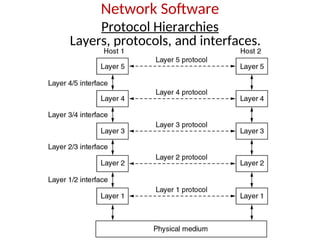
  • 248.
    IEEE Standards • In1985, the Computer Society of the IEEE started a project, called Project 802, to set standards to enable intercommunication among equipment from a variety of manufacturers. Project 802 is a way of specifying functions of the physical layer and the data link layer of major LAN protocols.
  • 249.
    IEEE 802 WorkingGroup Active working groups Inactive or disbanded working groups 802.1 Higher Layer LAN Protocols Working Group 802.3 Ethernet Working Group 802.11 Wireless LAN Working Group 802.15 Wireless Personal Area Network (WPAN) Working Group 802.16 Broadband Wireless Access Working Group 802.17 Resilient Packet Ring Working Group 802.18 Radio Regulatory TAG 802.19 Coexistence TAG 802.20 Mobile Broadband Wireless Access (MBWA) Working Group 802.21 Media Independent Handoff Working Group 802.22 Wireless Regional Area Networks 802.2 Logical Link Control Working Group 802.4 Token Bus Working Group 802.5 Token Ring Working Group 802.7 Broadband Area Network Working Group 802.8 Fiber Optic TAG 802.9 Integrated Service LAN Working Group 802.10 Security Working Group 802.12 Demand Priority Working Group 802.14 Cable Modem Working Group
  • 250.
    Collisions A B A B Collisionsare caused when two adaptors transmit at the same time (adaptors sense collision based on voltage differences) • Both found line to be idle • Both had been waiting to for a busy line to become idle A starts at time 0 Message almost there at time T when B starts – collision! How can we be sure A knows about the collision?
  • 251.
    Collision Detection  Howcan A know that a collision has taken place? • There must be a mechanism to insure retransmission on collision • A’s message reaches B at time T • B’s message reaches A at time 2T • So, A must still be transmitting at 2T  IEEE 802.3 specifies max value of 2T to be 51.2us • This relates to maximum distance of 2500m between hosts • At 10Mbps it takes 0.1us to transmit one bit so 512 bits (64B) take 51.2us to send • So, Ethernet frames must be at least 64B long  14B header, 46B data, 4B CRC  Padding is used if data is less than 46B  Send jamming signal after collision is detected to insure all hosts see collision • 48 bit signal
  • 252.
    Collision Detection contd. AB A B A B time = 0 time = T time = 2T
  • 253.
    • Slot timeand maximum network length • MaxLength = PropagationSpeed x SlotTime/2 • MaxLength = (2 x 10⁸ ) x (51.2 x 10⁻⁶ /2) = 5120 m • MaxLength = 2500 m 48 % of the theoretical calculation by considering delay times in repeaters and interfaces, and the time required to send the jam sequence
  • 254.
  • 255.
    Wireless Local AreaNetworks • The proliferation of laptop computers and other mobile devices (PDAs and cell phones) created an obvious application level demand for wireless local area networking. • Companies jumped in, quickly developing incompatible wireless products in the 1990’s. • Industry decided to entrust standardization to IEEE committee that dealt with wired LANS – namely, the IEEE 802 committee!!
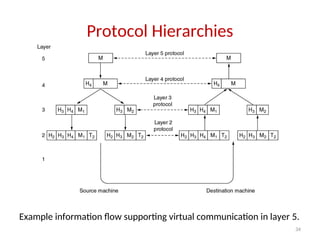
  • 256.
    IEEE 802 StandardsWorking Groups Figure 1-38. The important ones are marked with *. The ones marked with  are hibernating. The one marked with † gave up.
  • 257.
    Categories of WirelessNetworks • Base Station :: all communication through an access point {note hub topology}. Other nodes can be fixed or mobile. • Infrastructure Wireless :: base station network is connected to the wired Internet. • Ad hoc Wireless :: wireless nodes communicate directly with one another. • MANETs (Mobile Ad Hoc Networks) :: ad hoc nodes are mobile.
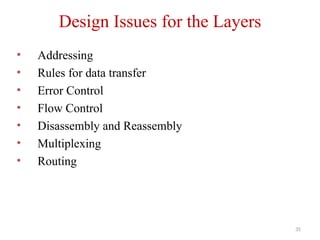
  • 258.
    Wireless LANs Figure 1-36.(a)Wireless networking with a base station. (b) Ad hoc networking.
  • 259.
    The 802.11 ProtocolStack Figure 4-25. Part of the 802.11 protocol stack.
  • 260.
    Wireless Physical Layer •Physical layer conforms to OSI (five options) – 1997: 802.11 infrared, FHSS, DHSS – 1999: 802.11a OFDM and 802.11b HR-DSSS – 2001: 802.11g OFDM • 802.11 Infrared – Two capacities 1 Mbps or 2 Mbps. – Range is 10 to 20 meters and cannot penetrate walls. – Does not work outdoors. • 802.11 FHSS (Frequence Hopping Spread Spectrum) – The main issue is multipath fading. – 79 non-overlapping channels, each 1 Mhz wide at low end of 2.4 GHz ISM band. – Same pseudo-random number generator used by all stations. – Dwell time: min. time on channel before hopping (400msec).
  • 261.
    Wireless Physical Layer •802.11 DSSS (Direct Sequence Spread Spectrum) – Spreads signal over entire spectrum using pseudo-random sequence (similar to CDMA see Tanenbaum sec. 2.6.2). – Each bit transmitted using an 11 chips Barker sequence, PSK at 1Mbaud. – 1 or 2 Mbps. • 802.11a OFDM (Orthogonal Frequency Divisional Multiplexing) – Compatible with European HiperLan2. – 54Mbps in wider 5.5 GHz band  transmission range is limited. – Uses 52 FDM channels (48 for data; 4 for synchronization). – Encoding is complex ( PSM up to 18 Mbps and QAM above this capacity). – E.g., at 54Mbps 216 data bits encoded into into 288-bit symbols. – More difficulty penetrating walls.
  • 262.
    Wireless Physical Layer •802.11b HR-DSSS (High Rate Direct Sequence Spread Spectrum) – 11a and 11b shows a split in the standards committee. – 11b approved and hit the market before 11a. – Up to 11 Mbps in 2.4 GHz band using 11 million chips/sec. – Note in this bandwidth all these protocols have to deal with interference from microwave ovens, cordless phones and garage door openers. – Range is 7 times greater than 11a.
  • 263.
    Wireless Physical Layer •802.11g OFDM(Orthogonal Frequency Division Multiplexing) – An attempt to combine the best of both 802.11a and 802.11b. – Supports bandwidths up to 54 MBps. – Uses 2.4 GHz frequency for greater range. – Is backward compatible with 802.11b.
  • 264.
    802.11 MAC SublayerProtocol • In 802.11 wireless LANs, “seizing channel” does not exist as in 802.3 wired Ethernet. • Two additional problems: – Hidden Terminal Problem – Exposed Station Problem • To deal with these two problems 802.11 supports two modes of operation DCF (Distributed Coordination Function) and PCF (Point Coordination Function). • All implementations must support DCF, but PCF is optional.
  • 265.
    Figure 4-26.(a)The hiddenstation problem. (b) The exposed station problem.
  • 266.
    The Hidden TerminalProblem • Wireless stations have transmission ranges and not all stations are within radio range of each other. • Simple CSMA will not work! • C transmits to B. • If A “senses” the channel, it will not hear C’s transmission and falsely conclude that A can begin a transmission to B.
  • 267.
    The Exposed StationProblem • This is the inverse problem. • B wants to send to C and listens to the channel. • When B hears A’s transmission, B falsely assumes that it cannot send to C.
  • 268.
    Wireless LAN Protocols •MACA protocol solved hidden, exposed terminal: – Send Ready-to-Send (RTS) and Clear-to-Send (CTS) first – RTS, CTS helps determine who else is in range or busy (Collision avoidance). – Can a collision still occur?
  • 269.
    Wireless LAN Protocols •MACAW added ACKs and CSMA (no RTS at same time) (a) A sending an RTS to B.(b) B responding with a CTS to A.
  • 270.
  • 271.
    Frame Control: Itcontains 11 sub fields. 1. Version: which allows two version of protocol to operate at same time in a same cell 2. Type: It can be data , control or management. 3. Sub type: RTS or CTS. 4. To DS & From DS: These bits indicates the frame is going to or coming from the inter cell distribution system(e.g Ethernet) 5. MF: more fragments will follow 6. Retry: marks a retransmission of a frame sent earlier
  • 272.
    8.Power management: Itis used by station to put ‘r’ into sleep & take it out of sleep. 9.More: ‘s’ has additional frames for ‘r’ 10. W: Frame body has encrypted using WEP(Wired Equivalent Privacy) 11.O: It tells ‘r’ that sequence of frames with this bit “on” must be processed strictly in order.
  • 273.
    Duration: It tells howlong the frame & its ack will occupy the channel. Address1 to 4: Source & destination are obviously needed, the other 2 addresses are used for source & destination base stations for intercell traffic(i.e frames may enter or leave a cell via BS) Sequence: allows fragments to be numbered. Out of 16 bits,12 identify frame, 4 identify fragment
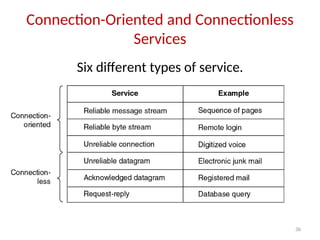
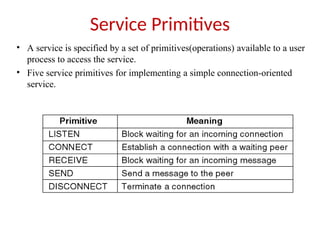
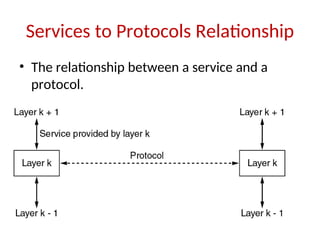
  • 274.
    • Data fieldcontains payload upto 2312 bytes followed by checksum. • Management frames have same format as that of data frames, except without one of BS addresses because management frames are restricted to single cell. • Control fields will have only one or two addresses, no data field, no sequence field. The key information is in sub-type field, usually RTS, CTS, or ACK.
  • 275.
    Services of 802.11 Thefive distribution services are provided by the Base station and deals with station mobility as ther enter and leave cells. They are: 1.Association: •This is used by MS to connect themselves to BS. When MS moves within the radio range of BS, it announces it’s identity and capabilities(data rates supported, need for PCF service, power management requirements). The BS may accept or reject the MS. If the MS is accepted, it must then authenticate itself.
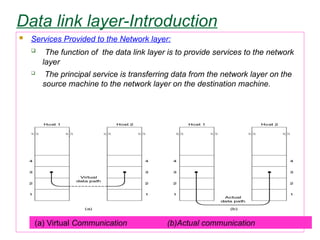
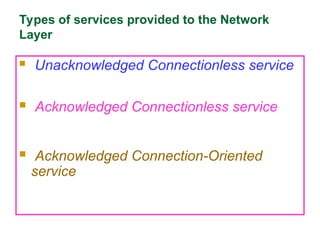
  • 276.
    2. Disassociation:  Eitherthe station or BS may disassociate, thus breaking the relationship.  A station should use this service before shutting down or leaving, but the BS may also use it before going down for maintenance. 3. Reassociation: A station may change its preferred BS using this service. This facility is useful for MSs moving from one cell to another