Data CommunicationData Communication
S.K.GaikwadS.K.Gaikwad
Overview
OVERVIEW
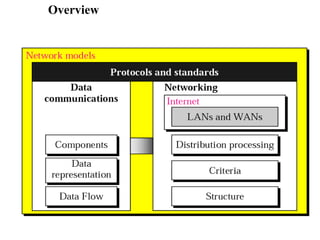
1. Data Communications
2. Networks
3. The Internet
4. Protocols and Standards
Data Communication
Components
Data Representation
Direction of Data Flow
Definitions
‱ Telecommunication: Communication at a distance
‱ Data: Information presented in whatever form is
agreed upon by the parties creating and using the data
‱ Data communications: Exchange of data between two
devices via some form of transmission medium such as
a wire cable.
‱ The effectiveness of data communications depends
upon three fundamental characteristics:
– Delivery: Deliver data to the correct destination.
– Accuracy: Deliver the data accurately.
– Timeliness: Deliver data in a timely manner. Real-time
transmission requires timely delivery [without significant
delay].
– Jitter: It refers to the variation in the packet arrival time.
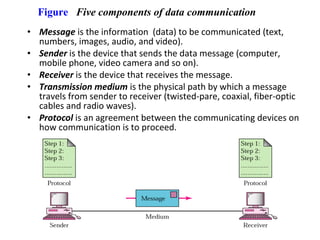
Figure Five components of data communication
‱ Message is the information (data) to be communicated (text,
numbers, images, audio, and video).
‱ Sender is the device that sends the data message (computer,
mobile phone, video camera and so on).
‱ Receiver is the device that receives the message.
‱ Transmission medium is the physical path by which a message
travels from sender to receiver (twisted-pare, coaxial, fiber-optic
cables and radio waves).
‱ Protocol is an agreement between the communicating devices on
how communication is to proceed.
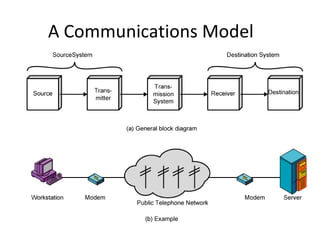
A Communications Model
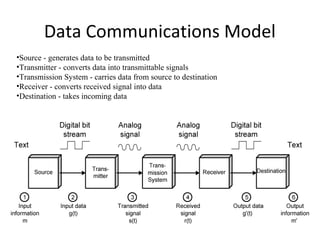
Data Communications Model
‱Source - generates data to be transmitted
‱Transmitter - converts data into transmittable signals
‱Transmission System - carries data from source to destination
‱Receiver - converts received signal into data
‱Destination - takes incoming data
Figure Simplex
‱ Data representation:
– Text: bits called as codes.
– ASCII(7 bits), Extended ASCII (8 bits)
– Unicode: 16 bits; used to represent different languages
– ISO: 32-bit
– Numbers, Image [Pixels; size of pixels depends on resolution],
Audio, Video
‱ Data Flow: Simplex [Unidirectional]
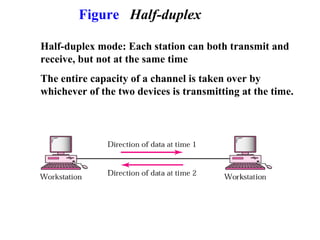
Figure Half-duplex
Half-duplex mode: Each station can both transmit and
receive, but not at the same time
The entire capacity of a channel is taken over by
whichever of the two devices is transmitting at the time.
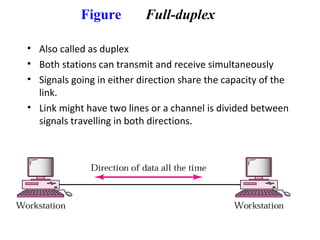
Figure Full-duplex
‱ Also called as duplex
‱ Both stations can transmit and receive simultaneously
‱ Signals going in either direction share the capacity of the
link.
‱ Link might have two lines or a channel is divided between
signals travelling in both directions.
Networks
Network: set of devices connected by
communication links.
Distributed Processing: Task is divided
among multiple computers.
Network Criteria
1. Performance: Transit and response time.
 Transit time is the amount of time required for a message
to travel from one device to another.
 Response time is the elapsed time between an inquiry and
a response.
 Depends upon number of users, type of transmission
medium, capabilities of hardware, efficiency of software.
2. Reliability is measured by :
1) accuracy of delivery;
2)frequency of failure;
3) time it takes a link recover from failure.
3. Security include:
1) protecting data from unauthorized access;
2) protecting data from damage;
3) development recovery policies and procedures.
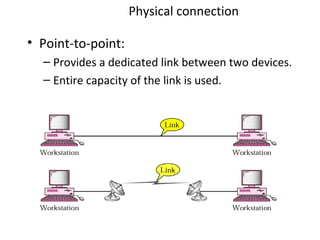
Physical connection
‱ Point-to-point:
– Provides a dedicated link between two devices.
– Entire capacity of the link is used.
Figure Multipoint connection
‱ Also called as multidrop.
‱ More than two specific devices share [spatially or
temporally] a single link.
‱ Spatially shared: Several devices can use the link
simultaneously
‱ Timeshare: Users must take turns.
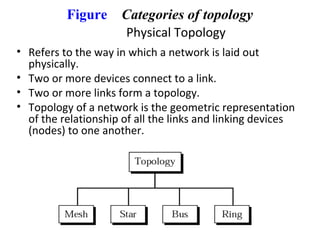
Figure Categories of topology
Physical Topology
‱ Refers to the way in which a network is laid out
physically.
‱ Two or more devices connect to a link.
‱ Two or more links form a topology.
‱ Topology of a network is the geometric representation
of the relationship of all the links and linking devices
(nodes) to one another.
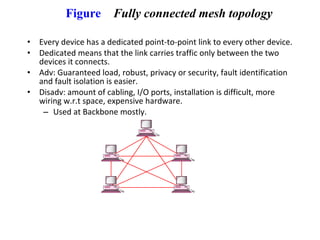
Figure Fully connected mesh topology
‱ Every device has a dedicated point-to-point link to every other device.
‱ Dedicated means that the link carries traffic only between the two
devices it connects.
‱ Adv: Guaranteed load, robust, privacy or security, fault identification
and fault isolation is easier.
‱ Disadv: amount of cabling, I/O ports, installation is difficult, more
wiring w.r.t space, expensive hardware.
– Used at Backbone mostly.
Figure Star topology
‱ Each device has a dedicated pt-to-pt link only to a
central controller [Hub].
‱ No direct connection or traffic.
Advantages
‱ It is easy to modify & new computers can be added to the
central hub or any computer can be removed without affecting
the network.
‱ It is usually easy to troubleshoot a star network.
‱ If any computer in the star topology breaks down, the network
is not affected.
‱ It is more flexible among the remaining topology.
‱ It is much fast topology.
‱ Multiple cable types supported by hubs.
Disadvantages
‱ If the central hub fails, the whole network breaks down.
‱ Star network requires more communication cable than any
other network.
‱ It is more expensive.
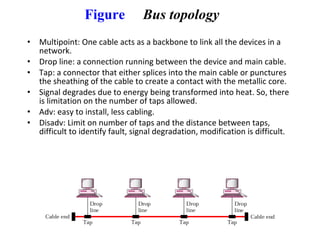
Figure Bus topology
‱ Multipoint: One cable acts as a backbone to link all the devices in a
network.
‱ Drop line: a connection running between the device and main cable.
‱ Tap: a connector that either splices into the main cable or punctures
the sheathing of the cable to create a contact with the metallic core.
‱ Signal degrades due to energy being transformed into heat. So, there
is limitation on the number of taps allowed.
‱ Adv: easy to install, less cabling.
‱ Disadv: Limit on number of taps and the distance between taps,
difficult to identify fault, signal degradation, modification is difficult.
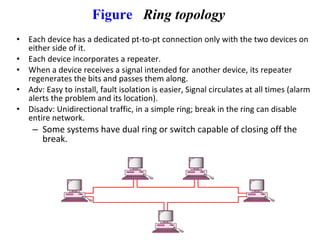
Figure Ring topology
‱ Each device has a dedicated pt-to-pt connection only with the two devices on
either side of it.
‱ Each device incorporates a repeater.
‱ When a device receives a signal intended for another device, its repeater
regenerates the bits and passes them along.
‱ Adv: Easy to install, fault isolation is easier, Signal circulates at all times (alarm
alerts the problem and its location).
‱ Disadv: Unidirectional traffic, in a simple ring; break in the ring can disable
entire network.
– Some systems have dual ring or switch capable of closing off the
break.
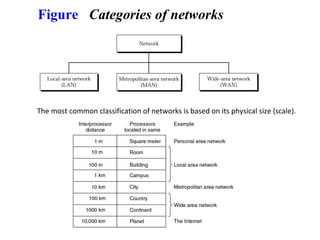
Figure Categories of networks
The most common classification of networks is based on its physical size (scale).
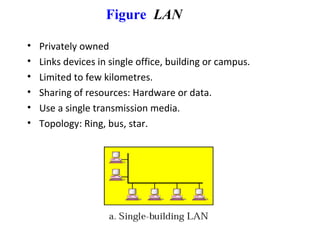
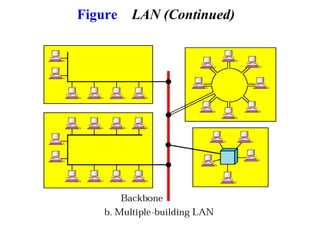
Figure LAN
‱ Privately owned
‱ Links devices in single office, building or campus.
‱ Limited to few kilometres.
‱ Sharing of resources: Hardware or data.
‱ Use a single transmission media.
‱ Topology: Ring, bus, star.
Figure LAN (Continued)
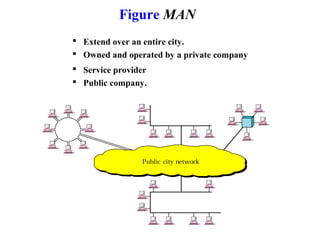
Figure MAN
 Extend over an entire city.
 Owned and operated by a private company
 Service provider
 Public company.
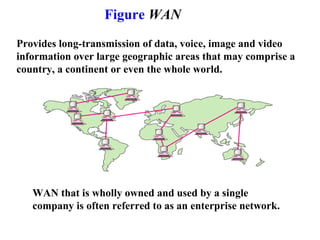
Figure WAN
Provides long-transmission of data, voice, image and video
information over large geographic areas that may comprise a
country, a continent or even the whole world.
WAN that is wholly owned and used by a single
company is often referred to as an enterprise network.
27
- Every device in the home will be capable of
communicating with every other device, and all of them will
be accessible over the Internet.
- Examples of devices that are capable of being
networked:
1- Computers (PC, Notebook, PDA)
2-Entertainment (TV, DVD, Camera...)
3-Telecommunications (telephone, intercom...)
4-Appliances (microwave, refrigerator, lights
)
5- Telemetry (smoke alarm, thermostat, babycam
)
Home Networks
28
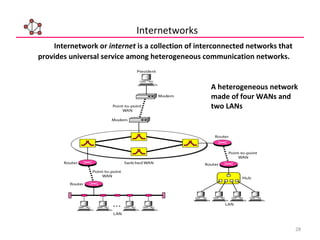
Internetwork or internet is a collection of interconnected networks that
provides universal service among heterogeneous communication networks.
Internetworks
A heterogeneous network
made of four WANs and
two LANs
29
The Internet (1)
The Internet has revolutionized many aspects of our daily lives. It has
affected the way we do business as well as the way we spend our leisure time.
The Internet is a communication system that has brought a wealth of
information to our fingertips and organized it for our use.
History of the Internet:
1968 - DARPA (Defense Advanced Research Projects Agency)
contracts with BBN (Bolt, Beranek & Newman) to create
ARPAnet
1970 - First five nodes:
UCLA
Stanford
UC Santa Barbara
U of Utah, and
BBN
1974 - TCP specification by Vint Cerf
1984 – On January 1, the Internet with its 1000 hosts
converts en masse to using TCP/IP for its messaging
30
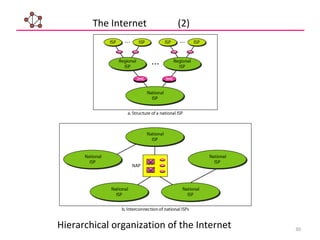
Hierarchical organization of the Internet
The Internet (2)
31
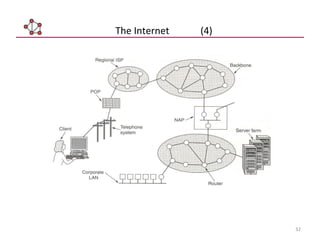
- The Internet today is run by private companies, not the government.
- The national Internet service providers are backbone networks created and
maintained by specialized companies.
- These backbone networks are connected by complex switching stations
(normally run by a third party) called network access points (NAPs).
- Local ISPs can be connected to a regional or national service provider.
- Most end users are connected to the local ISPs.
The Internet (3)
32
The Internet (4)
34
Networking Standards (1)
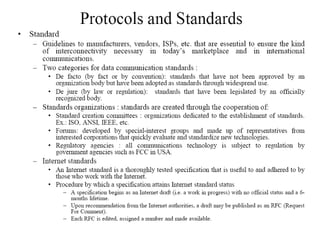
In this section, we define two widely used terms: protocols and standards.
First, we define protocol, which is synonymous with rule. Then we discuss
standards, which are agreed-upon rules.
A protocol is a set of rules that governs data communication; the key elements of
a protocol are syntax, semantics, and timing.
- The term syntax refers to the structure or format of the data, meaning the order in
which they are presented.
- The word semantics refers to the meaning of each section of bits. How is a
particular pattern to be interpreted, and what action is to be taken based on that
interpretation?
- The term timing refers to two characteristics: when data should be sent and how
fast they can be sent.
35
Networking Standards (2)
Advantages of standards
‱ A standard assures that there will be a large market for a particular piece
of equipment or software.
‱ A standard allows products from multiple vendors to communicate.
Disadvantages of standards
‱ A standard tends to freeze the technology.
‱ There are multiple standards for the same thing.
Standards are necessary to ensure that products from different manufacturers
can work together as expected.
36
Networking Standards (3)
Standards are developed through the cooperation of standards creation
committees, forums, and government regulatory agencies.
The ISO, ITU-T, ANSI, IEEE, and IETF are some of the organizations
involved in standards creation.
ISO - International Organization for Standardization
ITU-T - International Telecommunication Union-Telecommunication Standards
Sector
ANSI - American National Standards Institute
IEEE - Institute of Electrical and Electronics Engineers
IETF - Internet Engineering Task Force
- Forums are special-interest groups that quickly evaluate and
standardize new technologies.
- A Request for Comment (RFC) is an idea or concept that is a
originator to an Internet standard.
37
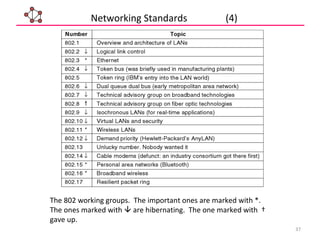
The 802 working groups. The important ones are marked with *.
The ones marked with ïƒą are hibernating. The one marked with †
gave up.
Networking Standards (4)
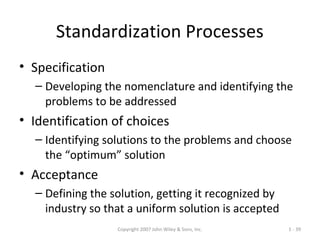
Copyright 2007 John Wiley & Sons, Inc. 1 - 38
Standards
‱ Importance
– Provide a “fixed” way for hardware and/or software systems
(different companies) to communicate
– Help promote competition and decrease the price
‱ Types of Standards
– Formal standards
‱ Developed by an industry or government standards-making body
– De-facto standards
‱ Emerge in the marketplace and widely used
‱ Lack official backing by a standards-making body
Copyright 2007 John Wiley & Sons, Inc. 1 - 39
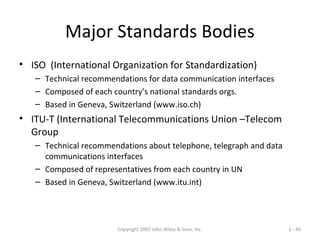
Standardization Processes
‱ Specification
– Developing the nomenclature and identifying the
problems to be addressed
‱ Identification of choices
– Identifying solutions to the problems and choose
the “optimum” solution
‱ Acceptance
– Defining the solution, getting it recognized by
industry so that a uniform solution is accepted
Copyright 2007 John Wiley & Sons, Inc. 1 - 40
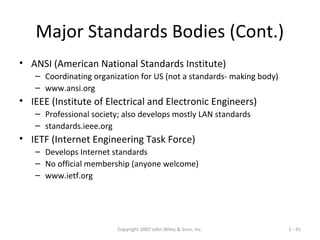
Major Standards Bodies
‱ ISO (International Organization for Standardization)
– Technical recommendations for data communication interfaces
– Composed of each country’s national standards orgs.
– Based in Geneva, Switzerland (www.iso.ch)
‱ ITU-T (International Telecommunications Union –Telecom
Group
– Technical recommendations about telephone, telegraph and data
communications interfaces
– Composed of representatives from each country in UN
– Based in Geneva, Switzerland (www.itu.int)
Copyright 2007 John Wiley & Sons, Inc. 1 - 41
Major Standards Bodies (Cont.)
‱ ANSI (American National Standards Institute)
– Coordinating organization for US (not a standards- making body)
– www.ansi.org
‱ IEEE (Institute of Electrical and Electronic Engineers)
– Professional society; also develops mostly LAN standards
– standards.ieee.org
‱ IETF (Internet Engineering Task Force)
– Develops Internet standards
– No official membership (anyone welcome)
– www.ietf.org
Copyright 2007 John Wiley & Sons, Inc. 1 - 42
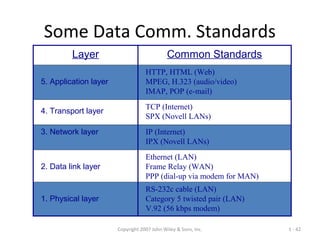
Some Data Comm. Standards
Layer Common Standards
5. Application layer
HTTP, HTML (Web)
MPEG, H.323 (audio/video)
IMAP, POP (e-mail)
4. Transport layer
TCP (Internet)
SPX (Novell LANs)
3. Network layer IP (Internet)
IPX (Novell LANs)
2. Data link layer
Ethernet (LAN)
Frame Relay (WAN)
PPP (dial-up via modem for MAN)
1. Physical layer
RS-232c cable (LAN)
Category 5 twisted pair (LAN)
V.92 (56 kbps modem)

Dc1 t1

  • 1.
  • 2.
  • 3.
    OVERVIEW 1. Data Communications 2.Networks 3. The Internet 4. Protocols and Standards
  • 4.
  • 5.
    Definitions ‱ Telecommunication: Communicationat a distance ‱ Data: Information presented in whatever form is agreed upon by the parties creating and using the data ‱ Data communications: Exchange of data between two devices via some form of transmission medium such as a wire cable. ‱ The effectiveness of data communications depends upon three fundamental characteristics: – Delivery: Deliver data to the correct destination. – Accuracy: Deliver the data accurately. – Timeliness: Deliver data in a timely manner. Real-time transmission requires timely delivery [without significant delay]. – Jitter: It refers to the variation in the packet arrival time.
  • 6.
    Figure Five componentsof data communication ‱ Message is the information (data) to be communicated (text, numbers, images, audio, and video). ‱ Sender is the device that sends the data message (computer, mobile phone, video camera and so on). ‱ Receiver is the device that receives the message. ‱ Transmission medium is the physical path by which a message travels from sender to receiver (twisted-pare, coaxial, fiber-optic cables and radio waves). ‱ Protocol is an agreement between the communicating devices on how communication is to proceed.
  • 7.
  • 8.
    Data Communications Model ‱Source- generates data to be transmitted ‱Transmitter - converts data into transmittable signals ‱Transmission System - carries data from source to destination ‱Receiver - converts received signal into data ‱Destination - takes incoming data
  • 9.
    Figure Simplex ‱ Datarepresentation: – Text: bits called as codes. – ASCII(7 bits), Extended ASCII (8 bits) – Unicode: 16 bits; used to represent different languages – ISO: 32-bit – Numbers, Image [Pixels; size of pixels depends on resolution], Audio, Video ‱ Data Flow: Simplex [Unidirectional]
  • 10.
    Figure Half-duplex Half-duplex mode:Each station can both transmit and receive, but not at the same time The entire capacity of a channel is taken over by whichever of the two devices is transmitting at the time.
  • 11.
    Figure Full-duplex ‱ Alsocalled as duplex ‱ Both stations can transmit and receive simultaneously ‱ Signals going in either direction share the capacity of the link. ‱ Link might have two lines or a channel is divided between signals travelling in both directions.
  • 12.
    Networks Network: set ofdevices connected by communication links. Distributed Processing: Task is divided among multiple computers.
  • 13.
    Network Criteria 1. Performance:Transit and response time.  Transit time is the amount of time required for a message to travel from one device to another.  Response time is the elapsed time between an inquiry and a response.  Depends upon number of users, type of transmission medium, capabilities of hardware, efficiency of software. 2. Reliability is measured by : 1) accuracy of delivery; 2)frequency of failure; 3) time it takes a link recover from failure. 3. Security include: 1) protecting data from unauthorized access; 2) protecting data from damage; 3) development recovery policies and procedures.
  • 14.
    Physical connection ‱ Point-to-point: –Provides a dedicated link between two devices. – Entire capacity of the link is used.
  • 15.
    Figure Multipoint connection ‱Also called as multidrop. ‱ More than two specific devices share [spatially or temporally] a single link. ‱ Spatially shared: Several devices can use the link simultaneously ‱ Timeshare: Users must take turns.
  • 16.
    Figure Categories oftopology Physical Topology ‱ Refers to the way in which a network is laid out physically. ‱ Two or more devices connect to a link. ‱ Two or more links form a topology. ‱ Topology of a network is the geometric representation of the relationship of all the links and linking devices (nodes) to one another.
  • 17.
    Figure Fully connectedmesh topology ‱ Every device has a dedicated point-to-point link to every other device. ‱ Dedicated means that the link carries traffic only between the two devices it connects. ‱ Adv: Guaranteed load, robust, privacy or security, fault identification and fault isolation is easier. ‱ Disadv: amount of cabling, I/O ports, installation is difficult, more wiring w.r.t space, expensive hardware. – Used at Backbone mostly.
  • 18.
    Figure Star topology ‱Each device has a dedicated pt-to-pt link only to a central controller [Hub]. ‱ No direct connection or traffic.
  • 19.
    Advantages ‱ It iseasy to modify & new computers can be added to the central hub or any computer can be removed without affecting the network. ‱ It is usually easy to troubleshoot a star network. ‱ If any computer in the star topology breaks down, the network is not affected. ‱ It is more flexible among the remaining topology. ‱ It is much fast topology. ‱ Multiple cable types supported by hubs. Disadvantages ‱ If the central hub fails, the whole network breaks down. ‱ Star network requires more communication cable than any other network. ‱ It is more expensive.
  • 20.
    Figure Bus topology ‱Multipoint: One cable acts as a backbone to link all the devices in a network. ‱ Drop line: a connection running between the device and main cable. ‱ Tap: a connector that either splices into the main cable or punctures the sheathing of the cable to create a contact with the metallic core. ‱ Signal degrades due to energy being transformed into heat. So, there is limitation on the number of taps allowed. ‱ Adv: easy to install, less cabling. ‱ Disadv: Limit on number of taps and the distance between taps, difficult to identify fault, signal degradation, modification is difficult.
  • 21.
    Figure Ring topology ‱Each device has a dedicated pt-to-pt connection only with the two devices on either side of it. ‱ Each device incorporates a repeater. ‱ When a device receives a signal intended for another device, its repeater regenerates the bits and passes them along. ‱ Adv: Easy to install, fault isolation is easier, Signal circulates at all times (alarm alerts the problem and its location). ‱ Disadv: Unidirectional traffic, in a simple ring; break in the ring can disable entire network. – Some systems have dual ring or switch capable of closing off the break.
  • 22.
    Figure Categories ofnetworks The most common classification of networks is based on its physical size (scale).
  • 23.
    Figure LAN ‱ Privatelyowned ‱ Links devices in single office, building or campus. ‱ Limited to few kilometres. ‱ Sharing of resources: Hardware or data. ‱ Use a single transmission media. ‱ Topology: Ring, bus, star.
  • 24.
  • 25.
    Figure MAN  Extendover an entire city.  Owned and operated by a private company  Service provider  Public company.
  • 26.
    Figure WAN Provides long-transmissionof data, voice, image and video information over large geographic areas that may comprise a country, a continent or even the whole world. WAN that is wholly owned and used by a single company is often referred to as an enterprise network.
  • 27.
    27 - Every devicein the home will be capable of communicating with every other device, and all of them will be accessible over the Internet. - Examples of devices that are capable of being networked: 1- Computers (PC, Notebook, PDA) 2-Entertainment (TV, DVD, Camera...) 3-Telecommunications (telephone, intercom...) 4-Appliances (microwave, refrigerator, lights
) 5- Telemetry (smoke alarm, thermostat, babycam
) Home Networks
  • 28.
    28 Internetwork or internetis a collection of interconnected networks that provides universal service among heterogeneous communication networks. Internetworks A heterogeneous network made of four WANs and two LANs
  • 29.
    29 The Internet (1) TheInternet has revolutionized many aspects of our daily lives. It has affected the way we do business as well as the way we spend our leisure time. The Internet is a communication system that has brought a wealth of information to our fingertips and organized it for our use. History of the Internet: 1968 - DARPA (Defense Advanced Research Projects Agency) contracts with BBN (Bolt, Beranek & Newman) to create ARPAnet 1970 - First five nodes: UCLA Stanford UC Santa Barbara U of Utah, and BBN 1974 - TCP specification by Vint Cerf 1984 – On January 1, the Internet with its 1000 hosts converts en masse to using TCP/IP for its messaging
  • 30.
    30 Hierarchical organization ofthe Internet The Internet (2)
  • 31.
    31 - The Internettoday is run by private companies, not the government. - The national Internet service providers are backbone networks created and maintained by specialized companies. - These backbone networks are connected by complex switching stations (normally run by a third party) called network access points (NAPs). - Local ISPs can be connected to a regional or national service provider. - Most end users are connected to the local ISPs. The Internet (3)
  • 32.
  • 34.
    34 Networking Standards (1) Inthis section, we define two widely used terms: protocols and standards. First, we define protocol, which is synonymous with rule. Then we discuss standards, which are agreed-upon rules. A protocol is a set of rules that governs data communication; the key elements of a protocol are syntax, semantics, and timing. - The term syntax refers to the structure or format of the data, meaning the order in which they are presented. - The word semantics refers to the meaning of each section of bits. How is a particular pattern to be interpreted, and what action is to be taken based on that interpretation? - The term timing refers to two characteristics: when data should be sent and how fast they can be sent.
  • 35.
    35 Networking Standards (2) Advantagesof standards ‱ A standard assures that there will be a large market for a particular piece of equipment or software. ‱ A standard allows products from multiple vendors to communicate. Disadvantages of standards ‱ A standard tends to freeze the technology. ‱ There are multiple standards for the same thing. Standards are necessary to ensure that products from different manufacturers can work together as expected.
  • 36.
    36 Networking Standards (3) Standardsare developed through the cooperation of standards creation committees, forums, and government regulatory agencies. The ISO, ITU-T, ANSI, IEEE, and IETF are some of the organizations involved in standards creation. ISO - International Organization for Standardization ITU-T - International Telecommunication Union-Telecommunication Standards Sector ANSI - American National Standards Institute IEEE - Institute of Electrical and Electronics Engineers IETF - Internet Engineering Task Force - Forums are special-interest groups that quickly evaluate and standardize new technologies. - A Request for Comment (RFC) is an idea or concept that is a originator to an Internet standard.
  • 37.
    37 The 802 workinggroups. The important ones are marked with *. The ones marked with ïƒą are hibernating. The one marked with † gave up. Networking Standards (4)
  • 38.
    Copyright 2007 JohnWiley & Sons, Inc. 1 - 38 Standards ‱ Importance – Provide a “fixed” way for hardware and/or software systems (different companies) to communicate – Help promote competition and decrease the price ‱ Types of Standards – Formal standards ‱ Developed by an industry or government standards-making body – De-facto standards ‱ Emerge in the marketplace and widely used ‱ Lack official backing by a standards-making body
  • 39.
    Copyright 2007 JohnWiley & Sons, Inc. 1 - 39 Standardization Processes ‱ Specification – Developing the nomenclature and identifying the problems to be addressed ‱ Identification of choices – Identifying solutions to the problems and choose the “optimum” solution ‱ Acceptance – Defining the solution, getting it recognized by industry so that a uniform solution is accepted
  • 40.
    Copyright 2007 JohnWiley & Sons, Inc. 1 - 40 Major Standards Bodies ‱ ISO (International Organization for Standardization) – Technical recommendations for data communication interfaces – Composed of each country’s national standards orgs. – Based in Geneva, Switzerland (www.iso.ch) ‱ ITU-T (International Telecommunications Union –Telecom Group – Technical recommendations about telephone, telegraph and data communications interfaces – Composed of representatives from each country in UN – Based in Geneva, Switzerland (www.itu.int)
  • 41.
    Copyright 2007 JohnWiley & Sons, Inc. 1 - 41 Major Standards Bodies (Cont.) ‱ ANSI (American National Standards Institute) – Coordinating organization for US (not a standards- making body) – www.ansi.org ‱ IEEE (Institute of Electrical and Electronic Engineers) – Professional society; also develops mostly LAN standards – standards.ieee.org ‱ IETF (Internet Engineering Task Force) – Develops Internet standards – No official membership (anyone welcome) – www.ietf.org
  • 42.
    Copyright 2007 JohnWiley & Sons, Inc. 1 - 42 Some Data Comm. Standards Layer Common Standards 5. Application layer HTTP, HTML (Web) MPEG, H.323 (audio/video) IMAP, POP (e-mail) 4. Transport layer TCP (Internet) SPX (Novell LANs) 3. Network layer IP (Internet) IPX (Novell LANs) 2. Data link layer Ethernet (LAN) Frame Relay (WAN) PPP (dial-up via modem for MAN) 1. Physical layer RS-232c cable (LAN) Category 5 twisted pair (LAN) V.92 (56 kbps modem)

Editor's Notes

  • #8 The fundamental purpose of a communications system is the exchange of data between two parties. This section introduces a simple model of communication, illustrated in general and by specific example in Stallings DCC8e Figure 1.2. The key elements of this model are: Source - generates data to be transmitted Transmitter - converts data into transmittable signals Transmission System - carries data from source to destination Receiver - converts received signal into data Destination - takes incoming data What is the basis of 56 Kbps modem?
  • #9 The next section of the text on "Data Communications”, deals with the most fundamental aspects of the communications function, focusing on the transmission of signals in a reliable and efficient manner. Stallings DCC8e Figure 1.3 provides a new perspective on the communications model of Figure 1.2a. We trace the details of this figure using electronic mail as an example. Assume a PC user wants to send an email message m to another user. The process is modeled as follows: user keys in message m comprising bits g buffered in source PC memory input data is transferred to I/O device (transmitter) as sequence of bits g(t) using voltage shifts transmitter converts these into a signal s(t) suitable for transmission media being used whilst transmitting media signal may be impaired so received signal r(t) may differ from s(t) receiver decodes signal recovering g’(t) as estimate of original g(t) which is buffered in destination PC memory as bits g’ being the received message m’