Computer NetworksStructure and Types
Connecting Devices
BY
Dr. SAJEEVE V.P.

2/2/2014

Dr.SAJEEVE VP

1
Network- meaning
Linking of two or more computers
with or without wires
so as to provide access- mutual or one way

2/2/2014

Dr.SAJEEVE VP

2
Network – types-

1.
2.
3.
4.

Based on structure-Star, Bus, Ring, Mesh
Based on Area- WAN, LAN, MAN
Based on status- Client-Server, Peer-Peer
Based on Purpose- Storage Area Network,
others

2/2/2014

Dr.SAJEEVE VP

3
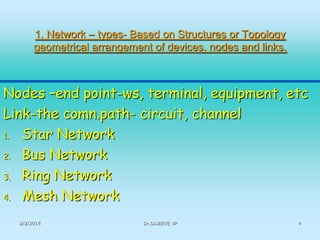
1. Network – types- Based on Structures or Topology
geometrical arrangement of devices, nodes and links,

Nodes –end point-ws, terminal, equipment, etc
Link-the comn.path- circuit, channel
1. Star Network
2. Bus Network
3. Ring Network
4. Mesh Network
2/2/2014

Dr.SAJEEVE VP

4
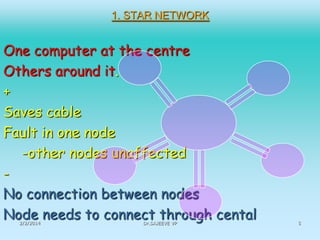
1. STAR NETWORK

One computer at the centre
Others around it.
+
Saves cable
Fault in one node
-other nodes unaffected
No connection between nodes
Node needs to connect through cental
2/2/2014

Dr.SAJEEVE VP

5
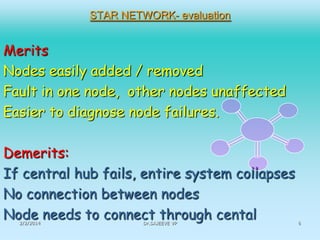
STAR NETWORK- evaluation

Merits
Nodes easily added / removed
Fault in one node, other nodes unaffected
Easier to diagnose node failures.
Demerits:
If central hub fails, entire system collapses
No connection between nodes
Node needs to connect through cental
2/2/2014

Dr.SAJEEVE VP

6
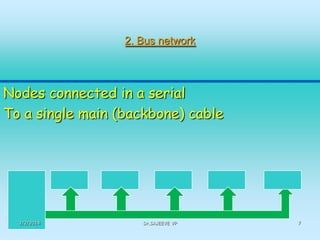
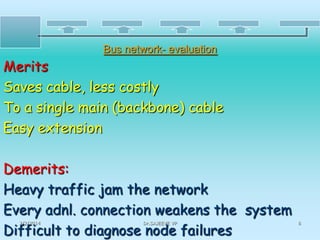
2. Bus network

Nodes connected in a serial
To a single main (backbone) cable

2/2/2014

Dr.SAJEEVE VP

7
Bus network- evaluation

Merits
Saves cable, less costly
To a single main (backbone) cable
Easy extension
Demerits:
Heavy traffic jam the network
Every adnl. connection weakens the system
Difficult to diagnose node failures
2/2/2014

Dr.SAJEEVE VP

8
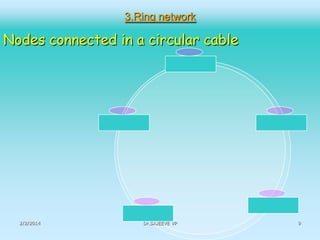
3.Ring network

Nodes connected in a circular cable

2/2/2014

Dr.SAJEEVE VP

9
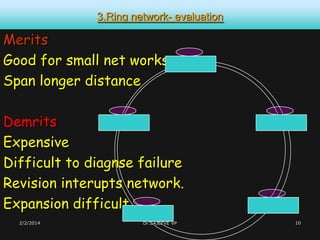
3.Ring network- evaluation

Merits
Good for small net works
Span longer distance
Demrits
Expensive
Difficult to diagnse failure
Revision interupts network.
Expansion difficult
2/2/2014

Dr.SAJEEVE VP

10
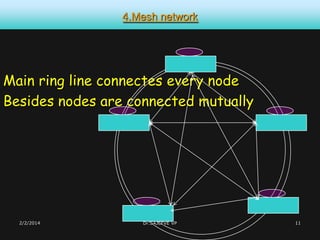
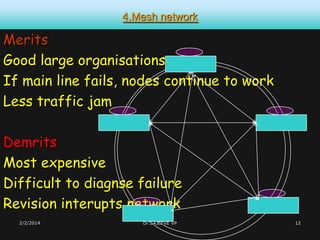
4.Mesh network

Main ring line connectes every node
Besides nodes are connected mutually

2/2/2014

Dr.SAJEEVE VP

11
4.Mesh network

Merits
Good large organisations
If main line fails, nodes continue to work
Less traffic jam

Demrits
Most expensive
Difficult to diagnse failure
Revision interupts network
2/2/2014

Dr.SAJEEVE VP

12
Network – what for? -USES

1.Sharing of resources
 Processor speed
 Storage
 Hardwares
-Peripherals connected-printer, scanner,
camera, microphone, speakers, projector
-Softare
-Internet services
2. Savings in cost / resources/ installation
2/2/2014

Dr.SAJEEVE VP

13
Network – what for

3. Quick, real-time two-way communication
Information / data transfer
Banking, fund transfer, email.
4. Easy and quick access to files
5. Personal touchvideo call and conference
6. Leads to efficiency-prompt employees to
report to, work in time.
7. Distributed processing
8. Less supervision-system auto-checks
2/2/2014

Dr.SAJEEVE VP

14
Network – risks

1. Failure of one unit in the network collapses
the entire system
2. Too much sophistication makes difficult to
manage and operate without experts
3. Data loss affects the entire system,
especially if no proper backup.
4. Cost
5. Nodes not independent- permission
2/2/2014

Dr.SAJEEVE VP

15
2. Network – Types Based on area




LAN- Local Area Network
MAN- Metropolitan (medium) Area Net Work
WAN – Wide Area Network

2/2/2014

Dr.SAJEEVE VP

16
LANLocal Area Network
Network of computers
in restricted (small) limited geographical area.
Whole network confines to single site.
Within an office, one organisation, campus.
2/2/2014

Dr.SAJEEVE VP

17
LAN- Components







File servers
Network operating system (software)
PC, W. Stns, nodes-(computers)
Network interface cards
Cabling / wireless connectivity
2/2/2014

Dr.SAJEEVE VP

18
3. Network types- Based on statusNetwork Architectureorganisation of networks
Client – server (main-sub)
one main computer serving the nodes
several nodes needing permission to access
Peer-to peer (equal status)
All computers are of same status
having equal access to any other.
no permission needed
2/2/2014

Dr.SAJEEVE VP

19
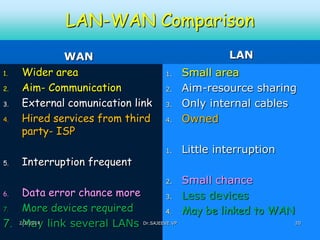
LAN-WAN Comparison
1.

2.
3.
4.

5.

WAN
Wider area
Aim- Communication
External comunication link
Hired services from third
party- ISP
Interruption frequent

LAN

4.

Small area
Aim-resource sharing
Only internal cables
Owned

1.

Little interruption

1.

2.
3.

2.

Data error chance more
3.
7.
More devices required
4.
7. 2/2/2014 link several LANs Dr.SAJEEVE VP
May
6.

Small chance
Less devices
May be linked to WAN
20
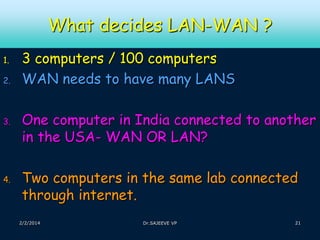
What decides LAN-WAN ?
1.
2.

3.

4.

3 computers / 100 computers
WAN needs to have many LANS
One computer in India connected to another
in the USA- WAN OR LAN?
Two computers in the same lab connected
through internet.
2/2/2014

Dr.SAJEEVE VP

21
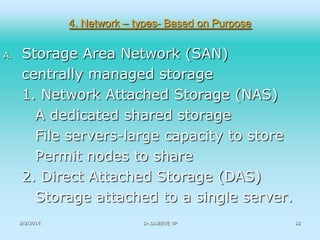
4. Network – types- Based on Purpose
A.

Storage Area Network (SAN)
centrally managed storage
1. Network Attached Storage (NAS)
A dedicated shared storage
File servers-large capacity to store
Permit nodes to share
2. Direct Attached Storage (DAS)
Storage attached to a single server.
2/2/2014

Dr.SAJEEVE VP

22
5. Other Network – types- Based on Purpose

Based on mode of connection
Wireless and wired
Global and national

Information super Highway
global networking
all digitally deliverable services.
2/2/2014

Dr.SAJEEVE VP

23
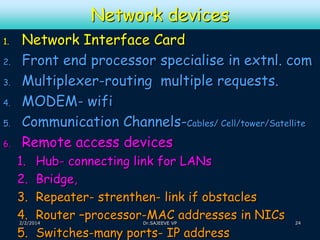
Network devices
1.
2.
3.
4.
5.

6.

Network Interface Card
Front end processor specialise in extnl. com
Multiplexer-routing multiple requests.
MODEM- wifi
Communication Channels-Cables/ Cell/tower/Satellite
Remote access devices
1.
2.
3.
4.
5.

Hub- connecting link for LANs
Bridge,
Repeater- strenthen- link if obstacles
Router –processor-MAC addresses in NICs
Switches-many ports- IP address

2/2/2014

Dr.SAJEEVE VP

24
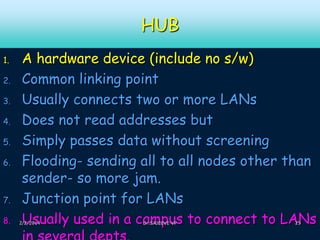
HUB
1.
2.
3.
4.

5.
6.

7.
8.

A hardware device (include no s/w)
Common linking point
Usually connects two or more LANs
Does not read addresses but
Simply passes data without screening
Flooding- sending all to all nodes other than
sender- so more jam.
Junction point for LANs
Usually used in a campus to connect to LANs

2/2/2014

Dr.SAJEEVE VP

25
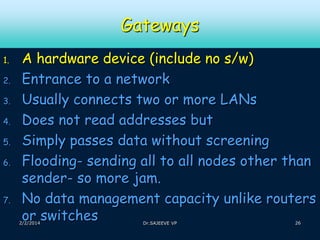
Gateways
1.
2.
3.
4.

5.
6.

7.

A hardware device (include no s/w)
Entrance to a network
Usually connects two or more LANs
Does not read addresses but
Simply passes data without screening
Flooding- sending all to all nodes other than
sender- so more jam.
No data management capacity unlike routers
or switches

2/2/2014

Dr.SAJEEVE VP

26
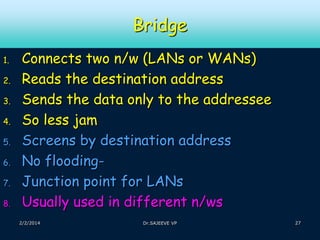
Bridge
1.
2.
3.
4.

5.
6.
7.
8.

Connects two n/w (LANs or WANs)
Reads the destination address
Sends the data only to the addressee
So less jam
Screens by destination address
No floodingJunction point for LANs
Usually used in different n/ws
2/2/2014

Dr.SAJEEVE VP

27
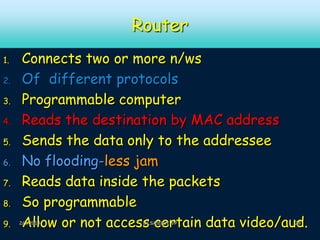
Router
1.
2.
3.
4.

5.
6.
7.
8.
9.

Connects two or more n/ws
Of different protocols
Programmable computer
Reads the destination by MAC address
Sends the data only to the addressee
No flooding-less jam
Reads data inside the packets
So programmable
Allow or not access certain data video/aud.

2/2/2014

Dr.SAJEEVE VP

28
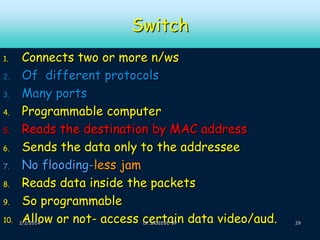
Switch
1.
2.
3.
4.
5.
6.
7.
8.
9.
10.

Connects two or more n/ws
Of different protocols
Many ports
Programmable computer
Reads the destination by MAC address
Sends the data only to the addressee
No flooding-less jam
Reads data inside the packets
So programmable
Allow or not- access certain data video/aud.

2/2/2014

Dr.SAJEEVE VP

29
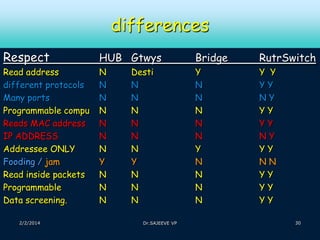
differences
Respect

HUB Gtwys

Bridge

RutrSwitch

Read address
different protocols
Many ports
Programmable compu
Reads MAC address
IP ADDRESS
Addressee ONLY
Fooding / jam
Read inside packets
Programmable
Data screening.

N
N
N
N
N
N
N
Y
N
N
N

Y
N
N
N
N
N
Y
N
N
N
N

Y Y
YY
NY
YY
YY
NY
YY
NN
YY
YY
YY

2/2/2014

Desti
N
N
N
N
N
N
Y
N
N
N
Dr.SAJEEVE VP

30

Computer netwoks meaning, types, benefits

  • 1.
    Computer NetworksStructure andTypes Connecting Devices BY Dr. SAJEEVE V.P. 2/2/2014 Dr.SAJEEVE VP 1
  • 2.
    Network- meaning Linking oftwo or more computers with or without wires so as to provide access- mutual or one way 2/2/2014 Dr.SAJEEVE VP 2
  • 3.
    Network – types- 1. 2. 3. 4. Basedon structure-Star, Bus, Ring, Mesh Based on Area- WAN, LAN, MAN Based on status- Client-Server, Peer-Peer Based on Purpose- Storage Area Network, others 2/2/2014 Dr.SAJEEVE VP 3
  • 4.
    1. Network –types- Based on Structures or Topology geometrical arrangement of devices, nodes and links, Nodes –end point-ws, terminal, equipment, etc Link-the comn.path- circuit, channel 1. Star Network 2. Bus Network 3. Ring Network 4. Mesh Network 2/2/2014 Dr.SAJEEVE VP 4
  • 5.
    1. STAR NETWORK Onecomputer at the centre Others around it. + Saves cable Fault in one node -other nodes unaffected No connection between nodes Node needs to connect through cental 2/2/2014 Dr.SAJEEVE VP 5
  • 6.
    STAR NETWORK- evaluation Merits Nodeseasily added / removed Fault in one node, other nodes unaffected Easier to diagnose node failures. Demerits: If central hub fails, entire system collapses No connection between nodes Node needs to connect through cental 2/2/2014 Dr.SAJEEVE VP 6
  • 7.
    2. Bus network Nodesconnected in a serial To a single main (backbone) cable 2/2/2014 Dr.SAJEEVE VP 7
  • 8.
    Bus network- evaluation Merits Savescable, less costly To a single main (backbone) cable Easy extension Demerits: Heavy traffic jam the network Every adnl. connection weakens the system Difficult to diagnose node failures 2/2/2014 Dr.SAJEEVE VP 8
  • 9.
    3.Ring network Nodes connectedin a circular cable 2/2/2014 Dr.SAJEEVE VP 9
  • 10.
    3.Ring network- evaluation Merits Goodfor small net works Span longer distance Demrits Expensive Difficult to diagnse failure Revision interupts network. Expansion difficult 2/2/2014 Dr.SAJEEVE VP 10
  • 11.
    4.Mesh network Main ringline connectes every node Besides nodes are connected mutually 2/2/2014 Dr.SAJEEVE VP 11
  • 12.
    4.Mesh network Merits Good largeorganisations If main line fails, nodes continue to work Less traffic jam Demrits Most expensive Difficult to diagnse failure Revision interupts network 2/2/2014 Dr.SAJEEVE VP 12
  • 13.
    Network – whatfor? -USES 1.Sharing of resources  Processor speed  Storage  Hardwares -Peripherals connected-printer, scanner, camera, microphone, speakers, projector -Softare -Internet services 2. Savings in cost / resources/ installation 2/2/2014 Dr.SAJEEVE VP 13
  • 14.
    Network – whatfor 3. Quick, real-time two-way communication Information / data transfer Banking, fund transfer, email. 4. Easy and quick access to files 5. Personal touchvideo call and conference 6. Leads to efficiency-prompt employees to report to, work in time. 7. Distributed processing 8. Less supervision-system auto-checks 2/2/2014 Dr.SAJEEVE VP 14
  • 15.
    Network – risks 1.Failure of one unit in the network collapses the entire system 2. Too much sophistication makes difficult to manage and operate without experts 3. Data loss affects the entire system, especially if no proper backup. 4. Cost 5. Nodes not independent- permission 2/2/2014 Dr.SAJEEVE VP 15
  • 16.
    2. Network –Types Based on area    LAN- Local Area Network MAN- Metropolitan (medium) Area Net Work WAN – Wide Area Network 2/2/2014 Dr.SAJEEVE VP 16
  • 17.
    LANLocal Area Network Networkof computers in restricted (small) limited geographical area. Whole network confines to single site. Within an office, one organisation, campus. 2/2/2014 Dr.SAJEEVE VP 17
  • 18.
    LAN- Components      File servers Networkoperating system (software) PC, W. Stns, nodes-(computers) Network interface cards Cabling / wireless connectivity 2/2/2014 Dr.SAJEEVE VP 18
  • 19.
    3. Network types-Based on statusNetwork Architectureorganisation of networks Client – server (main-sub) one main computer serving the nodes several nodes needing permission to access Peer-to peer (equal status) All computers are of same status having equal access to any other. no permission needed 2/2/2014 Dr.SAJEEVE VP 19
  • 20.
    LAN-WAN Comparison 1. 2. 3. 4. 5. WAN Wider area Aim-Communication External comunication link Hired services from third party- ISP Interruption frequent LAN 4. Small area Aim-resource sharing Only internal cables Owned 1. Little interruption 1. 2. 3. 2. Data error chance more 3. 7. More devices required 4. 7. 2/2/2014 link several LANs Dr.SAJEEVE VP May 6. Small chance Less devices May be linked to WAN 20
  • 21.
    What decides LAN-WAN? 1. 2. 3. 4. 3 computers / 100 computers WAN needs to have many LANS One computer in India connected to another in the USA- WAN OR LAN? Two computers in the same lab connected through internet. 2/2/2014 Dr.SAJEEVE VP 21
  • 22.
    4. Network –types- Based on Purpose A. Storage Area Network (SAN) centrally managed storage 1. Network Attached Storage (NAS) A dedicated shared storage File servers-large capacity to store Permit nodes to share 2. Direct Attached Storage (DAS) Storage attached to a single server. 2/2/2014 Dr.SAJEEVE VP 22
  • 23.
    5. Other Network– types- Based on Purpose Based on mode of connection Wireless and wired Global and national Information super Highway global networking all digitally deliverable services. 2/2/2014 Dr.SAJEEVE VP 23
  • 24.
    Network devices 1. 2. 3. 4. 5. 6. Network InterfaceCard Front end processor specialise in extnl. com Multiplexer-routing multiple requests. MODEM- wifi Communication Channels-Cables/ Cell/tower/Satellite Remote access devices 1. 2. 3. 4. 5. Hub- connecting link for LANs Bridge, Repeater- strenthen- link if obstacles Router –processor-MAC addresses in NICs Switches-many ports- IP address 2/2/2014 Dr.SAJEEVE VP 24
  • 25.
    HUB 1. 2. 3. 4. 5. 6. 7. 8. A hardware device(include no s/w) Common linking point Usually connects two or more LANs Does not read addresses but Simply passes data without screening Flooding- sending all to all nodes other than sender- so more jam. Junction point for LANs Usually used in a campus to connect to LANs 2/2/2014 Dr.SAJEEVE VP 25
  • 26.
    Gateways 1. 2. 3. 4. 5. 6. 7. A hardware device(include no s/w) Entrance to a network Usually connects two or more LANs Does not read addresses but Simply passes data without screening Flooding- sending all to all nodes other than sender- so more jam. No data management capacity unlike routers or switches 2/2/2014 Dr.SAJEEVE VP 26
  • 27.
    Bridge 1. 2. 3. 4. 5. 6. 7. 8. Connects two n/w(LANs or WANs) Reads the destination address Sends the data only to the addressee So less jam Screens by destination address No floodingJunction point for LANs Usually used in different n/ws 2/2/2014 Dr.SAJEEVE VP 27
  • 28.
    Router 1. 2. 3. 4. 5. 6. 7. 8. 9. Connects two ormore n/ws Of different protocols Programmable computer Reads the destination by MAC address Sends the data only to the addressee No flooding-less jam Reads data inside the packets So programmable Allow or not access certain data video/aud. 2/2/2014 Dr.SAJEEVE VP 28
  • 29.
    Switch 1. 2. 3. 4. 5. 6. 7. 8. 9. 10. Connects two ormore n/ws Of different protocols Many ports Programmable computer Reads the destination by MAC address Sends the data only to the addressee No flooding-less jam Reads data inside the packets So programmable Allow or not- access certain data video/aud. 2/2/2014 Dr.SAJEEVE VP 29
  • 30.
    differences Respect HUB Gtwys Bridge RutrSwitch Read address differentprotocols Many ports Programmable compu Reads MAC address IP ADDRESS Addressee ONLY Fooding / jam Read inside packets Programmable Data screening. N N N N N N N Y N N N Y N N N N N Y N N N N Y Y YY NY YY YY NY YY NN YY YY YY 2/2/2014 Desti N N N N N N Y N N N Dr.SAJEEVE VP 30