Compare and
Merge Scripts
© 2021 Syncro Soft SRL. All rights reserved.
Octavian Nadolu, Syncro Soft
octavian.nadolu@oxygenxml.com
@OctavianNadolu
Compare and Merge Scripts
Agenda
● Overview of the Oxygen Diff Support
● File Comparison and Merge Reports Using
Command Line Scripts
● Directory Comparison and Merge Reports
Using Command Line Scripts
● Generate File and Directory Comparison
Reports in Oxygen
Compare and Merge Scripts
Compare and Merge
● Compare documents – identify changes
between two versions of the same document
● Merge documents - uniting two documents
into a single one
Compare and Merge Scripts
Compare and Merge Support in Oxygen
● Compare and Merge Files
– Text and Visual Author Compare
– Three-Way Comparisons
– XML Diff Algorithms
● Compare and Merge Directories
– Binary, Timestamp, and Content Compare
– Compare in Archives
– Streaming Diff Algorithms
● 3-Way Directory Comparison and Merging Changes
● Generating File or Directory Comparison HTML Reports*
● Compare and Merge Files/Directories Command-Line Scripts*
Compare and Merge Scripts
Question: Do you use/intend to use Oxygen Diff, what tools?
 Compare and Merge Files
 Compare and Merge Directories
 3-Way Directory Comparison and Merging
Changes
 Generate Comparison HTML Reports
 Compare and Merge Scripts
Compare and Merge Scripts
Oxygen XML Scripting
oxygenxml.com/oxygen_scripting.html
oxygenxml.com/doc/ug-editor/topics/scripting_oxygen.html
Compare and Merge Scripts
Oxygen XML Scripting Functions
Automate and run Oxygen utilities from the command-line Interface
● Validation
● Transformation
● Conversion
● Generate Documentation
● Format and Indent
● Compare and Merge Files or Directories
● and more
Webinar: Automate XML processing with Oxygen XML Scripting
Compare and Merge Scripts
Question: Do you use/intend to use Oxygen Scripting, what tools?
 Validation
 Transformation
 Generate Documentation
 Compare and Merge
 Other
Compare and Merge Scripts
Compare and Merge Files Script
Compare and merge files and get the comparison results in various formats
Compare and Merge Scripts
Arguments for the Compare Files Script
firstFilePath - Mandatory argument that specifies the first file path.
secondFilePath - Mandatory argument that specifies the second file path.
baseFilePath - Optional argument that specifies the path of the base file (for 3-way comparisons).
-ct contentType - Specifies the content type of the files to be compared. The option is used to force the file
handling to the specific type of file. Otherwise, the file type is auto-detected.
-out outputFormat - Specifies the format of the output. Possible values: yaml, json, xml, html, htm,
html/inlineCSS, or htm/inlineCSS. Default value = yaml.
-outfile outputFile - Specifies the path for an output file to save the comparison results, instead of presenting
them in the console.
-help | --help | -h | --h - Displays help text.
Compare and Merge Scripts
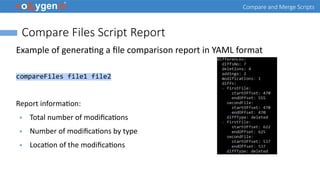
Compare Files Script Report
Example of generating a file comparison report in YAML format
compareFiles file1 file2
Report information:
● Total number of modifications
● Number of modifications by type
● Location of the modifications
Compare and Merge Scripts
Compare Files Script YAML/JSON/XML Report
Can be used to:
● Verify if the documents are modified
● Determine the type of changes between documents
● Process the changes from the documents
● Executed from CI/CD pipelines
Compare and Merge Scripts
Compare Files Script HTML Report
Example of generating a file comparison report in HTML format:
compareFiles file1 file2 -out html -outfile outFileName.html
Example of generating a file 3-way comparison report in HTML format:
compareFiles file1 file2 baseFile -out html -outfile outFileName.html
Compare and Merge Scripts
HTML Report for File Comparison
Compare and Merge Scripts
Arguments for the Compare Files Algorithms
-alg comparisonAlg - Specifies the algorithm to be used for the comparison. Possible values: auto, chars, words,
lines, syntax_aware, xml_fast, and xml_accurate. Default value = auto.
-als algStrength - Specifies the strength of the algorithm to be used for the comparison. Possible values: low,
medium, high, and very_high. Default value = medium.
-iws ignoreWS - If set to true, whitespaces are ignored if differences consist only of whitespaces. Default value =
false.
Compare and Merge Scripts
Compare Files Arguments
Example of a comparison that uses the Lines algorithm:
compareFiles file1 file2 base -out html -outfile fileName.html –alg lines
Compare and Merge Scripts
Arguments for XML-aware Algorithms
-ipi ignorePI - If set to true, processing instructions are ignored in the comparison. Default value = false.
-icm ignoreComments - If set to true, comments are ignored in the comparison. Default value = false.
-idt ignoreDocType - If set to true, DOCTYPE sections are ignored in the comparison. Default value = false.
-itn ignoreText - If set to true, text content is ignored in the comparison. Default value = false.
-ins ignoreNS - If set to true, namespaces are ignored in the comparison. Default value = false.
-ind ignoreNSDecl - If set to true, namespace declarations are ignored in the comparison. Default value = false.
-inp ignorePrefixes - If set to true, prefixes are ignored in the comparison. Default value = false.
-iao ignoreAttrOrder - If set to true, the order of attributes is ignored in the comparison. Default value = false.
-iee ignoreExpStateForEmptyElems - If set to true, the expansion state for empty elements is ignored in the
comparison. Default value = false.
-enx XpathExprToExcludeNodes - Specifies an XPath expression to exclude certain nodes from the comparison.
Compare and Merge Scripts
Compare Files Ignore Options
Example of a comparison that ignores whitespaces, comments, and
attributes order:
sh compareFiles.sh file1 file2 baseFile -iws -icm -iao -out html -outfile
outFileName.html
Compare and Merge Scripts
Merge Files Arguments
-merge mergeOperation - If set to true, a merge operation is invoked after the comparison. Default value = true.
-mergeout outputDirPathForMerge -Specifies the output directory path for the merged file (instead of directly
affecting the first compared file).
● The merge operation is similar to the same process in any versioning system
● If conflicting changes are detected, the merge operation is aborted and the first file remains unchanged
● After the comparison and merge, a report is created that provides some details about the changes that were
made
Compare and Merge Scripts
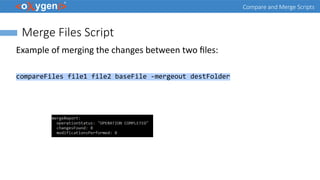
Merge Files Script
Example of merging the changes between two files:
compareFiles file1 file2 baseFile -mergeout destFolder
Compare and Merge Scripts
Compare and Merge Directories Script
Compare and merge directories and get the comparison results in various formats
Compare and Merge Scripts
Arguments for the Compare Directories Script
firstDirPath - Mandatory argument that specifies the first directory path.
secondDirPath - Mandatory argument that specifies the second directory path.
baseDirPath - Optional argument that specifies the path of the base directory (for 3-way comparisons).
-out outputFormat - Specifies the format of the output. Possible values: yaml/grouped, yaml/raw, json/grouped,
json/raw, xml/grouped, xml/raw, html, html/ifcr, htm, or htm/ifcr. Default value = yaml/grouped.
-outfile outputFile - Specifies the path for an output file to save the comparison results, instead of presenting
them in the console. The content of the output file is formatted according to the -out argument.
-help | --help | -h | --h - Displays help text.
Compare and Merge Scripts
Compare Directories Script Report
Example of generating a directories comparison report in YAML format
compareDirs dir1 dir2
Report information:
● Total number of modifications
● Number of modifications by type
● Modified files
Compare and Merge Scripts
Compare Directories Script Output Format
-out outputFormat - Specifies the format of the output. Possible values: yaml/grouped, yaml/raw, json/grouped,
json/raw, xml/grouped, xml/raw, html, html/ifcr, htm, or htm/ifcr. Default value = yaml/grouped.
● If you choose to save/redirect the console output to a file, this argument establishes the type of the output
file and its content is formatted accordingly. If you skip specifying the "/grouped" or the "/raw" qualifiers,
"/grouped" takes precedence.
● If you choose the html or htm output format, it is recommended that you also choose to save/redirect the
console to the specified HTML file to view the comparison result in your preferred browser.
● The "/ifcr" qualifier for the html or htm values is considered only if the -outfile argument is also present. IFCR
is an acronym for Include File Comparison Reports and it means that, along with generating the directory
comparison report, separate file comparison reports will be generated for all modified file pairs. These
reports are available through links from the main report and are saved to a specific directory based on the
value provided by the outfile argument. It will have the same parent directory and the same name as the
outputFile plus -OXY-FC-REPORTS added to the end of its name.
● The html value, as well as the grouped, raw, or ifcr qualifiers, are not considered if the -merge argument is
present.
Compare and Merge Scripts
Compare Directories Script HTML Report
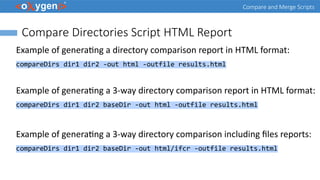
Example of generating a directory comparison report in HTML format:
compareDirs dir1 dir2 -out html -outfile results.html
Example of generating a 3-way directory comparison report in HTML format:
compareDirs dir1 dir2 baseDir -out html -outfile results.html
Example of generating a 3-way directory comparison including files reports:
compareDirs dir1 dir2 baseDir -out html/ifcr -outfile results.html
Compare and Merge Scripts
HTML Report for Directory Comparison
Compare and Merge Scripts
Arguments for Compare Directories Filter
-ia includeArchives - If set to true, files from archives are included in the comparison. Default value = false.
-if includeFilesFilter - Use this argument to only include files that match the specified pattern in the comparison
(e.g. .xml, .json). Default value = *.
-ef excludeFilesFilter - Use this argument to exclude files that match the specified pattern from the comparison
(e.g. *.jpg).
-ed excludeSubdirsFilter - Use this argument to exclude sub-directories that match the specified pattern from the
comparison (e.g. .svn, _svn, .git).
Compare and Merge Scripts
Arguments for the Compare Directories Script
Example of generating a directory comparison excluding JPEG files
compareDirs dir1 dir2 -out html -outfile results.html -ef *.jpg
Example of generating a directory comparison including just Dita files
compareDirs dir1 dir2 -out html -outfile results.html -if *.dita
Compare and Merge Scripts
Arguments for Compare Directories Algorithms
-cm comparisonMode - Specifies the comparison mode. There are three modes available: content, binary, and
timestamp. Default value = content.
-alg comparisonAlg - Specifies the algorithm to be used for the comparison. Possible values: auto, chars, words,
lines, syntax_aware, xml_fast, and xml_accurate. Default value = auto.
-als algStrength - Specifies the strength of the algorithm to be used for the comparison. Possible values: low,
medium, high, and very_high. Default value = medium.
-iws ignoreWS - If set to true, whitespaces are ignored if differences consist only of whitespaces. Default value =
false.
Compare and Merge Scripts
Arguments XML-aware Algorithms
-ipi ignorePI - If set to true, processing instructions are ignored in the comparison. Default value = false.
-icm ignoreComments - If set to true, comments are ignored in the comparison. Default value = false.
-idt ignoreDocType - If set to true, DOCTYPE sections are ignored in the comparison. Default value = false.
-itn ignoreText - If set to true, text content is ignored in the comparison. Default value = false.
-ins ignoreNS - If set to true, namespaces are ignored in the comparison. Default value = false.
-ind ignoreNSDecl - If set to true, namespace declarations are ignored in the comparison. Default value = false.
-inp ignorePrefixes - If set to true, prefixes are ignored in the comparison. Default value = false.
-iao ignoreAttrOrder - If set to true, the order of attributes is ignored in the comparison. Default value = false.
-iee ignoreExpStateForEmptyElems - If set to true, the expansion state for empty elements is ignored in the
comparison. Default value = false.
Compare and Merge Scripts
Merge Directories Arguments
-merge mergeOperation - If set to true, a merge operation is invoked after the comparison. Default value = true.
-mergeout outputDirPathForMerge - Specifies the output directory path for the merge operation.
● The merge operation is similar to the same process in any versioning system. Following the comparison
between the first and second directories (relative to the base folder), all the differences of the type incoming
are considered and the content of the first directory is updated accordingly.
● For conflicting files that could not be merged, the left file content is kept.
● After the comparison, a report is created that provides details about the changes that were made.
Compare and Merge Scripts
Merge Directories Script
Example of merging the changes between two
directories:
compareDirs dir1 dir2 baseDir -mergeout destFolder
Compare and Merge Scripts
Save HTML Comparison Report in Oxygen
● Compare Files – save result in HTML
format
● Compare Directories – save result in HTML
format
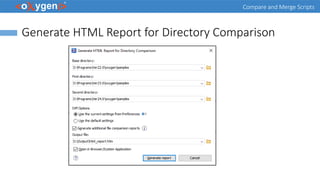
● Generate HTML Report for Directory
Comparison
Compare and Merge Scripts
Generate HTML Report for Directory Comparison
Compare and Merge Scripts
Conclusion
● Complete support for File and Directory Comparison
● Scripts to generate File and Directory comparison reports
● Scripts to merge Files and Directories
● Options to filter the differences
● Multiple algorithms to compare different type of files
Compare and Merge Scripts
Future Plans
● Improve Compare Script Algoritms
● Provide Other Compare Reports
● JSON Schema Documentation Script
● OpenAPI Documentation Script
● Other (feedback is welcome)
Compare and Merge Scripts
Question: What features are the most important for you?
 Improve Compare Script Algoritms
 Provide Other Compare Reports
 JSON/OpenAPI Schema Documentation
Script
 Apply Validation Scenario Script
 Other (feedback is welcome)
Compare and Merge Scripts
Resources
● oxygenxml.com/demo/generating_file_or_directory_comparison_reports_in_oxygen.html
● oxygenxml.com/demo/generating_file_comparison_reports_using_command_line.html
● oxygenxml.com/demo/generating_directory_comparison_reports_using_command_line.html
● oxygenxml.com/demo/Merge_Directories.html
● oxygenxml.com/demo/diff_eclipse.html
● oxygenxml.com/demo/three_way_diff.html
● oxygenxml.com/demo/XML_Diff_Merge.html
Questions?
Octavian Nadolu
Product Manager at Syncro Soft
octavian.nadolu@oxygenxml.com
Twitter: @OctavianNadolu
LinkedIn: octaviannadolu

Compare And Merge Scripts

  • 1.
    Compare and Merge Scripts ©2021 Syncro Soft SRL. All rights reserved. Octavian Nadolu, Syncro Soft octavian.nadolu@oxygenxml.com @OctavianNadolu
  • 2.
    Compare and MergeScripts Agenda ● Overview of the Oxygen Diff Support ● File Comparison and Merge Reports Using Command Line Scripts ● Directory Comparison and Merge Reports Using Command Line Scripts ● Generate File and Directory Comparison Reports in Oxygen
  • 3.
    Compare and MergeScripts Compare and Merge ● Compare documents – identify changes between two versions of the same document ● Merge documents - uniting two documents into a single one
  • 4.
    Compare and MergeScripts Compare and Merge Support in Oxygen ● Compare and Merge Files – Text and Visual Author Compare – Three-Way Comparisons – XML Diff Algorithms ● Compare and Merge Directories – Binary, Timestamp, and Content Compare – Compare in Archives – Streaming Diff Algorithms ● 3-Way Directory Comparison and Merging Changes ● Generating File or Directory Comparison HTML Reports* ● Compare and Merge Files/Directories Command-Line Scripts*
  • 5.
    Compare and MergeScripts Question: Do you use/intend to use Oxygen Diff, what tools?  Compare and Merge Files  Compare and Merge Directories  3-Way Directory Comparison and Merging Changes  Generate Comparison HTML Reports  Compare and Merge Scripts
  • 6.
    Compare and MergeScripts Compare and Merge Scripts
  • 7.
    Compare and MergeScripts Oxygen XML Scripting oxygenxml.com/oxygen_scripting.html oxygenxml.com/doc/ug-editor/topics/scripting_oxygen.html
  • 8.
    Compare and MergeScripts Oxygen XML Scripting Functions Automate and run Oxygen utilities from the command-line Interface ● Validation ● Transformation ● Conversion ● Generate Documentation ● Format and Indent ● Compare and Merge Files or Directories ● and more Webinar: Automate XML processing with Oxygen XML Scripting
  • 9.
    Compare and MergeScripts Question: Do you use/intend to use Oxygen Scripting, what tools?  Validation  Transformation  Generate Documentation  Compare and Merge  Other
  • 10.
    Compare and MergeScripts Compare and Merge Files Script Compare and merge files and get the comparison results in various formats
  • 11.
    Compare and MergeScripts Arguments for the Compare Files Script firstFilePath - Mandatory argument that specifies the first file path. secondFilePath - Mandatory argument that specifies the second file path. baseFilePath - Optional argument that specifies the path of the base file (for 3-way comparisons). -ct contentType - Specifies the content type of the files to be compared. The option is used to force the file handling to the specific type of file. Otherwise, the file type is auto-detected. -out outputFormat - Specifies the format of the output. Possible values: yaml, json, xml, html, htm, html/inlineCSS, or htm/inlineCSS. Default value = yaml. -outfile outputFile - Specifies the path for an output file to save the comparison results, instead of presenting them in the console. -help | --help | -h | --h - Displays help text.
  • 12.
    Compare and MergeScripts Compare Files Script Report Example of generating a file comparison report in YAML format compareFiles file1 file2 Report information: ● Total number of modifications ● Number of modifications by type ● Location of the modifications
  • 13.
    Compare and MergeScripts Compare Files Script YAML/JSON/XML Report Can be used to: ● Verify if the documents are modified ● Determine the type of changes between documents ● Process the changes from the documents ● Executed from CI/CD pipelines
  • 14.
    Compare and MergeScripts Compare Files Script HTML Report Example of generating a file comparison report in HTML format: compareFiles file1 file2 -out html -outfile outFileName.html Example of generating a file 3-way comparison report in HTML format: compareFiles file1 file2 baseFile -out html -outfile outFileName.html
  • 15.
    Compare and MergeScripts HTML Report for File Comparison
  • 16.
    Compare and MergeScripts Arguments for the Compare Files Algorithms -alg comparisonAlg - Specifies the algorithm to be used for the comparison. Possible values: auto, chars, words, lines, syntax_aware, xml_fast, and xml_accurate. Default value = auto. -als algStrength - Specifies the strength of the algorithm to be used for the comparison. Possible values: low, medium, high, and very_high. Default value = medium. -iws ignoreWS - If set to true, whitespaces are ignored if differences consist only of whitespaces. Default value = false.
  • 17.
    Compare and MergeScripts Compare Files Arguments Example of a comparison that uses the Lines algorithm: compareFiles file1 file2 base -out html -outfile fileName.html –alg lines
  • 18.
    Compare and MergeScripts Arguments for XML-aware Algorithms -ipi ignorePI - If set to true, processing instructions are ignored in the comparison. Default value = false. -icm ignoreComments - If set to true, comments are ignored in the comparison. Default value = false. -idt ignoreDocType - If set to true, DOCTYPE sections are ignored in the comparison. Default value = false. -itn ignoreText - If set to true, text content is ignored in the comparison. Default value = false. -ins ignoreNS - If set to true, namespaces are ignored in the comparison. Default value = false. -ind ignoreNSDecl - If set to true, namespace declarations are ignored in the comparison. Default value = false. -inp ignorePrefixes - If set to true, prefixes are ignored in the comparison. Default value = false. -iao ignoreAttrOrder - If set to true, the order of attributes is ignored in the comparison. Default value = false. -iee ignoreExpStateForEmptyElems - If set to true, the expansion state for empty elements is ignored in the comparison. Default value = false. -enx XpathExprToExcludeNodes - Specifies an XPath expression to exclude certain nodes from the comparison.
  • 19.
    Compare and MergeScripts Compare Files Ignore Options Example of a comparison that ignores whitespaces, comments, and attributes order: sh compareFiles.sh file1 file2 baseFile -iws -icm -iao -out html -outfile outFileName.html
  • 20.
    Compare and MergeScripts Merge Files Arguments -merge mergeOperation - If set to true, a merge operation is invoked after the comparison. Default value = true. -mergeout outputDirPathForMerge -Specifies the output directory path for the merged file (instead of directly affecting the first compared file). ● The merge operation is similar to the same process in any versioning system ● If conflicting changes are detected, the merge operation is aborted and the first file remains unchanged ● After the comparison and merge, a report is created that provides some details about the changes that were made
  • 21.
    Compare and MergeScripts Merge Files Script Example of merging the changes between two files: compareFiles file1 file2 baseFile -mergeout destFolder
  • 22.
    Compare and MergeScripts Compare and Merge Directories Script Compare and merge directories and get the comparison results in various formats
  • 23.
    Compare and MergeScripts Arguments for the Compare Directories Script firstDirPath - Mandatory argument that specifies the first directory path. secondDirPath - Mandatory argument that specifies the second directory path. baseDirPath - Optional argument that specifies the path of the base directory (for 3-way comparisons). -out outputFormat - Specifies the format of the output. Possible values: yaml/grouped, yaml/raw, json/grouped, json/raw, xml/grouped, xml/raw, html, html/ifcr, htm, or htm/ifcr. Default value = yaml/grouped. -outfile outputFile - Specifies the path for an output file to save the comparison results, instead of presenting them in the console. The content of the output file is formatted according to the -out argument. -help | --help | -h | --h - Displays help text.
  • 24.
    Compare and MergeScripts Compare Directories Script Report Example of generating a directories comparison report in YAML format compareDirs dir1 dir2 Report information: ● Total number of modifications ● Number of modifications by type ● Modified files
  • 25.
    Compare and MergeScripts Compare Directories Script Output Format -out outputFormat - Specifies the format of the output. Possible values: yaml/grouped, yaml/raw, json/grouped, json/raw, xml/grouped, xml/raw, html, html/ifcr, htm, or htm/ifcr. Default value = yaml/grouped. ● If you choose to save/redirect the console output to a file, this argument establishes the type of the output file and its content is formatted accordingly. If you skip specifying the "/grouped" or the "/raw" qualifiers, "/grouped" takes precedence. ● If you choose the html or htm output format, it is recommended that you also choose to save/redirect the console to the specified HTML file to view the comparison result in your preferred browser. ● The "/ifcr" qualifier for the html or htm values is considered only if the -outfile argument is also present. IFCR is an acronym for Include File Comparison Reports and it means that, along with generating the directory comparison report, separate file comparison reports will be generated for all modified file pairs. These reports are available through links from the main report and are saved to a specific directory based on the value provided by the outfile argument. It will have the same parent directory and the same name as the outputFile plus -OXY-FC-REPORTS added to the end of its name. ● The html value, as well as the grouped, raw, or ifcr qualifiers, are not considered if the -merge argument is present.
  • 26.
    Compare and MergeScripts Compare Directories Script HTML Report Example of generating a directory comparison report in HTML format: compareDirs dir1 dir2 -out html -outfile results.html Example of generating a 3-way directory comparison report in HTML format: compareDirs dir1 dir2 baseDir -out html -outfile results.html Example of generating a 3-way directory comparison including files reports: compareDirs dir1 dir2 baseDir -out html/ifcr -outfile results.html
  • 27.
    Compare and MergeScripts HTML Report for Directory Comparison
  • 28.
    Compare and MergeScripts Arguments for Compare Directories Filter -ia includeArchives - If set to true, files from archives are included in the comparison. Default value = false. -if includeFilesFilter - Use this argument to only include files that match the specified pattern in the comparison (e.g. .xml, .json). Default value = *. -ef excludeFilesFilter - Use this argument to exclude files that match the specified pattern from the comparison (e.g. *.jpg). -ed excludeSubdirsFilter - Use this argument to exclude sub-directories that match the specified pattern from the comparison (e.g. .svn, _svn, .git).
  • 29.
    Compare and MergeScripts Arguments for the Compare Directories Script Example of generating a directory comparison excluding JPEG files compareDirs dir1 dir2 -out html -outfile results.html -ef *.jpg Example of generating a directory comparison including just Dita files compareDirs dir1 dir2 -out html -outfile results.html -if *.dita
  • 30.
    Compare and MergeScripts Arguments for Compare Directories Algorithms -cm comparisonMode - Specifies the comparison mode. There are three modes available: content, binary, and timestamp. Default value = content. -alg comparisonAlg - Specifies the algorithm to be used for the comparison. Possible values: auto, chars, words, lines, syntax_aware, xml_fast, and xml_accurate. Default value = auto. -als algStrength - Specifies the strength of the algorithm to be used for the comparison. Possible values: low, medium, high, and very_high. Default value = medium. -iws ignoreWS - If set to true, whitespaces are ignored if differences consist only of whitespaces. Default value = false.
  • 31.
    Compare and MergeScripts Arguments XML-aware Algorithms -ipi ignorePI - If set to true, processing instructions are ignored in the comparison. Default value = false. -icm ignoreComments - If set to true, comments are ignored in the comparison. Default value = false. -idt ignoreDocType - If set to true, DOCTYPE sections are ignored in the comparison. Default value = false. -itn ignoreText - If set to true, text content is ignored in the comparison. Default value = false. -ins ignoreNS - If set to true, namespaces are ignored in the comparison. Default value = false. -ind ignoreNSDecl - If set to true, namespace declarations are ignored in the comparison. Default value = false. -inp ignorePrefixes - If set to true, prefixes are ignored in the comparison. Default value = false. -iao ignoreAttrOrder - If set to true, the order of attributes is ignored in the comparison. Default value = false. -iee ignoreExpStateForEmptyElems - If set to true, the expansion state for empty elements is ignored in the comparison. Default value = false.
  • 32.
    Compare and MergeScripts Merge Directories Arguments -merge mergeOperation - If set to true, a merge operation is invoked after the comparison. Default value = true. -mergeout outputDirPathForMerge - Specifies the output directory path for the merge operation. ● The merge operation is similar to the same process in any versioning system. Following the comparison between the first and second directories (relative to the base folder), all the differences of the type incoming are considered and the content of the first directory is updated accordingly. ● For conflicting files that could not be merged, the left file content is kept. ● After the comparison, a report is created that provides details about the changes that were made.
  • 33.
    Compare and MergeScripts Merge Directories Script Example of merging the changes between two directories: compareDirs dir1 dir2 baseDir -mergeout destFolder
  • 34.
    Compare and MergeScripts Save HTML Comparison Report in Oxygen ● Compare Files – save result in HTML format ● Compare Directories – save result in HTML format ● Generate HTML Report for Directory Comparison
  • 35.
    Compare and MergeScripts Generate HTML Report for Directory Comparison
  • 36.
    Compare and MergeScripts Conclusion ● Complete support for File and Directory Comparison ● Scripts to generate File and Directory comparison reports ● Scripts to merge Files and Directories ● Options to filter the differences ● Multiple algorithms to compare different type of files
  • 37.
    Compare and MergeScripts Future Plans ● Improve Compare Script Algoritms ● Provide Other Compare Reports ● JSON Schema Documentation Script ● OpenAPI Documentation Script ● Other (feedback is welcome)
  • 38.
    Compare and MergeScripts Question: What features are the most important for you?  Improve Compare Script Algoritms  Provide Other Compare Reports  JSON/OpenAPI Schema Documentation Script  Apply Validation Scenario Script  Other (feedback is welcome)
  • 39.
    Compare and MergeScripts Resources ● oxygenxml.com/demo/generating_file_or_directory_comparison_reports_in_oxygen.html ● oxygenxml.com/demo/generating_file_comparison_reports_using_command_line.html ● oxygenxml.com/demo/generating_directory_comparison_reports_using_command_line.html ● oxygenxml.com/demo/Merge_Directories.html ● oxygenxml.com/demo/diff_eclipse.html ● oxygenxml.com/demo/three_way_diff.html ● oxygenxml.com/demo/XML_Diff_Merge.html
  • 40.
    Questions? Octavian Nadolu Product Managerat Syncro Soft octavian.nadolu@oxygenxml.com Twitter: @OctavianNadolu LinkedIn: octaviannadolu