University of
Southern California
Enterprise Wide Information Systems
ABAP/ 4 Programming Language
Instructor: Richard W. Vawter
University of
Southern California
Objectives
 Upon completion of this topic, you should be able to:
 Define the general terms associated with the ABAP/4
Workbench.
 Work with the ABAP/4 Object Browser.
 Create a program object.
 Access tables to generate a report.
University of
Southern California
Topics
 ABAP/4 Development Workbench
 ABAP/4 Data Dictionary
 ABAP/4 Repository Information
University of
Southern California
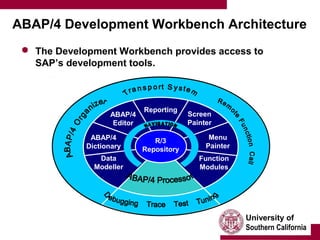
ABAP/4 Development Workbench Architecture
 The Development Workbench provides access to
SAP’s development tools.
Reporting
ABAP/4
Editor
ABAP/4
Dictionary
Menu
Painter
Screen
Painter
Data
Modeller
Function
Modules
R/3
Repository
University of
Southern California
ABAP/4 Development Workbench Architecture
 All programs are stored in the R/3 Repository.
 A program is simply an object.
 All definitions are kept in the data dictionary.
 e.g. variable descriptions and parameters of fields.
 Double-clicking will navigate you to wherever the
object is stored.
 Remote call functions let you access other systems.
University of
Southern California
Reporting and Dialog Programming
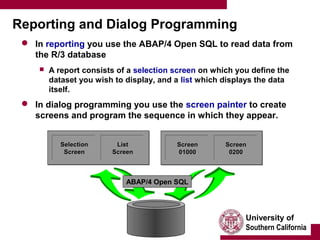
 In reporting you use the ABAP/4 Open SQL to read data from
the R/3 database
 A report consists of a selection screen on which you define the
dataset you wish to display, and a list which displays the data
itself.
 In dialog programming you use the screen painter to create
screens and program the sequence in which they appear.
SelectionSelection
ScreenScreen
ListList
ScreenScreen
ScreenScreen
0100001000
ScreenScreen
02000200
ABAP/4 Open SQL
University of
Southern California
ABAP/4 Program Objects
 You can use the ABAP/4 Development Workbench to
create ABAP/4 programs.
 You can call objects from the object list generated from
the Object Browser’s initial screen.
Development ClassDevelopment Class
Dev. Class object type
Dictionary objects
Programs
Function groups
Includes
Transactions
Logical databases
etc.
University of
Southern California
ABAP/4 Programs
 All ABAP/4 programs (objects) are made up of:
 Source code
 Text elements
 Attributes
AttributesAttributes
Source CodeSource Code Text Elements
• Titles
• Headers
• Text symbols
Text Elements
• Titles
• Headers
• Text symbols
ABAP/4 Program
University of
Southern California
Creating Programs
 Begin by first specifying a development class.
 Development classes are categories of SAP objects (e.g.
program object).
 Customer-specific program names begin with Y or Z.
 If you are creating a test object which you do not wish
to be transported, choose Local Object.
 The development class is then set to $TMP automatically.
University of
Southern California
The ABAP/4 Editor
 The ABAP/4 Editor can run in three different modes:
1. Command mode
2. PC mode with line numbering
3. PC mode without line numbering
 You can switch between editor modes by choosing
Settings → Editor mode
 It is recommended that you do your work in PC mode with line
numbering
University of
Southern California
ABAP/4 Syntax
 An ABAP/4 program consists of individual statements
 Each statement must end with a period.
 The first word of a statement is known as the key word.
 Words are separated from each other by at least one blank.
 Statements can be indented.
 Statements can extend over several lines.
 You can concatenate several consecutive statements
with an identical key word (e.g. WRITE: ).
 Follow the key word with a colon.
 Separate each concatenated part with a comma.
 End the lines of the concatenated statements with a period.
University of
Southern California
ABAP/4 Syntax (cont.)
 You can insert comments into a program in two ways:
1. An asterisk (*) in column 1 flags the whole line as a comment.
2. A quotation mark (“) within a line flags the remainder of the
line as a comment.
University of
Southern California
Tables and the Select Statement
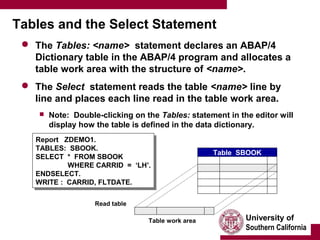
 The Tables: <name> statement declares an ABAP/4
Dictionary table in the ABAP/4 program and allocates a
table work area with the structure of <name>.
 The Select statement reads the table <name> line by
line and places each line read in the table work area.
 Note: Double-clicking on the Tables: statement in the editor will
display how the table is defined in the data dictionary.
Report ZDEMO1.
TABLES: SBOOK.
SELECT * FROM SBOOK
WHERE CARRID = ‘LH’.
ENDSELECT.
WRITE : CARRID, FLTDATE.
Report ZDEMO1.
TABLES: SBOOK.
SELECT * FROM SBOOK
WHERE CARRID = ‘LH’.
ENDSELECT.
WRITE : CARRID, FLTDATE.
Table SBOOK
Read table
Table work area
University of
Southern California
Accessing Tables (In summary…)
F1 F2 F3 Fn
SFLIGHT table work area
Report ZDEMO1.
TABLES: SBOOK.
SELECT * FROM SBOOK
WHERE CARRID = ‘LH’.
ENDSELECT.
WRITE : CARRID, FLTDATE.
Report ZDEMO1.
TABLES: SBOOK.
SELECT * FROM SBOOK
WHERE CARRID = ‘LH’.
ENDSELECT.
WRITE : CARRID, FLTDATE.
Program
SBOOK
F1 F2 F3 Fn
Database
SBOOK
F1
F2
F3
Fn
DDIC
Report
Definition in the Data
Dictionary
University of
Southern California
Topics
 ABAP/4 Development Workbench
 ABAP/4 Data Dictionary
 ABAP/4 Repository Information
University of
Southern California
Basic Dictionary Objects
 Tables - collection of records of data in fields.
 Data elements - contain the semantic definition (e.g.
short description) of what is contained w/in a field.
 Domains - describe the technical attributes of the
table’s fields (e.g. field type, length, value range, etc.).
Table field
Table
Data element
Domain
uses
uses
University of
Southern California
Structures and Aggregated Objects (Views)
 Besides defining tables stored in the database, you can
also define the structure of data which occurs when
performing calculations in programs, or when passing
data between programs.
 Structures are defined and activated in the ABAP/4 Dictionary.
 While data can be permanently stored in the database, data in
structures exists only during the runtime of a program.
 Aggregated objects are objects which come from
several different tables.
 Views are application-specific views of different ABAP/4
Dictionary tables.
 Views allow you to gather information from fields of different
tables and present it to users in the form they require.
University of
Southern California
ABAP/4 Dictionary (In summary)
 The ABAP/4 Dictionary is the central facility in the
system where you can create and maintain data
declarations, tables, structures and aggregated
objects.
 Since it is integrated into the ABAP/4 Development
Workbench as an active component, any change made
in the ABAP/4 Dictionary takes immediate effect in
programs affected.
University of
Southern California
Topics
 ABAP/4 Development Workbench
 ABAP/4 Data Dictionary
 ABAP/4 Repository Information
ABAP/4 Repository Information
 The ABAP/4 Repository Information System allows you
to obtain information about objects (tables, fields,
domains, etc.) in the ABAP/4 Repository.
 You can find anything that is used in programs by
using the Data Repository.
Data
Repository
Where-used lists
Display all objects of type Y
which use attribute X
Search by attributes
Display all objects of type X
with attribute Y
Information about
tables and
relationships
Display all table fields
with check table X
Modified objects
Display all objects of
type X which were changed by
user Y on date DDMMYY
?
?
?
?
University of
Southern California
ABAP/4 Repository (In summary)
 The ABAP/4 Repository Information System allows
search for ABAP/4 Development Workbench objects by
specifying required attributes.
From the ABAP/4 Development Workbench:
Overview → Repository Infosy.

Abap

  • 1.
    University of Southern California EnterpriseWide Information Systems ABAP/ 4 Programming Language Instructor: Richard W. Vawter
  • 2.
    University of Southern California Objectives Upon completion of this topic, you should be able to:  Define the general terms associated with the ABAP/4 Workbench.  Work with the ABAP/4 Object Browser.  Create a program object.  Access tables to generate a report.
  • 3.
    University of Southern California Topics ABAP/4 Development Workbench  ABAP/4 Data Dictionary  ABAP/4 Repository Information
  • 4.
    University of Southern California ABAP/4Development Workbench Architecture  The Development Workbench provides access to SAP’s development tools. Reporting ABAP/4 Editor ABAP/4 Dictionary Menu Painter Screen Painter Data Modeller Function Modules R/3 Repository
  • 5.
    University of Southern California ABAP/4Development Workbench Architecture  All programs are stored in the R/3 Repository.  A program is simply an object.  All definitions are kept in the data dictionary.  e.g. variable descriptions and parameters of fields.  Double-clicking will navigate you to wherever the object is stored.  Remote call functions let you access other systems.
  • 6.
    University of Southern California Reportingand Dialog Programming  In reporting you use the ABAP/4 Open SQL to read data from the R/3 database  A report consists of a selection screen on which you define the dataset you wish to display, and a list which displays the data itself.  In dialog programming you use the screen painter to create screens and program the sequence in which they appear. SelectionSelection ScreenScreen ListList ScreenScreen ScreenScreen 0100001000 ScreenScreen 02000200 ABAP/4 Open SQL
  • 7.
    University of Southern California ABAP/4Program Objects  You can use the ABAP/4 Development Workbench to create ABAP/4 programs.  You can call objects from the object list generated from the Object Browser’s initial screen. Development ClassDevelopment Class Dev. Class object type Dictionary objects Programs Function groups Includes Transactions Logical databases etc.
  • 8.
    University of Southern California ABAP/4Programs  All ABAP/4 programs (objects) are made up of:  Source code  Text elements  Attributes AttributesAttributes Source CodeSource Code Text Elements • Titles • Headers • Text symbols Text Elements • Titles • Headers • Text symbols ABAP/4 Program
  • 9.
    University of Southern California CreatingPrograms  Begin by first specifying a development class.  Development classes are categories of SAP objects (e.g. program object).  Customer-specific program names begin with Y or Z.  If you are creating a test object which you do not wish to be transported, choose Local Object.  The development class is then set to $TMP automatically.
  • 10.
    University of Southern California TheABAP/4 Editor  The ABAP/4 Editor can run in three different modes: 1. Command mode 2. PC mode with line numbering 3. PC mode without line numbering  You can switch between editor modes by choosing Settings → Editor mode  It is recommended that you do your work in PC mode with line numbering
  • 11.
    University of Southern California ABAP/4Syntax  An ABAP/4 program consists of individual statements  Each statement must end with a period.  The first word of a statement is known as the key word.  Words are separated from each other by at least one blank.  Statements can be indented.  Statements can extend over several lines.  You can concatenate several consecutive statements with an identical key word (e.g. WRITE: ).  Follow the key word with a colon.  Separate each concatenated part with a comma.  End the lines of the concatenated statements with a period.
  • 12.
    University of Southern California ABAP/4Syntax (cont.)  You can insert comments into a program in two ways: 1. An asterisk (*) in column 1 flags the whole line as a comment. 2. A quotation mark (“) within a line flags the remainder of the line as a comment.
  • 13.
    University of Southern California Tablesand the Select Statement  The Tables: <name> statement declares an ABAP/4 Dictionary table in the ABAP/4 program and allocates a table work area with the structure of <name>.  The Select statement reads the table <name> line by line and places each line read in the table work area.  Note: Double-clicking on the Tables: statement in the editor will display how the table is defined in the data dictionary. Report ZDEMO1. TABLES: SBOOK. SELECT * FROM SBOOK WHERE CARRID = ‘LH’. ENDSELECT. WRITE : CARRID, FLTDATE. Report ZDEMO1. TABLES: SBOOK. SELECT * FROM SBOOK WHERE CARRID = ‘LH’. ENDSELECT. WRITE : CARRID, FLTDATE. Table SBOOK Read table Table work area
  • 14.
    University of Southern California AccessingTables (In summary…) F1 F2 F3 Fn SFLIGHT table work area Report ZDEMO1. TABLES: SBOOK. SELECT * FROM SBOOK WHERE CARRID = ‘LH’. ENDSELECT. WRITE : CARRID, FLTDATE. Report ZDEMO1. TABLES: SBOOK. SELECT * FROM SBOOK WHERE CARRID = ‘LH’. ENDSELECT. WRITE : CARRID, FLTDATE. Program SBOOK F1 F2 F3 Fn Database SBOOK F1 F2 F3 Fn DDIC Report Definition in the Data Dictionary
  • 15.
    University of Southern California Topics ABAP/4 Development Workbench  ABAP/4 Data Dictionary  ABAP/4 Repository Information
  • 16.
    University of Southern California BasicDictionary Objects  Tables - collection of records of data in fields.  Data elements - contain the semantic definition (e.g. short description) of what is contained w/in a field.  Domains - describe the technical attributes of the table’s fields (e.g. field type, length, value range, etc.). Table field Table Data element Domain uses uses
  • 17.
    University of Southern California Structuresand Aggregated Objects (Views)  Besides defining tables stored in the database, you can also define the structure of data which occurs when performing calculations in programs, or when passing data between programs.  Structures are defined and activated in the ABAP/4 Dictionary.  While data can be permanently stored in the database, data in structures exists only during the runtime of a program.  Aggregated objects are objects which come from several different tables.  Views are application-specific views of different ABAP/4 Dictionary tables.  Views allow you to gather information from fields of different tables and present it to users in the form they require.
  • 18.
    University of Southern California ABAP/4Dictionary (In summary)  The ABAP/4 Dictionary is the central facility in the system where you can create and maintain data declarations, tables, structures and aggregated objects.  Since it is integrated into the ABAP/4 Development Workbench as an active component, any change made in the ABAP/4 Dictionary takes immediate effect in programs affected.
  • 19.
    University of Southern California Topics ABAP/4 Development Workbench  ABAP/4 Data Dictionary  ABAP/4 Repository Information
  • 20.
    ABAP/4 Repository Information The ABAP/4 Repository Information System allows you to obtain information about objects (tables, fields, domains, etc.) in the ABAP/4 Repository.  You can find anything that is used in programs by using the Data Repository. Data Repository Where-used lists Display all objects of type Y which use attribute X Search by attributes Display all objects of type X with attribute Y Information about tables and relationships Display all table fields with check table X Modified objects Display all objects of type X which were changed by user Y on date DDMMYY ? ? ? ?
  • 21.
    University of Southern California ABAP/4Repository (In summary)  The ABAP/4 Repository Information System allows search for ABAP/4 Development Workbench objects by specifying required attributes. From the ABAP/4 Development Workbench: Overview → Repository Infosy.