Oxygen Script
Validation
© 2023 Syncro Soft SRL. All rights reserved.
Octavian Nadolu, Syncro Soft
octavian.nadolu@oxygenxml.com
@OctavianNadolu
Oxygen Validation Script
Agenda
● Overview of the Oxygen Validation Support
● Oxygen Scripting Tools
● Validation Script Command Line Script
● Reports Using Command Line Scripts
● Examples of Validation
● Transformation Command Line Script
● Comparison/Merge Command Line Script
Oxygen Validation Script
Validation
Validation is the process of checking a document to
confirm that it is both well-formed and also "valid"
in that it follows a defined structure
● A well-formed document follows the basic
syntactic rules
● A valid document also respects the rules
dictated by a particular schema
Oxygen Validation Script
Validation Support in Oxygen
● Well-Formlessness Check
● Validate Documents Against a Schema
● Validation Scenarios
● Module Files Validation
● Batch Validation
● Validation As-You-Type
Oxygen Validation Script
Validation File Type Support
● XML - validate with XSD, DTD, RelaxNG, NVDL, Schematron
– Builtin schemas (Dita, DocBook, Tei ..)
● JSON/YAML - validate with JSON Schema, Schematron
– Builtin schemas (OpenAPI, AsyncAPI, JSON-LD)
● XSD, DTD, RelaxNG, NVDL, Schematron, JSON Schema
● XSLT, XQuery, XProc
● HTML, XHTML, CSS
● Markdown
● WSDL
oxygenxml.com/doc/ug-editor/topics/editing-documents.html
Oxygen Validation Script
Validation Engines
● XML - Saxon, LibXML, Xerces
● JSON/YAML - Everit
● HTML, XHTML, CSS – W3C Nu Validator
● XSLT, XQuery – Saxon, MSXML, Xalan
● XSD - Saxon, Xerces
● DTD - Xerces
● RelaxNG, NVDL – Jing
● Custom Validator
Oxygen Validation Script
Question: What type of validation do you use or intend to use?
 XML validation with DTD, XSD, RNG, NVDL
 JSON/YAML validation with JSON Schema
 Validation with Schematron
 XSD, DTD, RelaxNG, NVDL, Schematron, JSON
Schema
 Other (use the questions panel)
Oxygen Validation Script
Oxygen Scripting
Automate and Run Oxygen Utilities
from the Command-Line Interface
oxygenxml.com/oxygen_scripting.html
oxygenxml.com/doc/ug-editor/topics/scripting_oxygen.html
Oxygen Validation Script
Oxygen XML Scripting Functions
Automate and run Oxygen utilities from the command-line Interface
● Validation*
● Transformation*
● Compare and Merge Files or Directories*
● Conversion
● Generate Documentation
● Format and Indent
● and more
Webinar: Automate XML processing with Oxygen XML Scripting
Webinar: Oxygen Compare and Merge Scripts
Oxygen Validation Script
Question: What Oxygen Scripting tools do you use or intend to use?
 Validation
 Transformation
 Compare and Merge
 Generate Documentation
 Other (use the questions panel)
Oxygen Validation Script
Validation Script
● Validate files or directories from a command line interface or from an
integration server (CI/CD)
Oxygen Validation Script
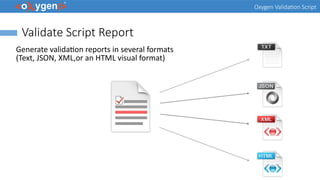
Validate Script Report
Generate validation reports in several formats
(Text, JSON, XML,or an HTML visual format)
Oxygen Validation Script
Validation Script Options
● You can specify a certain schema file to validate
against.
● You can validate using the schema(s) that are
internally associated within files.
● You can validate using the default Oxygen
validation scenarios for respective file types.
● You can specify a validation scenario name to
be referenced from either a scenarios file or a
project file.
Oxygen Validation Script
Arguments for the Validate Script
sh scripts/validate.sh fileOrDirPath [-s schemaFilePath | -sn scenarioName]
[-sf scenariosFilePath] [-if includeFilesFilter] [-ef excludeFilesFilter]
[-ed excludeSubdirsFilter] [-rf reportFile] [-rft reportFormat] [-v] [-help
| --help | -h | --h]
fileOrDirPath - Mandatory argument that specifies the path of the file or directory to validate
-s schemaFilePath - Optional argument that specifies the file path of the schema to validate against
-sn scenarioName - Optional argument that specifies the name of the validation scenario to be applied
-sf scenariosFilePath - Optional argument that specifies the path of the file that stores the validation scenarios
(either an Oxygen scenarios file or an Oxygen project file)
-rf reportFile - Specifies the path for the report file to save the validation results
-rft reportFormat - Specifies the format of the validation report. Possible values: text, xml, json, html
Oxygen Validation Script
Arguments for the Validate Script
-if includeFilesFilter - Use this argument to only validate the files that match the specified pattern (e.g. .xml,.json)
-ef excludeFilesFilter - Excludes the files that match the specified pattern (e.g. test.wsdl,draft.xsl)
-ed excludeSubdirsFilter - Excludes the sub-directories that match the specified pattern (e.g. .svn,_svn,.git)
-v - Prints additional information to the console (Verbose mode)
-help | --help | -h | --h - Displays help text
Oxygen Validation Script
Examples of the Validate Script
Validate a File by Applying a Custom Validation Scenario
sh validate.sh xmlFile.xml -sn xmlFileScenario -sf xmlFile.scenarios
This command implies validating xmlFile.xml by applying the validation scenario named
xmlFileScenario, described in the xmlFile.scenarios file. If you want to apply more than
one validation scenario, you can use the -sn scenarioName construct multiple times.
Oxygen Validation Script
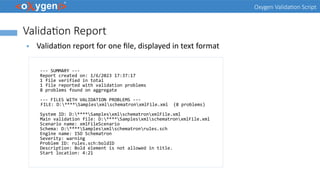
Validation Report
● Validation report for one file, displayed in text format
--- SUMMARY ---
Report created on: 1/6/2023 17:37:17
1 file verified in total
1 file reported with validation problems
8 problems found on aggregate
--- FILES WITH VALIDATION PROBLEMS ---
FILE: D:****SamplesxmlschematronxmlFile.xml (8 problems)
System ID: D:****SamplesxmlschematronxmlFile.xml
Main validation file: D:****SamplesxmlschematronxmlFile.xml
Scenario name: xmlFileScenario
Schema: D:****Samplesxmlschematronrules.sch
Engine name: ISO Schematron
Severity: warning
Problem ID: rules.sch:boldID
Description: Bold element is not allowed in title.
Start location: 4:21
Oxygen Validation Script
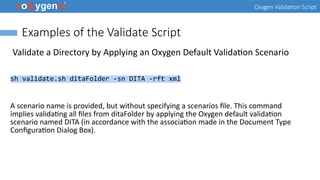
Examples of the Validate Script
Validate a Directory by Applying an Oxygen Default Validation Scenario
sh validate.sh ditaFolder -sn DITA -rft xml
A scenario name is provided, but without specifying a scenarios file. This command
implies validating all files from ditaFolder by applying the Oxygen default validation
scenario named DITA (in accordance with the association made in the Document Type
Configuration Dialog Box).
Oxygen Validation Script
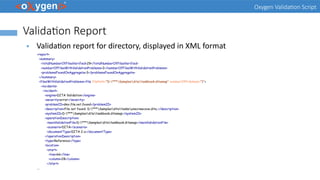
Validation Report
● Validation report for directory, displayed in XML format
<report>
<summary>
<totalNumberOfFilesVerified>29</totalNumberOfFilesVerified>
<numberOfFilesWithValidationProblems>2</numberOfFilesWithValidationProblems>
<problemsFoundOnAggregate>3</problemsFoundOnAggregate>
</summary>
<filesWithValidationProblems><file filePath="D:***Samplesditataskbook.ditamap" numberOfProblems="1">
<incidents>
<incident>
<engine>DITA Validation</engine>
<severity>error</severity>
<problemID>dmv.file.not.found</problemID>
<description>File not found: D:***Samplesditatasksunscrewcove.dita.</description>
<systemID>D:***Samplesditataskbook.ditamap</systemID>
<operationDescription>
<mainValidationFile>D:***Samplesditataskbook.ditamap</mainValidationFile>
<scenario>DITA</scenario>
<documentType>DITA 2.x</documentType>
</operationDescription>
<type>Reference</type>
<location>
<start>
<line>66</line>
<column>28</column>
</start>
...
Oxygen Validation Script
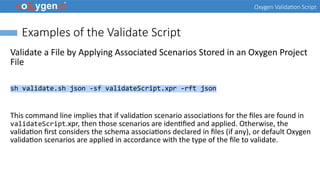
Examples of the Validate Script
Validate a File by Applying Associated Scenarios Stored in an Oxygen Project
File
sh validate.sh json -sf validateScript.xpr -rft json
This command line implies that if validation scenario associations for the files are found in
validateScript.xpr, then those scenarios are identified and applied. Otherwise, the
validation first considers the schema associations declared in files (if any), or default Oxygen
validation scenarios are applied in accordance with the type of the file to validate.
Oxygen Validation Script
Validation Report
● Validation report for directory, displayed in JSON format
{
"report": {
"summary": {
"totalNumberOfFilesVerified": 9,
"numberOfFilesWithValidationProblems": 4,
"problemsFoundOnAggregate": 4
},
"filesWithValidationProblems": [
{
"filePath": "file:/D:/***/Samples/json/JSON-LD/person.json",
"numberOfProblems": 1,
"incidents": [
{
"engine": "JSON Validator",
"severity": "error",
"description": "Missing value",
"systemID": "file:/D:/***/Samples/json/JSON-LD/person.json",
"mainValidationFile": "file:/D:/***/Samples/json/JSON-LD/person.json",
"location": {
"start": {
"line": 4,
"column": 12
}
}
}
]
}
...
Oxygen Validation Script
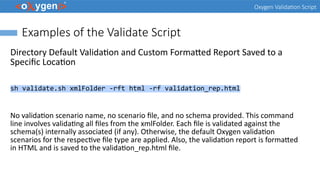
Examples of the Validate Script
Directory Default Validation and Custom Formatted Report Saved to a
Specific Location
sh validate.sh xmlFolder -rft html -rf validation_rep.html
No validation scenario name, no scenario file, and no schema provided. This command
line involves validating all files from the xmlFolder. Each file is validated against the
schema(s) internally associated (if any). Otherwise, the default Oxygen validation
scenarios for the respective file type are applied. Also, the validation report is formatted
in HTML and is saved to the validation_rep.html file.
Oxygen Validation Script
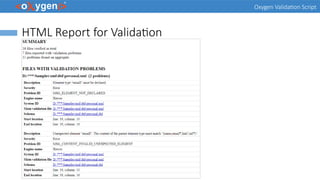
HTML Report for Validation
Oxygen Validation Script
Validation Script GitHub Template
● Automatically validate files on each commit
● Generate report and publish it on GitHub pages
● Run validation on specific folder from project
github.com/oxygenxml/oxygen-script-validation-template
Oxygen Validation Script
Validation Script GitHub Action
● Action that triggers Oxygen Scripting
● Performs validation on your repository files
● Can be integrated within an exiting workflow
github.com/marketplace/actions/oxygen-validation
Oxygen Validation Script
DITA Validate and Check For Completeness
● Validate a DITA map or a DITA Open Toolkit project
● Specify a settings file and a context id
sh scripts/validateCheckDITA.sh -i inputFile [-c contextId] [-s settingsFile] [-r reportFile]
oxygenxml.com/doc/ug-editor/topics/scripting_oxygen_dita_validate_and_check_for_completeness.html
Oxygen Validation Script
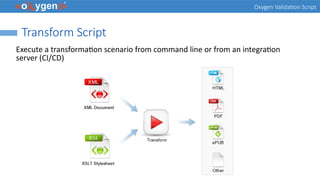
Transform Script
Execute a transformation scenario from command line or from an integration
server (CI/CD)
Oxygen Validation Script
Transform Script
● Run the transformation scenarios for the existing document types
● Specify a scenarios file or a project file that contains scenarios
sh transform.sh -i inputFile -sn scenarioName [-s scenariosFile] [-v]
oxygenxml.com/doc/ug-editor/topics/scripting_oxygen_transform.html
Oxygen Validation Script
Transformation Script GitHub Template
● Automatically transform files on each commit
● Generate report and publish it on GitHub pages
● Run transformation on specific file from project
github.com/oxygenxml/oxygen-script-transformation-template
Oxygen Validation Script
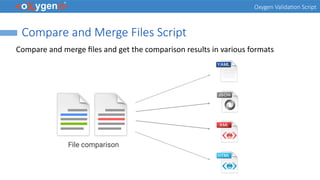
Compare and Merge Files Script
Compare and merge files and get the comparison results in various formats
Oxygen Validation Script
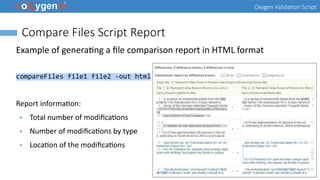
Compare Files Script Report
Example of generating a file comparison report in HTML format
compareFiles file1 file2 -out html
Report information:
● Total number of modifications
● Number of modifications by type
● Location of the modifications
Oxygen Validation Script
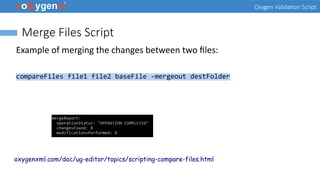
Merge Files Script
Example of merging the changes between two files:
compareFiles file1 file2 baseFile -mergeout destFolder
oxygenxml.com/doc/ug-editor/topics/scripting-compare-files.html
Oxygen Validation Script
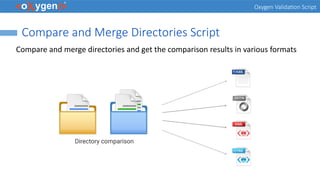
Compare and Merge Directories Script
Compare and merge directories and get the comparison results in various formats
Oxygen Validation Script
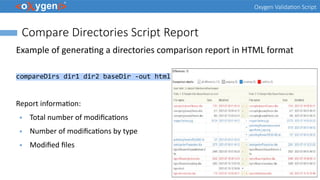
Compare Directories Script Report
Example of generating a directories comparison report in HTML format
compareDirs dir1 dir2 baseDir -out html
Report information:
● Total number of modifications
● Number of modifications by type
● Modified files
Oxygen Validation Script
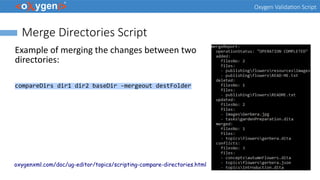
Merge Directories Script
Example of merging the changes between two
directories:
compareDirs dir1 dir2 baseDir -mergeout destFolder
oxygenxml.com/doc/ug-editor/topics/scripting-compare-directories.html
Oxygen Validation Script
Conclusion
● Complete Support for File and Directory Validation
● Scripts to Generate File and Directory Validation Reports
● Options to Filter the Validated Files
● Support to Validate Different Type of Files
● Multiple Command-Line Scripts: Transformation, Compare, Merge, ...
Oxygen Validation Script
Future Plans
● Improve Validation Script
● GitHub Templates and Actions for
Scripting
● JSON Schema and OpenAPI
Documentation Script
● XSD to JSON Schema Script
● Other (feedback is welcome)
Oxygen Validation Script
Question: What features are the most important for you?
 Improve Validation Script
 GitHub Templates and Actions for
Scripting
 JSON Schema and OpenAPI
Documentation Script
 XSD to JSON Schema Script
 Other (feedback is welcome)
Oxygen Validation Script
Resources
● https://www.oxygenxml.com/demo/validating-xml-and-json.html
● https://www.oxygenxml.com/demo/DITA_Map_Completeness_Check.html
● https://www.oxygenxml.com/demo/Schematron_Validation.html
● https://www.oxygenxml.com/demo/Validation_Scenario.html
● https://www.oxygenxml.com/demo/Working_With_XML_Modules.html
● oxygenxml.com/demo/generating_file_comparison_reports_using_command_line.html
● oxygenxml.com/demo/generating_directory_comparison_reports_using_command_line.html
● oxygenxml.com/events/2021/webinar_the_new_oxygen_compare_and_merge_scripts.html
● oxygenxml.com/events/2020/webinar_automate_xml_processing_with_oxygen_xml_scripting.html
Questions?
Octavian Nadolu
Product Manager at Syncro Soft
octavian.nadolu@oxygenxml.com
Twitter: @OctavianNadolu
LinkedIn: octaviannadolu

Validating XML and JSON Documents Using Oxygen Scripting

  • 1.
    Oxygen Script Validation © 2023Syncro Soft SRL. All rights reserved. Octavian Nadolu, Syncro Soft octavian.nadolu@oxygenxml.com @OctavianNadolu
  • 2.
    Oxygen Validation Script Agenda ●Overview of the Oxygen Validation Support ● Oxygen Scripting Tools ● Validation Script Command Line Script ● Reports Using Command Line Scripts ● Examples of Validation ● Transformation Command Line Script ● Comparison/Merge Command Line Script
  • 3.
    Oxygen Validation Script Validation Validationis the process of checking a document to confirm that it is both well-formed and also "valid" in that it follows a defined structure ● A well-formed document follows the basic syntactic rules ● A valid document also respects the rules dictated by a particular schema
  • 4.
    Oxygen Validation Script ValidationSupport in Oxygen ● Well-Formlessness Check ● Validate Documents Against a Schema ● Validation Scenarios ● Module Files Validation ● Batch Validation ● Validation As-You-Type
  • 5.
    Oxygen Validation Script ValidationFile Type Support ● XML - validate with XSD, DTD, RelaxNG, NVDL, Schematron – Builtin schemas (Dita, DocBook, Tei ..) ● JSON/YAML - validate with JSON Schema, Schematron – Builtin schemas (OpenAPI, AsyncAPI, JSON-LD) ● XSD, DTD, RelaxNG, NVDL, Schematron, JSON Schema ● XSLT, XQuery, XProc ● HTML, XHTML, CSS ● Markdown ● WSDL oxygenxml.com/doc/ug-editor/topics/editing-documents.html
  • 6.
    Oxygen Validation Script ValidationEngines ● XML - Saxon, LibXML, Xerces ● JSON/YAML - Everit ● HTML, XHTML, CSS – W3C Nu Validator ● XSLT, XQuery – Saxon, MSXML, Xalan ● XSD - Saxon, Xerces ● DTD - Xerces ● RelaxNG, NVDL – Jing ● Custom Validator
  • 7.
    Oxygen Validation Script Question:What type of validation do you use or intend to use?  XML validation with DTD, XSD, RNG, NVDL  JSON/YAML validation with JSON Schema  Validation with Schematron  XSD, DTD, RelaxNG, NVDL, Schematron, JSON Schema  Other (use the questions panel)
  • 8.
    Oxygen Validation Script OxygenScripting Automate and Run Oxygen Utilities from the Command-Line Interface oxygenxml.com/oxygen_scripting.html oxygenxml.com/doc/ug-editor/topics/scripting_oxygen.html
  • 9.
    Oxygen Validation Script OxygenXML Scripting Functions Automate and run Oxygen utilities from the command-line Interface ● Validation* ● Transformation* ● Compare and Merge Files or Directories* ● Conversion ● Generate Documentation ● Format and Indent ● and more Webinar: Automate XML processing with Oxygen XML Scripting Webinar: Oxygen Compare and Merge Scripts
  • 10.
    Oxygen Validation Script Question:What Oxygen Scripting tools do you use or intend to use?  Validation  Transformation  Compare and Merge  Generate Documentation  Other (use the questions panel)
  • 11.
    Oxygen Validation Script ValidationScript ● Validate files or directories from a command line interface or from an integration server (CI/CD)
  • 12.
    Oxygen Validation Script ValidateScript Report Generate validation reports in several formats (Text, JSON, XML,or an HTML visual format)
  • 13.
    Oxygen Validation Script ValidationScript Options ● You can specify a certain schema file to validate against. ● You can validate using the schema(s) that are internally associated within files. ● You can validate using the default Oxygen validation scenarios for respective file types. ● You can specify a validation scenario name to be referenced from either a scenarios file or a project file.
  • 14.
    Oxygen Validation Script Argumentsfor the Validate Script sh scripts/validate.sh fileOrDirPath [-s schemaFilePath | -sn scenarioName] [-sf scenariosFilePath] [-if includeFilesFilter] [-ef excludeFilesFilter] [-ed excludeSubdirsFilter] [-rf reportFile] [-rft reportFormat] [-v] [-help | --help | -h | --h] fileOrDirPath - Mandatory argument that specifies the path of the file or directory to validate -s schemaFilePath - Optional argument that specifies the file path of the schema to validate against -sn scenarioName - Optional argument that specifies the name of the validation scenario to be applied -sf scenariosFilePath - Optional argument that specifies the path of the file that stores the validation scenarios (either an Oxygen scenarios file or an Oxygen project file) -rf reportFile - Specifies the path for the report file to save the validation results -rft reportFormat - Specifies the format of the validation report. Possible values: text, xml, json, html
  • 15.
    Oxygen Validation Script Argumentsfor the Validate Script -if includeFilesFilter - Use this argument to only validate the files that match the specified pattern (e.g. .xml,.json) -ef excludeFilesFilter - Excludes the files that match the specified pattern (e.g. test.wsdl,draft.xsl) -ed excludeSubdirsFilter - Excludes the sub-directories that match the specified pattern (e.g. .svn,_svn,.git) -v - Prints additional information to the console (Verbose mode) -help | --help | -h | --h - Displays help text
  • 16.
    Oxygen Validation Script Examplesof the Validate Script Validate a File by Applying a Custom Validation Scenario sh validate.sh xmlFile.xml -sn xmlFileScenario -sf xmlFile.scenarios This command implies validating xmlFile.xml by applying the validation scenario named xmlFileScenario, described in the xmlFile.scenarios file. If you want to apply more than one validation scenario, you can use the -sn scenarioName construct multiple times.
  • 17.
    Oxygen Validation Script ValidationReport ● Validation report for one file, displayed in text format --- SUMMARY --- Report created on: 1/6/2023 17:37:17 1 file verified in total 1 file reported with validation problems 8 problems found on aggregate --- FILES WITH VALIDATION PROBLEMS --- FILE: D:****SamplesxmlschematronxmlFile.xml (8 problems) System ID: D:****SamplesxmlschematronxmlFile.xml Main validation file: D:****SamplesxmlschematronxmlFile.xml Scenario name: xmlFileScenario Schema: D:****Samplesxmlschematronrules.sch Engine name: ISO Schematron Severity: warning Problem ID: rules.sch:boldID Description: Bold element is not allowed in title. Start location: 4:21
  • 18.
    Oxygen Validation Script Examplesof the Validate Script Validate a Directory by Applying an Oxygen Default Validation Scenario sh validate.sh ditaFolder -sn DITA -rft xml A scenario name is provided, but without specifying a scenarios file. This command implies validating all files from ditaFolder by applying the Oxygen default validation scenario named DITA (in accordance with the association made in the Document Type Configuration Dialog Box).
  • 19.
    Oxygen Validation Script ValidationReport ● Validation report for directory, displayed in XML format <report> <summary> <totalNumberOfFilesVerified>29</totalNumberOfFilesVerified> <numberOfFilesWithValidationProblems>2</numberOfFilesWithValidationProblems> <problemsFoundOnAggregate>3</problemsFoundOnAggregate> </summary> <filesWithValidationProblems><file filePath="D:***Samplesditataskbook.ditamap" numberOfProblems="1"> <incidents> <incident> <engine>DITA Validation</engine> <severity>error</severity> <problemID>dmv.file.not.found</problemID> <description>File not found: D:***Samplesditatasksunscrewcove.dita.</description> <systemID>D:***Samplesditataskbook.ditamap</systemID> <operationDescription> <mainValidationFile>D:***Samplesditataskbook.ditamap</mainValidationFile> <scenario>DITA</scenario> <documentType>DITA 2.x</documentType> </operationDescription> <type>Reference</type> <location> <start> <line>66</line> <column>28</column> </start> ...
  • 20.
    Oxygen Validation Script Examplesof the Validate Script Validate a File by Applying Associated Scenarios Stored in an Oxygen Project File sh validate.sh json -sf validateScript.xpr -rft json This command line implies that if validation scenario associations for the files are found in validateScript.xpr, then those scenarios are identified and applied. Otherwise, the validation first considers the schema associations declared in files (if any), or default Oxygen validation scenarios are applied in accordance with the type of the file to validate.
  • 21.
    Oxygen Validation Script ValidationReport ● Validation report for directory, displayed in JSON format { "report": { "summary": { "totalNumberOfFilesVerified": 9, "numberOfFilesWithValidationProblems": 4, "problemsFoundOnAggregate": 4 }, "filesWithValidationProblems": [ { "filePath": "file:/D:/***/Samples/json/JSON-LD/person.json", "numberOfProblems": 1, "incidents": [ { "engine": "JSON Validator", "severity": "error", "description": "Missing value", "systemID": "file:/D:/***/Samples/json/JSON-LD/person.json", "mainValidationFile": "file:/D:/***/Samples/json/JSON-LD/person.json", "location": { "start": { "line": 4, "column": 12 } } } ] } ...
  • 22.
    Oxygen Validation Script Examplesof the Validate Script Directory Default Validation and Custom Formatted Report Saved to a Specific Location sh validate.sh xmlFolder -rft html -rf validation_rep.html No validation scenario name, no scenario file, and no schema provided. This command line involves validating all files from the xmlFolder. Each file is validated against the schema(s) internally associated (if any). Otherwise, the default Oxygen validation scenarios for the respective file type are applied. Also, the validation report is formatted in HTML and is saved to the validation_rep.html file.
  • 23.
    Oxygen Validation Script HTMLReport for Validation
  • 24.
    Oxygen Validation Script ValidationScript GitHub Template ● Automatically validate files on each commit ● Generate report and publish it on GitHub pages ● Run validation on specific folder from project github.com/oxygenxml/oxygen-script-validation-template
  • 25.
    Oxygen Validation Script ValidationScript GitHub Action ● Action that triggers Oxygen Scripting ● Performs validation on your repository files ● Can be integrated within an exiting workflow github.com/marketplace/actions/oxygen-validation
  • 26.
    Oxygen Validation Script DITAValidate and Check For Completeness ● Validate a DITA map or a DITA Open Toolkit project ● Specify a settings file and a context id sh scripts/validateCheckDITA.sh -i inputFile [-c contextId] [-s settingsFile] [-r reportFile] oxygenxml.com/doc/ug-editor/topics/scripting_oxygen_dita_validate_and_check_for_completeness.html
  • 27.
    Oxygen Validation Script TransformScript Execute a transformation scenario from command line or from an integration server (CI/CD)
  • 28.
    Oxygen Validation Script TransformScript ● Run the transformation scenarios for the existing document types ● Specify a scenarios file or a project file that contains scenarios sh transform.sh -i inputFile -sn scenarioName [-s scenariosFile] [-v] oxygenxml.com/doc/ug-editor/topics/scripting_oxygen_transform.html
  • 29.
    Oxygen Validation Script TransformationScript GitHub Template ● Automatically transform files on each commit ● Generate report and publish it on GitHub pages ● Run transformation on specific file from project github.com/oxygenxml/oxygen-script-transformation-template
  • 30.
    Oxygen Validation Script Compareand Merge Files Script Compare and merge files and get the comparison results in various formats
  • 31.
    Oxygen Validation Script CompareFiles Script Report Example of generating a file comparison report in HTML format compareFiles file1 file2 -out html Report information: ● Total number of modifications ● Number of modifications by type ● Location of the modifications
  • 32.
    Oxygen Validation Script MergeFiles Script Example of merging the changes between two files: compareFiles file1 file2 baseFile -mergeout destFolder oxygenxml.com/doc/ug-editor/topics/scripting-compare-files.html
  • 33.
    Oxygen Validation Script Compareand Merge Directories Script Compare and merge directories and get the comparison results in various formats
  • 34.
    Oxygen Validation Script CompareDirectories Script Report Example of generating a directories comparison report in HTML format compareDirs dir1 dir2 baseDir -out html Report information: ● Total number of modifications ● Number of modifications by type ● Modified files
  • 35.
    Oxygen Validation Script MergeDirectories Script Example of merging the changes between two directories: compareDirs dir1 dir2 baseDir -mergeout destFolder oxygenxml.com/doc/ug-editor/topics/scripting-compare-directories.html
  • 36.
    Oxygen Validation Script Conclusion ●Complete Support for File and Directory Validation ● Scripts to Generate File and Directory Validation Reports ● Options to Filter the Validated Files ● Support to Validate Different Type of Files ● Multiple Command-Line Scripts: Transformation, Compare, Merge, ...
  • 37.
    Oxygen Validation Script FuturePlans ● Improve Validation Script ● GitHub Templates and Actions for Scripting ● JSON Schema and OpenAPI Documentation Script ● XSD to JSON Schema Script ● Other (feedback is welcome)
  • 38.
    Oxygen Validation Script Question:What features are the most important for you?  Improve Validation Script  GitHub Templates and Actions for Scripting  JSON Schema and OpenAPI Documentation Script  XSD to JSON Schema Script  Other (feedback is welcome)
  • 39.
    Oxygen Validation Script Resources ●https://www.oxygenxml.com/demo/validating-xml-and-json.html ● https://www.oxygenxml.com/demo/DITA_Map_Completeness_Check.html ● https://www.oxygenxml.com/demo/Schematron_Validation.html ● https://www.oxygenxml.com/demo/Validation_Scenario.html ● https://www.oxygenxml.com/demo/Working_With_XML_Modules.html ● oxygenxml.com/demo/generating_file_comparison_reports_using_command_line.html ● oxygenxml.com/demo/generating_directory_comparison_reports_using_command_line.html ● oxygenxml.com/events/2021/webinar_the_new_oxygen_compare_and_merge_scripts.html ● oxygenxml.com/events/2020/webinar_automate_xml_processing_with_oxygen_xml_scripting.html
  • 40.
    Questions? Octavian Nadolu Product Managerat Syncro Soft octavian.nadolu@oxygenxml.com Twitter: @OctavianNadolu LinkedIn: octaviannadolu