Autoconfig R12.1/R12.2
Detailed working of Autoconfig
engine
Agenda
• What is AutoConfig?
• How it works?
• Maintaining System Configuration Using
AutoConfig
• Components of AutoConfig
• How to customize the Autoconfig template
files
• R12.2 restrictions
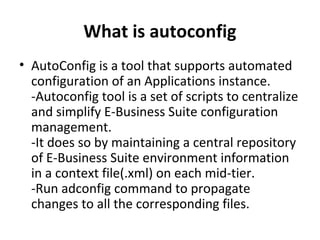
What is autoconfig
• AutoConfig is a tool that supports automated
configuration of an Applications instance.
-Autoconfig tool is a set of scripts to centralize
and simplify E-Business Suite configuration
management.
-It does so by maintaining a central repository
of E-Business Suite environment information
in a context file(.xml) on each mid-tier.
-Run adconfig command to propagate
changes to all the corresponding files.
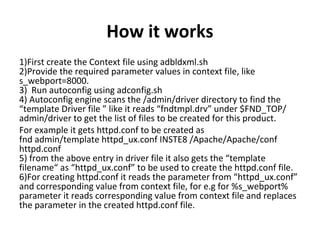
How it works
1)First create the Context file using adbldxml.sh
2)Provide the required parameter values in context file, like
s_webport=8000.
3) Run autoconfig using adconfig.sh
4) Autoconfig engine scans the /admin/driver directory to find the
“template Driver file ” like it reads “fndtmpl.drv” under $FND_TOP/
admin/driver to get the list of files to be created for this product.
For example it gets httpd.conf to be created as
fnd admin/template httpd_ux.conf INSTE8 /Apache/Apache/conf
httpd.conf
5) from the above entry in driver file it also gets the “template
filename“ as “httpd_ux.conf” to be used to create the httpd.conf file.
6)For creating httpd.conf it reads the parameter from “httpd_ux.conf”
and corresponding value from context file, for e.g for %s_webport%
parameter it reads corresponding value from context file and replaces
the parameter in the created httpd.conf file.
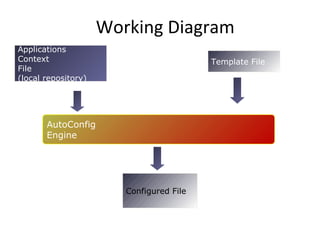
Working Diagram
Applications
Context
File
(local repository)
Template File
Configured File
AutoConfig
Engine
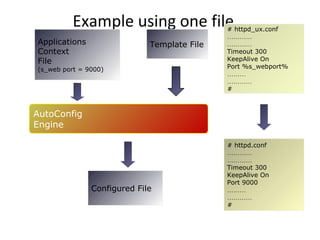
Example using one file
Applications
Context
File
(s_web port = 9000)
Template File
Configured File
# httpd_ux.conf
…………
…………
Timeout 300
KeepAlive On
Port %s_webport%
………
…………
#
# httpd.conf
…………
…………
Timeout 300
KeepAlive On
Port 9000
………
…………
#
AutoConfig
Engine
How to Implement Autoconfig
1)Apply Autoconfig Patches
2)Change ownership of the application tier ORACLE_HOME .It should be
owned by applmgr
3)Migrate Database tier to autoconfig
4)Generate appsutil.zip using perl $AD_TOP/bin/admkappsutil.pl on admin
tier as applmgr
5)Copy appsutil.zip to $ORACLE_HOME on database tier
6)unzip appsutil.zip
7)Create context.xml file using adbldxml.sh on Database tier as oracle
8)Generate diff Report using adcfgchk.sh and Analyze for differences.
9)Perform pre-Autoconfig steps
10)Run Autoconfig and do post Autoconfig Steps
11)Migrate Application tier to autoconfig
12)Create context.xml file using adbldxml.sh on Middle tier as applmgr
13)Generate diff Report using adcfgchk.sh and Analyze for differences.
14)Perform pre-Autoconfig steps
15)Run Autoconfig and do post Autoconfig Steps
16)Start applications using Autoconfig utilities.
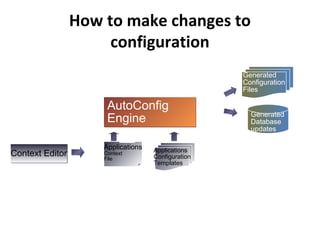
How to make changes to
configuration
AutoConfig
Engine
AutoConfig
Engine
Applications
Context
File
Generated
Configuration
Files
Generated
Database
updates
Context EditorContext Editor Applications
Configuration
Templates
Autoconfig Scripts
• Autoconfig Scripts
-adbldxml.sh – Creates the Applications context file,
e.g. .xml
-adchkcfg.sh – This script is used for analysis purpose.
It generates a report that shows differences between
the original configuration files and the AutoConfig
generated configuration files.
-adconfig.sh – This script calls the Java API to run the
AutoConfig engine, which instantiates template files
with instance-specific details from the XML context
file, updates configuration files and profile options.
Autoconfig context file
• Autoconfig Context file -Context file contains
all the variables and their values related to the
files of tech stack, environment for managing
the variables centrally.
-Context file is created under
$APPL_TOP/admin with naming conventions
as .xml using adbldxml.sh script.
Autconfig template files
• Autoconfig template files-Template files that include named tags, which are replaced with
instance-specific information from the according Context (this process is called “instantiation”).
-The template files are located in the relevant product. For e.g. $_TOP/admin/template directories
like adapcctl_ux.sh
resides under $AD_TOP/admin/template
header_string=”$Header: adapcctl_ux.sh 115.50 2006/04/07 11:05:26 mmanku ship $”
prog_version=`echo “$header_string” | awk ‘{print $3}’`
program=`basename $0`
usage=”t$program {start|stop|status|graceful|restart|configtest|help}”
• #
# Make sure the logfile directory exists
#
if [ ! -d `dirname %s_apclog%` ]; then
mkdir -p `dirname %s_apclog%`
fi;
if [ ! -d `dirname %s_apclog_pls%` ]; then
mkdir -p `dirname %s_apclog_pls%`
fi;
• printf “n$program version $prog_versionnn”
• -It is used to store site-specific details for each product. It maintains the template info about an
specific file as what it will contain. As above, varaible “”%s_apclog%” represnts a parameter value
as defined in context file.
Autoconfig template Driver files
-Every product in the E-Business Suite maintains
a driver file used by AutoConfig. The driver file
lists the AutoConfig file templates and their
destination locations.
-Used to tell AutoConfig how to build target files
-AutoConfig searches each /admin/driver
directory,
Looking for the appropriate tmpl.drv files.
For example: adtmpl.drv,fndtmpl.drv
How to customize the Autoconfig
template files
1)Decide about the file to customize
2) Go the Product whose file is getting
customized
3) Create
$<PRODUCT_TOP>/admin/template/custom
directory
4) copy the template and customize it
Continued
• You cannot customize all AutoConfig template
files. The AutoConfig template file cannot be
customized if the “LOCK” keyword appears in the
template file’s entry in the product driver file.
AutoConfig ignores custom template files that
are marked with “LOCK”.
• For example, the following entry in
/admin/driver/adtmpl.drv would prevent
customization of the file adconfig.txt:
ad admin/template adconfig.txt INSTE8 /admin
adconfig.txt 600 LOCK
R12.2 Autoconfig Restrictions
• With the inclusion of web logic in R12.2 techstack,all the
configuration are not managed by Autoconfig
• Some of the Apache config files are under fusion
middleware control now, namely httpd.conf, admin.conf
and ssl.conf. All other Apache config files are still under
Autoconfig control.
• if you have to change the port used by EBS instance, then
you have to log into the Weblogic admin console and
change port there and then sync context xml file using
adSyncContext.pl. This adSyncContext.pl utility will get the
current port values from Weblogic console and update the
xml with new port values. Once the context xml file syncs,
we have to run Autoconfig to sync other config files and
database profile values to pickup new webport
Thank You
Please visit the site
http://techgoeasy.com for such
material

Autoconfig r12

  • 1.
  • 2.
    Agenda • What isAutoConfig? • How it works? • Maintaining System Configuration Using AutoConfig • Components of AutoConfig • How to customize the Autoconfig template files • R12.2 restrictions
  • 3.
    What is autoconfig •AutoConfig is a tool that supports automated configuration of an Applications instance. -Autoconfig tool is a set of scripts to centralize and simplify E-Business Suite configuration management. -It does so by maintaining a central repository of E-Business Suite environment information in a context file(.xml) on each mid-tier. -Run adconfig command to propagate changes to all the corresponding files.
  • 4.
    How it works 1)Firstcreate the Context file using adbldxml.sh 2)Provide the required parameter values in context file, like s_webport=8000. 3) Run autoconfig using adconfig.sh 4) Autoconfig engine scans the /admin/driver directory to find the “template Driver file ” like it reads “fndtmpl.drv” under $FND_TOP/ admin/driver to get the list of files to be created for this product. For example it gets httpd.conf to be created as fnd admin/template httpd_ux.conf INSTE8 /Apache/Apache/conf httpd.conf 5) from the above entry in driver file it also gets the “template filename“ as “httpd_ux.conf” to be used to create the httpd.conf file. 6)For creating httpd.conf it reads the parameter from “httpd_ux.conf” and corresponding value from context file, for e.g for %s_webport% parameter it reads corresponding value from context file and replaces the parameter in the created httpd.conf file.
  • 5.
  • 6.
    Example using onefile Applications Context File (s_web port = 9000) Template File Configured File # httpd_ux.conf ………… ………… Timeout 300 KeepAlive On Port %s_webport% ……… ………… # # httpd.conf ………… ………… Timeout 300 KeepAlive On Port 9000 ……… ………… # AutoConfig Engine
  • 7.
    How to ImplementAutoconfig 1)Apply Autoconfig Patches 2)Change ownership of the application tier ORACLE_HOME .It should be owned by applmgr 3)Migrate Database tier to autoconfig 4)Generate appsutil.zip using perl $AD_TOP/bin/admkappsutil.pl on admin tier as applmgr 5)Copy appsutil.zip to $ORACLE_HOME on database tier 6)unzip appsutil.zip 7)Create context.xml file using adbldxml.sh on Database tier as oracle 8)Generate diff Report using adcfgchk.sh and Analyze for differences. 9)Perform pre-Autoconfig steps 10)Run Autoconfig and do post Autoconfig Steps 11)Migrate Application tier to autoconfig 12)Create context.xml file using adbldxml.sh on Middle tier as applmgr 13)Generate diff Report using adcfgchk.sh and Analyze for differences. 14)Perform pre-Autoconfig steps 15)Run Autoconfig and do post Autoconfig Steps 16)Start applications using Autoconfig utilities.
  • 8.
    How to makechanges to configuration AutoConfig Engine AutoConfig Engine Applications Context File Generated Configuration Files Generated Database updates Context EditorContext Editor Applications Configuration Templates
  • 9.
    Autoconfig Scripts • AutoconfigScripts -adbldxml.sh – Creates the Applications context file, e.g. .xml -adchkcfg.sh – This script is used for analysis purpose. It generates a report that shows differences between the original configuration files and the AutoConfig generated configuration files. -adconfig.sh – This script calls the Java API to run the AutoConfig engine, which instantiates template files with instance-specific details from the XML context file, updates configuration files and profile options.
  • 10.
    Autoconfig context file •Autoconfig Context file -Context file contains all the variables and their values related to the files of tech stack, environment for managing the variables centrally. -Context file is created under $APPL_TOP/admin with naming conventions as .xml using adbldxml.sh script.
  • 11.
    Autconfig template files •Autoconfig template files-Template files that include named tags, which are replaced with instance-specific information from the according Context (this process is called “instantiation”). -The template files are located in the relevant product. For e.g. $_TOP/admin/template directories like adapcctl_ux.sh resides under $AD_TOP/admin/template header_string=”$Header: adapcctl_ux.sh 115.50 2006/04/07 11:05:26 mmanku ship $” prog_version=`echo “$header_string” | awk ‘{print $3}’` program=`basename $0` usage=”t$program {start|stop|status|graceful|restart|configtest|help}” • # # Make sure the logfile directory exists # if [ ! -d `dirname %s_apclog%` ]; then mkdir -p `dirname %s_apclog%` fi; if [ ! -d `dirname %s_apclog_pls%` ]; then mkdir -p `dirname %s_apclog_pls%` fi; • printf “n$program version $prog_versionnn” • -It is used to store site-specific details for each product. It maintains the template info about an specific file as what it will contain. As above, varaible “”%s_apclog%” represnts a parameter value as defined in context file.
  • 12.
    Autoconfig template Driverfiles -Every product in the E-Business Suite maintains a driver file used by AutoConfig. The driver file lists the AutoConfig file templates and their destination locations. -Used to tell AutoConfig how to build target files -AutoConfig searches each /admin/driver directory, Looking for the appropriate tmpl.drv files. For example: adtmpl.drv,fndtmpl.drv
  • 13.
    How to customizethe Autoconfig template files 1)Decide about the file to customize 2) Go the Product whose file is getting customized 3) Create $<PRODUCT_TOP>/admin/template/custom directory 4) copy the template and customize it
  • 14.
    Continued • You cannotcustomize all AutoConfig template files. The AutoConfig template file cannot be customized if the “LOCK” keyword appears in the template file’s entry in the product driver file. AutoConfig ignores custom template files that are marked with “LOCK”. • For example, the following entry in /admin/driver/adtmpl.drv would prevent customization of the file adconfig.txt: ad admin/template adconfig.txt INSTE8 /admin adconfig.txt 600 LOCK
  • 15.
    R12.2 Autoconfig Restrictions •With the inclusion of web logic in R12.2 techstack,all the configuration are not managed by Autoconfig • Some of the Apache config files are under fusion middleware control now, namely httpd.conf, admin.conf and ssl.conf. All other Apache config files are still under Autoconfig control. • if you have to change the port used by EBS instance, then you have to log into the Weblogic admin console and change port there and then sync context xml file using adSyncContext.pl. This adSyncContext.pl utility will get the current port values from Weblogic console and update the xml with new port values. Once the context xml file syncs, we have to run Autoconfig to sync other config files and database profile values to pickup new webport
  • 16.
    Thank You Please visitthe site http://techgoeasy.com for such material