GOOGLE DRIVE
TOPIC: GOOGLE DRIVE
• BY: SHAHIDA BALOCH
• 21 BS ENGLISH 2014
• ASSIGNED BY: SIR
JABBAR
INTRODUCTION
• GOOGLE DRIVE is a product of GOOGLE brand
which is officially released on April 24, 2012.
• Its upgraded stable version was released on June
19,2012.
• Google started to work on this project on 2006
• Website: https://drive.google.com/
WHAT IS NEED OF GOOGLE DRIVE?
• To overcome the limitations of file format for
sharing and storing them on other Google
product like Google document, YouTube and
Picasa.
• To provide online backup services.
WHAT IS GOOGLE DRIVE?
• GOOGLE DRIVE is a online back up services, where you can create,
share, collaborate, and keep all of your stuff.
• It employees the concept of cloud computing for file storage and
access.
• It is an extensions of Google Document.
• You can upload and access all of your files, including videos, photos,
Google Docs, PDFs and beyond.
• It supports almost 20 formats of filies.
WHAT IS CLOUD COMPUTING?
• Cloud Computing is a technology that uses the internet and central
remote servers to maintain data and applications.
• Cloud computing allows consumers and businesses to use
applications without installation and access their personal files at any
computer with internetaccess.
• This technology allows for much more efficient computing by
centralizing storage, memory, processing and bandwidth.
VERSIONS OF GOOGLE
DRIVE
Drive services comes in two
versions:
• Free: which gives up to 5GB
data storage.
• Premium: This gives from
25GB to 16TB online data
storage on monthly
rental(2.49 USD/month).
HOW TO USE GOOGLE DRIVE?
• There are two way to use Google
Drive:
1. Online version.
2. Drive client software.
ONLINE VERSION
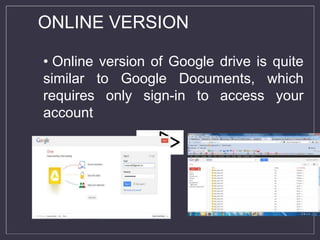
• Online version of Google drive is quite
similar to Google Documents, which
requires only sign-in to access your
account
Drive Client Software
• Drive client software which need to be installed in your system to
share and store stuff online
• Devices which support Google Drive client software are:
On PCs running Windows XP, Windows Vista and Windows 7, or Mac
OS X Lion (10.7) and Snow Leopard (10.6);
On Android smart phones and tablets with Eclair and newer OSes
(Android 2.1+);
On iPhones and iPads, iOS 3.0+.[7].
• Drive Client Software process in 3 steps:
Downloading and installation
Sign-up or sign-in in your account
Drag and drop(storing and sharing) of data
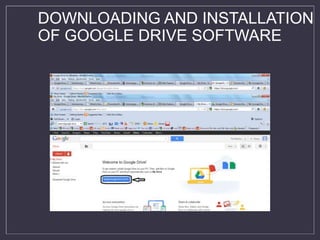
DOWNLOADING AND INSTALLATION
OF GOOGLE DRIVE SOFTWARE
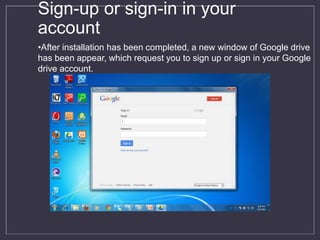
Sign-up or sign-in in your
account
•After installation has been completed, a new window of Google drive
has been appear, which request you to sign up or sign in your Google
drive account.
Drag and drop(storing and sharing) of
data
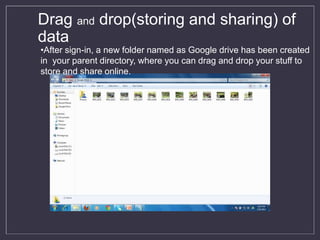
•After sign-in, a new folder named as Google drive has been created
in your parent directory, where you can drag and drop your stuff to
store and share online.
GOOGLE DRIVE
• Live changes:
• Users can create documents, spreadsheets, presentations etc and
can edit the same over internet.
• Anytime accessibility:
• Files and documents stored in the data centers of Google can be
accessed by a user while sitting in any part of the world, by simply
logging into their Google drive account.
• Device independency: There is no specific platform defined for using
the file uploaded on Google’s drive. Any device, which is connected
to network, can be used to access the file stored on drive.
• Go back in time: Google Drive tracks every change you make—so when you hit the
save button, a new revision is saved. You can look back as far as 30 days
automatically, or choose a revision to save forever.
• Send large files: Now you don’t need to attach big files with your emails. You can
send/share files from your Google Drive and recipients will be able to access the
same version of the file.
• Social Integration: The photos and videos you store in Google Drive are directly
available on your Google Plus account. All it takes is one click to share them within
your circles.
• Control your files: You can share your files with specific people, give them editing or
viewing privileges to files the way you wan
• Limited File Formats : It supports 15 file formats.
• Security Issue : In a cloud environment, many Data security issues
are arises and due to which it is considered unsuitable for use by
governments or commercial organisations.
• Internet Dependency: Internet based service means full dependency
on internet to access the data. As data is stored remotely so some
connection is required to access the data. In case of a scenario where
the Internet isn’t functioning access to your data in such situation
becomes impossible.
DIS-ADVANTAGES OF GOOGLE
DRIVE:
CONCLUSON
Google Drive provides an easy solution for online back-up of
data to the users. Especially, in emergency situations like hard
drive crash or data corruption, Google drive provides great
help to the users because of the availability of all time data
back-up for the users.
ANY QUESTION?

Cmputer ppt shado

  • 1.
  • 2.
    TOPIC: GOOGLE DRIVE •BY: SHAHIDA BALOCH • 21 BS ENGLISH 2014 • ASSIGNED BY: SIR JABBAR
  • 3.
    INTRODUCTION • GOOGLE DRIVEis a product of GOOGLE brand which is officially released on April 24, 2012. • Its upgraded stable version was released on June 19,2012. • Google started to work on this project on 2006 • Website: https://drive.google.com/
  • 4.
    WHAT IS NEEDOF GOOGLE DRIVE? • To overcome the limitations of file format for sharing and storing them on other Google product like Google document, YouTube and Picasa. • To provide online backup services.
  • 5.
    WHAT IS GOOGLEDRIVE? • GOOGLE DRIVE is a online back up services, where you can create, share, collaborate, and keep all of your stuff. • It employees the concept of cloud computing for file storage and access. • It is an extensions of Google Document. • You can upload and access all of your files, including videos, photos, Google Docs, PDFs and beyond. • It supports almost 20 formats of filies.
  • 6.
    WHAT IS CLOUDCOMPUTING? • Cloud Computing is a technology that uses the internet and central remote servers to maintain data and applications. • Cloud computing allows consumers and businesses to use applications without installation and access their personal files at any computer with internetaccess. • This technology allows for much more efficient computing by centralizing storage, memory, processing and bandwidth.
  • 7.
    VERSIONS OF GOOGLE DRIVE Driveservices comes in two versions: • Free: which gives up to 5GB data storage. • Premium: This gives from 25GB to 16TB online data storage on monthly rental(2.49 USD/month).
  • 8.
    HOW TO USEGOOGLE DRIVE? • There are two way to use Google Drive: 1. Online version. 2. Drive client software.
  • 9.
    ONLINE VERSION • Onlineversion of Google drive is quite similar to Google Documents, which requires only sign-in to access your account
  • 10.
    Drive Client Software •Drive client software which need to be installed in your system to share and store stuff online • Devices which support Google Drive client software are: On PCs running Windows XP, Windows Vista and Windows 7, or Mac OS X Lion (10.7) and Snow Leopard (10.6); On Android smart phones and tablets with Eclair and newer OSes (Android 2.1+); On iPhones and iPads, iOS 3.0+.[7]. • Drive Client Software process in 3 steps: Downloading and installation Sign-up or sign-in in your account Drag and drop(storing and sharing) of data
  • 11.
    DOWNLOADING AND INSTALLATION OFGOOGLE DRIVE SOFTWARE
  • 12.
    Sign-up or sign-inin your account •After installation has been completed, a new window of Google drive has been appear, which request you to sign up or sign in your Google drive account.
  • 13.
    Drag and drop(storingand sharing) of data •After sign-in, a new folder named as Google drive has been created in your parent directory, where you can drag and drop your stuff to store and share online.
  • 14.
  • 15.
    • Live changes: •Users can create documents, spreadsheets, presentations etc and can edit the same over internet. • Anytime accessibility: • Files and documents stored in the data centers of Google can be accessed by a user while sitting in any part of the world, by simply logging into their Google drive account. • Device independency: There is no specific platform defined for using the file uploaded on Google’s drive. Any device, which is connected to network, can be used to access the file stored on drive.
  • 16.
    • Go backin time: Google Drive tracks every change you make—so when you hit the save button, a new revision is saved. You can look back as far as 30 days automatically, or choose a revision to save forever. • Send large files: Now you don’t need to attach big files with your emails. You can send/share files from your Google Drive and recipients will be able to access the same version of the file. • Social Integration: The photos and videos you store in Google Drive are directly available on your Google Plus account. All it takes is one click to share them within your circles. • Control your files: You can share your files with specific people, give them editing or viewing privileges to files the way you wan
  • 17.
    • Limited FileFormats : It supports 15 file formats. • Security Issue : In a cloud environment, many Data security issues are arises and due to which it is considered unsuitable for use by governments or commercial organisations. • Internet Dependency: Internet based service means full dependency on internet to access the data. As data is stored remotely so some connection is required to access the data. In case of a scenario where the Internet isn’t functioning access to your data in such situation becomes impossible. DIS-ADVANTAGES OF GOOGLE DRIVE:
  • 18.
    CONCLUSON Google Drive providesan easy solution for online back-up of data to the users. Especially, in emergency situations like hard drive crash or data corruption, Google drive provides great help to the users because of the availability of all time data back-up for the users.
  • 19.