Press:
Windows Key + Ctrl Key + D
Reporter:
Suarez, Rizza O.
MaEd – Mathematics
Objectives:
•To identify Cloud Storage and Cloud Computing;
•To differentiate Cloud Storage and Cloud
Computing;
•To distinguish the advantages and
disadvantages of using Cloud Storage and Cloud
Computing
•To define the meaning of Cloud Mapping
Definition of Terms:
• ARPANET – Advanced Research Projects Agency Network
• AWS – Amazon Web Services
• Database – a structured set of data held in a computer,
especially one that is accessible in various ways
• HPE – Hewlett Packard Enterprise
• IaaS – Infrastructure-as-a-Service
• IBM – International Business Machines Corporation
• Microservices – approach to application development in
which a large application is built as a suite of modular
components or services
Definition of Terms:
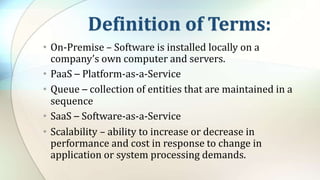
• On-Premise – Software is installed locally on a
company’s own computer and servers.
• PaaS – Platform-as-a-Service
• Queue – collection of entities that are maintained in a
sequence
• SaaS – Software-as-a-Service
• Scalability – ability to increase or decrease in
performance and cost in response to change in
application or system processing demands.
What is the cloud?
•The cloud is the Internet—
more specifically, it's all of
the things you can access
remotely over the Internet.
Reasons to use the Cloud
•File storage
•File sharing
•Backing up data
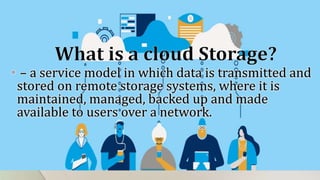
• – a service model in which data is transmitted and
stored on remote storage systems, where it is
maintained, managed, backed up and made
available to users over a network.
Types of Cloud Storage:
•Public cloud storage services
•Private cloud storage service
•Hybrid cloud storage service
Types of Cloud Storage:
•Public cloud storage services
– provide a Multi-tenant storage environment
that is most suited for unstructured data on a
subscription basis.
Types of Cloud Storage:
•Private cloud storage services
– provided by in-house storage resources
deployed as a dedicated environment
protected behind an organization's firewall
Types of Cloud Storage:
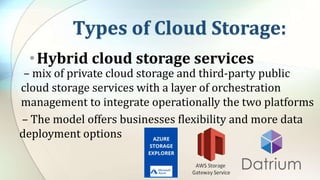
•Hybrid cloud storage services
– mix of private cloud storage and third-party public
cloud storage services with a layer of orchestration
management to integrate operationally the two platforms
– The model offers businesses flexibility and more data
deployment options
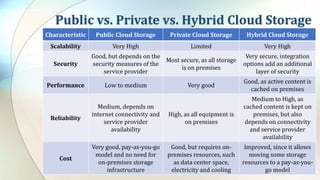
Public vs. Private vs. Hybrid Cloud Storage
Characteristic Public Cloud Storage Private Cloud Storage Hybrid Cloud Storage
Scalability Very High Limited Very High
Security
Good, but depends on the
security measures of the
service provider
Most secure, as all storage
is on premises
Very secure, integration
options add an additional
layer of security
Performance Low to medium Very good
Good, as active content is
cached on premises
Reliability
Medium, depends on
internet connectivity and
service provider
availability
High, as all equipment is
on premises
Medium to High, as
cached content is kept on
premises, but also
depends on connectivity
and service provider
availability
Cost
Very good, pay-as-you-go
model and no need for
on-premises storage
infrastructure
Good, but requires on-
premises resources, such
as data center space,
electricity and cooling
Improved, since it allows
moving some storage
resources to a pay-as-you-
go model
Benefits of Cloud Storage
• Pay for what is used
• Utility billing
• Global availability
• Ease of use
• Offsite security
Drawbacks of Cloud Storage
• Security
• Access to data stored in the cloud may also be an
issue and could significantly increase the cost of
using cloud storage
• A company may run into performance issues Offsite
security
• If a company requires a lot of cloud storage capacity
and frequently moves its data back and forth, the
monthly costs can be quite high
Cloud-based Storage Market Leaders
•Amazon Web Services (AWS)
•Google
•Microsoft Azure
What is a Cloud Computing?
– the delivery of on-demand computing
services -- from applications to storage and
processing power -- typically over the internet
and on a pay-as-you-go basis.
What are examples of cloud computing
in Education?
• SlideRocket
• Ratatype
• AWS Cloud for K-12 and Primary Education
3 Cloud Computing Models
• Infrastructure-as-a-Service (Iaas)
• Platform-as-a-Service (Paas)
• Software-as-a-Service (SaaS)
What is Infrastructure-as-a-Service?
• refers to the fundamental building blocks
of computing that can be rented: physical
or virtual servers, storage and networking
What is Platform-as-a-Service?
• the next layer up -- as well as the underlying
storage, networking, and virtual servers
• this will also include the tools and software
that developers need to build applications on
top of: that could include middleware,
database management, operating systems, and
development tools.
What is Software-as-a-Service?
• the delivery of applications-as-a-service,
probably the version of cloud computing
that most people are used to on a day-to-
day basis.
• the dominant cloud computing model in
the medium term
Benefits of Cloud Computing
• Companies not having to buy or maintain their own
computing infrastructure.
• No more buying servers, updating applications or
operating systems, or decommissioning and
disposing of hardware or software when it is out of
date.
• companies can move faster on projects and test out
concepts without lengthy procurement and big
upfront costs
Advantages and Disadvantages of Cloud
Computing
• Cloud computing is not necessarily cheaper than
other forms of computing, just as renting is not
always cheaper than buying in the long term.
• Some companies may be reluctant to host sensitive
data in a service that is also used by rivals.
• While it may be easy to start using a new cloud
application, migrating existing data or apps to the
cloud may be much more complicated and
expensive.
Advantages and Disadvantages of Cloud
Computing
• a significant proportion of experienced cloud users
said that they thought upfront migration costs
ultimately outweigh the long-term savings created
by IaaS.
• You can only access your applications if you have an
internet connection.
What is a Public Cloud?
• Public cloud is the classic cloud computing
model, where users can access a large pool
of computing power over the internet
(whether that is IaaS, PaaS, or SaaS).
• One of the significant benefits here is the
ability to rapidly scale a service.
What is a Private Cloud?
• Private cloud allows organizations to benefit
from some of the advantages of public cloud --
but without the concerns about relinquishing
control over data and services, because it is
tucked away behind the corporate firewall.
• Give developers access to a pool of computing
power that scales on-demand without putting
security at risk.
What is a Hybrid Cloud?
• Some data in the public cloud, some
projects in private cloud, multiple vendors
and different levels of cloud usage.
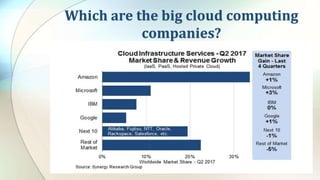
Which are the big cloud computing
companies?
Is Cloud Storage and Cloud Computing
the same?
What is the Difference between Cloud
Storage and Cloud Computing ?
• You use cloud storage to save and keep data.
Cloud computing, on the other hand, is used to
work on and complete specified projects.
• Cloud computing is linked with cloud storage
in that you have to move data to the cloud
(cloud storage) before you can make use of
cloud computing systems.
What is the Difference between Cloud
Storage and Cloud Computing ?
• Cloud computing requires higher processing power than
cloud storage. Cloud storage, on the other hand, needs
more storage space.
• Cloud computing is essentially targeted towards
businesses. Cloud storage, on the other hand, is utilized
both for professional and personal reasons.
• Cloud storage is simply a data storage and sharing
medium, while cloud computing gives you the ability to
remotely work on and transform data
What is a Cloud Map?
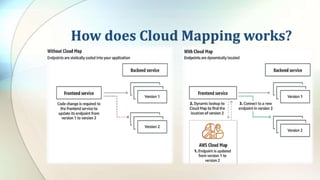
• Cloud Map is a cloud resource discovery service.
• With Cloud Map, you can define custom names for your
application resources, and it maintains the updated
location of these dynamically changing resources.
• Cloud Map allows you to register any application
resources, such as databases, queues, microservices, and
other cloud resources, with custom names.
How does Cloud Mapping works?
Benefits of using Cloud Map
• Increase application availability
• Increase developer productivity
Resources:
• Cloud Storage vs. Cloud Computing: What’s the Difference? (2018). Cloud Carib.
https://info.cloudcarib.com/blog/cloud-storage-vs.-cloud-computing-whats-the-
difference#:%7E:text=Cloud%20computing%20requires%20higher%20processing,
hand%2C%20needs%20more%20storage%20space.&text=Cloud%20storage%20is
%20simply%20a,%2C%20coding%20an%20application%20remotely).
• Computer Basics: Understanding the Cloud. (2021). GCFGlobal.Org.
https://edu.gcfglobal.org/en/computerbasics/understanding-the-cloud/1/
• Goddard, W. (2021, January 13). The Evolution of Cloud Computing – Where’s It
Going Next? ITChronicles. https://itchronicles.com/cloud/the-evolution-of-cloud-
computing-wheres-it-going-next/
• Introducing AWS Cloud Map. (2020). Amazon Web Services, Inc.
https://aws.amazon.com/cloud-map/
Cloud Storage and  Cloud Computing.pptx

Cloud Storage and Cloud Computing.pptx

  • 1.
  • 2.
  • 3.
    Objectives: •To identify CloudStorage and Cloud Computing; •To differentiate Cloud Storage and Cloud Computing; •To distinguish the advantages and disadvantages of using Cloud Storage and Cloud Computing •To define the meaning of Cloud Mapping
  • 4.
    Definition of Terms: •ARPANET – Advanced Research Projects Agency Network • AWS – Amazon Web Services • Database – a structured set of data held in a computer, especially one that is accessible in various ways • HPE – Hewlett Packard Enterprise • IaaS – Infrastructure-as-a-Service • IBM – International Business Machines Corporation • Microservices – approach to application development in which a large application is built as a suite of modular components or services
  • 5.
    Definition of Terms: •On-Premise – Software is installed locally on a company’s own computer and servers. • PaaS – Platform-as-a-Service • Queue – collection of entities that are maintained in a sequence • SaaS – Software-as-a-Service • Scalability – ability to increase or decrease in performance and cost in response to change in application or system processing demands.
  • 7.
    What is thecloud? •The cloud is the Internet— more specifically, it's all of the things you can access remotely over the Internet.
  • 8.
    Reasons to usethe Cloud •File storage •File sharing •Backing up data
  • 9.
    • – aservice model in which data is transmitted and stored on remote storage systems, where it is maintained, managed, backed up and made available to users over a network.
  • 10.
    Types of CloudStorage: •Public cloud storage services •Private cloud storage service •Hybrid cloud storage service
  • 11.
    Types of CloudStorage: •Public cloud storage services – provide a Multi-tenant storage environment that is most suited for unstructured data on a subscription basis.
  • 12.
    Types of CloudStorage: •Private cloud storage services – provided by in-house storage resources deployed as a dedicated environment protected behind an organization's firewall
  • 13.
    Types of CloudStorage: •Hybrid cloud storage services – mix of private cloud storage and third-party public cloud storage services with a layer of orchestration management to integrate operationally the two platforms – The model offers businesses flexibility and more data deployment options
  • 14.
    Public vs. Privatevs. Hybrid Cloud Storage Characteristic Public Cloud Storage Private Cloud Storage Hybrid Cloud Storage Scalability Very High Limited Very High Security Good, but depends on the security measures of the service provider Most secure, as all storage is on premises Very secure, integration options add an additional layer of security Performance Low to medium Very good Good, as active content is cached on premises Reliability Medium, depends on internet connectivity and service provider availability High, as all equipment is on premises Medium to High, as cached content is kept on premises, but also depends on connectivity and service provider availability Cost Very good, pay-as-you-go model and no need for on-premises storage infrastructure Good, but requires on- premises resources, such as data center space, electricity and cooling Improved, since it allows moving some storage resources to a pay-as-you- go model
  • 15.
    Benefits of CloudStorage • Pay for what is used • Utility billing • Global availability • Ease of use • Offsite security
  • 16.
    Drawbacks of CloudStorage • Security • Access to data stored in the cloud may also be an issue and could significantly increase the cost of using cloud storage • A company may run into performance issues Offsite security • If a company requires a lot of cloud storage capacity and frequently moves its data back and forth, the monthly costs can be quite high
  • 17.
    Cloud-based Storage MarketLeaders •Amazon Web Services (AWS) •Google •Microsoft Azure
  • 18.
    What is aCloud Computing? – the delivery of on-demand computing services -- from applications to storage and processing power -- typically over the internet and on a pay-as-you-go basis.
  • 19.
    What are examplesof cloud computing in Education? • SlideRocket • Ratatype • AWS Cloud for K-12 and Primary Education
  • 21.
    3 Cloud ComputingModels • Infrastructure-as-a-Service (Iaas) • Platform-as-a-Service (Paas) • Software-as-a-Service (SaaS)
  • 22.
    What is Infrastructure-as-a-Service? •refers to the fundamental building blocks of computing that can be rented: physical or virtual servers, storage and networking
  • 23.
    What is Platform-as-a-Service? •the next layer up -- as well as the underlying storage, networking, and virtual servers • this will also include the tools and software that developers need to build applications on top of: that could include middleware, database management, operating systems, and development tools.
  • 24.
    What is Software-as-a-Service? •the delivery of applications-as-a-service, probably the version of cloud computing that most people are used to on a day-to- day basis. • the dominant cloud computing model in the medium term
  • 25.
    Benefits of CloudComputing • Companies not having to buy or maintain their own computing infrastructure. • No more buying servers, updating applications or operating systems, or decommissioning and disposing of hardware or software when it is out of date. • companies can move faster on projects and test out concepts without lengthy procurement and big upfront costs
  • 26.
    Advantages and Disadvantagesof Cloud Computing • Cloud computing is not necessarily cheaper than other forms of computing, just as renting is not always cheaper than buying in the long term. • Some companies may be reluctant to host sensitive data in a service that is also used by rivals. • While it may be easy to start using a new cloud application, migrating existing data or apps to the cloud may be much more complicated and expensive.
  • 27.
    Advantages and Disadvantagesof Cloud Computing • a significant proportion of experienced cloud users said that they thought upfront migration costs ultimately outweigh the long-term savings created by IaaS. • You can only access your applications if you have an internet connection.
  • 28.
    What is aPublic Cloud? • Public cloud is the classic cloud computing model, where users can access a large pool of computing power over the internet (whether that is IaaS, PaaS, or SaaS). • One of the significant benefits here is the ability to rapidly scale a service.
  • 29.
    What is aPrivate Cloud? • Private cloud allows organizations to benefit from some of the advantages of public cloud -- but without the concerns about relinquishing control over data and services, because it is tucked away behind the corporate firewall. • Give developers access to a pool of computing power that scales on-demand without putting security at risk.
  • 30.
    What is aHybrid Cloud? • Some data in the public cloud, some projects in private cloud, multiple vendors and different levels of cloud usage.
  • 31.
    Which are thebig cloud computing companies?
  • 32.
    Is Cloud Storageand Cloud Computing the same?
  • 33.
    What is theDifference between Cloud Storage and Cloud Computing ? • You use cloud storage to save and keep data. Cloud computing, on the other hand, is used to work on and complete specified projects. • Cloud computing is linked with cloud storage in that you have to move data to the cloud (cloud storage) before you can make use of cloud computing systems.
  • 34.
    What is theDifference between Cloud Storage and Cloud Computing ? • Cloud computing requires higher processing power than cloud storage. Cloud storage, on the other hand, needs more storage space. • Cloud computing is essentially targeted towards businesses. Cloud storage, on the other hand, is utilized both for professional and personal reasons. • Cloud storage is simply a data storage and sharing medium, while cloud computing gives you the ability to remotely work on and transform data
  • 35.
    What is aCloud Map? • Cloud Map is a cloud resource discovery service. • With Cloud Map, you can define custom names for your application resources, and it maintains the updated location of these dynamically changing resources. • Cloud Map allows you to register any application resources, such as databases, queues, microservices, and other cloud resources, with custom names.
  • 36.
    How does CloudMapping works?
  • 37.
    Benefits of usingCloud Map • Increase application availability • Increase developer productivity
  • 39.
    Resources: • Cloud Storagevs. Cloud Computing: What’s the Difference? (2018). Cloud Carib. https://info.cloudcarib.com/blog/cloud-storage-vs.-cloud-computing-whats-the- difference#:%7E:text=Cloud%20computing%20requires%20higher%20processing, hand%2C%20needs%20more%20storage%20space.&text=Cloud%20storage%20is %20simply%20a,%2C%20coding%20an%20application%20remotely). • Computer Basics: Understanding the Cloud. (2021). GCFGlobal.Org. https://edu.gcfglobal.org/en/computerbasics/understanding-the-cloud/1/ • Goddard, W. (2021, January 13). The Evolution of Cloud Computing – Where’s It Going Next? ITChronicles. https://itchronicles.com/cloud/the-evolution-of-cloud- computing-wheres-it-going-next/ • Introducing AWS Cloud Map. (2020). Amazon Web Services, Inc. https://aws.amazon.com/cloud-map/