Apache Sqoop

A Data Transfer Tool for Hadoop


         Arvind Prabhakar, Cloudera Inc. Sept 21, 2011
What is Sqoop?

● Allows easy import and export of data from structured
  data stores:
   ○ Relational Database
   ○ Enterprise Data Warehouse
   ○ NoSQL Datastore

● Allows easy integration with Hadoop based systems:
   ○ Hive
   ○ HBase
   ○ Oozie
Agenda

● Motivation

● Importing and exporting data using Sqoop

● Provisioning Hive Metastore

● Populating HBase tables

● Sqoop Connectors

● Current Status and Road Map
Motivation

● Structured data stored in Databases and EDW is not easily
  accessible for analysis in Hadoop

● Access to Databases and EDW from Hadoop Clusters is
  problematic.

● Forcing MapReduce to access data from Databases/EDWs is
  repititive, error-prone and non-trivial.

● Data preparation often required for efficient consumption
  by Hadoop based data pipelines. 

● Current methods of transferring data are inefficient/ad-
  hoc.
Enter: Sqoop

    A tool to automate data transfer between structured     
    datastores and Hadoop.

Highlights

 ● Uses datastore metadata to infer structure definitions
 ● Uses MapReduce framework to transfer data in parallel
 ● Allows structure definitions to be provisioned in Hive
   metastore
 ● Provides an extension mechanism to incorporate high
   performance connectors for external systems. 
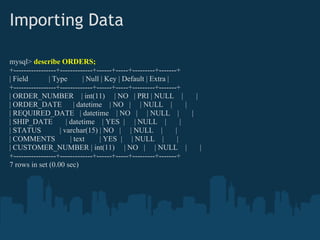
Importing Data

mysql> describe ORDERS;
+-----------------+-------------+------+-----+---------+-------+
| Field        | Type        | Null | Key | Default | Extra |
+-----------------+-------------+------+-----+---------+-------+
| ORDER_NUMBER | int(11) | NO | PRI | NULL |                            |
| ORDER_DATE | datetime | NO | | NULL |                             |
| REQUIRED_DATE | datetime | NO | | NULL |                            |
| SHIP_DATE           | datetime | YES | | NULL |                 |
| STATUS           | varchar(15) | NO | | NULL |               |
| COMMENTS              | text     | YES | | NULL |             |
| CUSTOMER_NUMBER | int(11) | NO | | NULL |                               |
+-----------------+-------------+------+-----+---------+-------+
7 rows in set (0.00 sec)
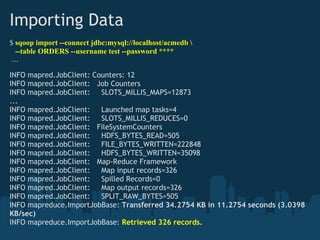
Importing Data
$ sqoop import --connect jdbc:mysql://localhost/acmedb 
  --table ORDERS --username test --password ****
 ...

INFO mapred.JobClient: Counters: 12
INFO mapred.JobClient:   Job Counters 
INFO mapred.JobClient:     SLOTS_MILLIS_MAPS=12873
...
INFO mapred.JobClient:     Launched map tasks=4
INFO mapred.JobClient:     SLOTS_MILLIS_REDUCES=0
INFO mapred.JobClient:   FileSystemCounters
INFO mapred.JobClient:     HDFS_BYTES_READ=505
INFO mapred.JobClient:     FILE_BYTES_WRITTEN=222848
INFO mapred.JobClient:     HDFS_BYTES_WRITTEN=35098
INFO mapred.JobClient:   Map-Reduce Framework
INFO mapred.JobClient:     Map input records=326
INFO mapred.JobClient:     Spilled Records=0
INFO mapred.JobClient:     Map output records=326
INFO mapred.JobClient:     SPLIT_RAW_BYTES=505
INFO mapreduce.ImportJobBase: Transferred 34.2754 KB in 11.2754 seconds (3.0398
KB/sec)
INFO mapreduce.ImportJobBase: Retrieved 326 records.
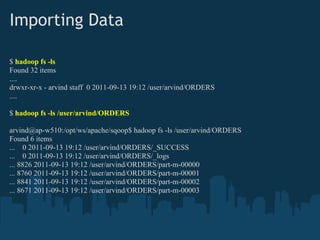
Importing Data

$ hadoop fs -ls
Found 32 items
....
drwxr-xr-x - arvind staff 0 2011-09-13 19:12 /user/arvind/ORDERS
....

$ hadoop fs -ls /user/arvind/ORDERS

arvind@ap-w510:/opt/ws/apache/sqoop$ hadoop fs -ls /user/arvind/ORDERS
Found 6 items
... 0 2011-09-13 19:12 /user/arvind/ORDERS/_SUCCESS
... 0 2011-09-13 19:12 /user/arvind/ORDERS/_logs
... 8826 2011-09-13 19:12 /user/arvind/ORDERS/part-m-00000
... 8760 2011-09-13 19:12 /user/arvind/ORDERS/part-m-00001
... 8841 2011-09-13 19:12 /user/arvind/ORDERS/part-m-00002
... 8671 2011-09-13 19:12 /user/arvind/ORDERS/part-m-00003
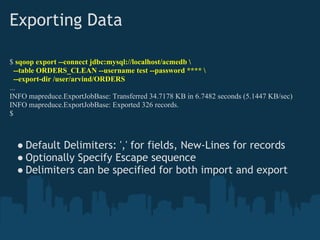
Exporting Data

$ sqoop export --connect jdbc:mysql://localhost/acmedb 
  --table ORDERS_CLEAN --username test --password **** 
  --export-dir /user/arvind/ORDERS
...
INFO mapreduce.ExportJobBase: Transferred 34.7178 KB in 6.7482 seconds (5.1447 KB/sec)
INFO mapreduce.ExportJobBase: Exported 326 records.
$


  ● Default Delimiters: ',' for fields, New-Lines for records
  ● Optionally Specify Escape sequence 
  ● Delimiters can be specified for both import and export
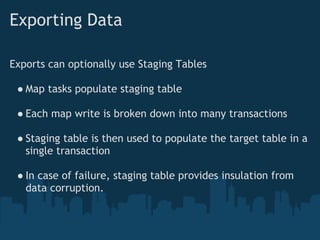
Exporting Data

Exports can optionally use Staging Tables

 ● Map tasks populate staging table

 ● Each map write is broken down into many transactions

 ● Staging table is then used to populate the target table in a
   single transaction

 ● In case of failure, staging table provides insulation from
   data corruption.
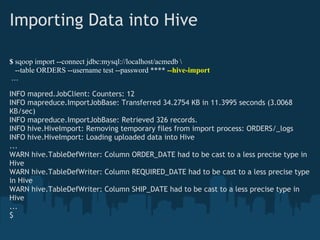
Importing Data into Hive

$ sqoop import --connect jdbc:mysql://localhost/acmedb 
  --table ORDERS --username test --password **** --hive-import
 ...

INFO mapred.JobClient: Counters: 12
INFO mapreduce.ImportJobBase: Transferred 34.2754 KB in 11.3995 seconds (3.0068
KB/sec)
INFO mapreduce.ImportJobBase: Retrieved 326 records.
INFO hive.HiveImport: Removing temporary files from import process: ORDERS/_logs
INFO hive.HiveImport: Loading uploaded data into Hive
...
WARN hive.TableDefWriter: Column ORDER_DATE had to be cast to a less precise type in
Hive
WARN hive.TableDefWriter: Column REQUIRED_DATE had to be cast to a less precise type
in Hive
WARN hive.TableDefWriter: Column SHIP_DATE had to be cast to a less precise type in
Hive
...
$
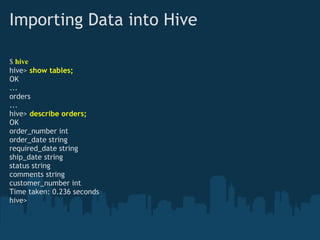
Importing Data into Hive

$ hive
hive> show tables;
OK
...
orders
...
hive> describe orders;
OK
order_number int
order_date string
required_date string
ship_date string
status string
comments string
customer_number int
Time taken: 0.236 seconds
hive>
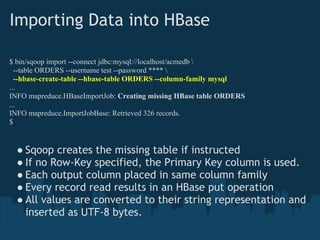
Importing Data into HBase

$ bin/sqoop import --connect jdbc:mysql://localhost/acmedb 
  --table ORDERS --username test --password **** 
  --hbase-create-table --hbase-table ORDERS --column-family mysql
...
INFO mapreduce.HBaseImportJob: Creating missing HBase table ORDERS
...
INFO mapreduce.ImportJobBase: Retrieved 326 records.
$


  ● Sqoop creates the missing table if instructed
  ● If no Row-Key specified, the Primary Key column is used.
  ● Each output column placed in same column family
  ● Every record read results in an HBase put operation
  ● All values are converted to their string representation and
    inserted as UTF-8 bytes.
Importing Data into HBase

hbase(main):001:0> list
TABLE 
ORDERS 
1 row(s) in 0.3650 seconds

hbase(main):002:0>  describe 'ORDERS'
DESCRIPTION                             ENABLED
{NAME => 'ORDERS', FAMILIES => [                true
 {NAME => 'mysql', BLOOMFILTER => 'NONE',
  REPLICATION_SCOPE => '0', COMPRESSION => 'NONE',
  VERSIONS => '3', TTL => '2147483647',
  BLOCKSIZE => '65536', IN_MEMORY => 'false',
  BLOCKCACHE => 'true'}]}
1 row(s) in 0.0310 seconds

hbase(main):003:0>
Importing Data into HBase

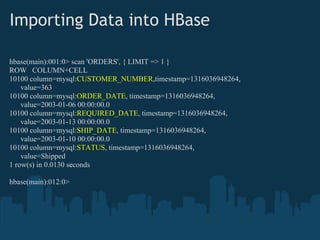
hbase(main):001:0> scan 'ORDERS', { LIMIT => 1 }
ROW COLUMN+CELL
10100 column=mysql:CUSTOMER_NUMBER,timestamp=1316036948264,
    value=363
10100 column=mysql:ORDER_DATE, timestamp=1316036948264,
    value=2003-01-06 00:00:00.0
10100 column=mysql:REQUIRED_DATE, timestamp=1316036948264,
    value=2003-01-13 00:00:00.0
10100 column=mysql:SHIP_DATE, timestamp=1316036948264,
    value=2003-01-10 00:00:00.0
10100 column=mysql:STATUS, timestamp=1316036948264,
    value=Shipped
1 row(s) in 0.0130 seconds

hbase(main):012:0>
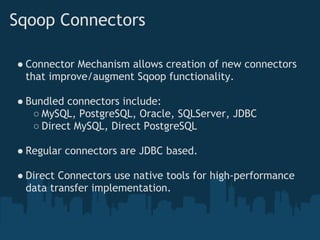
Sqoop Connectors

● Connector Mechanism allows creation of new connectors
  that improve/augment Sqoop functionality.

● Bundled connectors include:
   ○ MySQL, PostgreSQL, Oracle, SQLServer, JDBC
   ○ Direct MySQL, Direct PostgreSQL

● Regular connectors are JDBC based.

● Direct Connectors use native tools for high-performance
  data transfer implementation.
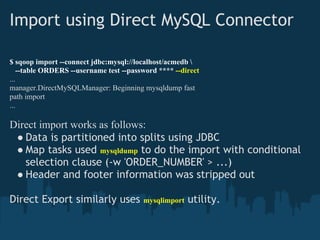
Import using Direct MySQL Connector

$ sqoop import --connect jdbc:mysql://localhost/acmedb 
   --table ORDERS --username test --password **** --direct
...
manager.DirectMySQLManager: Beginning mysqldump fast
path import
...

Direct import works as follows:
 ● Data is partitioned into splits using JDBC
 ● Map tasks used mysqldump to do the import with conditional
   selection clause (-w 'ORDER_NUMBER' > ...)
 ● Header and footer information was stripped out

Direct Export similarly uses            mysqlimport   utility.
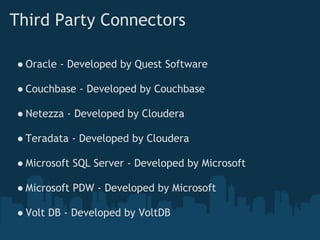
Third Party Connectors

● Oracle - Developed by Quest Software

● Couchbase - Developed by Couchbase

● Netezza - Developed by Cloudera

● Teradata - Developed by Cloudera

● Microsoft SQL Server - Developed by Microsoft

● Microsoft PDW - Developed by Microsoft

● Volt DB - Developed by VoltDB
Current Status

Sqoop is currently in Apache Incubator

  ● Status Page
     http://incubator.apache.org/projects/sqoop.html

  ● Mailing Lists
     sqoop-user@incubator.apache.org
     sqoop-dev@incubator.apache.org

  ● Release
     Current shipping version is 1.3.0
Hadoop World 2011


A gathering of Hadoop practitioners, developers,
business executives, industry luminaries and
innovative companies in the Hadoop ecosystem.

    ● Network: 1400 attendees, 25+ sponsors
    ● Learn: 60 sessions across 5 tracks for             November 8-9
         ○ Developers                              Sheraton New York Hotel &
         ○ IT Operations                                  Towers, NYC
         ○ Enterprise Architects
         ○ Data Scientists
         ○ Business Decision Makers                 Learn more and register at
                                                     www.hadoopworld.com
    ● Train: Cloudera training and certification
       (November 7, 10, 11)
Sqoop Meetup


      Monday, November 7 - 2011, 8pm - 9pm

                       at

     Sheraton New York Hotel & Towers, NYC
Thank you!

   Q&A

Apache Sqoop: A Data Transfer Tool for Hadoop

  • 1.
    Apache Sqoop A DataTransfer Tool for Hadoop Arvind Prabhakar, Cloudera Inc. Sept 21, 2011
  • 2.
    What is Sqoop? ●Allows easy import and export of data from structured data stores: ○ Relational Database ○ Enterprise Data Warehouse ○ NoSQL Datastore ● Allows easy integration with Hadoop based systems: ○ Hive ○ HBase ○ Oozie
  • 3.
    Agenda ● Motivation ● Importingand exporting data using Sqoop ● Provisioning Hive Metastore ● Populating HBase tables ● Sqoop Connectors ● Current Status and Road Map
  • 4.
    Motivation ● Structured datastored in Databases and EDW is not easily accessible for analysis in Hadoop ● Access to Databases and EDW from Hadoop Clusters is problematic. ● Forcing MapReduce to access data from Databases/EDWs is repititive, error-prone and non-trivial. ● Data preparation often required for efficient consumption by Hadoop based data pipelines.  ● Current methods of transferring data are inefficient/ad- hoc.
  • 5.
    Enter: Sqoop     Atool to automate data transfer between structured          datastores and Hadoop. Highlights ● Uses datastore metadata to infer structure definitions ● Uses MapReduce framework to transfer data in parallel ● Allows structure definitions to be provisioned in Hive metastore ● Provides an extension mechanism to incorporate high performance connectors for external systems. 
  • 6.
    Importing Data mysql> describeORDERS; +-----------------+-------------+------+-----+---------+-------+ | Field | Type | Null | Key | Default | Extra | +-----------------+-------------+------+-----+---------+-------+ | ORDER_NUMBER | int(11) | NO | PRI | NULL | | | ORDER_DATE | datetime | NO | | NULL | | | REQUIRED_DATE | datetime | NO | | NULL | | | SHIP_DATE | datetime | YES | | NULL | | | STATUS | varchar(15) | NO | | NULL | | | COMMENTS | text | YES | | NULL | | | CUSTOMER_NUMBER | int(11) | NO | | NULL | | +-----------------+-------------+------+-----+---------+-------+ 7 rows in set (0.00 sec)
  • 7.
    Importing Data $ sqoopimport --connect jdbc:mysql://localhost/acmedb --table ORDERS --username test --password ****  ... INFO mapred.JobClient: Counters: 12 INFO mapred.JobClient:   Job Counters  INFO mapred.JobClient:     SLOTS_MILLIS_MAPS=12873 ... INFO mapred.JobClient:     Launched map tasks=4 INFO mapred.JobClient:     SLOTS_MILLIS_REDUCES=0 INFO mapred.JobClient:   FileSystemCounters INFO mapred.JobClient:     HDFS_BYTES_READ=505 INFO mapred.JobClient:     FILE_BYTES_WRITTEN=222848 INFO mapred.JobClient:     HDFS_BYTES_WRITTEN=35098 INFO mapred.JobClient:   Map-Reduce Framework INFO mapred.JobClient:     Map input records=326 INFO mapred.JobClient:     Spilled Records=0 INFO mapred.JobClient:     Map output records=326 INFO mapred.JobClient:     SPLIT_RAW_BYTES=505 INFO mapreduce.ImportJobBase: Transferred 34.2754 KB in 11.2754 seconds (3.0398 KB/sec) INFO mapreduce.ImportJobBase: Retrieved 326 records.
  • 8.
    Importing Data $ hadoopfs -ls Found 32 items .... drwxr-xr-x - arvind staff 0 2011-09-13 19:12 /user/arvind/ORDERS .... $ hadoop fs -ls /user/arvind/ORDERS arvind@ap-w510:/opt/ws/apache/sqoop$ hadoop fs -ls /user/arvind/ORDERS Found 6 items ... 0 2011-09-13 19:12 /user/arvind/ORDERS/_SUCCESS ... 0 2011-09-13 19:12 /user/arvind/ORDERS/_logs ... 8826 2011-09-13 19:12 /user/arvind/ORDERS/part-m-00000 ... 8760 2011-09-13 19:12 /user/arvind/ORDERS/part-m-00001 ... 8841 2011-09-13 19:12 /user/arvind/ORDERS/part-m-00002 ... 8671 2011-09-13 19:12 /user/arvind/ORDERS/part-m-00003
  • 9.
    Exporting Data $ sqoopexport --connect jdbc:mysql://localhost/acmedb --table ORDERS_CLEAN --username test --password **** --export-dir /user/arvind/ORDERS ... INFO mapreduce.ExportJobBase: Transferred 34.7178 KB in 6.7482 seconds (5.1447 KB/sec) INFO mapreduce.ExportJobBase: Exported 326 records. $ ● Default Delimiters: ',' for fields, New-Lines for records ● Optionally Specify Escape sequence  ● Delimiters can be specified for both import and export
  • 10.
    Exporting Data Exports canoptionally use Staging Tables ● Map tasks populate staging table ● Each map write is broken down into many transactions ● Staging table is then used to populate the target table in a single transaction ● In case of failure, staging table provides insulation from data corruption.
  • 11.
    Importing Data intoHive $ sqoop import --connect jdbc:mysql://localhost/acmedb --table ORDERS --username test --password **** --hive-import  ... INFO mapred.JobClient: Counters: 12 INFO mapreduce.ImportJobBase: Transferred 34.2754 KB in 11.3995 seconds (3.0068 KB/sec) INFO mapreduce.ImportJobBase: Retrieved 326 records. INFO hive.HiveImport: Removing temporary files from import process: ORDERS/_logs INFO hive.HiveImport: Loading uploaded data into Hive ... WARN hive.TableDefWriter: Column ORDER_DATE had to be cast to a less precise type in Hive WARN hive.TableDefWriter: Column REQUIRED_DATE had to be cast to a less precise type in Hive WARN hive.TableDefWriter: Column SHIP_DATE had to be cast to a less precise type in Hive ... $
  • 12.
    Importing Data intoHive $ hive hive> show tables; OK ... orders ... hive> describe orders; OK order_number int order_date string required_date string ship_date string status string comments string customer_number int Time taken: 0.236 seconds hive>
  • 13.
    Importing Data intoHBase $ bin/sqoop import --connect jdbc:mysql://localhost/acmedb --table ORDERS --username test --password **** --hbase-create-table --hbase-table ORDERS --column-family mysql ... INFO mapreduce.HBaseImportJob: Creating missing HBase table ORDERS ... INFO mapreduce.ImportJobBase: Retrieved 326 records. $ ● Sqoop creates the missing table if instructed ● If no Row-Key specified, the Primary Key column is used. ● Each output column placed in same column family ● Every record read results in an HBase put operation ● All values are converted to their string representation and inserted as UTF-8 bytes.
  • 14.
    Importing Data intoHBase hbase(main):001:0> list TABLE  ORDERS  1 row(s) in 0.3650 seconds hbase(main):002:0>  describe 'ORDERS' DESCRIPTION ENABLED {NAME => 'ORDERS', FAMILIES => [ true {NAME => 'mysql', BLOOMFILTER => 'NONE', REPLICATION_SCOPE => '0', COMPRESSION => 'NONE', VERSIONS => '3', TTL => '2147483647', BLOCKSIZE => '65536', IN_MEMORY => 'false', BLOCKCACHE => 'true'}]} 1 row(s) in 0.0310 seconds hbase(main):003:0>
  • 15.
    Importing Data intoHBase hbase(main):001:0> scan 'ORDERS', { LIMIT => 1 } ROW COLUMN+CELL 10100 column=mysql:CUSTOMER_NUMBER,timestamp=1316036948264, value=363 10100 column=mysql:ORDER_DATE, timestamp=1316036948264, value=2003-01-06 00:00:00.0 10100 column=mysql:REQUIRED_DATE, timestamp=1316036948264, value=2003-01-13 00:00:00.0 10100 column=mysql:SHIP_DATE, timestamp=1316036948264, value=2003-01-10 00:00:00.0 10100 column=mysql:STATUS, timestamp=1316036948264, value=Shipped 1 row(s) in 0.0130 seconds hbase(main):012:0>
  • 16.
    Sqoop Connectors ● ConnectorMechanism allows creation of new connectors that improve/augment Sqoop functionality. ● Bundled connectors include: ○ MySQL, PostgreSQL, Oracle, SQLServer, JDBC ○ Direct MySQL, Direct PostgreSQL ● Regular connectors are JDBC based. ● Direct Connectors use native tools for high-performance data transfer implementation.
  • 17.
    Import using DirectMySQL Connector $ sqoop import --connect jdbc:mysql://localhost/acmedb --table ORDERS --username test --password **** --direct ... manager.DirectMySQLManager: Beginning mysqldump fast path import ... Direct import works as follows: ● Data is partitioned into splits using JDBC ● Map tasks used mysqldump to do the import with conditional selection clause (-w 'ORDER_NUMBER' > ...) ● Header and footer information was stripped out Direct Export similarly uses mysqlimport utility.
  • 18.
    Third Party Connectors ●Oracle - Developed by Quest Software ● Couchbase - Developed by Couchbase ● Netezza - Developed by Cloudera ● Teradata - Developed by Cloudera ● Microsoft SQL Server - Developed by Microsoft ● Microsoft PDW - Developed by Microsoft ● Volt DB - Developed by VoltDB
  • 19.
    Current Status Sqoop iscurrently in Apache Incubator ● Status Page      http://incubator.apache.org/projects/sqoop.html ● Mailing Lists      sqoop-user@incubator.apache.org      sqoop-dev@incubator.apache.org ● Release      Current shipping version is 1.3.0
  • 20.
    Hadoop World 2011 Agathering of Hadoop practitioners, developers, business executives, industry luminaries and innovative companies in the Hadoop ecosystem. ● Network: 1400 attendees, 25+ sponsors ● Learn: 60 sessions across 5 tracks for November 8-9 ○ Developers Sheraton New York Hotel & ○ IT Operations Towers, NYC ○ Enterprise Architects ○ Data Scientists ○ Business Decision Makers Learn more and register at www.hadoopworld.com ● Train: Cloudera training and certification      (November 7, 10, 11)
  • 21.
    Sqoop Meetup Monday, November 7 - 2011, 8pm - 9pm at Sheraton New York Hotel & Towers, NYC
  • 22.