Copyright © 2017 CLO Virtual Fashion Inc. All Rights Reserved.
D R A P I N G
Select / Move Q
Select/Move points or patterns in the
3D Garment window
Simulate Space
Simulates / Drapes the 3D Garment
Show/Hide Avatar Shift + A
Show/Hide Arrangement Points Shift + F
A R R A N G E M E N T
Show/Hide 3D Pattern Shift + Q
Show/Hide All 3D Patterns Shift + W
Ctrl + V
Ctrl + C
Copy Paste
Reset 2D Arrangement (All)
Rearrange patterns as organized in the
2D Window
Reset 3D Arrangement (All)
Rearrange patterns to positions before
Simulate was activated
Reset 3D Arrangement (Selected) Ctrl + F
Hi-Res Garment
Optimal settings for image output,
low particle distance
Low-Res Garment
Optimal settings for editing,
high particle distance
SHORTCUT GUIDE
S E W I N G
Edit Sewing B
Select/Modify sewing lines
Segment Sewing N
Sew patterns segment-to-segment
Free Sewing M
Sew together patterns creating the
start and end points freely
Polygon H
Rectangle S
Circle E
Internal Polygon / Line G
Internal Circle R
2 D PAT T E R N
Edit Pattern Z
Select/Move points, lines, or patterns
Transform Pattern A
Scale/Move patterns or internal shapes
Edit Curve Point V
Add/Move curve points
Add Point / Split Line X
Add points to or split pattern lines
Copy baselines information to patterns
Trace I
C O P Y I N G
Ctrl + D
Mirror Paste
Ctrl+C, then Ctrl + R
Symmetric Pattern (with Sewing)
Mirror pastes selected patterns with symmetric editing and
sewing
R E D O Ctrl + Y
S H O W / H I D E L I B R A R Y Y
U N D O Ctrl + Z
Freeze/Unfreeze Ctrl + K
Strengthen/Unstrengthen Ctrl + H
Pin W
Hold W on the keyboard and click on a pattern in the
3D Garment window to affix it in 3D
These are common shortcuts and tools our 3D Designers use daily
If you would like to customize the shortcuts, please go to
Settings » User Settings » Shortcuts

Clo3D Short_Cut_Guide.pdf

  • 1.
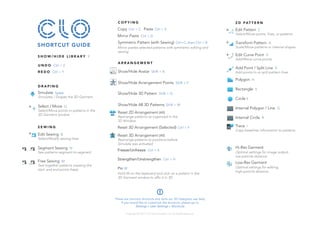
    Copyright © 2017CLO Virtual Fashion Inc. All Rights Reserved. D R A P I N G Select / Move Q Select/Move points or patterns in the 3D Garment window Simulate Space Simulates / Drapes the 3D Garment Show/Hide Avatar Shift + A Show/Hide Arrangement Points Shift + F A R R A N G E M E N T Show/Hide 3D Pattern Shift + Q Show/Hide All 3D Patterns Shift + W Ctrl + V Ctrl + C Copy Paste Reset 2D Arrangement (All) Rearrange patterns as organized in the 2D Window Reset 3D Arrangement (All) Rearrange patterns to positions before Simulate was activated Reset 3D Arrangement (Selected) Ctrl + F Hi-Res Garment Optimal settings for image output, low particle distance Low-Res Garment Optimal settings for editing, high particle distance SHORTCUT GUIDE S E W I N G Edit Sewing B Select/Modify sewing lines Segment Sewing N Sew patterns segment-to-segment Free Sewing M Sew together patterns creating the start and end points freely Polygon H Rectangle S Circle E Internal Polygon / Line G Internal Circle R 2 D PAT T E R N Edit Pattern Z Select/Move points, lines, or patterns Transform Pattern A Scale/Move patterns or internal shapes Edit Curve Point V Add/Move curve points Add Point / Split Line X Add points to or split pattern lines Copy baselines information to patterns Trace I C O P Y I N G Ctrl + D Mirror Paste Ctrl+C, then Ctrl + R Symmetric Pattern (with Sewing) Mirror pastes selected patterns with symmetric editing and sewing R E D O Ctrl + Y S H O W / H I D E L I B R A R Y Y U N D O Ctrl + Z Freeze/Unfreeze Ctrl + K Strengthen/Unstrengthen Ctrl + H Pin W Hold W on the keyboard and click on a pattern in the 3D Garment window to affix it in 3D These are common shortcuts and tools our 3D Designers use daily If you would like to customize the shortcuts, please go to Settings » User Settings » Shortcuts