Chapter 6
Distributed Database System
What Is A Distributed DBMS?
 A distributed database management system(Sirna
bulchiinsa kuusdeetaa raabsame)(DDBMS) governs
the storage and processing of logically related data
over interconnected computer systems in which both
data and processing functions are distributed among
several sites.
2
Distributed Database System
 DDB is a collection of multiple logically related database
distributed over a computer network, and a DDBMS as a
software system that manages a distributed database while
making the distribution transparent to the user.
 Distributed database: A logically interrelated collection of shared
data (and a description of this data) physically distributed over a
computer network.
 Distributed DBMS :The software system that permits the mgt of the
distributed database and makes the distribution transparent to users.
3
The Evolution of Distributed DBMS
 DDBMS Advantages
Data are located near the
“greatest demand” site.
Faster data access
Faster data processing
Growth facilitation
Improved communications
Reduced operating costs
User-friendly interface
Less danger of a single-point failure
Processor independence
 DDBMS Disadvantages
 Complexity of management
and control
 Security
 Lack of standards(Ulaagaa
dhabuu)
 Increased storage requirements
4
What Is A Distributed DBMS?
 Functions of a DDBMS
 Application interface
 Validation to analyze data requests
 Transformation to determine request’s components
 Query-optimization to find the best access strategy
 Mapping to determine the data location
 I/O interface to read or write data
 Formatting to prepare the data for presentation
 Security to provide data privacy
 Backup and recovery
 Database administration
 Concurrency control
 Transaction management
5
Some different database system architectures.
1. Shared nothing architecture:
In this architecture, every processor has its own primary and secondary (disk)
memory, no common memory exists, and the processors communicate over a high
speed interconnection network (bus or switch).
It resembles a distributed database computing environment, major differences exist
in the mode of operation.
This is not true of the distributed database environment where heterogeneity of
hardware and operating system at each node is very common.
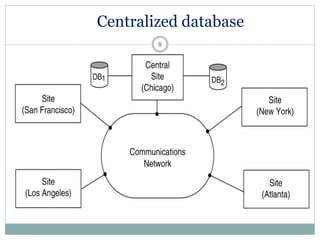
2. Centralized database architecture:
It is a networked architecture with a centralized database at one of the
sites.
3. A truly distributed database architecture:
6
Shared nothing architecture
7
Centralized database
8
Distributed database
9
Distributed Database System
Management of distributed data with different levels of
transparency:
This refers to the physical placement of data (files, relations, etc.)
which is not known to the user (distribution transparency).
Communications neteork
Site 5
Site 1
Site 2
Site 4
Site 3
Distributed Database System(cont...)
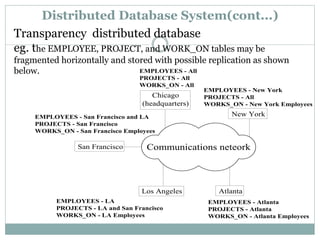
Transparency distributed database
eg. the EMPLOYEE, PROJECT, and WORK_ON tables may be
fragmented horizontally and stored with possible replication as shown
below.
Communications neteork
Atlanta
San Francisco
EMPLOYEES - All
PROJECTS - All
WORKS_ON - All
Chicago
(headquarters)
New York
EMPLOYEES - New York
PROJECTS - All
WORKS_ON - New York Employees
EMPLOYEES - San Francisco and LA
PROJECTS - San Francisco
WORKS_ON - San Francisco Employees
Los Angeles
EMPLOYEES - LA
PROJECTS - LA and San Francisco
WORKS_ON - LA Employees
EMPLOYEES - Atlanta
PROJECTS - Atlanta
WORKS_ON - Atlanta Employees
Management of distributed data with different levels of transparency:
1. Distribution and Network transparency: Users do not have to worry about
operational details of the network.
2. Location transparency: refers to freedom of issuing command from any
location without affecting its working.
3. Naming transparency: allows access to any names object (files, relations,
etc.) from any location.
4. Replication transparency: It allows to store copies of a data at multiple
sites as shown in the above diagram. This is done to minimize access time to
the required data.
5. Fragmentation transparency: Allows to fragment a relation horizontally
(create a subset of tuples of a relation) or vertically (create a subset of
columns of a relation).
12
Advantages of DDB system
1. Improved ease and flexibility of application development:
 Developing and maintaining applications at geographically distributed sites of an
organization is facilitated owing to transparency of data distribution and control.
2. Increased reliability and availability:
 Reliability refers to system live time, that is, system is running efficiently most of the time.
 Availability is the probability that the system is continuously available (usable or
accessible) during a time interval.
 A distributed database system has multiple nodes (computers) and if one fails then others
are available to do the job.
3. Improved performance: A distributed DBMS fragments the database to keep data closer to
where it is needed most. This reduces data management (access and modification) time
significantly.
4. Easier expansion (scalability): Allows new nodes (computers) to be added anytime without
chaining the entire configuration.
13
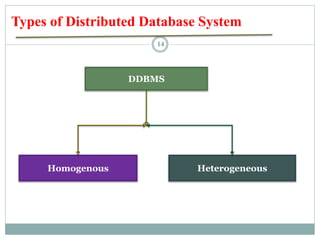
Types of Distributed Database System
DDBMS
Homogenous Heterogeneous
14
Homogenous Distributed Database Systems
Communications
neteork
Site 5
Site 1
Site 2
Site 3
Oracle Oracle
Oracle
Oracle
Site 4
Oracle
Linux
Linux
Window
Window
Unix
15
All sites of the database system have identical setup, i.e., same
database system software. The underlying operating system may be
different. For example, all sites run Oracle or DB2, or Sybase or some
other database system. The underlying operating systems can be a
mixture of Linux, Window, Unix, etc. The clients thus have to use
identical client software.
Homogenous Distributed Database Systems
In this type of distributed database has all data center
have same software.
Much easier to design and manage.
It appears to user as a single system.
16
Homogeneous Database
Same software 17
Advantages of Homogeneous Distributed Database
 Easy to use
 Easy to mange
 Easy to Design
Disadvantages of Homogeneous Distributed Database
Difficult for most organizations to force a homogeneous environment.
18
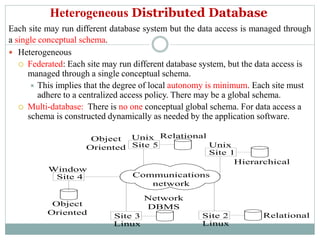
Heterogeneous Distributed Database
Each site may run different database system but the data access is managed through
a single conceptual schema.
 Heterogeneous
 Federated: Each site may run different database system, but the data access is
managed through a single conceptual schema.
 This implies that the degree of local autonomy is minimum. Each site must
adhere to a centralized access policy. There may be a global schema.
 Multi-database: There is no one conceptual global schema. For data access a
schema is constructed dynamically as needed by the application software.
Communications
network
Site 5
Site 1
Site 2
Site 3
Network
DBMS
Relational
Site 4
Object
Oriented
Linux
Linux
Unix
Hierarchical
Object
Oriented
Relational
Unix
Window
Federated Database Management Systems Issues
 A federated database system (FDBS) is a collection of cooperating database
systems that are autonomous and possibly heterogeneous.
1. Differences in data models: Relational, Objected oriented,
hierarchical, network, etc.
2. Differences in constraints: Each site may have their own data
accessing and processing constraints. It facilities for specification and
implementation vary from system to system.
3. Differences in query language: Some site may use SQL, some may use
SQL-89, some may use SQL-92, and so on.
Heterogeneous Distributed Database Systems
In this type of distributed database, different data center may run different
DBMS products, with possibly different underlying data models.
Occurs when sites have implemented their own databases and integration is
considered later.
Translations required to allow for:
o Different hardware.
o Different DBMS products.
o Different hardware and different DBMS products.
21
Heterogeneous Distributed database
Sql oracle
22
Huge data can be stored in one Global center from different data
center
Remote access is done using the global schema.
Different DBMSs may be used at each node
Disadvantages of Heterogeneous Distributed Database
Difficult to mange
Difficult to design.
23
Advantages of Heterogeneous Distributed Database
Distributed Processing and Distributed Database
 Distributed processing - shares the database’s logical processing among two
or more physically independent sites that are connected through a network.
 Distributed database - stores a logically related database over two or more
physically independent sites connected via a computer network.
Distributed processing does not require a distributed database, but a distributed
database requires distributed processing.
Distributed processing may be based on a single database located on a single
computer. In order to manage distributed data, copies or parts of the database
processing functions must be distributed to all data storage sites.
Both distributed processing and distributed databases require a network to
connect all components.
24
Distributed Processing Environment
25
Figure 6.1
Distributed Database Environment
26
Figure 6.2
DDBMS Components
Computer workstations that form the network
system.
Network hardware and software components that
reside in each workstation.
Communications media that carry the data from
one workstation to another.
Transaction processor (TP) receives and
processes the application’s data requests.
Data processor (DP) stores and retrieves data
located at the site. Also known as data manager
29
Distributed DB Transparency
 DDBMS transparency- features have the common property
of allowing the end users to think that he is the database’s
only user.
 Distribution transparency
 Transaction transparency
 Failure transparency
 Performance transparency
 Heterogeneity transparency
31
Cont’d...
 Distribution transparency  allows us to manage a physically
dispersed database as though it were a centralized database.
 Three Levels of Distribution Transparency
 Fragmentation transparency
 Location transparency
 Local mapping transparency
Table 6.2
32
Cont’d...
 Example :
Employee data (EMPLOYEE) are distributed over three locations:
New York, Atlanta, and Miami.
Depending on the level of distribution transparency support, three
different cases of queries are possible:
Figure 6.9 Fragment Locations
33
Distribution Transparency
 Case 1: DB Supports Fragmentation Transparency
SELECT * FROM EMPLOYEE
WHERE EMP_DOB < ‘01-JAN-2023’;
34
Cont’d ...
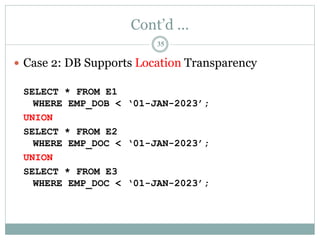
 Case 2: DB Supports Location Transparency
SELECT * FROM E1
WHERE EMP_DOB < ‘01-JAN-2023’;
UNION
SELECT * FROM E2
WHERE EMP_DOC < ‘01-JAN-2023’;
UNION
SELECT * FROM E3
WHERE EMP_DOC < ‘01-JAN-2023’;
35
Cont’d ...
 Case 3: DB Supports Local Mapping Transparency
SELECT * FROM E1 NODE NYork
WHERE EMP_DOB < ‘01-JAN-2023’;
UNION
SELECT * FROM E2 NODE ATL
WHERE EMP_DOC < ‘01-JAN-2023’;
UNION
SELECT * FROM E3 NODE MIA
WHERE EMP_DOC < ‘01-JAN-2023’;
36
A Distributed Request
38
Figure 6.13
Performance Transparency and Query Optimization
 The objective of a query optimization routine is to minimize the total cost
associated with the execution of a request. The costs associated with a request
are a function of the:
 Access time (I/O) cost involved in accessing the physical data stored on
disk.
 Communication cost associated with the transmission of data among nodes
in distributed database systems.
 CPU time cost associated with the processing overhead of managing
distributed transactions.
Replica transparency refers to the DDBMSs ability to hide the existence of
multiple copies of data from the user
 Most of the query optimization algorithms are based on two principles:
 Selection of the optimum execution order
 Selection of sites to be accessed to minimize communication costs
.
39
Distributed Database Design
 The design of a distributed database introduces three new issues:
 How to partition the database into fragments.
 Which fragments to replicate.
 Where to locate those fragments and replicas.
40
Data Fragmentation
 Data fragmentation allows us to break a single object into two
or more segments or fragments.
 Each fragment can be stored at any site over a computer
network.
 Data fragmentation information is stored in the distributed
data catalog (DDC), from which it is accessed by the
transaction processor (TP) to process user requests.
 Three Types of Fragmentation Strategies:
1. Horizontal fragmentation(Hf)-It is a subset of a relation which
contain those of tuples(rows)which satisfy selection conditions.
2. Vertical fragmentation(Vf)-It is a subset of a relation which is created
by a subset of columns. Like using sex, address etc.
3. Mixed fragmentation(Mf)- combine both fragments.
41
A Sample Example: CUSTOMER Table
42
Figure 6.16
Data Fragmentation
 Horizontal Fragmentation
Division of a relation into subsets (fragments) of tuples (rows).
Each fragment is stored at a different node, and each fragment has unique rows.
Each fragment represents the equivalent of a SELECT statement, with the
WHERE clause on a single attribute.
Horizontal Fragmentation of the CUSTOMER Table By State
Table 6.3 Horizontal Fragmentation of the CUSTOMER Table By State
43
Table Fragments In Three Locations
Figure 6.17
44
Data Fragmentation
 Vertical Fragmentation
Division of a relation into attribute (column) subsets. Each subset
(fragment) is stored at a different node, and each fragment has
unique columns with the exception of the key column. This is the
equivalent of the PROJECT statement.
Table 6.4 Vertical Fragmentation of the CUSTOMER Table
45
Vertically Fragmented Table Contents
Figure 6.18
46
Data Fragmentation
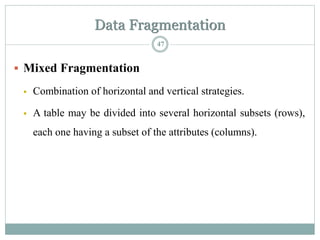
 Mixed Fragmentation
 Combination of horizontal and vertical strategies.
 A table may be divided into several horizontal subsets (rows),
each one having a subset of the attributes (columns).
47
Table 6.5 Mixed Fragmentation of the CUSTOMER Table
48
Figure 6.19
49
Data Replication
 Data replication refers to the storage of data copies at
multiple sites served by a computer network.
 Fragment copies(data replication) can be stored at several sites to
serve specific information requirements.
 The existence of fragment copies can enhance data availability and
response time, reducing communication and total query costs.
Figure 6.20
50
Data Replication(cont’d...)
 Replication Conditions
 A fully replicated database stores multiple copies of all database
fragments at multiple sites.
 A partially replicated database stores multiple copies of some
database fragments at multiple sites.
Factors for Data Replication Decision
 Database Size
 Usage Frequency
51
Data Allocation
 Data allocation- describes the processing of deciding where to
locate data.
 Data Allocation Strategies
 Centralized:
The entire database is stored at one site.
 Partitioned
The database is divided into several disjoint parts (fragments)
and stored at several sites.
 Replicated
Copies of one or more database fragments are stored at several
sites.
52
Data Allocation(cont’d...)
 Data allocation algorithms take into consideration a
variety of factors:
 Performance and data availability goals
 Size, number of rows, the number of relations that an entity
maintains with other entities.
 Types of transactions to be applied to the database, the
attributes accessed by each of those transactions.
53
Slide 25- 54
Query Processing in Distributed Databases
 Hence, DDBMS query optimization algorithms consider the goal of reducing the
amount of data transfer as an optimization criterion in choosing a distributed
query execution strategy.
 Issues
 Cost of transferring data (files and results) over the network.
 This cost is usually high so some optimization is necessary.
 Example relations: Suppose that the Employee at site1 and Department site2
relations
 Employee at site 1. 10,000 rows. Row size = 100 bytes. Find the size
of the Employee relation? Table size = 106 bytes.
 Department at Site 2. 100 rows. Row size = 35 bytes. Find the size
of the Department relation? Table size = 3,500 bytes.
 Consider the query Q: For each employee, retrieve employee name
and department name Where the employee works in RA.
 Ans
Fname Minit Lname SSN Bdate Address Sex Salary Superssn Dno
Dname Dnumber Mgrssn Mgrstartdate
Slide 25- 55
Query Processing in Distributed Databases (cont’d…)
 Result
 The result of this query will have 10,000 tuples or records,
assuming that every employee is related to a department.
Another example:
Suppose each result tuple is 40 bytes long.
 The query is submitted at site 3 and the result is sent to this site.
 Problem: Employee and Department relations are not present at
site 3.
Slide 25- 56
Query Processing in Distributed Databases (cont’d…)
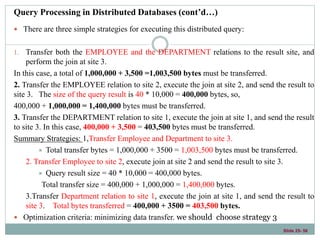
 There are three simple strategies for executing this distributed query:
1. Transfer both the EMPLOYEE and the DEPARTMENT relations to the result site, and
perform the join at site 3.
In this case, a total of 1,000,000 + 3,500 =1,003,500 bytes must be transferred.
2. Transfer the EMPLOYEE relation to site 2, execute the join at site 2, and send the result to
site 3. The size of the query result is 40 * 10,000 = 400,000 bytes, so,
400,000 + 1,000,000 = 1,400,000 bytes must be transferred.
3. Transfer the DEPARTMENT relation to site 1, execute the join at site 1, and send the result
to site 3. In this case, 400,000 + 3,500 = 403,500 bytes must be transferred.
Summary Strategies: 1,Transfer Employee and Department to site 3.
 Total transfer bytes = 1,000,000 + 3500 = 1,003,500 bytes must be transferred.
2. Transfer Employee to site 2, execute join at site 2 and send the result to site 3.
 Query result size = 40 * 10,000 = 400,000 bytes.
Total transfer size = 400,000 + 1,000,000 = 1,400,000 bytes.
3.Transfer Department relation to site 1, execute the join at site 1, and send the result to
site 3. Total bytes transferred = 400,000 + 3500 = 403,500 bytes.
 Optimization criteria: minimizing data transfer. we should choose strategy 3
Slide 25- 58
Semijoin: Objective is to reduce the number of tuples in a relation before
transferring it to another site.
 Example execution of Q or Q’:
1. Project the join attributes of Department at site 2, and transfer them to
site 1.
2. For Q, we transfer whose size is 4 * 100 = 400
bytes are transferred and whereas, for Q’,we transfer
for Q’, 9 * 100 = 900 bytes are transferred.
2. Join the transferred file with the Employee relation at site 1, and transfer
the required attributes from the resulting file to site 2.
 For Q we transfer, 34 * 10,000 =
340,000 bytes, for Q’, we transfer R’= 39 *
100 = 3900 bytes are transferred.
3. Execute the query by joining the transferred file R or R’ with Department
and present the result to the user at site 2.
Slide 25- 59
Client-Server Database Architecture
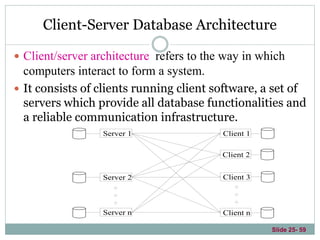
 Client/server architecture refers to the way in which
computers interact to form a system.
 It consists of clients running client software, a set of
servers which provide all database functionalities and
a reliable communication infrastructure.
Client 1
Client 3
Client 2
Client n
Server 1
Server 2
Server n
Client/Server Architecture
 Client/ServerAdvantages
 Client/server solutions tend to be less expensive.
 Client/server solutions allow the end user to use the microcomputer’s graphical user interface (GUI), thereby
improving functionality and simplicity.
 There are more people with PC skills than with mainframe skills.
 The PC is well established in the workplace.
 Numerous data analysis and query tools exist to facilitate interaction with many of the DBMSs.
 There are considerable cost advantages to off-loading application development from the mainframe to PCs.
 Client/Server Disadvantages
 The client/server architecture creates a more complex environment with different platforms.
 An increase in the number of users and processing sites often paves the way for security problems.
 The burden of training a wider circle of users and computer personnel increases the cost of maintaining the
environment
61
Three-Tier Client-Server Architecture
 It is now more common to use a three-tier architecture, particularly
in Web applications.
 In the three-tier client-server architecture, the following three layers
exist:
1. Presentation layer (client)-Web browsers are often utilized, and the
languages and specifications used include HTML, XHTML,CSS, MathML,
Java, JavaScript and others.
2. Application layer (business logic)-For example, queries can be
formulated based on user input from the client, or query results can be
formatted and sent to the client for presentation.
3. Database server- This layer handles query and update requests from the
application layer, processes the requests, and sends the results.
62
Three-Tier Client-Server Architecture
63
64

Chapter-6 Distribute Database system (3).ppt

  • 1.
  • 2.
    What Is ADistributed DBMS?  A distributed database management system(Sirna bulchiinsa kuusdeetaa raabsame)(DDBMS) governs the storage and processing of logically related data over interconnected computer systems in which both data and processing functions are distributed among several sites. 2
  • 3.
    Distributed Database System DDB is a collection of multiple logically related database distributed over a computer network, and a DDBMS as a software system that manages a distributed database while making the distribution transparent to the user.  Distributed database: A logically interrelated collection of shared data (and a description of this data) physically distributed over a computer network.  Distributed DBMS :The software system that permits the mgt of the distributed database and makes the distribution transparent to users. 3
  • 4.
    The Evolution ofDistributed DBMS  DDBMS Advantages Data are located near the “greatest demand” site. Faster data access Faster data processing Growth facilitation Improved communications Reduced operating costs User-friendly interface Less danger of a single-point failure Processor independence  DDBMS Disadvantages  Complexity of management and control  Security  Lack of standards(Ulaagaa dhabuu)  Increased storage requirements 4
  • 5.
    What Is ADistributed DBMS?  Functions of a DDBMS  Application interface  Validation to analyze data requests  Transformation to determine request’s components  Query-optimization to find the best access strategy  Mapping to determine the data location  I/O interface to read or write data  Formatting to prepare the data for presentation  Security to provide data privacy  Backup and recovery  Database administration  Concurrency control  Transaction management 5
  • 6.
    Some different databasesystem architectures. 1. Shared nothing architecture: In this architecture, every processor has its own primary and secondary (disk) memory, no common memory exists, and the processors communicate over a high speed interconnection network (bus or switch). It resembles a distributed database computing environment, major differences exist in the mode of operation. This is not true of the distributed database environment where heterogeneity of hardware and operating system at each node is very common. 2. Centralized database architecture: It is a networked architecture with a centralized database at one of the sites. 3. A truly distributed database architecture: 6
  • 7.
  • 8.
  • 9.
  • 10.
    Distributed Database System Managementof distributed data with different levels of transparency: This refers to the physical placement of data (files, relations, etc.) which is not known to the user (distribution transparency). Communications neteork Site 5 Site 1 Site 2 Site 4 Site 3
  • 11.
    Distributed Database System(cont...) Transparencydistributed database eg. the EMPLOYEE, PROJECT, and WORK_ON tables may be fragmented horizontally and stored with possible replication as shown below. Communications neteork Atlanta San Francisco EMPLOYEES - All PROJECTS - All WORKS_ON - All Chicago (headquarters) New York EMPLOYEES - New York PROJECTS - All WORKS_ON - New York Employees EMPLOYEES - San Francisco and LA PROJECTS - San Francisco WORKS_ON - San Francisco Employees Los Angeles EMPLOYEES - LA PROJECTS - LA and San Francisco WORKS_ON - LA Employees EMPLOYEES - Atlanta PROJECTS - Atlanta WORKS_ON - Atlanta Employees
  • 12.
    Management of distributeddata with different levels of transparency: 1. Distribution and Network transparency: Users do not have to worry about operational details of the network. 2. Location transparency: refers to freedom of issuing command from any location without affecting its working. 3. Naming transparency: allows access to any names object (files, relations, etc.) from any location. 4. Replication transparency: It allows to store copies of a data at multiple sites as shown in the above diagram. This is done to minimize access time to the required data. 5. Fragmentation transparency: Allows to fragment a relation horizontally (create a subset of tuples of a relation) or vertically (create a subset of columns of a relation). 12
  • 13.
    Advantages of DDBsystem 1. Improved ease and flexibility of application development:  Developing and maintaining applications at geographically distributed sites of an organization is facilitated owing to transparency of data distribution and control. 2. Increased reliability and availability:  Reliability refers to system live time, that is, system is running efficiently most of the time.  Availability is the probability that the system is continuously available (usable or accessible) during a time interval.  A distributed database system has multiple nodes (computers) and if one fails then others are available to do the job. 3. Improved performance: A distributed DBMS fragments the database to keep data closer to where it is needed most. This reduces data management (access and modification) time significantly. 4. Easier expansion (scalability): Allows new nodes (computers) to be added anytime without chaining the entire configuration. 13
  • 14.
    Types of DistributedDatabase System DDBMS Homogenous Heterogeneous 14
  • 15.
    Homogenous Distributed DatabaseSystems Communications neteork Site 5 Site 1 Site 2 Site 3 Oracle Oracle Oracle Oracle Site 4 Oracle Linux Linux Window Window Unix 15 All sites of the database system have identical setup, i.e., same database system software. The underlying operating system may be different. For example, all sites run Oracle or DB2, or Sybase or some other database system. The underlying operating systems can be a mixture of Linux, Window, Unix, etc. The clients thus have to use identical client software.
  • 16.
    Homogenous Distributed DatabaseSystems In this type of distributed database has all data center have same software. Much easier to design and manage. It appears to user as a single system. 16
  • 17.
  • 18.
    Advantages of HomogeneousDistributed Database  Easy to use  Easy to mange  Easy to Design Disadvantages of Homogeneous Distributed Database Difficult for most organizations to force a homogeneous environment. 18
  • 19.
    Heterogeneous Distributed Database Eachsite may run different database system but the data access is managed through a single conceptual schema.  Heterogeneous  Federated: Each site may run different database system, but the data access is managed through a single conceptual schema.  This implies that the degree of local autonomy is minimum. Each site must adhere to a centralized access policy. There may be a global schema.  Multi-database: There is no one conceptual global schema. For data access a schema is constructed dynamically as needed by the application software. Communications network Site 5 Site 1 Site 2 Site 3 Network DBMS Relational Site 4 Object Oriented Linux Linux Unix Hierarchical Object Oriented Relational Unix Window
  • 20.
    Federated Database ManagementSystems Issues  A federated database system (FDBS) is a collection of cooperating database systems that are autonomous and possibly heterogeneous. 1. Differences in data models: Relational, Objected oriented, hierarchical, network, etc. 2. Differences in constraints: Each site may have their own data accessing and processing constraints. It facilities for specification and implementation vary from system to system. 3. Differences in query language: Some site may use SQL, some may use SQL-89, some may use SQL-92, and so on.
  • 21.
    Heterogeneous Distributed DatabaseSystems In this type of distributed database, different data center may run different DBMS products, with possibly different underlying data models. Occurs when sites have implemented their own databases and integration is considered later. Translations required to allow for: o Different hardware. o Different DBMS products. o Different hardware and different DBMS products. 21
  • 22.
  • 23.
    Huge data canbe stored in one Global center from different data center Remote access is done using the global schema. Different DBMSs may be used at each node Disadvantages of Heterogeneous Distributed Database Difficult to mange Difficult to design. 23 Advantages of Heterogeneous Distributed Database
  • 24.
    Distributed Processing andDistributed Database  Distributed processing - shares the database’s logical processing among two or more physically independent sites that are connected through a network.  Distributed database - stores a logically related database over two or more physically independent sites connected via a computer network. Distributed processing does not require a distributed database, but a distributed database requires distributed processing. Distributed processing may be based on a single database located on a single computer. In order to manage distributed data, copies or parts of the database processing functions must be distributed to all data storage sites. Both distributed processing and distributed databases require a network to connect all components. 24
  • 25.
  • 26.
  • 27.
    DDBMS Components Computer workstationsthat form the network system. Network hardware and software components that reside in each workstation. Communications media that carry the data from one workstation to another. Transaction processor (TP) receives and processes the application’s data requests. Data processor (DP) stores and retrieves data located at the site. Also known as data manager 29
  • 28.
    Distributed DB Transparency DDBMS transparency- features have the common property of allowing the end users to think that he is the database’s only user.  Distribution transparency  Transaction transparency  Failure transparency  Performance transparency  Heterogeneity transparency 31
  • 29.
    Cont’d...  Distribution transparency allows us to manage a physically dispersed database as though it were a centralized database.  Three Levels of Distribution Transparency  Fragmentation transparency  Location transparency  Local mapping transparency Table 6.2 32
  • 30.
    Cont’d...  Example : Employeedata (EMPLOYEE) are distributed over three locations: New York, Atlanta, and Miami. Depending on the level of distribution transparency support, three different cases of queries are possible: Figure 6.9 Fragment Locations 33
  • 31.
    Distribution Transparency  Case1: DB Supports Fragmentation Transparency SELECT * FROM EMPLOYEE WHERE EMP_DOB < ‘01-JAN-2023’; 34
  • 32.
    Cont’d ...  Case2: DB Supports Location Transparency SELECT * FROM E1 WHERE EMP_DOB < ‘01-JAN-2023’; UNION SELECT * FROM E2 WHERE EMP_DOC < ‘01-JAN-2023’; UNION SELECT * FROM E3 WHERE EMP_DOC < ‘01-JAN-2023’; 35
  • 33.
    Cont’d ...  Case3: DB Supports Local Mapping Transparency SELECT * FROM E1 NODE NYork WHERE EMP_DOB < ‘01-JAN-2023’; UNION SELECT * FROM E2 NODE ATL WHERE EMP_DOC < ‘01-JAN-2023’; UNION SELECT * FROM E3 NODE MIA WHERE EMP_DOC < ‘01-JAN-2023’; 36
  • 34.
  • 35.
    Performance Transparency andQuery Optimization  The objective of a query optimization routine is to minimize the total cost associated with the execution of a request. The costs associated with a request are a function of the:  Access time (I/O) cost involved in accessing the physical data stored on disk.  Communication cost associated with the transmission of data among nodes in distributed database systems.  CPU time cost associated with the processing overhead of managing distributed transactions. Replica transparency refers to the DDBMSs ability to hide the existence of multiple copies of data from the user  Most of the query optimization algorithms are based on two principles:  Selection of the optimum execution order  Selection of sites to be accessed to minimize communication costs . 39
  • 36.
    Distributed Database Design The design of a distributed database introduces three new issues:  How to partition the database into fragments.  Which fragments to replicate.  Where to locate those fragments and replicas. 40
  • 37.
    Data Fragmentation  Datafragmentation allows us to break a single object into two or more segments or fragments.  Each fragment can be stored at any site over a computer network.  Data fragmentation information is stored in the distributed data catalog (DDC), from which it is accessed by the transaction processor (TP) to process user requests.  Three Types of Fragmentation Strategies: 1. Horizontal fragmentation(Hf)-It is a subset of a relation which contain those of tuples(rows)which satisfy selection conditions. 2. Vertical fragmentation(Vf)-It is a subset of a relation which is created by a subset of columns. Like using sex, address etc. 3. Mixed fragmentation(Mf)- combine both fragments. 41
  • 38.
    A Sample Example:CUSTOMER Table 42 Figure 6.16
  • 39.
    Data Fragmentation  HorizontalFragmentation Division of a relation into subsets (fragments) of tuples (rows). Each fragment is stored at a different node, and each fragment has unique rows. Each fragment represents the equivalent of a SELECT statement, with the WHERE clause on a single attribute. Horizontal Fragmentation of the CUSTOMER Table By State Table 6.3 Horizontal Fragmentation of the CUSTOMER Table By State 43
  • 40.
    Table Fragments InThree Locations Figure 6.17 44
  • 41.
    Data Fragmentation  VerticalFragmentation Division of a relation into attribute (column) subsets. Each subset (fragment) is stored at a different node, and each fragment has unique columns with the exception of the key column. This is the equivalent of the PROJECT statement. Table 6.4 Vertical Fragmentation of the CUSTOMER Table 45
  • 42.
    Vertically Fragmented TableContents Figure 6.18 46
  • 43.
    Data Fragmentation  MixedFragmentation  Combination of horizontal and vertical strategies.  A table may be divided into several horizontal subsets (rows), each one having a subset of the attributes (columns). 47
  • 44.
    Table 6.5 MixedFragmentation of the CUSTOMER Table 48
  • 45.
  • 46.
    Data Replication  Datareplication refers to the storage of data copies at multiple sites served by a computer network.  Fragment copies(data replication) can be stored at several sites to serve specific information requirements.  The existence of fragment copies can enhance data availability and response time, reducing communication and total query costs. Figure 6.20 50
  • 47.
    Data Replication(cont’d...)  ReplicationConditions  A fully replicated database stores multiple copies of all database fragments at multiple sites.  A partially replicated database stores multiple copies of some database fragments at multiple sites. Factors for Data Replication Decision  Database Size  Usage Frequency 51
  • 48.
    Data Allocation  Dataallocation- describes the processing of deciding where to locate data.  Data Allocation Strategies  Centralized: The entire database is stored at one site.  Partitioned The database is divided into several disjoint parts (fragments) and stored at several sites.  Replicated Copies of one or more database fragments are stored at several sites. 52
  • 49.
    Data Allocation(cont’d...)  Dataallocation algorithms take into consideration a variety of factors:  Performance and data availability goals  Size, number of rows, the number of relations that an entity maintains with other entities.  Types of transactions to be applied to the database, the attributes accessed by each of those transactions. 53
  • 50.
    Slide 25- 54 QueryProcessing in Distributed Databases  Hence, DDBMS query optimization algorithms consider the goal of reducing the amount of data transfer as an optimization criterion in choosing a distributed query execution strategy.  Issues  Cost of transferring data (files and results) over the network.  This cost is usually high so some optimization is necessary.  Example relations: Suppose that the Employee at site1 and Department site2 relations  Employee at site 1. 10,000 rows. Row size = 100 bytes. Find the size of the Employee relation? Table size = 106 bytes.  Department at Site 2. 100 rows. Row size = 35 bytes. Find the size of the Department relation? Table size = 3,500 bytes.  Consider the query Q: For each employee, retrieve employee name and department name Where the employee works in RA.  Ans Fname Minit Lname SSN Bdate Address Sex Salary Superssn Dno Dname Dnumber Mgrssn Mgrstartdate
  • 51.
    Slide 25- 55 QueryProcessing in Distributed Databases (cont’d…)  Result  The result of this query will have 10,000 tuples or records, assuming that every employee is related to a department. Another example: Suppose each result tuple is 40 bytes long.  The query is submitted at site 3 and the result is sent to this site.  Problem: Employee and Department relations are not present at site 3.
  • 52.
    Slide 25- 56 QueryProcessing in Distributed Databases (cont’d…)  There are three simple strategies for executing this distributed query: 1. Transfer both the EMPLOYEE and the DEPARTMENT relations to the result site, and perform the join at site 3. In this case, a total of 1,000,000 + 3,500 =1,003,500 bytes must be transferred. 2. Transfer the EMPLOYEE relation to site 2, execute the join at site 2, and send the result to site 3. The size of the query result is 40 * 10,000 = 400,000 bytes, so, 400,000 + 1,000,000 = 1,400,000 bytes must be transferred. 3. Transfer the DEPARTMENT relation to site 1, execute the join at site 1, and send the result to site 3. In this case, 400,000 + 3,500 = 403,500 bytes must be transferred. Summary Strategies: 1,Transfer Employee and Department to site 3.  Total transfer bytes = 1,000,000 + 3500 = 1,003,500 bytes must be transferred. 2. Transfer Employee to site 2, execute join at site 2 and send the result to site 3.  Query result size = 40 * 10,000 = 400,000 bytes. Total transfer size = 400,000 + 1,000,000 = 1,400,000 bytes. 3.Transfer Department relation to site 1, execute the join at site 1, and send the result to site 3. Total bytes transferred = 400,000 + 3500 = 403,500 bytes.  Optimization criteria: minimizing data transfer. we should choose strategy 3
  • 53.
    Slide 25- 58 Semijoin:Objective is to reduce the number of tuples in a relation before transferring it to another site.  Example execution of Q or Q’: 1. Project the join attributes of Department at site 2, and transfer them to site 1. 2. For Q, we transfer whose size is 4 * 100 = 400 bytes are transferred and whereas, for Q’,we transfer for Q’, 9 * 100 = 900 bytes are transferred. 2. Join the transferred file with the Employee relation at site 1, and transfer the required attributes from the resulting file to site 2.  For Q we transfer, 34 * 10,000 = 340,000 bytes, for Q’, we transfer R’= 39 * 100 = 3900 bytes are transferred. 3. Execute the query by joining the transferred file R or R’ with Department and present the result to the user at site 2.
  • 54.
    Slide 25- 59 Client-ServerDatabase Architecture  Client/server architecture refers to the way in which computers interact to form a system.  It consists of clients running client software, a set of servers which provide all database functionalities and a reliable communication infrastructure. Client 1 Client 3 Client 2 Client n Server 1 Server 2 Server n
  • 55.
    Client/Server Architecture  Client/ServerAdvantages Client/server solutions tend to be less expensive.  Client/server solutions allow the end user to use the microcomputer’s graphical user interface (GUI), thereby improving functionality and simplicity.  There are more people with PC skills than with mainframe skills.  The PC is well established in the workplace.  Numerous data analysis and query tools exist to facilitate interaction with many of the DBMSs.  There are considerable cost advantages to off-loading application development from the mainframe to PCs.  Client/Server Disadvantages  The client/server architecture creates a more complex environment with different platforms.  An increase in the number of users and processing sites often paves the way for security problems.  The burden of training a wider circle of users and computer personnel increases the cost of maintaining the environment 61
  • 56.
    Three-Tier Client-Server Architecture It is now more common to use a three-tier architecture, particularly in Web applications.  In the three-tier client-server architecture, the following three layers exist: 1. Presentation layer (client)-Web browsers are often utilized, and the languages and specifications used include HTML, XHTML,CSS, MathML, Java, JavaScript and others. 2. Application layer (business logic)-For example, queries can be formulated based on user input from the client, or query results can be formatted and sent to the client for presentation. 3. Database server- This layer handles query and update requests from the application layer, processes the requests, and sends the results. 62
  • 57.
  • 58.