NETWORKING
TROUBLESHOOTING
Troubleshooting process
 Troubleshooting is the process of identifying, locating
and correcting problems that occur.
 Several different structured troubleshooting
techniques available:
– Top-down Top-down starts with the application
layer and works down. It looks at the problem from
the point of view of the user and the application.
– Bottom-up starts with the physical layer and works
up. The physical layer is concerned with hardware and
wire connections
Troubleshooting process…cont…
– Divide-and-Conquer begins troubleshooting at one
of the middle layers and works up or down from there.
Exp: the troubleshooter may begin at the network
layer, by verifying IP configuration information.
NETWORKING TROUBLESHOOTING
Common physical problem in network
 Physical problems are concerned mainly with the
hardware aspects of computers and networking
devices and the cables that interconnect them.
 One of the best detection methods for physical
problems is the use of the senses - vision, smell,
touch and hearing.
 The Sense of Sight (Vision)
– Vision is used to detect problems such as improperly
connected or poorly constructed cables
 The Sense of Smell
– The smell of burning insulation or components is very
distinct and is a sure sign that something is seriously
wrong.
NETWORKING TROUBLESHOOTING
Common physical problem in network…cont..
 The Sense of Touch
– Troubleshooters can use touch to feel for overheated
components as well as to detect mechanical problems with
devices such as cooling fans
 The Sense of Hearing
– All devices have characteristic sounds and any change from
the normal sounds usually indicates a problem of some
sort.
NETWORKING TROUBLESHOOTING
Software utilities for troubleshooting
connectivity
NETWORKING TROUBLESHOOTING
Software utilities for troubleshooting
connectivity…cont…
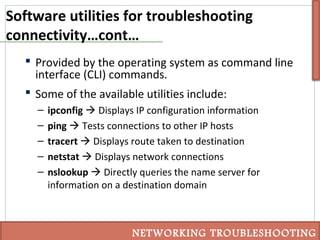
 Provided by the operating system as command line
interface (CLI) commands.
 Some of the available utilities include:
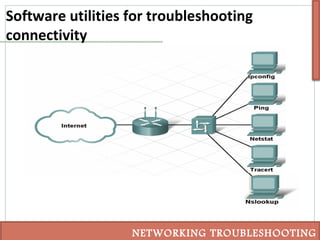
– ipconfig  Displays IP configuration information
– ping  Tests connections to other IP hosts
– tracert  Displays route taken to destination
– netstat  Displays network connections
– nslookup  Directly queries the name server for
information on a destination domain
NETWORKING TROUBLESHOOTING
Troubleshooting using ipconfig
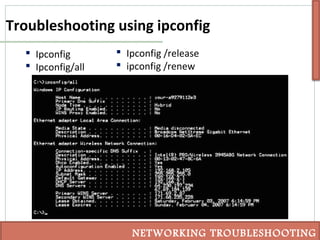
 Ipconfig
 Ipconfig/all
NETWORKING TROUBLESHOOTING
 Ipconfig /release
 ipconfig /renew
Troubleshooting using ping
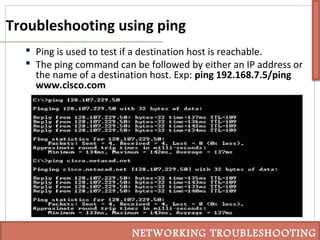
 Ping is used to test if a destination host is reachable.
 The ping command can be followed by either an IP address or
the name of a destination host. Exp: ping 192.168.7.5/ping
www.cisco.com
NETWORKING TROUBLESHOOTING
Troubleshoot using tracert
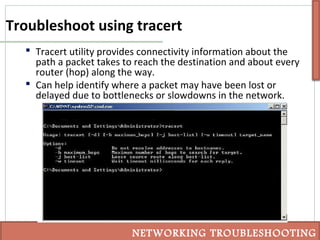
 Tracert utility provides connectivity information about the
path a packet takes to reach the destination and about every
router (hop) along the way.
 Can help identify where a packet may have been lost or
delayed due to bottlenecks or slowdowns in the network.
NETWORKING TROUBLESHOOTING
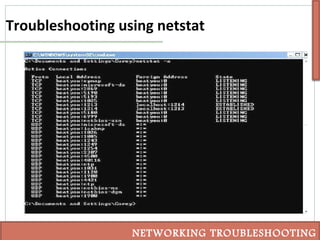
Troubleshooting using netstat
 Necessary to know which active TCP connections are
open and running on a networked host.
 Netstat should be used to examine the open
connections on a host when performance appears to
be compromised.
NETWORKING TROUBLESHOOTING
Troubleshooting using netstat
NETWORKING TROUBLESHOOTING
Troubleshooting using nslookup
 The nslookup utility allows an end-user to look up
information about a particular DNS name in the DNS
server
 Nslookup is often used as a troubleshooting tool for
determining if the DNS server is performing name
resolution as expected.
NETWORKING TROUBLESHOOTING
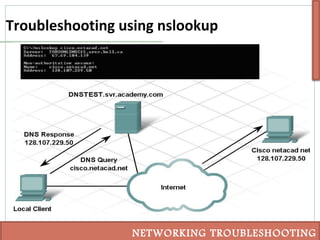
Troubleshooting using nslookup
NETWORKING TROUBLESHOOTING
Common faults in cabling
NETWORKING TROUBLESHOOTING
 Be sure to use the correct type of cable: Straight-
through and Cross-over cables
 Improper cable termination
 Maximum cable run lengths exist based on
characteristics of the different cables.
 If connectivity is a problem, verify that the correct
ports are being used between the networking
devices.
 Protect cables and connectors from physical damage.
Troubleshoot radio problems in a WLAN
 Wireless host cannot connect to the AP
 Many factors can affect our ability to connect hosts
using Radio Frequency.
– Not all wireless standards are compatible
– The strength of an RF signal decreases with distance
– RF signals are susceptible to interference from outside
sources
– APs share the available bandwidth between devices
NETWORKING TROUBLESHOOTING
Association and authentication problems on a
WLAN
 Configured incorrectly include: the SSID,
authentication and encryption.
– SSID is a case-sensitive, alpha-numeric string up to 32-
characters. It must match on both the AP and client.
– authentication Both the client and the AP must be
configured with the same key
– encryption  the same encryption key must be configured
on both the AP and the client
NETWORKING TROUBLESHOOTING
Troubleshoot an incorrectly configured
wireless device in WLAN
 DHCP issues
– The IP address on the client must be on the same network
as the LAN interface of the Linksys device(wireless router).
– If not, the address should be released (ipconfig /release)
and renewed (ipconfig /renew) to form a new binding.
– If both the wired and wireless clients are obtaining the
correct IP configuration, and can connect to the Linksys
device, but are unable to ping each other, the problem is
most likely occurring on the Linksys device.
NETWORKING TROUBLESHOOTING
Troubleshoot an incorrectly configured
wireless device in WLAN…cont…
 Troubleshooting the ISR to ISP Connection
– Wired and wireless hosts can connect to each other, but
not to the Internet
– the problem may be in the connection between the
integrated router and the ISP.
– Check all physical connections and LED indicators.
– try to re-establish connectivity by clicking the Connect, or
IP address renew.
– Lastly, contact the ISP to see if the issue is occurring from
their end.
NETWORKING TROUBLESHOOTING
Document troubleshooting
 This documentation can be a valuable reference and
can be used when future issues arise.
 Good troubleshooting documentation should
include:
– Initial problem
– Steps taken to isolate the problem
– Results of all steps taken, both successful and unsuccessful
– Final determined cause of the problem
– Final problem resolution
– Preventative measures
NETWORKING TROUBLESHOOTING
Purpose of outside sources in troubleshooting
 If the troubleshooter is unable to determine the
problem and its resolution, it might be necessary to
obtain assistance from outside sources.
 Some of the most common sources for help include:
– Previously kept documentation
– Online FAQs (Frequently Asked Questions)
– Colleagues and other network professionals
– Internet forums
NETWORKING TROUBLESHOOTING
Purpose of helpdesk in troubleshooting
 The helpdesk is a group of individuals with the
knowledge and tools required to help diagnose and
correct common problems
 It provides assistance for the end-user to determine
if a problem exists, the nature of the problem, and
the solution.
 There are many ways to contact a helpdesk,
including email, live chat, and phone.
NETWORKING TROUBLESHOOTING

POLITEKNIK MALAYSIA

  • 1.
  • 2.
    Troubleshooting process  Troubleshootingis the process of identifying, locating and correcting problems that occur.  Several different structured troubleshooting techniques available: – Top-down Top-down starts with the application layer and works down. It looks at the problem from the point of view of the user and the application. – Bottom-up starts with the physical layer and works up. The physical layer is concerned with hardware and wire connections
  • 3.
    Troubleshooting process…cont… – Divide-and-Conquerbegins troubleshooting at one of the middle layers and works up or down from there. Exp: the troubleshooter may begin at the network layer, by verifying IP configuration information. NETWORKING TROUBLESHOOTING
  • 4.
    Common physical problemin network  Physical problems are concerned mainly with the hardware aspects of computers and networking devices and the cables that interconnect them.  One of the best detection methods for physical problems is the use of the senses - vision, smell, touch and hearing.  The Sense of Sight (Vision) – Vision is used to detect problems such as improperly connected or poorly constructed cables  The Sense of Smell – The smell of burning insulation or components is very distinct and is a sure sign that something is seriously wrong. NETWORKING TROUBLESHOOTING
  • 5.
    Common physical problemin network…cont..  The Sense of Touch – Troubleshooters can use touch to feel for overheated components as well as to detect mechanical problems with devices such as cooling fans  The Sense of Hearing – All devices have characteristic sounds and any change from the normal sounds usually indicates a problem of some sort. NETWORKING TROUBLESHOOTING
  • 6.
    Software utilities fortroubleshooting connectivity NETWORKING TROUBLESHOOTING
  • 7.
    Software utilities fortroubleshooting connectivity…cont…  Provided by the operating system as command line interface (CLI) commands.  Some of the available utilities include: – ipconfig  Displays IP configuration information – ping  Tests connections to other IP hosts – tracert  Displays route taken to destination – netstat  Displays network connections – nslookup  Directly queries the name server for information on a destination domain NETWORKING TROUBLESHOOTING
  • 8.
    Troubleshooting using ipconfig Ipconfig  Ipconfig/all NETWORKING TROUBLESHOOTING  Ipconfig /release  ipconfig /renew
  • 9.
    Troubleshooting using ping Ping is used to test if a destination host is reachable.  The ping command can be followed by either an IP address or the name of a destination host. Exp: ping 192.168.7.5/ping www.cisco.com NETWORKING TROUBLESHOOTING
  • 10.
    Troubleshoot using tracert Tracert utility provides connectivity information about the path a packet takes to reach the destination and about every router (hop) along the way.  Can help identify where a packet may have been lost or delayed due to bottlenecks or slowdowns in the network. NETWORKING TROUBLESHOOTING
  • 11.
    Troubleshooting using netstat Necessary to know which active TCP connections are open and running on a networked host.  Netstat should be used to examine the open connections on a host when performance appears to be compromised. NETWORKING TROUBLESHOOTING
  • 12.
  • 13.
    Troubleshooting using nslookup The nslookup utility allows an end-user to look up information about a particular DNS name in the DNS server  Nslookup is often used as a troubleshooting tool for determining if the DNS server is performing name resolution as expected. NETWORKING TROUBLESHOOTING
  • 14.
  • 15.
    Common faults incabling NETWORKING TROUBLESHOOTING  Be sure to use the correct type of cable: Straight- through and Cross-over cables  Improper cable termination  Maximum cable run lengths exist based on characteristics of the different cables.  If connectivity is a problem, verify that the correct ports are being used between the networking devices.  Protect cables and connectors from physical damage.
  • 16.
    Troubleshoot radio problemsin a WLAN  Wireless host cannot connect to the AP  Many factors can affect our ability to connect hosts using Radio Frequency. – Not all wireless standards are compatible – The strength of an RF signal decreases with distance – RF signals are susceptible to interference from outside sources – APs share the available bandwidth between devices NETWORKING TROUBLESHOOTING
  • 17.
    Association and authenticationproblems on a WLAN  Configured incorrectly include: the SSID, authentication and encryption. – SSID is a case-sensitive, alpha-numeric string up to 32- characters. It must match on both the AP and client. – authentication Both the client and the AP must be configured with the same key – encryption  the same encryption key must be configured on both the AP and the client NETWORKING TROUBLESHOOTING
  • 18.
    Troubleshoot an incorrectlyconfigured wireless device in WLAN  DHCP issues – The IP address on the client must be on the same network as the LAN interface of the Linksys device(wireless router). – If not, the address should be released (ipconfig /release) and renewed (ipconfig /renew) to form a new binding. – If both the wired and wireless clients are obtaining the correct IP configuration, and can connect to the Linksys device, but are unable to ping each other, the problem is most likely occurring on the Linksys device. NETWORKING TROUBLESHOOTING
  • 19.
    Troubleshoot an incorrectlyconfigured wireless device in WLAN…cont…  Troubleshooting the ISR to ISP Connection – Wired and wireless hosts can connect to each other, but not to the Internet – the problem may be in the connection between the integrated router and the ISP. – Check all physical connections and LED indicators. – try to re-establish connectivity by clicking the Connect, or IP address renew. – Lastly, contact the ISP to see if the issue is occurring from their end. NETWORKING TROUBLESHOOTING
  • 20.
    Document troubleshooting  Thisdocumentation can be a valuable reference and can be used when future issues arise.  Good troubleshooting documentation should include: – Initial problem – Steps taken to isolate the problem – Results of all steps taken, both successful and unsuccessful – Final determined cause of the problem – Final problem resolution – Preventative measures NETWORKING TROUBLESHOOTING
  • 21.
    Purpose of outsidesources in troubleshooting  If the troubleshooter is unable to determine the problem and its resolution, it might be necessary to obtain assistance from outside sources.  Some of the most common sources for help include: – Previously kept documentation – Online FAQs (Frequently Asked Questions) – Colleagues and other network professionals – Internet forums NETWORKING TROUBLESHOOTING
  • 22.
    Purpose of helpdeskin troubleshooting  The helpdesk is a group of individuals with the knowledge and tools required to help diagnose and correct common problems  It provides assistance for the end-user to determine if a problem exists, the nature of the problem, and the solution.  There are many ways to contact a helpdesk, including email, live chat, and phone. NETWORKING TROUBLESHOOTING

Editor's Notes

  • #3 - Troubleshooting adalah proses mengenalpasti, mencari dan memperbaiki masalah yang terjadi.
  • #12 When accessing applications or services across the network, individuals usually rely on the DNS name instead of the IP address. When a request is sent to that name, the host must first contact the DNS server to resolve the name to the corresponding IP. The host then uses IP to package the information for delivery
  • #15 The diagram depicts a small network. A local client, DNS server (DNS TEST.svr.example.com, IP address 192.168.254.32), and a computer with the name cisco.netacad.net and IP address of 209.165.200.224. The local client, using n s lookup from a Windows command line, sends a DNS Query cisco.netacad.net to DNS TEST.svr.example.com, which in turn tries to resolve the name to the corresponding IP. It then responds to the local client with its own name and IP address, and lists an IP address for cisco.netacad.net of 209.165.200.224 as a non-authoritative answer. This allows the user at the local client to determine which DNS server is being used and which IP address the DNS server has associated with the DNS name cisco.netacad.net.
  • #17 - Kekuatan isyarat RF menurun dengan jarak. Jika kekuatan isyarat terlalu rendah, peranti akan mampu mengasosiasikan data yang handal dan bergerak. Isyarat dapat dihapuskan. Utiliti NIC pelanggan boleh digunakan untuk memaparkan kekuatan isyarat dan high Sambungan. - Solusinya adalah dengan mengurangkan jumlah pelanggan wayarles menggunakan setiap saluran.
  • #18 1)SSID - If the SSID is broadcast and detected, this is not an issue. If the SSID is not broadcast, it must be manually entered onto the client. If the client is configured with the wrong SSID, it will not associate with the AP. Additionally, if another AP is present that is broadcasting the SSID, the client may automatically associate to it. 2)Authentication - On most APs open authentication is configured by default, allowing all devices to connect. 3)Encryption - the process of altering the data so that it is not usable by anyone without the proper encryption key. If the client associates with the AP but can not send or receive data, the encryption key may be the issue.
  • #20 If the status page shows that the connection is up, but a ping to an Internet site fails, it may be that the individual site is down. Try pinging another site to see if that is successful. If not, check for security measures that are enabled that may be creating the issue, such as port filtering.
  • #21 Awal masalahLangkah yang diambil untuk mengasingkan masalahHasil dari semua langkah yang diambil, baik berjaya dan tidak berjayaAkhir ditentukan punca masalahAkhir Menyelesaikan masalahTindakan pencegahan