

© 2008 Cisco Systems, Inc. All rights reserved. Cisco ConfidentialPresentation_ID 1
Chapter 8: Network
Troubleshooting
Connecting Networks
Presentation_ID 2© 2008 Cisco Systems, Inc. All rights reserved. Cisco Confidential
Chapter 8 - Sections & Objectives
 8.1 Troubleshooting Methodology
• Explain troubleshooting approaches for various network problems.
 8.2 Troubleshooting Scenarios
• Troubleshoot end-to-end connectivity in a small to medium-sized
business network, using a systematic approach.
© 2008 Cisco Systems, Inc. All rights reserved. Cisco ConfidentialPresentation_ID 3
8.1 Troubleshooting Methodology
Presentation_ID 4© 2008 Cisco Systems, Inc. All rights reserved. Cisco Confidential
Troubleshooting Methodology
Network Documentation
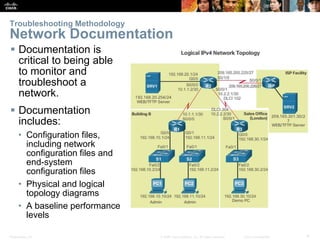
 Documentation is
critical to being able
to monitor and
troubleshoot a
network.
 Documentation
includes:
• Configuration files,
including network
configuration files and
end-system
configuration files
• Physical and logical
topology diagrams
• A baseline performance
levels
Presentation_ID 5© 2008 Cisco Systems, Inc. All rights reserved. Cisco Confidential
Troubleshooting Methodology
Network Documentation
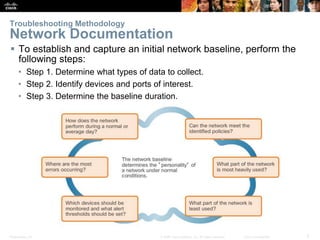
 To establish and capture an initial network baseline, perform the
following steps:
• Step 1. Determine what types of data to collect.
• Step 2. Identify devices and ports of interest.
• Step 3. Determine the baseline duration.
Presentation_ID 6© 2008 Cisco Systems, Inc. All rights reserved. Cisco Confidential
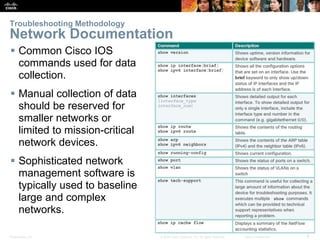
 Common Cisco IOS
commands used for data
collection.
 Manual collection of data
should be reserved for
smaller networks or
limited to mission-critical
network devices.
 Sophisticated network
management software is
typically used to baseline
large and complex
networks.
Troubleshooting Methodology
Network Documentation
Presentation_ID 7© 2008 Cisco Systems, Inc. All rights reserved. Cisco Confidential
Troubleshooting Methodology
Troubleshooting Process
Presentation_ID 8© 2008 Cisco Systems, Inc. All rights reserved. Cisco Confidential
Troubleshooting Methodology
Troubleshooting Process
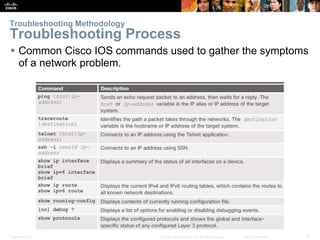
 Common Cisco IOS commands used to gather the symptoms
of a network problem.
Presentation_ID 9© 2008 Cisco Systems, Inc. All rights reserved. Cisco Confidential
Troubleshooting Methodology
Isolating the Issue Using Layered Models
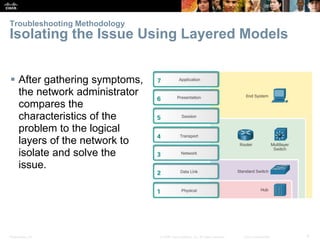
 After gathering symptoms,
the network administrator
compares the
characteristics of the
problem to the logical
layers of the network to
isolate and solve the
issue.
Presentation_ID 10© 2008 Cisco Systems, Inc. All rights reserved. Cisco Confidential
Troubleshooting Methodology
Isolating the Issue Using Layered Models
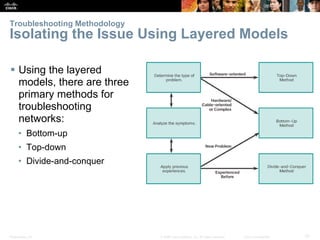
 Using the layered
models, there are three
primary methods for
troubleshooting
networks:
• Bottom-up
• Top-down
• Divide-and-conquer
© 2008 Cisco Systems, Inc. All rights reserved. Cisco ConfidentialPresentation_ID 11
8.2 Troubleshooting Scenarios
Presentation_ID 12© 2008 Cisco Systems, Inc. All rights reserved. Cisco Confidential
Troubleshooting Scenarios
Using IP SLA
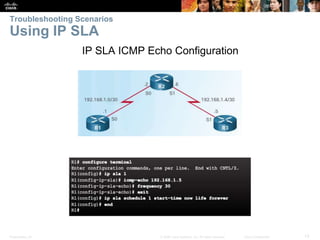
 Cisco IP Service Level Agreements (SLA) generate traffic to
measure network performance.
 Additional benefits include:
• SLA monitoring, measurement, and verification
• Measure the jitter, latency, or packet loss in the network
• IP service network health assessment
• Edge-to-edge network availability
Presentation_ID 13© 2008 Cisco Systems, Inc. All rights reserved. Cisco Confidential
Troubleshooting Scenarios
Using IP SLA
IP SLA ICMP Echo Configuration
Presentation_ID 14© 2008 Cisco Systems, Inc. All rights reserved. Cisco Confidential
Troubleshooting Scenarios
Using IP SLA
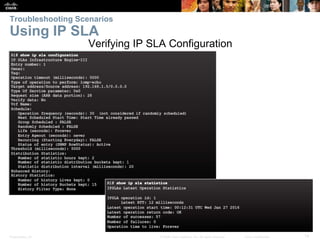
Verifying IP SLA Configuration
Presentation_ID 15© 2008 Cisco Systems, Inc. All rights reserved. Cisco Confidential
Troubleshooting Scenarios
Troubleshooting Tools
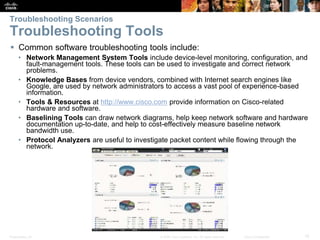
 Common software troubleshooting tools include:
• Network Management System Tools include device-level monitoring, configuration, and
fault-management tools. These tools can be used to investigate and correct network
problems.
• Knowledge Bases from device vendors, combined with Internet search engines like
Google, are used by network administrators to access a vast pool of experience-based
information.
• Tools & Resources at http://www.cisco.com provide information on Cisco-related
hardware and software.
• Baselining Tools can draw network diagrams, help keep network software and hardware
documentation up-to-date, and help to cost-effectively measure baseline network
bandwidth use.
• Protocol Analyzers are useful to investigate packet content while flowing through the
network.
Presentation_ID 16© 2008 Cisco Systems, Inc. All rights reserved. Cisco Confidential
Troubleshooting Scenarios
Troubleshooting Tools
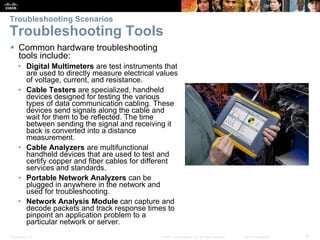
 Common hardware troubleshooting
tools include:
• Digital Multimeters are test instruments that
are used to directly measure electrical values
of voltage, current, and resistance.
• Cable Testers are specialized, handheld
devices designed for testing the various
types of data communication cabling. These
devices send signals along the cable and
wait for them to be reflected. The time
between sending the signal and receiving it
back is converted into a distance
measurement.
• Cable Analyzers are multifunctional
handheld devices that are used to test and
certify copper and fiber cables for different
services and standards.
• Portable Network Analyzers can be
plugged in anywhere in the network and
used for troubleshooting.
• Network Analysis Module can capture and
decode packets and track response times to
pinpoint an application problem to a
particular network or server.
Presentation_ID 17© 2008 Cisco Systems, Inc. All rights reserved. Cisco Confidential
Troubleshooting Scenarios
Symptoms and Causes of Network Troubleshooting
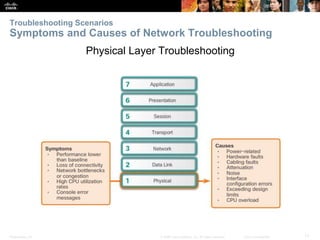
Physical Layer Troubleshooting
Presentation_ID 18© 2008 Cisco Systems, Inc. All rights reserved. Cisco Confidential
Troubleshooting Scenarios
Symptoms and Causes of Network Troubleshooting
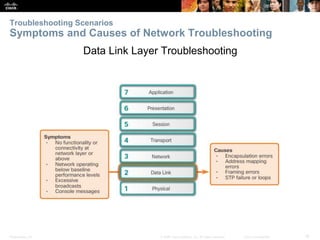
Data Link Layer Troubleshooting
Presentation_ID 19© 2008 Cisco Systems, Inc. All rights reserved. Cisco Confidential
Troubleshooting Scenarios
Symptoms and Causes of Network Troubleshooting
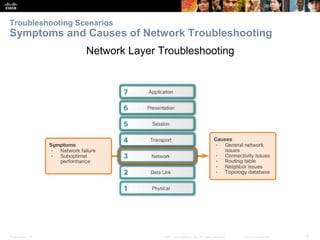
Network Layer Troubleshooting
Presentation_ID 20© 2008 Cisco Systems, Inc. All rights reserved. Cisco Confidential
Troubleshooting Scenarios
Symptoms and Causes of Network Troubleshooting
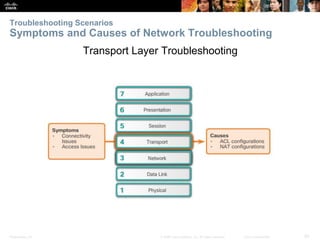
Transport Layer Troubleshooting
Presentation_ID 21© 2008 Cisco Systems, Inc. All rights reserved. Cisco Confidential
Troubleshooting Scenarios
Symptoms and Causes of Network Troubleshooting
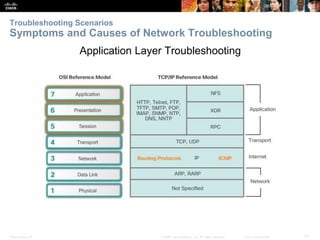
Application Layer Troubleshooting
Presentation_ID 22© 2008 Cisco Systems, Inc. All rights reserved. Cisco Confidential
Troubleshooting Scenarios
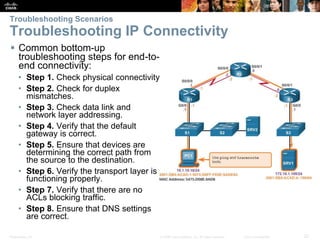
Troubleshooting IP Connectivity
 Common bottom-up
troubleshooting steps for end-to-
end connectivity:
• Step 1. Check physical connectivity
• Step 2. Check for duplex
mismatches.
• Step 3. Check data link and
network layer addressing.
• Step 4. Verify that the default
gateway is correct.
• Step 5. Ensure that devices are
determining the correct path from
the source to the destination.
• Step 6. Verify the transport layer is
functioning properly.
• Step 7. Verify that there are no
ACLs blocking traffic.
• Step 8. Ensure that DNS settings
are correct.
© 2008 Cisco Systems, Inc. All rights reserved. Cisco ConfidentialPresentation_ID 23
8.3 Chapter Summary
Presentation_ID 24© 2008 Cisco Systems, Inc. All rights reserved. Cisco Confidential
Chapter Summary
Summary
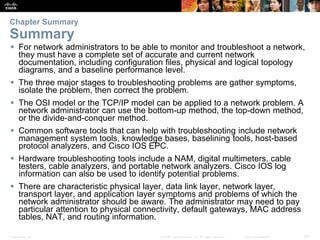
 For network administrators to be able to monitor and troubleshoot a network,
they must have a complete set of accurate and current network
documentation, including configuration files, physical and logical topology
diagrams, and a baseline performance level.
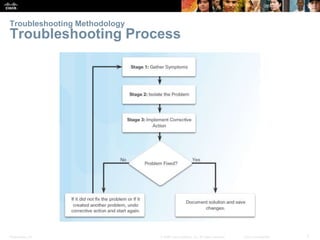
 The three major stages to troubleshooting problems are gather symptoms,
isolate the problem, then correct the problem.
 The OSI model or the TCP/IP model can be applied to a network problem. A
network administrator can use the bottom-up method, the top-down method,
or the divide-and-conquer method.
 Common software tools that can help with troubleshooting include network
management system tools, knowledge bases, baselining tools, host-based
protocol analyzers, and Cisco IOS EPC.
 Hardware troubleshooting tools include a NAM, digital multimeters, cable
testers, cable analyzers, and portable network analyzers. Cisco IOS log
information can also be used to identify potential problems.
 There are characteristic physical layer, data link layer, network layer,
transport layer, and application layer symptoms and problems of which the
network administrator should be aware. The administrator may need to pay
particular attention to physical connectivity, default gateways, MAC address
tables, NAT, and routing information.
Presentation_ID 25© 2008 Cisco Systems, Inc. All rights reserved. Cisco Confidential
Presentation_ID 26© 2008 Cisco Systems, Inc. All rights reserved. Cisco Confidential

CCNA (R & S) Module 02 - Connecting Networks - Chapter 8

  • 1.
    © 2008 CiscoSystems, Inc. All rights reserved. Cisco ConfidentialPresentation_ID 1 Chapter 8: Network Troubleshooting Connecting Networks
  • 2.
    Presentation_ID 2© 2008Cisco Systems, Inc. All rights reserved. Cisco Confidential Chapter 8 - Sections & Objectives  8.1 Troubleshooting Methodology • Explain troubleshooting approaches for various network problems.  8.2 Troubleshooting Scenarios • Troubleshoot end-to-end connectivity in a small to medium-sized business network, using a systematic approach.
  • 3.
    © 2008 CiscoSystems, Inc. All rights reserved. Cisco ConfidentialPresentation_ID 3 8.1 Troubleshooting Methodology
  • 4.
    Presentation_ID 4© 2008Cisco Systems, Inc. All rights reserved. Cisco Confidential Troubleshooting Methodology Network Documentation  Documentation is critical to being able to monitor and troubleshoot a network.  Documentation includes: • Configuration files, including network configuration files and end-system configuration files • Physical and logical topology diagrams • A baseline performance levels
  • 5.
    Presentation_ID 5© 2008Cisco Systems, Inc. All rights reserved. Cisco Confidential Troubleshooting Methodology Network Documentation  To establish and capture an initial network baseline, perform the following steps: • Step 1. Determine what types of data to collect. • Step 2. Identify devices and ports of interest. • Step 3. Determine the baseline duration.
  • 6.
    Presentation_ID 6© 2008Cisco Systems, Inc. All rights reserved. Cisco Confidential  Common Cisco IOS commands used for data collection.  Manual collection of data should be reserved for smaller networks or limited to mission-critical network devices.  Sophisticated network management software is typically used to baseline large and complex networks. Troubleshooting Methodology Network Documentation
  • 7.
    Presentation_ID 7© 2008Cisco Systems, Inc. All rights reserved. Cisco Confidential Troubleshooting Methodology Troubleshooting Process
  • 8.
    Presentation_ID 8© 2008Cisco Systems, Inc. All rights reserved. Cisco Confidential Troubleshooting Methodology Troubleshooting Process  Common Cisco IOS commands used to gather the symptoms of a network problem.
  • 9.
    Presentation_ID 9© 2008Cisco Systems, Inc. All rights reserved. Cisco Confidential Troubleshooting Methodology Isolating the Issue Using Layered Models  After gathering symptoms, the network administrator compares the characteristics of the problem to the logical layers of the network to isolate and solve the issue.
  • 10.
    Presentation_ID 10© 2008Cisco Systems, Inc. All rights reserved. Cisco Confidential Troubleshooting Methodology Isolating the Issue Using Layered Models  Using the layered models, there are three primary methods for troubleshooting networks: • Bottom-up • Top-down • Divide-and-conquer
  • 11.
    © 2008 CiscoSystems, Inc. All rights reserved. Cisco ConfidentialPresentation_ID 11 8.2 Troubleshooting Scenarios
  • 12.
    Presentation_ID 12© 2008Cisco Systems, Inc. All rights reserved. Cisco Confidential Troubleshooting Scenarios Using IP SLA  Cisco IP Service Level Agreements (SLA) generate traffic to measure network performance.  Additional benefits include: • SLA monitoring, measurement, and verification • Measure the jitter, latency, or packet loss in the network • IP service network health assessment • Edge-to-edge network availability
  • 13.
    Presentation_ID 13© 2008Cisco Systems, Inc. All rights reserved. Cisco Confidential Troubleshooting Scenarios Using IP SLA IP SLA ICMP Echo Configuration
  • 14.
    Presentation_ID 14© 2008Cisco Systems, Inc. All rights reserved. Cisco Confidential Troubleshooting Scenarios Using IP SLA Verifying IP SLA Configuration
  • 15.
    Presentation_ID 15© 2008Cisco Systems, Inc. All rights reserved. Cisco Confidential Troubleshooting Scenarios Troubleshooting Tools  Common software troubleshooting tools include: • Network Management System Tools include device-level monitoring, configuration, and fault-management tools. These tools can be used to investigate and correct network problems. • Knowledge Bases from device vendors, combined with Internet search engines like Google, are used by network administrators to access a vast pool of experience-based information. • Tools & Resources at http://www.cisco.com provide information on Cisco-related hardware and software. • Baselining Tools can draw network diagrams, help keep network software and hardware documentation up-to-date, and help to cost-effectively measure baseline network bandwidth use. • Protocol Analyzers are useful to investigate packet content while flowing through the network.
  • 16.
    Presentation_ID 16© 2008Cisco Systems, Inc. All rights reserved. Cisco Confidential Troubleshooting Scenarios Troubleshooting Tools  Common hardware troubleshooting tools include: • Digital Multimeters are test instruments that are used to directly measure electrical values of voltage, current, and resistance. • Cable Testers are specialized, handheld devices designed for testing the various types of data communication cabling. These devices send signals along the cable and wait for them to be reflected. The time between sending the signal and receiving it back is converted into a distance measurement. • Cable Analyzers are multifunctional handheld devices that are used to test and certify copper and fiber cables for different services and standards. • Portable Network Analyzers can be plugged in anywhere in the network and used for troubleshooting. • Network Analysis Module can capture and decode packets and track response times to pinpoint an application problem to a particular network or server.
  • 17.
    Presentation_ID 17© 2008Cisco Systems, Inc. All rights reserved. Cisco Confidential Troubleshooting Scenarios Symptoms and Causes of Network Troubleshooting Physical Layer Troubleshooting
  • 18.
    Presentation_ID 18© 2008Cisco Systems, Inc. All rights reserved. Cisco Confidential Troubleshooting Scenarios Symptoms and Causes of Network Troubleshooting Data Link Layer Troubleshooting
  • 19.
    Presentation_ID 19© 2008Cisco Systems, Inc. All rights reserved. Cisco Confidential Troubleshooting Scenarios Symptoms and Causes of Network Troubleshooting Network Layer Troubleshooting
  • 20.
    Presentation_ID 20© 2008Cisco Systems, Inc. All rights reserved. Cisco Confidential Troubleshooting Scenarios Symptoms and Causes of Network Troubleshooting Transport Layer Troubleshooting
  • 21.
    Presentation_ID 21© 2008Cisco Systems, Inc. All rights reserved. Cisco Confidential Troubleshooting Scenarios Symptoms and Causes of Network Troubleshooting Application Layer Troubleshooting
  • 22.
    Presentation_ID 22© 2008Cisco Systems, Inc. All rights reserved. Cisco Confidential Troubleshooting Scenarios Troubleshooting IP Connectivity  Common bottom-up troubleshooting steps for end-to- end connectivity: • Step 1. Check physical connectivity • Step 2. Check for duplex mismatches. • Step 3. Check data link and network layer addressing. • Step 4. Verify that the default gateway is correct. • Step 5. Ensure that devices are determining the correct path from the source to the destination. • Step 6. Verify the transport layer is functioning properly. • Step 7. Verify that there are no ACLs blocking traffic. • Step 8. Ensure that DNS settings are correct.
  • 23.
    © 2008 CiscoSystems, Inc. All rights reserved. Cisco ConfidentialPresentation_ID 23 8.3 Chapter Summary
  • 24.
    Presentation_ID 24© 2008Cisco Systems, Inc. All rights reserved. Cisco Confidential Chapter Summary Summary  For network administrators to be able to monitor and troubleshoot a network, they must have a complete set of accurate and current network documentation, including configuration files, physical and logical topology diagrams, and a baseline performance level.  The three major stages to troubleshooting problems are gather symptoms, isolate the problem, then correct the problem.  The OSI model or the TCP/IP model can be applied to a network problem. A network administrator can use the bottom-up method, the top-down method, or the divide-and-conquer method.  Common software tools that can help with troubleshooting include network management system tools, knowledge bases, baselining tools, host-based protocol analyzers, and Cisco IOS EPC.  Hardware troubleshooting tools include a NAM, digital multimeters, cable testers, cable analyzers, and portable network analyzers. Cisco IOS log information can also be used to identify potential problems.  There are characteristic physical layer, data link layer, network layer, transport layer, and application layer symptoms and problems of which the network administrator should be aware. The administrator may need to pay particular attention to physical connectivity, default gateways, MAC address tables, NAT, and routing information.
  • 25.
    Presentation_ID 25© 2008Cisco Systems, Inc. All rights reserved. Cisco Confidential
  • 26.
    Presentation_ID 26© 2008Cisco Systems, Inc. All rights reserved. Cisco Confidential