HUMAN COMPUTER
INTERACTION: INTERFACE
DESCRIPTION
AIMAN AL-HAKIM 13DDT16F2030
Command line interface
 Way of expressing instructions to the computer directly
- function keys, single characters, short abbreviations, whole words, or a combination
 suitable for repetitive tasks
 better for expert users than novices
 offers direct access to system functionality
 command names/abbreviations should be meaningful!
Typical example: the Unix system
menus
 Set of options displayed on the screen
 Options visible
- less recall - easier to use
- rely on recognition so names should be meaningful
 Selection by:
- numbers, letters, arrow keys, mouse
- combination (e.g. mouse plus accelerators)
 Often options hierarchically grouped
- sensible grouping is needed
 Restricted form of full WIMP system
menus
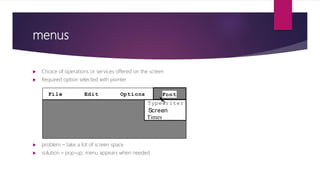
 Choice of operations or services offered on the screen
 Required option selected with pointer
 problem – take a lot of screen space
 solution – pop-up: menu appears when needed
File Edit Options
Typewriter
Screen
Times
Font
Natural language
 Familiar to user
 speech recognition or typed natural language
 Problems
- vague
- ambiguous
- hard to do well!
 Solutions
- try to understand a subset
- pick on key words
Wimp interface: windows, icon, menus &
pointers
 WIMP interface
Windows
Icons
Menus
Pointers
… or windows, icons, mice, and pull-down menus!
• default style for majority of interactive computer systems, especially PCs and desktop
machines
Wimp interface: windows, icon, menus &
pointers
 WINDOWS
• Areas of the screen that behave as if they were independent
- can contain text or graphics
- can be moved or resized
- can overlap and obscure each other, or can be laid out next to one another (tiled)
• scrollbars
-allow the user to move the contents of the window up and down or from side to side
• title bars
describe the name of the window
Wimp interface: windows, icon, menus &
pointers
 ICON
• small picture or image
• represents some object in the interface
- often a window or action
• windows can be closed down (iconised)
- small representation fi many accessible windows
• icons can be many and various
- highly stylized
- realistic representations.
Wimp interface: windows, icon, menus &
pointers
 MENUS
• Set of options displayed on the screen
• Options visible
- less recall - easier to use
- rely on recognition so names should be meaningful
• Selection by:
- numbers, letters, arrow keys, mouse
- combination (e.g. mouse plus accelerators)
• Often options hierarchically grouped
- sensible grouping is needed
• Restricted form of full WIMP system
Wimp interface: windows, icon, menus &
pointers
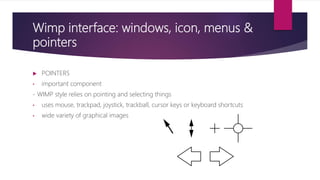
 POINTERS
• important component
- WIMP style relies on pointing and selecting things
• uses mouse, trackpad, joystick, trackball, cursor keys or keyboard shortcuts
• wide variety of graphical images
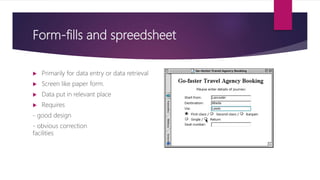
Form-fills and spreedsheet
 Primarily for data entry or data retrieval
 Screen like paper form.
 Data put in relevant place
 Requires
- good design
- obvious correction
facilities
Point & click interfaces
 used in ..
- multimedia
- web browsers
- hypertext
 just click something!
- icons, text links or location on map
 minimal typing
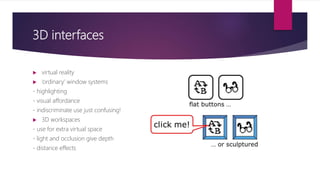
3D interfaces
 virtual reality
 ‘ordinary’ window systems
- highlighting
- visual affordance
- indiscriminate use just confusing!
 3D workspaces
- use for extra virtual space
- light and occlusion give depth
- distance effects
Web navigation
 Web navigation refers to the process of navigating a network of information resources in the World Wide
Web, which is organized as hypertext or hypermedia. The user interface that is used to do so is called a web
browser.
 A central theme in web design is the development of a web navigation interface that maximizes usability.
 A website's overall navigational scheme includes several navigational pieces such as global, local,
supplemental, and contextual navigation; all of these are vital aspects of the broad topic of web navigation.[3]
Hierarchical navigation systems are vital as well since it is the primary navigation system. It allows for the user
to navigate within the site using levels alone, which is often seen as restricting and requires additional
navigation systems to better structure the website.The global navigation of a website, as another segment of
web navigation, serves as the outline and template in order to achieve an easy maneuver for the users
accessing the site, while local navigation is often used to help the users within a specific section of the site. All
these navigational pieces fall under the categories of various types of web navigation, allowing for further
development and for more efficient experiences upon visiting a webpage.

POLITEKNIK MALAYSIA

  • 1.
  • 2.
    Command line interface Way of expressing instructions to the computer directly - function keys, single characters, short abbreviations, whole words, or a combination  suitable for repetitive tasks  better for expert users than novices  offers direct access to system functionality  command names/abbreviations should be meaningful! Typical example: the Unix system
  • 3.
    menus  Set ofoptions displayed on the screen  Options visible - less recall - easier to use - rely on recognition so names should be meaningful  Selection by: - numbers, letters, arrow keys, mouse - combination (e.g. mouse plus accelerators)  Often options hierarchically grouped - sensible grouping is needed  Restricted form of full WIMP system
  • 4.
    menus  Choice ofoperations or services offered on the screen  Required option selected with pointer  problem – take a lot of screen space  solution – pop-up: menu appears when needed File Edit Options Typewriter Screen Times Font
  • 5.
    Natural language  Familiarto user  speech recognition or typed natural language  Problems - vague - ambiguous - hard to do well!  Solutions - try to understand a subset - pick on key words
  • 6.
    Wimp interface: windows,icon, menus & pointers  WIMP interface Windows Icons Menus Pointers … or windows, icons, mice, and pull-down menus! • default style for majority of interactive computer systems, especially PCs and desktop machines
  • 7.
    Wimp interface: windows,icon, menus & pointers  WINDOWS • Areas of the screen that behave as if they were independent - can contain text or graphics - can be moved or resized - can overlap and obscure each other, or can be laid out next to one another (tiled) • scrollbars -allow the user to move the contents of the window up and down or from side to side • title bars describe the name of the window
  • 8.
    Wimp interface: windows,icon, menus & pointers  ICON • small picture or image • represents some object in the interface - often a window or action • windows can be closed down (iconised) - small representation fi many accessible windows • icons can be many and various - highly stylized - realistic representations.
  • 9.
    Wimp interface: windows,icon, menus & pointers  MENUS • Set of options displayed on the screen • Options visible - less recall - easier to use - rely on recognition so names should be meaningful • Selection by: - numbers, letters, arrow keys, mouse - combination (e.g. mouse plus accelerators) • Often options hierarchically grouped - sensible grouping is needed • Restricted form of full WIMP system
  • 10.
    Wimp interface: windows,icon, menus & pointers  POINTERS • important component - WIMP style relies on pointing and selecting things • uses mouse, trackpad, joystick, trackball, cursor keys or keyboard shortcuts • wide variety of graphical images
  • 11.
    Form-fills and spreedsheet Primarily for data entry or data retrieval  Screen like paper form.  Data put in relevant place  Requires - good design - obvious correction facilities
  • 12.
    Point & clickinterfaces  used in .. - multimedia - web browsers - hypertext  just click something! - icons, text links or location on map  minimal typing
  • 13.
    3D interfaces  virtualreality  ‘ordinary’ window systems - highlighting - visual affordance - indiscriminate use just confusing!  3D workspaces - use for extra virtual space - light and occlusion give depth - distance effects
  • 14.
    Web navigation  Webnavigation refers to the process of navigating a network of information resources in the World Wide Web, which is organized as hypertext or hypermedia. The user interface that is used to do so is called a web browser.  A central theme in web design is the development of a web navigation interface that maximizes usability.  A website's overall navigational scheme includes several navigational pieces such as global, local, supplemental, and contextual navigation; all of these are vital aspects of the broad topic of web navigation.[3] Hierarchical navigation systems are vital as well since it is the primary navigation system. It allows for the user to navigate within the site using levels alone, which is often seen as restricting and requires additional navigation systems to better structure the website.The global navigation of a website, as another segment of web navigation, serves as the outline and template in order to achieve an easy maneuver for the users accessing the site, while local navigation is often used to help the users within a specific section of the site. All these navigational pieces fall under the categories of various types of web navigation, allowing for further development and for more efficient experiences upon visiting a webpage.