Learning SAS With Example by Ron Cody :Chapter 16 to Chapter 20 Solution
1) The document demonstrates various SAS procedures to analyze and summarize data from multiple SAS data sets, including PROC MEANS, PROC FREQ, PROC TABULATE, PROC GCHART, and PROC GPLOT.
2) Examples include computing statistics by gender and school size using BY and CLASS statements in PROC MEANS, creating frequency tables and cross tabulations in PROC FREQ, producing customized tables using PROC TABULATE, and creating bar charts and scatter plots using PROC GCHART and PROC GPLOT.
3) The document also demonstrates using ODS to produce output files and control formatting and layout of results.
Creating a SAS format library with variables for Gender, SchoolSize, and Scholarship; generating a synthetic dataset for college.
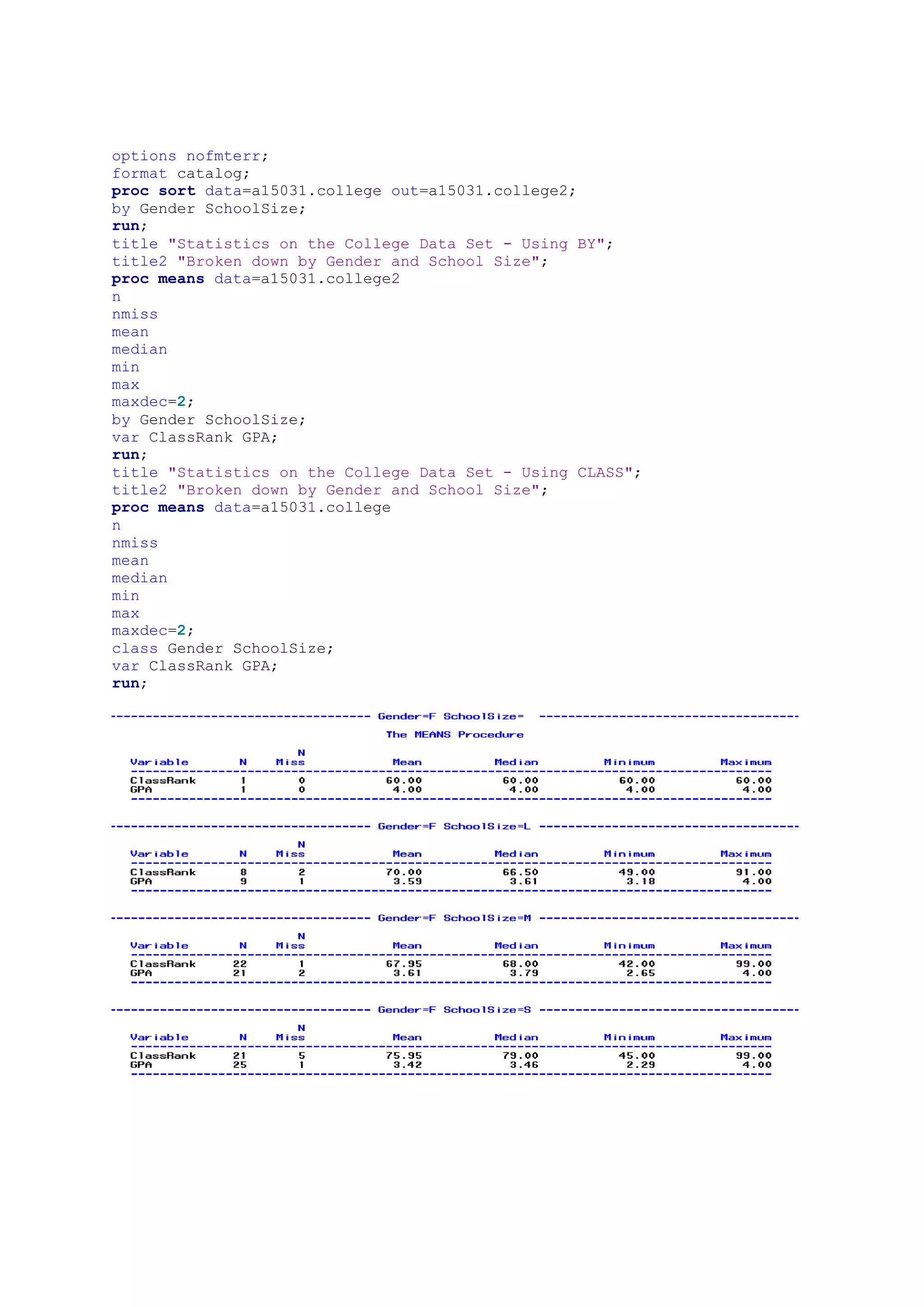
Performing statistical analysis on College data using BY and CLASS statements for ClassRank and GPA by Gender and SchoolSize.
Creating formats to group School sizes; generating summary statistics (mean, median) for ClassRank and GPA based on redefined SchoolSize.Generating frequency distributions for Age, and producing a three-way table of Gender, Scholarship, and SchoolSize.
Using ODS to generate HTML files including body, contents, and frame for displaying GPA and ClassRank statistics.
Creating visual representations including bar charts for Units Sold by Model and Total Sales by Country, along with a scatter plot of TimeMile vs. RestPulse.
Learning SAS With Example by Ron Cody :Chapter 16 to Chapter 20 Solution
1.
Chapter 16
libname a15031"c:/work/sas/blog";
/* 17.2 Repeat Problem 1, except compute the desired statistics for each
combination of
Gender SchoolSize. Do this twice, once using a BY statement, and once using
a
CLASS statement.
Note: The data set College has permanent formats for Gender, SchoolSize,
and
Scholarship. Either make this format catalog available to SAS (see Chapter
5),
run the PROC FORMAT statements that follow, or use the system option*/
*Data set COLLEGE;
proc format library=a15031;
value $yesno 'Y','1' = 'Yes'
'N','0' = 'No'
' ' = 'Not Given';
value $size 'S' = 'Small'
'M' = 'Medium'
'L' = 'Large'
' ' = 'Missing';
value $gender 'F' = 'Female'
'M' = 'Male'
' ' = 'Not Given';
run;
data a15031.college;
length StudentID $ 5 Gender SchoolSize $ 1;
do i = 1 to 100;
StudentID = put(round(ranuni(123456)*10000),z5.);
if ranuni(0) lt .4 then Gender = 'M';
else Gender = 'F';
if ranuni(0) lt .3 then SchoolSize = 'S';
else if ranuni(0) lt .7 then SchoolSize = 'M';
else SchoolSize = 'L';
if ranuni(0) lt .2 then Scholarship = 'Y';
else Scholarship = 'N';
GPA = round(rannor(0)*.5 + 3.5,.01);
if GPA gt 4 then GPA = 4;
ClassRank = int(ranuni(0)*60 + 41);
if ranuni(0) lt .1 then call missing(ClassRank);
if ranuni(0) lt .05 then call missing(SchoolSize);
if ranuni(0) lt .05 then call missing(GPA);
output;
end;
format Gender $gender1.
SchoolSize $size.
Scholarship $yesno.;
drop i;
run;
2.
options nofmterr;
format catalog;
procsort data=a15031.college out=a15031.college2;
by Gender SchoolSize;
run;
title "Statistics on the College Data Set - Using BY";
title2 "Broken down by Gender and School Size";
proc means data=a15031.college2
n
nmiss
mean
median
min
max
maxdec=2;
by Gender SchoolSize;
var ClassRank GPA;
run;
title "Statistics on the College Data Set - Using CLASS";
title2 "Broken down by Gender and School Size";
proc means data=a15031.college
n
nmiss
mean
median
min
max
maxdec=2;
class Gender SchoolSize;
var ClassRank GPA;
run;
3.
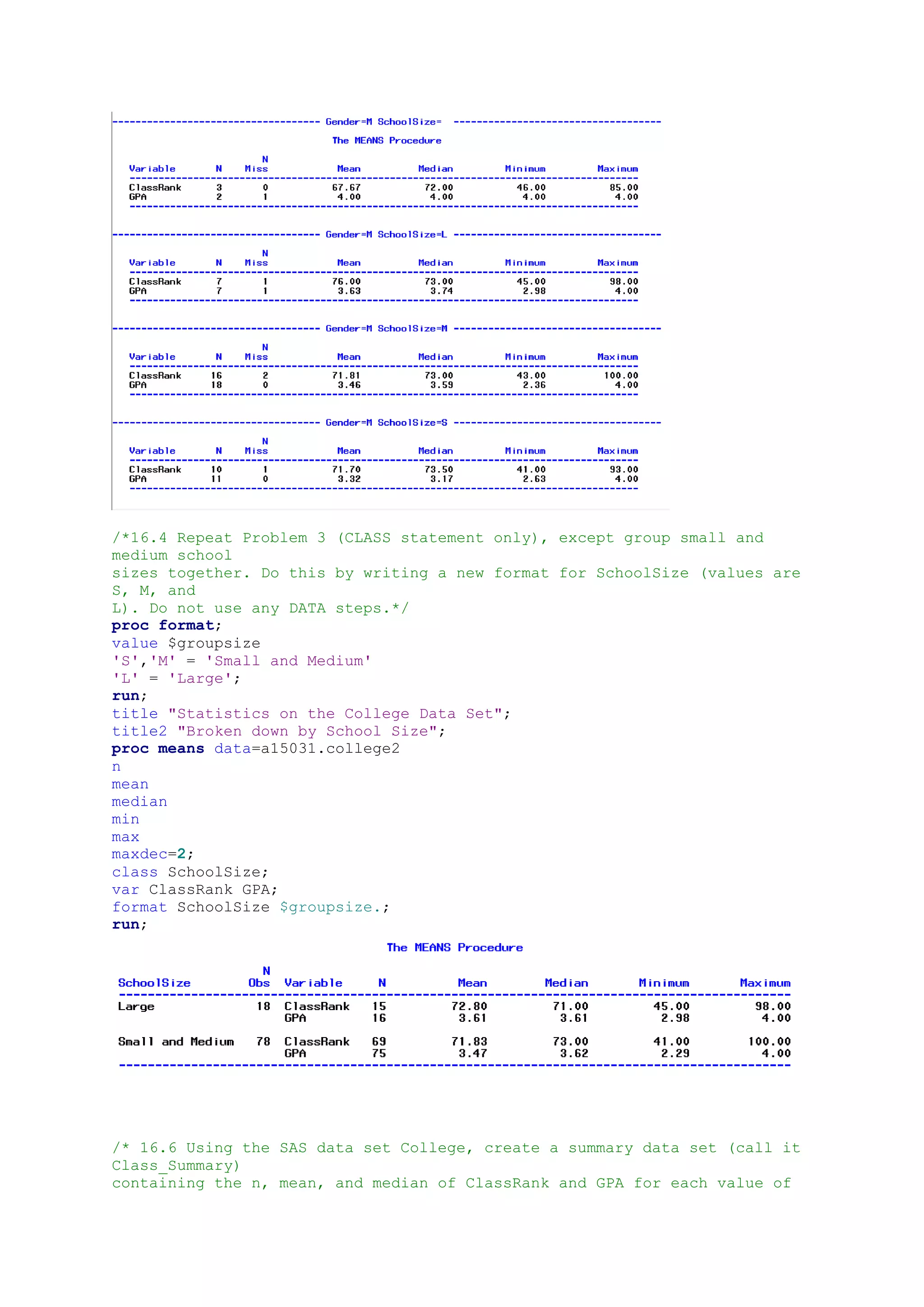
/*16.4 Repeat Problem3 (CLASS statement only), except group small and
medium school
sizes together. Do this by writing a new format for SchoolSize (values are
S, M, and
L). Do not use any DATA steps.*/
proc format;
value $groupsize
'S','M' = 'Small and Medium'
'L' = 'Large';
run;
title "Statistics on the College Data Set";
title2 "Broken down by School Size";
proc means data=a15031.college2
n
mean
median
min
max
maxdec=2;
class SchoolSize;
var ClassRank GPA;
format SchoolSize $groupsize.;
run;
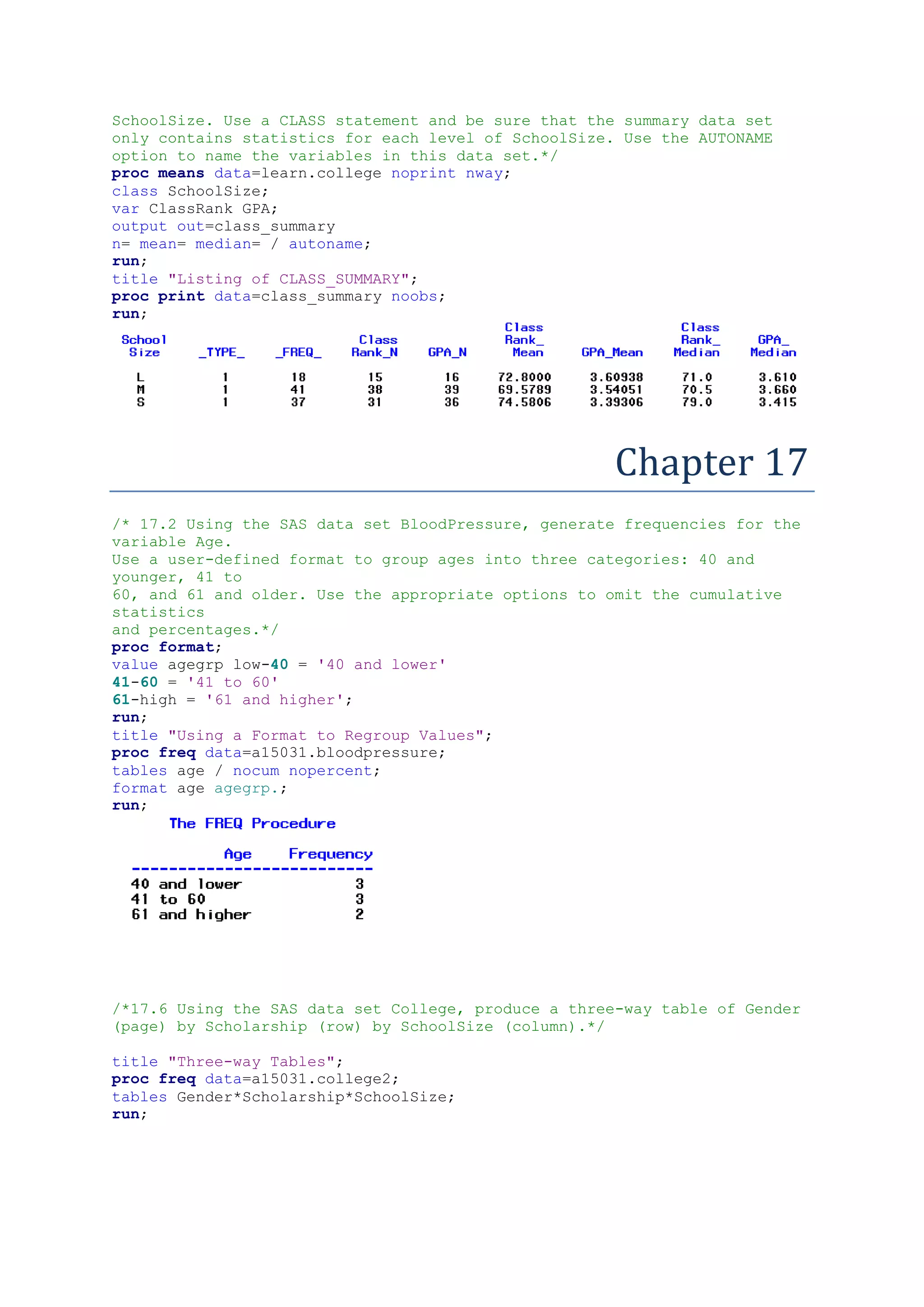
/* 16.6 Using the SAS data set College, create a summary data set (call it
Class_Summary)
containing the n, mean, and median of ClassRank and GPA for each value of
4.
SchoolSize. Use aCLASS statement and be sure that the summary data set
only contains statistics for each level of SchoolSize. Use the AUTONAME
option to name the variables in this data set.*/
proc means data=learn.college noprint nway;
class SchoolSize;
var ClassRank GPA;
output out=class_summary
n= mean= median= / autoname;
run;
title "Listing of CLASS_SUMMARY";
proc print data=class_summary noobs;
run;
Chapter 17
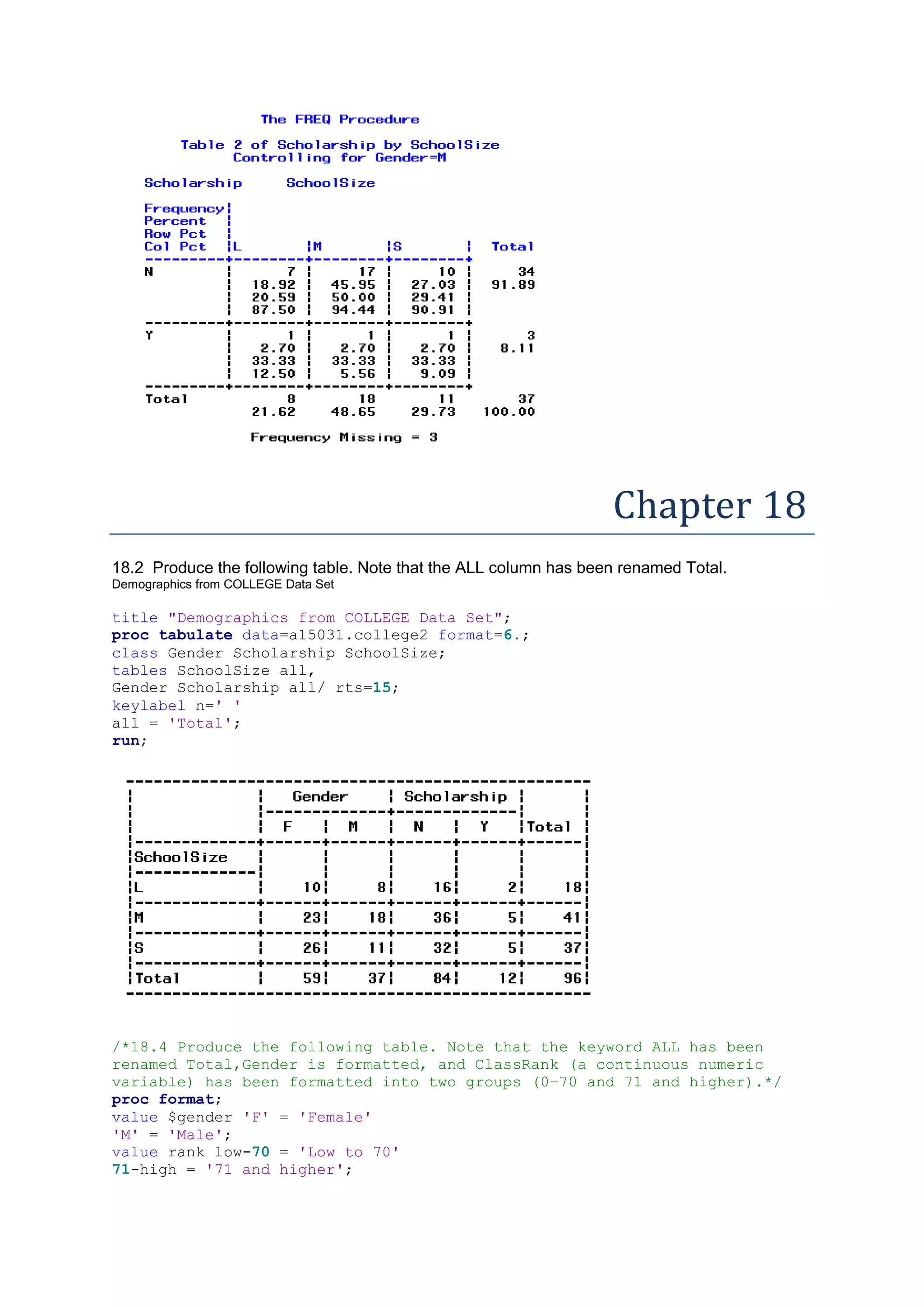
/* 17.2 Using the SAS data set BloodPressure, generate frequencies for the
variable Age.
Use a user-defined format to group ages into three categories: 40 and
younger, 41 to
60, and 61 and older. Use the appropriate options to omit the cumulative
statistics
and percentages.*/
proc format;
value agegrp low-40 = '40 and lower'
41-60 = '41 to 60'
61-high = '61 and higher';
run;
title "Using a Format to Regroup Values";
proc freq data=a15031.bloodpressure;
tables age / nocum nopercent;
format age agegrp.;
run;
/*17.6 Using the SAS data set College, produce a three-way table of Gender
(page) by Scholarship (row) by SchoolSize (column).*/
title "Three-way Tables";
proc freq data=a15031.college2;
tables Gender*Scholarship*SchoolSize;
run;
5.
Chapter 18
18.2 Producethe following table. Note that the ALL column has been renamed Total.
Demographics from COLLEGE Data Set
title "Demographics from COLLEGE Data Set";
proc tabulate data=a15031.college2 format=6.;
class Gender Scholarship SchoolSize;
tables SchoolSize all,
Gender Scholarship all/ rts=15;
keylabel n=' '
all = 'Total';
run;
/*18.4 Produce the following table. Note that the keyword ALL has been
renamed Total,Gender is formatted, and ClassRank (a continuous numeric
variable) has been formatted into two groups (0–70 and 71 and higher).*/
proc format;
value $gender 'F' = 'Female'
'M' = 'Male';
value rank low-70 = 'Low to 70'
71-high = '71 and higher';
6.
run;
title "Demographics fromCOLLEGE Data Set";
proc tabulate data=a15031.college2 format=6.;
class Gender Scholarship ClassRank;
tables Scholarship all,
(ClassRank)*(Gender all) / rts=15;
keylabel n=' '
all = 'Total';
format Gender $gender. ClassRank rank.;
run;
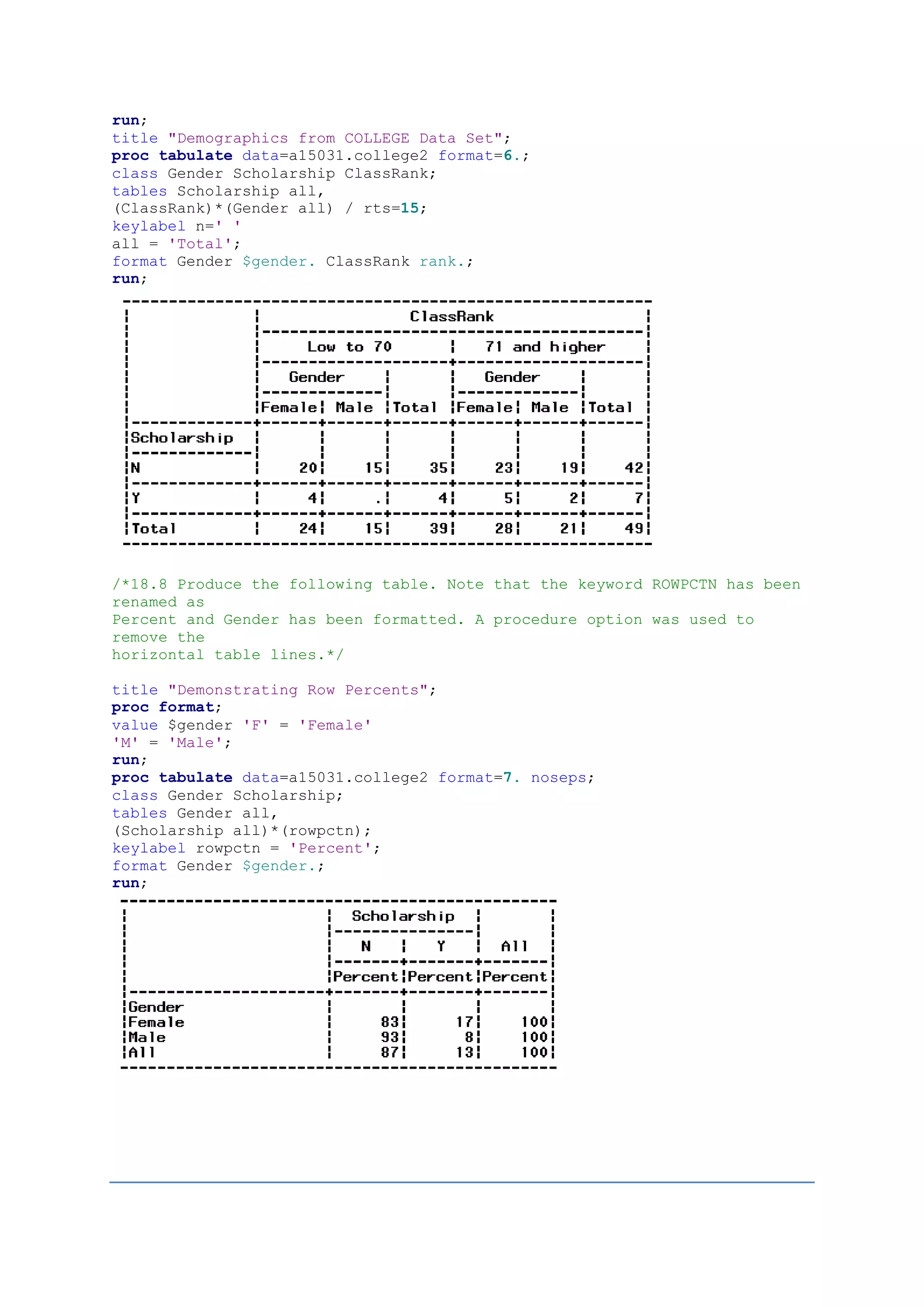
/*18.8 Produce the following table. Note that the keyword ROWPCTN has been
renamed as
Percent and Gender has been formatted. A procedure option was used to
remove the
horizontal table lines.*/
title "Demonstrating Row Percents";
proc format;
value $gender 'F' = 'Female'
'M' = 'Male';
run;
proc tabulate data=a15031.college2 format=7. noseps;
class Gender Scholarship;
tables Gender all,
(Scholarship all)*(rowpctn);
keylabel rowpctn = 'Percent';
format Gender $gender.;
run;
7.
chapter 19
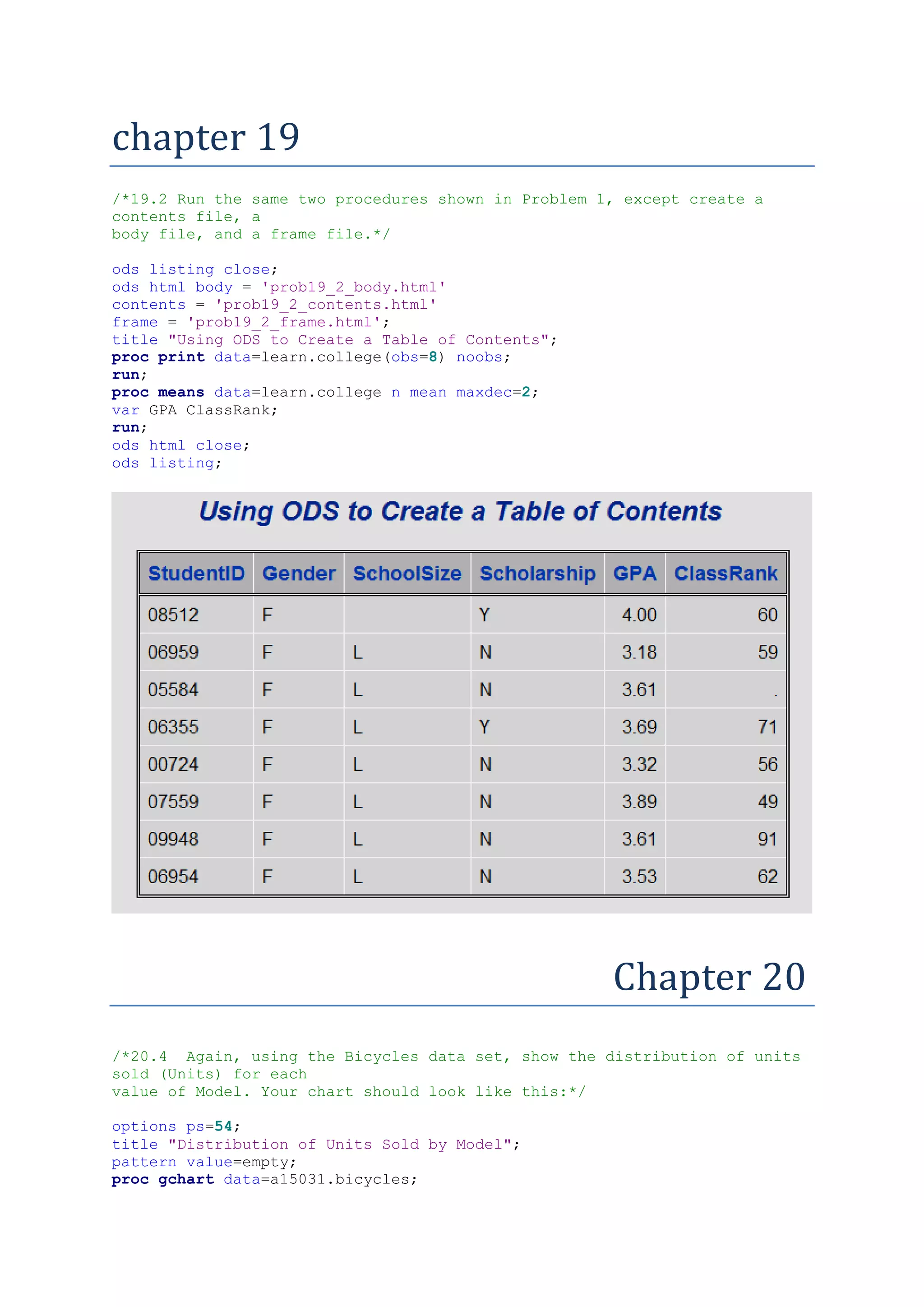
/*19.2 Runthe same two procedures shown in Problem 1, except create a
contents file, a
body file, and a frame file.*/
ods listing close;
ods html body = 'prob19_2_body.html'
contents = 'prob19_2_contents.html'
frame = 'prob19_2_frame.html';
title "Using ODS to Create a Table of Contents";
proc print data=learn.college(obs=8) noobs;
run;
proc means data=learn.college n mean maxdec=2;
var GPA ClassRank;
run;
ods html close;
ods listing;
Chapter 20
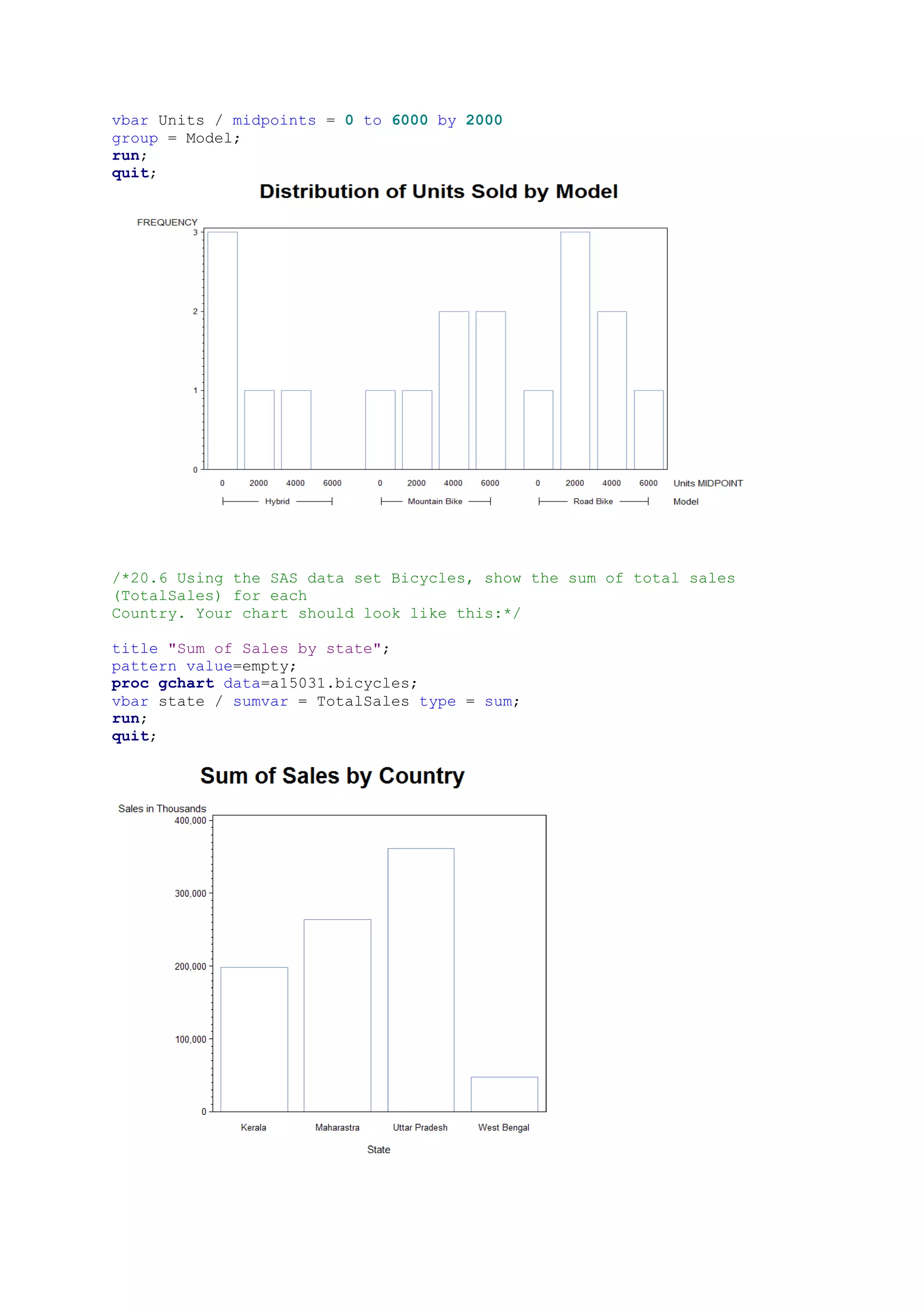
/*20.4 Again, using the Bicycles data set, show the distribution of units
sold (Units) for each
value of Model. Your chart should look like this:*/
options ps=54;
title "Distribution of Units Sold by Model";
pattern value=empty;
proc gchart data=a15031.bicycles;
8.
vbar Units /midpoints = 0 to 6000 by 2000
group = Model;
run;
quit;
/*20.6 Using the SAS data set Bicycles, show the sum of total sales
(TotalSales) for each
Country. Your chart should look like this:*/
title "Sum of Sales by state";
pattern value=empty;
proc gchart data=a15031.bicycles;
vbar state / sumvar = TotalSales type = sum;
run;
quit;
9.
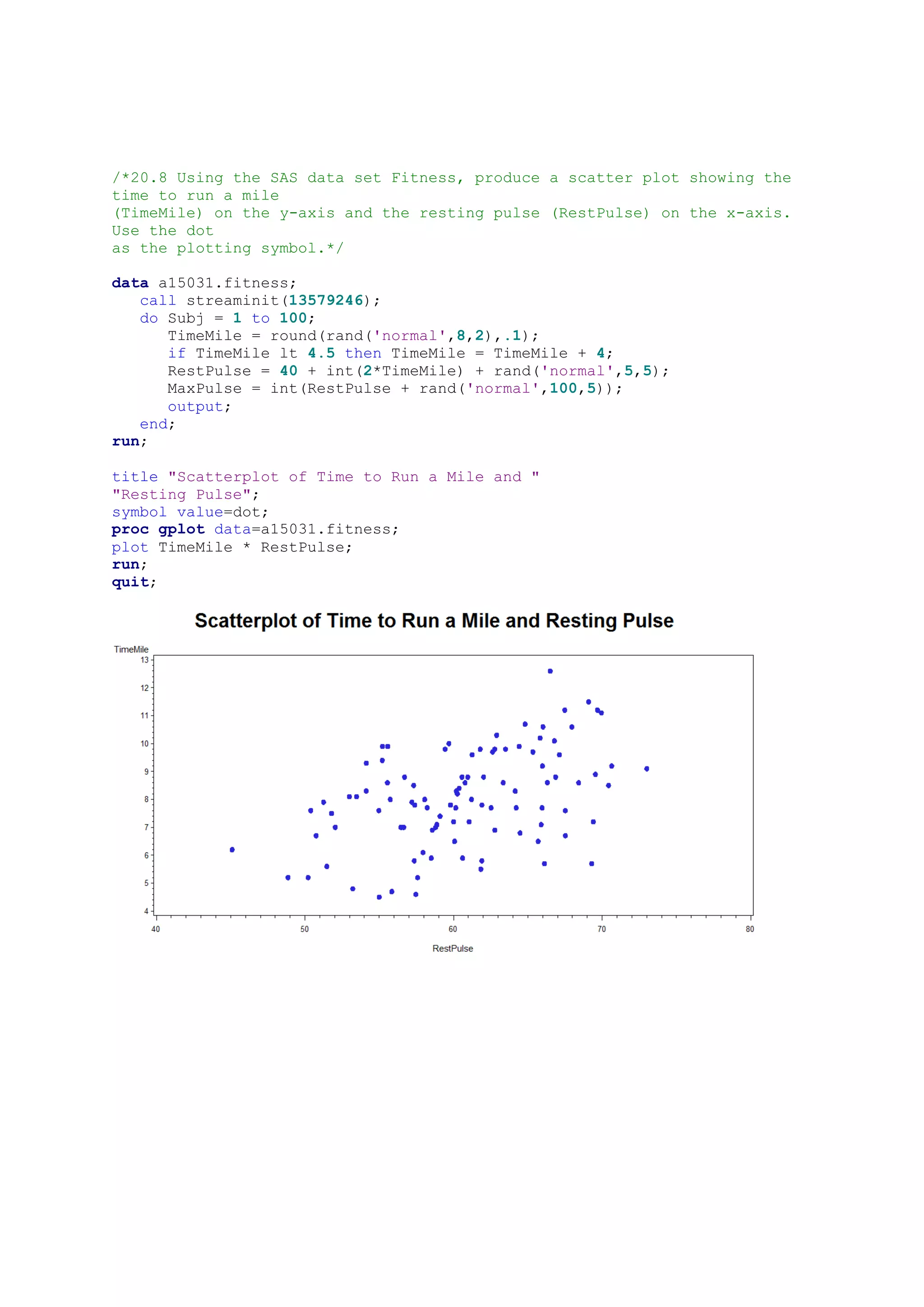
/*20.8 Using theSAS data set Fitness, produce a scatter plot showing the
time to run a mile
(TimeMile) on the y-axis and the resting pulse (RestPulse) on the x-axis.
Use the dot
as the plotting symbol.*/
data a15031.fitness;
call streaminit(13579246);
do Subj = 1 to 100;
TimeMile = round(rand('normal',8,2),.1);
if TimeMile lt 4.5 then TimeMile = TimeMile + 4;
RestPulse = 40 + int(2*TimeMile) + rand('normal',5,5);
MaxPulse = int(RestPulse + rand('normal',100,5));
output;
end;
run;
title "Scatterplot of Time to Run a Mile and "
"Resting Pulse";
symbol value=dot;
proc gplot data=a15031.fitness;
plot TimeMile * RestPulse;
run;
quit;