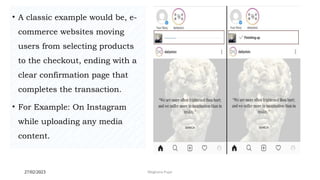
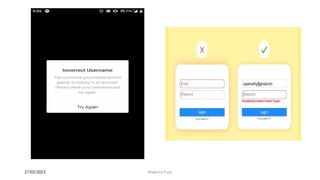
——
Human Computer
Interaction
IT351
January-May 2023
Objectives
• To provide the basic understanding of the different ways to design and
evaluation methods of "Good/User-Friendly Intercases and Interactive
Systems".
• To provide the basic understanding of the design techniques and tools for
building HCI Systems with respect to Effective Interfaces and Affective
User Experiences.
2 February 2023 2
Meghana Pujar
• To provide the basic understanding of HCI Tools like Google Glass, Kinect,
Leap Motion, Sense 3D, Environmental and IoT Sensors for the Design and
Implementation of HCI Applications.
• To understand of ever-present Computing, Augmented / Virtual / Mixed
Realities and Applications.
• To Understand of the Challenging Issues, Research Trends in HCI Systems.
2 February 2023 3
Meghana Pujar
• Human-computer Interaction (HCI) is the field of study that focuses on
optimizing how users and computers interact by designing interactive
computer interfaces that satisfy users needs.
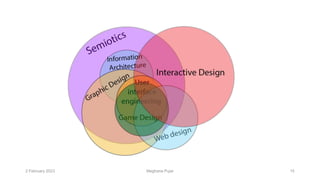
• It is a multidisciplinary subject covering computer science, behavioral
sciences, cognitive science, ergonomics, psychology, and design principles.
• The emergence of HCI dates back to the 1980s, when personal computing was
on the rise.
Introduction to HCI
2 February 2023 4
Meghana Pujar
• It was when desktop computers started appearing in households and
corporate offices.
• HCI’s journey began with video games, word processors, and numerical
units.
• However, with the advent of the internet and the explosion of mobile and
diversified technologies such as voice-based and Internet of Things (IoT),
computing became omnipresent.
2 February 2023 5
Meghana Pujar
• Consequently, the need for developing a tool that would make such man-
machine interactions more human-like grew significantly.
• This established HCI as a technology, bringing different fields such as
cognitive engineering, linguistics, neuroscience etc.
• Today, HCI focuses on designing, implementing, and evaluating interactive
interfaces that enhance user experience using computing devices.
• This includes user interface design, user-centered design, and user
experience design.
2 February 2023 6
Meghana Pujar
2 February 2023 7
Meghana Pujar
Key components of HCI
The user
• The user component refers to an individual or a group of individuals that
participate in a common task.
• HCI studies users needs, goals, and interaction patterns.
• It analyzes various parameters such as users’ cognitive capabilities,
emotions, and experiences to provide them with a seamless experience
while interacting with computing systems.
2 February 2023 8
Meghana Pujar
2 February 2023 9
Meghana Pujar
The goal-oriented task
• A user operates a computer system with an objective or goal in mind.
• The computer provides a digital representation of objects to accomplish this goal.
• In goal-oriented scenarios, one should consider the following aspects for a better user
experience:
• The complexity of the task that the user intends to accomplish.
• Knowledge and skills necessary to interact with the digital object.
• Time required to carry out the task.
2 February 2023 10
Meghana Pujar
• The interface is a crucial HCI component that can enhance the overall user
interaction experience.
• Various interface-related aspects must be considered, such as interaction
type (touch, click, gesture, or voice), screen resolution, display size, or
even color contrast.
• Users can adjust these depending on the their needs and requirements.
The Interface
2 February 2023 11
Meghana Pujar
For example, consider a user visiting a website on a smartphone.
• In such a case, the mobile version of the website should only display
important information that allows the user to navigate through the site easily.
• Moreover, the text size should be appropriately adjusted so that the user is
in a position to read it on the mobile device.
• Such design optimization boosts user experience as it makes them feel
comfortable while accessing the site on a mobile phone.
2 February 2023 12
Meghana Pujar
The context
• HCI is not only about providing better communication between users and computers
but also about factoring in the context and environment in which the system is
accessed.
• For example, while designing a smartphone app, designers need to evaluate how the
app will visually appear in different lighting conditions or how it will perform when
there is a poor network connection.
• Such aspects can have a significant impact on the end-user experience.
• Thus, HCI is a result of continuous testing and refinement of interface designs that
can affect the context of use for the users.
2 February 2023 13
Meghana Pujar
• HCI is crucial in designing intuitive interfaces that people with different abilities
and expertise usually access.
• Most importantly, human-computer interaction is helpful for communities lacking
knowledge and formal training on interacting with specific computing systems.
• With efficient HCI designs, users need not consider the intricacies and complexities
of using the computing system.
• User-friendly interfaces ensure that user interactions are clear, precise, and natural.
Importance of HCI
2 February 2023 15
Meghana Pujar
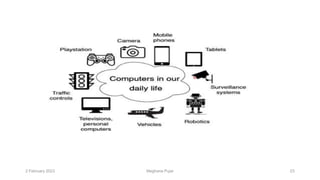
1) HCI in daily lives
• Today, technology has penetrated our routine lives and has impacted our daily
activities.
• To experience HCI technology, one need not own or use a smartphone or computer.
• When people use an ATM, food dispensing machine, or snack vending machine,
they inevitably come in contact with HCI.
• This is because HCI plays a vital role in designing the interfaces of such systems
that make them usable and efficient.
2 February 2023 16
Meghana Pujar
2) Industry
• Industries that use computing technology for day-to-day activities tend to consider HCI a
necessary business-driving force.
• Efficiently designed systems ensure that employees are comfortable using the systems for their
everyday work.
• With HCI, systems are easy to handle, even for untrained staff.
• HCI is critical for designing safety systems such as those used in air traffic control (ATC) or
power plants.
• The aim of HCI, in such cases, is to make sure that the system is accessible to any non-expert
individual who can handle safety-critical situations if the need arises.
2 February 2023 17
Meghana Pujar
2 February 2023 18
Meghana Pujar
2 February 2023 19
Meghana Pujar
Examples of HCI
IoT devices
• IoT devices and applications have significantly impacted our daily lives.
• According to a May 2022 report by IoT Analytics, global IoT endpoints are
expected to reach 14.4 billion in 2022 and grow to 27 billion (approx.) by 2025.
• As users interact with such devices, they tend to collect their data, which helps
understand different user interaction patterns.
• IoT companies can make critical business decisions that can eventually drive their
future revenues and profits.
2 February 2023 20
Meghana Pujar
IoT technology
• IoT devices and applications have significantly impacted our daily lives. According to
a May 2022 report by IoT Analytics, global IoT endpoints are expected to reach 14.4
billion in 2022 and grow to 27 billion (approx.) by 2025.
• As users interact with such devices, they tend to collect their data, which helps
understand different user interaction patterns.
• IoT companies can make critical business decisions that can eventually drive their
future revenues and profits.
• Another HCI-related development is that of ‘Paper ID’.
2 February 2023 21
Meghana Pujar
2 February 2023 22
• The paper acts as a touchscreen, senses the environment, detects gestures, and
connects to other IoT devices.
• Fundamentally, it digitizes the paper and executes tasks based on gestures by focusing
on man-machine interaction variables.
Eye-tracking technology
• Eye-tracking is about detecting where a person is looking based on the gaze point.
• Eye-tracking devices use cameras to capture the user’s gaze along with some
embedded light sources for clarity..
Meghana Pujar
2 February 2023 23
Meghana Pujar
2 February 2023 24
The most notable industries that rely on HCI are:
• Virtual and Augmented Reality
• Ubiquitous and Context-Sensitive Computing (user, environment, system)
• Healthcare technologies
• Education-based technologies
• Security and cybersecurity
• Voice User interfaces and speed recognition technologies
Meghana Pujar
2 February 2023 25
Components of HCI
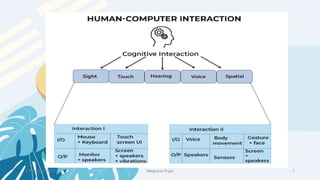
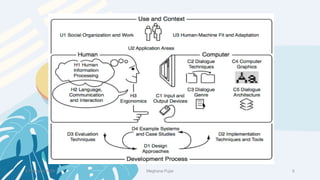
• HCI includes three intersecting components: a human, a computer, and the interactions
between them.
• Humans interact with the inferences of computers to perform various tasks.
• A computer interface is the medium that enables communication between any user and a
computer.
• Much of HCI focuses on interfaces.
• In order to build effective interfaces, we need to first understand the limitations and
capabilities of both components.
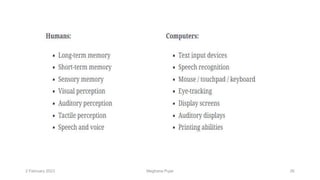
• Humans and computers have different input-output channels.
Meghana Pujar
2 February 2023 26
Meghana Pujar
2 February 2023 27
• Moreover, these devices use machine learning algorithms and image processing
capabilities for accurate gaze detection.
• Businesses can use such eye-tracking systems to monitor their personnel’s visual
attention.
• It can help companies manage distractions that tend to trouble their employees,
enhancing their focus on the task.
• In this manner, eye-tracking technology, along with HCI-enabled interactions, can
help industries monitor the daily operations of their employees or workers.
• Other applications include ‘driver monitoring systems’ that ensure road security.
Meghana Pujar
2 February 2023 28
Speech recognition technology
• Speech recognition technology interprets human language, derives meaning
from it, and performs the task for the user.
• Recently, this technology has gained significant popularity with the emergence
of chatbots and virtual assistants.
• For example, products such as Amazon’s Alexa, Microsoft’s Cortana, Google’s
Google Assistant, and Apple’s Siri employ speech recognition to enable user
interaction with their devices, cars, etc.
Meghana Pujar
2 February 2023 29
• The combination of HCI and speech recognition further fine-tune man-machine
interactions that allow the devices to interpret and respond to users’ commands and
questions with maximum accuracy.
• It has various applications, such as transcribing conference calls, training sessions,
and interviews.
AR/VR technology
• AR and VR are immersive technologies that allow humans to interact with the digital
world and increase the productivity of their daily tasks.
Meghana Pujar
2 February 2023 30
• For example, smart glasses enable hands-free and seamless user interaction
with computing systems.
• Consider an example of a chef who intends to learn a new recipe.
• With smart glass technology, the chef can learn and prepare the target dish
simultaneously.
• Moreover, the technology also reduces system downtime significantly.
• This implies that as smart AR/VR glasses such as ‘Oculus Quest 2’ are
supported by apps, the faults or problems in the system can be resolved by
maintenance teams in real-time.
Meghana Pujar
2 February 2023 31
• This enhances user experience in a minimum time span.
• Also, the glasses can detect the user’s response to the interface and further
optimize the interaction based on the user’s personality, needs, and preferences.
• Thus, AR/VR technology with the blend of HCI ensures that the task is
accomplished with minimal errors and also achieves greater accuracy and quality.
• Currently, HCI research is targeting other fields of study, such as brain -computer
interfaces and sentiment analysis, to boost the user’s AR/VR experience.
Meghana Pujar
2 February 2023 32
Cloud computing
• Today, companies across different fields are embracing remote task forces.
• According to a ‘Breaking Barriers 2020’ survey by Fuze (An 8×8 Company), around
83% of employees feel more productive working remotely.
• Considering the current trend, conventional workplaces will witness a massive and
transform entirely in a couple of decades.
• Thanks to cloud computing and human-computer interaction, such flexible offices
have become a reality.
Meghana Pujar
Goals of HCI
2 February 2023 33
• The principal objective of HCI is to develop functional systems that are usable,
safe, and efficient for end-users.
• The developer community can achieve this goal by fulfilling the following criteria :
• Have sound knowledge of how users use computing systems.
• Design methods, techniques, and tools that allow users to access systems based
on their needs.
• Adjust, test, refine, validate, and ensure that users achieve effective
communication or interaction with the systems.
• Always give priority to end-users and lay the robust foundation of HCI.
Meghana Pujar
2 February 2023 34
Usability
• Usability is key to HCI as it ensures that users of all types can quickly learn and
use computing systems.
• A practical and usable HCI system has the following characteristics:
How to use it: This should be easy to learn and remember for new and infrequent
users to learn and remember.
• For example, operating systems with a user-friendly interface are easier to
understand than DOS operating systems that use a command-line interface.
Meghana Pujar
2 February 2023 35
Safe
• A safe system safeguards users from undesirable and dangerous situations.
• This may refer to users making mistakes and errors while using the system that may
lead to severe consequences.
• Users can resolve this through HCI practices.
• For example, systems can be designed to prevent users from activating specific keys
or buttons accidentally.
• Another example could be to provide recovery plans once the user commits mistakes.
• This may give users the confidence to explore the system or interface further.
Meghana Pujar
2 February 2023 36
Efficient
• An efficient system defines how good the system is and whether it accomplishes
the tasks that it is supposed to.
• Moreover, it illustrates how the system provides the necessary support to users to
complete their tasks.
Effective
• A practical system provides high-quality performance.
• It describes whether the system can achieve the desired goals.
Meghana Pujar
2 February 2023 37
Utility
• Utility refers to the various functionalities and tools provided by the system to
complete the intended task.
• For example, a sound utility system offers an integrated development environment
(IDE) that provides intermittent help to programmers or users through suggestions.
Enjoyable
• Users find the computing system enjoyable to use when the interface is less complex
to interpret and understand.
Meghana Pujar
2 February 2023 38
User experience
• User experience is a subjective trait that focuses on how users feel about the
computing system when interacting with it.
• Here, user feelings are studied individually so that developers and support teams
can target particular users to evoke positive feelings while using the system.
• HCI systems classify user interaction patterns into the following categories and
further refine the system based on the detected pattern:
• Desirable traits – enjoyable, motivating, or surprising
• Undesirable traits – Frustrating, unpleasant, or annoying
Meghana Pujar
2 February 2023 39
Concept of Usability Engineering
• Usability Engineering is a method in the progress of software and systems, which
includes user contribution from the inception of the process and assures the
effectiveness of the product through the use of a usability requirement and metrics.
• It thus refers to the Usability Function features of the entire process of abstracting,
implementing & testing hardware and software products.
• Requirements gathering stage to installation, marketing and testing of products, all
fall in this process.
Meghana Pujar
2 February 2023 40
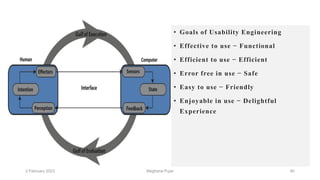
• Goals of Usability Engineering
• Effective to use − Functional
• Efficient to use − Efficient
• Error free in use − Safe
• Easy to use − Friendly
• Enjoyable in use − Delightful
Experience
Meghana Pujar
2 February 2023 41
Usability Study
• The methodical study on the interaction between people, products, and environment
based on experimental assessment.
• Example: Psychology, Behavioral Science, etc.
Usability Testing
• The scientific evaluation of the stated usability parameters as per the user’s
requirements, competences, prospects, safety and satisfaction is known as usability
testing.
Meghana Pujar
2 February 2023 42
Acceptance Testing
• Acceptance testing also known as User Acceptance Testing (UAT), is a testing
procedure that is performed by the users as a final checkpoint before signing off from
a vendor.
• Let us assume that a supermarket has bought barcode scanners from a vendor.
• The supermarket gathers a team of counter employees and make them test the device
in a mock store setting.
• By this procedure, the users would determine if the product is acceptable for their
needs.
• It is required that the user acceptance testing "pass" before they receive the final
product from the vendor.
Meghana Pujar
Software Tools
2 February 2023 43
• A software tool is a programmatic software used to create, maintain, or otherwise
support other programs and applications.
• Some of the commonly used software tools in HCI are as follows
• Specification Methods: The methods used to specify the GUI.
• Even though these are lengthy and ambiguous methods, they are easy to
understand.
• Grammars − Written Instructions or Expressions that a program would understand.
• They provide confirmations for completeness and correctness.
Meghana Pujar
2 February 2023 44
• Transition Diagram − Set of nodes and links that can be displayed in text, link
frequency, state diagram, etc.
• They are difficult in evaluating usability, visibility, modularity and
synchronization.
• Statecharts − Chart methods developed for simultaneous user activities and
external actions.
• They provide link-specification with interface building tools.
• Interface Building Tools − Design methods that help in designing command
languages, data-entry structures, and widgets.
Meghana Pujar
2 February 2023 45
• Interface Mockup Tools − Tools to develop a quick sketch of GUI. E.g.,
Microsoft Visio, Visual Studio .Net, etc.
• Software Engineering Tools − Extensive programming tools to provide user
interface management system.
• Evaluation Tools − Tools to evaluate the correctness and completeness of
programs.
Meghana Pujar
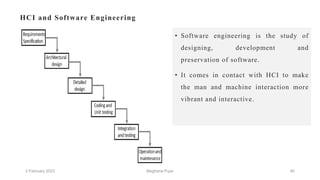
HCI and Software Engineering
• Software engineering is the study of
designing, development and
preservation of software.
• It comes in contact with HCI to make
the man and machine interaction more
vibrant and interactive.
2 February 2023 46
Meghana Pujar
2 February 2023 47
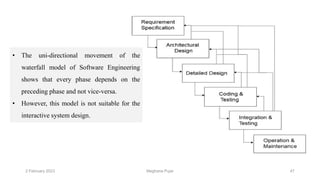
• The uni-directional movement of the
waterfall model of Software Engineering
shows that every phase depends on the
preceding phase and not vice-versa.
• However, this model is not suitable for the
interactive system design.
Meghana Pujar
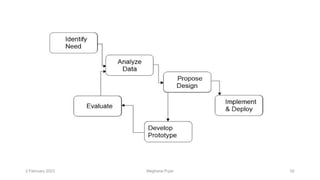
• The interactive system design shows that every phase depends on each other to
serve the purpose of designing and product creation.
• It is a continuous process as there is so much to know and users keep changing all
the time.
• An interactive system designer should recognize this diversity.
Prototyping
• Prototyping is another type of software engineering models that can have a
complete range of functionalities of the projected system.
• In HCI, prototyping is a trial and partial design that helps users in testing design
ideas without executing a complete system.
2 February 2023 48
Meghana Pujar
2 February 2023 49
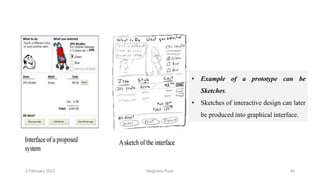
• Example of a prototype can be
Sketches.
• Sketches of interactive design can later
be produced into graphical interface.
Meghana Pujar
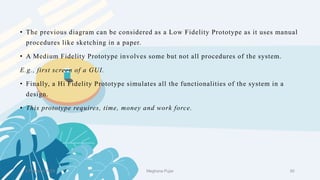
• The previous diagram can be considered as a Low Fidelity Prototype as it uses manual
procedures like sketching in a paper.
• A Medium Fidelity Prototype involves some but not all procedures of the system.
E.g., first screen of a GUI.
• Finally, a Hi Fidelity Prototype simulates all the functionalities of the system in a
design.
• This prototype requires, time, money and work force.
2 February 2023 50
Meghana Pujar
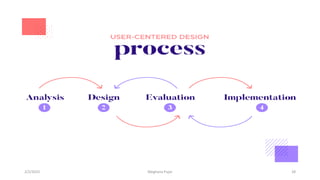
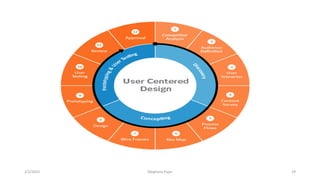
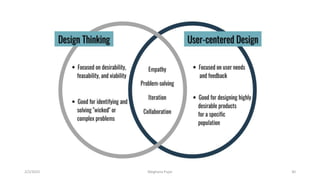
User Centered Design (UCD)
• The process of collecting feedback from users to improve the design is known as user
centered design or UCD.
UCD Drawbacks
• Passive user involvement.
• User’s perception about the new interface may be inappropriate.
• Designers may ask incorrect questions to users.
2 February 2023 51
Meghana Pujar
2 February 2023 52
Meghana Pujar
HCI Analogy
2 February 2023 53
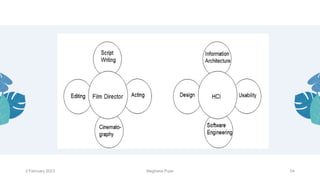
• Let us take a known analogy that can be understood by everyone.
• A film director is a person who with his/her experience can work on script writing,
acting, editing, and cinematography.
• He/She can be considered as the only person accountable for all the creative
phases of the film.
• Similarly, HCI can be considered as the film director whose job is part creative
and part technical.
• An HCI designer have substantial understanding of all areas of designing.
Meghana Pujar
2 February 2023 54
Meghana Pujar
The future
• Machine learning is an application of AI that provides a system with the ability to
draw inferences from interacting with the environment in the same way as humans do.
• It empowers the device to think for itself, which is quite fascinating for to imbibe a
non-living object with the power to think with a high degree of intelligence is nothing
short of creating a new organism from scratch.
• A balance must be struck, else we might find ourselves being controlled by our own
creations.
• Herein lies the controversy in the interaction between man and computers for men
tend to become more machine-like as machines become more human-like.
2 February 2023 55
Meghana Pujar
——
Thank you
2 February 2023 56
Meghana Pujar
IT351
January-May 2023
Human Computer
Interaction
DEFINING THE USER INTERFACE
• User interface, design is a subset of a field of study called human-computer interaction (HCI).
• Human-computer interaction is the study, planning, and design of how people and
computers work together so that a person's needs are satisfied in the most effective way.
• HCI designers must consider a variety of factors:
• what people want and expect, physical limitations and abilities people possess
2/2/2023 2
Meghana Pujar
• how information processing systems work
• what people find enjoyable and attractive.
• Technical characteristics and limitations of the computer hardware and software
must also be considered.
The user interface is to
• The part of a computer and its software that people can see, hear, touch, talk
to, or otherwise understand or direct.
• The user interface has essentially two components: input and output.
2/2/2023 3
Meghana Pujar
• Input is how a person communicates his / her needs to the computer.
• Some common input components are the keyboard, mouse, trackball, finger, and voice.
• Output is how the computer conveys the results of its computations and requirements to the user.
• Today, the most common computer output mechanism is the display screen, followed by
mechanisms that take advantage of a person's auditory capabilities: voice and sound.
• The use of the human senses of smell and touch output in interface design still remain largely
unexplored.
2/2/2023 4
Meghana Pujar
• Proper interface design will provide a mix of well-designed input and output mechanisms that
satisfy the user's needs, capabilities, and limitations in the most effective way possible.
• The best interface is one that it not noticed, one that permits the user to focus on the
information and task at hand, not the mechanisms used to present the information and perform
the task.
• Along with the innovative designs and new hardware and software, touch screens are likely to
grow in a big way in the future.
• A further development can be made by making a sync between the touch and other devices.
2/2/2023 5
Meghana Pujar
Touch Screen
• The touch screen concept was prophesized decades ago, however the platform was acquired
recently.
• Today there are many devices that use touch screen.
• After vigilant selection of these devices, developers customize their touch screen experiences.
• The cheapest and relatively easy way of manufacturing touch screens are the ones using electrodes
and a voltage association.
• Other than the hardware differences, software alone can bring major differences from one touch
device to another, even when the same hardware is used.
2/2/2023 6
Meghana Pujar
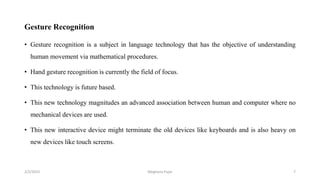
Gesture Recognition
• Gesture recognition is a subject in language technology that has the objective of understanding
human movement via mathematical procedures.
• Hand gesture recognition is currently the field of focus.
• This technology is future based.
• This new technology magnitudes an advanced association between human and computer where no
mechanical devices are used.
• This new interactive device might terminate the old devices like keyboards and is also heavy on
new devices like touch screens.
2/2/2023 7
Meghana Pujar
Speech Recognition
• The technology of transcribing spoken phrases into written text is Speech Recognition.
• Such technologies can be used in advanced control of many devices such as switching on and off
the electrical appliances.
• Only certain commands are required to be recognized for a complete transcription.
• However, this cannot be beneficial for big vocabularies.
• This HCI device help the user in hands free movement and keep the instruction based technology
up to date with the users.
2/2/2023 8
Meghana Pujar
Response Time
• Response time is the time taken by a device to respond to a request.
• The request can be anything from a database query to loading a web page.
• The response time is the sum of the service time and wait time.
• Transmission time becomes a part of the response time when the response has to travel over a
network.
• In modern HCI devices, there are several applications installed and most of them function
simultaneously or as per the user’s usage.
• This makes a busier response time.
• All of that increase in the response time is caused by increase in the wait time.
• The wait time is due to the running of the requests and the queue of requests following it.
2/2/2023 9
Meghana Pujar
Design Methodologies
• Various methodologies have materialized since the inception that outline the techniques for
human–computer interaction.
Following are few design methodologies −
• Activity Theory − This is an HCI method that describes the framework where the human-
computer interactions take place.
Activity theory provides reasoning, analytical tools and interaction designs.
• User-Centered Design − It provides users the center-stage in designing where they get the
opportunity to work with designers and technical practitioners.
2/2/2023 10
Meghana Pujar
• Principles of User Interface Design − Tolerance, simplicity, visibility, affordance, consistency,
structure and feedback are the seven principles used in interface designing.
• Value Sensitive Design − This method is used for developing technology and includes three types
of studies − conceptual, empirical and technical.
2/2/2023 11
Meghana Pujar
• Conceptual investigations works towards understanding the values of the investors who use
technology.
• Empirical investigations are qualitative or quantitative design research studies that shows the
designer’s understanding of the users’ values.
• Technical investigations contain the use of technologies and designs in the conceptual and
empirical investigations.
2/2/2023 12
Meghana Pujar
Participatory Design
• Participatory design process involves all stakeholders in the design process, so that the end result
meets the needs they are desiring.
• This design is used in various areas such as software design, architecture, landscape architecture,
product design, sustainability, graphic design, planning, urban design, and even medicine.
• Participatory design is not a style, but focus on processes and procedures of designing.
• It is seen as a way of removing design accountability and origination by designers.
2/2/2023 13
Meghana Pujar
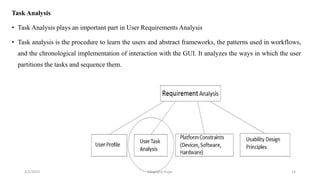
Task Analysis
• Task Analysis plays an important part in User Requirements Analysis
• Task analysis is the procedure to learn the users and abstract frameworks, the patterns used in workflows,
and the chronological implementation of interaction with the GUI. It analyzes the ways in which the user
partitions the tasks and sequence them.
2/2/2023 14
Meghana Pujar
Techniques for Analysis
• Task decomposition − Splitting tasks into sub-tasks and in sequence.
• Knowledge-based techniques − Any instructions that users need to know.
‘User’ is always the beginning point for a task.
• Ethnography − Observation of users’ behavior in the use context.
• Protocol analysis − Observation and documentation of actions of the user.
This is achieved by authenticating the user’s thinking.
The user is made to think aloud so that the user’s mental logic can be understood.
2/2/2023 15
Meghana Pujar
Engineering Task Models
Unlike Hierarchical Task Analysis, Engineering Task Models can be specified formally and
are more useful.
Characteristics of Engineering Task Models
• Engineering task models have flexible notations, which describes the possible activities clearly.
• They have organized approaches to support the requirement, analysis, and use of task models in the
design.
• They support the recycle of in-condition design solutions to problems that happen throughout
applications.
• Finally, they let the automatic tools accessible to support the different phases of the design cycle.
2/2/2023 16
Meghana Pujar
ConcurTaskTree (CTT)
• CTT is an engineering methodology used for modeling a task and consists of tasks and operators.
• Operators in CTT are used to portray chronological associations between tasks.
Following are the key features of a CTT −
• Focus on actions that users wish to accomplish.
• Hierarchical structure.
• Graphical syntax.
• Rich set of sequential operators.
2/2/2023 17
Meghana Pujar
State Transition Network (STN)
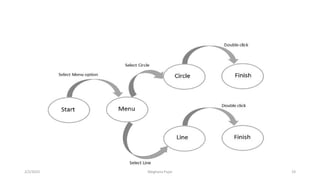
• STNs are the most spontaneous, which knows that a dialog fundamentally denotes to a progression
from one state of the system to the next.
The syntax of an STN consists of the following two entities −
• Circles − A circle refers to a state of the system, which is branded by giving a name to the state.
• Arcs − The circles are connected with arcs that refers to the action/event resulting in the transition
from the state where the arc initiates, to the state where it ends.
2/2/2023 18
Meghana Pujar
2/2/2023 19
Meghana Pujar
StateCharts
• StateCharts represent complex reactive systems that extends Finite State Machines (FSM), handle
concurrency, and adds memory to FSM.
• It also simplifies complex system representations.
StateCharts has the following states −
• Active state − The present state of the underlying FSM.
• Basic states − These are individual states and are not composed of other states.
• Super states − These states are composed of other states.
2/2/2023 20
Meghana Pujar
2/2/2023 21
Meghana Pujar
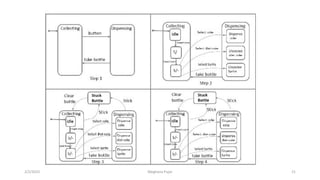
• The diagram explains the entire procedure of a bottle dispensing machine.
• On pressing the button after inserting coin, the machine will toggle between bottle filling and
dispensing modes.
• When a required request bottle is available, it dispense the bottle.
• In the background, another procedure runs where any stuck bottle will be cleared.
• The ‘H’ symbol in Step 4, indicates that a procedure is added to History for future access.
2/2/2023 22
Meghana Pujar
Visual Thinking
• Visual materials has assisted in the communication process since ages in form of paintings,
sketches, maps, diagrams, photographs, etc.
• In today’s world, with the invention of technology and its further growth, new potentials are
offered for visual information such as thinking and reasoning.
• As per studies, the command of visual thinking in human-computer interaction (HCI) design is still
not discovered completely.
• So, let us learn the theories that support visual thinking in sense-making activities in HCI design.
2/2/2023 23
Meghana Pujar
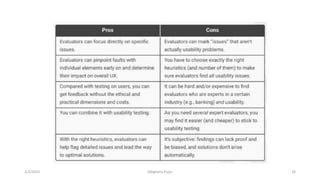
Heuristics evaluation
• Heuristics evaluation is a methodical procedure to check user interface for usability problems.
• Once a usability problem is detected in design, they are attended as an integral part of constant
design processes.
• Heuristic evaluation method includes some usability principles such as
• Keep users informed about its status appropriately and promptly.
• Show information in ways users understand from how the real world operates, and in the users’
language.
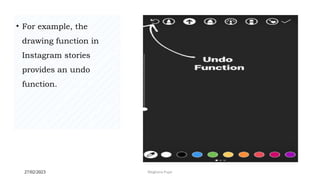
• Offer users control and let them undo errors easily.
2/2/2023 24
Meghana Pujar
• Be consistent so users aren’t confused over what different words, icons, etc. mean.
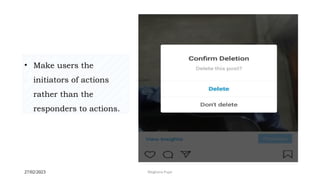
• Prevent errors – a system should either avoid conditions where errors arise or warn users before
they take risky actions (e.g., “Are you sure you want to do this?” messages).
• Have visible information, instructions, etc. to let users recognize options, actions, etc. instead of
forcing them to rely on memory.
• Be flexible so experienced users find faster ways to attain goals.
• Have no clutter, containing only relevant information for current tasks.
• Provide plain-language help regarding errors and solutions.
• List concise steps in lean, searchable documentation for overcoming problems.
2/2/2023 25
Meghana Pujar
2/2/2023 26
Meghana Pujar
User-Centric:
User-centric computing is all about the shift from a device-centered world to a consumer-based
one.
The three-layer frameworkof application software:
• Top layer ia application software
• Middle layer is Operating system
• Lower layer is Hardware
2/2/2023 27
Meghana Pujar
2/2/2023 28
Meghana Pujar
2/2/2023 29
Meghana Pujar
2/2/2023 30
Meghana Pujar
• GOMS is based on the research phase with end-users and it could be as a strong analysis
benchmark of user’s behaviours.
• It help eliminate developing unnecessary actions, so it’s time and cost-saving.
• GOMS is a model of human performance and it can be used to improve human-computer
interaction efficiency by eliminating useless or unnecessary interactions.
• GOMS is an abbreviation from:
• G → Goals
• O → Operators
• M → Methods
• S → Selection
The GOMS MODELS
2/2/2023 31
Meghana Pujar
• We can distinguish a few types of GOMS e.g. CPM-GOM, NGOMSL, or
• SCMN-GOMS), but the most popular is KLM-GOMS (Keystroke Level Model) where we can
empirically check values for operators like button presses, clicks, pointer movement time, etc.
• For the detailed description, we define:
• Goals (G) as a task to do e.g. “Send e-mail”
• Operators (O) as all actions needed to achieve the goal e.g. “amount of mouse clicks to send e-
mail”.
• Methods (M) as a group of operators e.g. “move mouse to send button, click on the button”
• Selection (S) as a user decision approach e.g. “move mouse to send button, click on the button” or
“move mouse to send button, click ENTER”
2/2/2023 32
Meghana Pujar
• Quantitatively GOMS can be used to design training programs and help systems.
• For example, when chosing between two programs you can use GOMS model.
• With quantitive predictions you can examine tradeoffs in the light of what is best for your
company.
• GOMS model has been shown to be efficient way to organise help systems, tutorials, and training
programs as well as user documentation.
2/2/2023 33
Meghana Pujar
Uses: When analyzing existing designs.
• To describe how a user completes a task. Allows analysts to estimate performance times and predict
how the users will learn.
• How do I use this tool?
• 1. DEFINE THE USERS TOP-LEVEL GOALS.
• 2. GOAL DECOMPOSITION. Break down each top-level goal into its own subgoals.
• 3. DETERMINE AND DESCRIBE OPERATORS. Find out what actions are done by the user to
complete each subgoal from step 2. These are the operators.
2/2/2023 34
Meghana Pujar
• 4. DETERMINE AND DESCRIBE METHODS. Determine the series of operators that can be used
to achieve the goal. Determine if there are multiple methods and record them all.
• 5. DESCRIBE SELECTION RULES. If more than one method is found in step 4, then the
selection rules, or which method the user will typically used, should be defined for the goal.
This tool is an advanced tool and requires formal training or education.
2/2/2023 35
Meghana Pujar
Advantages
• Methods portion of the GOMS analysis facilitates the description of numerous potential task paths.
• Because GOMS allows performance times and learning times to be estimated, the analysis is able
to assist designers in choosing one of multiple systems.
• Provides hierarchical task description for a specific activity.
2/2/2023 36
Meghana Pujar
Disadvantages
• Is difficult to use and complex compared to other task analysis methods.
• Does not consider context.
• Is mostly limited to the HCI domain.
• Is time consuming.
• Requires significant training
2/2/2023 37
Meghana Pujar
• Refer
• https://www.sciencedirect.com/science/article/pii/S1532046416000241
• https://journals.plos.org/ploscompbiol/article?id=10.1371/journal.pcbi.1002554
• https://dl.acm.org/doi/pdf/10.1145/1621995.1621997
2/2/2023 38
Meghana Pujar
Dr. Samit Bhattacharya
Assistant Professor,
Dept. of Computer Science
and Engineering,
IIT Guwahati, Assam, India
NPTEL Course on
Human Computer Interaction
- An Introduction
Dr. Pradeep Yammiyavar
Professor,
Dept. of Design,
IIT Guwahati,
Assam, India
Indian Institute of Technology Guwahati
Module 2:
Interactive System Design
Lecture 4:
Prototyping
Dr. Samit Bhattacharya
Objective
• In the previous lecture, we have learned about a
method (contextual inquiry) to gather
requirements for a design
• Designer can come up with design ideas on the
basis of this data
– Typically more than one designs are proposed
• It is necessary to evaluate the alternative designs
to find out the most appropriate one
Objective
• Interactive systems are designed following a
user-centered design approach
– Evaluation of the alternative design proposals should
be done from user’s perspective
• Employing end users in evaluating designs is not
easy
– It is costly in terms of money, time, effort and
manpower
Objective
• In the initial design phase, when the proposed
design undergoes frequent changes, it is not
advisable to even feasible to carry out evaluation
with real users
• An alternative way to collect feedback on
proposed design is to develop and evaluate
“prototypes”
Objective
• In this lecture, we shall learn about the
prototyping techniques used in interactive system
design
• In particular, we shall learn about the following
– Why we need prototyping (already discussed in the
previous slides)?
– What are the techniques available (overview)?
– How these techniques are used (details)?
Prototyping
• A prototype is essentially a model of the
system
– The prototype (model) can have limited or full
range of functionalities of the proposed system
• A widely used technique in engineering
where novel products are tested by testing a
prototype
Prototyping
• Prototypes can be “throw away” (e.g., scale
models which are thrown away after they serve
their purpose) or can go into commercial use
• In software development prototypes can be
– Paper-based: likely to be thrown away after use
– Software-based: can support few or all functionalities
of the proposed system. May develop into full-scale
final product
Prototyping in HCI
• Essential element in user centered design
– Is an experimental and partial design
– Helps involving users in testing design ideas without
implementing a full-scale system
• Typically done very early in the design process
– Can be used throughout the design life cycle
What to Prototype?
• Any aspect of the design that needs to be
evaluated
– Work flow
– Task design
– Screen layout
– Difficult, controversial, critical areas
Prototypes in HCI
• In HCI, prototypes take many forms
– A storyboard (cartoon-like series of screen sketches)
– A power point slide slow
– A video simulating the use of a system
– A cardboard mock-up
– A piece of software with limited functionality
– Even a lump of wood
Prototypes in HCI
• We can categorize all these different forms of
prototypes in three groups
– Low fidelity prototypes
– Medium fidelity prototypes
– High fidelity prototypes
Low Fidelity Prototypes
• Basically paper mock-up of the interface look,
feel, functionality
– Quick and cheap to prepare and modify
• Purpose
– Brainstorm competing designs
– Elicit user reaction (including any suggestions for
modifications)
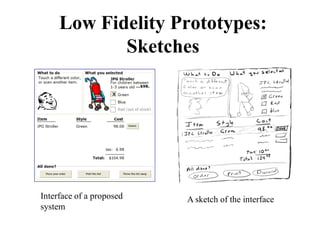
Interface of a proposed
system
A sketch of the interface
Low Fidelity Prototypes:
Sketches
Low Fidelity Prototypes:
Sketches
• In a sketch, the outward appearance of the
intended system is drawn
– Typically a crude approximation of the final
appearance
• Such crude approximation helps people
concentrate on high level concepts
– But difficult to visualize interaction (dialog’s
progression)
Low Fidelity Prototypes:
Storyboarding
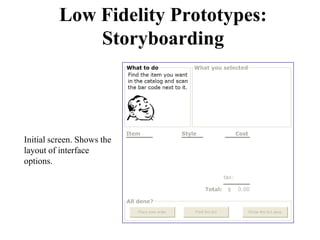
• Scenario-based prototyping
• Scenarios are scripts of particular usage of the
system
• The following (four) slides show an example
storyboarding of a scenario of stroller-buying
using an e-commerce interface
Low Fidelity Prototypes:
Storyboarding
Initial screen. Shows the
layout of interface
options.
Low Fidelity Prototypes:
Storyboarding
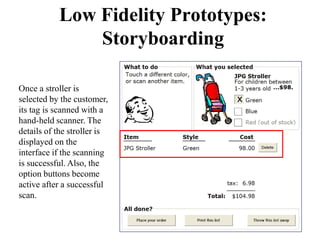
Once a stroller is
selected by the customer,
its tag is scanned with a
hand-held scanner. The
details of the stroller is
displayed on the
interface if the scanning
is successful. Also, the
option buttons become
active after a successful
scan.
Low Fidelity Prototypes:
Storyboarding
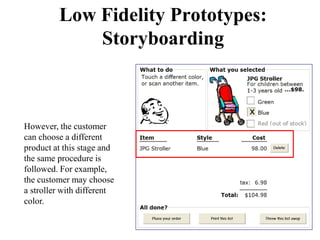
However, the customer
can choose a different
product at this stage and
the same procedure is
followed. For example,
the customer may choose
a stroller with different
color.
Low Fidelity Prototypes:
Storyboarding
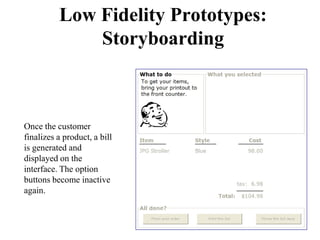
Once the customer
finalizes a product, a bill
is generated and
displayed on the
interface. The option
buttons become inactive
again.
Low Fidelity Prototypes:
Storyboarding
• Here, a series of sketches of the keyframes during
an interaction is drawn
– Typically drawn for one or more typical interaction
scenarios
– Captures the interface appearance during specific
instances of the interaction
– Helps user evaluate the interaction (dialog) unlike
sketches
Low Fidelity Prototypes:
Pictiv
• Pictiv stands for “plastic interface for
collaborative technology initiatives through video
exploration”
• Basically, using readily available materials to
prototype designs
– Sticky notes are primarily used (with plastic overlays)
– Represent different interface elements such as icons,
menus, windows etc. by varying sticky note sizes
Low Fidelity Prototypes:
Pictiv
• Interaction demonstrated by manipulating sticky
notes
– Easy to build new interfaces “on the fly”
• Interaction (sticky note manipulation) is
videotaped for later analysis
Medium Fidelity Prototypes
• Prototypes built using computers
– More powerful than low fidelity prototypes
– Simulates some but not all functionalities of the
system
– More engaging for end users as the user can get better
feeling of the system
– Can be helpful in testing more subtle design issues
Medium Fidelity Prototypes
• Broadly of two types
– Vertical prototype where in-depth functionalities of a
limited number of selected features are implemented.
Such prototypes helps to evaluate common design
ideas in depth.
– Example: working of a single menu item in full
Medium Fidelity Prototypes
• Broadly of two types
– Horizontal prototype where the entire surface
interface is implemented without any functionality.
No real task can be performed with such prototypes.
– Example: first screen of an interface (showing
layout)
Medium Fidelity Prototypes:
Scenarios
• Computer are more useful (than drawing on
paper as in storyboarding) to implement
scenarios
– Provide many useful tools (e.g., power point slides,
animation)
– More engaging to end-users (and easier to elicit better
response) compared to hand-drawn story-boarding
Hi Fidelity Prototypes
• Typically a software implementation of the
design with full or most of the functionalities
– Requires money, manpower, time and effort
– Typically done at the end for final user evaluations
Prototype and Final Product
• Prototypes are designed and used in either of the
following ways
– Throw-away: prototypes are used only to elicit user
reaction. Once their purpose is served, they are thrown
away.
– Typically done with low and some medium fidelity
prototypes
Prototype and Final Product
• Prototypes are designed and used in either of the
following ways
– Incremental: Product is built as separate components
(modules). After each component is prototyped and
tested, it is added to the final system
– Typically done with medium and hi fidelity prototypes
Prototype and Final Product
• Prototypes are designed and used in either of the
following ways
– Evolutionary: A single prototype is refined and
altered after testing, iteratively, which ultimately
“evolve” to the final product
– Typically done with hi fidelity prototypes
Prototyping Tools
• For (computer-based) medium and hi fidelity
prototype developed, several tools are available
– Drawing tools, such as Adobe Photoshop, MS Visio
can be used to develop sketch/storyboards
– Presentation software, such as MS Power Point with
integrated drawing support are also suitable for low
fidelity prototypes
Prototyping Tools
• For (computer-based) medium and hi fidelity
prototype developed, several tools are available
– Media tools, such as Adobe flash can be to develop
storyboards. Scene transition is achieved by simple
user inputs such as key press or mouse clicks
Prototyping Tools
• For (computer-based) medium and hi fidelity
prototype developed, several tools are available
– Interface builders, such as VB, Java Swing with their
widget libraries are useful for implementing screen
layouts easily (horizontal prototyping). The interface
builders also supports rapid implementation of vertical
prototyping through programming with their extensive
software libraries
The Wizard of Oz Technique
• A technique to test a system that does not exist
• First used to test a system by IBM called the
listening typewriter (1984)
– Listening typewriter was much like modern day voice
recognition systems. User inputs text by uttering the
text in front of a microphone. The voice is taken as
input by the computer, which then identifies the text
from it.
The Wizard of Oz Technique
• Implementing voice recognition system is too
complex and time consuming
• Before the developers embark on the process,
they need to check if the “idea” is alright;
otherwise the money and effort spent in
developing the system would be wasted
• Wizard of oz provides a mechanism to test the
idea without implementing the system
The Wizard of Oz Technique
• Suppose a user is asked to evaluate the listening
typewriter
• He is asked to sit in front of a computer screen
• A microphone is placed in front of him
• He is told that “whatever he speaks in front of the
microphone will be displayed on the screen”
The Wizard of Oz Technique
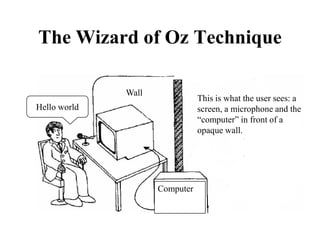
Hello world
Computer
This is what the user sees: a
screen, a microphone and the
“computer” in front of a
opaque wall.
Wall
The Wizard of Oz Technique
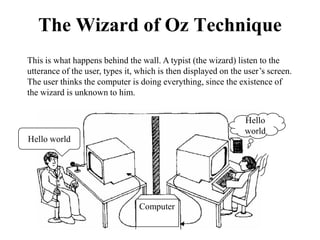
Computer
Hello world
Hello
world
This is what happens behind the wall. A typist (the wizard) listen to the
utterance of the user, types it, which is then displayed on the user’s screen.
The user thinks the computer is doing everything, since the existence of
the wizard is unknown to him.
The Wizard of Oz Technique
• Human ‘wizard’ simulates system response
– Interprets user input
– Controls computer to simulate appropriate output
– Uses real or mock interface
– Wizard is typically hidden from the user; however,
sometimes the user is informed about the wizard’s
presence
The Wizard of Oz Technique
• The technique is very useful for
– Simulating complex vertical functionalities of a
system
– Testing futuristic ideas
Dr. Samit Bhattacharya
Assistant Professor,
Dept. of Computer Science
and Engineering,
IIT Guwahati, Assam, India
NPTEL Course on
Human Computer Interaction
- An Introduction
Dr. Pradeep Yammiyavar
Professor,
Dept. of Design,
IIT Guwahati,
Assam, India
Indian Institute of Technology Guwahati
Module 3:
Model-based Design
Lecture 1:
Introduction
Dr. Samit Bhattacharya
Objective
• In the previous module (module II), we have
learned about the process involved in interactive
system design
• We have learned that interactive systems are
designed following the ISLC
– Consisting of the stages for requirement identification,
design, prototyping and evaluation
– Highly iterative
Objective
• The iterative life cycle is time consuming and
also requires money (for coding and testing)
• It is always good if we have an alternative
method that reduces the time and effort required
for the design life cycle
• Model-based design provides one such
alternative
Objective
• In this lecture, we shall learn about the model-
based design in HCI
• In particular, we shall learn about the following
– Motivation for model-based design approach
– The idea of models
– Types of models used in HCI
Motivation
• Suppose you are trying to design an interactive
system
• First, you should identify requirements (“know the user”)
following methods such as contextual inquiry
– Time consuming and tedious process
• Instead of going through the process, it would have been
better if we have a “model of the user”
Idea of a Model
• A ‘model’ in HCI refers to “a representation of
the user’s interaction behavior under certain
assumptions”
• The representation is typically obtained form
extensive empirical studies (collecting and
analyzing data from end users)
– The model represents behavior of average users, not
individuals
Motivation Contd…
• By encompassing information about user
behavior, a model helps in alleviating the need
for extensive requirement identification process
– Such requirements are already known from the model
• Once the requirements have been identified,
designer ‘propose’ design(s)
Motivation Contd…
• Typically, more than one designs are proposed
– The competing designs need to be evaluated
• This can be done by evaluating either prototypes
(in the early design phase) or the full system (at
the final stages of the design) with end users
– End user evaluation is a must in user centered design
Motivation Contd…
• Like requirement identification stage, the
continuous evaluation with end users is also
money and time consuming
• If we have a model of end users as before, we can
employ the model to evaluate design
– Because the model already captures the end user
characteristics, no need to go for actual users
Summary
• A model is assumed to capture behavior of an
average user of interactive system
• User behavior and responses are what we are
interested in knowing during ISLC
• Thus by using models, we can fulfill the key
requirement of interactive system design (without
actually going to the user)
– Saves lots of time, effort and money
Types of Models
• For the purpose of this lecture, we shall follow
two broad categorization of the models used in
HCI
– Descriptive/prescriptive models: some models in HCI
are used to explain/describe user behavior during
interaction in qualitative terms. An example is the
Norman’s model of interaction (to be discussed in a
later lecture). These models help in formulating
(prescribing) guidelines for interface design
Types of Models
• For the purpose of this lecture, we shall follow
two broad categorization of the models used in
HCI
– Predictive engineering models: these models can
“predict” behavior of a user in quantitative terms. An
example is the GOMS model (to be discussed later in
this module), which can predict the task completion
time of an average user for a given system. We can
actually “compute” such behavior as we shall see later
Predictive Engineering Models
• The predictive engineering models used in
HCI are of three types
– Formal (system) models
– Cognitive (user) models
– Syndetic (hybrid) model
Formal (System) Model
• In these models, the interactive system (interface
and interaction) is represented using ‘formal
specification’ techniques
– For example, the interaction modeling using state
transition networks
• Essentially models of the ‘external aspects’ of
interactive system (what is seen from outside)
Formal (System) Model
• Interaction is assumed to be a transition between
states in a ‘system state space’
– A ‘system state’ is characterized by the state of the
interface (what the user sees)
• It is assumed that certain state transitions increase
usability while the others do not
Formal (System) Model
• The models try to predict if the proposed design
allows the users to make usability-enhancing
transitions
– By applying ‘reasoning’ (manually or using tools) on
the formal specification.
• We shall discuss more on this in Module VII
(dialog design)
Cognitive (User) Models
• These models capture the user’s thought
(cognitive) process during interaction
– For example, a GOMS model tells us the series of
cognitive steps involved in typing a word
• Essentially models are the ‘internal aspects’ of
interaction (what goes on inside user’s mind)
Cognitive (User) Models
• Usability is assumed to depend on the
‘complexity’ of the thought process (cognitive
activities)
– Higher complexity implies less usability
• Cognitive activities involved in interacting with a
system is assumed to be composed of a series of
steps (serial or parallel)
– More the number of steps (or more the amount of
parallelism involved), the more complex the cognitive
activities are
Cognitive (User) Models
• The models try to predict the number of cognitive
steps involved in executing ‘representative’ tasks
with the proposed designs
– Which leads to an estimation of usability of the
proposed design
• In this module, we shall discuss about cognitive
models
Syndetic (Hybrid) Model
• HCI literature mentions one more type of model,
called ‘Syndetic’ model
• In this model, both the system (external aspect)
and the cognitive activities (internal aspect) are
combined and represented using formal
specification
• The model is rather complex and rarely used – ,
we shall not discuss it in this course
Cognitive Models in HCI
• Although we said before that cognitive models
are models of human thinking process, they are
not exactly treated as the same in HCI
• Since interaction is involved, cognitive models in
HCI not only model human cognition (thinking)
alone, but the perception and motor actions also
(as interaction requires ‘perceiving what is in
front’ and ‘acting’ after decision making)
Cognitive Models in HCI
• Thus cognitive models in HCI should be
considered as the models of human perception
(perceiving the surrounding), cognition (thinking
in the ‘mind’) and motor action (result of
thinking such as hand movement, eye movement
etc.)
Cognitive Models in HCI
• In HCI, broadly three different approaches are
used to model cognition
– Simple models of human information processing
– Individual models of human factors
– Integrated cognitive architectures
Simple Models of Human
Information Processing
• These are the earliest cognitive models used in
HCI
• These model complex cognition as a series of
simple (primitive/atomic) cognitive steps
– Most well-known and widely used models based on
this approach is the GOMS family of models
• Due to its nature, application of such models to
identify usability issues is also known as the
“cognitive task analysis (CTA)”
Individual Models of Human
Factors
• In this approach, individual human factors such
as manual (motor) movement, eye movement,
decision time in the presence of visual stimuli
etc. are modeled
– The models are basically analytical expressions to
compute task execution times in terms of interface and
cognitive parameters
• Examples are the Hick-Hyman law, the Fitts’ law
Integrated Cognitive Architectures
• Here, the whole human cognition process
(including perception and motor actions) is
modeled
– Models capture the complex interaction between
different components of the cognitive mechanism
unlike the first approach
– Combines all human factors in a single model unlike
the second approach
• Examples are MHP, ACT-R/PM, Soar
Model-based Design Limitations
• As we mentioned before, model-based design
reduce the need for real users in ISLC
• However, they can not completely eliminate the
role played by real users
• We still need to evaluate designs with real users,
albeit during the final stages
– Model-based design can be employed in the initial
design stages
Model-based Design Limitations
• This is so since
– The present models are not complete in representing
average end user (they are very crude approximations
only)
– The models can not capture individual user
characteristics (only models average user behavior)
Note
• In the rest of the lectures in this module, we shall
focus on the models belonging to the first two
types of cognitive modeling approaches
• The integrated cognitive architectures shall be
discussed in Module VIII
Dr. Samit Bhattacharya
Assistant Professor,
Dept. of Computer Science
and Engineering,
IIT Guwahati, Assam, India
NPTEL Course on
Human Computer Interaction
- An Introduction
Dr. Pradeep Yammiyavar
Professor,
Dept. of Design,
IIT Guwahati,
Assam, India
Indian Institute of Technology Guwahati
Module 3:
Model-based Design
Lecture 2:
Keystroke Level Model - I
Dr. Samit Bhattacharya
Objective
• In the previous lecture, we have discussed about
the idea of model-based design in HCI
• We have also discussed about the type of models
used in HCI
– We learned about the concepts of prescriptive and
predictive models
– We came across different types of predictive
engineering models
Objective
• As we mentioned, the particular type of
predictive engineering model that we shall be
dealing with in this module are the “simple
models of human information processing”
• GOMS family of models is the best known
examples of the above type
– GOMS stands for Goals, Operators, Methods and
Selection Rules
Objective
• The family consists of FOUR models
– Keystroke Level Model or KLM
– Original GOMS proposed by Card, Moran and
Newell, popularly known as (CMN) GOMS
– Natural GOMS Language or NGOMSL
– Cognitive Perceptual Motor or (CPM)GOMS [also
known as Critical Path Method GOMS]
Objective
• In this and the next two lecture, we shall learn
about two members of the model family, namely
the KLM and the (CMN)GOMS
• In particular, we shall learn
– The idea of the models
– Application of the model in interface design
Keystroke Level Model (KLM)
• We start with the Keystroke Level Model
(KLM)
– The model was proposed way back in 1980 by Card,
Moran and Newell; retains its popularity even today
– This is the earliest model to be proposed in the
GOMS family (and one of the first predictive models
in HCI)
KLM - Purpose
• The model provides a quantitative tool (like
other predictive engineering models)
– The model allows a designer to ‘predict’ the time it
takes for an average user to execute a task using an
interface and interaction method
– For example, the model can predict how long it takes
to close this PPT using the “close” menu option
How KLM Works
• In KLM, it is assumed that any decision-
making task is composed of a series of
‘elementary’ cognitive (mental) steps, that are
executed in sequence
• These ‘elementary’ steps essentially represent
low-level cognitive activities, which can not
be decomposed any further
How KLM Works
• The method of breaking down a higher-level
cognitive activity into a sequence of
elementary steps is simple to understand,
provides a good level of accuracy and enough
flexibility to apply in practical design
situations
The Idea of Operators
• To understand how the model works, we first
have to understand this concept of
‘elementary’ cognitive steps
• These elementary cognitive steps are known
as operators
– For example, a key press, mouse button press and
release etc.
The Idea of Operators
• Each operator takes a pre-determined amount
of time to perform
• The operator times are determined from
empirical data (i.e., data collected from
several users over a period of time under
different experimental conditions)
– That means, operator times represent average user
behavior (not the exact behavior of an individual)
The Idea of Operators
• The empirical nature of operator values
indicate that, we can predict the behavior of
average user with KLM
– The model can not predict individual traits
• There are seven operator defined, belonging
to three broad groups
The Idea of Operators
• There are seven operator defined, belonging
to three broad groups
– Physical (motor) operators
– Mental operator
– System response operator
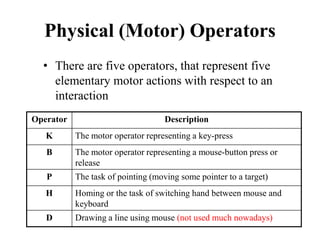
Physical (Motor) Operators
• There are five operators, that represent five
elementary motor actions with respect to an
interaction
Operator Description
K The motor operator representing a key-press
B The motor operator representing a mouse-button press or
release
P The task of pointing (moving some pointer to a target)
H Homing or the task of switching hand between mouse and
keyboard
D Drawing a line using mouse (not used much nowadays)
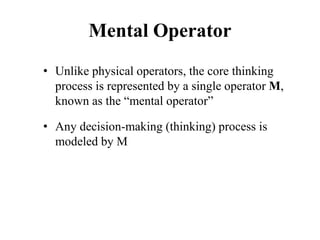
Mental Operator
• Unlike physical operators, the core thinking
process is represented by a single operator M,
known as the “mental operator”
• Any decision-making (thinking) process is
modeled by M
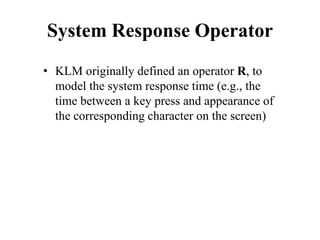
System Response Operator
• KLM originally defined an operator R, to
model the system response time (e.g., the
time between a key press and appearance of
the corresponding character on the screen)
System Response Operator
• When the model was first proposed (1980), R
was significant
– However, it is no longer used since we are
accustomed to almost instantaneous system
response, unless we are dealing with some
networked system where network delay may be
an issue
Operator Times
• as we mentioned before, each operator in
KLM refers to an elementary cognitive
activity that takes a pre-determined amount of
time to perform
• The times are shown in the next slides
(excluding the times for the operators D
which is rarely used and R, which is system
dependent)
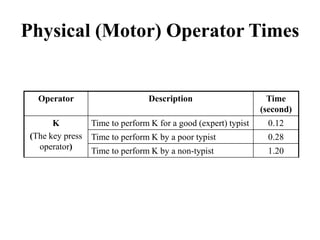
Physical (Motor) Operator Times
Operator Description Time
(second)
K
(The key press
operator)
Time to perform K for a good (expert) typist 0.12
Time to perform K by a poor typist 0.28
Time to perform K by a non-typist 1.20
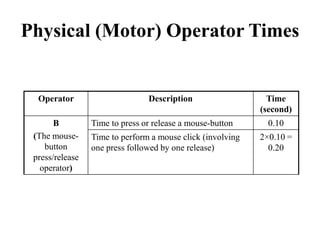
Physical (Motor) Operator Times
Operator Description Time
(second)
B
(The mouse-
button
press/release
operator)
Time to press or release a mouse-button 0.10
Time to perform a mouse click (involving
one press followed by one release)
2×0.10 =
0.20
Physical (Motor) Operator Times
Operator Description Time
(second)
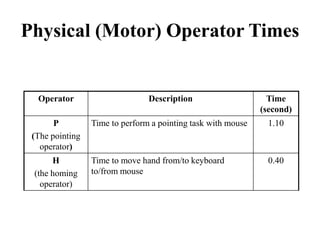
P
(The pointing
operator)
Time to perform a pointing task with mouse 1.10
H
(the homing
operator)
Time to move hand from/to keyboard
to/from mouse
0.40
Mental Operator Time
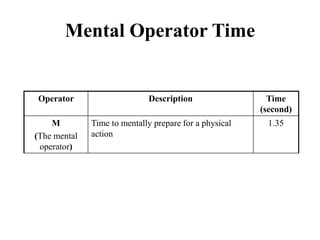
Operator Description Time
(second)
M
(The mental
operator)
Time to mentally prepare for a physical
action
1.35
How KLM Works
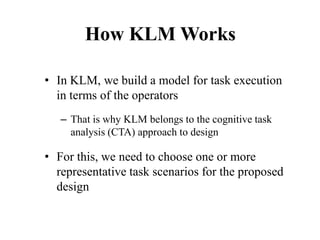
• In KLM, we build a model for task execution
in terms of the operators
– That is why KLM belongs to the cognitive task
analysis (CTA) approach to design
• For this, we need to choose one or more
representative task scenarios for the proposed
design
How KLM Works
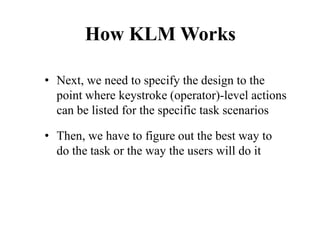
• Next, we need to specify the design to the
point where keystroke (operator)-level actions
can be listed for the specific task scenarios
• Then, we have to figure out the best way to
do the task or the way the users will do it
How KLM Works
• Next, we have to list the keystroke-level
actions and the corresponding physical
operators involved in doing the task
• If necessary, we may have to include
operators when the user must wait for the
system to respond (as we discussed before,
this step may not be ignored most of the times
for modern-day computing systems)
How KLM Works
• In the listing, we have to insert mental
operator M when user has to stop and think
(or when the designer feels that the user has
to think before taking next action)
How KLM Works
• Once we list in proper sequence all the
operators involved in executing the task, we
have to do the following
– Look up the standard execution time for each
operator
– Add the execution times of the operators in the list
How KLM Works
• The total of the operator times obtained in the
previous step is “the time estimated for an
average user to complete the task with the
proposed design”
How KLM Works
• If there are more than one design, we can
estimate the completion time of the same task
with the alternative designs
– The design with least estimated task completion
time will be the best
Note
• We shall see an example of task execution
time estimation using a KLM in the next
lecture
Dr. Samit Bhattacharya
Assistant Professor,
Dept. of Computer Science
and Engineering,
IIT Guwahati, Assam, India
NPTEL Course on
Human Computer Interaction
- An Introduction
Dr. Pradeep Yammiyavar
Professor,
Dept. of Design,
IIT Guwahati,
Assam, India
Indian Institute of Technology Guwahati
Module 3:
Model-based Design
Lecture 3:
Keystroke Level Model - II
Dr. Samit Bhattacharya
Objective
• In the previous lecture, we learned about the
keystroke level model (KLM)
• To recap, we break down a complex cognitive
task into a series of keystroke level (elementary)
cognitive operations, called operators
– Each operator has its own pre-determined execution
time (empirically derived)
Objective
• Although there are a total of seven original
operators, two (D and R) are not used much
nowadays
• Any task execution with an interactive system is
converted to a list of operators
Objective
• When we add the execution times of the
operators in the list, we get an estimate of the
task execution time (by a user) with the
particular system, thereby getting some idea
about the system performance from user’s point
of view
– The choice of the task is important and should
represent the typical usage scenario
Objective
• In this lecture, we shall try to understand the
working of the model through an illustrative
example
An Example
• Suppose a user is writing some text using a text editor
program. At some instant, the user notices a single
character error (i.e., a wrong character is typed) in the
text. In order to rectify it, the user moves the cursor to
the location of the character (using mouse), deletes the
character and retypes the correct character. Afterwards,
the user returns to the original typing position (by
repositioning the cursor using mouse). Calculate the time
taken to perform this task (error rectification) following
a KLM analysis.
Building KLM for the Task
• To compute task execution time, we first need to
build KLM for the task
– That means, listing of the operator sequence required
to perform the task
• Let us try to do that step-by-step
Building KLM for the Task
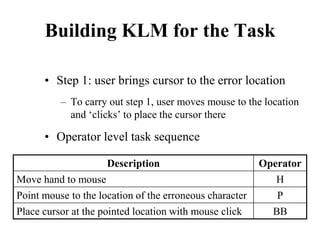
• Step 1: user brings cursor to the error location
– To carry out step 1, user moves mouse to the location
and ‘clicks’ to place the cursor there
• Operator level task sequence
Description Operator
Move hand to mouse H
Point mouse to the location of the erroneous character P
Place cursor at the pointed location with mouse click BB
Building KLM for the Task
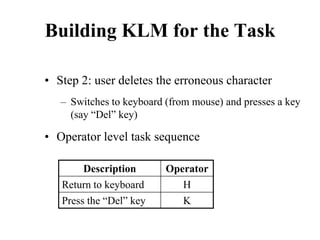
• Step 2: user deletes the erroneous character
– Switches to keyboard (from mouse) and presses a key
(say “Del” key)
• Operator level task sequence
Description Operator
Return to keyboard H
Press the “Del” key K
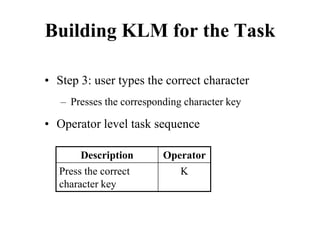
Building KLM for the Task
• Step 3: user types the correct character
– Presses the corresponding character key
• Operator level task sequence
Description Operator
Press the correct
character key
K
Building KLM for the Task
• Step 4: user returns to previous typing place
– Moves hand to mouse (from keyboard), brings the
mouse pointer to the previous point of typing and
places the cursor there with mouse click
• Operator level task sequence
Description Operator
Move hand to mouse H
Point mouse to the previous point of typing P
Place cursor at the pointed location with mouse click BB
Building KLM for the Task
• Total execution time (T) = the sum of all the
operator times in the component activities
T = HPBBHKKHPBB = 6.20 seconds
Step Activities Operator
Sequence
Execution Time
(sec)
1 Point at the error HPBB 0.40+1.10+0.20 =
1.70
2 Delete character HK 0.40+1.20 = 1.60
3 Insert right character K 1.20
4 Return to the previous typing point HPBB 1.70
Something Missing!!
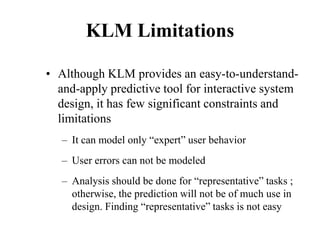
• What about M (mental operator) – where to
place them in the list?
• It is usually difficult to identify the correct
position of M
– However, we can use some guidelines and heuristics
General Guidelines
• Place an M whenever a task is initiated
• M should be placed before executing a strategy
decision
– If there is more than one way to proceed, and the
decision is not obvious or well practiced, but is
important, the user has to stop and think
General Guidelines
• M is required for retrieving a chunk from
memory
– A chunk is a familiar unit such as a file name,
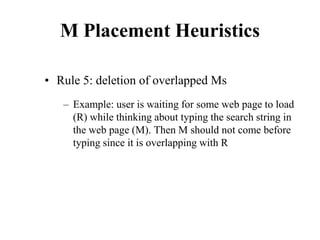
command name or abbreviation
– Example - the user wants to list the contents of
directory foo; it needs to retrieve two chunks - dir
(command name) and foo (file name), each of which
takes an M
General Guidelines
• Other situations where M is required
– Trying to locate something on the screen (e.g.,
looking for an image, a word)
– Verifying the result of an action (e.g., checking if the
cursor appears after clicking at a location in a text
editor)
General Guidelines
• Consistency – be sure to place M in alternative
designs following a consistent policy
• Number of Ms – total number of M is more
important than their exact position
– Explore different ways of placing M and count total
M in each possibility
General Guidelines
• Apples & oranges – don’t use same policy to
place M in two different contexts of interaction
– Example: don’t place M using the same policy while
comparing between menu driven word processing
(MS Word) vs command driven word processing
(Latex)
General Guidelines
• Yellow pad heuristics
– If the alternative designs raises an apples &
oranges situation then consider removing the
mental activities from action sequence and assume
that the user has the results of such activities easily
available, as if they were written on a yellow pad in
front of them
Note
• The previous slides mentioned some broad
guidelines for placing M
• Some specific heuristics are also available, as
discussed in the next slides
M Placement Heuristics
• Rule 0: initial insertion of candidate Ms
– Insert Ms in front of all keystrokes (K)
– Insert Ms in front of all acts of pointing (P) that
select commands
– Do not insert Ms before any P that points to an
argument
M Placement Heuristics
• Rule 0: initial insertion of candidate Ms
– Mouse-operated widgets (like buttons, check boxes,
radio buttons, and links) are considered commands
– Text entry is considered as argument
M Placement Heuristics
• Rule 1: deletion of anticipated Ms
– If an operator following an M is fully anticipated in
an operator immediately preceding that M, then
delete the M
M Placement Heuristics
• Rule 1: deletion of anticipated Ms
– Example - if user clicks the mouse with the intention
of typing at the location, then delete the M inserted
as a consequence of rule 0
– So BBMK becomes BBK
M Placement Heuristics
• Rule 2: deletion of Ms within cognitive units
– If a string of MKs belongs to a cognitive unit then
delete all Ms except the first
– A cognitive unit refers to a chunk of cognitive
activities which is predetermined
M Placement Heuristics
• Rule 2: deletion of Ms within cognitive units
– Example - if a user is typing “100”, MKMKMK
becomes MKKK (since the user decided to type 100
before starts typing, thus typing 100 constitutes a
cognitive unit)
M Placement Heuristics
• Rule 3: deletion of Ms before consecutive
terminators
– If a K is a redundant delimiter at the end of a
cognitive unit, such as the delimiter of a command
immediately following the delimiter of its argument,
then delete the M in front of it
M Placement Heuristics
• Rule 3: deletion of Ms before consecutive
terminators
– Example: when typing code in Java, we end most
lines with a semi-colon, followed by a carriage
return. The semi-colon is a terminator, and the
carriage return is a redundant terminator, since both
serve to end the line of code
M Placement Heuristics
• Rule 4: deletion of Ms that are terminators of
commands
– If a K is a delimiter that follows a constant string, a
command name (like “print”), or something that is
the same every time you use it, then delete the M in
front of it
M Placement Heuristics
• Rule 4: deletion of Ms that are terminators of
commands
– If a K terminates a variable string (e.g., the name of
the file to be printed, which is different each time)
then leave it
M Placement Heuristics
• Rule 5: deletion of overlapped Ms
– Do not count any portion of an M that overlaps a R
— a delay, with the user waiting for a response from
the computer
M Placement Heuristics
• Rule 5: deletion of overlapped Ms
– Example: user is waiting for some web page to load
(R) while thinking about typing the search string in
the web page (M). Then M should not come before
typing since it is overlapping with R
KLM Limitations
• Although KLM provides an easy-to-understand-
and-apply predictive tool for interactive system
design, it has few significant constraints and
limitations
– It can model only “expert” user behavior
– User errors can not be modeled
– Analysis should be done for “representative” tasks ;
otherwise, the prediction will not be of much use in
design. Finding “representative” tasks is not easy
Dr. Samit Bhattacharya
Assistant Professor,
Dept. of Computer Science
and Engineering,
IIT Guwahati, Assam, India
NPTEL Course on
Human Computer Interaction
- An Introduction
Dr. Pradeep Yammiyavar
Professor,
Dept. of Design,
IIT Guwahati,
Assam, India
Indian Institute of Technology Guwahati
Module 3:
Model-based Design
Lecture 4:
(CMN)GOMS
Dr. Samit Bhattacharya
Objective
• In the previous lectures, we learned about the
KLM
• In KLM, we list the elementary (cognitive) steps
or operators required to carry out a complex
interaction task
– The listing of operators implies a linear and
sequential cognitive behavior
Objective
• In this lecture, we shall learn about another
model in the GOMS family, namely the
(CMN)GOMS
– CMN stands for Card, Moran and Newell – the
surname of the three researchers who proposed it
KLM vs (CMN)GOMS
• In (CMN)GOMS, a hierarchical cognitive
(thought) process is assumed, as opposed to the
linear thought process of KLM
• Both assumes error-free and ‘logical’ behavior
– A logical behavior implies that we think logically,
rather than driven by emotions
(CMN) GOMS – Basic Idea
• (CMN)GOMS allows us to model the the task
and user actions in terms of four constructs
(goals, operators, methods, selection rules)
– Goals: represents what the user wants to achieve, at a
higher cognitive level. This is a way to structure a
task from cognitive point of view
– The notion of Goal allows us to model a cognitive
process hierarchically
(CMN) GOMS – Basic Idea
• (CMN)GOMS allows us to model the the task
and user actions in terms of four constructs
(goals, operators, methods, selection rules)
– Operators: elementary acts that change user’s mental
(cognitive) state or task environment. This is similar
to the operators we have encountered in KLM, but
here the concept is more general
(CMN) GOMS – Basic Idea
• (CMN)GOMS allows us to model the the task
and user actions in terms of four constructs
(goals, operators, methods, selection rules)
– Methods: these are sets of goal-operator sequences
to accomplish a sub-goal
(CMN) GOMS – Basic Idea
• (CMN)GOMS allows us to model the the task
and user actions in terms of four constructs
(goals, operators, methods, selection rules)
– Selection rules: sometimes there can be more than
one method to accomplice a goal. Selection rules
provide a mechanism to decide among the methods in
a particular context of interaction
Operator in (CMN)GOMS
• As mentioned before, operators in (CMN)GOMS
are conceptually similar to operators in KLM
• The major difference is that in KLM, only seven
operators are defined. In (CMN)GOMS, the
notion of operators is not restricted to those seven
– The modeler has the freedom to define any
“elementary” cognitive operation and use that as
operator
Operator in (CMN)GOMS
• The operator can be defined
– At the keystroke level (as in KLM)
– At higher levels (for example, the entire cognitive
process involved in “closing a file by selecting the
close menu option” can be defined as operator)
Operator in (CMN)GOMS
• (CMN)GOMS gives the flexibility of defining
operators at any level of cognition and different
parts of the model can have operators defined at
various levels
Example
• Suppose we want to find out the definition of a
word from an online dictionary. How can we
model this task with (CMN)GOMS?
Example
• We shall list the goals (high level tasks) first
– Goal: Access online dictionary (first, we need to
access the dictionary)
– Goal: Lookup definition (then, we have to find out the
definition)
Example
• Next, we have to determine the methods
(operator or goal-operator sequence) to achieve
each of these goals
– Goal: Access online dictionary
• Operator: Type URL sequence
• Operator: Press Enter
Example
• Next, we have to determine the methods
(operator or goal-operator sequence) to achieve
each of these goals
– Goal: Lookup definition
• Operator: Type word in entry field
• Goal: Submit the word
– Operator: Move cursor from field to Lookup button
– Operator: Select Lookup
• Operator: Read output
Example
• Thus, the complete model for the task is
– Goal: Access online dictionary
• Operator: Type URL sequence
• Operator: Press Enter
– Goal: Lookup definition
• Operator: Type word in entry field
• Goal: Submit the word
– Operator: Move cursor from field to Lookup button
– Operator: Select Lookup button
• Operator: Read output
Example
• Notice the hierarchical nature of the model
• Note the use of operators
– The operator “type URL sequence” is a high-level
operator defined by the modeler
– “Press Enter” is a keystroke level operator
– Note how both the low-level and high-level operators
co-exist in the same model
Example
• Note the use of methods
– For the first goal, the method consisted of two
operators
– For the second goal, the method consisted of two
operators and a sub-goal (which has a two-operators
method for itself)
Another Example
• The previous example illustrates the concepts of
goals and goal hierarchy, operators and methods
• The other important concept in (CMN)GOMS is
the selection rules
– The example in the next slide illustrates this concept
Another Example
• Suppose we have a window interface that can be
closed in either of the two methods: by selecting
the ‘close’ option from the file menu or by
selecting the Ctrl key and the F4 key together.
How we can model the task of “closing the
window” for this system?
Another Example
• Here, we have the high level goal of “close
window” which can be achieved with either of
the two methods: “use menu option” and “use
Ctrl+F4 keys”
– This is unlike the previous example where we had
only one method for each goal
• We use the “Select” construct to model such
situations (next slide)
Another Example
Goal: Close window
• [Select Goal: Use menu method
Operator: Move mouse to file menu
Operator: Pull down file menu
Operator: Click over close option
Goal: Use Ctrl+F4 method
Operator: Press Ctrl and F4 keys together]
Another Example
• The select construct implies that “selection rules”
are there to determine a method among the
alternatives for a particular usage context
• Example selection rules for the window closing
task can be
Rule 1: Select “use menu method” unless another rule
applies
Rule 2: If the application is GAME, select “use
Ctrl+F4 method”
Another Example
• The rules state that, if the window appears as an
interface for a game application, it should be
closed using the Ctrl+F4 keys. Otherwise, it
should be closed using the close menu option
Steps for Model Construction
• A (CMN)GOMS model for a task is constructed
according to the following steps
– Determine high-level user goals
– Write method and selection rules (if any) for
accomplishing goals
– This may invoke sub-goals, write methods for sub-
goals
– This is recursive. Stop when operators are reached
Use of the Model
• Like KLM, (CMN)GOMS also makes
quantitative prediction about user performance
– By adding up the operator times, total task execution
time can be computed
• However, if the modeler uses operators other
than those in KLM, the modeler has to determine
the operator times
Use of the Model
• The task completion time can be used to compare
competing designs
• In addition to the task completion times, the task
hierarchy itself can be used for comparison
– The deeper the hierarchy (keeping the operators
same), the more complex the interface is (since it
involves more thinking to operate the interface)
Model Limitations
• Like KLM, (CMN)GOMS also models only
skilled (expert) user behavior
– That means user does not make any errors
• Can not capture the full complexity of human
cognition such as learning effect, parallel
cognitive activities and emotional behavior
Dr. Samit Bhattacharya
Assistant Professor,
Dept. of Computer Science
and Engineering,
IIT Guwahati, Assam, India
NPTEL Course on
Human Computer Interaction
- An Introduction
Dr. Pradeep Yammiyavar
Professor,
Dept. of Design,
IIT Guwahati,
Assam, India
Indian Institute of Technology Guwahati
Module 3:
Model-based Design
Lecture 5:
Individual Models of Human Factors - I
Dr. Samit Bhattacharya
Objective
• In the previous lectures, we learned about two
popular models belonging to the GOMS family,
namely KLM and (CMN)GOMS
– Those models, as we mentioned before, are simple
models of human information processing
• They are one of three cognitive modeling
approaches used in HCI
Objective
• A second type of cognitive models used in HCI
is the individual models of human factors
• To recap, these are models of human factors
such as motor movement, choice-reaction, eye
movement etc.
– The models provide analytical expressions to
compute values associated with the corresponding
factors, such as movement time, movement effort etc.
Objective
• In this lecture, we shall learn about two well-
known models belonging to this category
– The Fitts’ law: a law governing the manual (motor)
movement
– The Hick-Hyman law: a law governing the decision
making process in the presence of choice
Fitts’ Law
• It is one of the earliest predictive models
used in HCI (and among the most well-
known models in HCI also)
• First proposed by PM Fitts (hence the name)
in 1954
Fitts, P. M. (1954). The information capacity of
the human motor system in controlling the
amplitude of movement. Journal of Experimental
Psychology, 47, 381-391.
Fitts’ Law
• As we noted before, the Fitts’ law is a model of
human motor performance
– It mainly models the way we move our hand and
fingers
• A very important thing to note is that the law is
not general; it models motor performance under
certain constraints (next slide)
Fitts’ Law - Characteristics
• The law models human motor performance
having the following characteristics
– The movement is related to some “target acquisition
task” (i.e., the human wants to acquire some target
at some distance from the current hand/finger
position)
Fitts’ Law - Characteristics
• The law models human motor performance
having the following characteristics
– The movement is rapid and aimed (i.e., no decision
making is involved during movement)
– The movement is error-free (i.e. the target is
acquired at the very first attempt)
Nature of the Fitts’ Law
• Another important thing about the Fitts’ law is
that, it is both a descriptive and a predictive
model
• Why it is a descriptive model?
– Because it provides “throughput”, which is a
descriptive measure of human motor performance
Nature of the Fitts’ Law
• Another important thing about the Fitts’ law is
that, it is both a descriptive and a predictive
model
• Why it is a predictive model?
– Because it provides a prediction equation (an
analytical expression) for the time to acquire a
target, given the distance and size of the target
Task Difficulty
• The key concern in the law is to measure
“task difficulty” (i.e., how difficult it is for a
person to acquire, with his hand/finger, a
target at a distance D from the hand/finger’s
current position)
– Note that the movement is assumed to be rapid,
aimed and error-free
Task Difficulty
• Fitts, in his experiments, noted that the
difficulty of a target acquisition task is related
to two factors
– Distance (D): the distance by which the person
needs to move his hand/finger. This is also called
amplitude (A) of the movement
– The larger the D is, the harder the task becomes
Task Difficulty
• Fitts, in his experiments, noted that the
difficulty of a target acquisition task is related
to two factors
– Width (W): the difficulty also depends on the
width of the target to be acquired by the person
– As the width increase, the task becomes easier
Measuring Task Difficulty
• The qualitative description of the
relationships between the task difficulty and
the target distance (D) and width (W) can not
help in “measuring” how difficult a task is
• Fitts’ proposed a ‘concrete’ measure of task
difficulty, called the “index of difficulty” (ID)
Measuring Task Difficulty
• From the analysis of empirical data, Fitts’
proposed the following relationship between
ID, D and W
ID = log2(D/W+1) [unit is bits]
(Note: the above formulation was not what Fitts
originally proposed. It is a refinement of the original
formulation over time. Since this is the most common
formulation of ID, we shall follow this rather than the
original one)
ID - Example
• Suppose a person wants to grab a small cubic
block of wood (side length = 10 mm) at a
distance of 20 mm. What is the difficulty for
this task?
20 mm
10 mm
Current
hand
position
ID - Example
• Suppose a person wants to grab a small cubic
block of wood (side length = 10 mm) at a
distance of 20 mm. What is the difficulty for
this task?
Here D = 20 mm, W = 10 mm
Thus, ID = log2(20/10+1)
= log2(2+1)
= log23 = 1.57 bits
Throughput
• Fitts’ also proposed a measure called the
index of performance (IP), now called
throughput (TP)
– Computed as the difficulty of a task (ID, in bits)
divided by the movement time to complete the
task (MT, in seconds)
• Thus, TP = ID/MT bits/s
Throughput - Example
• Consider our previous example (on ID). If
the person takes 2 sec to reach for the block,
what is the throughput of the person for the
task
Here ID = 1.57 bits, MT = 2 sec
Thus TP = 1.57/2
= 0.785 bits/s
Implication of Throughput
• The concept of throughput is very important
• It actually refers to a measure of
performance for rapid, aimed, error-free
target acquisition task (as implied by its
original name “index of performance”)
– Taking the human motor behavior into account
Implication of Throughput
• In other words, throughput should be
relatively constant for a test condition over a
wide range of task difficulties; i.e., over a
wide range of target distances and target
widths
Examples of Test Condition
• Suppose a user is trying to point to an icon
on the screen using a mouse
– The task can be mapped to a rapid, aimed, error-
free target acquisition task
– The mouse is the test condition here
• If the user is trying to point with a touchpad,
then touchpad is the test condition
Examples of Test Condition
• Suppose we are trying to determine target
acquisition performance for a group of
persons (say, workers in a factory) after
lunch
– The “taking of lunch” is the test condition here
Throughput – Design Implication
• The central idea is - Throughput provides a
means to measure user performance for a
given test condition
– We can use this idea in design
• We collect throughput data from a set of
users for different task difficulties
– The mean throughput for all users over all task
difficulties represents the average user
performance for the test condition
Throughput – Design Implication
• Example – suppose we want to measure the
performance of a mouse. We employ 10
participants in an experiment and gave them
6 different target acquisition tasks (where
the task difficulties varied). From the data
collected, we can measure the mouse
performance by taking the mean throughput
over all participants and tasks (next slide)
Throughput – Design Implication
D W ID (bits) MT (sec) TP (bits/s)
8 8 1.00 0.576 1.74
16 8 1.58 0.694 2.28
16 2 3.17 1.104 2.87
32 2 4.09 1.392 2.94
32 1 5.04 1.711 2.95
64 1 6.02 2.295 2.62
Mean 2.57
Throughput = 2.57 bits/s
Each value
indicates
mean of 10
participants
The 6 tasks
with varying
difficulty
levels
Throughput – Design Implication
• In the example, note that the mean
throughputs for each task difficulty is
relatively constant (i.e., not varying widely)
– This is one way of checking the correctness of
our procedure (i.e., whether the data collection
and analysis was proper or not)
Note
• In this lecture, we got introduced to the
concept of throughput and how to measure it
• In the next lecture, we shall see more design
implications of throughput
• We will also learn about the predictive
nature of the Fitts’ law
• And, we shall discuss about the Hick-
Hyman law
Dr. Samit Bhattacharya
Assistant Professor,
Dept. of Computer Science
and Engineering,
IIT Guwahati, Assam, India
NPTEL Course on
Human Computer Interaction
- An Introduction
Dr. Pradeep Yammiyavar
Professor,
Dept. of Design,
IIT Guwahati,
Assam, India
Indian Institute of Technology Guwahati
Module 3:
Model-based Design
Lecture 6:
Individual Models of Human Factors - II
Dr. Samit Bhattacharya
Objective
• In the previous lectures, we got introduced to the
Fitts’ law
– The law models human motor behavior for rapid,
aimed, error-free target acquisition task
• The law allows us to measure the task difficulty
using the index of difficulty (ID)
Objective
• Using ID and task completion time (MT), we
can compute throughput (TP), which is a
measure of task performance
TP = ID/MT
Unit of ID is bits, unit of MT is sec
Thus, unit of TP is bits/sec
Objective
• We saw how TP helps in design
– We estimate the user performance under a test
condition by estimating TP
– The TP is estimated by taking mean of the TP
achieved by different persons tested with varying task
difficulty levels under the same test condition
Objective
• In this lecture, we shall extend this knowledge
further and learn about the following
– How TP can help in comparing designs?
– How the Fitts’ law can be used as a predictive
model?
• Also, we shall learn about the Hick-Hyman law,
another model of human factor (models choice-
reaction time)
Throughput – Design Implication
• In the previous lecture, we discussed about
one design implication of throughput in HCI
– That is, to estimate user’s motor performance in a
given test condition
• We can extend this idea further to compare
competing designs
Throughput – Design Implication
• Suppose you have designed two input
devices: a mouse and a touchpad. You want
to determine which of the two is better in
terms of user performance, when used to
acquire targets (e.g., for point and select
tasks). How can you do so?
Throughput – Design Implication
• You set up two experiments for two test
conditions: one with the mouse and the
other with the touchpad
• Determine throughput for each test
condition as we have done before (i.e.,
collect throughput data from a group of
users for a set of tasks with varying
difficulty level and take the overall mean)
Throughput – Design Implication
• Suppose we got the throughputs TP1 and
TP2 for the mouse and the touchpad
experiments, respectively
• Compare TP1 and TP2
– If TP1>TP2, the mouse gives better performance
– The touchpad is better if TP1<TP2
Throughput – Design Implication
• Suppose we got the throughputs TP1 and
TP2 for the mouse and the touchpad
experiments, respectively
• Compare TP1 and TP2
– They are the same performance-wise if
TP1=TP2 (this is very unlikely as we are most
likely to observe some difference)
Predictive Nature of Fitts’ Law
• The throughput measure, derived from the
Fitts’ law, is descriptive
– We need to determine its value empirically
• Fitts’ law also allows us to predict
performance
– That means, we can “compute” performance
rather than determine it empirically
Predictive Nature of Fitts’ Law
• Although not proposed by Fitts, it is now
common to build a prediction equation in
Fitts’ law research
• The predictive equation is obtained by
linearly regressing MT (movement time)
against the ID (index of difficulty), in a MT-
ID plot
Predictive Nature of Fitts’ Law
• The equation is of the form
MT = a + b.ID
a and b are constants for a test condition
(empirically derived)
• As we can see, the equation allows us to
predict the time to complete a target
acquisition task (with known D and W)
Predictive Nature of Fitts’ Law
• How we can use the predictive equation in
design?
– We determine the constant values (a and b)
empirically, for a test condition
– Use the values in the predictive equation to
determine MT for a representative target
acquisition task under the test condition
Predictive Nature of Fitts’ Law
• How we can use the predictive equation in
design?
– Compare MTs for different test conditions to
decide (as with throughput)
• In the next lectures (case studies), we shall
see an interesting application of the
predictive law in design
A Note on Speed-Accuracy
Trade-off
• Suppose, we are trying to select an icon by
clicking on it. The icon width is D
– Suppose each click is called a “hit”. In a trial
involving several hits, we are most likely to
observe that not all hits lie within D (some may
be just outside)
– If we plot the hit distributions (i.e., the
coordinates of the hits), we shall see that about
4% of the hits are outside the target boundary
A Note on Speed-Accuracy
Trade-off
• This is called the speed-accuracy trade-off
– When we are trying to make rapid movements,
we can not avoid errors
• However, in the measures (ID, TP and MT),
we have used D only, without taking into
account the trade-off
– We assumed all hits will be inside the target
boundary
A Note on Speed-Accuracy
Trade-off
• We can resolve this in two-ways
– Either we proceed with our current approach,
with the knowledge that the measures will have
4% error rates
– Or we take the effective width De (the width of
the region enclosing all the hits) instead of D
• The second approach requires us to
empirically determine De for each test
condition
The Hick-Hyman Law
• While Fitts’ law relates task performance to
motor behavior, there is another law
popularly used in HCI, which tell us the
“reaction time” (i.e., the time to react to a
stimulus) of a person in the presence of
“choices”
• The law is called the Hick-Hyman law,
named after its inventors
Example
• A telephone call operator has 10 buttons.
When the light behind one of the buttons
comes on, the operator must push the button
and answer the call
– When a light comes on, how long does the
operator takes to decide which button to press?
Example
• In the example,
– The “light on” is the stimulus
– We are interested to know the operator’s
“reaction time” in the presence of the stimulus
– The operator has to decide among the 10 buttons
(these buttons represent the set of choices)
• The Hick-Hyman law can be used to predict
the reaction times in such situations
The Law
• As we discussed before, the law models
human reaction time (also called choice-reaction
time) under uncertainty (the presence of choices)
– The law states that the reaction (decision) time T
increases with uncertainty about the judgment or
decision to be made
The Law
• We know that a measure of uncertainty is
entropy (H)
Thus, T α H
or equivalently, T = kH, where k is the
proportionality constant (empirically
determined)
The Law
• We can calculate H in terms of the choices
in the following way
let, pi be the probability of making the i-
th choice
Then, H = ∑
i
i
i p
p )
/
1
(
log 2
The Law
• Therefore,
T = k
• When all the probabilities of making
choices becomes equal, we have H = log2N
(N = no of choices)
– In such cases, T = k log2N
∑
=1
2 )
/
1
(
log
i
i
i p
p
Example Revisited
• Then, what will be the operator’s
reaction time in our example?
– Here N = 10
– A button can be selected with a probability
1/10 and all probabilities are equal
– Thus, T = k log210
= 0.66 ms (assuming a = 0, b = 0.2)
Dr. Samit Bhattacharya
Assistant Professor,
Dept. of Computer Science
and Engineering,
IIT Guwahati, Assam, India
NPTEL Course on
Human Computer Interaction
- An Introduction
Dr. Pradeep Yammiyavar
Professor,
Dept. of Design,
IIT Guwahati,
Assam, India
Indian Institute of Technology Guwahati
Module 3:
Model-based Design
Lecture 7:
A Case Study on Model-Based Design - I
Dr. Samit Bhattacharya
Objective
• In the previous lectures, we learned about the
idea of models and model-based design
– We discussed about different types of models used in
HCI
– We learned in details about four models – KLM,
(CMN)GOMS, Fitts’ law and Hick-Hyman law
Objective
• We have discussed about the broad principles of
model-based design
• In this and the following lecture, we shall see a
specific case study on model-based design,
namely design of virtual keyboards, to
understand the idea better
Virtual Keyboards
• Before going into the design, let us first try to
understand virtual keyboard (VK)
• We know what a physical keyboard is
– The input device through which you can input
characters
• Although physical keyboards are ubiquitous and
familiar, sometimes it is not available or feasible
Virtual Keyboards
• Suppose you want to input characters in a
mobile device (e.g., your mobile phone or iPad)
– Physical keyboards make the system bulky and
reduces mobility
• Sometimes the users’ may not have the requisite
motor control to operate physical keyboards
– For example, persons with cerebral palsy, paraplegia
etc.
Virtual Keyboards
• In such scenario, VKs are useful
– A VK is an on-screen representation of the
physical keyboard (see the below image which
shows text input in iPad with a VK)
VK Design Challenge
• The iPad example in the previous slide show
a QWERTY layout (i.e., key arrangement)
– That’s because the typing is two-hand and
QWERTY layout is suitable for two-hand typing
• However, in many cases, VK is used with
single-hand typing (particularly for small
devices where one hand holds the device)
VK Design Challenge
• Since QWERTY layout is good for two-
hand typing, we have to find out alternative
“efficient” layout
– Efficiency, in the context of keyboards in
general and VK in particular, is measured in
terms of character entry speed (characters/sec or
CPS, words/min or WPM etc)
VK Design Challenge
• Thus, what we want is a VK layout for
single hand typing that allows the user to
input characters with high speed and
accuracy
• Mathematically, for a N character keyboard,
we have to determine the best among N!
possible key arrangements
VK Design Challenge
• Thus, it is a typical “search” problem
– We want to search for a solution in a search
space of size N!
– Note the “huge” size of the search space (for
example, if N = 26 letters of English alphabet +
10 numerals = 36, the search space size is 36!)
What We Can Do
• We can apply the standard design life cycle
• Drawbacks
– We can not check all the alternatives in the
search space (that will in fact take millions of
years!)
• If the designer is experienced, he can chose
a small subset from the search space based
on intuition
What We Can Do
• The alternatives in the subset can be put
through the standard design life cycle for
comparison
– However, empirical comparison still requires
great time and effort
• Alternatively, we can use model-based
approach to compare alternatives
GOMS Analysis
• We can compare the designs in the subset
using a GOMS analysis (also called CTA or
cognitive task analysis)
• In order to do so, we first need to identify
one or a set of “representative tasks”
GOMS Analysis
• What is a task here?
– To input a series (string) of characters with the
VK
• Remember, we should have a representative
task
– That means, the string of characters that we
chose should represent the language
characteristics
GOMS Analysis
• How to characterize a language?
• There are many ways
– One simple approach is to consider unigram
character distribution, which refers to the
frequency of occurrence of characters in any
arbitrary sample of the language (text)
GOMS Analysis
• How to characterize a language?
• There are many ways
– Bigram distribution, which refers to the
frequency of occurrence of character pairs or
bigrams in any arbitrary sample, is another
popular way to characterize a language
GOMS Analysis
• In order to perform GOMS analysis, we
need to have character string(s) having
language characteristics (say, the unigram
distribution of characters in the string(s)
match(es) to that of the language)
– How to determine such string(s)?
• We can use a language corpus for the
purpose
Corpus
• Corpus (of a language) refers to a collection
of texts sampled from different categories
(genres)
– Stories, prose, poem, technical articles,
newspaper reports, mails …
• It is assumed that a corpus represents the
language (by capturing its idiosyncrasies
through proper sampling)
Corpus
• However, corpus development is not trivial
(requires great care to be truly
representative)
• The good news is, already developed
corpora are available for many languages
(e.g., British National Corpus or BNC for
English)
– We can make use of those
Corpus-based Approach
• How to use a corpus to extract
representative text?
– Get hold of a corpus
– Extract a representative text through some
statistical means (for example, cross-entropy
based similarity measure)
Cross-Entropy Based Similarity
Measure
• Let X be a random variable which can take any
character as its value
• Further, let P be the probability distribution
function of X [i.e., P(xi) = P(X = xi)]
• We can calculate the “entropy”, a statistical
measure, of P in the following way
∑
−
=
i
i
i x
P
x
P
P
H )
(
log
)
(
)
( 2
Cross-Entropy Based Similarity
Measure
• Now, suppose there are two distributions, P and
M
• We can calculate another statistical measure,
called “cross-entropy”, of the two distributions
∑
−
=
i
i
i x
M
x
P
M
P
H )
(
log
)
(
)
,
( 2
Cross-Entropy Based Similarity
Measure
• The cross-entropy measure can be used to
determine similarity of the two distributions
– Closer H(P,M) is to H(P), the better approximation M
is of P (i.e., M is similar to P)
• We can use this idea to extract representative text
from a corpus
Cross-Entropy Based Similarity
Measure
• Let P denotes the unigram probability
distribution of the language
– This can be determined from the corpus. Simply
calculate the character frequencies in the corpus. Since
the corpus is assumed to represent the language, the
character frequencies obtained from the corpus can be
taken as representative of the language
– Calculate H(P)
Cross-Entropy Based Similarity
Measure
• Take random samples of texts from the corpus
and determine the unigram character distribution
of the sample text, which is M
• Next, calculate H(P,M)
• The sample text for which H(P,M) is closest to
H(P) will be our representative text
Problem with GOMS-based CTA
• Thus, we can perform GOMS analysis
• However, there is a problem
– The text is usually large (typically >100 characters
to make it reasonably representative), which makes
it tedious to construct GOMS model
Problem with GOMS-based CTA
• We need some other approach, which is not
task-based, to address the design challenge
– Task-based approaches are typically tedious and
sometimes infeasible to perform
• In the next lecture, we shall discuss one such
approach, which is based on the Fitts’ law and
the Hick-Hyman law
Dr. Samit Bhattacharya
Assistant Professor,
Dept. of Computer Science
and Engineering,
IIT Guwahati, Assam, India
NPTEL Course on
Human Computer Interaction
- An Introduction
Dr. Pradeep Yammiyavar
Professor,
Dept. of Design,
IIT Guwahati,
Assam, India
Indian Institute of Technology Guwahati
Module 3:
Model-based Design
Lecture 8:
A Case Study on Model-Based Design -
II
Dr. Samit Bhattacharya
Objective
• In the previous lectures, we learned about the
challenge faced by virtual keyboards designers
– The objective of the designer is to determine an
efficient layout
– The challenge is to identify the layout from a large
design space
– We saw the difficulties in following standard design
life cycle
Objective
• We explored the possibility of using GOMS in
the design and discussed its problems
• In this lecture, we shall see another way of
addressing the issue, which illustrates the power
of model-based design
Design Approach
• E saw the problem with GOMS in VK design
– The problem arises due to the task-based analysis,
since identifying and analyzing tasks is tedious if
not difficult and sometimes not feasible
• We need some approach that is not task based
– Fitts’ Law and Hick-Hyman Law can be useful for
the purpose as they do not require task-based
analysis
Fitts’-Digraph Model
• The alternative approach makes use of the
Fitts’-diagraph (FD) model
• FD model was proposed to compute user
performance for a VK from layout
specification
– Layout in terms of keys and their positions
– Performance in text entry rate
Fitts’-Digraph Model
• The FD model has three components
– Visual search time (RT): time taken by a user to
locate a key on the keyboard. The Hick-Hyman law
is used to model this time
N is the total number of keys, a and b are empirically-
determined constants
2
log
RT a b N
= +
Fitts’-Digraph Model
• The FD model has three components
– Movement time (MT): time taken by the user to
move his hand/finger to the target key (from its
current position). This time is modeled by the Fitts’
law
MTij is the movement time from the source (i-th) to the target
(j-th) key, dij is the distance between the source and target
keys, wj is the width of the target key and a’ and b’ are
empirically-determined constants
2
' 'log ( 1)
ij
ij
j
d
MT a b
w
=
+ +
Fitts’-Digraph Model
• The FD model has three components
– Digraph probability: probability of occurrence of
character pairs or digraphs, which is determined
from a corpus
– Pij is the probability of occurrence of the i-th and j-th key
whereas fij is the frequency of the key pair in the corpus
1 1
/
N N
ij ij ij
i j
P f f
= =
= ∑∑
Fitts’-Digraph Model
• Using the movement time formulation
between a pair of keys, an average (mean)
movement time for the whole layout is
computed
• The mean movement time is used, along with
the visual search time, to compute user
performance for the layout
1 1
N N
MEAN ij ij
i j
MT MT P
= =
= ×
∑∑
Fitts’-Digraph Model
• Performance is measured in terms of
characters/second (CPS) or words/minute
(WPM)
• Performances for two categories of users,
namely novice and expert users, are computed
Fitts’-Digraph Model
• Novice user performance: they are assumed to
be unfamiliar with the layout. Hence, such
users require time to search for the desired key
before selecting the key
1
Novice
MEAN
CPS
RT MT
=
+
(60/ )
AVG
WPM CPS W
= ×
WAVG is the average number of characters in a word. For example,
English words have 5 characters on average
Fitts’-Digraph Model
• Expert user performance: an expert user is
assumed to be thoroughly familiar with the
layout. Hence, such users don’t require visual
search time
1
Expert
MEAN
CPS
MT
=
(60/ )
AVG
WPM CPS W
= ×
WAVG is the average number of characters in a word. For example,
English words have 5 characters on average
Using the FD Model
• If you are an expert designer
– You have few designs in mind (experience and
intuition helps)
– Compute WPM for those
– Compare
Using the FD Model
• Otherwise
– Perform design space exploration – search for a
good design in the design space using algorithm
• Many algorithms are developed for design
space exploration such as dynamic simulation,
Metropolis algorithm and genetic algorithm
– We shall discuss one (Metropolis algorithm) to
illustrate the idea
Metropolis Algorithm
• A “Monte Carlo” method widely used to
search for the minimum energy (stable) state
of molecules in statistical physics
• We map our problem (VK design) to a
minimum-energy state finding problem in
statistical physics
Metropolis Algorithm
• We map a layout to a molecule (keys in the
layout serves the role of atoms)
• We redefine performance as the average
movement time, which is mapped to energy of
the molecule
• Thus, our problem is to find a layout with
minimum energy
Metropolis Algorithm
• Steps of the algorithm
– Random walk: pick a key and move in a random
direction by a random amount to reach a new
configuration (called a state)
– Compute energy (average movement time) of the
state
– Decide whether to retain new state or not and
iterate
Metropolis Algorithm
• The decision to retain/ignore the new state
is taken on the basis of the decision
function, where ∆E indicates the energy
difference between the new and old state
(i.e., ∆E = energy of new state – energy of
old state)
0
( )
1 0
E
kT
e E
W O N
E
∆
−

 ∆ >
− =

 ∆ ≤

Metropolis Algorithm
• W is probability of changing from old to
new configuration
• k is a coefficient
• T is “temperature”
• Initial design: a “good” layout stretched
over a “large” space
Metropolis Algorithm
• Note the implications of the decision function
– If energy of the new state is less than the current
state, retain the new state
– If the new state is having more energy than the
current state, don’t discard the new state outright.
Instead, retain the new state if the probability W is
above some threshold value. This steps helps to
avoid local minima
Metropolis Algorithm
• To reduce the chances of getting struck at the
local minima further, “annealing” is used
– Bringing “temperature” through several up and
down cycles
Metropolis Algorithm
An example VK
layout, called the
Metropolis layout, is
shown, which was
designed using the
Metropolis algorithm
Some VK Layouts with
Performance
• QWERTY
– 28 WPM (novice)
– 45.7 WPM (expert)
Some VK Layouts with
Performance
• QWERTY
– 28 WPM (novice)
– 45.7 WPM (expert)
• FITALY
– 36 WPM (novice)
– 58.8 WPM (expert)
Some VK Layouts with
Performance
• QWERTY
– 28 WPM (novice)
– 45.7 WPM (expert)
• FITALY
– 36 WPM (novice)
– 58.8 WPM (expert)
• OPTI II
– 38 WPM (novice)
– 62 WPM (expert)
Some VK Layouts with
Performance
• The layouts mentioned before were not
designed using models
• They were designed primarily based on
designer’s intuition and empirical studies
• However, the performances shown are
computed using the FD model
Some VK Layouts with
Performance
• ATOMIK – a layout
designed using slightly
modified Metropolis
algorithm
• Performance of the
ATOMIK layout
– 41.2 WPM (novice)
– 67.2 WPM (expert)
Some VK Layouts with
Performance
• Note the large performance difference between
the ATOMIK and other layouts
• This shows the power of model-based design,
namely a (significant) improvement in
performance without increasing design time and
effort (since the design can be mostly
automated)
8 Golden Rules of
Interface Design
27/02/2023 Meghana Pujar
Introduction
• We as humans and designers need some standards to rely on,
some guidelines to follow so we can make choices or we will end up
making random decisions.
• So, earlier interface designers did years of research and figured out
how users interact with interfaces and they have tried to write
down these guidelines to record their insights and guide the efforts
of future designers.
27/02/2023 Meghana Pujar
• Ben Shneiderman an American computer scientist and professor, in
his famous book “Designing the User Interface: Strategies for Effective
Human-Computer Interaction”, these 8 golden rules of interface
design.
1. Strive for consistency
• Consistent sequences of actions should be required in similar
situations.
• Consistency helps users to achieve their goals and navigate through
your app easily.
27/02/2023 Meghana Pujar
• when a UI works consistently, it becomes predictable (in a good
way), which means users can understand
• how to use certain functions intuitively and without instruction
and as an interface designer
• you should remember that your user is not using your product
only, they are getting ideas, expectations, and building intuition
from lots of different products.
27/02/2023 Meghana Pujar
• Things can go south very easily and can frustrate our users if our
design is inconsistent and not familiar to users.
• As you can see, Instagram's design has been consistent from 2009
to 2020, with its Feed Layout style and navbar icons staying
consistent.
27/02/2023 Meghana Pujar
2. Cater to universal usability
• Recognize the needs of diverse users and design, facilitating the
transformation of content.
• Novice-expert differences, age ranges, disabilities, and technology
diversity each enrich the spectrum of requirements that guides
design.
• Adding features for novices, such as explanations, and features for
experts, such as shortcuts and faster pacing, can enrich the
interface design and improve perceived system quality.
27/02/2023 Meghana Pujar
• Let’s see how Instagram helps
different types of users
according to their experience so
they can carry out tasks
successfully without any
anxiety.
• For novice or first-time users,
Instagram provides visual cues
and instructions to help first-
time users as shown:
27/02/2023 Meghana Pujar
• For experienced or frequent users, Instagram has
this shortcut feature where you press and hold on
the profile icon and you can switch between your
accounts without even going to the profile page.
27/02/2023 Meghana Pujar
3. Offer informative feedback
• For every action, there should be appropriate, human-readable
feedback within a reasonable amount of time.
• So, users can know what is going on.
• For frequent and minor actions, the response can be modest,
whereas for infrequent and major actions.
• Example: Instagram’s double-tap like function gives the user
feedback as shown in these pictures
27/02/2023 Meghana Pujar
4. Design dialogue to yield closure
• Informative feedback after a group of actions gives operators the
satisfaction of accomplishment,
• a sense of relief, the signal to drop contingency plans from their
minds, and a signal to prepare for the next group of actions.
• Your user should not spend any time figuring out what is going on,
tell them what their action has led them to.
27/02/2023 Meghana Pujar
• A classic example would be, e-
commerce websites moving
users from selecting products
to the checkout, ending with a
clear confirmation page that
completes the transaction.
• For Example: On Instagram
while uploading any media
content.
27/02/2023 Meghana Pujar
5. Prevent Error / Offer simple error handling
• As much as possible, design the system such that users cannot
make serious errors;
• If a user makes an error, the interface should detect the error
and offer simple, constructive, and specific instructions for
recovery.
• For example error message for an incorrect username on the
Instagram login page.
27/02/2023 Meghana Pujar
6. Permit easy reversal of actions
• As much as possible, actions should be reversible.
• This feature relieves anxiety since the user knows that errors can
be undone, thus encouraging the exploration of unfamiliar options.
• The units of reversibility may be a single action, a data-entry task,
or a complete group of actions, such as entry of a name and
address block.
• Allow your user to undo the action instead of starting over.
27/02/2023 Meghana Pujar
• For example, the
drawing function in
Instagram stories
provides an undo
function.
27/02/2023 Meghana Pujar
7. Support internal locus of control
• Experienced operators strongly desire the sense that they are in
charge of the interface and that the interface responds to their
actions.
• Surprising interface actions, tedious sequences of data entries,
inability to obtain or
• difficulty in obtaining necessary information and inability to produce
the action desired all build anxiety and dissatisfaction.
27/02/2023 Meghana Pujar
• Make users the
initiators of actions
rather than the
responders to actions.
27/02/2023 Meghana Pujar
8. Reduce short-term memory load
• The limitation of human information processing in short-term memory
(the rule of thumb is that humans can remember “seven plus or
minus two chunks” of information) requires that displays be kept
simple.
• Keeping our interface consistent and following the existing guidelines
for interface design will help us to make our design more intuitive so
our user doesn’t have to recall every time he/she uses the product.
• It’s simpler for us to recognize information rather than recall it.
27/02/2023 Meghana Pujar
• You can see in the navigation bar,
the “search” icon — which looks
like a magnifying glass, the “add”
icon — which is made up of the “+”
sign. “Home” icon — resembles the
real-world home.
• All these visual elements are easy to
recognize because they resemble
real-world things that serve the
same purpose.
27/02/2023 Meghana Pujar
Conclusion
• These rules will always help you to design a more intuitive interface
and will provide a good starting point for interface designers.
• Try to find out if your everyday apps use these rules or not.
27/02/2023 Meghana Pujar
Norman 7 design principles
The principles are:
• Discoverability increases understanding of the available options
and where to perform them.
• Feedback communicates the response to our actions or the status
of systems.
• Conceptual models are simple explanations of how something
works.
27/02/2023 Meghana Pujar
• Affordance is the perceived action of an object.
• Signifiers tell us exactly where to act.
• Mapping is the relationship between the controls and the effect
they have.
• Constraints help restrict the kind of interactions that can take
place.
27/02/2023 Meghana Pujar
An Introduction To Heuristic Evaluation
• A Heuristic Evaluation is a usability inspection technique where
one or a number of usability experts evaluate the user interface of
a product (for example a website)
• against a set of Heuristic Principles (also known as Heuristics).
27/02/2023 Meghana Pujar
As the definition of Heuristic Evaluation by the Interaction Design
Foundation explains:
• Heuristic evaluation is a usability engineering method for finding
usability problems in a user interface design, thereby making them
addressable and solvable as part of an iterative design process.
• It involves a small set of expert evaluators who examine the interface
and assess its compliance with “heuristics,” or recognized usability
principles.
• Such processes help prevent product failure post-release
27/02/2023 Meghana Pujar
How to Conduct a Heuristic Evaluation
• Now that we have stated what a heuristic evaluation is and when
you should (and should not) use it, we will dive more in-depth
about how the process works and talk more about the heuristics
and the experts involved.
• The process of conducting a heuristic evaluation is divided in three
key phases: Planning, Executing and Reviewing:
27/02/2023 Meghana Pujar
1. Planning
• Since heuristic evaluation is a usability evaluation technique, you
should have a clear objective of what you are hoping to achieve
with your evaluation.
• In other words, you need to set your goals prior to any inspections.
• Understand what exactly needs to be evaluated and make sure that
the experts who are involved are briefed accordingly.
• It is also essential that you know who your users are.
27/02/2023 Meghana Pujar
• Even though you are not performing usability testing, the
demographics, needs, motivations and behaviors of the people that
will be using your product should be in mind.
• Personas, stories and information gathered through interviews are
very helpful here.
• The experts evaluating the interface must consider the users and
their perspective and ideally should be familiar with the domain in
which the product will operate in.
27/02/2023 Meghana Pujar
2. Executing
• Once you have your goals clear, your target demographic and a set
of heuristics defined and a team of evaluators ready, you can move
on to the execution phase.
• The evaluators will go through your product’s flows and respective
interfaces independently.
• They will analyze them against the defined principles and whenever
they come across an issue or an area for improvement, they will
record it.
27/02/2023 Meghana Pujar
• Typical data that is recorded should include the issue found
together with relevant details such as what the task attempted was,
where they encountered the problem, why that is a problem and
possibly also suggest ways of fixing it
3. Reviewing
• After the evaluations have been completed, the experts should
summarize their findings to eliminate duplicates and create a list of
usability issues that should be addressed.
• These issues should also be prioritized in terms of severity.
27/02/2023 Meghana Pujar
Heuristics
• Let us now talk about Heuristics.
• Unfortunately, there is not a single correct answer to “What set of
Heuristics should I use?”.
• What you should do is consider the project’s specificities and either
use a set of heuristics that are a good fit or adapt them to create
your own custom set.
27/02/2023 Meghana Pujar
Usability Heuristics
• Jakob Nielsen's 10 general principles for interaction design.
• They are called "heuristics" because they are broad rules of thumb
and not specific usability guideline
1: Visibility of system status
• The design should always keep users informed about what is going
on, through appropriate feedback within a reasonable amount of
time.
27/02/2023 Meghana Pujar
• When users know the current system status, they learn the
outcome of their prior interactions and determine next steps.
• Predictable interactions create trust in the product as well as the
brand.
Example of Usability Heuristic #1:
• You Are Here indicators on mall maps show people where they
currently are, to help them understand where to go next.
27/02/2023 Meghana Pujar
2: Match between system and the real world
• The design should speak the users' language. Use words, phrases,
and concepts familiar to the user, rather than internal jargon. Follow
real-world conventions, making information appear in a natural and
logical order.
• The way you should design depends very much on your specific
users. Terms, concepts, icons, and images that seem perfectly clear
to you and your colleagues may be unfamiliar or confusing to your
users.
27/02/2023 Meghana Pujar
• When a design’s controls follow real-world conventions and
correspond to desired outcomes (called natural mapping), it’s easier
for users to learn and remember how the interface works.
• This helps to build an experience that feels intuitive.
Example of Usability Heuristic #2:
• When stovetop controls match the layout of heating elements,
users can quickly understand which control maps to which heating
element.
27/02/2023 Meghana Pujar
3: User control and freedom
• Users often perform actions by mistake.
• They need a clearly marked "emergency exit" to leave the unwanted
action without having to go through an extended process.
• When it's easy for people to back out of a process or undo an
action, it fosters a sense of freedom and confidence.
27/02/2023 Meghana Pujar
• Exits allow users to remain in control of the system and avoid
getting stuck and feeling frustrated.
Example of Usability Heuristic #3:
• Digital spaces need quick emergency exits, just like physical spaces
do
27/02/2023 Meghana Pujar
4: Consistency and standards
• Users should not have to wonder whether different words,
situations, or actions mean the same thing.
• Follow platform and industry conventions.
• Jakob's Law states that people spend most of their time using
digital products other than yours.
• Users’ experiences with those other products set their expectations.
27/02/2023 Meghana Pujar
• Failing to maintain consistency may increase the users' cognitive
load by forcing them to learn something new.
Example of Usability Heuristic #4:
• Checkin counters are usually located at the front of hotels. This
consistency meets customers’ expectations.
27/02/2023 Meghana Pujar
5: Error prevention
• Good error messages are important, but the best designs carefully
prevent problems from occurring in the first place.
• Either eliminate error-prone conditions, or check for them and
present users with a confirmation option before they commit to the
action.
• There are two types of errors: slips and mistakes.
• Slips are unconscious errors caused by inattention.
27/02/2023 Meghana Pujar
• Mistakes are conscious errors based on a mismatch between the
user’s mental model and the design.
Example of Usability Heuristic #5:
• Guard rails on curvy mountain roads prevent drivers from falling
off cliffs.
27/02/2023 Meghana Pujar
6: Recognition rather than recall
• Minimize the user's memory load by making elements, actions, and
options visible.
• The user should not have to remember information from one part
of the interface to another.
• Information required to use the design (e.g. field labels or menu
items) should be visible or easily retrievable when needed.
27/02/2023 Meghana Pujar
• Humans have limited short-term memories.
• Interfaces that promote recognition reduce the amount of cognitive
effort required from users.
Example of Usability Heuristic #6:
• It’s easier for most people to recognize the capitals of countries,
instead of having to remember them.
• People are more likely to correctly answer the question Is Lisbon
the capital of Portugal? rather than What’s the capital of Portugal?
27/02/2023 Meghana Pujar
7: Flexibility and efficiency of use
• Shortcuts — hidden from novice users — may speed up the
interaction for the expert user so that the design can cater to both
inexperienced and experienced users.
• Allow users to tailor frequent actions.
• Flexible processes can be carried out in different ways, so that
people can pick whichever method works for them.
27/02/2023 Meghana Pujar
Example of Usability Heuristic #7:
• Regular routes are listed on maps, but locals with knowledge of the
area can take shortcuts.
8: Aesthetic and minimalist design
• Interfaces should not contain information that is irrelevant or
rarely needed.
• Every extra unit of information in an interface competes with the
relevant units of information and diminishes their relative visibility.
27/02/2023 Meghana Pujar
• This heuristic doesn't mean you have to use a flat design — it's about
making sure you're keeping the content and visual design focused on
the essentials.
• Ensure that the visual elements of the interface support the user's
primary goals.
Example of Usability Heuristic #8:
• An ornate teapot may have excessive decorative elements, like an
uncomfortable handle or hard-to-wash nozzle, that can interfere with
usability.
27/02/2023 Meghana Pujar
9: Help users recognize, diagnose, and recover from errors
• Error messages should be expressed in plain language (no error
codes), precisely indicate the problem, and constructively suggest a
solution.
• These error messages should also be presented with visual
treatments that will help users notice and recognize them.
Example of Usability Heuristic #9:
• Wrong way signs on the road remind drivers that they are heading
in the wrong direction and ask them to stop.
27/02/2023 Meghana Pujar
10: Help and documentation
• It’s best if the system doesn’t need any additional explanation.
• However, it may be necessary to provide documentation to help
users understand how to complete their tasks.
• Help and documentation content should be easy to search and
focused on the user's task.
• Keep it concise, and list concrete steps that need to be carried out.
27/02/2023 Meghana Pujar
• Example of Usability Heuristic #10:
• Information kiosks at airports are easily recognizable and
solve customers’ problems in context and immediately.
27/02/2023 Meghana Pujar
Conclusion
• Nielsen’s Ten Heuristics make digital products and services less
mechanical and more human.
• After all, applications, platforms, and systems exist to simplify
people’s daily lives and,
• the more pleasant and fluid their usability (user experience), the
greater their efficiency.

IT351_Mid.pdf

  • 1.
  • 2.
    Objectives • To providethe basic understanding of the different ways to design and evaluation methods of "Good/User-Friendly Intercases and Interactive Systems". • To provide the basic understanding of the design techniques and tools for building HCI Systems with respect to Effective Interfaces and Affective User Experiences. 2 February 2023 2 Meghana Pujar
  • 3.
    • To providethe basic understanding of HCI Tools like Google Glass, Kinect, Leap Motion, Sense 3D, Environmental and IoT Sensors for the Design and Implementation of HCI Applications. • To understand of ever-present Computing, Augmented / Virtual / Mixed Realities and Applications. • To Understand of the Challenging Issues, Research Trends in HCI Systems. 2 February 2023 3 Meghana Pujar
  • 4.
    • Human-computer Interaction(HCI) is the field of study that focuses on optimizing how users and computers interact by designing interactive computer interfaces that satisfy users needs. • It is a multidisciplinary subject covering computer science, behavioral sciences, cognitive science, ergonomics, psychology, and design principles. • The emergence of HCI dates back to the 1980s, when personal computing was on the rise. Introduction to HCI 2 February 2023 4 Meghana Pujar
  • 5.
    • It waswhen desktop computers started appearing in households and corporate offices. • HCI’s journey began with video games, word processors, and numerical units. • However, with the advent of the internet and the explosion of mobile and diversified technologies such as voice-based and Internet of Things (IoT), computing became omnipresent. 2 February 2023 5 Meghana Pujar
  • 6.
    • Consequently, theneed for developing a tool that would make such man- machine interactions more human-like grew significantly. • This established HCI as a technology, bringing different fields such as cognitive engineering, linguistics, neuroscience etc. • Today, HCI focuses on designing, implementing, and evaluating interactive interfaces that enhance user experience using computing devices. • This includes user interface design, user-centered design, and user experience design. 2 February 2023 6 Meghana Pujar
  • 7.
    2 February 20237 Meghana Pujar
  • 8.
    Key components ofHCI The user • The user component refers to an individual or a group of individuals that participate in a common task. • HCI studies users needs, goals, and interaction patterns. • It analyzes various parameters such as users’ cognitive capabilities, emotions, and experiences to provide them with a seamless experience while interacting with computing systems. 2 February 2023 8 Meghana Pujar
  • 9.
    2 February 20239 Meghana Pujar
  • 10.
    The goal-oriented task •A user operates a computer system with an objective or goal in mind. • The computer provides a digital representation of objects to accomplish this goal. • In goal-oriented scenarios, one should consider the following aspects for a better user experience: • The complexity of the task that the user intends to accomplish. • Knowledge and skills necessary to interact with the digital object. • Time required to carry out the task. 2 February 2023 10 Meghana Pujar
  • 11.
    • The interfaceis a crucial HCI component that can enhance the overall user interaction experience. • Various interface-related aspects must be considered, such as interaction type (touch, click, gesture, or voice), screen resolution, display size, or even color contrast. • Users can adjust these depending on the their needs and requirements. The Interface 2 February 2023 11 Meghana Pujar
  • 12.
    For example, considera user visiting a website on a smartphone. • In such a case, the mobile version of the website should only display important information that allows the user to navigate through the site easily. • Moreover, the text size should be appropriately adjusted so that the user is in a position to read it on the mobile device. • Such design optimization boosts user experience as it makes them feel comfortable while accessing the site on a mobile phone. 2 February 2023 12 Meghana Pujar
  • 13.
    The context • HCIis not only about providing better communication between users and computers but also about factoring in the context and environment in which the system is accessed. • For example, while designing a smartphone app, designers need to evaluate how the app will visually appear in different lighting conditions or how it will perform when there is a poor network connection. • Such aspects can have a significant impact on the end-user experience. • Thus, HCI is a result of continuous testing and refinement of interface designs that can affect the context of use for the users. 2 February 2023 13 Meghana Pujar
  • 14.
    • HCI iscrucial in designing intuitive interfaces that people with different abilities and expertise usually access. • Most importantly, human-computer interaction is helpful for communities lacking knowledge and formal training on interacting with specific computing systems. • With efficient HCI designs, users need not consider the intricacies and complexities of using the computing system. • User-friendly interfaces ensure that user interactions are clear, precise, and natural. Importance of HCI
  • 15.
    2 February 202315 Meghana Pujar
  • 16.
    1) HCI indaily lives • Today, technology has penetrated our routine lives and has impacted our daily activities. • To experience HCI technology, one need not own or use a smartphone or computer. • When people use an ATM, food dispensing machine, or snack vending machine, they inevitably come in contact with HCI. • This is because HCI plays a vital role in designing the interfaces of such systems that make them usable and efficient. 2 February 2023 16 Meghana Pujar
  • 17.
    2) Industry • Industriesthat use computing technology for day-to-day activities tend to consider HCI a necessary business-driving force. • Efficiently designed systems ensure that employees are comfortable using the systems for their everyday work. • With HCI, systems are easy to handle, even for untrained staff. • HCI is critical for designing safety systems such as those used in air traffic control (ATC) or power plants. • The aim of HCI, in such cases, is to make sure that the system is accessible to any non-expert individual who can handle safety-critical situations if the need arises. 2 February 2023 17 Meghana Pujar
  • 18.
    2 February 202318 Meghana Pujar
  • 19.
    2 February 202319 Meghana Pujar
  • 20.
    Examples of HCI IoTdevices • IoT devices and applications have significantly impacted our daily lives. • According to a May 2022 report by IoT Analytics, global IoT endpoints are expected to reach 14.4 billion in 2022 and grow to 27 billion (approx.) by 2025. • As users interact with such devices, they tend to collect their data, which helps understand different user interaction patterns. • IoT companies can make critical business decisions that can eventually drive their future revenues and profits. 2 February 2023 20 Meghana Pujar
  • 21.
    IoT technology • IoTdevices and applications have significantly impacted our daily lives. According to a May 2022 report by IoT Analytics, global IoT endpoints are expected to reach 14.4 billion in 2022 and grow to 27 billion (approx.) by 2025. • As users interact with such devices, they tend to collect their data, which helps understand different user interaction patterns. • IoT companies can make critical business decisions that can eventually drive their future revenues and profits. • Another HCI-related development is that of ‘Paper ID’. 2 February 2023 21 Meghana Pujar
  • 22.
    2 February 202322 • The paper acts as a touchscreen, senses the environment, detects gestures, and connects to other IoT devices. • Fundamentally, it digitizes the paper and executes tasks based on gestures by focusing on man-machine interaction variables. Eye-tracking technology • Eye-tracking is about detecting where a person is looking based on the gaze point. • Eye-tracking devices use cameras to capture the user’s gaze along with some embedded light sources for clarity.. Meghana Pujar
  • 23.
    2 February 202323 Meghana Pujar
  • 24.
    2 February 202324 The most notable industries that rely on HCI are: • Virtual and Augmented Reality • Ubiquitous and Context-Sensitive Computing (user, environment, system) • Healthcare technologies • Education-based technologies • Security and cybersecurity • Voice User interfaces and speed recognition technologies Meghana Pujar
  • 25.
    2 February 202325 Components of HCI • HCI includes three intersecting components: a human, a computer, and the interactions between them. • Humans interact with the inferences of computers to perform various tasks. • A computer interface is the medium that enables communication between any user and a computer. • Much of HCI focuses on interfaces. • In order to build effective interfaces, we need to first understand the limitations and capabilities of both components. • Humans and computers have different input-output channels. Meghana Pujar
  • 26.
    2 February 202326 Meghana Pujar
  • 27.
    2 February 202327 • Moreover, these devices use machine learning algorithms and image processing capabilities for accurate gaze detection. • Businesses can use such eye-tracking systems to monitor their personnel’s visual attention. • It can help companies manage distractions that tend to trouble their employees, enhancing their focus on the task. • In this manner, eye-tracking technology, along with HCI-enabled interactions, can help industries monitor the daily operations of their employees or workers. • Other applications include ‘driver monitoring systems’ that ensure road security. Meghana Pujar
  • 28.
    2 February 202328 Speech recognition technology • Speech recognition technology interprets human language, derives meaning from it, and performs the task for the user. • Recently, this technology has gained significant popularity with the emergence of chatbots and virtual assistants. • For example, products such as Amazon’s Alexa, Microsoft’s Cortana, Google’s Google Assistant, and Apple’s Siri employ speech recognition to enable user interaction with their devices, cars, etc. Meghana Pujar
  • 29.
    2 February 202329 • The combination of HCI and speech recognition further fine-tune man-machine interactions that allow the devices to interpret and respond to users’ commands and questions with maximum accuracy. • It has various applications, such as transcribing conference calls, training sessions, and interviews. AR/VR technology • AR and VR are immersive technologies that allow humans to interact with the digital world and increase the productivity of their daily tasks. Meghana Pujar
  • 30.
    2 February 202330 • For example, smart glasses enable hands-free and seamless user interaction with computing systems. • Consider an example of a chef who intends to learn a new recipe. • With smart glass technology, the chef can learn and prepare the target dish simultaneously. • Moreover, the technology also reduces system downtime significantly. • This implies that as smart AR/VR glasses such as ‘Oculus Quest 2’ are supported by apps, the faults or problems in the system can be resolved by maintenance teams in real-time. Meghana Pujar
  • 31.
    2 February 202331 • This enhances user experience in a minimum time span. • Also, the glasses can detect the user’s response to the interface and further optimize the interaction based on the user’s personality, needs, and preferences. • Thus, AR/VR technology with the blend of HCI ensures that the task is accomplished with minimal errors and also achieves greater accuracy and quality. • Currently, HCI research is targeting other fields of study, such as brain -computer interfaces and sentiment analysis, to boost the user’s AR/VR experience. Meghana Pujar
  • 32.
    2 February 202332 Cloud computing • Today, companies across different fields are embracing remote task forces. • According to a ‘Breaking Barriers 2020’ survey by Fuze (An 8×8 Company), around 83% of employees feel more productive working remotely. • Considering the current trend, conventional workplaces will witness a massive and transform entirely in a couple of decades. • Thanks to cloud computing and human-computer interaction, such flexible offices have become a reality. Meghana Pujar
  • 33.
    Goals of HCI 2February 2023 33 • The principal objective of HCI is to develop functional systems that are usable, safe, and efficient for end-users. • The developer community can achieve this goal by fulfilling the following criteria : • Have sound knowledge of how users use computing systems. • Design methods, techniques, and tools that allow users to access systems based on their needs. • Adjust, test, refine, validate, and ensure that users achieve effective communication or interaction with the systems. • Always give priority to end-users and lay the robust foundation of HCI. Meghana Pujar
  • 34.
    2 February 202334 Usability • Usability is key to HCI as it ensures that users of all types can quickly learn and use computing systems. • A practical and usable HCI system has the following characteristics: How to use it: This should be easy to learn and remember for new and infrequent users to learn and remember. • For example, operating systems with a user-friendly interface are easier to understand than DOS operating systems that use a command-line interface. Meghana Pujar
  • 35.
    2 February 202335 Safe • A safe system safeguards users from undesirable and dangerous situations. • This may refer to users making mistakes and errors while using the system that may lead to severe consequences. • Users can resolve this through HCI practices. • For example, systems can be designed to prevent users from activating specific keys or buttons accidentally. • Another example could be to provide recovery plans once the user commits mistakes. • This may give users the confidence to explore the system or interface further. Meghana Pujar
  • 36.
    2 February 202336 Efficient • An efficient system defines how good the system is and whether it accomplishes the tasks that it is supposed to. • Moreover, it illustrates how the system provides the necessary support to users to complete their tasks. Effective • A practical system provides high-quality performance. • It describes whether the system can achieve the desired goals. Meghana Pujar
  • 37.
    2 February 202337 Utility • Utility refers to the various functionalities and tools provided by the system to complete the intended task. • For example, a sound utility system offers an integrated development environment (IDE) that provides intermittent help to programmers or users through suggestions. Enjoyable • Users find the computing system enjoyable to use when the interface is less complex to interpret and understand. Meghana Pujar
  • 38.
    2 February 202338 User experience • User experience is a subjective trait that focuses on how users feel about the computing system when interacting with it. • Here, user feelings are studied individually so that developers and support teams can target particular users to evoke positive feelings while using the system. • HCI systems classify user interaction patterns into the following categories and further refine the system based on the detected pattern: • Desirable traits – enjoyable, motivating, or surprising • Undesirable traits – Frustrating, unpleasant, or annoying Meghana Pujar
  • 39.
    2 February 202339 Concept of Usability Engineering • Usability Engineering is a method in the progress of software and systems, which includes user contribution from the inception of the process and assures the effectiveness of the product through the use of a usability requirement and metrics. • It thus refers to the Usability Function features of the entire process of abstracting, implementing & testing hardware and software products. • Requirements gathering stage to installation, marketing and testing of products, all fall in this process. Meghana Pujar
  • 40.
    2 February 202340 • Goals of Usability Engineering • Effective to use − Functional • Efficient to use − Efficient • Error free in use − Safe • Easy to use − Friendly • Enjoyable in use − Delightful Experience Meghana Pujar
  • 41.
    2 February 202341 Usability Study • The methodical study on the interaction between people, products, and environment based on experimental assessment. • Example: Psychology, Behavioral Science, etc. Usability Testing • The scientific evaluation of the stated usability parameters as per the user’s requirements, competences, prospects, safety and satisfaction is known as usability testing. Meghana Pujar
  • 42.
    2 February 202342 Acceptance Testing • Acceptance testing also known as User Acceptance Testing (UAT), is a testing procedure that is performed by the users as a final checkpoint before signing off from a vendor. • Let us assume that a supermarket has bought barcode scanners from a vendor. • The supermarket gathers a team of counter employees and make them test the device in a mock store setting. • By this procedure, the users would determine if the product is acceptable for their needs. • It is required that the user acceptance testing "pass" before they receive the final product from the vendor. Meghana Pujar
  • 43.
    Software Tools 2 February2023 43 • A software tool is a programmatic software used to create, maintain, or otherwise support other programs and applications. • Some of the commonly used software tools in HCI are as follows • Specification Methods: The methods used to specify the GUI. • Even though these are lengthy and ambiguous methods, they are easy to understand. • Grammars − Written Instructions or Expressions that a program would understand. • They provide confirmations for completeness and correctness. Meghana Pujar
  • 44.
    2 February 202344 • Transition Diagram − Set of nodes and links that can be displayed in text, link frequency, state diagram, etc. • They are difficult in evaluating usability, visibility, modularity and synchronization. • Statecharts − Chart methods developed for simultaneous user activities and external actions. • They provide link-specification with interface building tools. • Interface Building Tools − Design methods that help in designing command languages, data-entry structures, and widgets. Meghana Pujar
  • 45.
    2 February 202345 • Interface Mockup Tools − Tools to develop a quick sketch of GUI. E.g., Microsoft Visio, Visual Studio .Net, etc. • Software Engineering Tools − Extensive programming tools to provide user interface management system. • Evaluation Tools − Tools to evaluate the correctness and completeness of programs. Meghana Pujar
  • 46.
    HCI and SoftwareEngineering • Software engineering is the study of designing, development and preservation of software. • It comes in contact with HCI to make the man and machine interaction more vibrant and interactive. 2 February 2023 46 Meghana Pujar
  • 47.
    2 February 202347 • The uni-directional movement of the waterfall model of Software Engineering shows that every phase depends on the preceding phase and not vice-versa. • However, this model is not suitable for the interactive system design. Meghana Pujar
  • 48.
    • The interactivesystem design shows that every phase depends on each other to serve the purpose of designing and product creation. • It is a continuous process as there is so much to know and users keep changing all the time. • An interactive system designer should recognize this diversity. Prototyping • Prototyping is another type of software engineering models that can have a complete range of functionalities of the projected system. • In HCI, prototyping is a trial and partial design that helps users in testing design ideas without executing a complete system. 2 February 2023 48 Meghana Pujar
  • 49.
    2 February 202349 • Example of a prototype can be Sketches. • Sketches of interactive design can later be produced into graphical interface. Meghana Pujar
  • 50.
    • The previousdiagram can be considered as a Low Fidelity Prototype as it uses manual procedures like sketching in a paper. • A Medium Fidelity Prototype involves some but not all procedures of the system. E.g., first screen of a GUI. • Finally, a Hi Fidelity Prototype simulates all the functionalities of the system in a design. • This prototype requires, time, money and work force. 2 February 2023 50 Meghana Pujar
  • 51.
    User Centered Design(UCD) • The process of collecting feedback from users to improve the design is known as user centered design or UCD. UCD Drawbacks • Passive user involvement. • User’s perception about the new interface may be inappropriate. • Designers may ask incorrect questions to users. 2 February 2023 51 Meghana Pujar
  • 52.
    2 February 202352 Meghana Pujar
  • 53.
    HCI Analogy 2 February2023 53 • Let us take a known analogy that can be understood by everyone. • A film director is a person who with his/her experience can work on script writing, acting, editing, and cinematography. • He/She can be considered as the only person accountable for all the creative phases of the film. • Similarly, HCI can be considered as the film director whose job is part creative and part technical. • An HCI designer have substantial understanding of all areas of designing. Meghana Pujar
  • 54.
    2 February 202354 Meghana Pujar
  • 55.
    The future • Machinelearning is an application of AI that provides a system with the ability to draw inferences from interacting with the environment in the same way as humans do. • It empowers the device to think for itself, which is quite fascinating for to imbibe a non-living object with the power to think with a high degree of intelligence is nothing short of creating a new organism from scratch. • A balance must be struck, else we might find ourselves being controlled by our own creations. • Herein lies the controversy in the interaction between man and computers for men tend to become more machine-like as machines become more human-like. 2 February 2023 55 Meghana Pujar
  • 56.
    —— Thank you 2 February2023 56 Meghana Pujar
  • 57.
  • 58.
    DEFINING THE USERINTERFACE • User interface, design is a subset of a field of study called human-computer interaction (HCI). • Human-computer interaction is the study, planning, and design of how people and computers work together so that a person's needs are satisfied in the most effective way. • HCI designers must consider a variety of factors: • what people want and expect, physical limitations and abilities people possess 2/2/2023 2 Meghana Pujar
  • 59.
    • how informationprocessing systems work • what people find enjoyable and attractive. • Technical characteristics and limitations of the computer hardware and software must also be considered. The user interface is to • The part of a computer and its software that people can see, hear, touch, talk to, or otherwise understand or direct. • The user interface has essentially two components: input and output. 2/2/2023 3 Meghana Pujar
  • 60.
    • Input ishow a person communicates his / her needs to the computer. • Some common input components are the keyboard, mouse, trackball, finger, and voice. • Output is how the computer conveys the results of its computations and requirements to the user. • Today, the most common computer output mechanism is the display screen, followed by mechanisms that take advantage of a person's auditory capabilities: voice and sound. • The use of the human senses of smell and touch output in interface design still remain largely unexplored. 2/2/2023 4 Meghana Pujar
  • 61.
    • Proper interfacedesign will provide a mix of well-designed input and output mechanisms that satisfy the user's needs, capabilities, and limitations in the most effective way possible. • The best interface is one that it not noticed, one that permits the user to focus on the information and task at hand, not the mechanisms used to present the information and perform the task. • Along with the innovative designs and new hardware and software, touch screens are likely to grow in a big way in the future. • A further development can be made by making a sync between the touch and other devices. 2/2/2023 5 Meghana Pujar
  • 62.
    Touch Screen • Thetouch screen concept was prophesized decades ago, however the platform was acquired recently. • Today there are many devices that use touch screen. • After vigilant selection of these devices, developers customize their touch screen experiences. • The cheapest and relatively easy way of manufacturing touch screens are the ones using electrodes and a voltage association. • Other than the hardware differences, software alone can bring major differences from one touch device to another, even when the same hardware is used. 2/2/2023 6 Meghana Pujar
  • 63.
    Gesture Recognition • Gesturerecognition is a subject in language technology that has the objective of understanding human movement via mathematical procedures. • Hand gesture recognition is currently the field of focus. • This technology is future based. • This new technology magnitudes an advanced association between human and computer where no mechanical devices are used. • This new interactive device might terminate the old devices like keyboards and is also heavy on new devices like touch screens. 2/2/2023 7 Meghana Pujar
  • 64.
    Speech Recognition • Thetechnology of transcribing spoken phrases into written text is Speech Recognition. • Such technologies can be used in advanced control of many devices such as switching on and off the electrical appliances. • Only certain commands are required to be recognized for a complete transcription. • However, this cannot be beneficial for big vocabularies. • This HCI device help the user in hands free movement and keep the instruction based technology up to date with the users. 2/2/2023 8 Meghana Pujar
  • 65.
    Response Time • Responsetime is the time taken by a device to respond to a request. • The request can be anything from a database query to loading a web page. • The response time is the sum of the service time and wait time. • Transmission time becomes a part of the response time when the response has to travel over a network. • In modern HCI devices, there are several applications installed and most of them function simultaneously or as per the user’s usage. • This makes a busier response time. • All of that increase in the response time is caused by increase in the wait time. • The wait time is due to the running of the requests and the queue of requests following it. 2/2/2023 9 Meghana Pujar
  • 66.
    Design Methodologies • Variousmethodologies have materialized since the inception that outline the techniques for human–computer interaction. Following are few design methodologies − • Activity Theory − This is an HCI method that describes the framework where the human- computer interactions take place. Activity theory provides reasoning, analytical tools and interaction designs. • User-Centered Design − It provides users the center-stage in designing where they get the opportunity to work with designers and technical practitioners. 2/2/2023 10 Meghana Pujar

  • 67.
    • Principles ofUser Interface Design − Tolerance, simplicity, visibility, affordance, consistency, structure and feedback are the seven principles used in interface designing. • Value Sensitive Design − This method is used for developing technology and includes three types of studies − conceptual, empirical and technical. 2/2/2023 11 Meghana Pujar
  • 68.
    • Conceptual investigationsworks towards understanding the values of the investors who use technology. • Empirical investigations are qualitative or quantitative design research studies that shows the designer’s understanding of the users’ values. • Technical investigations contain the use of technologies and designs in the conceptual and empirical investigations. 2/2/2023 12 Meghana Pujar
  • 69.
    Participatory Design • Participatorydesign process involves all stakeholders in the design process, so that the end result meets the needs they are desiring. • This design is used in various areas such as software design, architecture, landscape architecture, product design, sustainability, graphic design, planning, urban design, and even medicine. • Participatory design is not a style, but focus on processes and procedures of designing. • It is seen as a way of removing design accountability and origination by designers. 2/2/2023 13 Meghana Pujar
  • 70.
    Task Analysis • TaskAnalysis plays an important part in User Requirements Analysis • Task analysis is the procedure to learn the users and abstract frameworks, the patterns used in workflows, and the chronological implementation of interaction with the GUI. It analyzes the ways in which the user partitions the tasks and sequence them. 2/2/2023 14 Meghana Pujar
  • 71.
    Techniques for Analysis •Task decomposition − Splitting tasks into sub-tasks and in sequence. • Knowledge-based techniques − Any instructions that users need to know. ‘User’ is always the beginning point for a task. • Ethnography − Observation of users’ behavior in the use context. • Protocol analysis − Observation and documentation of actions of the user. This is achieved by authenticating the user’s thinking. The user is made to think aloud so that the user’s mental logic can be understood. 2/2/2023 15 Meghana Pujar
  • 72.
    Engineering Task Models UnlikeHierarchical Task Analysis, Engineering Task Models can be specified formally and are more useful. Characteristics of Engineering Task Models • Engineering task models have flexible notations, which describes the possible activities clearly. • They have organized approaches to support the requirement, analysis, and use of task models in the design. • They support the recycle of in-condition design solutions to problems that happen throughout applications. • Finally, they let the automatic tools accessible to support the different phases of the design cycle. 2/2/2023 16 Meghana Pujar
  • 73.
    ConcurTaskTree (CTT) • CTTis an engineering methodology used for modeling a task and consists of tasks and operators. • Operators in CTT are used to portray chronological associations between tasks. Following are the key features of a CTT − • Focus on actions that users wish to accomplish. • Hierarchical structure. • Graphical syntax. • Rich set of sequential operators. 2/2/2023 17 Meghana Pujar
  • 74.
    State Transition Network(STN) • STNs are the most spontaneous, which knows that a dialog fundamentally denotes to a progression from one state of the system to the next. The syntax of an STN consists of the following two entities − • Circles − A circle refers to a state of the system, which is branded by giving a name to the state. • Arcs − The circles are connected with arcs that refers to the action/event resulting in the transition from the state where the arc initiates, to the state where it ends. 2/2/2023 18 Meghana Pujar
  • 75.
  • 76.
    StateCharts • StateCharts representcomplex reactive systems that extends Finite State Machines (FSM), handle concurrency, and adds memory to FSM. • It also simplifies complex system representations. StateCharts has the following states − • Active state − The present state of the underlying FSM. • Basic states − These are individual states and are not composed of other states. • Super states − These states are composed of other states. 2/2/2023 20 Meghana Pujar
  • 77.
  • 78.
    • The diagramexplains the entire procedure of a bottle dispensing machine. • On pressing the button after inserting coin, the machine will toggle between bottle filling and dispensing modes. • When a required request bottle is available, it dispense the bottle. • In the background, another procedure runs where any stuck bottle will be cleared. • The ‘H’ symbol in Step 4, indicates that a procedure is added to History for future access. 2/2/2023 22 Meghana Pujar
  • 79.
    Visual Thinking • Visualmaterials has assisted in the communication process since ages in form of paintings, sketches, maps, diagrams, photographs, etc. • In today’s world, with the invention of technology and its further growth, new potentials are offered for visual information such as thinking and reasoning. • As per studies, the command of visual thinking in human-computer interaction (HCI) design is still not discovered completely. • So, let us learn the theories that support visual thinking in sense-making activities in HCI design. 2/2/2023 23 Meghana Pujar
  • 80.
    Heuristics evaluation • Heuristicsevaluation is a methodical procedure to check user interface for usability problems. • Once a usability problem is detected in design, they are attended as an integral part of constant design processes. • Heuristic evaluation method includes some usability principles such as • Keep users informed about its status appropriately and promptly. • Show information in ways users understand from how the real world operates, and in the users’ language. • Offer users control and let them undo errors easily. 2/2/2023 24 Meghana Pujar
  • 81.
    • Be consistentso users aren’t confused over what different words, icons, etc. mean. • Prevent errors – a system should either avoid conditions where errors arise or warn users before they take risky actions (e.g., “Are you sure you want to do this?” messages). • Have visible information, instructions, etc. to let users recognize options, actions, etc. instead of forcing them to rely on memory. • Be flexible so experienced users find faster ways to attain goals. • Have no clutter, containing only relevant information for current tasks. • Provide plain-language help regarding errors and solutions. • List concise steps in lean, searchable documentation for overcoming problems. 2/2/2023 25 Meghana Pujar
  • 82.
  • 83.
    User-Centric: User-centric computing isall about the shift from a device-centered world to a consumer-based one. The three-layer frameworkof application software: • Top layer ia application software • Middle layer is Operating system • Lower layer is Hardware 2/2/2023 27 Meghana Pujar
  • 84.
  • 85.
  • 86.
  • 87.
    • GOMS isbased on the research phase with end-users and it could be as a strong analysis benchmark of user’s behaviours. • It help eliminate developing unnecessary actions, so it’s time and cost-saving. • GOMS is a model of human performance and it can be used to improve human-computer interaction efficiency by eliminating useless or unnecessary interactions. • GOMS is an abbreviation from: • G → Goals • O → Operators • M → Methods • S → Selection The GOMS MODELS 2/2/2023 31 Meghana Pujar
  • 88.
    • We candistinguish a few types of GOMS e.g. CPM-GOM, NGOMSL, or • SCMN-GOMS), but the most popular is KLM-GOMS (Keystroke Level Model) where we can empirically check values for operators like button presses, clicks, pointer movement time, etc. • For the detailed description, we define: • Goals (G) as a task to do e.g. “Send e-mail” • Operators (O) as all actions needed to achieve the goal e.g. “amount of mouse clicks to send e- mail”. • Methods (M) as a group of operators e.g. “move mouse to send button, click on the button” • Selection (S) as a user decision approach e.g. “move mouse to send button, click on the button” or “move mouse to send button, click ENTER” 2/2/2023 32 Meghana Pujar
  • 89.
    • Quantitatively GOMScan be used to design training programs and help systems. • For example, when chosing between two programs you can use GOMS model. • With quantitive predictions you can examine tradeoffs in the light of what is best for your company. • GOMS model has been shown to be efficient way to organise help systems, tutorials, and training programs as well as user documentation. 2/2/2023 33 Meghana Pujar
  • 90.
    Uses: When analyzingexisting designs. • To describe how a user completes a task. Allows analysts to estimate performance times and predict how the users will learn. • How do I use this tool? • 1. DEFINE THE USERS TOP-LEVEL GOALS. • 2. GOAL DECOMPOSITION. Break down each top-level goal into its own subgoals. • 3. DETERMINE AND DESCRIBE OPERATORS. Find out what actions are done by the user to complete each subgoal from step 2. These are the operators. 2/2/2023 34 Meghana Pujar
  • 91.
    • 4. DETERMINEAND DESCRIBE METHODS. Determine the series of operators that can be used to achieve the goal. Determine if there are multiple methods and record them all. • 5. DESCRIBE SELECTION RULES. If more than one method is found in step 4, then the selection rules, or which method the user will typically used, should be defined for the goal. This tool is an advanced tool and requires formal training or education. 2/2/2023 35 Meghana Pujar

  • 92.
    Advantages • Methods portionof the GOMS analysis facilitates the description of numerous potential task paths. • Because GOMS allows performance times and learning times to be estimated, the analysis is able to assist designers in choosing one of multiple systems. • Provides hierarchical task description for a specific activity. 2/2/2023 36 Meghana Pujar
  • 93.
    Disadvantages • Is difficultto use and complex compared to other task analysis methods. • Does not consider context. • Is mostly limited to the HCI domain. • Is time consuming. • Requires significant training 2/2/2023 37 Meghana Pujar
  • 94.
    • Refer • https://www.sciencedirect.com/science/article/pii/S1532046416000241 •https://journals.plos.org/ploscompbiol/article?id=10.1371/journal.pcbi.1002554 • https://dl.acm.org/doi/pdf/10.1145/1621995.1621997 2/2/2023 38 Meghana Pujar
  • 95.
    Dr. Samit Bhattacharya AssistantProfessor, Dept. of Computer Science and Engineering, IIT Guwahati, Assam, India NPTEL Course on Human Computer Interaction - An Introduction Dr. Pradeep Yammiyavar Professor, Dept. of Design, IIT Guwahati, Assam, India Indian Institute of Technology Guwahati
  • 96.
    Module 2: Interactive SystemDesign Lecture 4: Prototyping Dr. Samit Bhattacharya
  • 97.
    Objective • In theprevious lecture, we have learned about a method (contextual inquiry) to gather requirements for a design • Designer can come up with design ideas on the basis of this data – Typically more than one designs are proposed • It is necessary to evaluate the alternative designs to find out the most appropriate one
  • 98.
    Objective • Interactive systemsare designed following a user-centered design approach – Evaluation of the alternative design proposals should be done from user’s perspective • Employing end users in evaluating designs is not easy – It is costly in terms of money, time, effort and manpower
  • 99.
    Objective • In theinitial design phase, when the proposed design undergoes frequent changes, it is not advisable to even feasible to carry out evaluation with real users • An alternative way to collect feedback on proposed design is to develop and evaluate “prototypes”
  • 100.
    Objective • In thislecture, we shall learn about the prototyping techniques used in interactive system design • In particular, we shall learn about the following – Why we need prototyping (already discussed in the previous slides)? – What are the techniques available (overview)? – How these techniques are used (details)?
  • 101.
    Prototyping • A prototypeis essentially a model of the system – The prototype (model) can have limited or full range of functionalities of the proposed system • A widely used technique in engineering where novel products are tested by testing a prototype
  • 102.
    Prototyping • Prototypes canbe “throw away” (e.g., scale models which are thrown away after they serve their purpose) or can go into commercial use • In software development prototypes can be – Paper-based: likely to be thrown away after use – Software-based: can support few or all functionalities of the proposed system. May develop into full-scale final product
  • 103.
    Prototyping in HCI •Essential element in user centered design – Is an experimental and partial design – Helps involving users in testing design ideas without implementing a full-scale system • Typically done very early in the design process – Can be used throughout the design life cycle
  • 104.
    What to Prototype? •Any aspect of the design that needs to be evaluated – Work flow – Task design – Screen layout – Difficult, controversial, critical areas
  • 105.
    Prototypes in HCI •In HCI, prototypes take many forms – A storyboard (cartoon-like series of screen sketches) – A power point slide slow – A video simulating the use of a system – A cardboard mock-up – A piece of software with limited functionality – Even a lump of wood
  • 106.
    Prototypes in HCI •We can categorize all these different forms of prototypes in three groups – Low fidelity prototypes – Medium fidelity prototypes – High fidelity prototypes
  • 107.
    Low Fidelity Prototypes •Basically paper mock-up of the interface look, feel, functionality – Quick and cheap to prepare and modify • Purpose – Brainstorm competing designs – Elicit user reaction (including any suggestions for modifications)
  • 108.
    Interface of aproposed system A sketch of the interface Low Fidelity Prototypes: Sketches
  • 109.
    Low Fidelity Prototypes: Sketches •In a sketch, the outward appearance of the intended system is drawn – Typically a crude approximation of the final appearance • Such crude approximation helps people concentrate on high level concepts – But difficult to visualize interaction (dialog’s progression)
  • 110.
    Low Fidelity Prototypes: Storyboarding •Scenario-based prototyping • Scenarios are scripts of particular usage of the system • The following (four) slides show an example storyboarding of a scenario of stroller-buying using an e-commerce interface
  • 111.
    Low Fidelity Prototypes: Storyboarding Initialscreen. Shows the layout of interface options.
  • 112.
    Low Fidelity Prototypes: Storyboarding Oncea stroller is selected by the customer, its tag is scanned with a hand-held scanner. The details of the stroller is displayed on the interface if the scanning is successful. Also, the option buttons become active after a successful scan.
  • 113.
    Low Fidelity Prototypes: Storyboarding However,the customer can choose a different product at this stage and the same procedure is followed. For example, the customer may choose a stroller with different color.
  • 114.
    Low Fidelity Prototypes: Storyboarding Oncethe customer finalizes a product, a bill is generated and displayed on the interface. The option buttons become inactive again.
  • 115.
    Low Fidelity Prototypes: Storyboarding •Here, a series of sketches of the keyframes during an interaction is drawn – Typically drawn for one or more typical interaction scenarios – Captures the interface appearance during specific instances of the interaction – Helps user evaluate the interaction (dialog) unlike sketches
  • 116.
    Low Fidelity Prototypes: Pictiv •Pictiv stands for “plastic interface for collaborative technology initiatives through video exploration” • Basically, using readily available materials to prototype designs – Sticky notes are primarily used (with plastic overlays) – Represent different interface elements such as icons, menus, windows etc. by varying sticky note sizes
  • 117.
    Low Fidelity Prototypes: Pictiv •Interaction demonstrated by manipulating sticky notes – Easy to build new interfaces “on the fly” • Interaction (sticky note manipulation) is videotaped for later analysis
  • 118.
    Medium Fidelity Prototypes •Prototypes built using computers – More powerful than low fidelity prototypes – Simulates some but not all functionalities of the system – More engaging for end users as the user can get better feeling of the system – Can be helpful in testing more subtle design issues
  • 119.
    Medium Fidelity Prototypes •Broadly of two types – Vertical prototype where in-depth functionalities of a limited number of selected features are implemented. Such prototypes helps to evaluate common design ideas in depth. – Example: working of a single menu item in full
  • 120.
    Medium Fidelity Prototypes •Broadly of two types – Horizontal prototype where the entire surface interface is implemented without any functionality. No real task can be performed with such prototypes. – Example: first screen of an interface (showing layout)
  • 121.
    Medium Fidelity Prototypes: Scenarios •Computer are more useful (than drawing on paper as in storyboarding) to implement scenarios – Provide many useful tools (e.g., power point slides, animation) – More engaging to end-users (and easier to elicit better response) compared to hand-drawn story-boarding
  • 122.
    Hi Fidelity Prototypes •Typically a software implementation of the design with full or most of the functionalities – Requires money, manpower, time and effort – Typically done at the end for final user evaluations
  • 123.
    Prototype and FinalProduct • Prototypes are designed and used in either of the following ways – Throw-away: prototypes are used only to elicit user reaction. Once their purpose is served, they are thrown away. – Typically done with low and some medium fidelity prototypes
  • 124.
    Prototype and FinalProduct • Prototypes are designed and used in either of the following ways – Incremental: Product is built as separate components (modules). After each component is prototyped and tested, it is added to the final system – Typically done with medium and hi fidelity prototypes
  • 125.
    Prototype and FinalProduct • Prototypes are designed and used in either of the following ways – Evolutionary: A single prototype is refined and altered after testing, iteratively, which ultimately “evolve” to the final product – Typically done with hi fidelity prototypes
  • 126.
    Prototyping Tools • For(computer-based) medium and hi fidelity prototype developed, several tools are available – Drawing tools, such as Adobe Photoshop, MS Visio can be used to develop sketch/storyboards – Presentation software, such as MS Power Point with integrated drawing support are also suitable for low fidelity prototypes
  • 127.
    Prototyping Tools • For(computer-based) medium and hi fidelity prototype developed, several tools are available – Media tools, such as Adobe flash can be to develop storyboards. Scene transition is achieved by simple user inputs such as key press or mouse clicks
  • 128.
    Prototyping Tools • For(computer-based) medium and hi fidelity prototype developed, several tools are available – Interface builders, such as VB, Java Swing with their widget libraries are useful for implementing screen layouts easily (horizontal prototyping). The interface builders also supports rapid implementation of vertical prototyping through programming with their extensive software libraries
  • 129.
    The Wizard ofOz Technique • A technique to test a system that does not exist • First used to test a system by IBM called the listening typewriter (1984) – Listening typewriter was much like modern day voice recognition systems. User inputs text by uttering the text in front of a microphone. The voice is taken as input by the computer, which then identifies the text from it.
  • 130.
    The Wizard ofOz Technique • Implementing voice recognition system is too complex and time consuming • Before the developers embark on the process, they need to check if the “idea” is alright; otherwise the money and effort spent in developing the system would be wasted • Wizard of oz provides a mechanism to test the idea without implementing the system
  • 131.
    The Wizard ofOz Technique • Suppose a user is asked to evaluate the listening typewriter • He is asked to sit in front of a computer screen • A microphone is placed in front of him • He is told that “whatever he speaks in front of the microphone will be displayed on the screen”
  • 132.
    The Wizard ofOz Technique Hello world Computer This is what the user sees: a screen, a microphone and the “computer” in front of a opaque wall. Wall
  • 133.
    The Wizard ofOz Technique Computer Hello world Hello world This is what happens behind the wall. A typist (the wizard) listen to the utterance of the user, types it, which is then displayed on the user’s screen. The user thinks the computer is doing everything, since the existence of the wizard is unknown to him.
  • 134.
    The Wizard ofOz Technique • Human ‘wizard’ simulates system response – Interprets user input – Controls computer to simulate appropriate output – Uses real or mock interface – Wizard is typically hidden from the user; however, sometimes the user is informed about the wizard’s presence
  • 135.
    The Wizard ofOz Technique • The technique is very useful for – Simulating complex vertical functionalities of a system – Testing futuristic ideas
  • 136.
    Dr. Samit Bhattacharya AssistantProfessor, Dept. of Computer Science and Engineering, IIT Guwahati, Assam, India NPTEL Course on Human Computer Interaction - An Introduction Dr. Pradeep Yammiyavar Professor, Dept. of Design, IIT Guwahati, Assam, India Indian Institute of Technology Guwahati
  • 137.
    Module 3: Model-based Design Lecture1: Introduction Dr. Samit Bhattacharya
  • 138.
    Objective • In theprevious module (module II), we have learned about the process involved in interactive system design • We have learned that interactive systems are designed following the ISLC – Consisting of the stages for requirement identification, design, prototyping and evaluation – Highly iterative
  • 139.
    Objective • The iterativelife cycle is time consuming and also requires money (for coding and testing) • It is always good if we have an alternative method that reduces the time and effort required for the design life cycle • Model-based design provides one such alternative
  • 140.
    Objective • In thislecture, we shall learn about the model- based design in HCI • In particular, we shall learn about the following – Motivation for model-based design approach – The idea of models – Types of models used in HCI
  • 141.
    Motivation • Suppose youare trying to design an interactive system • First, you should identify requirements (“know the user”) following methods such as contextual inquiry – Time consuming and tedious process • Instead of going through the process, it would have been better if we have a “model of the user”
  • 142.
    Idea of aModel • A ‘model’ in HCI refers to “a representation of the user’s interaction behavior under certain assumptions” • The representation is typically obtained form extensive empirical studies (collecting and analyzing data from end users) – The model represents behavior of average users, not individuals
  • 143.
    Motivation Contd… • Byencompassing information about user behavior, a model helps in alleviating the need for extensive requirement identification process – Such requirements are already known from the model • Once the requirements have been identified, designer ‘propose’ design(s)
  • 144.
    Motivation Contd… • Typically,more than one designs are proposed – The competing designs need to be evaluated • This can be done by evaluating either prototypes (in the early design phase) or the full system (at the final stages of the design) with end users – End user evaluation is a must in user centered design
  • 145.
    Motivation Contd… • Likerequirement identification stage, the continuous evaluation with end users is also money and time consuming • If we have a model of end users as before, we can employ the model to evaluate design – Because the model already captures the end user characteristics, no need to go for actual users
  • 146.
    Summary • A modelis assumed to capture behavior of an average user of interactive system • User behavior and responses are what we are interested in knowing during ISLC • Thus by using models, we can fulfill the key requirement of interactive system design (without actually going to the user) – Saves lots of time, effort and money
  • 147.
    Types of Models •For the purpose of this lecture, we shall follow two broad categorization of the models used in HCI – Descriptive/prescriptive models: some models in HCI are used to explain/describe user behavior during interaction in qualitative terms. An example is the Norman’s model of interaction (to be discussed in a later lecture). These models help in formulating (prescribing) guidelines for interface design
  • 148.
    Types of Models •For the purpose of this lecture, we shall follow two broad categorization of the models used in HCI – Predictive engineering models: these models can “predict” behavior of a user in quantitative terms. An example is the GOMS model (to be discussed later in this module), which can predict the task completion time of an average user for a given system. We can actually “compute” such behavior as we shall see later
  • 149.
    Predictive Engineering Models •The predictive engineering models used in HCI are of three types – Formal (system) models – Cognitive (user) models – Syndetic (hybrid) model
  • 150.
    Formal (System) Model •In these models, the interactive system (interface and interaction) is represented using ‘formal specification’ techniques – For example, the interaction modeling using state transition networks • Essentially models of the ‘external aspects’ of interactive system (what is seen from outside)
  • 151.
    Formal (System) Model •Interaction is assumed to be a transition between states in a ‘system state space’ – A ‘system state’ is characterized by the state of the interface (what the user sees) • It is assumed that certain state transitions increase usability while the others do not
  • 152.
    Formal (System) Model •The models try to predict if the proposed design allows the users to make usability-enhancing transitions – By applying ‘reasoning’ (manually or using tools) on the formal specification. • We shall discuss more on this in Module VII (dialog design)
  • 153.
    Cognitive (User) Models •These models capture the user’s thought (cognitive) process during interaction – For example, a GOMS model tells us the series of cognitive steps involved in typing a word • Essentially models are the ‘internal aspects’ of interaction (what goes on inside user’s mind)
  • 154.
    Cognitive (User) Models •Usability is assumed to depend on the ‘complexity’ of the thought process (cognitive activities) – Higher complexity implies less usability • Cognitive activities involved in interacting with a system is assumed to be composed of a series of steps (serial or parallel) – More the number of steps (or more the amount of parallelism involved), the more complex the cognitive activities are
  • 155.
    Cognitive (User) Models •The models try to predict the number of cognitive steps involved in executing ‘representative’ tasks with the proposed designs – Which leads to an estimation of usability of the proposed design • In this module, we shall discuss about cognitive models
  • 156.
    Syndetic (Hybrid) Model •HCI literature mentions one more type of model, called ‘Syndetic’ model • In this model, both the system (external aspect) and the cognitive activities (internal aspect) are combined and represented using formal specification • The model is rather complex and rarely used – , we shall not discuss it in this course
  • 157.
    Cognitive Models inHCI • Although we said before that cognitive models are models of human thinking process, they are not exactly treated as the same in HCI • Since interaction is involved, cognitive models in HCI not only model human cognition (thinking) alone, but the perception and motor actions also (as interaction requires ‘perceiving what is in front’ and ‘acting’ after decision making)
  • 158.
    Cognitive Models inHCI • Thus cognitive models in HCI should be considered as the models of human perception (perceiving the surrounding), cognition (thinking in the ‘mind’) and motor action (result of thinking such as hand movement, eye movement etc.)
  • 159.
    Cognitive Models inHCI • In HCI, broadly three different approaches are used to model cognition – Simple models of human information processing – Individual models of human factors – Integrated cognitive architectures
  • 160.
    Simple Models ofHuman Information Processing • These are the earliest cognitive models used in HCI • These model complex cognition as a series of simple (primitive/atomic) cognitive steps – Most well-known and widely used models based on this approach is the GOMS family of models • Due to its nature, application of such models to identify usability issues is also known as the “cognitive task analysis (CTA)”
  • 161.
    Individual Models ofHuman Factors • In this approach, individual human factors such as manual (motor) movement, eye movement, decision time in the presence of visual stimuli etc. are modeled – The models are basically analytical expressions to compute task execution times in terms of interface and cognitive parameters • Examples are the Hick-Hyman law, the Fitts’ law
  • 162.
    Integrated Cognitive Architectures •Here, the whole human cognition process (including perception and motor actions) is modeled – Models capture the complex interaction between different components of the cognitive mechanism unlike the first approach – Combines all human factors in a single model unlike the second approach • Examples are MHP, ACT-R/PM, Soar
  • 163.
    Model-based Design Limitations •As we mentioned before, model-based design reduce the need for real users in ISLC • However, they can not completely eliminate the role played by real users • We still need to evaluate designs with real users, albeit during the final stages – Model-based design can be employed in the initial design stages
  • 164.
    Model-based Design Limitations •This is so since – The present models are not complete in representing average end user (they are very crude approximations only) – The models can not capture individual user characteristics (only models average user behavior)
  • 165.
    Note • In therest of the lectures in this module, we shall focus on the models belonging to the first two types of cognitive modeling approaches • The integrated cognitive architectures shall be discussed in Module VIII
  • 166.
    Dr. Samit Bhattacharya AssistantProfessor, Dept. of Computer Science and Engineering, IIT Guwahati, Assam, India NPTEL Course on Human Computer Interaction - An Introduction Dr. Pradeep Yammiyavar Professor, Dept. of Design, IIT Guwahati, Assam, India Indian Institute of Technology Guwahati
  • 167.
    Module 3: Model-based Design Lecture2: Keystroke Level Model - I Dr. Samit Bhattacharya
  • 168.
    Objective • In theprevious lecture, we have discussed about the idea of model-based design in HCI • We have also discussed about the type of models used in HCI – We learned about the concepts of prescriptive and predictive models – We came across different types of predictive engineering models
  • 169.
    Objective • As wementioned, the particular type of predictive engineering model that we shall be dealing with in this module are the “simple models of human information processing” • GOMS family of models is the best known examples of the above type – GOMS stands for Goals, Operators, Methods and Selection Rules
  • 170.
    Objective • The familyconsists of FOUR models – Keystroke Level Model or KLM – Original GOMS proposed by Card, Moran and Newell, popularly known as (CMN) GOMS – Natural GOMS Language or NGOMSL – Cognitive Perceptual Motor or (CPM)GOMS [also known as Critical Path Method GOMS]
  • 171.
    Objective • In thisand the next two lecture, we shall learn about two members of the model family, namely the KLM and the (CMN)GOMS • In particular, we shall learn – The idea of the models – Application of the model in interface design
  • 172.
    Keystroke Level Model(KLM) • We start with the Keystroke Level Model (KLM) – The model was proposed way back in 1980 by Card, Moran and Newell; retains its popularity even today – This is the earliest model to be proposed in the GOMS family (and one of the first predictive models in HCI)
  • 173.
    KLM - Purpose •The model provides a quantitative tool (like other predictive engineering models) – The model allows a designer to ‘predict’ the time it takes for an average user to execute a task using an interface and interaction method – For example, the model can predict how long it takes to close this PPT using the “close” menu option
  • 174.
    How KLM Works •In KLM, it is assumed that any decision- making task is composed of a series of ‘elementary’ cognitive (mental) steps, that are executed in sequence • These ‘elementary’ steps essentially represent low-level cognitive activities, which can not be decomposed any further
  • 175.
    How KLM Works •The method of breaking down a higher-level cognitive activity into a sequence of elementary steps is simple to understand, provides a good level of accuracy and enough flexibility to apply in practical design situations
  • 176.
    The Idea ofOperators • To understand how the model works, we first have to understand this concept of ‘elementary’ cognitive steps • These elementary cognitive steps are known as operators – For example, a key press, mouse button press and release etc.
  • 177.
    The Idea ofOperators • Each operator takes a pre-determined amount of time to perform • The operator times are determined from empirical data (i.e., data collected from several users over a period of time under different experimental conditions) – That means, operator times represent average user behavior (not the exact behavior of an individual)
  • 178.
    The Idea ofOperators • The empirical nature of operator values indicate that, we can predict the behavior of average user with KLM – The model can not predict individual traits • There are seven operator defined, belonging to three broad groups
  • 179.
    The Idea ofOperators • There are seven operator defined, belonging to three broad groups – Physical (motor) operators – Mental operator – System response operator
  • 180.
    Physical (Motor) Operators •There are five operators, that represent five elementary motor actions with respect to an interaction Operator Description K The motor operator representing a key-press B The motor operator representing a mouse-button press or release P The task of pointing (moving some pointer to a target) H Homing or the task of switching hand between mouse and keyboard D Drawing a line using mouse (not used much nowadays)
  • 181.
    Mental Operator • Unlikephysical operators, the core thinking process is represented by a single operator M, known as the “mental operator” • Any decision-making (thinking) process is modeled by M
  • 182.
    System Response Operator •KLM originally defined an operator R, to model the system response time (e.g., the time between a key press and appearance of the corresponding character on the screen)
  • 183.
    System Response Operator •When the model was first proposed (1980), R was significant – However, it is no longer used since we are accustomed to almost instantaneous system response, unless we are dealing with some networked system where network delay may be an issue
  • 184.
    Operator Times • aswe mentioned before, each operator in KLM refers to an elementary cognitive activity that takes a pre-determined amount of time to perform • The times are shown in the next slides (excluding the times for the operators D which is rarely used and R, which is system dependent)
  • 185.
    Physical (Motor) OperatorTimes Operator Description Time (second) K (The key press operator) Time to perform K for a good (expert) typist 0.12 Time to perform K by a poor typist 0.28 Time to perform K by a non-typist 1.20
  • 186.
    Physical (Motor) OperatorTimes Operator Description Time (second) B (The mouse- button press/release operator) Time to press or release a mouse-button 0.10 Time to perform a mouse click (involving one press followed by one release) 2×0.10 = 0.20
  • 187.
    Physical (Motor) OperatorTimes Operator Description Time (second) P (The pointing operator) Time to perform a pointing task with mouse 1.10 H (the homing operator) Time to move hand from/to keyboard to/from mouse 0.40
  • 188.
    Mental Operator Time OperatorDescription Time (second) M (The mental operator) Time to mentally prepare for a physical action 1.35
  • 189.
    How KLM Works •In KLM, we build a model for task execution in terms of the operators – That is why KLM belongs to the cognitive task analysis (CTA) approach to design • For this, we need to choose one or more representative task scenarios for the proposed design
  • 190.
    How KLM Works •Next, we need to specify the design to the point where keystroke (operator)-level actions can be listed for the specific task scenarios • Then, we have to figure out the best way to do the task or the way the users will do it
  • 191.
    How KLM Works •Next, we have to list the keystroke-level actions and the corresponding physical operators involved in doing the task • If necessary, we may have to include operators when the user must wait for the system to respond (as we discussed before, this step may not be ignored most of the times for modern-day computing systems)
  • 192.
    How KLM Works •In the listing, we have to insert mental operator M when user has to stop and think (or when the designer feels that the user has to think before taking next action)
  • 193.
    How KLM Works •Once we list in proper sequence all the operators involved in executing the task, we have to do the following – Look up the standard execution time for each operator – Add the execution times of the operators in the list
  • 194.
    How KLM Works •The total of the operator times obtained in the previous step is “the time estimated for an average user to complete the task with the proposed design”
  • 195.
    How KLM Works •If there are more than one design, we can estimate the completion time of the same task with the alternative designs – The design with least estimated task completion time will be the best
  • 196.
    Note • We shallsee an example of task execution time estimation using a KLM in the next lecture
  • 197.
    Dr. Samit Bhattacharya AssistantProfessor, Dept. of Computer Science and Engineering, IIT Guwahati, Assam, India NPTEL Course on Human Computer Interaction - An Introduction Dr. Pradeep Yammiyavar Professor, Dept. of Design, IIT Guwahati, Assam, India Indian Institute of Technology Guwahati
  • 198.
    Module 3: Model-based Design Lecture3: Keystroke Level Model - II Dr. Samit Bhattacharya
  • 199.
    Objective • In theprevious lecture, we learned about the keystroke level model (KLM) • To recap, we break down a complex cognitive task into a series of keystroke level (elementary) cognitive operations, called operators – Each operator has its own pre-determined execution time (empirically derived)
  • 200.
    Objective • Although thereare a total of seven original operators, two (D and R) are not used much nowadays • Any task execution with an interactive system is converted to a list of operators
  • 201.
    Objective • When weadd the execution times of the operators in the list, we get an estimate of the task execution time (by a user) with the particular system, thereby getting some idea about the system performance from user’s point of view – The choice of the task is important and should represent the typical usage scenario
  • 202.
    Objective • In thislecture, we shall try to understand the working of the model through an illustrative example
  • 203.
    An Example • Supposea user is writing some text using a text editor program. At some instant, the user notices a single character error (i.e., a wrong character is typed) in the text. In order to rectify it, the user moves the cursor to the location of the character (using mouse), deletes the character and retypes the correct character. Afterwards, the user returns to the original typing position (by repositioning the cursor using mouse). Calculate the time taken to perform this task (error rectification) following a KLM analysis.
  • 204.
    Building KLM forthe Task • To compute task execution time, we first need to build KLM for the task – That means, listing of the operator sequence required to perform the task • Let us try to do that step-by-step
  • 205.
    Building KLM forthe Task • Step 1: user brings cursor to the error location – To carry out step 1, user moves mouse to the location and ‘clicks’ to place the cursor there • Operator level task sequence Description Operator Move hand to mouse H Point mouse to the location of the erroneous character P Place cursor at the pointed location with mouse click BB
  • 206.
    Building KLM forthe Task • Step 2: user deletes the erroneous character – Switches to keyboard (from mouse) and presses a key (say “Del” key) • Operator level task sequence Description Operator Return to keyboard H Press the “Del” key K
  • 207.
    Building KLM forthe Task • Step 3: user types the correct character – Presses the corresponding character key • Operator level task sequence Description Operator Press the correct character key K
  • 208.
    Building KLM forthe Task • Step 4: user returns to previous typing place – Moves hand to mouse (from keyboard), brings the mouse pointer to the previous point of typing and places the cursor there with mouse click • Operator level task sequence Description Operator Move hand to mouse H Point mouse to the previous point of typing P Place cursor at the pointed location with mouse click BB
  • 209.
    Building KLM forthe Task • Total execution time (T) = the sum of all the operator times in the component activities T = HPBBHKKHPBB = 6.20 seconds Step Activities Operator Sequence Execution Time (sec) 1 Point at the error HPBB 0.40+1.10+0.20 = 1.70 2 Delete character HK 0.40+1.20 = 1.60 3 Insert right character K 1.20 4 Return to the previous typing point HPBB 1.70
  • 210.
    Something Missing!! • Whatabout M (mental operator) – where to place them in the list? • It is usually difficult to identify the correct position of M – However, we can use some guidelines and heuristics
  • 211.
    General Guidelines • Placean M whenever a task is initiated • M should be placed before executing a strategy decision – If there is more than one way to proceed, and the decision is not obvious or well practiced, but is important, the user has to stop and think
  • 212.
    General Guidelines • Mis required for retrieving a chunk from memory – A chunk is a familiar unit such as a file name, command name or abbreviation – Example - the user wants to list the contents of directory foo; it needs to retrieve two chunks - dir (command name) and foo (file name), each of which takes an M
  • 213.
    General Guidelines • Othersituations where M is required – Trying to locate something on the screen (e.g., looking for an image, a word) – Verifying the result of an action (e.g., checking if the cursor appears after clicking at a location in a text editor)
  • 214.
    General Guidelines • Consistency– be sure to place M in alternative designs following a consistent policy • Number of Ms – total number of M is more important than their exact position – Explore different ways of placing M and count total M in each possibility
  • 215.
    General Guidelines • Apples& oranges – don’t use same policy to place M in two different contexts of interaction – Example: don’t place M using the same policy while comparing between menu driven word processing (MS Word) vs command driven word processing (Latex)
  • 216.
    General Guidelines • Yellowpad heuristics – If the alternative designs raises an apples & oranges situation then consider removing the mental activities from action sequence and assume that the user has the results of such activities easily available, as if they were written on a yellow pad in front of them
  • 217.
    Note • The previousslides mentioned some broad guidelines for placing M • Some specific heuristics are also available, as discussed in the next slides
  • 218.
    M Placement Heuristics •Rule 0: initial insertion of candidate Ms – Insert Ms in front of all keystrokes (K) – Insert Ms in front of all acts of pointing (P) that select commands – Do not insert Ms before any P that points to an argument
  • 219.
    M Placement Heuristics •Rule 0: initial insertion of candidate Ms – Mouse-operated widgets (like buttons, check boxes, radio buttons, and links) are considered commands – Text entry is considered as argument
  • 220.
    M Placement Heuristics •Rule 1: deletion of anticipated Ms – If an operator following an M is fully anticipated in an operator immediately preceding that M, then delete the M
  • 221.
    M Placement Heuristics •Rule 1: deletion of anticipated Ms – Example - if user clicks the mouse with the intention of typing at the location, then delete the M inserted as a consequence of rule 0 – So BBMK becomes BBK
  • 222.
    M Placement Heuristics •Rule 2: deletion of Ms within cognitive units – If a string of MKs belongs to a cognitive unit then delete all Ms except the first – A cognitive unit refers to a chunk of cognitive activities which is predetermined
  • 223.
    M Placement Heuristics •Rule 2: deletion of Ms within cognitive units – Example - if a user is typing “100”, MKMKMK becomes MKKK (since the user decided to type 100 before starts typing, thus typing 100 constitutes a cognitive unit)
  • 224.
    M Placement Heuristics •Rule 3: deletion of Ms before consecutive terminators – If a K is a redundant delimiter at the end of a cognitive unit, such as the delimiter of a command immediately following the delimiter of its argument, then delete the M in front of it
  • 225.
    M Placement Heuristics •Rule 3: deletion of Ms before consecutive terminators – Example: when typing code in Java, we end most lines with a semi-colon, followed by a carriage return. The semi-colon is a terminator, and the carriage return is a redundant terminator, since both serve to end the line of code
  • 226.
    M Placement Heuristics •Rule 4: deletion of Ms that are terminators of commands – If a K is a delimiter that follows a constant string, a command name (like “print”), or something that is the same every time you use it, then delete the M in front of it
  • 227.
    M Placement Heuristics •Rule 4: deletion of Ms that are terminators of commands – If a K terminates a variable string (e.g., the name of the file to be printed, which is different each time) then leave it
  • 228.
    M Placement Heuristics •Rule 5: deletion of overlapped Ms – Do not count any portion of an M that overlaps a R — a delay, with the user waiting for a response from the computer
  • 229.
    M Placement Heuristics •Rule 5: deletion of overlapped Ms – Example: user is waiting for some web page to load (R) while thinking about typing the search string in the web page (M). Then M should not come before typing since it is overlapping with R
  • 230.
    KLM Limitations • AlthoughKLM provides an easy-to-understand- and-apply predictive tool for interactive system design, it has few significant constraints and limitations – It can model only “expert” user behavior – User errors can not be modeled – Analysis should be done for “representative” tasks ; otherwise, the prediction will not be of much use in design. Finding “representative” tasks is not easy
  • 231.
    Dr. Samit Bhattacharya AssistantProfessor, Dept. of Computer Science and Engineering, IIT Guwahati, Assam, India NPTEL Course on Human Computer Interaction - An Introduction Dr. Pradeep Yammiyavar Professor, Dept. of Design, IIT Guwahati, Assam, India Indian Institute of Technology Guwahati
  • 232.
    Module 3: Model-based Design Lecture4: (CMN)GOMS Dr. Samit Bhattacharya
  • 233.
    Objective • In theprevious lectures, we learned about the KLM • In KLM, we list the elementary (cognitive) steps or operators required to carry out a complex interaction task – The listing of operators implies a linear and sequential cognitive behavior
  • 234.
    Objective • In thislecture, we shall learn about another model in the GOMS family, namely the (CMN)GOMS – CMN stands for Card, Moran and Newell – the surname of the three researchers who proposed it
  • 235.
    KLM vs (CMN)GOMS •In (CMN)GOMS, a hierarchical cognitive (thought) process is assumed, as opposed to the linear thought process of KLM • Both assumes error-free and ‘logical’ behavior – A logical behavior implies that we think logically, rather than driven by emotions
  • 236.
    (CMN) GOMS –Basic Idea • (CMN)GOMS allows us to model the the task and user actions in terms of four constructs (goals, operators, methods, selection rules) – Goals: represents what the user wants to achieve, at a higher cognitive level. This is a way to structure a task from cognitive point of view – The notion of Goal allows us to model a cognitive process hierarchically
  • 237.
    (CMN) GOMS –Basic Idea • (CMN)GOMS allows us to model the the task and user actions in terms of four constructs (goals, operators, methods, selection rules) – Operators: elementary acts that change user’s mental (cognitive) state or task environment. This is similar to the operators we have encountered in KLM, but here the concept is more general
  • 238.
    (CMN) GOMS –Basic Idea • (CMN)GOMS allows us to model the the task and user actions in terms of four constructs (goals, operators, methods, selection rules) – Methods: these are sets of goal-operator sequences to accomplish a sub-goal
  • 239.
    (CMN) GOMS –Basic Idea • (CMN)GOMS allows us to model the the task and user actions in terms of four constructs (goals, operators, methods, selection rules) – Selection rules: sometimes there can be more than one method to accomplice a goal. Selection rules provide a mechanism to decide among the methods in a particular context of interaction
  • 240.
    Operator in (CMN)GOMS •As mentioned before, operators in (CMN)GOMS are conceptually similar to operators in KLM • The major difference is that in KLM, only seven operators are defined. In (CMN)GOMS, the notion of operators is not restricted to those seven – The modeler has the freedom to define any “elementary” cognitive operation and use that as operator
  • 241.
    Operator in (CMN)GOMS •The operator can be defined – At the keystroke level (as in KLM) – At higher levels (for example, the entire cognitive process involved in “closing a file by selecting the close menu option” can be defined as operator)
  • 242.
    Operator in (CMN)GOMS •(CMN)GOMS gives the flexibility of defining operators at any level of cognition and different parts of the model can have operators defined at various levels
  • 243.
    Example • Suppose wewant to find out the definition of a word from an online dictionary. How can we model this task with (CMN)GOMS?
  • 244.
    Example • We shalllist the goals (high level tasks) first – Goal: Access online dictionary (first, we need to access the dictionary) – Goal: Lookup definition (then, we have to find out the definition)
  • 245.
    Example • Next, wehave to determine the methods (operator or goal-operator sequence) to achieve each of these goals – Goal: Access online dictionary • Operator: Type URL sequence • Operator: Press Enter
  • 246.
    Example • Next, wehave to determine the methods (operator or goal-operator sequence) to achieve each of these goals – Goal: Lookup definition • Operator: Type word in entry field • Goal: Submit the word – Operator: Move cursor from field to Lookup button – Operator: Select Lookup • Operator: Read output
  • 247.
    Example • Thus, thecomplete model for the task is – Goal: Access online dictionary • Operator: Type URL sequence • Operator: Press Enter – Goal: Lookup definition • Operator: Type word in entry field • Goal: Submit the word – Operator: Move cursor from field to Lookup button – Operator: Select Lookup button • Operator: Read output
  • 248.
    Example • Notice thehierarchical nature of the model • Note the use of operators – The operator “type URL sequence” is a high-level operator defined by the modeler – “Press Enter” is a keystroke level operator – Note how both the low-level and high-level operators co-exist in the same model
  • 249.
    Example • Note theuse of methods – For the first goal, the method consisted of two operators – For the second goal, the method consisted of two operators and a sub-goal (which has a two-operators method for itself)
  • 250.
    Another Example • Theprevious example illustrates the concepts of goals and goal hierarchy, operators and methods • The other important concept in (CMN)GOMS is the selection rules – The example in the next slide illustrates this concept
  • 251.
    Another Example • Supposewe have a window interface that can be closed in either of the two methods: by selecting the ‘close’ option from the file menu or by selecting the Ctrl key and the F4 key together. How we can model the task of “closing the window” for this system?
  • 252.
    Another Example • Here,we have the high level goal of “close window” which can be achieved with either of the two methods: “use menu option” and “use Ctrl+F4 keys” – This is unlike the previous example where we had only one method for each goal • We use the “Select” construct to model such situations (next slide)
  • 253.
    Another Example Goal: Closewindow • [Select Goal: Use menu method Operator: Move mouse to file menu Operator: Pull down file menu Operator: Click over close option Goal: Use Ctrl+F4 method Operator: Press Ctrl and F4 keys together]
  • 254.
    Another Example • Theselect construct implies that “selection rules” are there to determine a method among the alternatives for a particular usage context • Example selection rules for the window closing task can be Rule 1: Select “use menu method” unless another rule applies Rule 2: If the application is GAME, select “use Ctrl+F4 method”
  • 255.
    Another Example • Therules state that, if the window appears as an interface for a game application, it should be closed using the Ctrl+F4 keys. Otherwise, it should be closed using the close menu option
  • 256.
    Steps for ModelConstruction • A (CMN)GOMS model for a task is constructed according to the following steps – Determine high-level user goals – Write method and selection rules (if any) for accomplishing goals – This may invoke sub-goals, write methods for sub- goals – This is recursive. Stop when operators are reached
  • 257.
    Use of theModel • Like KLM, (CMN)GOMS also makes quantitative prediction about user performance – By adding up the operator times, total task execution time can be computed • However, if the modeler uses operators other than those in KLM, the modeler has to determine the operator times
  • 258.
    Use of theModel • The task completion time can be used to compare competing designs • In addition to the task completion times, the task hierarchy itself can be used for comparison – The deeper the hierarchy (keeping the operators same), the more complex the interface is (since it involves more thinking to operate the interface)
  • 259.
    Model Limitations • LikeKLM, (CMN)GOMS also models only skilled (expert) user behavior – That means user does not make any errors • Can not capture the full complexity of human cognition such as learning effect, parallel cognitive activities and emotional behavior
  • 260.
    Dr. Samit Bhattacharya AssistantProfessor, Dept. of Computer Science and Engineering, IIT Guwahati, Assam, India NPTEL Course on Human Computer Interaction - An Introduction Dr. Pradeep Yammiyavar Professor, Dept. of Design, IIT Guwahati, Assam, India Indian Institute of Technology Guwahati
  • 261.
    Module 3: Model-based Design Lecture5: Individual Models of Human Factors - I Dr. Samit Bhattacharya
  • 262.
    Objective • In theprevious lectures, we learned about two popular models belonging to the GOMS family, namely KLM and (CMN)GOMS – Those models, as we mentioned before, are simple models of human information processing • They are one of three cognitive modeling approaches used in HCI
  • 263.
    Objective • A secondtype of cognitive models used in HCI is the individual models of human factors • To recap, these are models of human factors such as motor movement, choice-reaction, eye movement etc. – The models provide analytical expressions to compute values associated with the corresponding factors, such as movement time, movement effort etc.
  • 264.
    Objective • In thislecture, we shall learn about two well- known models belonging to this category – The Fitts’ law: a law governing the manual (motor) movement – The Hick-Hyman law: a law governing the decision making process in the presence of choice
  • 265.
    Fitts’ Law • Itis one of the earliest predictive models used in HCI (and among the most well- known models in HCI also) • First proposed by PM Fitts (hence the name) in 1954 Fitts, P. M. (1954). The information capacity of the human motor system in controlling the amplitude of movement. Journal of Experimental Psychology, 47, 381-391.
  • 266.
    Fitts’ Law • Aswe noted before, the Fitts’ law is a model of human motor performance – It mainly models the way we move our hand and fingers • A very important thing to note is that the law is not general; it models motor performance under certain constraints (next slide)
  • 267.
    Fitts’ Law -Characteristics • The law models human motor performance having the following characteristics – The movement is related to some “target acquisition task” (i.e., the human wants to acquire some target at some distance from the current hand/finger position)
  • 268.
    Fitts’ Law -Characteristics • The law models human motor performance having the following characteristics – The movement is rapid and aimed (i.e., no decision making is involved during movement) – The movement is error-free (i.e. the target is acquired at the very first attempt)
  • 269.
    Nature of theFitts’ Law • Another important thing about the Fitts’ law is that, it is both a descriptive and a predictive model • Why it is a descriptive model? – Because it provides “throughput”, which is a descriptive measure of human motor performance
  • 270.
    Nature of theFitts’ Law • Another important thing about the Fitts’ law is that, it is both a descriptive and a predictive model • Why it is a predictive model? – Because it provides a prediction equation (an analytical expression) for the time to acquire a target, given the distance and size of the target
  • 271.
    Task Difficulty • Thekey concern in the law is to measure “task difficulty” (i.e., how difficult it is for a person to acquire, with his hand/finger, a target at a distance D from the hand/finger’s current position) – Note that the movement is assumed to be rapid, aimed and error-free
  • 272.
    Task Difficulty • Fitts,in his experiments, noted that the difficulty of a target acquisition task is related to two factors – Distance (D): the distance by which the person needs to move his hand/finger. This is also called amplitude (A) of the movement – The larger the D is, the harder the task becomes
  • 273.
    Task Difficulty • Fitts,in his experiments, noted that the difficulty of a target acquisition task is related to two factors – Width (W): the difficulty also depends on the width of the target to be acquired by the person – As the width increase, the task becomes easier
  • 274.
    Measuring Task Difficulty •The qualitative description of the relationships between the task difficulty and the target distance (D) and width (W) can not help in “measuring” how difficult a task is • Fitts’ proposed a ‘concrete’ measure of task difficulty, called the “index of difficulty” (ID)
  • 275.
    Measuring Task Difficulty •From the analysis of empirical data, Fitts’ proposed the following relationship between ID, D and W ID = log2(D/W+1) [unit is bits] (Note: the above formulation was not what Fitts originally proposed. It is a refinement of the original formulation over time. Since this is the most common formulation of ID, we shall follow this rather than the original one)
  • 276.
    ID - Example •Suppose a person wants to grab a small cubic block of wood (side length = 10 mm) at a distance of 20 mm. What is the difficulty for this task? 20 mm 10 mm Current hand position
  • 277.
    ID - Example •Suppose a person wants to grab a small cubic block of wood (side length = 10 mm) at a distance of 20 mm. What is the difficulty for this task? Here D = 20 mm, W = 10 mm Thus, ID = log2(20/10+1) = log2(2+1) = log23 = 1.57 bits
  • 278.
    Throughput • Fitts’ alsoproposed a measure called the index of performance (IP), now called throughput (TP) – Computed as the difficulty of a task (ID, in bits) divided by the movement time to complete the task (MT, in seconds) • Thus, TP = ID/MT bits/s
  • 279.
    Throughput - Example •Consider our previous example (on ID). If the person takes 2 sec to reach for the block, what is the throughput of the person for the task Here ID = 1.57 bits, MT = 2 sec Thus TP = 1.57/2 = 0.785 bits/s
  • 280.
    Implication of Throughput •The concept of throughput is very important • It actually refers to a measure of performance for rapid, aimed, error-free target acquisition task (as implied by its original name “index of performance”) – Taking the human motor behavior into account
  • 281.
    Implication of Throughput •In other words, throughput should be relatively constant for a test condition over a wide range of task difficulties; i.e., over a wide range of target distances and target widths
  • 282.
    Examples of TestCondition • Suppose a user is trying to point to an icon on the screen using a mouse – The task can be mapped to a rapid, aimed, error- free target acquisition task – The mouse is the test condition here • If the user is trying to point with a touchpad, then touchpad is the test condition
  • 283.
    Examples of TestCondition • Suppose we are trying to determine target acquisition performance for a group of persons (say, workers in a factory) after lunch – The “taking of lunch” is the test condition here
  • 284.
    Throughput – DesignImplication • The central idea is - Throughput provides a means to measure user performance for a given test condition – We can use this idea in design • We collect throughput data from a set of users for different task difficulties – The mean throughput for all users over all task difficulties represents the average user performance for the test condition
  • 285.
    Throughput – DesignImplication • Example – suppose we want to measure the performance of a mouse. We employ 10 participants in an experiment and gave them 6 different target acquisition tasks (where the task difficulties varied). From the data collected, we can measure the mouse performance by taking the mean throughput over all participants and tasks (next slide)
  • 286.
    Throughput – DesignImplication D W ID (bits) MT (sec) TP (bits/s) 8 8 1.00 0.576 1.74 16 8 1.58 0.694 2.28 16 2 3.17 1.104 2.87 32 2 4.09 1.392 2.94 32 1 5.04 1.711 2.95 64 1 6.02 2.295 2.62 Mean 2.57 Throughput = 2.57 bits/s Each value indicates mean of 10 participants The 6 tasks with varying difficulty levels
  • 287.
    Throughput – DesignImplication • In the example, note that the mean throughputs for each task difficulty is relatively constant (i.e., not varying widely) – This is one way of checking the correctness of our procedure (i.e., whether the data collection and analysis was proper or not)
  • 288.
    Note • In thislecture, we got introduced to the concept of throughput and how to measure it • In the next lecture, we shall see more design implications of throughput • We will also learn about the predictive nature of the Fitts’ law • And, we shall discuss about the Hick- Hyman law
  • 289.
    Dr. Samit Bhattacharya AssistantProfessor, Dept. of Computer Science and Engineering, IIT Guwahati, Assam, India NPTEL Course on Human Computer Interaction - An Introduction Dr. Pradeep Yammiyavar Professor, Dept. of Design, IIT Guwahati, Assam, India Indian Institute of Technology Guwahati
  • 290.
    Module 3: Model-based Design Lecture6: Individual Models of Human Factors - II Dr. Samit Bhattacharya
  • 291.
    Objective • In theprevious lectures, we got introduced to the Fitts’ law – The law models human motor behavior for rapid, aimed, error-free target acquisition task • The law allows us to measure the task difficulty using the index of difficulty (ID)
  • 292.
    Objective • Using IDand task completion time (MT), we can compute throughput (TP), which is a measure of task performance TP = ID/MT Unit of ID is bits, unit of MT is sec Thus, unit of TP is bits/sec
  • 293.
    Objective • We sawhow TP helps in design – We estimate the user performance under a test condition by estimating TP – The TP is estimated by taking mean of the TP achieved by different persons tested with varying task difficulty levels under the same test condition
  • 294.
    Objective • In thislecture, we shall extend this knowledge further and learn about the following – How TP can help in comparing designs? – How the Fitts’ law can be used as a predictive model? • Also, we shall learn about the Hick-Hyman law, another model of human factor (models choice- reaction time)
  • 295.
    Throughput – DesignImplication • In the previous lecture, we discussed about one design implication of throughput in HCI – That is, to estimate user’s motor performance in a given test condition • We can extend this idea further to compare competing designs
  • 296.
    Throughput – DesignImplication • Suppose you have designed two input devices: a mouse and a touchpad. You want to determine which of the two is better in terms of user performance, when used to acquire targets (e.g., for point and select tasks). How can you do so?
  • 297.
    Throughput – DesignImplication • You set up two experiments for two test conditions: one with the mouse and the other with the touchpad • Determine throughput for each test condition as we have done before (i.e., collect throughput data from a group of users for a set of tasks with varying difficulty level and take the overall mean)
  • 298.
    Throughput – DesignImplication • Suppose we got the throughputs TP1 and TP2 for the mouse and the touchpad experiments, respectively • Compare TP1 and TP2 – If TP1>TP2, the mouse gives better performance – The touchpad is better if TP1<TP2
  • 299.
    Throughput – DesignImplication • Suppose we got the throughputs TP1 and TP2 for the mouse and the touchpad experiments, respectively • Compare TP1 and TP2 – They are the same performance-wise if TP1=TP2 (this is very unlikely as we are most likely to observe some difference)
  • 300.
    Predictive Nature ofFitts’ Law • The throughput measure, derived from the Fitts’ law, is descriptive – We need to determine its value empirically • Fitts’ law also allows us to predict performance – That means, we can “compute” performance rather than determine it empirically
  • 301.
    Predictive Nature ofFitts’ Law • Although not proposed by Fitts, it is now common to build a prediction equation in Fitts’ law research • The predictive equation is obtained by linearly regressing MT (movement time) against the ID (index of difficulty), in a MT- ID plot
  • 302.
    Predictive Nature ofFitts’ Law • The equation is of the form MT = a + b.ID a and b are constants for a test condition (empirically derived) • As we can see, the equation allows us to predict the time to complete a target acquisition task (with known D and W)
  • 303.
    Predictive Nature ofFitts’ Law • How we can use the predictive equation in design? – We determine the constant values (a and b) empirically, for a test condition – Use the values in the predictive equation to determine MT for a representative target acquisition task under the test condition
  • 304.
    Predictive Nature ofFitts’ Law • How we can use the predictive equation in design? – Compare MTs for different test conditions to decide (as with throughput) • In the next lectures (case studies), we shall see an interesting application of the predictive law in design
  • 305.
    A Note onSpeed-Accuracy Trade-off • Suppose, we are trying to select an icon by clicking on it. The icon width is D – Suppose each click is called a “hit”. In a trial involving several hits, we are most likely to observe that not all hits lie within D (some may be just outside) – If we plot the hit distributions (i.e., the coordinates of the hits), we shall see that about 4% of the hits are outside the target boundary
  • 306.
    A Note onSpeed-Accuracy Trade-off • This is called the speed-accuracy trade-off – When we are trying to make rapid movements, we can not avoid errors • However, in the measures (ID, TP and MT), we have used D only, without taking into account the trade-off – We assumed all hits will be inside the target boundary
  • 307.
    A Note onSpeed-Accuracy Trade-off • We can resolve this in two-ways – Either we proceed with our current approach, with the knowledge that the measures will have 4% error rates – Or we take the effective width De (the width of the region enclosing all the hits) instead of D • The second approach requires us to empirically determine De for each test condition
  • 308.
    The Hick-Hyman Law •While Fitts’ law relates task performance to motor behavior, there is another law popularly used in HCI, which tell us the “reaction time” (i.e., the time to react to a stimulus) of a person in the presence of “choices” • The law is called the Hick-Hyman law, named after its inventors
  • 309.
    Example • A telephonecall operator has 10 buttons. When the light behind one of the buttons comes on, the operator must push the button and answer the call – When a light comes on, how long does the operator takes to decide which button to press?
  • 310.
    Example • In theexample, – The “light on” is the stimulus – We are interested to know the operator’s “reaction time” in the presence of the stimulus – The operator has to decide among the 10 buttons (these buttons represent the set of choices) • The Hick-Hyman law can be used to predict the reaction times in such situations
  • 311.
    The Law • Aswe discussed before, the law models human reaction time (also called choice-reaction time) under uncertainty (the presence of choices) – The law states that the reaction (decision) time T increases with uncertainty about the judgment or decision to be made
  • 312.
    The Law • Weknow that a measure of uncertainty is entropy (H) Thus, T α H or equivalently, T = kH, where k is the proportionality constant (empirically determined)
  • 313.
    The Law • Wecan calculate H in terms of the choices in the following way let, pi be the probability of making the i- th choice Then, H = ∑ i i i p p ) / 1 ( log 2
  • 314.
    The Law • Therefore, T= k • When all the probabilities of making choices becomes equal, we have H = log2N (N = no of choices) – In such cases, T = k log2N ∑ =1 2 ) / 1 ( log i i i p p
  • 315.
    Example Revisited • Then,what will be the operator’s reaction time in our example? – Here N = 10 – A button can be selected with a probability 1/10 and all probabilities are equal – Thus, T = k log210 = 0.66 ms (assuming a = 0, b = 0.2)
  • 316.
    Dr. Samit Bhattacharya AssistantProfessor, Dept. of Computer Science and Engineering, IIT Guwahati, Assam, India NPTEL Course on Human Computer Interaction - An Introduction Dr. Pradeep Yammiyavar Professor, Dept. of Design, IIT Guwahati, Assam, India Indian Institute of Technology Guwahati
  • 317.
    Module 3: Model-based Design Lecture7: A Case Study on Model-Based Design - I Dr. Samit Bhattacharya
  • 318.
    Objective • In theprevious lectures, we learned about the idea of models and model-based design – We discussed about different types of models used in HCI – We learned in details about four models – KLM, (CMN)GOMS, Fitts’ law and Hick-Hyman law
  • 319.
    Objective • We havediscussed about the broad principles of model-based design • In this and the following lecture, we shall see a specific case study on model-based design, namely design of virtual keyboards, to understand the idea better
  • 320.
    Virtual Keyboards • Beforegoing into the design, let us first try to understand virtual keyboard (VK) • We know what a physical keyboard is – The input device through which you can input characters • Although physical keyboards are ubiquitous and familiar, sometimes it is not available or feasible
  • 321.
    Virtual Keyboards • Supposeyou want to input characters in a mobile device (e.g., your mobile phone or iPad) – Physical keyboards make the system bulky and reduces mobility • Sometimes the users’ may not have the requisite motor control to operate physical keyboards – For example, persons with cerebral palsy, paraplegia etc.
  • 322.
    Virtual Keyboards • Insuch scenario, VKs are useful – A VK is an on-screen representation of the physical keyboard (see the below image which shows text input in iPad with a VK)
  • 323.
    VK Design Challenge •The iPad example in the previous slide show a QWERTY layout (i.e., key arrangement) – That’s because the typing is two-hand and QWERTY layout is suitable for two-hand typing • However, in many cases, VK is used with single-hand typing (particularly for small devices where one hand holds the device)
  • 324.
    VK Design Challenge •Since QWERTY layout is good for two- hand typing, we have to find out alternative “efficient” layout – Efficiency, in the context of keyboards in general and VK in particular, is measured in terms of character entry speed (characters/sec or CPS, words/min or WPM etc)
  • 325.
    VK Design Challenge •Thus, what we want is a VK layout for single hand typing that allows the user to input characters with high speed and accuracy • Mathematically, for a N character keyboard, we have to determine the best among N! possible key arrangements
  • 326.
    VK Design Challenge •Thus, it is a typical “search” problem – We want to search for a solution in a search space of size N! – Note the “huge” size of the search space (for example, if N = 26 letters of English alphabet + 10 numerals = 36, the search space size is 36!)
  • 327.
    What We CanDo • We can apply the standard design life cycle • Drawbacks – We can not check all the alternatives in the search space (that will in fact take millions of years!) • If the designer is experienced, he can chose a small subset from the search space based on intuition
  • 328.
    What We CanDo • The alternatives in the subset can be put through the standard design life cycle for comparison – However, empirical comparison still requires great time and effort • Alternatively, we can use model-based approach to compare alternatives
  • 329.
    GOMS Analysis • Wecan compare the designs in the subset using a GOMS analysis (also called CTA or cognitive task analysis) • In order to do so, we first need to identify one or a set of “representative tasks”
  • 330.
    GOMS Analysis • Whatis a task here? – To input a series (string) of characters with the VK • Remember, we should have a representative task – That means, the string of characters that we chose should represent the language characteristics
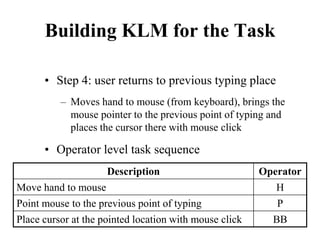
  • 331.
    GOMS Analysis • Howto characterize a language? • There are many ways – One simple approach is to consider unigram character distribution, which refers to the frequency of occurrence of characters in any arbitrary sample of the language (text)
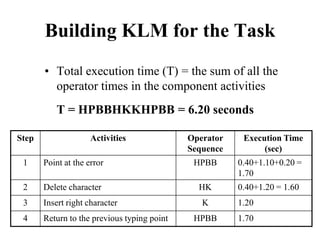
  • 332.
    GOMS Analysis • Howto characterize a language? • There are many ways – Bigram distribution, which refers to the frequency of occurrence of character pairs or bigrams in any arbitrary sample, is another popular way to characterize a language
  • 333.
    GOMS Analysis • Inorder to perform GOMS analysis, we need to have character string(s) having language characteristics (say, the unigram distribution of characters in the string(s) match(es) to that of the language) – How to determine such string(s)? • We can use a language corpus for the purpose
  • 334.
    Corpus • Corpus (ofa language) refers to a collection of texts sampled from different categories (genres) – Stories, prose, poem, technical articles, newspaper reports, mails … • It is assumed that a corpus represents the language (by capturing its idiosyncrasies through proper sampling)
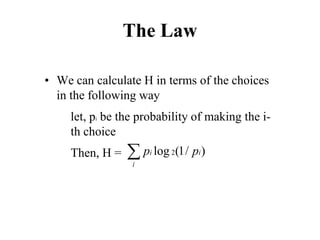
  • 335.
    Corpus • However, corpusdevelopment is not trivial (requires great care to be truly representative) • The good news is, already developed corpora are available for many languages (e.g., British National Corpus or BNC for English) – We can make use of those
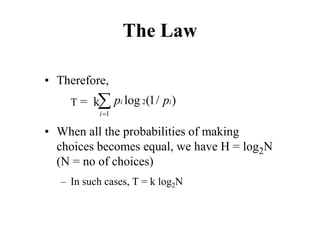
  • 336.
    Corpus-based Approach • Howto use a corpus to extract representative text? – Get hold of a corpus – Extract a representative text through some statistical means (for example, cross-entropy based similarity measure)
  • 337.
    Cross-Entropy Based Similarity Measure •Let X be a random variable which can take any character as its value • Further, let P be the probability distribution function of X [i.e., P(xi) = P(X = xi)] • We can calculate the “entropy”, a statistical measure, of P in the following way ∑ − = i i i x P x P P H ) ( log ) ( ) ( 2
  • 338.
    Cross-Entropy Based Similarity Measure •Now, suppose there are two distributions, P and M • We can calculate another statistical measure, called “cross-entropy”, of the two distributions ∑ − = i i i x M x P M P H ) ( log ) ( ) , ( 2
  • 339.
    Cross-Entropy Based Similarity Measure •The cross-entropy measure can be used to determine similarity of the two distributions – Closer H(P,M) is to H(P), the better approximation M is of P (i.e., M is similar to P) • We can use this idea to extract representative text from a corpus
  • 340.
    Cross-Entropy Based Similarity Measure •Let P denotes the unigram probability distribution of the language – This can be determined from the corpus. Simply calculate the character frequencies in the corpus. Since the corpus is assumed to represent the language, the character frequencies obtained from the corpus can be taken as representative of the language – Calculate H(P)
  • 341.
    Cross-Entropy Based Similarity Measure •Take random samples of texts from the corpus and determine the unigram character distribution of the sample text, which is M • Next, calculate H(P,M) • The sample text for which H(P,M) is closest to H(P) will be our representative text
  • 342.
    Problem with GOMS-basedCTA • Thus, we can perform GOMS analysis • However, there is a problem – The text is usually large (typically >100 characters to make it reasonably representative), which makes it tedious to construct GOMS model
  • 343.
    Problem with GOMS-basedCTA • We need some other approach, which is not task-based, to address the design challenge – Task-based approaches are typically tedious and sometimes infeasible to perform • In the next lecture, we shall discuss one such approach, which is based on the Fitts’ law and the Hick-Hyman law
  • 344.
    Dr. Samit Bhattacharya AssistantProfessor, Dept. of Computer Science and Engineering, IIT Guwahati, Assam, India NPTEL Course on Human Computer Interaction - An Introduction Dr. Pradeep Yammiyavar Professor, Dept. of Design, IIT Guwahati, Assam, India Indian Institute of Technology Guwahati
  • 345.
    Module 3: Model-based Design Lecture8: A Case Study on Model-Based Design - II Dr. Samit Bhattacharya
  • 346.
    Objective • In theprevious lectures, we learned about the challenge faced by virtual keyboards designers – The objective of the designer is to determine an efficient layout – The challenge is to identify the layout from a large design space – We saw the difficulties in following standard design life cycle
  • 347.
    Objective • We exploredthe possibility of using GOMS in the design and discussed its problems • In this lecture, we shall see another way of addressing the issue, which illustrates the power of model-based design
  • 348.
    Design Approach • Esaw the problem with GOMS in VK design – The problem arises due to the task-based analysis, since identifying and analyzing tasks is tedious if not difficult and sometimes not feasible • We need some approach that is not task based – Fitts’ Law and Hick-Hyman Law can be useful for the purpose as they do not require task-based analysis
  • 349.
    Fitts’-Digraph Model • Thealternative approach makes use of the Fitts’-diagraph (FD) model • FD model was proposed to compute user performance for a VK from layout specification – Layout in terms of keys and their positions – Performance in text entry rate
  • 350.
    Fitts’-Digraph Model • TheFD model has three components – Visual search time (RT): time taken by a user to locate a key on the keyboard. The Hick-Hyman law is used to model this time N is the total number of keys, a and b are empirically- determined constants 2 log RT a b N = +
  • 351.
    Fitts’-Digraph Model • TheFD model has three components – Movement time (MT): time taken by the user to move his hand/finger to the target key (from its current position). This time is modeled by the Fitts’ law MTij is the movement time from the source (i-th) to the target (j-th) key, dij is the distance between the source and target keys, wj is the width of the target key and a’ and b’ are empirically-determined constants 2 ' 'log ( 1) ij ij j d MT a b w = + +
  • 352.
    Fitts’-Digraph Model • TheFD model has three components – Digraph probability: probability of occurrence of character pairs or digraphs, which is determined from a corpus – Pij is the probability of occurrence of the i-th and j-th key whereas fij is the frequency of the key pair in the corpus 1 1 / N N ij ij ij i j P f f = = = ∑∑
  • 353.
    Fitts’-Digraph Model • Usingthe movement time formulation between a pair of keys, an average (mean) movement time for the whole layout is computed • The mean movement time is used, along with the visual search time, to compute user performance for the layout 1 1 N N MEAN ij ij i j MT MT P = = = × ∑∑
  • 354.
    Fitts’-Digraph Model • Performanceis measured in terms of characters/second (CPS) or words/minute (WPM) • Performances for two categories of users, namely novice and expert users, are computed
  • 355.
    Fitts’-Digraph Model • Noviceuser performance: they are assumed to be unfamiliar with the layout. Hence, such users require time to search for the desired key before selecting the key 1 Novice MEAN CPS RT MT = + (60/ ) AVG WPM CPS W = × WAVG is the average number of characters in a word. For example, English words have 5 characters on average
  • 356.
    Fitts’-Digraph Model • Expertuser performance: an expert user is assumed to be thoroughly familiar with the layout. Hence, such users don’t require visual search time 1 Expert MEAN CPS MT = (60/ ) AVG WPM CPS W = × WAVG is the average number of characters in a word. For example, English words have 5 characters on average
  • 357.
    Using the FDModel • If you are an expert designer – You have few designs in mind (experience and intuition helps) – Compute WPM for those – Compare
  • 358.
    Using the FDModel • Otherwise – Perform design space exploration – search for a good design in the design space using algorithm • Many algorithms are developed for design space exploration such as dynamic simulation, Metropolis algorithm and genetic algorithm – We shall discuss one (Metropolis algorithm) to illustrate the idea
  • 359.
    Metropolis Algorithm • A“Monte Carlo” method widely used to search for the minimum energy (stable) state of molecules in statistical physics • We map our problem (VK design) to a minimum-energy state finding problem in statistical physics
  • 360.
    Metropolis Algorithm • Wemap a layout to a molecule (keys in the layout serves the role of atoms) • We redefine performance as the average movement time, which is mapped to energy of the molecule • Thus, our problem is to find a layout with minimum energy
  • 361.
    Metropolis Algorithm • Stepsof the algorithm – Random walk: pick a key and move in a random direction by a random amount to reach a new configuration (called a state) – Compute energy (average movement time) of the state – Decide whether to retain new state or not and iterate
  • 362.
    Metropolis Algorithm • Thedecision to retain/ignore the new state is taken on the basis of the decision function, where ∆E indicates the energy difference between the new and old state (i.e., ∆E = energy of new state – energy of old state) 0 ( ) 1 0 E kT e E W O N E ∆ −   ∆ > − =   ∆ ≤ 
  • 363.
    Metropolis Algorithm • Wis probability of changing from old to new configuration • k is a coefficient • T is “temperature” • Initial design: a “good” layout stretched over a “large” space
  • 364.
    Metropolis Algorithm • Notethe implications of the decision function – If energy of the new state is less than the current state, retain the new state – If the new state is having more energy than the current state, don’t discard the new state outright. Instead, retain the new state if the probability W is above some threshold value. This steps helps to avoid local minima
  • 365.
    Metropolis Algorithm • Toreduce the chances of getting struck at the local minima further, “annealing” is used – Bringing “temperature” through several up and down cycles
  • 366.
    Metropolis Algorithm An exampleVK layout, called the Metropolis layout, is shown, which was designed using the Metropolis algorithm
  • 367.
    Some VK Layoutswith Performance • QWERTY – 28 WPM (novice) – 45.7 WPM (expert)
  • 368.
    Some VK Layoutswith Performance • QWERTY – 28 WPM (novice) – 45.7 WPM (expert) • FITALY – 36 WPM (novice) – 58.8 WPM (expert)
  • 369.
    Some VK Layoutswith Performance • QWERTY – 28 WPM (novice) – 45.7 WPM (expert) • FITALY – 36 WPM (novice) – 58.8 WPM (expert) • OPTI II – 38 WPM (novice) – 62 WPM (expert)
  • 370.
    Some VK Layoutswith Performance • The layouts mentioned before were not designed using models • They were designed primarily based on designer’s intuition and empirical studies • However, the performances shown are computed using the FD model
  • 371.
    Some VK Layoutswith Performance • ATOMIK – a layout designed using slightly modified Metropolis algorithm • Performance of the ATOMIK layout – 41.2 WPM (novice) – 67.2 WPM (expert)
  • 372.
    Some VK Layoutswith Performance • Note the large performance difference between the ATOMIK and other layouts • This shows the power of model-based design, namely a (significant) improvement in performance without increasing design time and effort (since the design can be mostly automated)
  • 373.
    8 Golden Rulesof Interface Design
  • 374.
    27/02/2023 Meghana Pujar Introduction •We as humans and designers need some standards to rely on, some guidelines to follow so we can make choices or we will end up making random decisions. • So, earlier interface designers did years of research and figured out how users interact with interfaces and they have tried to write down these guidelines to record their insights and guide the efforts of future designers.
  • 375.
    27/02/2023 Meghana Pujar •Ben Shneiderman an American computer scientist and professor, in his famous book “Designing the User Interface: Strategies for Effective Human-Computer Interaction”, these 8 golden rules of interface design. 1. Strive for consistency • Consistent sequences of actions should be required in similar situations. • Consistency helps users to achieve their goals and navigate through your app easily.
  • 376.
    27/02/2023 Meghana Pujar •when a UI works consistently, it becomes predictable (in a good way), which means users can understand • how to use certain functions intuitively and without instruction and as an interface designer • you should remember that your user is not using your product only, they are getting ideas, expectations, and building intuition from lots of different products.
  • 377.
    27/02/2023 Meghana Pujar •Things can go south very easily and can frustrate our users if our design is inconsistent and not familiar to users. • As you can see, Instagram's design has been consistent from 2009 to 2020, with its Feed Layout style and navbar icons staying consistent.
  • 378.
  • 379.
    27/02/2023 Meghana Pujar 2.Cater to universal usability • Recognize the needs of diverse users and design, facilitating the transformation of content. • Novice-expert differences, age ranges, disabilities, and technology diversity each enrich the spectrum of requirements that guides design. • Adding features for novices, such as explanations, and features for experts, such as shortcuts and faster pacing, can enrich the interface design and improve perceived system quality.
  • 380.
    27/02/2023 Meghana Pujar •Let’s see how Instagram helps different types of users according to their experience so they can carry out tasks successfully without any anxiety. • For novice or first-time users, Instagram provides visual cues and instructions to help first- time users as shown:
  • 381.
    27/02/2023 Meghana Pujar •For experienced or frequent users, Instagram has this shortcut feature where you press and hold on the profile icon and you can switch between your accounts without even going to the profile page.
  • 382.
    27/02/2023 Meghana Pujar 3.Offer informative feedback • For every action, there should be appropriate, human-readable feedback within a reasonable amount of time. • So, users can know what is going on. • For frequent and minor actions, the response can be modest, whereas for infrequent and major actions. • Example: Instagram’s double-tap like function gives the user feedback as shown in these pictures
  • 383.
  • 384.
  • 385.
    27/02/2023 Meghana Pujar 4.Design dialogue to yield closure • Informative feedback after a group of actions gives operators the satisfaction of accomplishment, • a sense of relief, the signal to drop contingency plans from their minds, and a signal to prepare for the next group of actions. • Your user should not spend any time figuring out what is going on, tell them what their action has led them to.
  • 386.
    27/02/2023 Meghana Pujar •A classic example would be, e- commerce websites moving users from selecting products to the checkout, ending with a clear confirmation page that completes the transaction. • For Example: On Instagram while uploading any media content.
  • 387.
    27/02/2023 Meghana Pujar 5.Prevent Error / Offer simple error handling • As much as possible, design the system such that users cannot make serious errors; • If a user makes an error, the interface should detect the error and offer simple, constructive, and specific instructions for recovery. • For example error message for an incorrect username on the Instagram login page.
  • 388.
  • 389.
    27/02/2023 Meghana Pujar 6.Permit easy reversal of actions • As much as possible, actions should be reversible. • This feature relieves anxiety since the user knows that errors can be undone, thus encouraging the exploration of unfamiliar options. • The units of reversibility may be a single action, a data-entry task, or a complete group of actions, such as entry of a name and address block. • Allow your user to undo the action instead of starting over.
  • 390.
    27/02/2023 Meghana Pujar •For example, the drawing function in Instagram stories provides an undo function.
  • 391.
  • 392.
    27/02/2023 Meghana Pujar 7.Support internal locus of control • Experienced operators strongly desire the sense that they are in charge of the interface and that the interface responds to their actions. • Surprising interface actions, tedious sequences of data entries, inability to obtain or • difficulty in obtaining necessary information and inability to produce the action desired all build anxiety and dissatisfaction.
  • 393.
    27/02/2023 Meghana Pujar •Make users the initiators of actions rather than the responders to actions.
  • 394.
  • 395.
    27/02/2023 Meghana Pujar 8.Reduce short-term memory load • The limitation of human information processing in short-term memory (the rule of thumb is that humans can remember “seven plus or minus two chunks” of information) requires that displays be kept simple. • Keeping our interface consistent and following the existing guidelines for interface design will help us to make our design more intuitive so our user doesn’t have to recall every time he/she uses the product. • It’s simpler for us to recognize information rather than recall it.
  • 396.
    27/02/2023 Meghana Pujar •You can see in the navigation bar, the “search” icon — which looks like a magnifying glass, the “add” icon — which is made up of the “+” sign. “Home” icon — resembles the real-world home. • All these visual elements are easy to recognize because they resemble real-world things that serve the same purpose.
  • 397.
    27/02/2023 Meghana Pujar Conclusion •These rules will always help you to design a more intuitive interface and will provide a good starting point for interface designers. • Try to find out if your everyday apps use these rules or not.
  • 398.
    27/02/2023 Meghana Pujar Norman7 design principles The principles are: • Discoverability increases understanding of the available options and where to perform them. • Feedback communicates the response to our actions or the status of systems. • Conceptual models are simple explanations of how something works.
  • 399.
    27/02/2023 Meghana Pujar •Affordance is the perceived action of an object. • Signifiers tell us exactly where to act. • Mapping is the relationship between the controls and the effect they have. • Constraints help restrict the kind of interactions that can take place.
  • 400.
  • 401.
    27/02/2023 Meghana Pujar AnIntroduction To Heuristic Evaluation • A Heuristic Evaluation is a usability inspection technique where one or a number of usability experts evaluate the user interface of a product (for example a website) • against a set of Heuristic Principles (also known as Heuristics).
  • 402.
    27/02/2023 Meghana Pujar Asthe definition of Heuristic Evaluation by the Interaction Design Foundation explains: • Heuristic evaluation is a usability engineering method for finding usability problems in a user interface design, thereby making them addressable and solvable as part of an iterative design process. • It involves a small set of expert evaluators who examine the interface and assess its compliance with “heuristics,” or recognized usability principles. • Such processes help prevent product failure post-release
  • 403.
    27/02/2023 Meghana Pujar Howto Conduct a Heuristic Evaluation • Now that we have stated what a heuristic evaluation is and when you should (and should not) use it, we will dive more in-depth about how the process works and talk more about the heuristics and the experts involved. • The process of conducting a heuristic evaluation is divided in three key phases: Planning, Executing and Reviewing:
  • 404.
    27/02/2023 Meghana Pujar 1.Planning • Since heuristic evaluation is a usability evaluation technique, you should have a clear objective of what you are hoping to achieve with your evaluation. • In other words, you need to set your goals prior to any inspections. • Understand what exactly needs to be evaluated and make sure that the experts who are involved are briefed accordingly. • It is also essential that you know who your users are.
  • 405.
    27/02/2023 Meghana Pujar •Even though you are not performing usability testing, the demographics, needs, motivations and behaviors of the people that will be using your product should be in mind. • Personas, stories and information gathered through interviews are very helpful here. • The experts evaluating the interface must consider the users and their perspective and ideally should be familiar with the domain in which the product will operate in.
  • 406.
    27/02/2023 Meghana Pujar 2.Executing • Once you have your goals clear, your target demographic and a set of heuristics defined and a team of evaluators ready, you can move on to the execution phase. • The evaluators will go through your product’s flows and respective interfaces independently. • They will analyze them against the defined principles and whenever they come across an issue or an area for improvement, they will record it.
  • 407.
    27/02/2023 Meghana Pujar •Typical data that is recorded should include the issue found together with relevant details such as what the task attempted was, where they encountered the problem, why that is a problem and possibly also suggest ways of fixing it 3. Reviewing • After the evaluations have been completed, the experts should summarize their findings to eliminate duplicates and create a list of usability issues that should be addressed. • These issues should also be prioritized in terms of severity.
  • 408.
    27/02/2023 Meghana Pujar Heuristics •Let us now talk about Heuristics. • Unfortunately, there is not a single correct answer to “What set of Heuristics should I use?”. • What you should do is consider the project’s specificities and either use a set of heuristics that are a good fit or adapt them to create your own custom set.
  • 409.
    27/02/2023 Meghana Pujar UsabilityHeuristics • Jakob Nielsen's 10 general principles for interaction design. • They are called "heuristics" because they are broad rules of thumb and not specific usability guideline 1: Visibility of system status • The design should always keep users informed about what is going on, through appropriate feedback within a reasonable amount of time.
  • 410.
    27/02/2023 Meghana Pujar •When users know the current system status, they learn the outcome of their prior interactions and determine next steps. • Predictable interactions create trust in the product as well as the brand. Example of Usability Heuristic #1: • You Are Here indicators on mall maps show people where they currently are, to help them understand where to go next.
  • 411.
    27/02/2023 Meghana Pujar 2:Match between system and the real world • The design should speak the users' language. Use words, phrases, and concepts familiar to the user, rather than internal jargon. Follow real-world conventions, making information appear in a natural and logical order. • The way you should design depends very much on your specific users. Terms, concepts, icons, and images that seem perfectly clear to you and your colleagues may be unfamiliar or confusing to your users.
  • 412.
    27/02/2023 Meghana Pujar •When a design’s controls follow real-world conventions and correspond to desired outcomes (called natural mapping), it’s easier for users to learn and remember how the interface works. • This helps to build an experience that feels intuitive. Example of Usability Heuristic #2: • When stovetop controls match the layout of heating elements, users can quickly understand which control maps to which heating element.
  • 413.
    27/02/2023 Meghana Pujar 3:User control and freedom • Users often perform actions by mistake. • They need a clearly marked "emergency exit" to leave the unwanted action without having to go through an extended process. • When it's easy for people to back out of a process or undo an action, it fosters a sense of freedom and confidence.
  • 414.
    27/02/2023 Meghana Pujar •Exits allow users to remain in control of the system and avoid getting stuck and feeling frustrated. Example of Usability Heuristic #3: • Digital spaces need quick emergency exits, just like physical spaces do
  • 415.
    27/02/2023 Meghana Pujar 4:Consistency and standards • Users should not have to wonder whether different words, situations, or actions mean the same thing. • Follow platform and industry conventions. • Jakob's Law states that people spend most of their time using digital products other than yours. • Users’ experiences with those other products set their expectations.
  • 416.
    27/02/2023 Meghana Pujar •Failing to maintain consistency may increase the users' cognitive load by forcing them to learn something new. Example of Usability Heuristic #4: • Checkin counters are usually located at the front of hotels. This consistency meets customers’ expectations.
  • 417.
    27/02/2023 Meghana Pujar 5:Error prevention • Good error messages are important, but the best designs carefully prevent problems from occurring in the first place. • Either eliminate error-prone conditions, or check for them and present users with a confirmation option before they commit to the action. • There are two types of errors: slips and mistakes. • Slips are unconscious errors caused by inattention.
  • 418.
    27/02/2023 Meghana Pujar •Mistakes are conscious errors based on a mismatch between the user’s mental model and the design. Example of Usability Heuristic #5: • Guard rails on curvy mountain roads prevent drivers from falling off cliffs.
  • 419.
    27/02/2023 Meghana Pujar 6:Recognition rather than recall • Minimize the user's memory load by making elements, actions, and options visible. • The user should not have to remember information from one part of the interface to another. • Information required to use the design (e.g. field labels or menu items) should be visible or easily retrievable when needed.
  • 420.
    27/02/2023 Meghana Pujar •Humans have limited short-term memories. • Interfaces that promote recognition reduce the amount of cognitive effort required from users. Example of Usability Heuristic #6: • It’s easier for most people to recognize the capitals of countries, instead of having to remember them. • People are more likely to correctly answer the question Is Lisbon the capital of Portugal? rather than What’s the capital of Portugal?
  • 421.
    27/02/2023 Meghana Pujar 7:Flexibility and efficiency of use • Shortcuts — hidden from novice users — may speed up the interaction for the expert user so that the design can cater to both inexperienced and experienced users. • Allow users to tailor frequent actions. • Flexible processes can be carried out in different ways, so that people can pick whichever method works for them.
  • 422.
    27/02/2023 Meghana Pujar Exampleof Usability Heuristic #7: • Regular routes are listed on maps, but locals with knowledge of the area can take shortcuts. 8: Aesthetic and minimalist design • Interfaces should not contain information that is irrelevant or rarely needed. • Every extra unit of information in an interface competes with the relevant units of information and diminishes their relative visibility.
  • 423.
    27/02/2023 Meghana Pujar •This heuristic doesn't mean you have to use a flat design — it's about making sure you're keeping the content and visual design focused on the essentials. • Ensure that the visual elements of the interface support the user's primary goals. Example of Usability Heuristic #8: • An ornate teapot may have excessive decorative elements, like an uncomfortable handle or hard-to-wash nozzle, that can interfere with usability.
  • 424.
    27/02/2023 Meghana Pujar 9:Help users recognize, diagnose, and recover from errors • Error messages should be expressed in plain language (no error codes), precisely indicate the problem, and constructively suggest a solution. • These error messages should also be presented with visual treatments that will help users notice and recognize them. Example of Usability Heuristic #9: • Wrong way signs on the road remind drivers that they are heading in the wrong direction and ask them to stop.
  • 425.
    27/02/2023 Meghana Pujar 10:Help and documentation • It’s best if the system doesn’t need any additional explanation. • However, it may be necessary to provide documentation to help users understand how to complete their tasks. • Help and documentation content should be easy to search and focused on the user's task. • Keep it concise, and list concrete steps that need to be carried out.
  • 426.
    27/02/2023 Meghana Pujar •Example of Usability Heuristic #10: • Information kiosks at airports are easily recognizable and solve customers’ problems in context and immediately.
  • 427.
    27/02/2023 Meghana Pujar Conclusion •Nielsen’s Ten Heuristics make digital products and services less mechanical and more human. • After all, applications, platforms, and systems exist to simplify people’s daily lives and, • the more pleasant and fluid their usability (user experience), the greater their efficiency.