CHAPTER
SIX
Database Driven
Websites









PHP/MySQL
Understanding the MySQL Privilege
System
Locking and concurrency
Speeding up database
queries
General optimization tips
Different table types
Loading data from a file
wit
h
indexe
s
Making your database
more
secur
e
Web security and cryptography
theory
 Static Web pages
 Data is stored in .html
files
 Won't change until
someone codes
changes their
source
 Dynamic Web
pages
 Web pages that respond to users' requests and
gather
information from them. Oftentimes, they have
built-in
links to a database, from which they extract
data based
on input from the users

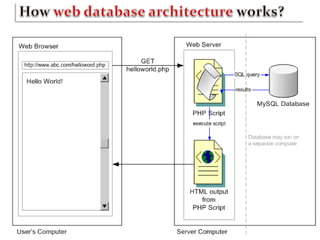
 A database-driven Web site is a Web site that uses
a
database to gather, display, or manipulate
information
Example:



News sites: CNN.com and MSNBC.com
E-commerce companies: Amazon.com, which is
a Web interface of a big-sized database system
containing customer and transactional
information.
 What do we need to built a database-driven
website?
 A DBMS & a scripting
language
 Commercial databases: Oracle, SQL
Server

Cost:
expensive
 Hardware requirements:
high
 Have an impressive array of advanced
features
 Open source databases:
MySQL,

PostgreSQ
L
Cost:
cheap
 Hardware requirements:
low
 Lack some advanced
features
 Open-
source

scriptin
g
language
s
PHP
 JSP
 Per
l
 Proprietar
y
 ASP.NET
scripting
languages
 Cold
Fusion
 MySQL is the de-facto standard database
system for
web sites with HUGE volumes of both data
and
end-users (like Facebook, Twitter, and
Wikipedia).
 PHP combined with MySQL are cross-
platform
(you can develop in Windows and serve on a
Unix
platform
)






MySQ
L
MySQ
L
MySQ
L
MySQ
L
MySQ
L
MySQ
L
is ideal for both small and large
applications
is very fast, reliable, and easy to
use
uses standard SQL
compiles on a number of platforms
is free to download and use
is developed, distributed, and
supported
by
Oracle Corporation
MySQL is named after co-founder Monty
Widenius's
daughter: My

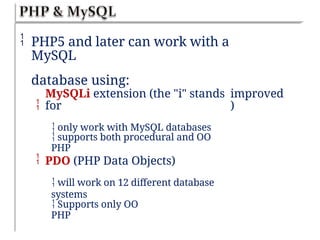
 PHP5 and later can work with a
MySQL
database using:

MySQLi extension (the "i" stands
for
 only work with MySQL databases
improved
)
 supports both procedural and OO
PHP
 PDO (PHP Data Objects)
 will work on 12 different database
systems
 Supports only OO
PHP
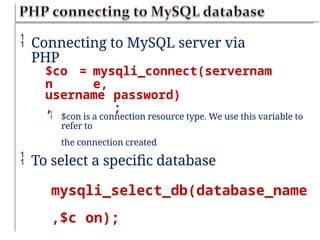
 Connecting to MySQL server via
PHP
$co
n
= mysqli_connect(servernam
e,
username
,
password)
;
 $con is a connection resource type. We use this variable to
refer to
the connection created
 To select a specific database
mysqli_select_db(database_name
,$c on);
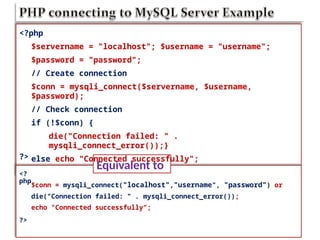
Equivalent to
<?
php
<?php
$servername = "localhost"; $username = "username";
$password = "password";
// Create connection
$conn = mysqli_connect($servername, $username,
$password);
// Check connection
if (!$conn) {
die("Connection failed: " .
mysqli_connect_error());}
else echo "Connected successfully";
?>
$conn = mysqli_connect("localhost","username", "password") or
die("Connection failed: " . mysqli_connect_error());
echo "Connected successfully";
?>
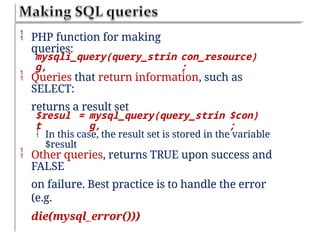
 PHP function for making
queries:
mysqli_query(query_strin
g,
con_resource)
;
 Queries that return information, such as
SELECT:
returns a result set
$resul
t
= mysql_query(query_strin
g,
$con)
;
 In this case, the result set is stored in the variable
$result
 Other queries, returns TRUE upon success and
FALSE
on failure. Best practice is to handle the error
(e.g.
die(mysql_error()))


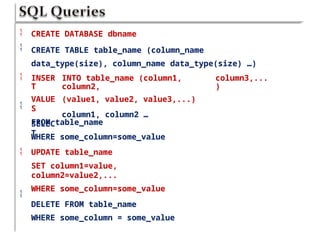
CREATE DATABASE dbname
CREATE TABLE table_name (column_name
data_type(size), column_name data_type(size) …)
 INSER
T
VALUE
S
SELEC
T
INTO table_name (column1,
column2,
(value1, value2, value3,...)
column1, column2 …
column3,...
)

FROM table_name
WHERE some_column=some_value
UPDATE table_name
SET column1=value,
column2=value2,...
WHERE some_column=some_value
DELETE FROM table_name
WHERE some_column = some_value


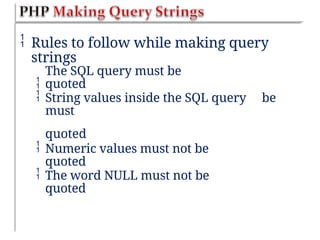
 Rules to follow while making query
strings

The SQL query must be
quoted
 String values inside the SQL query
must
quoted
be
 Numeric values must not be
quoted
 The word NULL must not be
quoted
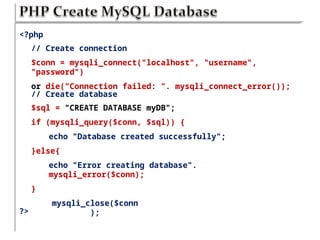
<?php
// Create connection
$conn = mysqli_connect("localhost", "username",
"password")
or die("Connection failed: ". mysqli_connect_error());
// Create database
$sql = "CREATE DATABASE myDB";
if (mysqli_query($conn, $sql)) {
echo "Database created successfully";
}else{
echo "Error creating database".
mysqli_error($conn);
}
mysqli_close($conn
);
?>
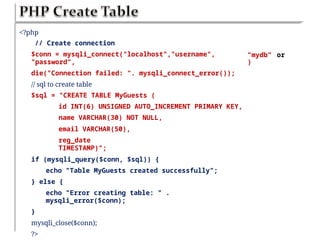
<?php
// Create connection
$conn = mysqli_connect("localhost","username",
"password“,
die("Connection failed: ". mysqli_connect_error());
// sql to create table
$sql = "CREATE TABLE MyGuests (
id INT(6) UNSIGNED AUTO_INCREMENT PRIMARY KEY,
name VARCHAR(30) NOT NULL,
email VARCHAR(50),
reg_date
TIMESTAMP)";
if (mysqli_query($conn, $sql)) {
echo "Table MyGuests created successfully";
} else {
echo "Error creating table: " .
mysqli_error($conn);
}
mysqli_close($conn);
?>
”mydb”
)
or
<?php
$servername = "localhost"; $username =
"username";
$password =
"password";
// Create
connection
$dbname =
"myDB";
$conn = mysqli_connect($servername, $username,
$password,
$dbname)
or
die("Connection failed: ".
mysqli_connect_error());
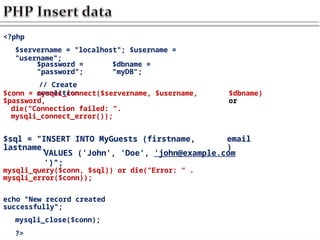
$sql = "INSERT INTO MyGuests (firstname,
lastname,
email
)
VALUES ('John', 'Doe', 'john@example.com
')";
mysqli_query($conn, $sql)) or die("Error: “ .
mysqli_error($conn));
echo "New record created
successfully";
mysqli_close($conn);
?>
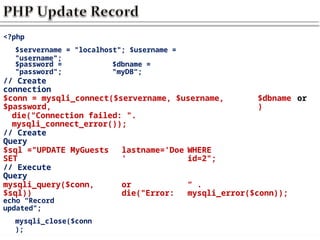
<?php
$servername = "localhost"; $username =
"username";
$password =
"password";
$dbname =
"myDB“;
// Create
connection
$conn = mysqli_connect($servername, $username,
$password,
$dbname
)
or
die("Connection failed: ".
mysqli_connect_error());
// Create
Query
$sql ="UPDATE MyGuests
SET
lastname='Doe
'
WHERE
id=2";
// Execute
Query
mysqli_query($conn,
$sql))
or
die("Error:
“ .
mysqli_error($conn));
echo “Record
updated";
mysqli_close($conn
);
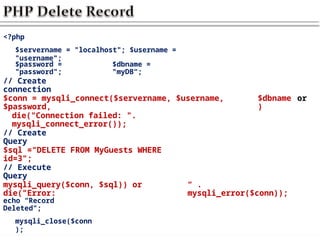
<?php
$servername = "localhost"; $username =
"username";
$password =
"password";
$dbname =
"myDB“;
// Create
connection
$conn = mysqli_connect($servername, $username,
$password,
$dbname
)
or
die("Connection failed: ".
mysqli_connect_error());
// Create
Query
$sql ="DELETE FROM MyGuests WHERE
id=3";
// Execute
Query
mysqli_query($conn, $sql)) or
die("Error:
“ .
mysqli_error($conn));
echo “Record
Deleted";
mysqli_close($conn
);
 The PHP function num_rows() is used to check if there
are
more than zero rows returned
 The function fetch_assoc() puts all the
results
associative array that we can loop
through
Example
$result = mysqli_query(query,
$con);
into
an

if (mysqli_num_rows($result) >
0) {
while ($row
=
mysqli_fetch_assoc($result
))
$row['column_1_name'];
$row['column_2_name'];
{
$col
1
$col
2
//
and
=
=
so
forth...
}
}
<?php
$servername = "localhost"; $username =
"username";
$password =
"password";
$dbname =
"myDB";
$conn = mysqli_connect($servername, $username, $password,
$dbname) or
die("Connection failed: ".
mysqli_connect_error());
$sql = "SELECT id, fname, lname FROM
MyGuests";
mysqli_query($conn, $sql)) or die("Error: “ .
mysqli_error($conn));
if (mysqli_num_rows($result) > 0) {
while($row = mysqli_fetch_assoc($result)) {
echo "id:". $row["id"]. "Name:".
$row[“fname"].”
}
} else {
echo "0 results";}
mysqli_close($conn);
“.
$row["lname"]."<br>";
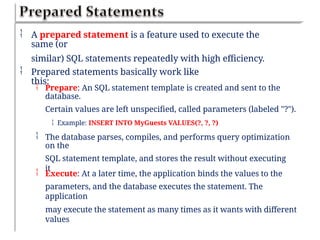
 A prepared statement is a feature used to execute the
same (or
similar) SQL statements repeatedly with high efficiency.
 Prepared statements basically work like
this:
 Prepare: An SQL statement template is created and sent to the
database.
Certain values are left unspecified, called parameters (labeled "?").
 Example: INSERT INTO MyGuests VALUES(?, ?, ?)
 The database parses, compiles, and performs query optimization
on the
SQL statement template, and stores the result without executing
it
 Execute: At a later time, the application binds the values to the
parameters, and the database executes the statement. The
application
may execute the statement as many times as it wants with different
values
 Compared to executing SQL statements directly,
prepared
statements have two main advantages:
 Prepared statements reduces parsing time as the
preparation on
the query is done only once (although the statement is
executed
multiple times)
Bound parameters minimize bandwidth to the server as
you need
to send only the parameters each time, and not the whole
query
Prepared statements are very useful against SQL
injections,
because parameter values, which are transmitted later
using a


 The LOAD DATA INFILE
statement
 Is used to load table data in
from a
file
 It executes very
quickly
 Syntax
:
 LOAD DATA INFILE
filename
tablename;
INTO
TABLE
 By default, data fields in the file must be
separated
by tabs and enclosed in single quotation
marks, and
 In Database-Driven Websites or web
based
applications speed is a big issue
 Ther
e
use
to
are:
are a lot of techniques that you
can
speed
up
executio
n
ofqueries
.
Som
e
 Using
Indexes
 Optimization
Techniques
 A database index is a data structure that improves the speed of
data
retrieval operations on a database table at the cost of
additional writes
and storage space to maintain the index data structure.
The SQL to add an index to column of a table is

 ALTER TABLE table ADD INDEX
(column);
 Indexes are best used on columns that are frequently used in
where
clauses, and in any kind of sorting, such as "order by".
you can check which indexes are being used by running
EXPLAIN
don't create indexes that are not being used by your queries
Indexes slow down inserts and updates, so use them
carefully on
columns that are FREQUENTLY updated.




 Design
Optimization
 Everything (data & data types) in a database should be as
small as
possibl
e
Minimize
redundancy
Minimize
nulls
Make your primary key as short as
possible
Avoid variable length columns if
possible (varchar, text and blob).
Fixed-length fields are faster but might
take up a little more space





 Table
Optimization
 If a table has been in use for a period of time, data can
become
fragmented as updates and deletions are process
 This fragmentation increases the time taken to find things in this
table
 This problem can be fixed by using the
statement
 OPTIMIZE TABLE tablename; or
 myisamchk -r tablename at the command prompt
 Simplify
permissions
 Queries are checked against the permission system before
being
executed
 The simpler the permission process is the faster your query
will run
 Database-Driven Web
Applications
of concurrent database
operations
ar
e
ful
l
 So the question is
 How can we manage concurrent
access
records, tables & databases?
to
 Solutions
 Using Concurrency Control
Mechanisms
 Concurrency control and locking
mechanism


is used by DBMSs for the sharing of data
the primary use of locking is to solve
concurrency
problems
is necessary to ensure data consistency when
there
 is a
possibility of multiple clients accessing
and
modifying the same data at the same
time.
possibl
y
 Locking Types:
 table-level locks
&
 row-level locks.
 Table-level
locks



locks the entire table while performing operations on the
table
allows only one session to update a table at a time
other sessions that want to modify the table must wait
until the
current DML statement finishes
deadlocks can be fairly easily avoided
has poor performance in applications that do a large
number of
concurrent reads and writes
suitable for read-only, read-mostly, or single-user
applications




 Row-level
locks
 possible to lock a single row while other sessions are still
able to
access the rest of the table
simultaneous write access by multiple sessions
allow high performance at a very high level of
concurrency at the
cost of greater complexity in the implementation
slower performance for applications that have a low
probability of
lock contention as well as higher probability of bugs.
very difficult to completely avoid deadlocks
MySQL uses row-level locking for InnoDB tables
suitable for multi-user, highly concurrent






 Types of
locks
 Read
lock


The session that holds the lock can read the table (but not
write it).
Multiple sessions can acquire a READ lock for the table at the
same
time.
Other sessions are not allowed to acquire a WRITE lock

 Write
lock


The session that holds the lock can read and write to the
table
Only the session that holds the lock can access the table. No
other
session can access it until the lock is released
Lock requests for the table by other sessions is blocked

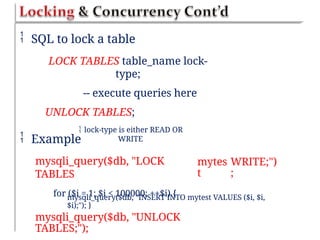
 SQL to lock a table
LOCK TABLES table_name lock-
type;
-- execute queries here
UNLOCK TABLES;
 lock-type is either READ OR
WRITE
 Example
mysqli_query($db, "LOCK
TABLES
for ($i = 1; $i < 100000; ++$i) {
mytes
t
WRITE;")
;
mysqli_query($db, "INSERT INTO mytest VALUES ($i, $i,
$i);"); }
mysqli_query($db, "UNLOCK
TABLES;");
 Storage Engine (Table
Type)
 is what stores, handles, and retrieves information from a
table.
 The standard engines supported by MySQL
are:










MyISAM
InnoDB
MERGE
MEMORY
(HEAP)
BDB
(BerkeleyDB)
EXAMPLE
ARCHIVE
CSV
BLACKHOLE
 The common storage
engines

MyISAM and
InnoDB
 The default storage
engine

MyISA
M
 You can also assign a storage engine to a
specific
table with the following
syntax:

CREATE TABLE tblname(col1, col2,
..)
ENGINE =
storageEngine;
 All storage engines can be selected per
server, per
 MyISA
M






Is the default storage engine for MySQL servers.
Is a branch, or child, of the ISAM engine.
Doesn’t support transaction,
Supports table-level locking as opposed to row-level locking,
Has the best performance and functionality
is great for sites that have a very low INSERT/UPDATE rate and
a very
high SELECT rate.
Do not support foreign keys
The max number of rows supported for MyISAM is ~4.29E+09
with up to
64 indexes per table. Fields of TEXT/BLOB can be fully indexed for
cases
such as searching.


 InnoD
B
 compared to MyISAM, InnoDB provides many more
feature to
increase performance.
supports row-level locking, as opposed to table-level
locking
 This allows parallel INSERT/UPDATE/DELETE queries to be run on
the
same table, unlike MyISAM where each query has to wait its turn
to run.




provides foreign key functionality.
supports Transactions
provides caching for data and indexes in memory, as
well as on
disk, which provides a large increase in performance
gain. For
those low on RAM this might not be the ideal solution.
 MERGE
 Allows users to treat collection of identical
MyISAM
tables as a single table for the purpose of
querying.
 There are constraints to this type, such as all
tables
needs to have the same definition.
 Example Scenario
 If you store sales transactions on your site in a daily
table, and
want to pull a report for the month, this would allow you
to
execute a query against a single table to pull all sales for
the
 MEMORY (HEAP)
 Tables of this type are stored in memory and their indexes
are
hashed
Makes memory tables extremely fast, but, in the event of
a crash,
your data will be lost
Ideal for storing temporary or derived data
Doesn’t support BLOB, TEXT, or AUTO INCREMENT
columns



 BDB
(BerkeleyDB)
 Supports transactions and uses a hash based storage
system
 This allows for some of the quickest reading of data, especially
when
paired with unique keys.
 The biggest downfall of the BDB system, is speed on un-
index
 The MySQL
server

stores privilege information in the grant
tables
(user, host, db, tables_priv & columns_priv) of
the
mysql database (that is, in the database
named
mysql)
 reads the contents of these tables into
memory
when it starts and bases access-control
decisions
on the in-memory copies of the grant tables
 user
table


determines whether a user can connect to a MySQL server and
whether a user has any global privileges that apply to every
database in the server
 host table
 determines which host(s) can connect to the MySQL
server
db table

 determines which user can access which database from
which host
 tables_pri
v
 determines which user can access which tables from which
database
 columns_pri
v
 determines which user can access which columns within
a table
 MySQL Access
Control
 MySQL uses the grant tables to determine
what a
user is allowed to do in a two stage process
Connection Verification
 The MySQL server checks if a user is allowed to
connect, based on the information from the user
and host table
1
.
2. Request Verification
 After a connection is established, the server checks
each
statement you issue to determine whether you
have
 The MySQL server reads the grant tables when
it is
started
When you update the grant tables using grant
and
revoke statements the MySQL server will not
notice
they have changed

that
 To point out to
server
can run the
following
that a change has occurred,
you
commands
//from mysql command line



flush
privileges
mysqladmin flush-privileges //from the operating
system
mysqladmin
reload
//from the operating
system
1
.
Running MySQL server as a
root


is a bad idea if you are running a Unix-Like OS
doing this gives a MySQL user with a full set of privileges. The right to
read and
write files anywhere in the operating system
Instead setup a MySQL user specifically for the purpose of running
mysqld

2. Setup the MySQL server behind firewall, to stop connection
from
unauthorized machines
 The default port to connect to the mysql server is
3306
3. Make sure that all your users have passwords and that they are
well
chosen and regularly changed, as with operating system
passwords Write
you PHP scripts that are used to connect to the database in a
separate file
called dbconnect.php, that you then include when required .
4.


Don’t store passwords in plain text in your database
You can encrypt passwords using MySQL SHA1(). When you run
select you
will need to use the same function again to check the password a
user has
typed
Don’t grant more privileges to any user than he/she needs .
Don’t grant the PROCESS, FILE, SHUTDOWN and RELOAD privileges
to any user other than an administrator


 The PROCESS privileges can be used to see what other users are doing and
typing,
including their passwords
The FILE privilege can be used to read and write files to and from the
operating system

 Grant users access only from the hosts that they will be connecting
from like
jane@localhost
You can further increase security by using IP addresses rather than
domain
names in your host table

 Secure Hash
Algorithm
 String sha1(String str [, bool
raw_output])
 Returns pseudo random 40-character
string
 If raw_output is set
true



It returns random 20-character string of binary
data
The password cannot be decrypted back
If(sha1($password)==lajsdf0asdfj323j8258hasd
f93q)
 Example
 Select count(*) from authorized_users where
name=$username
and password=sha1($password)
 The password column should have
varchar(40)



Connecting MySQL database to the web raises special security
issues
Set up a special user just for the purpose of web connections
Give the minimum privilege necessary and not grant DROP,
ALTER
and CREATE privileges to that user
Unless you are using SSL users password will be transmitted
from the
browser to the server in plain text
Do a general data clean up before sending anything to the
MySQL
database


 Addslashes(), stripslashes() to get rid of any problematic
characters in
strings
Doubleval() to check that the numeric data is really numeric

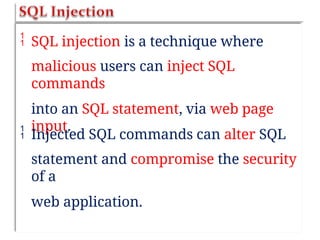
 SQL injection is a technique where
malicious users can inject SQL
commands
into an SQL statement, via web page
input.
 Injected SQL commands can alter SQL
statement and compromise the security
of a
web application.
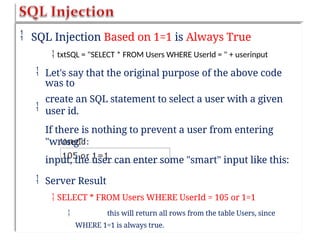
 SQL Injection Based on 1=1 is Always True
 txtSQL = "SELECT * FROM Users WHERE UserId = " + userinput
 Let's say that the original purpose of the above code
was to
create an SQL statement to select a user with a given
user id.
If there is nothing to prevent a user from entering
"wrong"
input, the user can enter some "smart" input like this:

 Server Result
 SELECT * FROM Users WHERE UserId = 105 or 1=1
 this will return all rows from the table Users, since
WHERE 1=1 is always true.
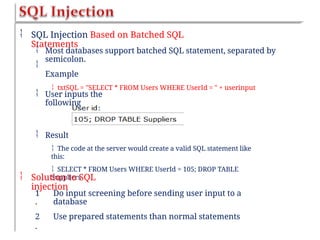
 SQL Injection Based on Batched SQL
Statements


Most databases support batched SQL statement, separated by
semicolon.
Example
 txtSQL = "SELECT * FROM Users WHERE UserId = " + userinput
 User inputs the
following
 Result
 The code at the server would create a valid SQL statement like
this:
 SELECT * FROM Users WHERE UserId = 105; DROP TABLE
Suppliers
 Solution to SQL
injection
1
.
2
.
Do input screening before sending user input to a
database
Use prepared statements than normal statements
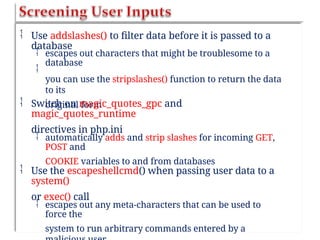
 Use addslashes() to filter data before it is passed to a
database


escapes out characters that might be troublesome to a
database
you can use the stripslashes() function to return the data
to its
original form
 Switch on magic_quotes_gpc and
magic_quotes_runtime
directives in php.ini
 automatically adds and strip slashes for incoming GET,
POST and
COOKIE variables to and from databases
 Use the escapeshellcmd() when passing user data to a
system()
or exec() call
 escapes out any meta-characters that can be used to
force the
system to run arbitrary commands entered by a
 The strip_tags() strips out HTML and PHP
tags
from a string
 prevents users from planting a malicious
script
data
inuse
r
 htmlspecialchars() PHP function converts
characters to HTML entities
 for example, < is converted to &lt; this function
converts any
script tags to harmless characters
 trim() strips unnecessary characters (extra
space,
tab, newline) from the user input data
<?php
$name = $email = $gender = $comment =
$website = "";
if ($_SERVER["REQUEST_METHOD"] ==
"POST")
$name = test_input($_POST["name"]);
$email = test_input($_POST["email"]);
$website = test_input($_POST["website"]);
$gender = test_input($_POST["gender"]);
}
{
function
test_input($data) {
$dat
a
$dat
a
$dat
a
=
=
=
trim($data);
stripslashes($data);
htmlspecialchars($dat
a);
return
$data;
}
?

CHAPTER six DataBase Driven Websites.pptx

  • 1.
  • 2.
             PHP/MySQL Understanding the MySQLPrivilege System Locking and concurrency Speeding up database queries General optimization tips Different table types Loading data from a file wit h indexe s Making your database more secur e Web security and cryptography theory
  • 3.
     Static Webpages  Data is stored in .html files  Won't change until someone codes changes their source  Dynamic Web pages  Web pages that respond to users' requests and gather information from them. Oftentimes, they have built-in links to a database, from which they extract data based on input from the users 
  • 4.
     A database-drivenWeb site is a Web site that uses a database to gather, display, or manipulate information Example:    News sites: CNN.com and MSNBC.com E-commerce companies: Amazon.com, which is a Web interface of a big-sized database system containing customer and transactional information.  What do we need to built a database-driven website?  A DBMS & a scripting language
  • 6.
     Commercial databases:Oracle, SQL Server  Cost: expensive  Hardware requirements: high  Have an impressive array of advanced features  Open source databases: MySQL,  PostgreSQ L Cost: cheap  Hardware requirements: low  Lack some advanced features
  • 7.
     Open- source  scriptin g language s PHP  JSP Per l  Proprietar y  ASP.NET scripting languages  Cold Fusion
  • 8.
     MySQL isthe de-facto standard database system for web sites with HUGE volumes of both data and end-users (like Facebook, Twitter, and Wikipedia).  PHP combined with MySQL are cross- platform (you can develop in Windows and serve on a Unix platform )
  • 9.
          MySQ L MySQ L MySQ L MySQ L MySQ L MySQ L is ideal forboth small and large applications is very fast, reliable, and easy to use uses standard SQL compiles on a number of platforms is free to download and use is developed, distributed, and supported by Oracle Corporation MySQL is named after co-founder Monty Widenius's daughter: My 
  • 10.
     PHP5 andlater can work with a MySQL database using:  MySQLi extension (the "i" stands for  only work with MySQL databases improved )  supports both procedural and OO PHP  PDO (PHP Data Objects)  will work on 12 different database systems  Supports only OO PHP
  • 11.
     Connecting toMySQL server via PHP $co n = mysqli_connect(servernam e, username , password) ;  $con is a connection resource type. We use this variable to refer to the connection created  To select a specific database mysqli_select_db(database_name ,$c on);
  • 12.
    Equivalent to <? php <?php $servername ="localhost"; $username = "username"; $password = "password"; // Create connection $conn = mysqli_connect($servername, $username, $password); // Check connection if (!$conn) { die("Connection failed: " . mysqli_connect_error());} else echo "Connected successfully"; ?> $conn = mysqli_connect("localhost","username", "password") or die("Connection failed: " . mysqli_connect_error()); echo "Connected successfully"; ?>
  • 13.
     PHP functionfor making queries: mysqli_query(query_strin g, con_resource) ;  Queries that return information, such as SELECT: returns a result set $resul t = mysql_query(query_strin g, $con) ;  In this case, the result set is stored in the variable $result  Other queries, returns TRUE upon success and FALSE on failure. Best practice is to handle the error (e.g. die(mysql_error()))
  • 14.
      CREATE DATABASE dbname CREATETABLE table_name (column_name data_type(size), column_name data_type(size) …)  INSER T VALUE S SELEC T INTO table_name (column1, column2, (value1, value2, value3,...) column1, column2 … column3,... )  FROM table_name WHERE some_column=some_value UPDATE table_name SET column1=value, column2=value2,... WHERE some_column=some_value DELETE FROM table_name WHERE some_column = some_value  
  • 15.
     Rules tofollow while making query strings  The SQL query must be quoted  String values inside the SQL query must quoted be  Numeric values must not be quoted  The word NULL must not be quoted
  • 16.
    <?php // Create connection $conn= mysqli_connect("localhost", "username", "password") or die("Connection failed: ". mysqli_connect_error()); // Create database $sql = "CREATE DATABASE myDB"; if (mysqli_query($conn, $sql)) { echo "Database created successfully"; }else{ echo "Error creating database". mysqli_error($conn); } mysqli_close($conn ); ?>
  • 17.
    <?php // Create connection $conn= mysqli_connect("localhost","username", "password“, die("Connection failed: ". mysqli_connect_error()); // sql to create table $sql = "CREATE TABLE MyGuests ( id INT(6) UNSIGNED AUTO_INCREMENT PRIMARY KEY, name VARCHAR(30) NOT NULL, email VARCHAR(50), reg_date TIMESTAMP)"; if (mysqli_query($conn, $sql)) { echo "Table MyGuests created successfully"; } else { echo "Error creating table: " . mysqli_error($conn); } mysqli_close($conn); ?> ”mydb” ) or
  • 18.
    <?php $servername = "localhost";$username = "username"; $password = "password"; // Create connection $dbname = "myDB"; $conn = mysqli_connect($servername, $username, $password, $dbname) or die("Connection failed: ". mysqli_connect_error()); $sql = "INSERT INTO MyGuests (firstname, lastname, email ) VALUES ('John', 'Doe', 'john@example.com ')"; mysqli_query($conn, $sql)) or die("Error: “ . mysqli_error($conn)); echo "New record created successfully"; mysqli_close($conn); ?>
  • 19.
    <?php $servername = "localhost";$username = "username"; $password = "password"; $dbname = "myDB“; // Create connection $conn = mysqli_connect($servername, $username, $password, $dbname ) or die("Connection failed: ". mysqli_connect_error()); // Create Query $sql ="UPDATE MyGuests SET lastname='Doe ' WHERE id=2"; // Execute Query mysqli_query($conn, $sql)) or die("Error: “ . mysqli_error($conn)); echo “Record updated"; mysqli_close($conn );
  • 20.
    <?php $servername = "localhost";$username = "username"; $password = "password"; $dbname = "myDB“; // Create connection $conn = mysqli_connect($servername, $username, $password, $dbname ) or die("Connection failed: ". mysqli_connect_error()); // Create Query $sql ="DELETE FROM MyGuests WHERE id=3"; // Execute Query mysqli_query($conn, $sql)) or die("Error: “ . mysqli_error($conn)); echo “Record Deleted"; mysqli_close($conn );
  • 21.
     The PHPfunction num_rows() is used to check if there are more than zero rows returned  The function fetch_assoc() puts all the results associative array that we can loop through Example $result = mysqli_query(query, $con); into an  if (mysqli_num_rows($result) > 0) { while ($row = mysqli_fetch_assoc($result )) $row['column_1_name']; $row['column_2_name']; { $col 1 $col 2 // and = = so forth... } }
  • 22.
    <?php $servername = "localhost";$username = "username"; $password = "password"; $dbname = "myDB"; $conn = mysqli_connect($servername, $username, $password, $dbname) or die("Connection failed: ". mysqli_connect_error()); $sql = "SELECT id, fname, lname FROM MyGuests"; mysqli_query($conn, $sql)) or die("Error: “ . mysqli_error($conn)); if (mysqli_num_rows($result) > 0) { while($row = mysqli_fetch_assoc($result)) { echo "id:". $row["id"]. "Name:". $row[“fname"].” } } else { echo "0 results";} mysqli_close($conn); “. $row["lname"]."<br>";
  • 23.
     A preparedstatement is a feature used to execute the same (or similar) SQL statements repeatedly with high efficiency.  Prepared statements basically work like this:  Prepare: An SQL statement template is created and sent to the database. Certain values are left unspecified, called parameters (labeled "?").  Example: INSERT INTO MyGuests VALUES(?, ?, ?)  The database parses, compiles, and performs query optimization on the SQL statement template, and stores the result without executing it  Execute: At a later time, the application binds the values to the parameters, and the database executes the statement. The application may execute the statement as many times as it wants with different values
  • 24.
     Compared toexecuting SQL statements directly, prepared statements have two main advantages:  Prepared statements reduces parsing time as the preparation on the query is done only once (although the statement is executed multiple times) Bound parameters minimize bandwidth to the server as you need to send only the parameters each time, and not the whole query Prepared statements are very useful against SQL injections, because parameter values, which are transmitted later using a  
  • 25.
     The LOADDATA INFILE statement  Is used to load table data in from a file  It executes very quickly  Syntax :  LOAD DATA INFILE filename tablename; INTO TABLE  By default, data fields in the file must be separated by tabs and enclosed in single quotation marks, and
  • 26.
     In Database-DrivenWebsites or web based applications speed is a big issue  Ther e use to are: are a lot of techniques that you can speed up executio n ofqueries . Som e  Using Indexes  Optimization Techniques
  • 27.
     A databaseindex is a data structure that improves the speed of data retrieval operations on a database table at the cost of additional writes and storage space to maintain the index data structure. The SQL to add an index to column of a table is   ALTER TABLE table ADD INDEX (column);  Indexes are best used on columns that are frequently used in where clauses, and in any kind of sorting, such as "order by". you can check which indexes are being used by running EXPLAIN don't create indexes that are not being used by your queries Indexes slow down inserts and updates, so use them carefully on columns that are FREQUENTLY updated.    
  • 28.
     Design Optimization  Everything(data & data types) in a database should be as small as possibl e Minimize redundancy Minimize nulls Make your primary key as short as possible Avoid variable length columns if possible (varchar, text and blob). Fixed-length fields are faster but might take up a little more space     
  • 29.
     Table Optimization  Ifa table has been in use for a period of time, data can become fragmented as updates and deletions are process  This fragmentation increases the time taken to find things in this table  This problem can be fixed by using the statement  OPTIMIZE TABLE tablename; or  myisamchk -r tablename at the command prompt  Simplify permissions  Queries are checked against the permission system before being executed  The simpler the permission process is the faster your query will run
  • 30.
     Database-Driven Web Applications ofconcurrent database operations ar e ful l  So the question is  How can we manage concurrent access records, tables & databases? to  Solutions  Using Concurrency Control Mechanisms
  • 31.
     Concurrency controland locking mechanism   is used by DBMSs for the sharing of data the primary use of locking is to solve concurrency problems is necessary to ensure data consistency when there  is a possibility of multiple clients accessing and modifying the same data at the same time. possibl y  Locking Types:  table-level locks &  row-level locks.
  • 32.
     Table-level locks    locks theentire table while performing operations on the table allows only one session to update a table at a time other sessions that want to modify the table must wait until the current DML statement finishes deadlocks can be fairly easily avoided has poor performance in applications that do a large number of concurrent reads and writes suitable for read-only, read-mostly, or single-user applications    
  • 33.
     Row-level locks  possibleto lock a single row while other sessions are still able to access the rest of the table simultaneous write access by multiple sessions allow high performance at a very high level of concurrency at the cost of greater complexity in the implementation slower performance for applications that have a low probability of lock contention as well as higher probability of bugs. very difficult to completely avoid deadlocks MySQL uses row-level locking for InnoDB tables suitable for multi-user, highly concurrent      
  • 34.
     Types of locks Read lock   The session that holds the lock can read the table (but not write it). Multiple sessions can acquire a READ lock for the table at the same time. Other sessions are not allowed to acquire a WRITE lock   Write lock   The session that holds the lock can read and write to the table Only the session that holds the lock can access the table. No other session can access it until the lock is released Lock requests for the table by other sessions is blocked 
  • 35.
     SQL tolock a table LOCK TABLES table_name lock- type; -- execute queries here UNLOCK TABLES;  lock-type is either READ OR WRITE  Example mysqli_query($db, "LOCK TABLES for ($i = 1; $i < 100000; ++$i) { mytes t WRITE;") ; mysqli_query($db, "INSERT INTO mytest VALUES ($i, $i, $i);"); } mysqli_query($db, "UNLOCK TABLES;");
  • 36.
     Storage Engine(Table Type)  is what stores, handles, and retrieves information from a table.  The standard engines supported by MySQL are:           MyISAM InnoDB MERGE MEMORY (HEAP) BDB (BerkeleyDB) EXAMPLE ARCHIVE CSV BLACKHOLE  The common storage engines  MyISAM and InnoDB  The default storage engine  MyISA M  You can also assign a storage engine to a specific table with the following syntax:  CREATE TABLE tblname(col1, col2, ..) ENGINE = storageEngine;  All storage engines can be selected per server, per
  • 37.
     MyISA M       Is thedefault storage engine for MySQL servers. Is a branch, or child, of the ISAM engine. Doesn’t support transaction, Supports table-level locking as opposed to row-level locking, Has the best performance and functionality is great for sites that have a very low INSERT/UPDATE rate and a very high SELECT rate. Do not support foreign keys The max number of rows supported for MyISAM is ~4.29E+09 with up to 64 indexes per table. Fields of TEXT/BLOB can be fully indexed for cases such as searching.  
  • 38.
     InnoD B  comparedto MyISAM, InnoDB provides many more feature to increase performance. supports row-level locking, as opposed to table-level locking  This allows parallel INSERT/UPDATE/DELETE queries to be run on the same table, unlike MyISAM where each query has to wait its turn to run.     provides foreign key functionality. supports Transactions provides caching for data and indexes in memory, as well as on disk, which provides a large increase in performance gain. For those low on RAM this might not be the ideal solution.
  • 39.
     MERGE  Allowsusers to treat collection of identical MyISAM tables as a single table for the purpose of querying.  There are constraints to this type, such as all tables needs to have the same definition.  Example Scenario  If you store sales transactions on your site in a daily table, and want to pull a report for the month, this would allow you to execute a query against a single table to pull all sales for the
  • 40.
     MEMORY (HEAP) Tables of this type are stored in memory and their indexes are hashed Makes memory tables extremely fast, but, in the event of a crash, your data will be lost Ideal for storing temporary or derived data Doesn’t support BLOB, TEXT, or AUTO INCREMENT columns     BDB (BerkeleyDB)  Supports transactions and uses a hash based storage system  This allows for some of the quickest reading of data, especially when paired with unique keys.  The biggest downfall of the BDB system, is speed on un- index
  • 41.
     The MySQL server  storesprivilege information in the grant tables (user, host, db, tables_priv & columns_priv) of the mysql database (that is, in the database named mysql)  reads the contents of these tables into memory when it starts and bases access-control decisions on the in-memory copies of the grant tables
  • 42.
     user table   determines whethera user can connect to a MySQL server and whether a user has any global privileges that apply to every database in the server  host table  determines which host(s) can connect to the MySQL server db table   determines which user can access which database from which host  tables_pri v  determines which user can access which tables from which database  columns_pri v  determines which user can access which columns within a table
  • 43.
     MySQL Access Control MySQL uses the grant tables to determine what a user is allowed to do in a two stage process Connection Verification  The MySQL server checks if a user is allowed to connect, based on the information from the user and host table 1 . 2. Request Verification  After a connection is established, the server checks each statement you issue to determine whether you have
  • 44.
     The MySQLserver reads the grant tables when it is started When you update the grant tables using grant and revoke statements the MySQL server will not notice they have changed  that  To point out to server can run the following that a change has occurred, you commands //from mysql command line    flush privileges mysqladmin flush-privileges //from the operating system mysqladmin reload //from the operating system
  • 45.
    1 . Running MySQL serveras a root   is a bad idea if you are running a Unix-Like OS doing this gives a MySQL user with a full set of privileges. The right to read and write files anywhere in the operating system Instead setup a MySQL user specifically for the purpose of running mysqld  2. Setup the MySQL server behind firewall, to stop connection from unauthorized machines  The default port to connect to the mysql server is 3306 3. Make sure that all your users have passwords and that they are well chosen and regularly changed, as with operating system passwords Write you PHP scripts that are used to connect to the database in a separate file called dbconnect.php, that you then include when required . 4.
  • 46.
      Don’t store passwordsin plain text in your database You can encrypt passwords using MySQL SHA1(). When you run select you will need to use the same function again to check the password a user has typed Don’t grant more privileges to any user than he/she needs . Don’t grant the PROCESS, FILE, SHUTDOWN and RELOAD privileges to any user other than an administrator    The PROCESS privileges can be used to see what other users are doing and typing, including their passwords The FILE privilege can be used to read and write files to and from the operating system   Grant users access only from the hosts that they will be connecting from like jane@localhost You can further increase security by using IP addresses rather than domain names in your host table 
  • 47.
     Secure Hash Algorithm String sha1(String str [, bool raw_output])  Returns pseudo random 40-character string  If raw_output is set true    It returns random 20-character string of binary data The password cannot be decrypted back If(sha1($password)==lajsdf0asdfj323j8258hasd f93q)  Example  Select count(*) from authorized_users where name=$username and password=sha1($password)  The password column should have varchar(40)
  • 48.
       Connecting MySQL databaseto the web raises special security issues Set up a special user just for the purpose of web connections Give the minimum privilege necessary and not grant DROP, ALTER and CREATE privileges to that user Unless you are using SSL users password will be transmitted from the browser to the server in plain text Do a general data clean up before sending anything to the MySQL database    Addslashes(), stripslashes() to get rid of any problematic characters in strings Doubleval() to check that the numeric data is really numeric 
  • 49.
     SQL injectionis a technique where malicious users can inject SQL commands into an SQL statement, via web page input.  Injected SQL commands can alter SQL statement and compromise the security of a web application.
  • 50.
     SQL InjectionBased on 1=1 is Always True  txtSQL = "SELECT * FROM Users WHERE UserId = " + userinput  Let's say that the original purpose of the above code was to create an SQL statement to select a user with a given user id. If there is nothing to prevent a user from entering "wrong" input, the user can enter some "smart" input like this:   Server Result  SELECT * FROM Users WHERE UserId = 105 or 1=1  this will return all rows from the table Users, since WHERE 1=1 is always true.
  • 51.
     SQL InjectionBased on Batched SQL Statements   Most databases support batched SQL statement, separated by semicolon. Example  txtSQL = "SELECT * FROM Users WHERE UserId = " + userinput  User inputs the following  Result  The code at the server would create a valid SQL statement like this:  SELECT * FROM Users WHERE UserId = 105; DROP TABLE Suppliers  Solution to SQL injection 1 . 2 . Do input screening before sending user input to a database Use prepared statements than normal statements
  • 52.
     Use addslashes()to filter data before it is passed to a database   escapes out characters that might be troublesome to a database you can use the stripslashes() function to return the data to its original form  Switch on magic_quotes_gpc and magic_quotes_runtime directives in php.ini  automatically adds and strip slashes for incoming GET, POST and COOKIE variables to and from databases  Use the escapeshellcmd() when passing user data to a system() or exec() call  escapes out any meta-characters that can be used to force the system to run arbitrary commands entered by a
  • 53.
     The strip_tags()strips out HTML and PHP tags from a string  prevents users from planting a malicious script data inuse r  htmlspecialchars() PHP function converts characters to HTML entities  for example, < is converted to &lt; this function converts any script tags to harmless characters  trim() strips unnecessary characters (extra space, tab, newline) from the user input data
  • 54.
    <?php $name = $email= $gender = $comment = $website = ""; if ($_SERVER["REQUEST_METHOD"] == "POST") $name = test_input($_POST["name"]); $email = test_input($_POST["email"]); $website = test_input($_POST["website"]); $gender = test_input($_POST["gender"]); } { function test_input($data) { $dat a $dat a $dat a = = = trim($data); stripslashes($data); htmlspecialchars($dat a); return $data; } ?