User Credential handling
  in Web Applications
       done right


         Benjamin Erhart
      be@benjaminerhart.com
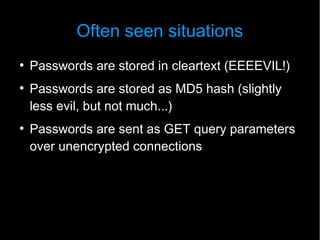
Often seen situations
●
    Passwords are stored in cleartext (EEEEVIL!)
●
    Passwords are stored as MD5 hash (slightly
    less evil, but not much...)
●
    Passwords are sent as GET query parameters
    over unencrypted connections
Why Care?


        Your mama will leak your database
https://www.youtube.com/watch?v=aPWN683KsqU

             Need rainbow tables?
https://www.google.com/search?q=md5+5f4dcc3b5aa
Rainbows, Brony? Cute!
●
    Rainbow Tables are precalculated reverse
    lookup tables for hash digests.
●
    Just ask Google for the easy ones.
●
    Find more specialized tables on shady sites.
●
    Calculate your own, while you're not mining for
    BitCoins.
●
    Having the proper RT enables attackers to find
    your users passwords in minutes!
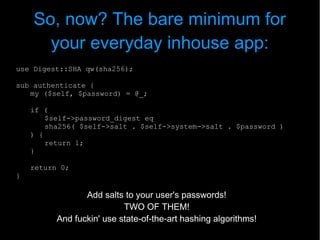
So, now? The bare minimum for
      your everyday inhouse app:
use Digest::SHA qw(sha256);

sub authenticate {
   my ($self, $password) = @_;

    if (
        $self->password_digest eq
        sha256( $self->salt . $self->system->salt . $password )
    ) {
        return 1;
    }

    return 0;
}

                 Add salts to your user's passwords!
                           TWO OF THEM!
          And fuckin' use state-of-the-art hashing algorithms!
User Salt
●
    Generated on password creation/update
●
    Unique per user
●
    Store with the user in the database (own column
    or within password digest column using some
    delimiter)
●
    Use as much randomness as you can get!
    (Quick bet: UUIDs)
●
    This effectively destroys attackers possibility of
    using a single rainbow table.
System Salt
●
    Generated once for your application
●   Lives outside the database (e.g. config file)
●
    Destroys the attackers ability to brute-force the
    passwords easily, when they already have the
    database dump.
For your brand new web 2.0 social
                app: KDF
●
    Kraft Durch Freude?
●
    Key Derivation Functions!
●
    Hashing functions are designed to be fast.
●
    We don't process passwords by the millions
    normally.
●
    We don't need it fast!
●
    KDFs are about doing it slowly, so to make it
    harder for the attacker to crack our passwords.
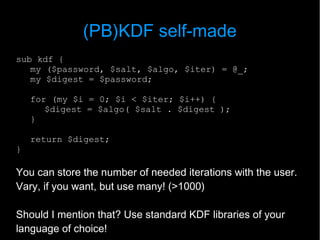
(PB)KDF self-made
sub kdf {
   my ($password, $salt, $algo, $iter) = @_;
   my $digest = $password;

    for (my $i = 0; $i < $iter; $i++) {
       $digest = $algo( $salt . $digest );
    }

    return $digest;
}

You can store the number of needed iterations with the user.
Vary, if you want, but use many! (>1000)

Should I mention that? Use standard KDF libraries of your
language of choice!
Transmitting Passwords
●
    We ain't gonna transmit passwords in the clear
    in 2012!
●
    Bring yourself up to speed, how to configure
    your environment for SSL/TLS!
    Use CAcert for inhouse apps. (I can assure
    you, if you want.)
●
    StartSSL issues free certs which most
    browsers recognize without warning.
Transmitting Passwords cont'd
●
    If SSL is really too much effort:
●
    Do not use credentials in GET queries, these get
    stored in HTTP server logs, which will leak!
●
    At least, use HTTP digest authentication, which
    doesn't transmit the users password.
●
    Or use a JavaScript Challenge-Response
    Authentication (but be really careful about that!)
Transmitting Passwords cont'd
●
    If SSL is really too much effort:
●
    Do not use credentials in GET queries, these get
    stored in HTTP server logs, which will leak!
●
    At least, use HTTP digest authentication, which
    doesn't transmit the users password.
●
    Or use a JavaScript Challenge-Response
    Authentication (but be really careful about that!)
But I can't log in with other
     credentials for debugging now!
●
    That's really NOT a good reason to save
    passwords in the clear.
●
    Add a feature which allows your admin users
    to impersonate any other user on the system!
Password Strength
●
    Educate your users
●
    Show password strength meters in your
    change-password-forms
●
    Disallow weak passwords (server side!!)
Web Services
●
    Do not use username/password credentials,
    especially, if you can't use encryption on
    transport.
●
    Treating web services like users gives another
    attack vector. And there's always this one
    place, where you broke your authorization...
●
    Treat them with different mechanisms, give
    out API keys for them, restrict them to IP
    adresses, domain names, time constraints...

User Credential handling in Web Applications done right

  • 1.
    User Credential handling in Web Applications done right Benjamin Erhart be@benjaminerhart.com
  • 2.
    Often seen situations ● Passwords are stored in cleartext (EEEEVIL!) ● Passwords are stored as MD5 hash (slightly less evil, but not much...) ● Passwords are sent as GET query parameters over unencrypted connections
  • 3.
    Why Care? Your mama will leak your database https://www.youtube.com/watch?v=aPWN683KsqU Need rainbow tables? https://www.google.com/search?q=md5+5f4dcc3b5aa
  • 4.
    Rainbows, Brony? Cute! ● Rainbow Tables are precalculated reverse lookup tables for hash digests. ● Just ask Google for the easy ones. ● Find more specialized tables on shady sites. ● Calculate your own, while you're not mining for BitCoins. ● Having the proper RT enables attackers to find your users passwords in minutes!
  • 5.
    So, now? Thebare minimum for your everyday inhouse app: use Digest::SHA qw(sha256); sub authenticate { my ($self, $password) = @_; if ( $self->password_digest eq sha256( $self->salt . $self->system->salt . $password ) ) { return 1; } return 0; } Add salts to your user's passwords! TWO OF THEM! And fuckin' use state-of-the-art hashing algorithms!
  • 6.
    User Salt ● Generated on password creation/update ● Unique per user ● Store with the user in the database (own column or within password digest column using some delimiter) ● Use as much randomness as you can get! (Quick bet: UUIDs) ● This effectively destroys attackers possibility of using a single rainbow table.
  • 7.
    System Salt ● Generated once for your application ● Lives outside the database (e.g. config file) ● Destroys the attackers ability to brute-force the passwords easily, when they already have the database dump.
  • 8.
    For your brandnew web 2.0 social app: KDF ● Kraft Durch Freude? ● Key Derivation Functions! ● Hashing functions are designed to be fast. ● We don't process passwords by the millions normally. ● We don't need it fast! ● KDFs are about doing it slowly, so to make it harder for the attacker to crack our passwords.
  • 9.
    (PB)KDF self-made sub kdf{ my ($password, $salt, $algo, $iter) = @_; my $digest = $password; for (my $i = 0; $i < $iter; $i++) { $digest = $algo( $salt . $digest ); } return $digest; } You can store the number of needed iterations with the user. Vary, if you want, but use many! (>1000) Should I mention that? Use standard KDF libraries of your language of choice!
  • 10.
    Transmitting Passwords ● We ain't gonna transmit passwords in the clear in 2012! ● Bring yourself up to speed, how to configure your environment for SSL/TLS! Use CAcert for inhouse apps. (I can assure you, if you want.) ● StartSSL issues free certs which most browsers recognize without warning.
  • 11.
    Transmitting Passwords cont'd ● If SSL is really too much effort: ● Do not use credentials in GET queries, these get stored in HTTP server logs, which will leak! ● At least, use HTTP digest authentication, which doesn't transmit the users password. ● Or use a JavaScript Challenge-Response Authentication (but be really careful about that!)
  • 12.
    Transmitting Passwords cont'd ● If SSL is really too much effort: ● Do not use credentials in GET queries, these get stored in HTTP server logs, which will leak! ● At least, use HTTP digest authentication, which doesn't transmit the users password. ● Or use a JavaScript Challenge-Response Authentication (but be really careful about that!)
  • 13.
    But I can'tlog in with other credentials for debugging now! ● That's really NOT a good reason to save passwords in the clear. ● Add a feature which allows your admin users to impersonate any other user on the system!
  • 14.
    Password Strength ● Educate your users ● Show password strength meters in your change-password-forms ● Disallow weak passwords (server side!!)
  • 15.
    Web Services ● Do not use username/password credentials, especially, if you can't use encryption on transport. ● Treating web services like users gives another attack vector. And there's always this one place, where you broke your authorization... ● Treat them with different mechanisms, give out API keys for them, restrict them to IP adresses, domain names, time constraints...