Computer maintenance
Zainab Almugbel
Community College
Imam AbdulRahman Bin Faisal University
Book: A+ Guide to Managing &
Maintaining Your PC, 8th Edition
First Look at Computer
Parts and Tools
A+ Guide to Managing & Maintaining Your PC,
8th Edition
Objectives
• Learn the parts inside a computer case
• Learn how to protect yourself and the
equipment against the dangers of
electricity
• Learn about some tools you will need as
a PC hardware technician
3
What’s Inside the Case
• Computer Case
– What does it hold?
A+ Guide to Managing & Maintaining
Your PC, 8th Edition
4
A+ Guide to Managing & Maintaining
Your PC, 8th Edition
5
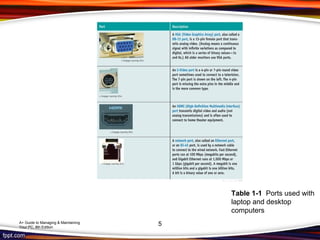
Table 1-1 Ports used with
laptop and desktop
computers
A+ Guide to Managing & Maintaining
Your PC, 8th Edition
6
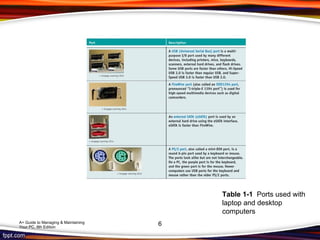
Table 1-1 Ports used with
laptop and desktop
computers
A+ Guide to Managing & Maintaining
Your PC, 8th Edition 7
Figure 1-2 Inside the computer case
What’s Inside the Case
• Motherboard Largest and most
important circuit board
• Processor – central processing unit
(CPU)
– Processes most of the data and instructions
for the entire system
– CPUs generate heat and require a heat sink
and fan (together called the processor
cooler)
A+ Guide to Managing & Maintaining
Your PC, 8th Edition
8
What’s Inside the Case
• Expansion cards
A+ Guide to Managing & Maintaining
Your PC, 8th Edition
9
What’s Inside the Case
• Memory modules – random access
memory (RAM)
– Temporary storage for data and instructions
as they are being processed by the CPU
A+ Guide to Managing & Maintaining
Your PC, 8th Edition
10
What’s Inside the Case
• Hard drives and other drives
– Hard drives may also be called hard disk
drive (HDD)
• Permanent storage used to hold data and
programs
• Use SATA as data cable
– Other drives include: optical drive and tape
drive
A+ Guide to Managing & Maintaining
Your PC, 8th Edition
11
What’s Inside the Case
• Power supply – also called power
supply unit (PSU)
– Receives and converts house current so
that components inside the case can use it
A+ Guide to Managing & Maintaining
Your PC, 8th Edition
12
Form Factors Used by
Computer Cases
• ATX (Advanced Technology Extended)
– supply has a variety of power connectors, for
example:
– 20-pin P1 connector: used by the first ATX
power supplies and motherboards
A+ Guide to Managing & Maintaining
Your PC, 8th Edition
13
A+ Guide to Managing & Maintaining
Your PC, 8th Edition
14
Part Two
Protect your self and Equipemnt
A+ Guide to Managing & Maintaining
Your PC, 8th Edition
15
Protecting Yourself and
Equipment Against Electrical
Dangers
• Important to understand electricity and
how to protect yourself and equipment
against it
• Must learn to prevent getting shocked or
damaging a component
A+ Guide to Managing & Maintaining
Your PC, 8th Edition
16
Measures and Properties of
Electricity
• Alternating current (AC): oscillates between
negative and positive voltage
– House current is AC
• Direct current (DC): travels in one direction
– Type of current used by most electronic
devices
A+ Guide to Managing & Maintaining
Your PC, 8th Edition
17
A+ Guide to Managing & Maintaining
Your PC, 8th Edition
18
Figure 1-31 A polarized plug showing hot and neutral, and a three-prong plug
showing hot, neutral, and ground
Protect Yourself Against
Electrical Shock and Burns
• When working with any electrical device, disconnect
power if you notice a dangerous situation that might
lead to electrical shock or fire.
• Potential dangers might include:
– Power cord is frayed or damaged
– Water or other liquid is spilled near
– Smell
– Power supply or fans make a whining noise
– Smoke
A+ Guide to Managing & Maintaining
Your PC, 8th Edition
19
Protect Yourself Against
Electrical Shock and Burns
• When working on sensitive low-voltage equipment
such as a motherboard or processor:
– Ground yourself
• When working with power supplies, printers, and CRT
monitors that contain capacitors:
– Do not ground yourself
– Power supplies and monitors are considered a field
replaceable unit (FRU)
A+ Guide to Managing & Maintaining
Your PC, 8th Edition
20
Protect Yourself Against
Electrical Shock and Burns
• Never use water to put out a fire
• Use a fire extinguisher that is rated to put out electrical
fires
• Fire extinguisher ratings:
– Class A: can use water to put out fires caused by wood,
paper, or other combustibles
– Class B: can put out fires caused by liquids such as
gasoline, kerosene, and oil
– Class C: use nonconductive chemicals to put out a fire
caused by electricity
A+ Guide to Managing & Maintaining
Your PC, 8th Edition
21
A+ Guide to Managing & Maintaining
Your PC, 8th Edition
22
Figure 1-33 A Class C fire extinguisher is rated to put out electrical fires
Protect the Equipment Against
Static Electricity or ESD
• To protect against ESD, always ground
yourself with one or more of the following
static control methods:
– Ground bracelet
– Ground mats
– Static shielding bags
– Antistatic gloves
A+ Guide to Managing & Maintaining
Your PC, 8th Edition
23
A+ Guide to Managing & Maintaining
Your PC, 8th Edition
24
Tools Used By a PC Repair
Technician
A+ Guide to Managing & Maintaining
Your PC, 8th Edition
25
Power Supply Tester
• Power Supply Tester
– Measures output of each power supply
connector
A+ Guide to Managing & Maintaining
Your PC, 8th Edition
26
Loopback Plugs
• Loopback plug
– Used to test a port in a computer or other
device to make sure the port is working
A+ Guide to Managing & Maintaining
Your PC, 8th Edition
27
Proper Use of Cleaning Pads
and Solutions
• Use cleaning solutions
– Take care when using them
– A Material Safety Data Sheet (MSDS)
A+ Guide to Managing & Maintaining
Your PC, 8th Edition
28
A+ Guide to Managing & Maintaining
Your PC, 8th Edition
29
Figure 1-45 Cleaning solutions and pads
A+ Guide to Managing & Maintaining
Your PC, 8th Edition
Summary
• Ports on a computer
• Internal computer components
• Form factors used by cases
• Protecting against ESD
• Tools a PC support technician might need
30
computer maintenance

computer maintenance

  • 1.
    Computer maintenance Zainab Almugbel CommunityCollege Imam AbdulRahman Bin Faisal University
  • 2.
    Book: A+ Guideto Managing & Maintaining Your PC, 8th Edition First Look at Computer Parts and Tools
  • 3.
    A+ Guide toManaging & Maintaining Your PC, 8th Edition Objectives • Learn the parts inside a computer case • Learn how to protect yourself and the equipment against the dangers of electricity • Learn about some tools you will need as a PC hardware technician 3
  • 4.
    What’s Inside theCase • Computer Case – What does it hold? A+ Guide to Managing & Maintaining Your PC, 8th Edition 4
  • 5.
    A+ Guide toManaging & Maintaining Your PC, 8th Edition 5 Table 1-1 Ports used with laptop and desktop computers
  • 6.
    A+ Guide toManaging & Maintaining Your PC, 8th Edition 6 Table 1-1 Ports used with laptop and desktop computers
  • 7.
    A+ Guide toManaging & Maintaining Your PC, 8th Edition 7 Figure 1-2 Inside the computer case
  • 8.
    What’s Inside theCase • Motherboard Largest and most important circuit board • Processor – central processing unit (CPU) – Processes most of the data and instructions for the entire system – CPUs generate heat and require a heat sink and fan (together called the processor cooler) A+ Guide to Managing & Maintaining Your PC, 8th Edition 8
  • 9.
    What’s Inside theCase • Expansion cards A+ Guide to Managing & Maintaining Your PC, 8th Edition 9
  • 10.
    What’s Inside theCase • Memory modules – random access memory (RAM) – Temporary storage for data and instructions as they are being processed by the CPU A+ Guide to Managing & Maintaining Your PC, 8th Edition 10
  • 11.
    What’s Inside theCase • Hard drives and other drives – Hard drives may also be called hard disk drive (HDD) • Permanent storage used to hold data and programs • Use SATA as data cable – Other drives include: optical drive and tape drive A+ Guide to Managing & Maintaining Your PC, 8th Edition 11
  • 12.
    What’s Inside theCase • Power supply – also called power supply unit (PSU) – Receives and converts house current so that components inside the case can use it A+ Guide to Managing & Maintaining Your PC, 8th Edition 12
  • 13.
    Form Factors Usedby Computer Cases • ATX (Advanced Technology Extended) – supply has a variety of power connectors, for example: – 20-pin P1 connector: used by the first ATX power supplies and motherboards A+ Guide to Managing & Maintaining Your PC, 8th Edition 13
  • 14.
    A+ Guide toManaging & Maintaining Your PC, 8th Edition 14
  • 15.
    Part Two Protect yourself and Equipemnt A+ Guide to Managing & Maintaining Your PC, 8th Edition 15
  • 16.
    Protecting Yourself and EquipmentAgainst Electrical Dangers • Important to understand electricity and how to protect yourself and equipment against it • Must learn to prevent getting shocked or damaging a component A+ Guide to Managing & Maintaining Your PC, 8th Edition 16
  • 17.
    Measures and Propertiesof Electricity • Alternating current (AC): oscillates between negative and positive voltage – House current is AC • Direct current (DC): travels in one direction – Type of current used by most electronic devices A+ Guide to Managing & Maintaining Your PC, 8th Edition 17
  • 18.
    A+ Guide toManaging & Maintaining Your PC, 8th Edition 18 Figure 1-31 A polarized plug showing hot and neutral, and a three-prong plug showing hot, neutral, and ground
  • 19.
    Protect Yourself Against ElectricalShock and Burns • When working with any electrical device, disconnect power if you notice a dangerous situation that might lead to electrical shock or fire. • Potential dangers might include: – Power cord is frayed or damaged – Water or other liquid is spilled near – Smell – Power supply or fans make a whining noise – Smoke A+ Guide to Managing & Maintaining Your PC, 8th Edition 19
  • 20.
    Protect Yourself Against ElectricalShock and Burns • When working on sensitive low-voltage equipment such as a motherboard or processor: – Ground yourself • When working with power supplies, printers, and CRT monitors that contain capacitors: – Do not ground yourself – Power supplies and monitors are considered a field replaceable unit (FRU) A+ Guide to Managing & Maintaining Your PC, 8th Edition 20
  • 21.
    Protect Yourself Against ElectricalShock and Burns • Never use water to put out a fire • Use a fire extinguisher that is rated to put out electrical fires • Fire extinguisher ratings: – Class A: can use water to put out fires caused by wood, paper, or other combustibles – Class B: can put out fires caused by liquids such as gasoline, kerosene, and oil – Class C: use nonconductive chemicals to put out a fire caused by electricity A+ Guide to Managing & Maintaining Your PC, 8th Edition 21
  • 22.
    A+ Guide toManaging & Maintaining Your PC, 8th Edition 22 Figure 1-33 A Class C fire extinguisher is rated to put out electrical fires
  • 23.
    Protect the EquipmentAgainst Static Electricity or ESD • To protect against ESD, always ground yourself with one or more of the following static control methods: – Ground bracelet – Ground mats – Static shielding bags – Antistatic gloves A+ Guide to Managing & Maintaining Your PC, 8th Edition 23
  • 24.
    A+ Guide toManaging & Maintaining Your PC, 8th Edition 24
  • 25.
    Tools Used Bya PC Repair Technician A+ Guide to Managing & Maintaining Your PC, 8th Edition 25
  • 26.
    Power Supply Tester •Power Supply Tester – Measures output of each power supply connector A+ Guide to Managing & Maintaining Your PC, 8th Edition 26
  • 27.
    Loopback Plugs • Loopbackplug – Used to test a port in a computer or other device to make sure the port is working A+ Guide to Managing & Maintaining Your PC, 8th Edition 27
  • 28.
    Proper Use ofCleaning Pads and Solutions • Use cleaning solutions – Take care when using them – A Material Safety Data Sheet (MSDS) A+ Guide to Managing & Maintaining Your PC, 8th Edition 28
  • 29.
    A+ Guide toManaging & Maintaining Your PC, 8th Edition 29 Figure 1-45 Cleaning solutions and pads
  • 30.
    A+ Guide toManaging & Maintaining Your PC, 8th Edition Summary • Ports on a computer • Internal computer components • Form factors used by cases • Protecting against ESD • Tools a PC support technician might need 30