Basic Introduction To Perl Programming
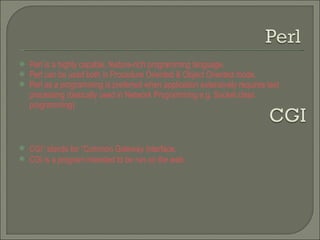
Perl is a highly capable, feature-rich programming language.  Perl can be used both in Procedure Oriented & Object Oriented mode. Perl as a programming is preferred when application extensively requires text processing (basically used in Network Programming e.g. Socket class programming) CGI” stands for “Common Gateway Interface.  CGI is a program intended to be run on the web.
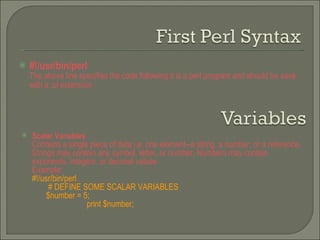
#!/usr/bin/perl The above line specifies the code following it is a perl program and should be save with a .pl extension Scalar Variables   Contains a single piece of data i.e. one element--a string, a number, or a reference. Strings may contain any symbol, letter, or number. Numbers may contain exponents, integers, or decimal values Example:  #!/usr/bin/perl  # DEFINE SOME SCALAR VARIABLES  $number = 5;  print $number;
Array Variables( List Variables)  Arrays contain a list of scalar data (single elements). A list can hold an unlimited number of elements. In Perl, arrays are defined with the at (@) symbol Example: #!/usr/bin/perl #DEFINE SOME ARRAYS @days = ("Monday", "Tuesday", "Wednesday"); print @days;  print  “@days”; [Displays the o/p nicely] Hash  Hashes are complex lists with both a  key  and a  value  part for each element of the list. We define a hash using the percent symbol (%).
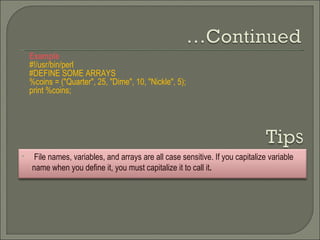
Example  #!/usr/bin/perl #DEFINE SOME ARRAYS %coins = ("Quarter", 25, "Dime", 10, "Nickle", 5); print %coins; File names, variables, and arrays are all case sensitive. If you capitalize variable  name when you define it, you must capitalize it to call it .
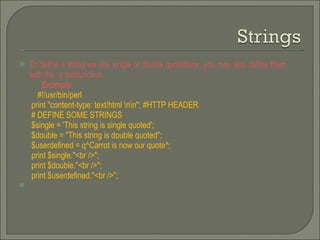
To define a string we use single or double quotations, you may also define them with the  q  subfunction.  Example   #!/usr/bin/perl print &quot;content-type: text/html \n\n&quot;; #HTTP HEADER # DEFINE SOME STRINGS $single = 'This string is single quoted'; $double = &quot;This string is double quoted&quot;; $userdefined = q^Carrot is now our quote^; print $single.&quot;<br />&quot;; print $double.&quot;<br />&quot;; print $userdefined.&quot;<br />&quot;;
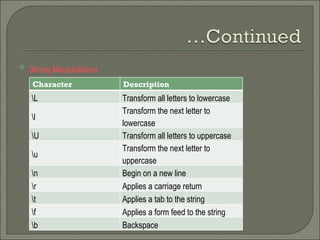
String Manipulation   Character Description \L Transform all letters to lowercase \l Transform the next letter to lowercase \U Transform all letters to uppercase \u Transform the next letter to uppercase \n Begin on a new line \r Applies a carriage return \t Applies a tab to the string \f Applies a form feed to the string \b Backspace
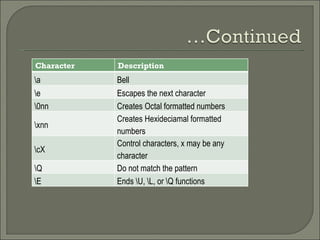
Character Description \a Bell \e Escapes the next character \0nn Creates Octal formatted numbers \xnn Creates Hexideciamal formatted numbers \cX Control characters, x may be any character \Q Do not match the pattern \E Ends \U, \L, or \Q functions
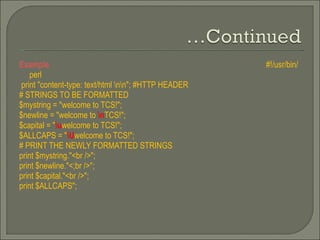
Example  #!/usr/bin/perl print &quot;content-type: text/html \n\n&quot;; #HTTP HEADER # STRINGS TO BE FORMATTED $mystring = &quot;welcome to TCS!&quot;;  $newline = &quot;welcome to  \n TCS!&quot;; $capital = &quot; \u welcome to TCS!&quot;; $ALLCAPS = &quot; \U welcome to TCS!&quot;; # PRINT THE NEWLY FORMATTED STRINGS print $mystring.&quot;<br />&quot;; print $newline.&quot;<;br />&quot;; print $capital.&quot;<br />&quot;; print $ALLCAPS&quot;;
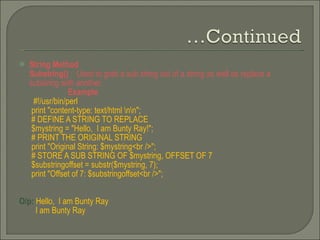
String Method  Substring()  :  Used to grab a sub string out of a string as well as replace a substring with another.  Example   #!/usr/bin/perl print &quot;content-type: text/html \n\n&quot;;  # DEFINE A STRING TO REPLACE $mystring = &quot;Hello,  I am Bunty Ray!&quot;; # PRINT THE ORIGINAL STRING print &quot;Original String: $mystring<br />&quot;; # STORE A SUB STRING OF $mystring, OFFSET OF 7 $substringoffset = substr($mystring, 7); print &quot;Offset of 7: $substringoffset<br />&quot;;  O/p:  Hello,  I am Bunty Ray  I am Bunty Ray
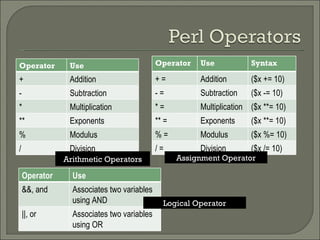
Arithmetic Operators Assignment Operator Logical Operator Operator Use + Addition - Subtraction * Multiplication ** Exponents % Modulus / Division Operator Use Syntax + = Addition ($x += 10) - = Subtraction ($x -= 10) * = Multiplication ($x **= 10) ** = Exponents ($x **= 10) % = Modulus ($x %= 10) / = Division ($x /= 10) Operator Use &&, and Associates two variables using AND ||, or  Associates two variables using OR
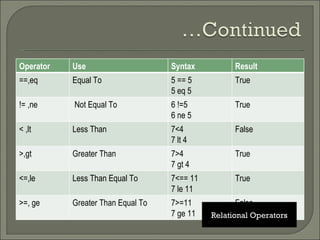
Relational Operators Operator Use Syntax Result ==,eq Equal To 5 == 5 5 eq 5 True != ,ne Not Equal To 6 !=5 6 ne 5 True < ,lt Less Than 7<4 7 lt 4 False >,gt Greater Than 7>4 7 gt 4 True <=,le Less Than Equal To 7<== 11 7 le 11 True >=, ge Greater Than Equal To 7>=11 7 ge 11 False
Indexing  Each element of the array can be indexed using a scalar version of the same array. When an array is defined, PERL automatically numbers each element in the array beginning with zero. This phenomenon is termed  array indexing. Example: #!/usr/bin/perl  print &quot;content-type: text/html \n\n&quot;;  # DEFINE AN ARRAY  @coins = (&quot;Quarter&quot;,&quot;Dime&quot;,&quot;Nickel&quot;);  # PRINT THE WHOLE ARRAY  print &quot;@coins&quot;;  print &quot;<br />&quot;;  print $coins[0]; #Prints the first element Quater print &quot;<br />&quot;;  print $coins[1]; #Prints the 2nd element Dime Elements can also be indexed backwards using  negative  integers instead of positive numbers. print $coins[-1]  #Prints the last element Nickel print $coins[-2]; #Prints 2nd to last element Dime
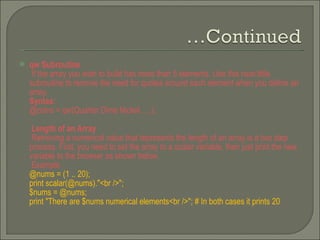
qw Subroutine If the array you wish to build has more than 5 elements. Use this neat little subroutine to remove the need for quotes around each element when you define an array. Syntax : @coins = qw(Quarter Dime Nickel ….); Length of an Array Retrieving a numerical value that represents the length of an array is a two step  process. First, you need to set the array to a scalar variable, then just print the new variable to the browser as shown below. Example @nums = (1 .. 20); print scalar(@nums).&quot;<br />&quot;; $nums = @nums; print &quot;There are $nums numerical elements<br />&quot;; # In both cases it prints 20
Adding and Removing Elements from & to an Array Example @solom = (“Manoj”,”Mukesh”,”Suresh); push(@solom, Ramesh); # Adds Ramesh to the end of the Array delete $solom [1];  # Removes the value on index 1 i.e. Mukesh Methods use push() adds an element to the end of an array.  unshift() adds an element to the beginning of an array pop() removes the last element of an array shift()  removes the first element of an array.
splice() Replacing elements is possible with the  splice()  function Syntax: splice(@array,first-element,sequential_length,name of new elements). Example @nums = (1..20); splice(@nums, 5,5,21..25);  print &quot;@nums&quot;; Here in the above example the replacement begins after the 5th element, starting  with the number 6 in the example above. Five elements are then replaced from 6-10 with the numbers 21-25. split() Transform a string into an array. The   split function requires two arguments, first the  character of which to split and also the string variable .
Example #!/usr/bin/perl print &quot;content-type: text/html \n\n&quot;; #HTTP HEADER # DEFINED STRINGS $astring = &quot;Rain-Drops-On-Roses-And-Whiskers-On-Kittens&quot;; $namelist = &quot;Larry,David,Roger,Ken,Michael,Tom&quot;; # STRINGS ARE NOW ARRAYS @array = split('-',$astring); @names = split(',',$namelist); # PRINT THE NEW ARRAYS print @array.&quot;<br />&quot;; print &quot;@names&quot;; In the first example, the split was called at each hyphen. In the latter example the names were split by a comma, allowing for the split to take place between each name O/P : Rain Drops On Roses And Whiskers On Kittens   Larry David Roger Ken Michael Tom
join() join() function to rejoin the array elements and form one long, scalar string. #!/usr/bin/perl print &quot;content-type: text/html \n\n&quot;; #HTTP HEADER # A COUPLE OF ARRAYS @array = (&quot;David&quot;,&quot;Larry&quot;,&quot;Roger&quot;,&quot;Ken&quot;,&quot;Michael&quot;,&quot;Tom&quot;); @array2 = qw(Pizza Steak Chicken Burgers); # JOIN 'EM TOGETHER $firststring = join(&quot;, &quot;,@array); $secondstring = join(&quot; &quot;,@array2); # PRINT THE STRINGS print &quot;$astring<br />&quot;; print &quot;$string&quot;; O/p: David,Larry,Roger,Ken,Michael,Tom   Pizza Steak Chicken Burgers
Control Structures If / unless statements While / until statements For statements Foreach statements Last , next , redo statements && And || as control structures
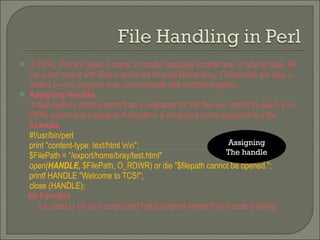
In PERL files are given a name, a handle, basically another way of saying alias. All input and output with files is achieved through filehandling. Filehandles are also a means by one program may communicate with another program. Assigning Handles A filehandle is nothing more than a nickname for the files you intend to use in your PERL scripts and programs. A handle is a temporary name assigned to a file. Example #!/usr/bin/perl print &quot;content-type: text/html \n\n&quot;;  $FilePath = “/export/home/bray/test.html&quot; open( HANDLE,  $FilePath, O_RDWR) or die &quot;$filepath cannot be opened.&quot;; printf HANDLE &quot;Welcome to TCS!&quot;; close (HANDLE); die Function  It is used to kill your scripts and helps pinpoint where/if your code is failing Assigning The handle
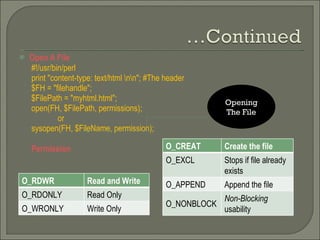
Open A File #!/usr/bin/perl print &quot;content-type: text/html \n\n&quot;; #The header $FH = &quot;filehandle&quot;; $FilePath = &quot;myhtml.html&quot;; open(FH, $FilePath, permissions); or sysopen(FH, $FileName, permission); Permission Opening The File O_RDWR Read and Write O_RDONLY Read Only O_WRONLY Write Only O_CREAT Create the file O_EXCL Stops if file already exists O_APPEND Append the file O_NONBLOCK Non-Blocking  usability
Following the example above when we called our HTML file handle using the input operator, PERL automatically stored each line of the file into a global array . #!/usr/bin/perl print &quot;content-type: text/html \n\n&quot;; #The header $HTML = &quot;myhtml.html&quot;; open (HTML) or die &quot;Can't open the file!&quot;; @fileinput = <HTML>; print $fileinput[0]; print $fileinput[1]; print $fileinput[2]; print &quot;<table border='1' align='center'><tr> <td>Dynamic</td><td>Table</td></tr>&quot;; print &quot;<tr><td>Temporarily Inserted</td> <td>Using PERL!</td></tr></table>&quot;; print $fileinput[3]; close (HTML);
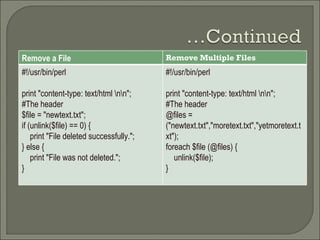
Remove a File Remove Multiple Files #!/usr/bin/perl print &quot;content-type: text/html \n\n&quot;; #The header $file = &quot;newtext.txt&quot;; if (unlink($file) == 0) { print &quot;File deleted successfully.&quot;; } else { print &quot;File was not deleted.&quot;; } #!/usr/bin/perl print &quot;content-type: text/html \n\n&quot;; #The header @files = (&quot;newtext.txt&quot;,&quot;moretext.txt&quot;,&quot;yetmoretext.txt&quot;); foreach $file (@files) { unlink($file); }
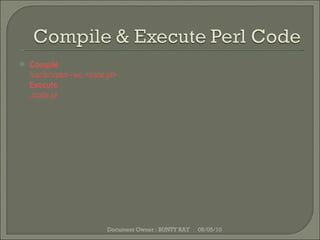
Compile /usr/bin/perl –wc <code.pl> Execute ./code.pl 08/05/10 Document Owner : BUNTY RAY

CGI With Object Oriented Perl

  • 1.
    Basic Introduction ToPerl Programming
  • 2.
    Perl is ahighly capable, feature-rich programming language. Perl can be used both in Procedure Oriented & Object Oriented mode. Perl as a programming is preferred when application extensively requires text processing (basically used in Network Programming e.g. Socket class programming) CGI” stands for “Common Gateway Interface. CGI is a program intended to be run on the web.
  • 3.
    #!/usr/bin/perl The aboveline specifies the code following it is a perl program and should be save with a .pl extension Scalar Variables Contains a single piece of data i.e. one element--a string, a number, or a reference. Strings may contain any symbol, letter, or number. Numbers may contain exponents, integers, or decimal values Example: #!/usr/bin/perl # DEFINE SOME SCALAR VARIABLES $number = 5; print $number;
  • 4.
    Array Variables( ListVariables) Arrays contain a list of scalar data (single elements). A list can hold an unlimited number of elements. In Perl, arrays are defined with the at (@) symbol Example: #!/usr/bin/perl #DEFINE SOME ARRAYS @days = (&quot;Monday&quot;, &quot;Tuesday&quot;, &quot;Wednesday&quot;); print @days; print “@days”; [Displays the o/p nicely] Hash Hashes are complex lists with both a key and a value part for each element of the list. We define a hash using the percent symbol (%).
  • 5.
    Example #!/usr/bin/perl#DEFINE SOME ARRAYS %coins = (&quot;Quarter&quot;, 25, &quot;Dime&quot;, 10, &quot;Nickle&quot;, 5); print %coins; File names, variables, and arrays are all case sensitive. If you capitalize variable name when you define it, you must capitalize it to call it .
  • 6.
    To define astring we use single or double quotations, you may also define them with the q subfunction. Example #!/usr/bin/perl print &quot;content-type: text/html \n\n&quot;; #HTTP HEADER # DEFINE SOME STRINGS $single = 'This string is single quoted'; $double = &quot;This string is double quoted&quot;; $userdefined = q^Carrot is now our quote^; print $single.&quot;<br />&quot;; print $double.&quot;<br />&quot;; print $userdefined.&quot;<br />&quot;;
  • 7.
    String Manipulation Character Description \L Transform all letters to lowercase \l Transform the next letter to lowercase \U Transform all letters to uppercase \u Transform the next letter to uppercase \n Begin on a new line \r Applies a carriage return \t Applies a tab to the string \f Applies a form feed to the string \b Backspace
  • 8.
    Character Description \aBell \e Escapes the next character \0nn Creates Octal formatted numbers \xnn Creates Hexideciamal formatted numbers \cX Control characters, x may be any character \Q Do not match the pattern \E Ends \U, \L, or \Q functions
  • 9.
    Example #!/usr/bin/perlprint &quot;content-type: text/html \n\n&quot;; #HTTP HEADER # STRINGS TO BE FORMATTED $mystring = &quot;welcome to TCS!&quot;; $newline = &quot;welcome to \n TCS!&quot;; $capital = &quot; \u welcome to TCS!&quot;; $ALLCAPS = &quot; \U welcome to TCS!&quot;; # PRINT THE NEWLY FORMATTED STRINGS print $mystring.&quot;<br />&quot;; print $newline.&quot;<;br />&quot;; print $capital.&quot;<br />&quot;; print $ALLCAPS&quot;;
  • 10.
    String Method Substring() : Used to grab a sub string out of a string as well as replace a substring with another. Example #!/usr/bin/perl print &quot;content-type: text/html \n\n&quot;; # DEFINE A STRING TO REPLACE $mystring = &quot;Hello, I am Bunty Ray!&quot;; # PRINT THE ORIGINAL STRING print &quot;Original String: $mystring<br />&quot;; # STORE A SUB STRING OF $mystring, OFFSET OF 7 $substringoffset = substr($mystring, 7); print &quot;Offset of 7: $substringoffset<br />&quot;; O/p: Hello, I am Bunty Ray I am Bunty Ray
  • 11.
    Arithmetic Operators AssignmentOperator Logical Operator Operator Use + Addition - Subtraction * Multiplication ** Exponents % Modulus / Division Operator Use Syntax + = Addition ($x += 10) - = Subtraction ($x -= 10) * = Multiplication ($x **= 10) ** = Exponents ($x **= 10) % = Modulus ($x %= 10) / = Division ($x /= 10) Operator Use &&, and Associates two variables using AND ||, or Associates two variables using OR
  • 12.
    Relational Operators OperatorUse Syntax Result ==,eq Equal To 5 == 5 5 eq 5 True != ,ne Not Equal To 6 !=5 6 ne 5 True < ,lt Less Than 7<4 7 lt 4 False >,gt Greater Than 7>4 7 gt 4 True <=,le Less Than Equal To 7<== 11 7 le 11 True >=, ge Greater Than Equal To 7>=11 7 ge 11 False
  • 13.
    Indexing Eachelement of the array can be indexed using a scalar version of the same array. When an array is defined, PERL automatically numbers each element in the array beginning with zero. This phenomenon is termed array indexing. Example: #!/usr/bin/perl print &quot;content-type: text/html \n\n&quot;; # DEFINE AN ARRAY @coins = (&quot;Quarter&quot;,&quot;Dime&quot;,&quot;Nickel&quot;); # PRINT THE WHOLE ARRAY print &quot;@coins&quot;; print &quot;<br />&quot;; print $coins[0]; #Prints the first element Quater print &quot;<br />&quot;; print $coins[1]; #Prints the 2nd element Dime Elements can also be indexed backwards using negative integers instead of positive numbers. print $coins[-1] #Prints the last element Nickel print $coins[-2]; #Prints 2nd to last element Dime
  • 14.
    qw Subroutine Ifthe array you wish to build has more than 5 elements. Use this neat little subroutine to remove the need for quotes around each element when you define an array. Syntax : @coins = qw(Quarter Dime Nickel ….); Length of an Array Retrieving a numerical value that represents the length of an array is a two step process. First, you need to set the array to a scalar variable, then just print the new variable to the browser as shown below. Example @nums = (1 .. 20); print scalar(@nums).&quot;<br />&quot;; $nums = @nums; print &quot;There are $nums numerical elements<br />&quot;; # In both cases it prints 20
  • 15.
    Adding and RemovingElements from & to an Array Example @solom = (“Manoj”,”Mukesh”,”Suresh); push(@solom, Ramesh); # Adds Ramesh to the end of the Array delete $solom [1]; # Removes the value on index 1 i.e. Mukesh Methods use push() adds an element to the end of an array. unshift() adds an element to the beginning of an array pop() removes the last element of an array shift() removes the first element of an array.
  • 16.
    splice() Replacing elementsis possible with the splice() function Syntax: splice(@array,first-element,sequential_length,name of new elements). Example @nums = (1..20); splice(@nums, 5,5,21..25); print &quot;@nums&quot;; Here in the above example the replacement begins after the 5th element, starting with the number 6 in the example above. Five elements are then replaced from 6-10 with the numbers 21-25. split() Transform a string into an array. The split function requires two arguments, first the character of which to split and also the string variable .
  • 17.
    Example #!/usr/bin/perl print&quot;content-type: text/html \n\n&quot;; #HTTP HEADER # DEFINED STRINGS $astring = &quot;Rain-Drops-On-Roses-And-Whiskers-On-Kittens&quot;; $namelist = &quot;Larry,David,Roger,Ken,Michael,Tom&quot;; # STRINGS ARE NOW ARRAYS @array = split('-',$astring); @names = split(',',$namelist); # PRINT THE NEW ARRAYS print @array.&quot;<br />&quot;; print &quot;@names&quot;; In the first example, the split was called at each hyphen. In the latter example the names were split by a comma, allowing for the split to take place between each name O/P : Rain Drops On Roses And Whiskers On Kittens Larry David Roger Ken Michael Tom
  • 18.
    join() join() functionto rejoin the array elements and form one long, scalar string. #!/usr/bin/perl print &quot;content-type: text/html \n\n&quot;; #HTTP HEADER # A COUPLE OF ARRAYS @array = (&quot;David&quot;,&quot;Larry&quot;,&quot;Roger&quot;,&quot;Ken&quot;,&quot;Michael&quot;,&quot;Tom&quot;); @array2 = qw(Pizza Steak Chicken Burgers); # JOIN 'EM TOGETHER $firststring = join(&quot;, &quot;,@array); $secondstring = join(&quot; &quot;,@array2); # PRINT THE STRINGS print &quot;$astring<br />&quot;; print &quot;$string&quot;; O/p: David,Larry,Roger,Ken,Michael,Tom Pizza Steak Chicken Burgers
  • 19.
    Control Structures If/ unless statements While / until statements For statements Foreach statements Last , next , redo statements && And || as control structures
  • 20.
    In PERL filesare given a name, a handle, basically another way of saying alias. All input and output with files is achieved through filehandling. Filehandles are also a means by one program may communicate with another program. Assigning Handles A filehandle is nothing more than a nickname for the files you intend to use in your PERL scripts and programs. A handle is a temporary name assigned to a file. Example #!/usr/bin/perl print &quot;content-type: text/html \n\n&quot;; $FilePath = “/export/home/bray/test.html&quot; open( HANDLE, $FilePath, O_RDWR) or die &quot;$filepath cannot be opened.&quot;; printf HANDLE &quot;Welcome to TCS!&quot;; close (HANDLE); die Function It is used to kill your scripts and helps pinpoint where/if your code is failing Assigning The handle
  • 21.
    Open A File#!/usr/bin/perl print &quot;content-type: text/html \n\n&quot;; #The header $FH = &quot;filehandle&quot;; $FilePath = &quot;myhtml.html&quot;; open(FH, $FilePath, permissions); or sysopen(FH, $FileName, permission); Permission Opening The File O_RDWR Read and Write O_RDONLY Read Only O_WRONLY Write Only O_CREAT Create the file O_EXCL Stops if file already exists O_APPEND Append the file O_NONBLOCK Non-Blocking usability
  • 22.
    Following the exampleabove when we called our HTML file handle using the input operator, PERL automatically stored each line of the file into a global array . #!/usr/bin/perl print &quot;content-type: text/html \n\n&quot;; #The header $HTML = &quot;myhtml.html&quot;; open (HTML) or die &quot;Can't open the file!&quot;; @fileinput = <HTML>; print $fileinput[0]; print $fileinput[1]; print $fileinput[2]; print &quot;<table border='1' align='center'><tr> <td>Dynamic</td><td>Table</td></tr>&quot;; print &quot;<tr><td>Temporarily Inserted</td> <td>Using PERL!</td></tr></table>&quot;; print $fileinput[3]; close (HTML);
  • 23.
    Remove a FileRemove Multiple Files #!/usr/bin/perl print &quot;content-type: text/html \n\n&quot;; #The header $file = &quot;newtext.txt&quot;; if (unlink($file) == 0) { print &quot;File deleted successfully.&quot;; } else { print &quot;File was not deleted.&quot;; } #!/usr/bin/perl print &quot;content-type: text/html \n\n&quot;; #The header @files = (&quot;newtext.txt&quot;,&quot;moretext.txt&quot;,&quot;yetmoretext.txt&quot;); foreach $file (@files) { unlink($file); }
  • 24.
    Compile /usr/bin/perl –wc<code.pl> Execute ./code.pl 08/05/10 Document Owner : BUNTY RAY

Editor's Notes

  • #2 BUNTY RAY BT-CISP Infrastructure Designer