K N O W   Camera Y O U R
To get your best pictures you must understand the basics of your camera Read the Manual! Then read it again - and operate each basic feature as you read - Take a few pictures based on what you read
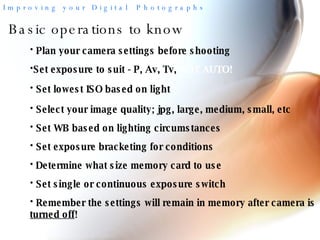
Basic operations to know Plan your camera settings before shooting Set lowest ISO based on light Select your image quality; jpg, large, medium, small, etc Set WB based on lighting circumstances Set exposure bracketing for conditions Determine what size memory card to use  Remember the settings will remain in memory after camera is  turned off !  Set single or continuous exposure switch Set exposure to suit - P, Av, Tv,  NOT AUTO!
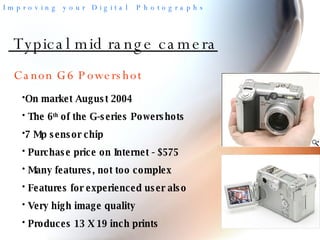
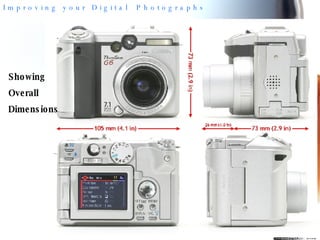
Typical mid range camera On market August 2004 The 6 th  of the G-series Powershots 7 Mp sensor chip Purchase price on Internet - $575 Many features, not too complex Features for experienced user also Very high image quality Produces 13 X 19 inch prints Canon G6 Powershot
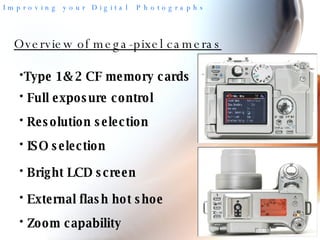
Overview of mega-pixel cameras Type 1& 2 CF memory cards Full exposure control Resolution selection ISO selection Bright LCD screen External flash hot shoe Zoom capability
Showing Overall Dimensions
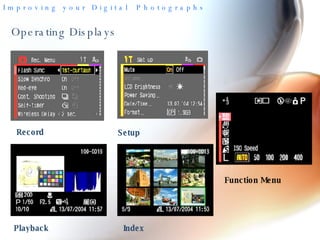
Operating Displays Record Setup Playback Index Function Menu
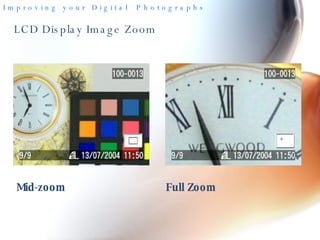
LCD Display Image Zoom Mid-zoom Full Zoom
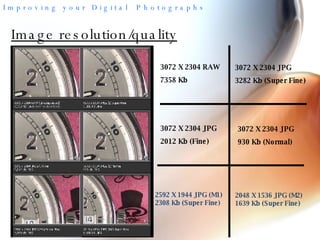
Image resolution/quality 3072 X 2304 RAW 7358 Kb 3072 X 2304 JPG 3282 Kb (Super Fine) 3072 X 2304 JPG 2012 Kb (Fine) 3072 X 2304 JPG 930 Kb (Normal) 2592 X 1944 JPG (M1) 2308 Kb (Super Fine) 2048 X 1536 JPG (M2) 1639 Kb (Super Fine)
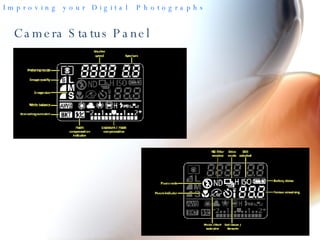
Camera Status Panel
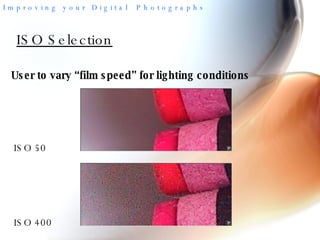
ISO Selection User to vary “film speed” for lighting conditions ISO 50 ISO 400
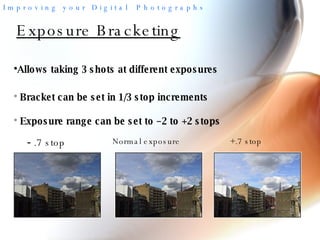
Exposure Bracketing Allows taking 3 shots at different exposures -  .7 stop Normal exposure +.7 stop Bracket can be set in 1/3 stop increments Exposure range can be set to –2 to +2 stops
The World of Digital Photography Getting your pictures into the computer  USB cable from camera to computer Need camera’s software for transfer Transfer rate is very slow … .a better way is
The World of Digital Photography Transfer using a card reader USB 2.0 cable reader to computer Computer sees card as external disk drive Very fast transfer of images Multiple cards in some single readers Usually requires a CD driver disk with reader Most readers are low cost devices
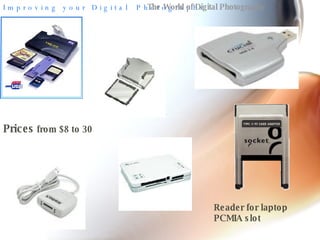
The World of Digital Photography Prices  from $8 to 30 Reader for laptop PCMIA slot
The World of Digital Photography Scan your old 35mm slides Archive your memories in a modern form After scanning, the slides are now digital images Digitized slides can be used same as images from the digital camera
The World of Digital Photography Scan your old 35mm slides - 2 The main task is to organize the slides When you review them after many years, you may decide to throw out some! Scanned old images are great for showing to family members that have long forgotten them
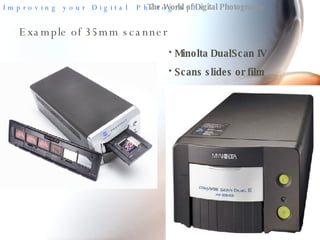
The World of Digital Photography Example of 35mm scanner Minolta DualScan IV Scans slides or film
Slide Shows! Next step in using your camera is making
Creating slide shows Better than the old “carousel days” Slide show creation software –  some good, some not “ Pictures to EXE” is one of the best Low price – download from Internet - $24
Above all  -  Have  FUN  with your photography

Know Your Camera

  • 1.
    K N OW Camera Y O U R
  • 2.
    To get yourbest pictures you must understand the basics of your camera Read the Manual! Then read it again - and operate each basic feature as you read - Take a few pictures based on what you read
  • 3.
    Basic operations toknow Plan your camera settings before shooting Set lowest ISO based on light Select your image quality; jpg, large, medium, small, etc Set WB based on lighting circumstances Set exposure bracketing for conditions Determine what size memory card to use Remember the settings will remain in memory after camera is turned off ! Set single or continuous exposure switch Set exposure to suit - P, Av, Tv, NOT AUTO!
  • 4.
    Typical mid rangecamera On market August 2004 The 6 th of the G-series Powershots 7 Mp sensor chip Purchase price on Internet - $575 Many features, not too complex Features for experienced user also Very high image quality Produces 13 X 19 inch prints Canon G6 Powershot
  • 5.
    Overview of mega-pixelcameras Type 1& 2 CF memory cards Full exposure control Resolution selection ISO selection Bright LCD screen External flash hot shoe Zoom capability
  • 6.
  • 7.
    Operating Displays RecordSetup Playback Index Function Menu
  • 8.
    LCD Display ImageZoom Mid-zoom Full Zoom
  • 9.
    Image resolution/quality 3072X 2304 RAW 7358 Kb 3072 X 2304 JPG 3282 Kb (Super Fine) 3072 X 2304 JPG 2012 Kb (Fine) 3072 X 2304 JPG 930 Kb (Normal) 2592 X 1944 JPG (M1) 2308 Kb (Super Fine) 2048 X 1536 JPG (M2) 1639 Kb (Super Fine)
  • 10.
  • 11.
    ISO Selection Userto vary “film speed” for lighting conditions ISO 50 ISO 400
  • 12.
    Exposure Bracketing Allowstaking 3 shots at different exposures - .7 stop Normal exposure +.7 stop Bracket can be set in 1/3 stop increments Exposure range can be set to –2 to +2 stops
  • 13.
    The World ofDigital Photography Getting your pictures into the computer USB cable from camera to computer Need camera’s software for transfer Transfer rate is very slow … .a better way is
  • 14.
    The World ofDigital Photography Transfer using a card reader USB 2.0 cable reader to computer Computer sees card as external disk drive Very fast transfer of images Multiple cards in some single readers Usually requires a CD driver disk with reader Most readers are low cost devices
  • 15.
    The World ofDigital Photography Prices from $8 to 30 Reader for laptop PCMIA slot
  • 16.
    The World ofDigital Photography Scan your old 35mm slides Archive your memories in a modern form After scanning, the slides are now digital images Digitized slides can be used same as images from the digital camera
  • 17.
    The World ofDigital Photography Scan your old 35mm slides - 2 The main task is to organize the slides When you review them after many years, you may decide to throw out some! Scanned old images are great for showing to family members that have long forgotten them
  • 18.
    The World ofDigital Photography Example of 35mm scanner Minolta DualScan IV Scans slides or film
  • 19.
    Slide Shows! Nextstep in using your camera is making
  • 20.
    Creating slide showsBetter than the old “carousel days” Slide show creation software – some good, some not “ Pictures to EXE” is one of the best Low price – download from Internet - $24
  • 21.
    Above all - Have FUN with your photography