1
Course Name: CAD I Grade Level(s): 9-12
Department: Technology Department Credits: 5
BOE Adoption Date: September 22, 2014 Revision Date(s):
ABSTRACT
In Introduction to Computer Aided Design I (CAD), students will learn how to use industry leading AutoCAD software program to model
construction projects, and then create and distribute basic, industry-standard architectural drawings. Throughout CAD I, students will (1) create
2D images in CAD, (2) design and print a blueprint of a land development project on campus, (3) create 3D sketches and shapes from drawings,
(4) create basic 3D models using the 3D printer, (5) demonstrate proper use of the 3D scanner, (6) re-create a 3D model of a “real world” object,
(7) assemble a gear train and determine its ratio, and (8) demonstrate a mastery of the Design Process by creating an Invention or Innovation
and giving a proposal to a panel of investors. By the end of CAD I, students will be better prepared to continue their education in this field and
have an understanding for how the world around them is designed and produced.
2
TABLE OF CONTENTS
Mission Statement Page 3
Curriculum and Instruction Goals Page 3
Philosophy of Shared Curriculum Service with South Harrison Township Elementary Page 3
How to Read this Document Page 4
Terms to Know Page 4
Pacing Guide Page(s) 7-10
Curriculum Units Page(s) 12-51
3
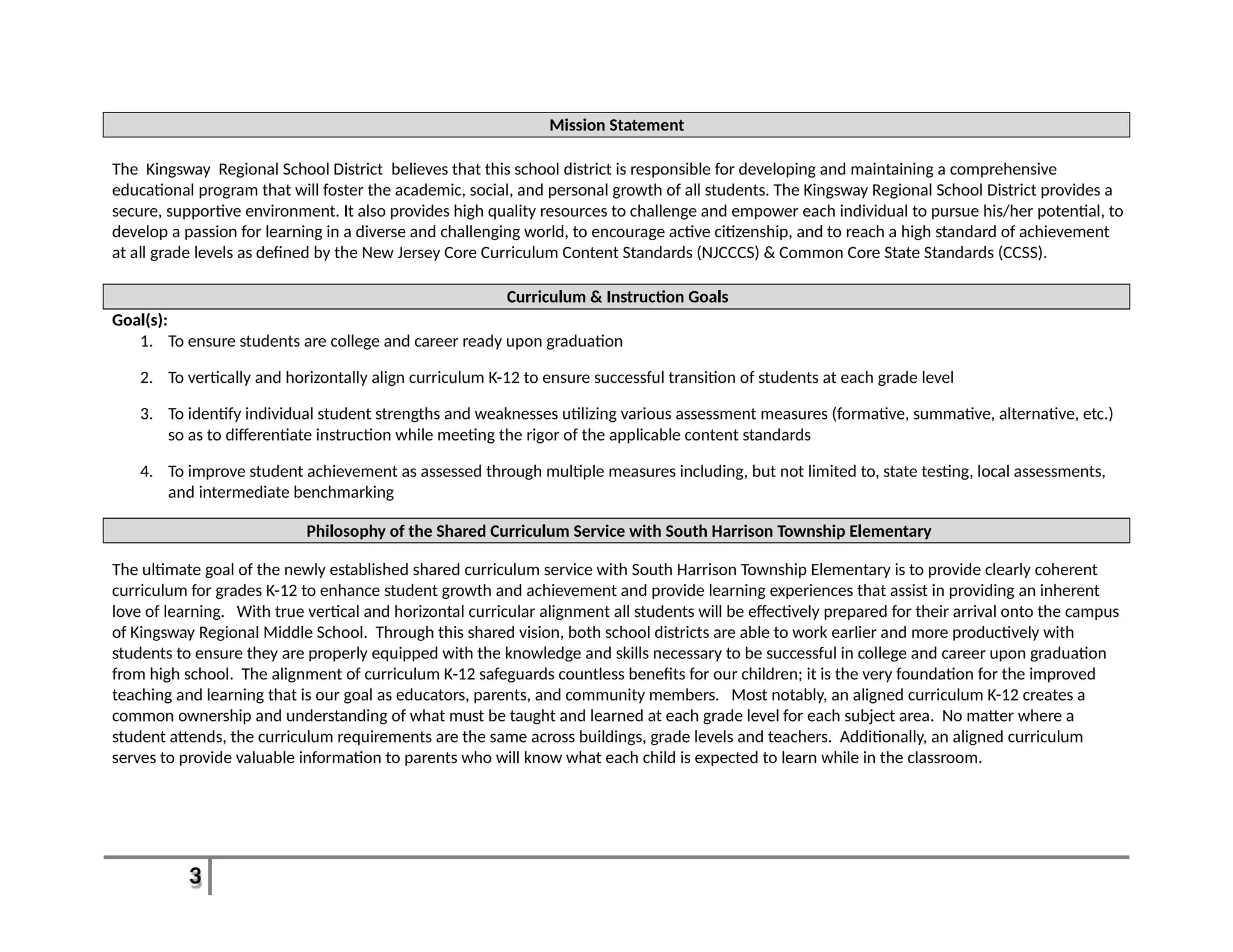
Mission Statement
The Kingsway Regional School District believes that this school district is responsible for developing and maintaining a comprehensive
educational program that will foster the academic, social, and personal growth of all students. The Kingsway Regional School District provides a
secure, supportive environment. It also provides high quality resources to challenge and empower each individual to pursue his/her potential, to
develop a passion for learning in a diverse and challenging world, to encourage active citizenship, and to reach a high standard of achievement
at all grade levels as defined by the New Jersey Core Curriculum Content Standards (NJCCCS) & Common Core State Standards (CCSS).
Curriculum & Instruction Goals
Goal(s):
1. To ensure students are college and career ready upon graduation
2. To vertically and horizontally align curriculum K-12 to ensure successful transition of students at each grade level
3. To identify individual student strengths and weaknesses utilizing various assessment measures (formative, summative, alternative, etc.)
so as to differentiate instruction while meeting the rigor of the applicable content standards
4. To improve student achievement as assessed through multiple measures including, but not limited to, state testing, local assessments,
and intermediate benchmarking
Philosophy of the Shared Curriculum Service with South Harrison Township Elementary
The ultimate goal of the newly established shared curriculum service with South Harrison Township Elementary is to provide clearly coherent
curriculum for grades K-12 to enhance student growth and achievement and provide learning experiences that assist in providing an inherent
love of learning. With true vertical and horizontal curricular alignment all students will be effectively prepared for their arrival onto the campus
of Kingsway Regional Middle School. Through this shared vision, both school districts are able to work earlier and more productively with
students to ensure they are properly equipped with the knowledge and skills necessary to be successful in college and career upon graduation
from high school. The alignment of curriculum K-12 safeguards countless benefits for our children; it is the very foundation for the improved
teaching and learning that is our goal as educators, parents, and community members. Most notably, an aligned curriculum K-12 creates a
common ownership and understanding of what must be taught and learned at each grade level for each subject area. No matter where a
student attends, the curriculum requirements are the same across buildings, grade levels and teachers. Additionally, an aligned curriculum
serves to provide valuable information to parents who will know what each child is expected to learn while in the classroom.
4
How to Read this Document
This curricular document contains both pacing guides and curriculum units. The pacing guides serve to communicate an estimated timeframe as
to when skills and topics will be taught throughout the year. The pacing, however, may differ slightly depending upon the unique needs of each
learner. The curriculum units contain more detailed information as to the content, goals, and objectives of the course well as how students will
be assessed. The terms and definitions below will assist the reader to better understand the sections and components of this curriculum
document.
Terms to Know
1. Accommodation(s): The term "accommodation" may be used to describe an alteration of environment, curriculum format, or
equipment that allows an individual with a disability to gain access to content and/or complete assigned tasks. They allow students with
disabilities to pursue a regular course of study. The term accommodation is often used interchangeable with the term modification.
However, it is important to remember that modifications change or modify the intended learning goal while accommodations result in
the same learning goal being expected but with added assistance in that achievement. Since accommodations do not alter what is
being taught, instructors should be able to implement the same grading scale for students with disabilities as they do for students
without disabilities.
2. Differentiated Instruction: Differentiation of instruction relies on the idea that instructional approaches should be tailored to each individual
student’s learning needs. It provides students an array of options during the learning process that allows them make sense of ideas as it
relates to them. The integration of differentiated instructional techniques is a curriculum design approach to increase flexibility in teaching
and decrease the barriers that frequently limit student access to materials and learning in classrooms.
3. Enduring Understanding: Enduring understandings (aka big ideas) are statements of understanding that articulate deep conceptual
understandings at the heart of each content area. Enduring understandings are noted in the alongside essential questions within each
unit in this document.
4. Essential Question: These are questions whose purpose is to stimulate thought, to provoke inquiry, and to spark more questions. They
extend beyond a single lesson or unit. Essential questions are noted in the beginning of each unit in this document.
5. Formative Assessments: Formative assessments monitor student learning to provide ongoing feedback that can be used by (1)
instructors to improve teaching and (2) by students to improve their learning. Formative assessments help identify students’ strengths
and weaknesses and address problems immediately.
6. Learning Activity(s): Learning activities are those activities that take place in the classroom for which the teacher facilitates and the
5
students participate in to ensure active engagement in the learning process. (Robert J. Marzano, The Art and Science of Teaching)
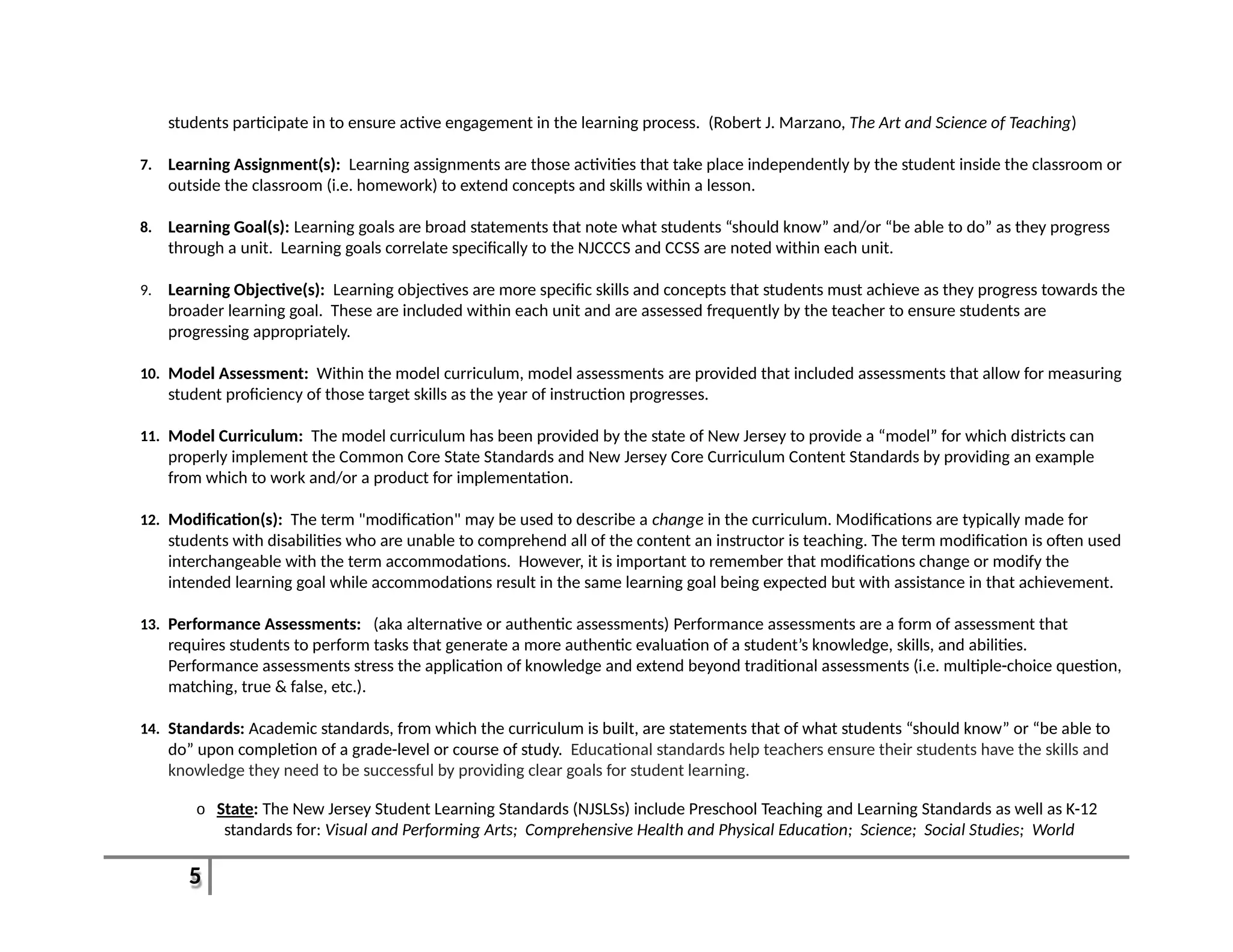
7. Learning Assignment(s): Learning assignments are those activities that take place independently by the student inside the classroom or
outside the classroom (i.e. homework) to extend concepts and skills within a lesson.
8. Learning Goal(s): Learning goals are broad statements that note what students “should know” and/or “be able to do” as they progress
through a unit. Learning goals correlate specifically to the NJCCCS and CCSS are noted within each unit.
9. Learning Objective(s): Learning objectives are more specific skills and concepts that students must achieve as they progress towards the
broader learning goal. These are included within each unit and are assessed frequently by the teacher to ensure students are
progressing appropriately.
10. Model Assessment: Within the model curriculum, model assessments are provided that included assessments that allow for measuring
student proficiency of those target skills as the year of instruction progresses.
11. Model Curriculum: The model curriculum has been provided by the state of New Jersey to provide a “model” for which districts can
properly implement the Common Core State Standards and New Jersey Core Curriculum Content Standards by providing an example
from which to work and/or a product for implementation.
12. Modification(s): The term "modification" may be used to describe a change in the curriculum. Modifications are typically made for
students with disabilities who are unable to comprehend all of the content an instructor is teaching. The term modification is often used
interchangeable with the term accommodations. However, it is important to remember that modifications change or modify the
intended learning goal while accommodations result in the same learning goal being expected but with assistance in that achievement.
13. Performance Assessments: (aka alternative or authentic assessments) Performance assessments are a form of assessment that
requires students to perform tasks that generate a more authentic evaluation of a student’s knowledge, skills, and abilities.
Performance assessments stress the application of knowledge and extend beyond traditional assessments (i.e. multiple-choice question,
matching, true & false, etc.).
14. Standards: Academic standards, from which the curriculum is built, are statements that of what students “should know” or “be able to
do” upon completion of a grade-level or course of study. Educational standards help teachers ensure their students have the skills and
knowledge they need to be successful by providing clear goals for student learning.
o State: The New Jersey Student Learning Standards (NJSLSs) include Preschool Teaching and Learning Standards as well as K-12
standards for: Visual and Performing Arts; Comprehensive Health and Physical Education; Science; Social Studies; World
6
Languages; Technology; 21st-Century Life and Careers; Language Arts Literacy; and, Mathematics.
15. Summative Assessments: Summative assessments evaluate student learning at the end of an instructional time period by comparing it
against some standard or benchmark. Information from summative assessments can be used formatively when students or faculty use it
to guide their efforts and activities in subsequent courses.
16. 21st
Century Skills: These skills emphasis the growing need to focus on those skills that prepare students successfully by focusing on core
subjects and 21 st
century themes; learning and innovation skills; information, media and technology skills; and life and career skills.
These concepts are embedded in each unit of the curriculum.
7
Proficiencies and Pacing:
Course Title: Intro to CAD/CAD I
Prerequisite(s): None
Unit Title: Duration/
Month(s)
Related Standards: Learning Goals: Topics and Skills:
Unit 1:
Intro to Design/Class Safety
1 – 2
Weeks
Sept. 4th
–
12th
Subject Area:
8.1.12.B.1
8.1.12.F.2
Interdisciplinary:
9.2.12.A.1
9.1.4.F.3
9.1.4.F.1
 Students will be able to identify
Machines/Tools in the
classroom.
 Students will be able to
demonstrate proper technique
when using machines/tools in
classroom.
 Students will be able to define
Technological Literacy.
 Students will be able to define
CAD and identify some its uses
in different fields.
 Students will be able to define
the difference between
Engineer and Engineering.
 Classroom Safety
 Proper Tool and Machine
Usage
 Technological Literacy
 Design Differences:
Industrial, Graphic, Fashion,
Cinematic, etc.
 Careers
 Uses of CAD in Today’s World
 Engineering and Engineers
 Speaker (Engineer and
Designer)
Unit 2:
Using the Design
Process/Design Loop Theory
2-3 Weeks
Sept. 15th
–
Oct. 3rd
Subject Area:
8.1.12.D.2
8.2.12.C.3
8.2.12.F.3
Interdisciplinary:
9.4.12A.16
 Students will be able to identify
the 7-9 steps of the Design
Process.
 Students will demonstrate the
use of the Design Loop.
 Students will be able to identify
the difference between
invention and innovation.
 Students will be able to define
Copyright and Patent.
 Students will understand the
importance of collaboration
and communication within a
team.
 Design Process Theory
 Using the Design Loop
 Inventions and Innovations
 Copyright and Patents
 Reverse Engineering
 Bridge Design (West Point
Program)
http://bridgecontest.org/
 Building and Material Costs
 Engineering Notebook
(Online or Hand Written
Journal)
 Teamwork
8
Unit Title: Duration/
Month(s)
Related Standards: Learning Goals: Topics and Skills:
 Students will compete to
create a bridge
Unit 3:
2-Dimension Modeling and
Sketching
2 Weeks
Oct. 6th
–
17th
Subject Area:
Interdisciplinary:
9.4.12.B.(1).9
9.4.12.B.4
9.4.12.B.75
 Students will be able to define
Perspective, Isometric, and
Orthographic Drawings.
 Students will be able to sketch
the above drawing types.
 Students will be able to identify
uses of technical drawings in
different careers/disciplines.
 Students will understand and
demonstrate the basic
principles of flight and
aerodynamics.
 Orthographic, Perspective
and Isometric Drawings
 Handwriting, Sketching, and
Drawing
 Uses of Technical Drawings
 Communication
 Paper Airplanes and
Aerodynamics
Unit 4:
Using AutoCAD (2-
Dimension)
2-3 Weeks
Oct. 20th
–
Nov. 14th
Subject Area:
8.2.12.F.3
Interdisciplinary:
9.4.12.B.75
9.4.12.B.74
9.4.12B.24
 Students will be able to
define and identify the
differences between
blueprints and schematics.
 Students will be able to
identify the basic parts of
AutoCAD.
 Students will create 2D
images in CAD from the
previous unit (Unit 3).
 Students will be able to
define and utilize units of
scale.
 Students will be able to
demonstrate proper use of
the plotter.
 Intro to AutoCAD
program
 Menus, toolbars,
windows, and work
areas/planes
 2D sketching tools and
functions
 Working in Scale
 Labeling
 Storing and Saving Work
 Blueprints and
schematics
Unit 5:
Architecture
4-5 Weeks
Nov. 17th
–
Dec. 23rd
Subject Area:
8.1.12.C.1
8.2.12.B.1
 Students will be able to
identify basic parts of a
structure/building
 Different styles/uses of
Architecture
 Floor plans, traffic flow and
9
Unit Title: Duration/
Month(s)
Related Standards: Learning Goals: Topics and Skills:
8.2.12.C.3
8.2.12.F.3
Interdisciplinary:
9.4.12A.19
9.4.12A.47
9.4.12.B.(1).5
9.4.12.B.(1).11
 Students will be able to
identify common
architectural styles.
 Students will be able to re-
create and re-design
classroom floor plans.
 Students will be able to
properly design and
assemble a scale addition
to the school.
 Students will be able to
design and print out a
blueprint of a land
development project on
campus.
 Students will understand
the value of self-
assessment.
regulations
 Importing 2D images
 Addition to School
 Creating scale 3D models
from foam core
 Development of land and
Project Planning
 Develop Rubric for self-
assessment
Unit 6:
3-D Modeling in AutoCAD
2-3 Weeks
Jan. 5th
–
Jan. 23rd
Subject Area:
8.2.12.F.3
Interdisciplinary:
9.4.12.B.75
9.4.12.B.74
9.4.12B.24
 Students will be able to identify
the differences between using
AutoCAD in 2D and 3D.
 Students will be able to create
3D sketches and shapes from
drawings in Unit 3.
 Students will be able to define
Rapid Prototyping and identify
its uses in Engineering and
other fields.
 Students will create basic 3D
models using the 3D printer.
 Menus, toolbars, windows,
and work areas/planes
 3D sketching tools and basic
functions (Extrude, cut, hole,
etc.)
 Reproducing 2D perspectives
and sketches from Unit 3
 Shading/Coloring
 Rapid Prototyping
 3D Printer
Unit 7:
Engineering Drawings
2 Weeks
Jan. 26th
–
Feb. 6th
Subject Area:
8.2.12.B.3
8.2.12.F.3
 Students will be able to identify
and correctly utilize
Dimensions and Constraints.
 Dimensions and Constraints
 Rendering
 Communication of Ideas
10
Unit Title: Duration/
Month(s)
Related Standards: Learning Goals: Topics and Skills:
Interdisciplinary:
9.2.12.B.1
9.2.12.B.6
9.4.12A.9
 Students will understand the
use of delegation of duties
within a team.
 Students will be able to
develop and utilize a budget
and cost sheet.
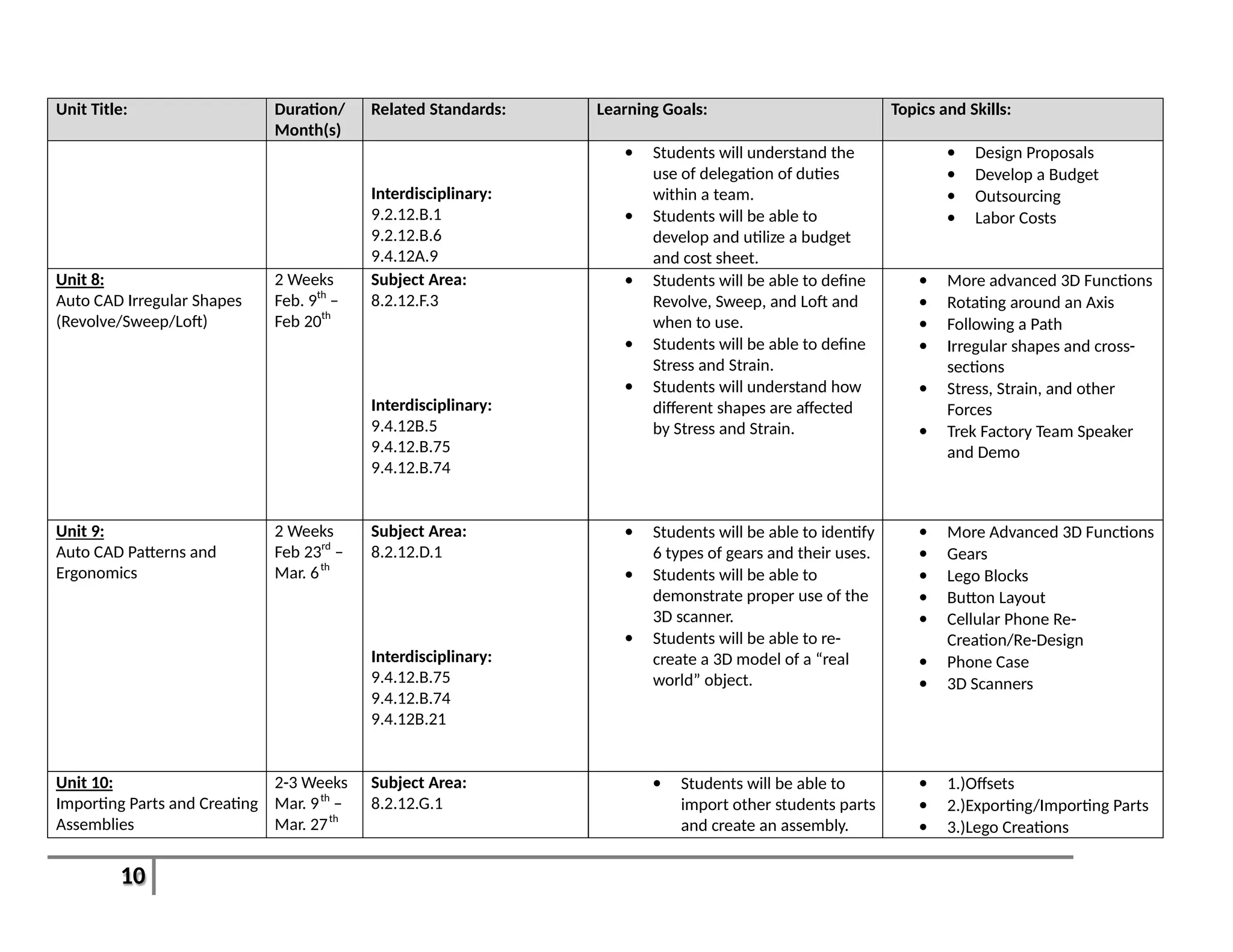
 Design Proposals
 Develop a Budget
 Outsourcing
 Labor Costs
Unit 8:
Auto CAD Irregular Shapes
(Revolve/Sweep/Loft)
2 Weeks
Feb. 9th
–
Feb 20th
Subject Area:
8.2.12.F.3
Interdisciplinary:
9.4.12B.5
9.4.12.B.75
9.4.12.B.74
 Students will be able to define
Revolve, Sweep, and Loft and
when to use.
 Students will be able to define
Stress and Strain.
 Students will understand how
different shapes are affected
by Stress and Strain.
 More advanced 3D Functions
 Rotating around an Axis
 Following a Path
 Irregular shapes and cross-
sections
 Stress, Strain, and other
Forces
 Trek Factory Team Speaker
and Demo
Unit 9:
Auto CAD Patterns and
Ergonomics
2 Weeks
Feb 23rd
–
Mar. 6th
Subject Area:
8.2.12.D.1
Interdisciplinary:
9.4.12.B.75
9.4.12.B.74
9.4.12B.21
 Students will be able to identify
6 types of gears and their uses.
 Students will be able to
demonstrate proper use of the
3D scanner.
 Students will be able to re-
create a 3D model of a “real
world” object.
 More Advanced 3D Functions
 Gears
 Lego Blocks
 Button Layout
 Cellular Phone Re-
Creation/Re-Design
 Phone Case
 3D Scanners
Unit 10:
Importing Parts and Creating
Assemblies
2-3 Weeks
Mar. 9th
–
Mar. 27th
Subject Area:
8.2.12.G.1
 Students will be able to
import other students parts
and create an assembly.
 1.)Offsets
 2.)Exporting/Importing Parts
 3.)Lego Creations
11
Unit Title: Duration/
Month(s)
Related Standards: Learning Goals: Topics and Skills:
Interdisciplinary:
9.4.12.B.75
 Students will be able to
assemble a gear train and
determine its ratio.
 Students will be able to
define Mechanical
Advantage.
 Gear Trains
 Mechanical Advantage
 Bike/Power Output
Demonstration
Unit 11:
Materials, Manufacturing,
and Testing and Analysis
3-4 Weeks
Apr 7th
–
May 1st
Subject Area:
8.2.12.E.1
8.2.12.F.2
8.2.12.C.2
8.1.12.A.1
Interdisciplinary:
9.4.12B.28
9.4.12.B.(1).10
 Students will be able to
identify proper design
testing methods and how
to analyze results.
 Students will be able to
identify 5 major
Manufacturing Processes.
 Students will be able to
identify 5 major material
processing processes.
 Testing and Analysis
 Manufacturing Processes
 Materials and Processing
 Red Shift Company Speaker
Unit 12:
Final Proposals
4-5 Weeks
May 4th
–
June 11th
Subject Area:
8.1.12.A.3
8.1.12.A.4
8.2.12.A.1
8.2.12.B.2
Interdisciplinary:
9.2.12.A.4
9.4.12A.9
9.4.12B.74
 Students will demonstrate
a mastery of the Design
Process by creating an
Invention or Innovation
and giving a proposal to a
panel of investors.
 Students will define and
demonstrate proper use of
Crowd Funding.
 Product Design, Prototype,
and Proposal
 Product Survey
 Final Portfolio
 Shark Tank/Dragon’s Den
 Kickstarter Project
12
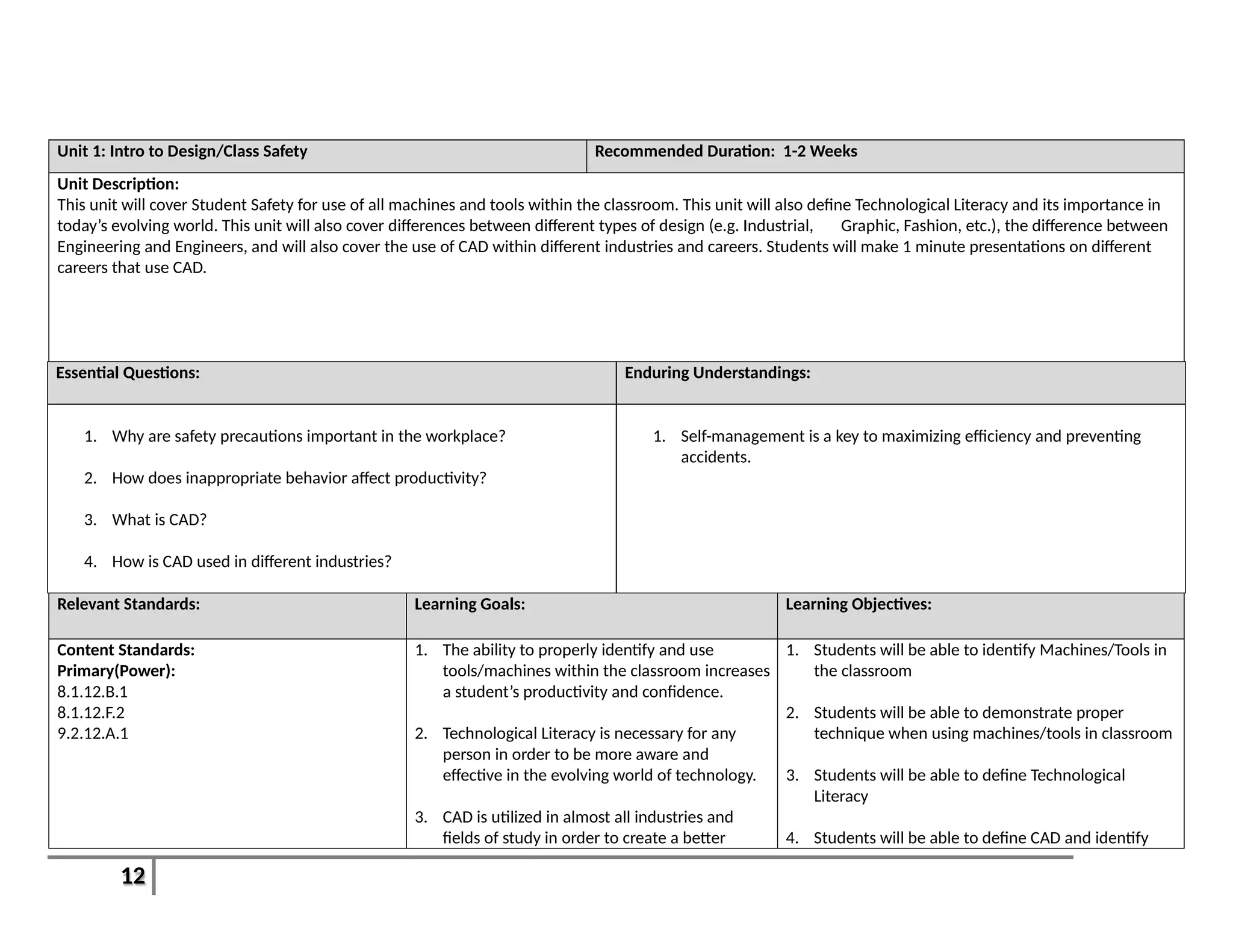
Unit 1: Intro to Design/Class Safety Recommended Duration: 1-2 Weeks
Unit Description:
This unit will cover Student Safety for use of all machines and tools within the classroom. This unit will also define Technological Literacy and its importance in
today’s evolving world. This unit will also cover differences between different types of design (e.g. Industrial, Graphic, Fashion, etc.), the difference between
Engineering and Engineers, and will also cover the use of CAD within different industries and careers. Students will make 1 minute presentations on different
careers that use CAD.
Essential Questions: Enduring Understandings:
1. Why are safety precautions important in the workplace?
2. How does inappropriate behavior affect productivity?
3. What is CAD?
4. How is CAD used in different industries?
1. Self-management is a key to maximizing efficiency and preventing
accidents.
Relevant Standards: Learning Goals: Learning Objectives:
Content Standards:
Primary(Power):
8.1.12.B.1
8.1.12.F.2
9.2.12.A.1
1. The ability to properly identify and use
tools/machines within the classroom increases
a student’s productivity and confidence.
2. Technological Literacy is necessary for any
person in order to be more aware and
effective in the evolving world of technology.
3. CAD is utilized in almost all industries and
fields of study in order to create a better
1. Students will be able to identify Machines/Tools in
the classroom
2. Students will be able to demonstrate proper
technique when using machines/tools in classroom
3. Students will be able to define Technological
Literacy
4. Students will be able to define CAD and identify
13
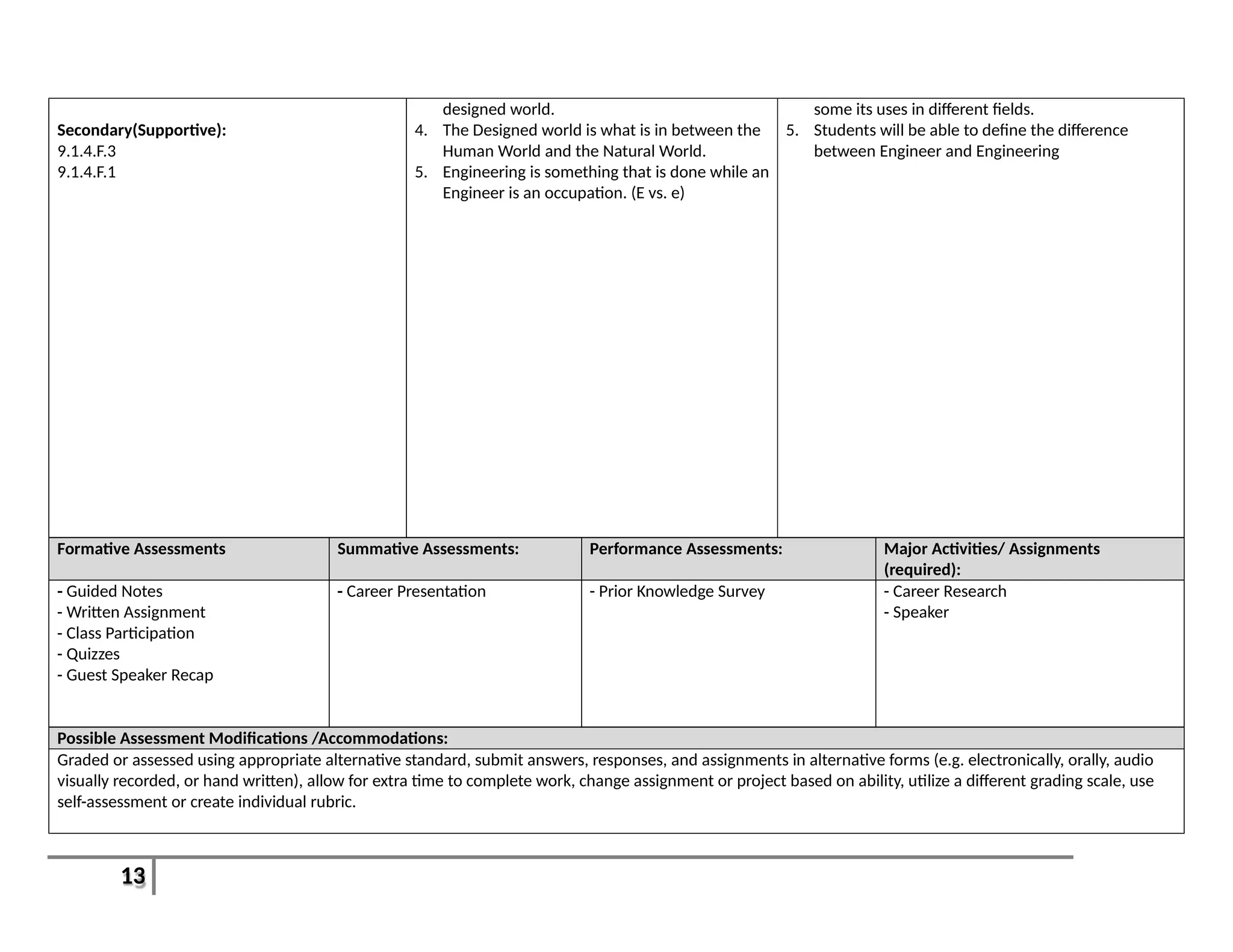
Secondary(Supportive):
9.1.4.F.3
9.1.4.F.1
designed world.
4. The Designed world is what is in between the
Human World and the Natural World.
5. Engineering is something that is done while an
Engineer is an occupation. (E vs. e)
some its uses in different fields.
5. Students will be able to define the difference
between Engineer and Engineering
Formative Assessments Summative Assessments: Performance Assessments: Major Activities/ Assignments
(required):
- Guided Notes
- Written Assignment
- Class Participation
- Quizzes
- Guest Speaker Recap
- Career Presentation - Prior Knowledge Survey - Career Research
- Speaker
Possible Assessment Modifications /Accommodations:
Graded or assessed using appropriate alternative standard, submit answers, responses, and assignments in alternative forms (e.g. electronically, orally, audio
visually recorded, or hand written), allow for extra time to complete work, change assignment or project based on ability, utilize a different grading scale, use
self-assessment or create individual rubric.
14
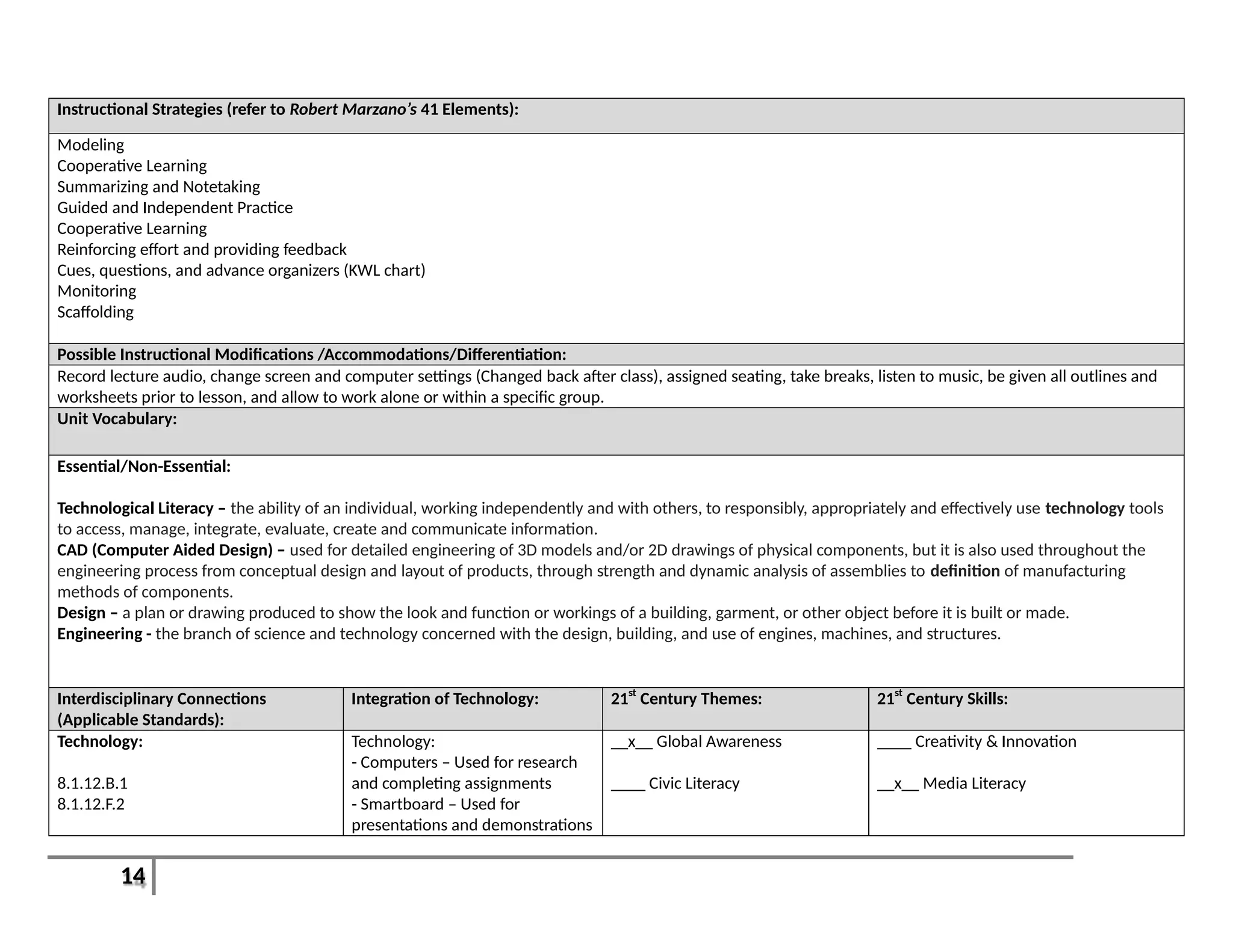
Instructional Strategies (refer to Robert Marzano’s 41 Elements):
Modeling
Cooperative Learning
Summarizing and Notetaking
Guided and Independent Practice
Cooperative Learning
Reinforcing effort and providing feedback
Cues, questions, and advance organizers (KWL chart)
Monitoring
Scaffolding
Possible Instructional Modifications /Accommodations/Differentiation:
Record lecture audio, change screen and computer settings (Changed back after class), assigned seating, take breaks, listen to music, be given all outlines and
worksheets prior to lesson, and allow to work alone or within a specific group.
Unit Vocabulary:
Essential/Non-Essential:
Technological Literacy – the ability of an individual, working independently and with others, to responsibly, appropriately and effectively use technology tools
to access, manage, integrate, evaluate, create and communicate information.
CAD (Computer Aided Design) – used for detailed engineering of 3D models and/or 2D drawings of physical components, but it is also used throughout the
engineering process from conceptual design and layout of products, through strength and dynamic analysis of assemblies to definition of manufacturing
methods of components.
Design – a plan or drawing produced to show the look and function or workings of a building, garment, or other object before it is built or made.
Engineering - the branch of science and technology concerned with the design, building, and use of engines, machines, and structures.
Interdisciplinary Connections
(Applicable Standards):
Integration of Technology: 21st
Century Themes: 21st
Century Skills:
Technology:
8.1.12.B.1
8.1.12.F.2
Technology:
- Computers – Used for research
and completing assignments
- Smartboard – Used for
presentations and demonstrations
__x__ Global Awareness
____ Civic Literacy
____ Creativity & Innovation
__x__ Media Literacy
15
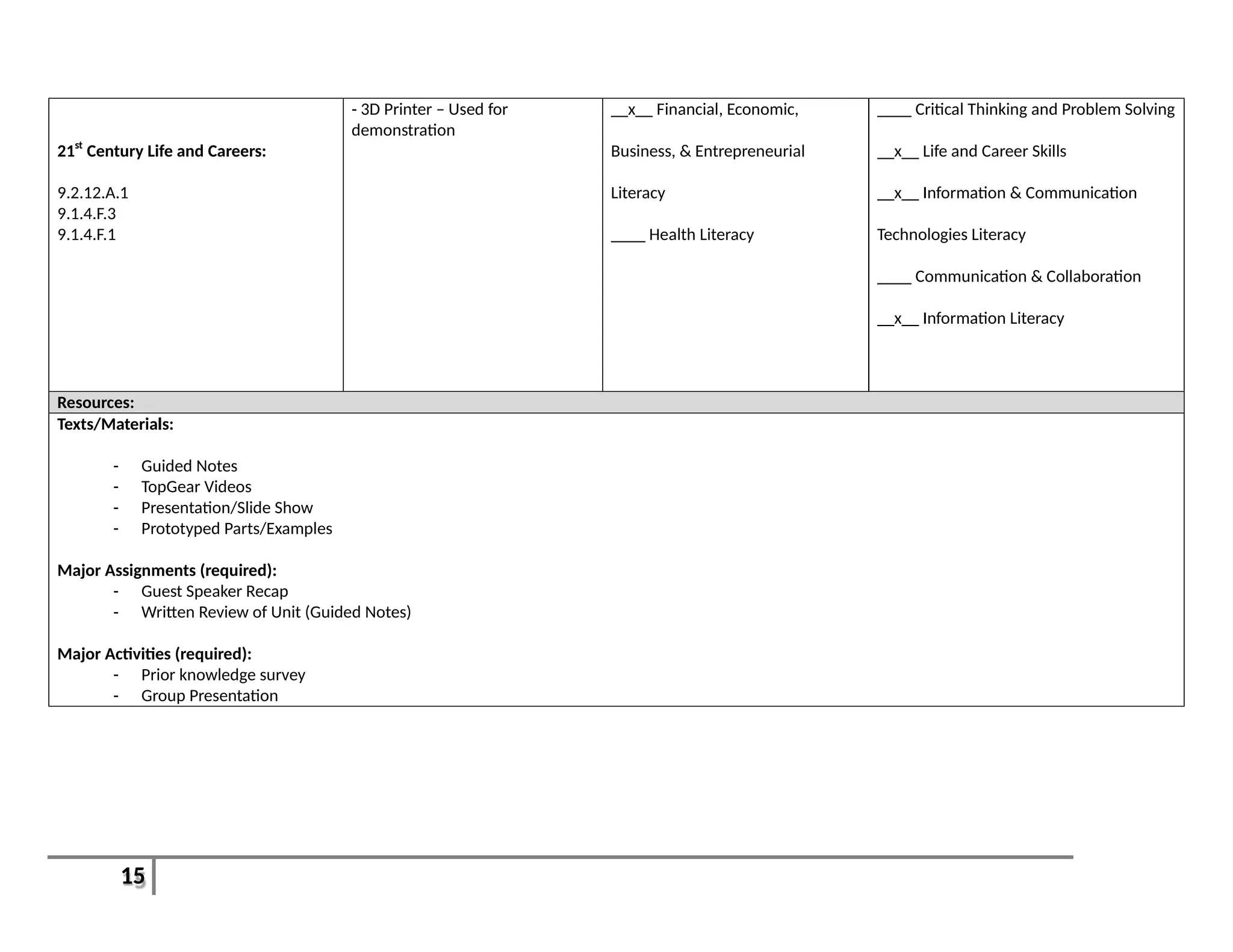
21st
Century Life and Careers:
9.2.12.A.1
9.1.4.F.3
9.1.4.F.1
- 3D Printer – Used for
demonstration
__x__ Financial, Economic,
Business, & Entrepreneurial
Literacy
____ Health Literacy
____ Critical Thinking and Problem Solving
__x__ Life and Career Skills
__x__ Information & Communication
Technologies Literacy
____ Communication & Collaboration
__x__ Information Literacy
Resources:
Texts/Materials:
- Guided Notes
- TopGear Videos
- Presentation/Slide Show
- Prototyped Parts/Examples
Major Assignments (required):
- Guest Speaker Recap
- Written Review of Unit (Guided Notes)
Major Activities (required):
- Prior knowledge survey
- Group Presentation
16
Unit 2: Using the Design Process Recommended Duration: [2-3 Weeks]
Unit Description:
This unit will go through the 7-9 steps of the Design Process and how they are used in problem and project based learning scenarios. This unit will cover the
differences between inventions and innovations and how copyright law and patents play a part. We will discuss reverse engineering and intellectual property.
Students will also be instructed on how to use their Engineering Notebook/Journal for the remainder of the year. This will end with a bridge building
competition to establish team work and student’s roles and relationships within the classroom.
Essential Questions: Enduring Understandings:
1. What are the components of the Design Process?
2. Who uses the Design Process and how does it change?
3. What are some organizational skills?
4. What are the benefits and disadvantages of working in a group instead of
individually?
1. The Design Process is a series of steps taken in order to create a product or
solve a problem.
17
Relevant Standards: Learning Goals: Learning Objectives:
Content Standards:
Primary(Power):
8.1.12.D.2
8.2.12.C.3
Secondary(Supportive):
8.2.12.F.3
9.4.12A.16
1. The Design Process can be used in most
situations to come to the best solution.
2. Innovations are modifications of current
products, processes, and ideas, while
Inventions are completely new ideas.
3. Explain: Copying or stealing one’s idea may or
may not be legal.
4. Teamwork is an essential skill in today’s world.
1. Students will be able to identify the 7-9 steps of the
Design Process
2. Students will demonstrate the use of the Design
Loop
3. Students will be able to identify the difference
between invention and innovation
4. Students will be able to define Copyright and
Patent
5. Students will understand the importance of
collaboration and communication within a team
Formative Assessments Summative Assessments: Performance Assessments: Major Activities/ Assignments
(required):
Engineering Notebook
Written assignment: Theft in Industry
Class Participation
- Engineering Notebook
- Team Challenge Rubric
- Bridge Design
- Teamwork Observation
- Bridge Design Challenge
- Written assignment on Theft in Industry
Possible Assessment Modifications /Accommodations:
Graded or assessed using appropriate alternative standard, submit answers, responses, and assignments in alternative forms (e.g. electronically, orally, audio
visually recorded, or hand written), allow for extra time to complete work, change assignment or project based on ability, utilize a different grading scale, use
self-assessment or create individual rubric
18
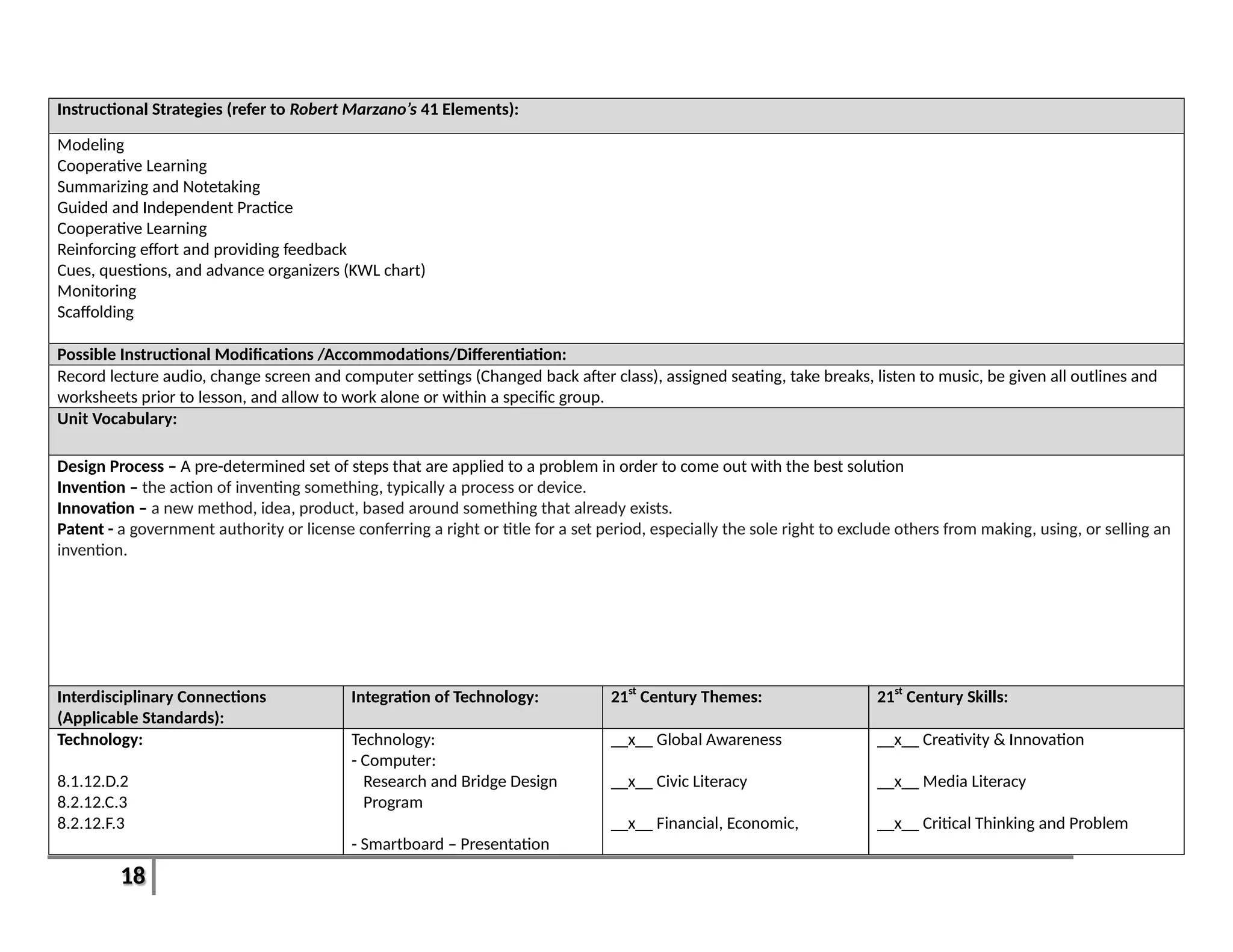
Instructional Strategies (refer to Robert Marzano’s 41 Elements):
Modeling
Cooperative Learning
Summarizing and Notetaking
Guided and Independent Practice
Cooperative Learning
Reinforcing effort and providing feedback
Cues, questions, and advance organizers (KWL chart)
Monitoring
Scaffolding
Possible Instructional Modifications /Accommodations/Differentiation:
Record lecture audio, change screen and computer settings (Changed back after class), assigned seating, take breaks, listen to music, be given all outlines and
worksheets prior to lesson, and allow to work alone or within a specific group.
Unit Vocabulary:
Design Process – A pre-determined set of steps that are applied to a problem in order to come out with the best solution
Invention – the action of inventing something, typically a process or device.
Innovation – a new method, idea, product, based around something that already exists.
Patent - a government authority or license conferring a right or title for a set period, especially the sole right to exclude others from making, using, or selling an
invention.
Interdisciplinary Connections
(Applicable Standards):
Integration of Technology: 21st
Century Themes: 21st
Century Skills:
Technology:
8.1.12.D.2
8.2.12.C.3
8.2.12.F.3
Technology:
- Computer:
Research and Bridge Design
Program
- Smartboard – Presentation
__x__ Global Awareness
__x__ Civic Literacy
__x__ Financial, Economic,
__x__ Creativity & Innovation
__x__ Media Literacy
__x__ Critical Thinking and Problem
19
21st
Century Life and Careers:
9.4.12.16
- 3D Printer - Demonstration Business, & Entrepreneurial
Literacy
____ Health Literacy
Solving
____ Life and Career Skills
__x__ Information & Communication
Technologies Literacy
__x__ Communication & Collaboration
____ Information Literacy
Resources:
Texts/Materials:
- Guided Notes
- TopGear Videos
- Presentation/Slide Show
Major Assignments (required):
- Engineering Notebook
- Written Assignment on Theft
Major Activities (required):
- Bridge Design Challenge
20
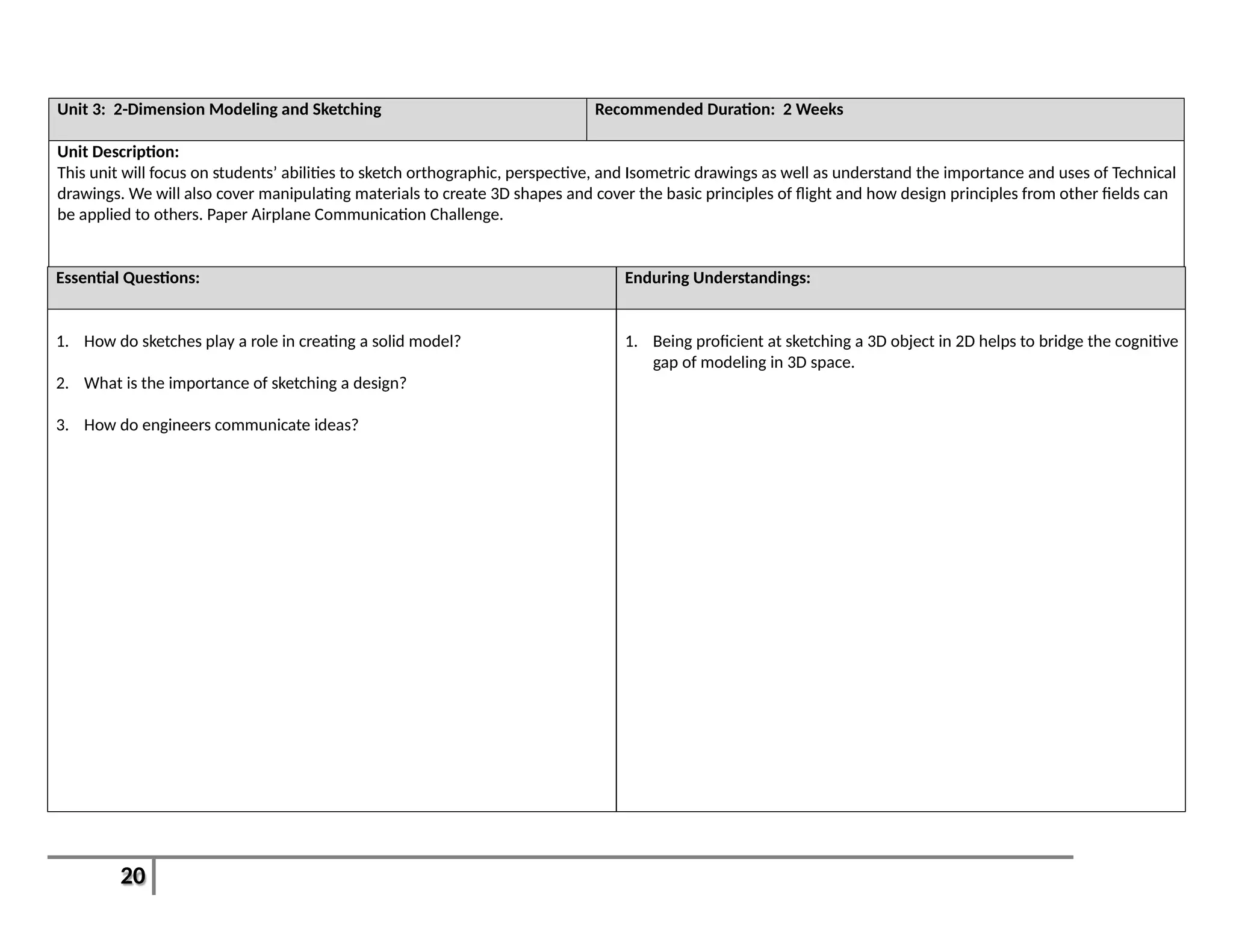
Unit 3: 2-Dimension Modeling and Sketching Recommended Duration: 2 Weeks
Unit Description:
This unit will focus on students’ abilities to sketch orthographic, perspective, and Isometric drawings as well as understand the importance and uses of Technical
drawings. We will also cover manipulating materials to create 3D shapes and cover the basic principles of flight and how design principles from other fields can
be applied to others. Paper Airplane Communication Challenge.
Essential Questions: Enduring Understandings:
1. How do sketches play a role in creating a solid model?
2. What is the importance of sketching a design?
3. How do engineers communicate ideas?
1. Being proficient at sketching a 3D object in 2D helps to bridge the cognitive
gap of modeling in 3D space.
21
Relevant Standards: Learning Goals: Learning Objectives:
Content Standards:
Primary(Power):
9.4.12.B.75
9.4.12.B.(1).9
Secondary(Supportive):
9.4.12.B.4
1. Drawing 3D shapes on a 2D surface is a
necessary ability to better understand
modeling in 3D on a computer.
2. Technical drawings give scope and definition
to a design or idea.
3. Technical drawings are a medium of
communication between engineers of
different fields and countries.
4. The path followed allowing man to fly is an
example of employing a design process.
1. Students will be able to define Perspective,
Isometric, and Orthographic Drawings.
2. Students will be able to sketch the above drawing
types.
3. Students will be able to identify uses of technical
drawings in different careers/disciplines.
4. Students will understand and demonstrate the
basic principles of flight and aerodynamics.
Formative Assessments Summative Assessments: Performance Assessments: Major Activities/ Assignments
(required):
- Engineering Notebook
- Guided Notes
- Quiz
- Written assignment on Flight
- Test (Units 1-3) - Paper Airplane Communication
Challenge
- Paper Airplane Communication
Challenge
- Test
- Written assignment on Flight
Possible Assessment Modifications /Accommodations:
Get graded or assessed using appropriate alternative standard, submit answers, responses, and assignments in alternative forms (e.g. electronically, orally,
audio visually recorded, or hand written), allow for extra time to complete work, change assignment or project based on ability, utilize a different grading scale,
use self-assessment or create individual rubric.
Instructional Strategies (refer to Robert Marzano’s 41 Elements):
Modeling
Cooperative Learning
Summarizing and Notetaking
Guided and Independent Practice
Cooperative Learning
Reinforcing effort and providing feedback
22
Cues, questions, and advance organizers (KWL chart)
Monitoring
Scaffolding
Possible Instructional Modifications /Accommodations/Differentiation:
Record lecture audio, change screen and computer settings (Changed back after class), assigned seating, take breaks, listen to music, be given all outlines and
worksheets prior to lesson, and allow to work alone or within a specific group.
Unit Vocabulary:
Orthographic Projection – a method of projection in which an object is depicted or a surface mapped using parallel lines to project its shape onto a plane.
Isometric Drawing – a method for visually representing three-dimensional objects in two dimensions in technical and engineering drawings. It is an
axonometric projection in which the three coordinate axes appear equally foreshortened and the angles between any two of them are 120 degrees.
Aerodynamics - the study of the properties of moving air, and especially of the interaction between the air and solid bodies moving through it.
Lift - move upward; be raised.
Bernoulli’s Principle - states that for an inviscid flow, an increase in the speed of the fluid occurs simultaneously with a decrease in pressure or a decrease in
the fluid's potential energy
Interdisciplinary Connections
(Applicable Standards):
Integration of Technology: 21st
Century Themes: 21st
Century Skills:
21st
Century Life and Careers:
9.4.12.B.(1).9
9.4.12.B.4
9.4.12.B.75
Technology:
Computer – Research and Design.
Smartboard – Presentation
Quadcopter - Demonstration
____ Global Awareness
____ Civic Literacy
____ Financial, Economic, Business,
& Entrepreneurial Literacy
____ Health Literacy
__x__ Creativity & Innovation
____ Media Literacy
__x__ Critical Thinking and Problem
Solving
____ Life and Career Skills
__x__ Information & Communication
Technologies Literacy
__x__ Communication & Collaboration
23
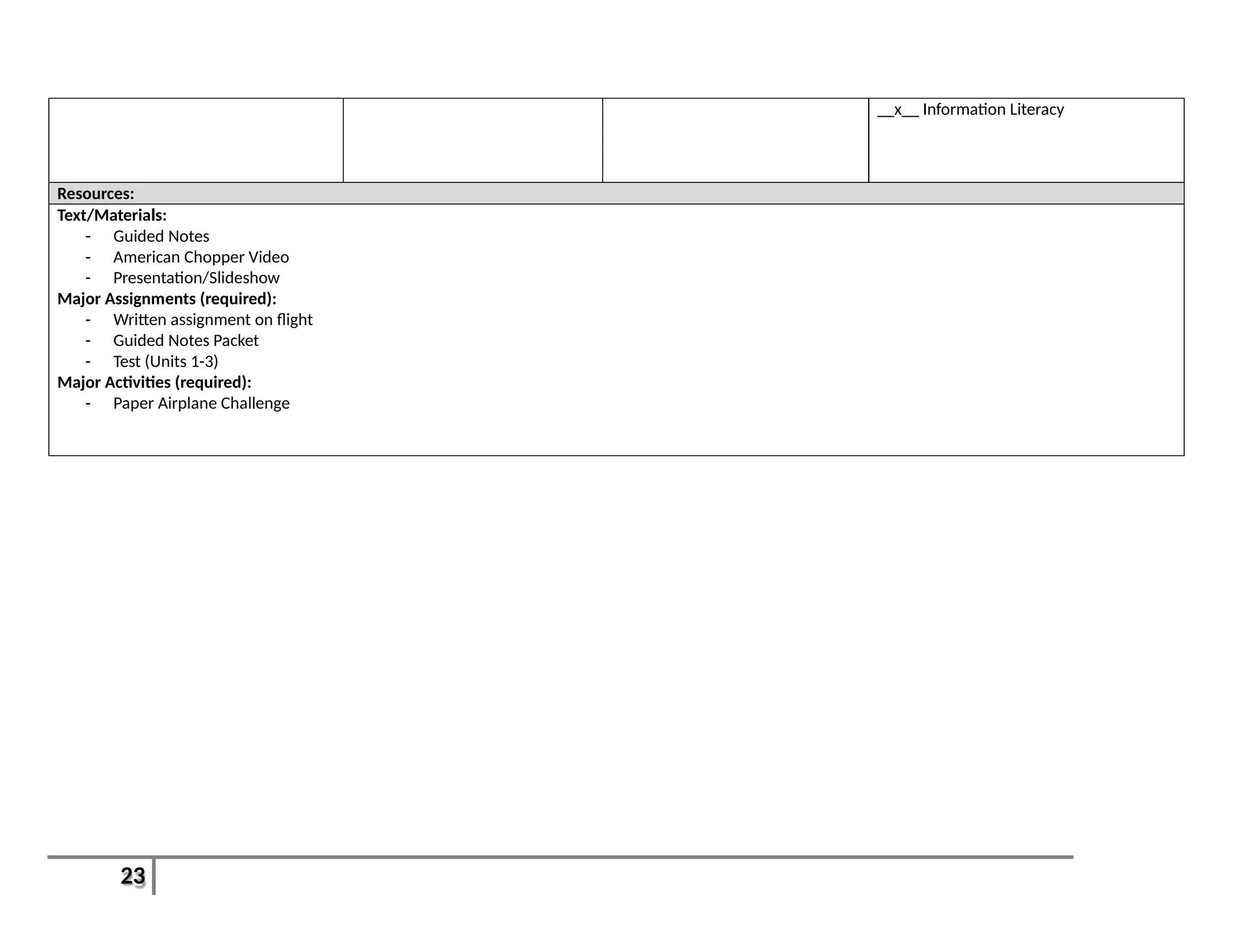
__x__ Information Literacy
Resources:
Text/Materials:
- Guided Notes
- American Chopper Video
- Presentation/Slideshow
Major Assignments (required):
- Written assignment on flight
- Guided Notes Packet
- Test (Units 1-3)
Major Activities (required):
- Paper Airplane Challenge
24
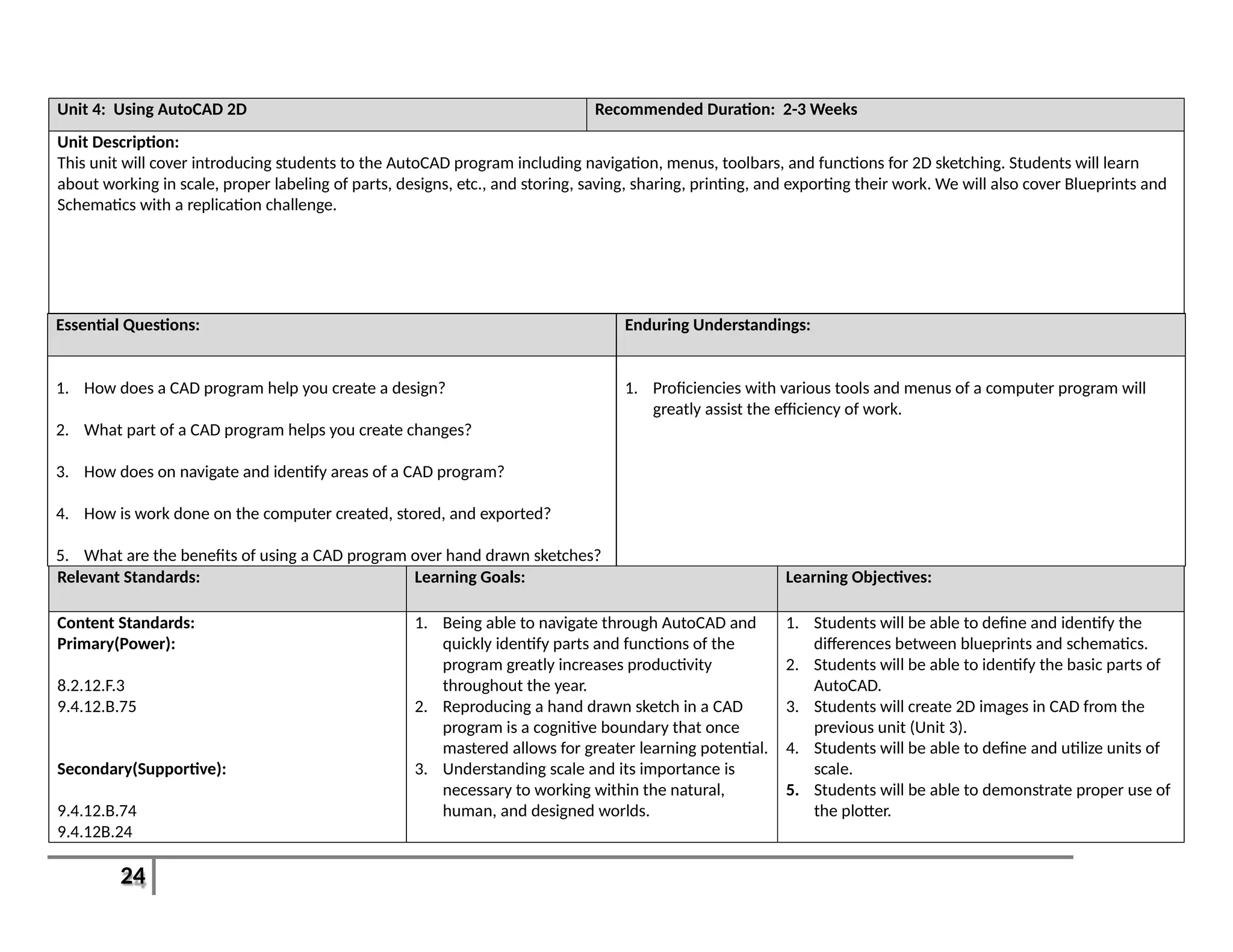
Unit 4: Using AutoCAD 2D Recommended Duration: 2-3 Weeks
Unit Description:
This unit will cover introducing students to the AutoCAD program including navigation, menus, toolbars, and functions for 2D sketching. Students will learn
about working in scale, proper labeling of parts, designs, etc., and storing, saving, sharing, printing, and exporting their work. We will also cover Blueprints and
Schematics with a replication challenge.
Essential Questions: Enduring Understandings:
1. How does a CAD program help you create a design?
2. What part of a CAD program helps you create changes?
3. How does on navigate and identify areas of a CAD program?
4. How is work done on the computer created, stored, and exported?
5. What are the benefits of using a CAD program over hand drawn sketches?
1. Proficiencies with various tools and menus of a computer program will
greatly assist the efficiency of work.
Relevant Standards: Learning Goals: Learning Objectives:
Content Standards:
Primary(Power):
8.2.12.F.3
9.4.12.B.75
Secondary(Supportive):
9.4.12.B.74
9.4.12B.24
1. Being able to navigate through AutoCAD and
quickly identify parts and functions of the
program greatly increases productivity
throughout the year.
2. Reproducing a hand drawn sketch in a CAD
program is a cognitive boundary that once
mastered allows for greater learning potential.
3. Understanding scale and its importance is
necessary to working within the natural,
human, and designed worlds.
1. Students will be able to define and identify the
differences between blueprints and schematics.
2. Students will be able to identify the basic parts of
AutoCAD.
3. Students will create 2D images in CAD from the
previous unit (Unit 3).
4. Students will be able to define and utilize units of
scale.
5. Students will be able to demonstrate proper use of
the plotter.
25
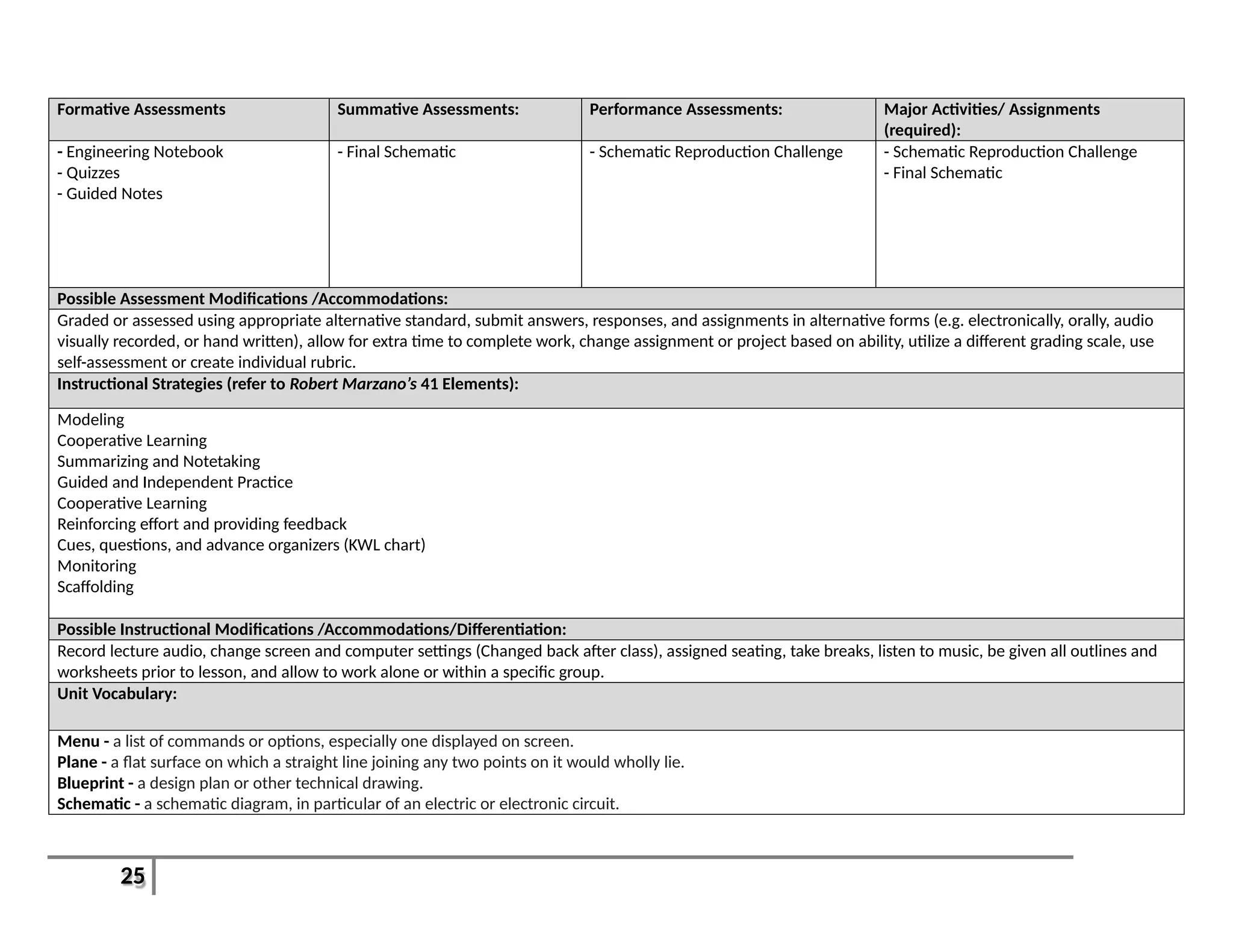
Formative Assessments Summative Assessments: Performance Assessments: Major Activities/ Assignments
(required):
- Engineering Notebook
- Quizzes
- Guided Notes
- Final Schematic - Schematic Reproduction Challenge - Schematic Reproduction Challenge
- Final Schematic
Possible Assessment Modifications /Accommodations:
Graded or assessed using appropriate alternative standard, submit answers, responses, and assignments in alternative forms (e.g. electronically, orally, audio
visually recorded, or hand written), allow for extra time to complete work, change assignment or project based on ability, utilize a different grading scale, use
self-assessment or create individual rubric.
Instructional Strategies (refer to Robert Marzano’s 41 Elements):
Modeling
Cooperative Learning
Summarizing and Notetaking
Guided and Independent Practice
Cooperative Learning
Reinforcing effort and providing feedback
Cues, questions, and advance organizers (KWL chart)
Monitoring
Scaffolding
Possible Instructional Modifications /Accommodations/Differentiation:
Record lecture audio, change screen and computer settings (Changed back after class), assigned seating, take breaks, listen to music, be given all outlines and
worksheets prior to lesson, and allow to work alone or within a specific group.
Unit Vocabulary:
Menu - a list of commands or options, especially one displayed on screen.
Plane - a flat surface on which a straight line joining any two points on it would wholly lie.
Blueprint - a design plan or other technical drawing.
Schematic - a schematic diagram, in particular of an electric or electronic circuit.
26
Interdisciplinary Connections
(Applicable Standards):
Integration of Technology: 21st
Century Themes: 21st
Century Skills:
Technology:
8.2.12.F.3
21st
Century Life and Careers:
9.4.12.B.75
9.4.12.B.74
9.4.12B.24
- Computer: Working with
AutoCAD and electronic
communication
- Smartboard Presentations
- Plotter: Demonstration and
Printing
- Electronic Circuit Demonstration
__x__ Global Awareness
____ Civic Literacy
____ Financial, Economic, Business,
& Entrepreneurial Literacy
____ Health Literacy
__x__ Creativity & Innovation
__x__ Media Literacy
__x__ Critical Thinking and Problem
Solving
__x__ Life and Career Skills
__x__ Information & Communication
Technologies Literacy
__x__ Communication & Collaboration
__x__ Information Literacy
Resources:
Texts/Materials:
- Guided Notes
- Presentation/Slideshow
- TopGear Video
Major Assignments (required):
- Engineering Notebook
- Final Schematic
- -Summative Assessment
Major Activities (required):
- Schematic Reproduction Challenge
27
Unit 5: Architecture Recommended Duration: [4-5 Weeks]
Unit Description:
This unit will cover the field of Architecture and how Design plays a role. Students will learn about basic Architectural Styles and parts of a standing structure.
Students will create floor plans and understand how traffic patterns and workflow inspire design. Students will create a scale addition to the high school and
have a printed floor plan to match with exterior features. They will also work on landscape and environmental design around the school.
Essential Questions: Enduring Understandings:
1. How are design and style related?
2. What characteristics are essential to a functional team?
3. Why is time management important?
4. What is efficiency?
1. Innovation in digital tools and products are utilized to aid and simplify
work and maximize efficiency.
Relevant Standards: Learning Goals: Learning Objectives:
Content Standards:
Primary(Power):
8.1.12.C.1
8.2.12.B.1
9.4.12A.19
Secondary(Supportive):
8.2.12.C.3
8.2.12.F.3
9.4.12A.47
9.4.12.B.(1).5
9.4.12.B.(1).11
1. There is a direct relationship between style
and design.
2. Maximizing efficiency doesn’t always mean
minimizing style.
3. When creating a design you will have to
interact with an existing part of the human,
natural, or designed world.
4. Being self-aware and open to criticism allows
for greater personal growth.
2. Students will be able to identify basic parts of a
structure/building.
3. Students will be able to identify common
architectural styles.
4. Students will be able to define and utilize efficiency
in their designs.
5. Students will be able to properly design and
assemble a scale addition to the school.
6. Students will understand the importance of the
natural world.
7. Students will understand the value of self-
assessment.
28
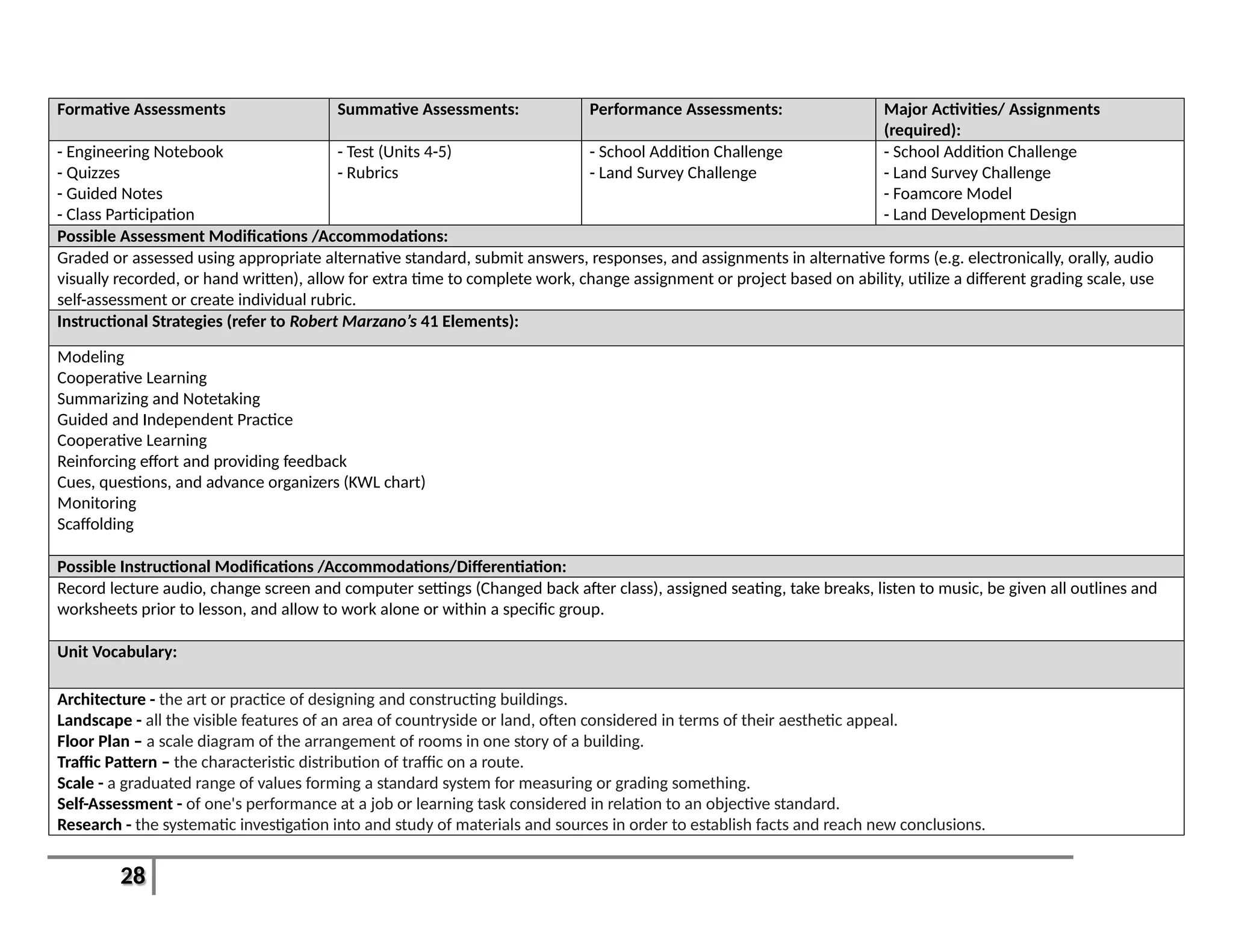
Formative Assessments Summative Assessments: Performance Assessments: Major Activities/ Assignments
(required):
- Engineering Notebook
- Quizzes
- Guided Notes
- Class Participation
- Test (Units 4-5)
- Rubrics
- School Addition Challenge
- Land Survey Challenge
- School Addition Challenge
- Land Survey Challenge
- Foamcore Model
- Land Development Design
Possible Assessment Modifications /Accommodations:
Graded or assessed using appropriate alternative standard, submit answers, responses, and assignments in alternative forms (e.g. electronically, orally, audio
visually recorded, or hand written), allow for extra time to complete work, change assignment or project based on ability, utilize a different grading scale, use
self-assessment or create individual rubric.
Instructional Strategies (refer to Robert Marzano’s 41 Elements):
Modeling
Cooperative Learning
Summarizing and Notetaking
Guided and Independent Practice
Cooperative Learning
Reinforcing effort and providing feedback
Cues, questions, and advance organizers (KWL chart)
Monitoring
Scaffolding
Possible Instructional Modifications /Accommodations/Differentiation:
Record lecture audio, change screen and computer settings (Changed back after class), assigned seating, take breaks, listen to music, be given all outlines and
worksheets prior to lesson, and allow to work alone or within a specific group.
Unit Vocabulary:
Architecture - the art or practice of designing and constructing buildings.
Landscape - all the visible features of an area of countryside or land, often considered in terms of their aesthetic appeal.
Floor Plan – a scale diagram of the arrangement of rooms in one story of a building.
Traffic Pattern – the characteristic distribution of traffic on a route.
Scale - a graduated range of values forming a standard system for measuring or grading something.
Self-Assessment - of one's performance at a job or learning task considered in relation to an objective standard.
Research - the systematic investigation into and study of materials and sources in order to establish facts and reach new conclusions.
29
Interdisciplinary Connections
(Applicable Standards):
Integration of Technology: 21st
Century Themes: 21st
Century Skills:
Technology:
8.1.12.C.1
8.2.12.B.1
8.2.12.C.3
8.2.12.F.3
21st
Century Life and Careers:
9.4.12A.19
9.4.12A.47
9.4.12.B.(1).5
9.4.12.B.(1).11
- Computer – Using AutoCAD and
Google Maps/Earth
- Mobile Computing Device – Land
Surveying
- Camera – Documentation
- Smartboard – Presentation
- Plotter – Project printouts
_x___ Global Awareness
__x__ Civic Literacy
__x__ Financial, Economic,
Business, & Entrepreneurial
Literacy
__x__ Health Literacy
__x__ Creativity & Innovation
__x__ Media Literacy
__x__ Critical Thinking and Problem
Solving
__x__ Life and Career Skills
__x__ Information & Communication
Technologies Literacy
__x__ Communication & Collaboration
__x__ Information Literacy
Resources:
Texts/Materials:
- Presentation/Slideshow
- Guided Notes
- TopGear Video
- Scale Model of School (FoamCore)
Major Assignments (required):
- Foamcore scale model
- Land Development Layout
Major Activities (required):
- School Addition Challenge
- Land Survey Challenge
30
Unit 6: 3D Modeling in AutoCAD Recommended Duration: [2-3 Weeks]
Unit Description:
Students will now expand on their prior knowledge of CAD from 2D to 3D. They will learn about basic functions such as extrude, cut, hole, etc. and working in
different planes. Students will reproduce their 2D sketches from Unit 3 in 3D space and learn about shading, coloring, and rendering an object/scene. Students
will also cover the use of rapid prototyping and how the 3D printer is changing the world of design.
Essential Questions: Enduring Understandings:
1. Why is it essential to follow proper procedure when creating a design?
2. What are the key features of rendering?
3. How is rapid prototyping used in product development?
1. CAD programs require knowledge of proper technique and purpose.
31
Relevant Standards: Learning Goals: Learning Objectives:
Content Standards:
Primary(Power):
8.2.12.F.3
9.4.12.B.75
Secondary(Supportive):
9.4.12.B.74
9.4.12B.24
1. CAD allows for product design, testing, and
rendering in 3D digital space.
2. Reproducing a 2D sketch in CAD is a career.
3. Rendering an object in 3D space gives scope
and balance.
4. Rapid prototyping allows designers to save
time and money when creating products or
developing a proposal.
1. Students will be able to identify the differences
between using AutoCAD in 2D and 3D.
2. Students will be able to create 3D sketches and
shapes from drawings in Unit 3.
3. Students will be able to define Rapid Prototyping
and identify its uses in Engineering and other fields.
4. Students will create basic 3D models using the 3D
printer.
Formative Assessments Summative Assessments: Performance Assessments: Major Activities/ Assignments
(required):
- Engineering Notebook
- Guided Notes
- Quizzes
- Class Participation
- 3D Shape Deliverables
- Rubric
- Rapid Prototype Project - Rapid Prototyping Challenge
- 3D Printed Shapes
Possible Assessment Modifications /Accommodations:
Graded or assessed using appropriate alternative standard, submit answers, responses, and assignments in alternative forms (e.g. electronically, orally, audio
visually recorded, or hand written), allow for extra time to complete work, change assignment or project based on ability, utilize a different grading scale, use
self-assessment or create individual rubric.
Instructional Strategies (refer to Robert Marzano’s 41 Elements):
Modeling
Cooperative Learning
Summarizing and Notetaking
Guided and Independent Practice
32
Cooperative Learning
Reinforcing effort and providing feedback
Cues, questions, and advance organizers (KWL chart)
Monitoring
Scaffolding
Possible Instructional Modifications /Accommodations/Differentiation:
Record lecture audio, change screen and computer settings (Changed back after class), assigned seating, take breaks, listen to music, be given all outlines and
worksheets prior to lesson, and allow to work alone or within a specific group.
Unit Vocabulary:
Modeling - the art or activity of making three-dimensional models.
Extrude - thrust or force out.
Prototype - a first, typical or preliminary model of something, especially a machine, from which other forms are developed or copied.
Rapid Prototyping - technique used to quickly fabricate a scale model of a physical part or assembly using three-dimensional computer aided design (CAD) data
Interdisciplinary Connections
(Applicable Standards):
Integration of Technology: 21st
Century Themes: 21st
Century Skills:
Technology:
8.2.12.F.3
21st
Century Life and Careers:
9.4.12.B.75
9.4.12.B.74
9.4.12B.24
- Computer – AutoCAD for design
and Exporting File
- USB Drive – Exporting 3D file
- 3D Printer – Producing
parts/objects
- Smartboard – Presentation and
Demonstration
__x__ Global Awareness
____ Civic Literacy
__x__ Financial, Economic,
Business, & Entrepreneurial
Literacy
____ Health Literacy
__x__ Creativity & Innovation
____ Media Literacy
___x_ Critical Thinking and Problem
Solving
__x__ Life and Career Skills
__x__ Information & Communication
Technologies Literacy
____ Communication & Collaboration
33
__x__ Information Literacy
Resources:
Texts/Materials:
- Presentation/Slide Show
- Guided Notes
- How’s it Made Video Clip
Major Assignments (required):
- 3D printed shapes
Major Activities (required):
- 3D Printer Demonstration and Challenge
34
Unit 7: Engineering Drawings Recommended Duration: 2 Weeks
Unit Description:
This unit will cover dimensions and constraints of objects/parts and further rendering. Students will learn how to create and use a design proposal when
communicating with others and potential clients in business. Along with the proposal, students will develop a design budget and learn about labor costs,
outsourcing work, etc.
Essential Questions: Enduring Understandings:
1. Why is using the correct format so important?
2. How does money affect a project?
3. How do you prioritize?
1. Engineering, like Science and Math, is a universal language.
Relevant Standards: Learning Goals: Learning Objectives:
Content Standards:
Primary(Power):
8.2.12.B.3
9.2.12.B.1
Secondary(Supportive):
8.2.12.F.3
9.2.12.B.6
9.4.12A.9
1. Provide plans and technical drawings in the
correct format allows for universal
acceptance.
2. Teams are most effective when each member
takes on the proper task for which they are
trained.
3. Adhering to constraints and prioritizing
different parts of a design are necessary to
succeed.
1. Students will be able to identify and correctly utilize
Dimensions and Constraints.
2. Students will understand the use of delegation of
duties within a team.
3. Students will be able to develop and utilize a
budget and cost sheet.
35
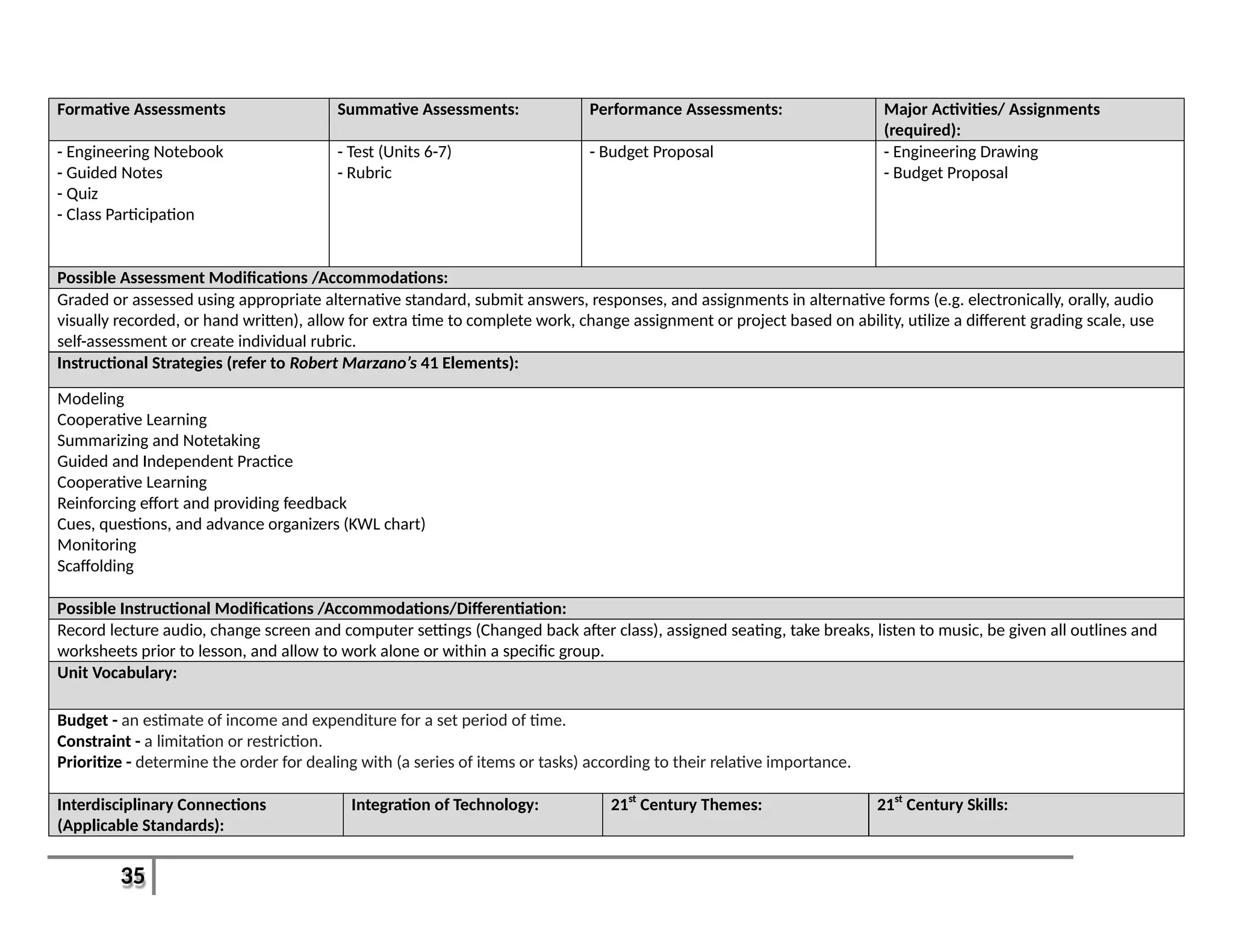
Formative Assessments Summative Assessments: Performance Assessments: Major Activities/ Assignments
(required):
- Engineering Notebook
- Guided Notes
- Quiz
- Class Participation
- Test (Units 6-7)
- Rubric
- Budget Proposal - Engineering Drawing
- Budget Proposal
Possible Assessment Modifications /Accommodations:
Graded or assessed using appropriate alternative standard, submit answers, responses, and assignments in alternative forms (e.g. electronically, orally, audio
visually recorded, or hand written), allow for extra time to complete work, change assignment or project based on ability, utilize a different grading scale, use
self-assessment or create individual rubric.
Instructional Strategies (refer to Robert Marzano’s 41 Elements):
Modeling
Cooperative Learning
Summarizing and Notetaking
Guided and Independent Practice
Cooperative Learning
Reinforcing effort and providing feedback
Cues, questions, and advance organizers (KWL chart)
Monitoring
Scaffolding
Possible Instructional Modifications /Accommodations/Differentiation:
Record lecture audio, change screen and computer settings (Changed back after class), assigned seating, take breaks, listen to music, be given all outlines and
worksheets prior to lesson, and allow to work alone or within a specific group.
Unit Vocabulary:
Budget - an estimate of income and expenditure for a set period of time.
Constraint - a limitation or restriction.
Prioritize - determine the order for dealing with (a series of items or tasks) according to their relative importance.
Interdisciplinary Connections
(Applicable Standards):
Integration of Technology: 21st
Century Themes: 21st
Century Skills:
36
Technology:
8.2.12.B.3
8.2.12.F.3
21st
Century Life and Careers:
9.2.12.B.1
9.2.12.B.6
9.4.12A.9
- Computer – AutoCAD
- Printer/Plotter – Print out
finalized drawings
- Smartboard - Presentation
____ Global Awareness
____ Civic Literacy
__x__ Financial, Economic,
Business, & Entrepreneurial
Literacy
____ Health Literacy
____ Creativity & Innovation
__x__ Media Literacy
__x__ Critical Thinking and Problem
Solving
__x__ Life and Career Skills
____ Information & Communication
Technologies Literacy
__x__ Communication & Collaboration
__x__ Information Literacy
Resources:
Texts/Materials:
- Presentation/Slide Show
- Guided Notes
- TopGear Video
- Movie Credits Video
Major Assignments (required):
- Engineering Drawings
Major Activities (required):
- Budget Proposals
37
Unit 8: Auto CAD Irregular Shapes Recommended Duration: 2 Weeks
Unit Description:
Students will build upon their 3D modeling to include creation of non-linear and irregular shapes using Revolve, Sweep, and Loft. We will also cover how and
why different shapes are used in objects. This will relate back to Unit 2 and the Bridge Design Challenge. We will discuss Stress and Strain and their impact on
Design.
Essential Questions: Enduring Understandings:
1. Why is using the correct shape important?
2. How do Stress and Strain affect an object or material?
3. Can CAD produce a sound?
1. CAD allows a person to create and test designs that may be impossible in
the real world or in real time.
Relevant Standards: Learning Goals: Learning Objectives:
Content Standards:
Primary(Power):
8.2.12.F.3
9.4.12B.5
Secondary(Supportive):
9.4.12.B.75
9.4.12.B.74
1. Not everything is designed or created using a
straight line.
2. Stress and Strain are hidden forces that CAD
can show and explain their impacts.
1. Students will be able to define and understand
when to use: Revolve, Sweep, and Loft.
2. Students will be able to define the terms: Stress
and Strain.
3. Students will understand how different shapes are
affected by Stress and Strain.
38
Formative Assessments Summative Assessments: Performance Assessments: Major Activities/ Assignments
(required):
- Engineering Notebook
- Guided Notes
- Class Participation
- Quiz
- Portfolio Check
- 3D Designs
- Rubric
- Demonstration of Skills - USB Key Project
- Project Write-Up
Possible Assessment Modifications /Accommodations:
Graded or assessed using appropriate alternative standard, submit answers, responses, and assignments in alternative forms (e.g. electronically, orally, audio
visually recorded, or hand written), allow for extra time to complete work, change assignment or project based on ability, utilize a different grading scale, use
self-assessment or create individual rubric.
Instructional Strategies (refer to Robert Marzano’s 41 Elements):
Modeling
Cooperative Learning
Summarizing and Notetaking
Guided and Independent Practice
Cooperative Learning
Reinforcing effort and providing feedback
Cues, questions, and advance organizers (KWL chart)
Monitoring
Scaffolding
Possible Instructional Modifications /Accommodations/Differentiation:
Record lecture audio, change screen and computer settings (Changed back after class), assigned seating, take breaks, listen to music, be given all outlines and
worksheets prior to lesson, and allow to work alone or within a specific group.
Unit Vocabulary:
Revolve – to move around an axis in CAD
Sweep – to follow a defined path in CAD
Loft – create an irregular solid in CAD
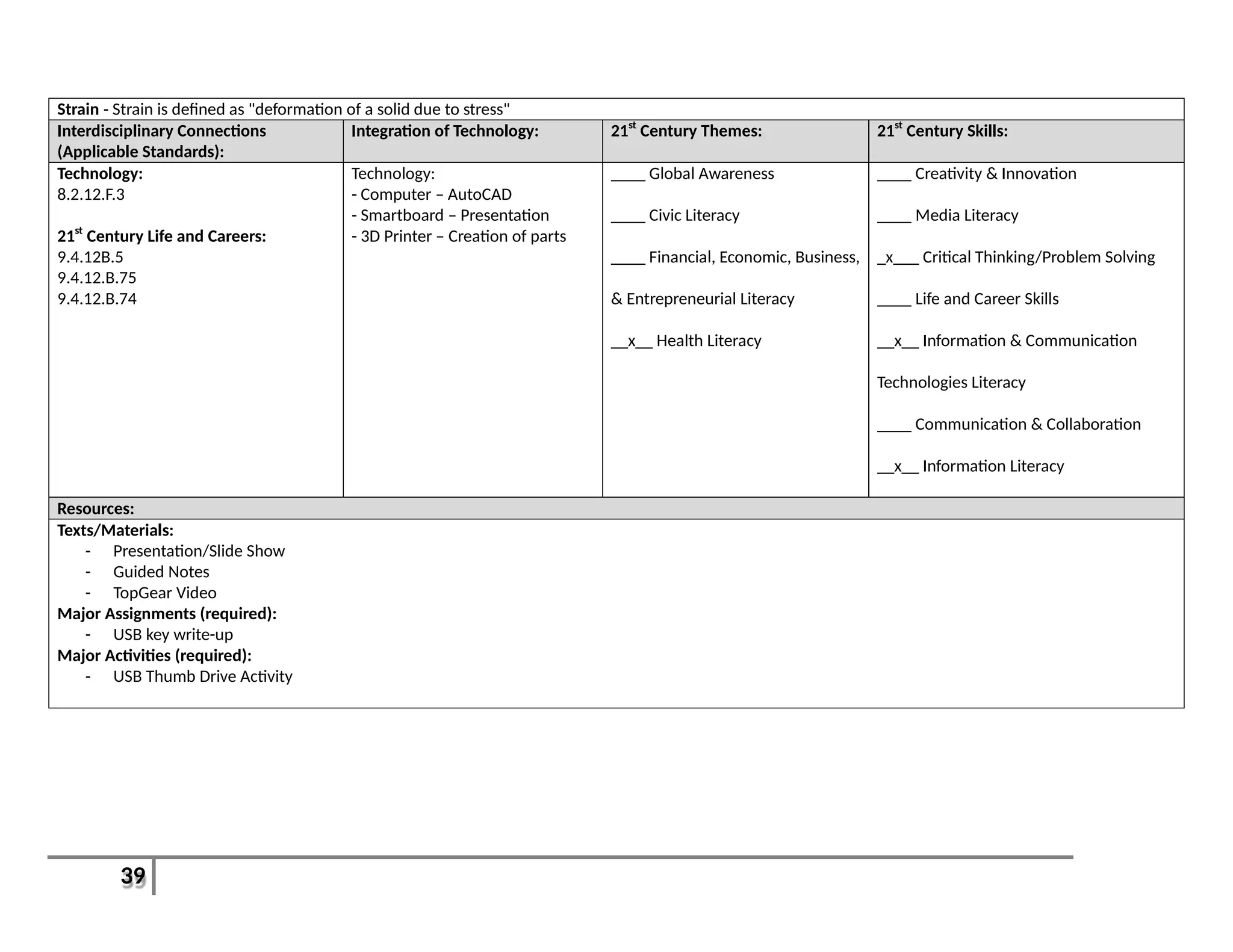
Stress - Stress is the ratio of applied force F (Tensile force or Compressive force) and cross section A, defined as "force per area".
39
Strain - Strain is defined as "deformation of a solid due to stress"
Interdisciplinary Connections
(Applicable Standards):
Integration of Technology: 21st
Century Themes: 21st
Century Skills:
Technology:
8.2.12.F.3
21st
Century Life and Careers:
9.4.12B.5
9.4.12.B.75
9.4.12.B.74
Technology:
- Computer – AutoCAD
- Smartboard – Presentation
- 3D Printer – Creation of parts
____ Global Awareness
____ Civic Literacy
____ Financial, Economic, Business,
& Entrepreneurial Literacy
__x__ Health Literacy
____ Creativity & Innovation
____ Media Literacy
_x___ Critical Thinking/Problem Solving
____ Life and Career Skills
__x__ Information & Communication
Technologies Literacy
____ Communication & Collaboration
__x__ Information Literacy
Resources:
Texts/Materials:
- Presentation/Slide Show
- Guided Notes
- TopGear Video
Major Assignments (required):
- USB key write-up
Major Activities (required):
- USB Thumb Drive Activity
40
Unit 9: Auto CAD Patterns and Ergonomics Recommended Duration: 2 Weeks
Unit Description:
Students will expand on their modeling abilities by including Patterning to designs. They will create gears, LEGO pieces, and phone cases. Students will also learn
about Ergonomics and the role it plays in Design. Students will also begin to use the 3D scanner for importing “real-world” objects into their projects and
compare to their designed ones.
Essential Questions: Enduring Understandings:
1. Why would you use a Pattern?
2. Why should Ergonomic be considered in design?
1. Proper design maximizes all of its benefits while mitigating its deficiencies.
Relevant Standards: Learning Goals: Learning Objectives:
Content Standards:
Primary(Power):
8.2.12.D.1
9.4.12.B.75
Secondary(Supportive):
9.4.12.B.74
9.4.12B.21
1. Gears allow forces to be distributed and
transmitted efficiently throughout machines.
2. Re-Creating an object in CAD allows for ease of
modification compared to the “real world”.
3. Replicating a common design the fewest times
possible using a pattern maximizes efficiency.
4. Ergonomics plays a key role in the efficient use
or interaction with an object or product.
1. Students will be able to identify 6 types of gears
and their uses.
2. Students will be able to demonstrate proper use of
the 3D scanner.
3. Students will be able to re-create a 3D model of a
“real world” object.
4. Students be able to define and properly use
Patterns.
5. Students will define and demonstrate proper use of
Ergonometric Design.
Formative Assessments Summative Assessments: Performance Assessments: Major Activities/ Assignments
(required):
- Engineering Notebook
- Guided Notes
- Quiz
- Class Participation
- Phone Holder
- Test (Units 6-9)
- Use of 3D Scanner
- Demonstration of Skills
- Phone Re-Creation
- Phone case re-design
Possible Assessment Modifications /Accommodations:
Graded or assessed using appropriate alternative standard, submit answers, responses, and assignments in alternative forms (e.g. electronically, orally, audio
visually recorded, or hand written), allow for extra time to complete work, change assignment or project based on ability, utilize a different grading scale, use
self-assessment or create individual rubric.
Instructional Strategies (refer to Robert Marzano’s 41 Elements):
41
Modeling
Cooperative Learning
Summarizing and Notetaking
Guided and Independent Practice
Cooperative Learning
Reinforcing effort and providing feedback
Cues, questions, and advance organizers (KWL chart)
Monitoring
Scaffolding
Possible Instructional Modifications /Accommodations/Differentiation:
Record lecture audio, change screen and computer settings (Changed back after class), assigned seating, take breaks, listen to music, be given all outlines and
worksheets prior to lesson, and allow to work alone or within a specific group.
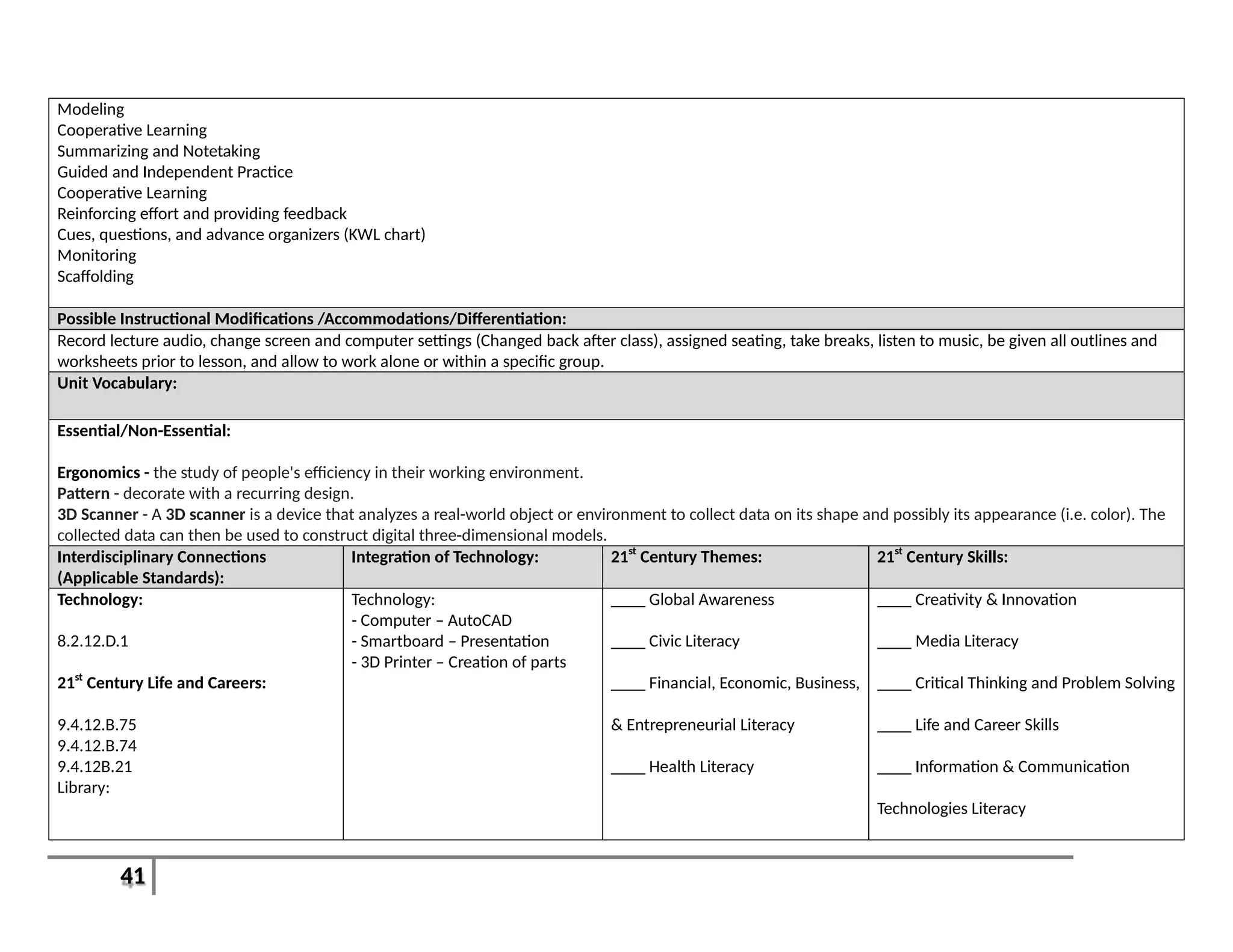
Unit Vocabulary:
Essential/Non-Essential:
Ergonomics - the study of people's efficiency in their working environment.
Pattern - decorate with a recurring design.
3D Scanner - A 3D scanner is a device that analyzes a real-world object or environment to collect data on its shape and possibly its appearance (i.e. color). The
collected data can then be used to construct digital three-dimensional models.
Interdisciplinary Connections
(Applicable Standards):
Integration of Technology: 21st
Century Themes: 21st
Century Skills:
Technology:
8.2.12.D.1
21st
Century Life and Careers:
9.4.12.B.75
9.4.12.B.74
9.4.12B.21
Library:
Technology:
- Computer – AutoCAD
- Smartboard – Presentation
- 3D Printer – Creation of parts
____ Global Awareness
____ Civic Literacy
____ Financial, Economic, Business,
& Entrepreneurial Literacy
____ Health Literacy
____ Creativity & Innovation
____ Media Literacy
____ Critical Thinking and Problem Solving
____ Life and Career Skills
____ Information & Communication
Technologies Literacy
42
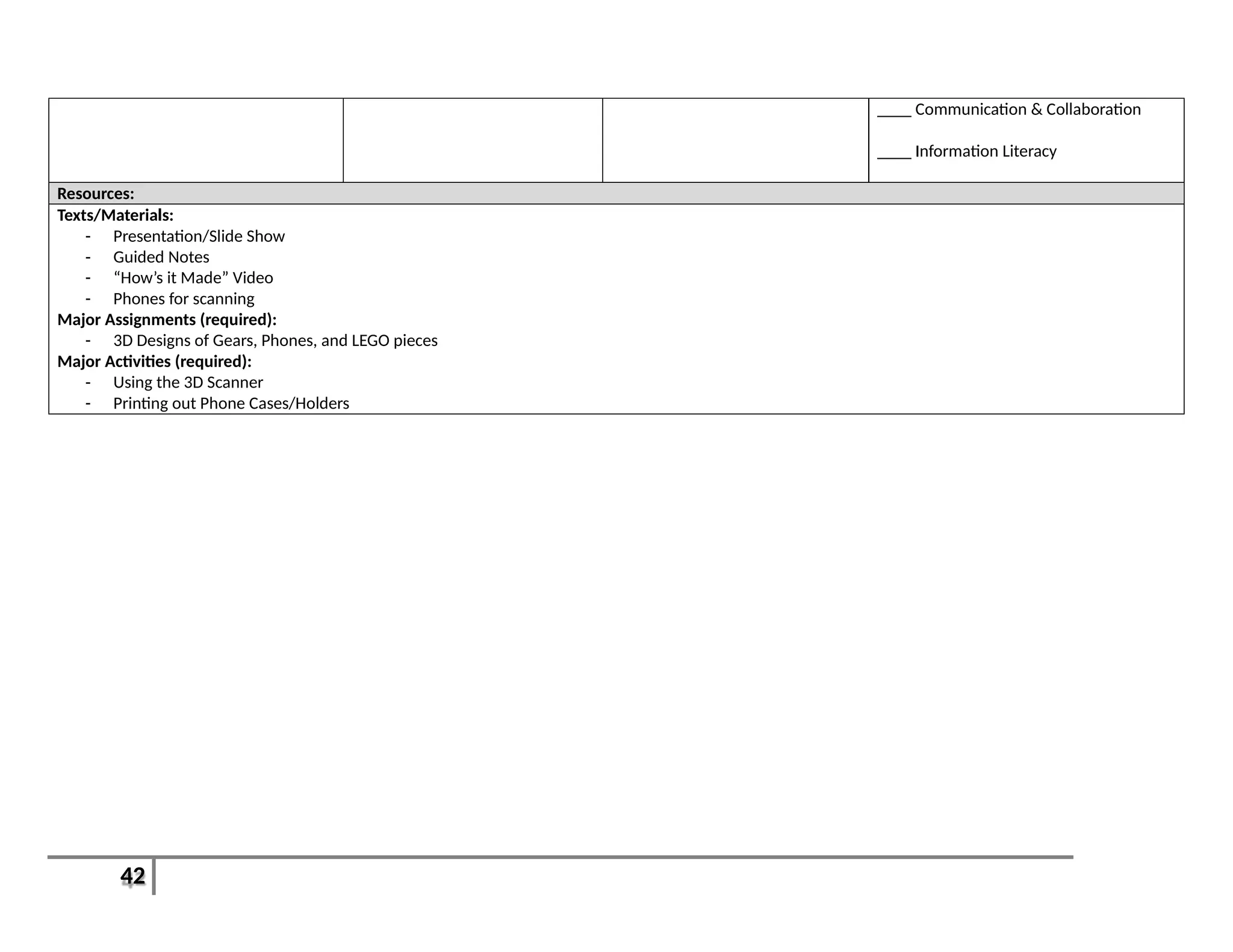
____ Communication & Collaboration
____ Information Literacy
Resources:
Texts/Materials:
- Presentation/Slide Show
- Guided Notes
- “How’s it Made” Video
- Phones for scanning
Major Assignments (required):
- 3D Designs of Gears, Phones, and LEGO pieces
Major Activities (required):
- Using the 3D Scanner
- Printing out Phone Cases/Holders
43
Unit 10: Importing Parts and Creating Assemblies Recommended Duration: 2-3 Weeks
Unit Description:
Students will design and import parts/designs from other sources to create and test assemblies including LEGO creations, Gear Trains, and other working
systems. Students will learn the importance of Mechanical Advantage in a system and how it is employed in design. Students will also compete in a Gear
Ratio/Power Output Challenge.
Essential Questions: Enduring Understandings:
1. Why is Mechanical Advantage important in design?
2. How does a system work?
3. How do various parts come together in CAD to form an assembly?
1. A system is made up of one or more assemblies that are made up of parts.
Relevant Standards: Learning Goals: Learning Objectives:
Content Standards:
Primary(Power):
8.2.12.G.1
Secondary(Supportive):
9.4.12.B.75
1. Most products are made up of multiple parts
that must work together.
2. Gears provide a Mechanical Advantage that
allows for work to be done more easily.
3. If parts are not designed to specific standards,
they will not work together.
1. Students will be able to import other students parts
and create an assembly.
2. Students will be able to assemble a gear train and
determine its ratio.
3. Students will be able to define Mechanical
Advantage.
Formative Assessments Summative Assessments: Performance Assessments: Major Activities/ Assignments
(required):
Engineering Notebook
Guided Notes
Quiz
Class Participation
Gears and MA Write Up
- Gear Train
- Rubric
- Assembly of LEGO blocks
- Assembly of Gear Train
- Building Block Challenge
- Gear Train Challenge
- Gear and MA Write- Up
Possible Assessment Modifications /Accommodations:
44
Graded or assessed using appropriate alternative standard, submit answers, responses, and assignments in alternative forms (e.g. electronically, orally, audio
visually recorded, or hand written), allow for extra time to complete work, change assignment or project based on ability, utilize a different grading scale, use
self-assessment or create individual rubric.
Instructional Strategies (refer to Robert Marzano’s 41 Elements):
Modeling
Cooperative Learning
Summarizing and Notetaking
Guided and Independent Practice
Cooperative Learning
Reinforcing effort and providing feedback
Cues, questions, and advance organizers (KWL chart)
Monitoring
Scaffolding
Possible Instructional Modifications /Accommodations/Differentiation:
Record lecture audio, change screen and computer settings (Changed back after class), assigned seating, take breaks, listen to music, be given all outlines and
worksheets prior to lesson, and allow to work alone or within a specific group.
Unit Vocabulary:
Essential/Non-Essential:
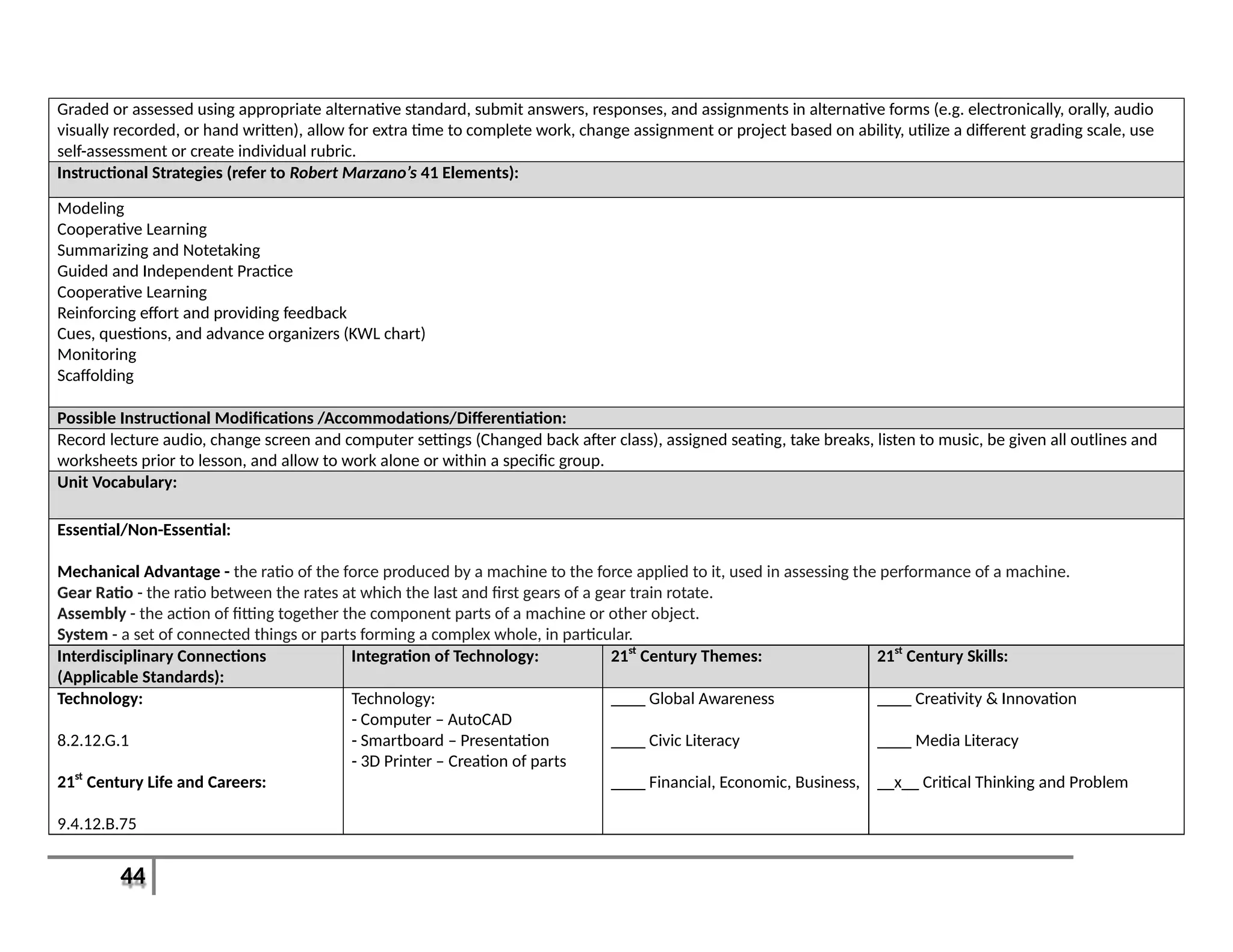
Mechanical Advantage - the ratio of the force produced by a machine to the force applied to it, used in assessing the performance of a machine.
Gear Ratio - the ratio between the rates at which the last and first gears of a gear train rotate.
Assembly - the action of fitting together the component parts of a machine or other object.
System - a set of connected things or parts forming a complex whole, in particular.
Interdisciplinary Connections
(Applicable Standards):
Integration of Technology: 21st
Century Themes: 21st
Century Skills:
Technology:
8.2.12.G.1
21st
Century Life and Careers:
9.4.12.B.75
Technology:
- Computer – AutoCAD
- Smartboard – Presentation
- 3D Printer – Creation of parts
____ Global Awareness
____ Civic Literacy
____ Financial, Economic, Business,
____ Creativity & Innovation
____ Media Literacy
__x__ Critical Thinking and Problem
45
& Entrepreneurial Literacy
____ Health Literacy
Solving
_x___ Life and Career Skills
____ Information & Communication
Technologies Literacy
__x__ Communication & Collaboration
____ Information Literacy
Resources:
Texts/Materials:
- Presentation/Slide Show
- Guided Notes
- Bike and Power Meter
- TopGear Video
Major Assignments (required):
- Gear and Mechanical Advantage Write Up
Major Activities (required):
- LEGO Assembly
- Gear Train Assembly
- Power Output Challenge
46
Unit 11: Materials, Manufacturing, and Testing Recommended Duration: 3-4 Weeks
Unit Description:
Students will learn about different materials and the processes by which they are produced and then manufactured into a final product. Students will learn
about the impact these materials and processes have on the environment, economy, and society in general. Students will also learn about the importance of
testing their designs, and more importantly learning to design the correct test for a product and how to analyze the results. Students will also have a debate on
environmental impacts of manufacturing processes.
Essential Questions: Enduring Understandings:
1. What is manufacturing?
2. How does a material impact the world?
3. Why is analysis of results important?
1. Understanding the results or impacts of an action is just as or more
important than the action itself.
Relevant Standards: Learning Goals: Learning Objectives:
Content Standards:
Primary(Power):
8.2.12.E.1
8.2.12.F.2
8.2.12.C.2
Secondary(Supportive):
8.1.12.A.1
9.4.12B.28
9.4.12.B.(1).10
1. Tests must be designed to accurately measure
the unique abilities of a product.
2. Results from a test must be collected and
analyzed to have value.
3. Knowledge of manufacturing processes
influences design and material choice.
4. Everything we do affects the world around us.
1. Students will be able to identify proper design
testing methods and how to analyze results.
2. Students will be able to identify 5 major
Manufacturing Processes.
3. Students will be able to identify 5 major material
processing processes
Formative Assessments Summative Assessments: Performance Assessments: Major Activities/ Assignments
(required):
- Engineering Notebook
- Guided Notes
- Class Participation
- Quiz
- Written assignment on
Environmental Impact
- Portfolio Review
- Manufacturing Project
- Rubric
- Test (Units 10-11)
- Manufacturing Debate Presentation - Manufacturing/Environment Debate
- Written Assignment Environmental
Impact
47
Possible Assessment Modifications /Accommodations:
Graded or assessed using appropriate alternative standard, submit answers, responses, and assignments in alternative forms (e.g. electronically, orally, audio
visually recorded, or hand written), allow for extra time to complete work, change assignment or project based on ability, utilize a different grading scale, use
self-assessment or create individual rubric.
Instructional Strategies (refer to Robert Marzano’s 41 Elements):
Modeling
Cooperative Learning
Summarizing and Notetaking
Guided and Independent Practice
Cooperative Learning
Reinforcing effort and providing feedback
Cues, questions, and advance organizers (KWL chart)
Monitoring
Scaffolding
Possible Instructional Modifications /Accommodations/Differentiation:
Record lecture audio, change screen and computer settings (Changed back after class), assigned seating, take breaks, listen to music, be given all outlines and
worksheets prior to lesson, and allow to work alone or within a specific group.
Unit Vocabulary:
Essential/Non-Essential:
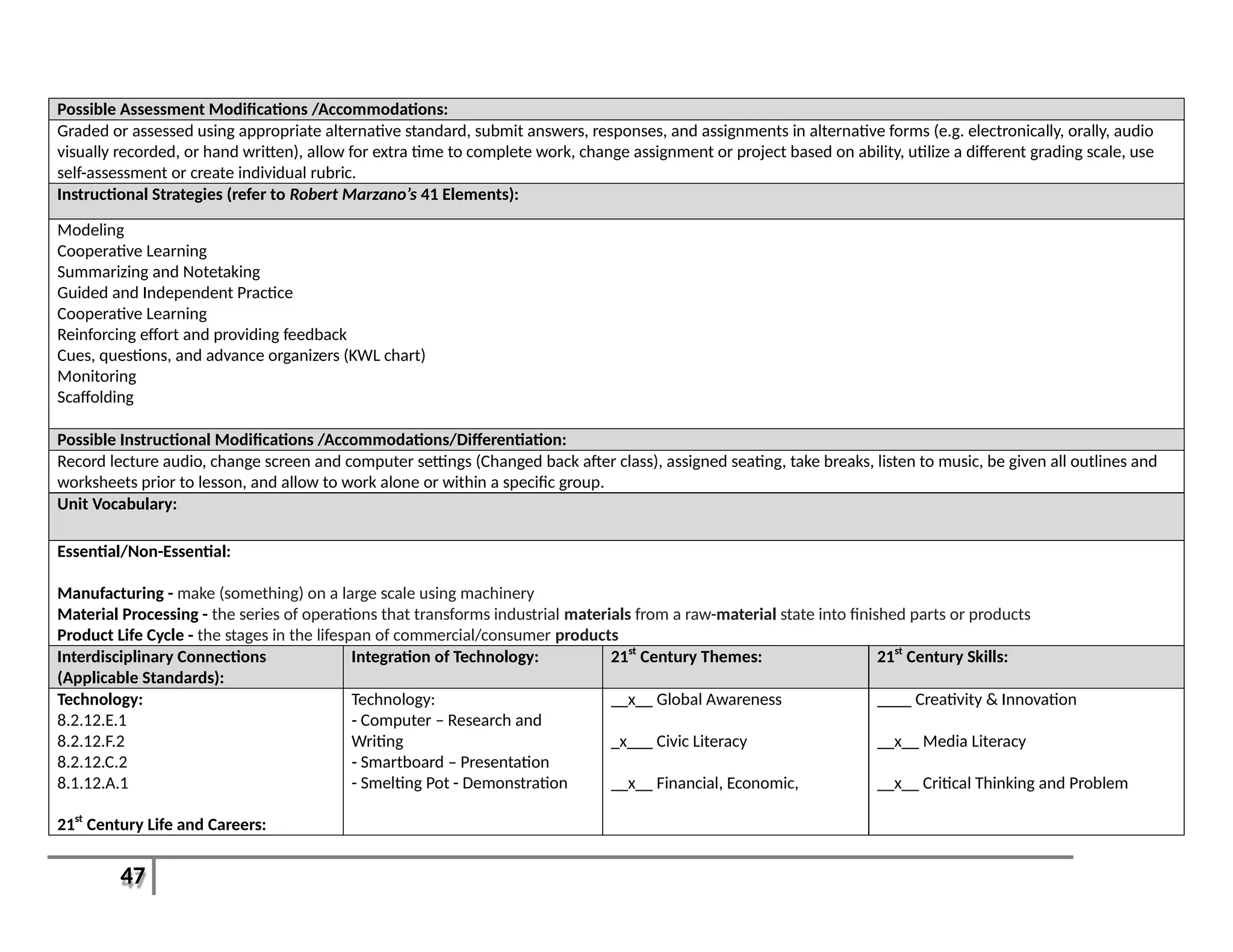
Manufacturing - make (something) on a large scale using machinery
Material Processing - the series of operations that transforms industrial materials from a raw-material state into finished parts or products
Product Life Cycle - the stages in the lifespan of commercial/consumer products
Interdisciplinary Connections
(Applicable Standards):
Integration of Technology: 21st
Century Themes: 21st
Century Skills:
Technology:
8.2.12.E.1
8.2.12.F.2
8.2.12.C.2
8.1.12.A.1
21st
Century Life and Careers:
Technology:
- Computer – Research and
Writing
- Smartboard – Presentation
- Smelting Pot - Demonstration
__x__ Global Awareness
_x___ Civic Literacy
__x__ Financial, Economic,
____ Creativity & Innovation
__x__ Media Literacy
__x__ Critical Thinking and Problem
48
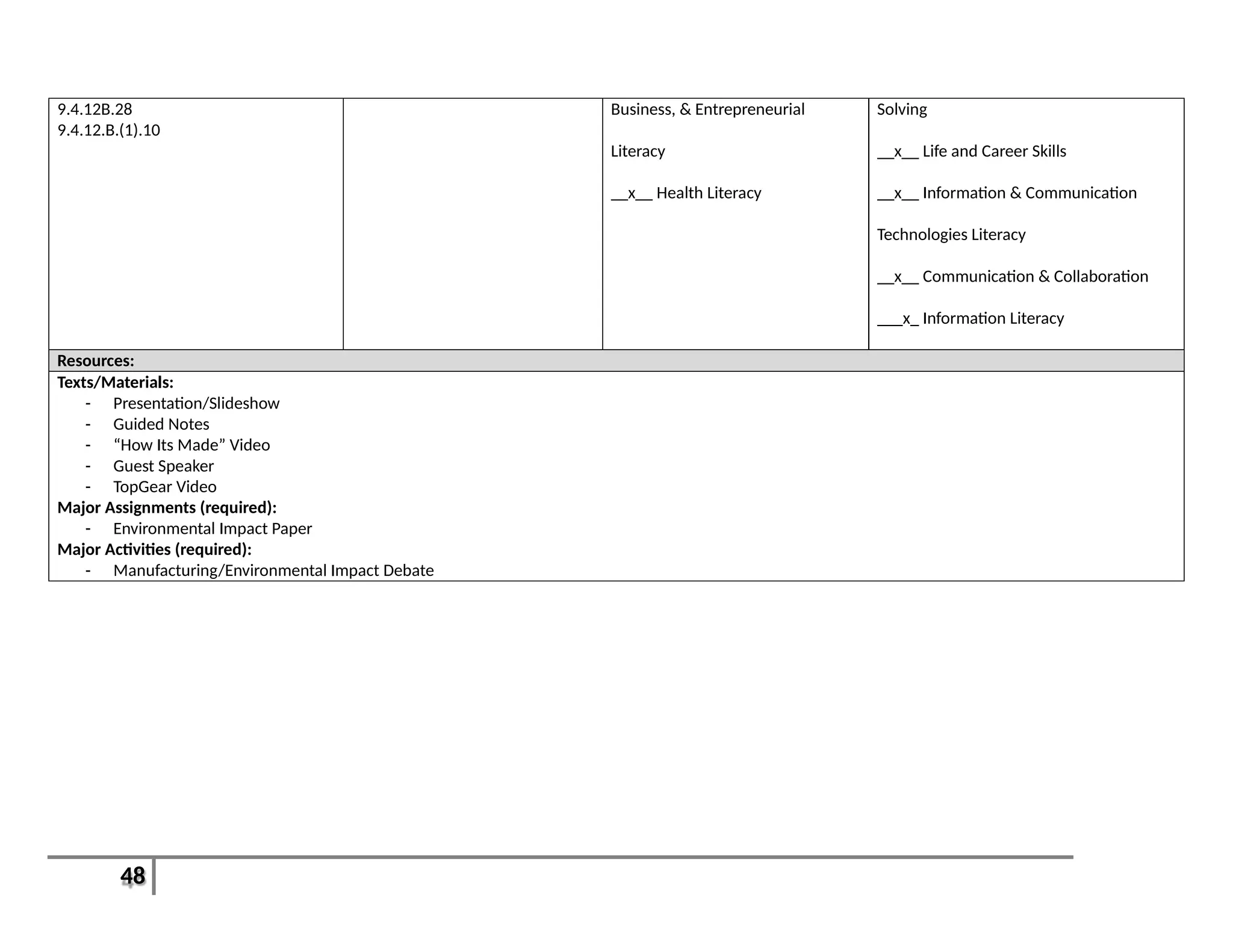
9.4.12B.28
9.4.12.B.(1).10
Business, & Entrepreneurial
Literacy
__x__ Health Literacy
Solving
__x__ Life and Career Skills
__x__ Information & Communication
Technologies Literacy
__x__ Communication & Collaboration
___x_ Information Literacy
Resources:
Texts/Materials:
- Presentation/Slideshow
- Guided Notes
- “How Its Made” Video
- Guest Speaker
- TopGear Video
Major Assignments (required):
- Environmental Impact Paper
Major Activities (required):
- Manufacturing/Environmental Impact Debate
49
Unit 12: Product Development Recommended Duration: 4-5 Weeks
Unit Description:
This will be a culmination of the entire course where students must design a product, create a prototype, test their design, and then present a final proposal to a
board of investors (Teachers, students, and staff). Students will hand in their final portfolio as well. This will be a demonstration on students’ mastery of the
basics of AutoCAD and the Design Process.
Essential Questions: Enduring Understandings:
1. How is the Design Process used?
2. What makes a good design?
3. Why is marketing so important?
1. The Design Process is not just a set of steps to follow to create a product,
but a tool to solve real world problems.
Relevant Standards: Learning Goals: Learning Objectives:
Content Standards:
Primary(Power):
8.1.12.A.3
8.1.12.A.4
8.2.12.A.1
8.2.12.B.2
Secondary(Supportive):
9.2.12.A.4
9.4.12A.9
9.4.12B.74
1. The Design Process is a problem solving tool
when properly applied to a situation.
2. A great design may or may not succeed
depending on how well it is presented. The
same holds true for a bad design.
1. Students will demonstrate a mastery of the Design
Process by creating an Invention or Innovation and
giving a proposal to a panel of investors.
2. Students will define and demonstrate proper use of
Crowd Funding.
Formative Assessments Summative Assessments: Performance Assessments: Major Activities/ Assignments
(required):
- Engineering Notebook
- Class Participation
- Quiz
- Final Product Prototype
- Class Portfolio
- Rubric
- Demonstration of skills
- Final Product Proposal
- Product Proposal
- “Shark Tank”
- Final Product Prototype
- Class Portfolio
- Class Survey
Possible Assessment Modifications /Accommodations:
Graded or assessed using appropriate alternative standard, submit answers, responses, and assignments in alternative forms (e.g. electronically, orally, audio
visually recorded, or hand written), allow for extra time to complete work, change assignment or project based on ability, utilize a different grading scale, use
self-assessment or create individual rubric.
50
Instructional Strategies (refer to Robert Marzano’s 41 Elements):
Modeling
Cooperative Learning
Summarizing and Notetaking
Guided and Independent Practice
Cooperative Learning
Reinforcing effort and providing feedback
Cues, questions, and advance organizers (KWL chart)
Monitoring
Scaffolding
Possible Instructional Modifications /Accommodations/Differentiation:
Record lecture audio, change screen and computer settings (Changed back after class), assigned seating, take breaks, listen to music, be given all outlines and
worksheets prior to lesson, and allow to work alone or within a specific group.
Unit Vocabulary:
Essential/Non-Essential:
Crowd funding - the practice of funding a project or venture by raising many small amounts of money from a large number of people, typically via the Internet.
Investor - a person who allocates capital with the expectation of a financial return.
Interdisciplinary Connections
(Applicable Standards):
Integration of Technology: 21st
Century Themes: 21st
Century Skills:
Technology:
8.1.12.A.3
8.1.12.A.4
8.2.12.A.1
8.2.12.B.2
21st
Century Life and Careers:
9.2.12.A.4
9.4.12A.9
Technology:
- Computer – AutoCAD, Research,
Presentation Design,
Writing Assignment
- Smartboard – Presentation
- 3D Printer – Prototyping
- 3D Scanner - Design
__x__ Global Awareness
__x__ Civic Literacy
___x_ Financial, Economic,
Business, & Entrepreneurial
Literacy
__x__ Health Literacy
__x__ Creativity & Innovation
__x__ Media Literacy
__x__ Critical Thinking and Problem
Solving
__x__ Life and Career Skills
__x__ Information & Communication
51
9.4.12B.74 Technologies Literacy
__x__ Communication & Collaboration
__x__ Information Literacy
Resources:
Texts/Materials:
- Presentation/Slideshow
- “Shark Tank” Video
- “TopGear” Video
- Teachers to be Investors
Major Assignments (required):
- Final Product Prototype
- Product Proposal
Major Activities (required):
- Product Proposal Presentation
- “Shark Tank”

Cad rubrics

  • 1.
    1 Course Name: CADI Grade Level(s): 9-12 Department: Technology Department Credits: 5 BOE Adoption Date: September 22, 2014 Revision Date(s): ABSTRACT In Introduction to Computer Aided Design I (CAD), students will learn how to use industry leading AutoCAD software program to model construction projects, and then create and distribute basic, industry-standard architectural drawings. Throughout CAD I, students will (1) create 2D images in CAD, (2) design and print a blueprint of a land development project on campus, (3) create 3D sketches and shapes from drawings, (4) create basic 3D models using the 3D printer, (5) demonstrate proper use of the 3D scanner, (6) re-create a 3D model of a “real world” object, (7) assemble a gear train and determine its ratio, and (8) demonstrate a mastery of the Design Process by creating an Invention or Innovation and giving a proposal to a panel of investors. By the end of CAD I, students will be better prepared to continue their education in this field and have an understanding for how the world around them is designed and produced.
  • 2.
    2 TABLE OF CONTENTS MissionStatement Page 3 Curriculum and Instruction Goals Page 3 Philosophy of Shared Curriculum Service with South Harrison Township Elementary Page 3 How to Read this Document Page 4 Terms to Know Page 4 Pacing Guide Page(s) 7-10 Curriculum Units Page(s) 12-51
  • 3.
    3 Mission Statement The KingswayRegional School District believes that this school district is responsible for developing and maintaining a comprehensive educational program that will foster the academic, social, and personal growth of all students. The Kingsway Regional School District provides a secure, supportive environment. It also provides high quality resources to challenge and empower each individual to pursue his/her potential, to develop a passion for learning in a diverse and challenging world, to encourage active citizenship, and to reach a high standard of achievement at all grade levels as defined by the New Jersey Core Curriculum Content Standards (NJCCCS) & Common Core State Standards (CCSS). Curriculum & Instruction Goals Goal(s): 1. To ensure students are college and career ready upon graduation 2. To vertically and horizontally align curriculum K-12 to ensure successful transition of students at each grade level 3. To identify individual student strengths and weaknesses utilizing various assessment measures (formative, summative, alternative, etc.) so as to differentiate instruction while meeting the rigor of the applicable content standards 4. To improve student achievement as assessed through multiple measures including, but not limited to, state testing, local assessments, and intermediate benchmarking Philosophy of the Shared Curriculum Service with South Harrison Township Elementary The ultimate goal of the newly established shared curriculum service with South Harrison Township Elementary is to provide clearly coherent curriculum for grades K-12 to enhance student growth and achievement and provide learning experiences that assist in providing an inherent love of learning. With true vertical and horizontal curricular alignment all students will be effectively prepared for their arrival onto the campus of Kingsway Regional Middle School. Through this shared vision, both school districts are able to work earlier and more productively with students to ensure they are properly equipped with the knowledge and skills necessary to be successful in college and career upon graduation from high school. The alignment of curriculum K-12 safeguards countless benefits for our children; it is the very foundation for the improved teaching and learning that is our goal as educators, parents, and community members. Most notably, an aligned curriculum K-12 creates a common ownership and understanding of what must be taught and learned at each grade level for each subject area. No matter where a student attends, the curriculum requirements are the same across buildings, grade levels and teachers. Additionally, an aligned curriculum serves to provide valuable information to parents who will know what each child is expected to learn while in the classroom.
  • 4.
    4 How to Readthis Document This curricular document contains both pacing guides and curriculum units. The pacing guides serve to communicate an estimated timeframe as to when skills and topics will be taught throughout the year. The pacing, however, may differ slightly depending upon the unique needs of each learner. The curriculum units contain more detailed information as to the content, goals, and objectives of the course well as how students will be assessed. The terms and definitions below will assist the reader to better understand the sections and components of this curriculum document. Terms to Know 1. Accommodation(s): The term "accommodation" may be used to describe an alteration of environment, curriculum format, or equipment that allows an individual with a disability to gain access to content and/or complete assigned tasks. They allow students with disabilities to pursue a regular course of study. The term accommodation is often used interchangeable with the term modification. However, it is important to remember that modifications change or modify the intended learning goal while accommodations result in the same learning goal being expected but with added assistance in that achievement. Since accommodations do not alter what is being taught, instructors should be able to implement the same grading scale for students with disabilities as they do for students without disabilities. 2. Differentiated Instruction: Differentiation of instruction relies on the idea that instructional approaches should be tailored to each individual student’s learning needs. It provides students an array of options during the learning process that allows them make sense of ideas as it relates to them. The integration of differentiated instructional techniques is a curriculum design approach to increase flexibility in teaching and decrease the barriers that frequently limit student access to materials and learning in classrooms. 3. Enduring Understanding: Enduring understandings (aka big ideas) are statements of understanding that articulate deep conceptual understandings at the heart of each content area. Enduring understandings are noted in the alongside essential questions within each unit in this document. 4. Essential Question: These are questions whose purpose is to stimulate thought, to provoke inquiry, and to spark more questions. They extend beyond a single lesson or unit. Essential questions are noted in the beginning of each unit in this document. 5. Formative Assessments: Formative assessments monitor student learning to provide ongoing feedback that can be used by (1) instructors to improve teaching and (2) by students to improve their learning. Formative assessments help identify students’ strengths and weaknesses and address problems immediately. 6. Learning Activity(s): Learning activities are those activities that take place in the classroom for which the teacher facilitates and the
  • 5.
    5 students participate into ensure active engagement in the learning process. (Robert J. Marzano, The Art and Science of Teaching) 7. Learning Assignment(s): Learning assignments are those activities that take place independently by the student inside the classroom or outside the classroom (i.e. homework) to extend concepts and skills within a lesson. 8. Learning Goal(s): Learning goals are broad statements that note what students “should know” and/or “be able to do” as they progress through a unit. Learning goals correlate specifically to the NJCCCS and CCSS are noted within each unit. 9. Learning Objective(s): Learning objectives are more specific skills and concepts that students must achieve as they progress towards the broader learning goal. These are included within each unit and are assessed frequently by the teacher to ensure students are progressing appropriately. 10. Model Assessment: Within the model curriculum, model assessments are provided that included assessments that allow for measuring student proficiency of those target skills as the year of instruction progresses. 11. Model Curriculum: The model curriculum has been provided by the state of New Jersey to provide a “model” for which districts can properly implement the Common Core State Standards and New Jersey Core Curriculum Content Standards by providing an example from which to work and/or a product for implementation. 12. Modification(s): The term "modification" may be used to describe a change in the curriculum. Modifications are typically made for students with disabilities who are unable to comprehend all of the content an instructor is teaching. The term modification is often used interchangeable with the term accommodations. However, it is important to remember that modifications change or modify the intended learning goal while accommodations result in the same learning goal being expected but with assistance in that achievement. 13. Performance Assessments: (aka alternative or authentic assessments) Performance assessments are a form of assessment that requires students to perform tasks that generate a more authentic evaluation of a student’s knowledge, skills, and abilities. Performance assessments stress the application of knowledge and extend beyond traditional assessments (i.e. multiple-choice question, matching, true & false, etc.). 14. Standards: Academic standards, from which the curriculum is built, are statements that of what students “should know” or “be able to do” upon completion of a grade-level or course of study. Educational standards help teachers ensure their students have the skills and knowledge they need to be successful by providing clear goals for student learning. o State: The New Jersey Student Learning Standards (NJSLSs) include Preschool Teaching and Learning Standards as well as K-12 standards for: Visual and Performing Arts; Comprehensive Health and Physical Education; Science; Social Studies; World
  • 6.
    6 Languages; Technology; 21st-CenturyLife and Careers; Language Arts Literacy; and, Mathematics. 15. Summative Assessments: Summative assessments evaluate student learning at the end of an instructional time period by comparing it against some standard or benchmark. Information from summative assessments can be used formatively when students or faculty use it to guide their efforts and activities in subsequent courses. 16. 21st Century Skills: These skills emphasis the growing need to focus on those skills that prepare students successfully by focusing on core subjects and 21 st century themes; learning and innovation skills; information, media and technology skills; and life and career skills. These concepts are embedded in each unit of the curriculum.
  • 7.
    7 Proficiencies and Pacing: CourseTitle: Intro to CAD/CAD I Prerequisite(s): None Unit Title: Duration/ Month(s) Related Standards: Learning Goals: Topics and Skills: Unit 1: Intro to Design/Class Safety 1 – 2 Weeks Sept. 4th – 12th Subject Area: 8.1.12.B.1 8.1.12.F.2 Interdisciplinary: 9.2.12.A.1 9.1.4.F.3 9.1.4.F.1  Students will be able to identify Machines/Tools in the classroom.  Students will be able to demonstrate proper technique when using machines/tools in classroom.  Students will be able to define Technological Literacy.  Students will be able to define CAD and identify some its uses in different fields.  Students will be able to define the difference between Engineer and Engineering.  Classroom Safety  Proper Tool and Machine Usage  Technological Literacy  Design Differences: Industrial, Graphic, Fashion, Cinematic, etc.  Careers  Uses of CAD in Today’s World  Engineering and Engineers  Speaker (Engineer and Designer) Unit 2: Using the Design Process/Design Loop Theory 2-3 Weeks Sept. 15th – Oct. 3rd Subject Area: 8.1.12.D.2 8.2.12.C.3 8.2.12.F.3 Interdisciplinary: 9.4.12A.16  Students will be able to identify the 7-9 steps of the Design Process.  Students will demonstrate the use of the Design Loop.  Students will be able to identify the difference between invention and innovation.  Students will be able to define Copyright and Patent.  Students will understand the importance of collaboration and communication within a team.  Design Process Theory  Using the Design Loop  Inventions and Innovations  Copyright and Patents  Reverse Engineering  Bridge Design (West Point Program) http://bridgecontest.org/  Building and Material Costs  Engineering Notebook (Online or Hand Written Journal)  Teamwork
  • 8.
    8 Unit Title: Duration/ Month(s) RelatedStandards: Learning Goals: Topics and Skills:  Students will compete to create a bridge Unit 3: 2-Dimension Modeling and Sketching 2 Weeks Oct. 6th – 17th Subject Area: Interdisciplinary: 9.4.12.B.(1).9 9.4.12.B.4 9.4.12.B.75  Students will be able to define Perspective, Isometric, and Orthographic Drawings.  Students will be able to sketch the above drawing types.  Students will be able to identify uses of technical drawings in different careers/disciplines.  Students will understand and demonstrate the basic principles of flight and aerodynamics.  Orthographic, Perspective and Isometric Drawings  Handwriting, Sketching, and Drawing  Uses of Technical Drawings  Communication  Paper Airplanes and Aerodynamics Unit 4: Using AutoCAD (2- Dimension) 2-3 Weeks Oct. 20th – Nov. 14th Subject Area: 8.2.12.F.3 Interdisciplinary: 9.4.12.B.75 9.4.12.B.74 9.4.12B.24  Students will be able to define and identify the differences between blueprints and schematics.  Students will be able to identify the basic parts of AutoCAD.  Students will create 2D images in CAD from the previous unit (Unit 3).  Students will be able to define and utilize units of scale.  Students will be able to demonstrate proper use of the plotter.  Intro to AutoCAD program  Menus, toolbars, windows, and work areas/planes  2D sketching tools and functions  Working in Scale  Labeling  Storing and Saving Work  Blueprints and schematics Unit 5: Architecture 4-5 Weeks Nov. 17th – Dec. 23rd Subject Area: 8.1.12.C.1 8.2.12.B.1  Students will be able to identify basic parts of a structure/building  Different styles/uses of Architecture  Floor plans, traffic flow and
  • 9.
    9 Unit Title: Duration/ Month(s) RelatedStandards: Learning Goals: Topics and Skills: 8.2.12.C.3 8.2.12.F.3 Interdisciplinary: 9.4.12A.19 9.4.12A.47 9.4.12.B.(1).5 9.4.12.B.(1).11  Students will be able to identify common architectural styles.  Students will be able to re- create and re-design classroom floor plans.  Students will be able to properly design and assemble a scale addition to the school.  Students will be able to design and print out a blueprint of a land development project on campus.  Students will understand the value of self- assessment. regulations  Importing 2D images  Addition to School  Creating scale 3D models from foam core  Development of land and Project Planning  Develop Rubric for self- assessment Unit 6: 3-D Modeling in AutoCAD 2-3 Weeks Jan. 5th – Jan. 23rd Subject Area: 8.2.12.F.3 Interdisciplinary: 9.4.12.B.75 9.4.12.B.74 9.4.12B.24  Students will be able to identify the differences between using AutoCAD in 2D and 3D.  Students will be able to create 3D sketches and shapes from drawings in Unit 3.  Students will be able to define Rapid Prototyping and identify its uses in Engineering and other fields.  Students will create basic 3D models using the 3D printer.  Menus, toolbars, windows, and work areas/planes  3D sketching tools and basic functions (Extrude, cut, hole, etc.)  Reproducing 2D perspectives and sketches from Unit 3  Shading/Coloring  Rapid Prototyping  3D Printer Unit 7: Engineering Drawings 2 Weeks Jan. 26th – Feb. 6th Subject Area: 8.2.12.B.3 8.2.12.F.3  Students will be able to identify and correctly utilize Dimensions and Constraints.  Dimensions and Constraints  Rendering  Communication of Ideas
  • 10.
    10 Unit Title: Duration/ Month(s) RelatedStandards: Learning Goals: Topics and Skills: Interdisciplinary: 9.2.12.B.1 9.2.12.B.6 9.4.12A.9  Students will understand the use of delegation of duties within a team.  Students will be able to develop and utilize a budget and cost sheet.  Design Proposals  Develop a Budget  Outsourcing  Labor Costs Unit 8: Auto CAD Irregular Shapes (Revolve/Sweep/Loft) 2 Weeks Feb. 9th – Feb 20th Subject Area: 8.2.12.F.3 Interdisciplinary: 9.4.12B.5 9.4.12.B.75 9.4.12.B.74  Students will be able to define Revolve, Sweep, and Loft and when to use.  Students will be able to define Stress and Strain.  Students will understand how different shapes are affected by Stress and Strain.  More advanced 3D Functions  Rotating around an Axis  Following a Path  Irregular shapes and cross- sections  Stress, Strain, and other Forces  Trek Factory Team Speaker and Demo Unit 9: Auto CAD Patterns and Ergonomics 2 Weeks Feb 23rd – Mar. 6th Subject Area: 8.2.12.D.1 Interdisciplinary: 9.4.12.B.75 9.4.12.B.74 9.4.12B.21  Students will be able to identify 6 types of gears and their uses.  Students will be able to demonstrate proper use of the 3D scanner.  Students will be able to re- create a 3D model of a “real world” object.  More Advanced 3D Functions  Gears  Lego Blocks  Button Layout  Cellular Phone Re- Creation/Re-Design  Phone Case  3D Scanners Unit 10: Importing Parts and Creating Assemblies 2-3 Weeks Mar. 9th – Mar. 27th Subject Area: 8.2.12.G.1  Students will be able to import other students parts and create an assembly.  1.)Offsets  2.)Exporting/Importing Parts  3.)Lego Creations
  • 11.
    11 Unit Title: Duration/ Month(s) RelatedStandards: Learning Goals: Topics and Skills: Interdisciplinary: 9.4.12.B.75  Students will be able to assemble a gear train and determine its ratio.  Students will be able to define Mechanical Advantage.  Gear Trains  Mechanical Advantage  Bike/Power Output Demonstration Unit 11: Materials, Manufacturing, and Testing and Analysis 3-4 Weeks Apr 7th – May 1st Subject Area: 8.2.12.E.1 8.2.12.F.2 8.2.12.C.2 8.1.12.A.1 Interdisciplinary: 9.4.12B.28 9.4.12.B.(1).10  Students will be able to identify proper design testing methods and how to analyze results.  Students will be able to identify 5 major Manufacturing Processes.  Students will be able to identify 5 major material processing processes.  Testing and Analysis  Manufacturing Processes  Materials and Processing  Red Shift Company Speaker Unit 12: Final Proposals 4-5 Weeks May 4th – June 11th Subject Area: 8.1.12.A.3 8.1.12.A.4 8.2.12.A.1 8.2.12.B.2 Interdisciplinary: 9.2.12.A.4 9.4.12A.9 9.4.12B.74  Students will demonstrate a mastery of the Design Process by creating an Invention or Innovation and giving a proposal to a panel of investors.  Students will define and demonstrate proper use of Crowd Funding.  Product Design, Prototype, and Proposal  Product Survey  Final Portfolio  Shark Tank/Dragon’s Den  Kickstarter Project
  • 12.
    12 Unit 1: Introto Design/Class Safety Recommended Duration: 1-2 Weeks Unit Description: This unit will cover Student Safety for use of all machines and tools within the classroom. This unit will also define Technological Literacy and its importance in today’s evolving world. This unit will also cover differences between different types of design (e.g. Industrial, Graphic, Fashion, etc.), the difference between Engineering and Engineers, and will also cover the use of CAD within different industries and careers. Students will make 1 minute presentations on different careers that use CAD. Essential Questions: Enduring Understandings: 1. Why are safety precautions important in the workplace? 2. How does inappropriate behavior affect productivity? 3. What is CAD? 4. How is CAD used in different industries? 1. Self-management is a key to maximizing efficiency and preventing accidents. Relevant Standards: Learning Goals: Learning Objectives: Content Standards: Primary(Power): 8.1.12.B.1 8.1.12.F.2 9.2.12.A.1 1. The ability to properly identify and use tools/machines within the classroom increases a student’s productivity and confidence. 2. Technological Literacy is necessary for any person in order to be more aware and effective in the evolving world of technology. 3. CAD is utilized in almost all industries and fields of study in order to create a better 1. Students will be able to identify Machines/Tools in the classroom 2. Students will be able to demonstrate proper technique when using machines/tools in classroom 3. Students will be able to define Technological Literacy 4. Students will be able to define CAD and identify
  • 13.
    13 Secondary(Supportive): 9.1.4.F.3 9.1.4.F.1 designed world. 4. TheDesigned world is what is in between the Human World and the Natural World. 5. Engineering is something that is done while an Engineer is an occupation. (E vs. e) some its uses in different fields. 5. Students will be able to define the difference between Engineer and Engineering Formative Assessments Summative Assessments: Performance Assessments: Major Activities/ Assignments (required): - Guided Notes - Written Assignment - Class Participation - Quizzes - Guest Speaker Recap - Career Presentation - Prior Knowledge Survey - Career Research - Speaker Possible Assessment Modifications /Accommodations: Graded or assessed using appropriate alternative standard, submit answers, responses, and assignments in alternative forms (e.g. electronically, orally, audio visually recorded, or hand written), allow for extra time to complete work, change assignment or project based on ability, utilize a different grading scale, use self-assessment or create individual rubric.
  • 14.
    14 Instructional Strategies (referto Robert Marzano’s 41 Elements): Modeling Cooperative Learning Summarizing and Notetaking Guided and Independent Practice Cooperative Learning Reinforcing effort and providing feedback Cues, questions, and advance organizers (KWL chart) Monitoring Scaffolding Possible Instructional Modifications /Accommodations/Differentiation: Record lecture audio, change screen and computer settings (Changed back after class), assigned seating, take breaks, listen to music, be given all outlines and worksheets prior to lesson, and allow to work alone or within a specific group. Unit Vocabulary: Essential/Non-Essential: Technological Literacy – the ability of an individual, working independently and with others, to responsibly, appropriately and effectively use technology tools to access, manage, integrate, evaluate, create and communicate information. CAD (Computer Aided Design) – used for detailed engineering of 3D models and/or 2D drawings of physical components, but it is also used throughout the engineering process from conceptual design and layout of products, through strength and dynamic analysis of assemblies to definition of manufacturing methods of components. Design – a plan or drawing produced to show the look and function or workings of a building, garment, or other object before it is built or made. Engineering - the branch of science and technology concerned with the design, building, and use of engines, machines, and structures. Interdisciplinary Connections (Applicable Standards): Integration of Technology: 21st Century Themes: 21st Century Skills: Technology: 8.1.12.B.1 8.1.12.F.2 Technology: - Computers – Used for research and completing assignments - Smartboard – Used for presentations and demonstrations __x__ Global Awareness ____ Civic Literacy ____ Creativity & Innovation __x__ Media Literacy
  • 15.
    15 21st Century Life andCareers: 9.2.12.A.1 9.1.4.F.3 9.1.4.F.1 - 3D Printer – Used for demonstration __x__ Financial, Economic, Business, & Entrepreneurial Literacy ____ Health Literacy ____ Critical Thinking and Problem Solving __x__ Life and Career Skills __x__ Information & Communication Technologies Literacy ____ Communication & Collaboration __x__ Information Literacy Resources: Texts/Materials: - Guided Notes - TopGear Videos - Presentation/Slide Show - Prototyped Parts/Examples Major Assignments (required): - Guest Speaker Recap - Written Review of Unit (Guided Notes) Major Activities (required): - Prior knowledge survey - Group Presentation
  • 16.
    16 Unit 2: Usingthe Design Process Recommended Duration: [2-3 Weeks] Unit Description: This unit will go through the 7-9 steps of the Design Process and how they are used in problem and project based learning scenarios. This unit will cover the differences between inventions and innovations and how copyright law and patents play a part. We will discuss reverse engineering and intellectual property. Students will also be instructed on how to use their Engineering Notebook/Journal for the remainder of the year. This will end with a bridge building competition to establish team work and student’s roles and relationships within the classroom. Essential Questions: Enduring Understandings: 1. What are the components of the Design Process? 2. Who uses the Design Process and how does it change? 3. What are some organizational skills? 4. What are the benefits and disadvantages of working in a group instead of individually? 1. The Design Process is a series of steps taken in order to create a product or solve a problem.
  • 17.
    17 Relevant Standards: LearningGoals: Learning Objectives: Content Standards: Primary(Power): 8.1.12.D.2 8.2.12.C.3 Secondary(Supportive): 8.2.12.F.3 9.4.12A.16 1. The Design Process can be used in most situations to come to the best solution. 2. Innovations are modifications of current products, processes, and ideas, while Inventions are completely new ideas. 3. Explain: Copying or stealing one’s idea may or may not be legal. 4. Teamwork is an essential skill in today’s world. 1. Students will be able to identify the 7-9 steps of the Design Process 2. Students will demonstrate the use of the Design Loop 3. Students will be able to identify the difference between invention and innovation 4. Students will be able to define Copyright and Patent 5. Students will understand the importance of collaboration and communication within a team Formative Assessments Summative Assessments: Performance Assessments: Major Activities/ Assignments (required): Engineering Notebook Written assignment: Theft in Industry Class Participation - Engineering Notebook - Team Challenge Rubric - Bridge Design - Teamwork Observation - Bridge Design Challenge - Written assignment on Theft in Industry Possible Assessment Modifications /Accommodations: Graded or assessed using appropriate alternative standard, submit answers, responses, and assignments in alternative forms (e.g. electronically, orally, audio visually recorded, or hand written), allow for extra time to complete work, change assignment or project based on ability, utilize a different grading scale, use self-assessment or create individual rubric
  • 18.
    18 Instructional Strategies (referto Robert Marzano’s 41 Elements): Modeling Cooperative Learning Summarizing and Notetaking Guided and Independent Practice Cooperative Learning Reinforcing effort and providing feedback Cues, questions, and advance organizers (KWL chart) Monitoring Scaffolding Possible Instructional Modifications /Accommodations/Differentiation: Record lecture audio, change screen and computer settings (Changed back after class), assigned seating, take breaks, listen to music, be given all outlines and worksheets prior to lesson, and allow to work alone or within a specific group. Unit Vocabulary: Design Process – A pre-determined set of steps that are applied to a problem in order to come out with the best solution Invention – the action of inventing something, typically a process or device. Innovation – a new method, idea, product, based around something that already exists. Patent - a government authority or license conferring a right or title for a set period, especially the sole right to exclude others from making, using, or selling an invention. Interdisciplinary Connections (Applicable Standards): Integration of Technology: 21st Century Themes: 21st Century Skills: Technology: 8.1.12.D.2 8.2.12.C.3 8.2.12.F.3 Technology: - Computer: Research and Bridge Design Program - Smartboard – Presentation __x__ Global Awareness __x__ Civic Literacy __x__ Financial, Economic, __x__ Creativity & Innovation __x__ Media Literacy __x__ Critical Thinking and Problem
  • 19.
    19 21st Century Life andCareers: 9.4.12.16 - 3D Printer - Demonstration Business, & Entrepreneurial Literacy ____ Health Literacy Solving ____ Life and Career Skills __x__ Information & Communication Technologies Literacy __x__ Communication & Collaboration ____ Information Literacy Resources: Texts/Materials: - Guided Notes - TopGear Videos - Presentation/Slide Show Major Assignments (required): - Engineering Notebook - Written Assignment on Theft Major Activities (required): - Bridge Design Challenge
  • 20.
    20 Unit 3: 2-DimensionModeling and Sketching Recommended Duration: 2 Weeks Unit Description: This unit will focus on students’ abilities to sketch orthographic, perspective, and Isometric drawings as well as understand the importance and uses of Technical drawings. We will also cover manipulating materials to create 3D shapes and cover the basic principles of flight and how design principles from other fields can be applied to others. Paper Airplane Communication Challenge. Essential Questions: Enduring Understandings: 1. How do sketches play a role in creating a solid model? 2. What is the importance of sketching a design? 3. How do engineers communicate ideas? 1. Being proficient at sketching a 3D object in 2D helps to bridge the cognitive gap of modeling in 3D space.
  • 21.
    21 Relevant Standards: LearningGoals: Learning Objectives: Content Standards: Primary(Power): 9.4.12.B.75 9.4.12.B.(1).9 Secondary(Supportive): 9.4.12.B.4 1. Drawing 3D shapes on a 2D surface is a necessary ability to better understand modeling in 3D on a computer. 2. Technical drawings give scope and definition to a design or idea. 3. Technical drawings are a medium of communication between engineers of different fields and countries. 4. The path followed allowing man to fly is an example of employing a design process. 1. Students will be able to define Perspective, Isometric, and Orthographic Drawings. 2. Students will be able to sketch the above drawing types. 3. Students will be able to identify uses of technical drawings in different careers/disciplines. 4. Students will understand and demonstrate the basic principles of flight and aerodynamics. Formative Assessments Summative Assessments: Performance Assessments: Major Activities/ Assignments (required): - Engineering Notebook - Guided Notes - Quiz - Written assignment on Flight - Test (Units 1-3) - Paper Airplane Communication Challenge - Paper Airplane Communication Challenge - Test - Written assignment on Flight Possible Assessment Modifications /Accommodations: Get graded or assessed using appropriate alternative standard, submit answers, responses, and assignments in alternative forms (e.g. electronically, orally, audio visually recorded, or hand written), allow for extra time to complete work, change assignment or project based on ability, utilize a different grading scale, use self-assessment or create individual rubric. Instructional Strategies (refer to Robert Marzano’s 41 Elements): Modeling Cooperative Learning Summarizing and Notetaking Guided and Independent Practice Cooperative Learning Reinforcing effort and providing feedback
  • 22.
    22 Cues, questions, andadvance organizers (KWL chart) Monitoring Scaffolding Possible Instructional Modifications /Accommodations/Differentiation: Record lecture audio, change screen and computer settings (Changed back after class), assigned seating, take breaks, listen to music, be given all outlines and worksheets prior to lesson, and allow to work alone or within a specific group. Unit Vocabulary: Orthographic Projection – a method of projection in which an object is depicted or a surface mapped using parallel lines to project its shape onto a plane. Isometric Drawing – a method for visually representing three-dimensional objects in two dimensions in technical and engineering drawings. It is an axonometric projection in which the three coordinate axes appear equally foreshortened and the angles between any two of them are 120 degrees. Aerodynamics - the study of the properties of moving air, and especially of the interaction between the air and solid bodies moving through it. Lift - move upward; be raised. Bernoulli’s Principle - states that for an inviscid flow, an increase in the speed of the fluid occurs simultaneously with a decrease in pressure or a decrease in the fluid's potential energy Interdisciplinary Connections (Applicable Standards): Integration of Technology: 21st Century Themes: 21st Century Skills: 21st Century Life and Careers: 9.4.12.B.(1).9 9.4.12.B.4 9.4.12.B.75 Technology: Computer – Research and Design. Smartboard – Presentation Quadcopter - Demonstration ____ Global Awareness ____ Civic Literacy ____ Financial, Economic, Business, & Entrepreneurial Literacy ____ Health Literacy __x__ Creativity & Innovation ____ Media Literacy __x__ Critical Thinking and Problem Solving ____ Life and Career Skills __x__ Information & Communication Technologies Literacy __x__ Communication & Collaboration
  • 23.
    23 __x__ Information Literacy Resources: Text/Materials: -Guided Notes - American Chopper Video - Presentation/Slideshow Major Assignments (required): - Written assignment on flight - Guided Notes Packet - Test (Units 1-3) Major Activities (required): - Paper Airplane Challenge
  • 24.
    24 Unit 4: UsingAutoCAD 2D Recommended Duration: 2-3 Weeks Unit Description: This unit will cover introducing students to the AutoCAD program including navigation, menus, toolbars, and functions for 2D sketching. Students will learn about working in scale, proper labeling of parts, designs, etc., and storing, saving, sharing, printing, and exporting their work. We will also cover Blueprints and Schematics with a replication challenge. Essential Questions: Enduring Understandings: 1. How does a CAD program help you create a design? 2. What part of a CAD program helps you create changes? 3. How does on navigate and identify areas of a CAD program? 4. How is work done on the computer created, stored, and exported? 5. What are the benefits of using a CAD program over hand drawn sketches? 1. Proficiencies with various tools and menus of a computer program will greatly assist the efficiency of work. Relevant Standards: Learning Goals: Learning Objectives: Content Standards: Primary(Power): 8.2.12.F.3 9.4.12.B.75 Secondary(Supportive): 9.4.12.B.74 9.4.12B.24 1. Being able to navigate through AutoCAD and quickly identify parts and functions of the program greatly increases productivity throughout the year. 2. Reproducing a hand drawn sketch in a CAD program is a cognitive boundary that once mastered allows for greater learning potential. 3. Understanding scale and its importance is necessary to working within the natural, human, and designed worlds. 1. Students will be able to define and identify the differences between blueprints and schematics. 2. Students will be able to identify the basic parts of AutoCAD. 3. Students will create 2D images in CAD from the previous unit (Unit 3). 4. Students will be able to define and utilize units of scale. 5. Students will be able to demonstrate proper use of the plotter.
  • 25.
    25 Formative Assessments SummativeAssessments: Performance Assessments: Major Activities/ Assignments (required): - Engineering Notebook - Quizzes - Guided Notes - Final Schematic - Schematic Reproduction Challenge - Schematic Reproduction Challenge - Final Schematic Possible Assessment Modifications /Accommodations: Graded or assessed using appropriate alternative standard, submit answers, responses, and assignments in alternative forms (e.g. electronically, orally, audio visually recorded, or hand written), allow for extra time to complete work, change assignment or project based on ability, utilize a different grading scale, use self-assessment or create individual rubric. Instructional Strategies (refer to Robert Marzano’s 41 Elements): Modeling Cooperative Learning Summarizing and Notetaking Guided and Independent Practice Cooperative Learning Reinforcing effort and providing feedback Cues, questions, and advance organizers (KWL chart) Monitoring Scaffolding Possible Instructional Modifications /Accommodations/Differentiation: Record lecture audio, change screen and computer settings (Changed back after class), assigned seating, take breaks, listen to music, be given all outlines and worksheets prior to lesson, and allow to work alone or within a specific group. Unit Vocabulary: Menu - a list of commands or options, especially one displayed on screen. Plane - a flat surface on which a straight line joining any two points on it would wholly lie. Blueprint - a design plan or other technical drawing. Schematic - a schematic diagram, in particular of an electric or electronic circuit.
  • 26.
    26 Interdisciplinary Connections (Applicable Standards): Integrationof Technology: 21st Century Themes: 21st Century Skills: Technology: 8.2.12.F.3 21st Century Life and Careers: 9.4.12.B.75 9.4.12.B.74 9.4.12B.24 - Computer: Working with AutoCAD and electronic communication - Smartboard Presentations - Plotter: Demonstration and Printing - Electronic Circuit Demonstration __x__ Global Awareness ____ Civic Literacy ____ Financial, Economic, Business, & Entrepreneurial Literacy ____ Health Literacy __x__ Creativity & Innovation __x__ Media Literacy __x__ Critical Thinking and Problem Solving __x__ Life and Career Skills __x__ Information & Communication Technologies Literacy __x__ Communication & Collaboration __x__ Information Literacy Resources: Texts/Materials: - Guided Notes - Presentation/Slideshow - TopGear Video Major Assignments (required): - Engineering Notebook - Final Schematic - -Summative Assessment Major Activities (required): - Schematic Reproduction Challenge
  • 27.
    27 Unit 5: ArchitectureRecommended Duration: [4-5 Weeks] Unit Description: This unit will cover the field of Architecture and how Design plays a role. Students will learn about basic Architectural Styles and parts of a standing structure. Students will create floor plans and understand how traffic patterns and workflow inspire design. Students will create a scale addition to the high school and have a printed floor plan to match with exterior features. They will also work on landscape and environmental design around the school. Essential Questions: Enduring Understandings: 1. How are design and style related? 2. What characteristics are essential to a functional team? 3. Why is time management important? 4. What is efficiency? 1. Innovation in digital tools and products are utilized to aid and simplify work and maximize efficiency. Relevant Standards: Learning Goals: Learning Objectives: Content Standards: Primary(Power): 8.1.12.C.1 8.2.12.B.1 9.4.12A.19 Secondary(Supportive): 8.2.12.C.3 8.2.12.F.3 9.4.12A.47 9.4.12.B.(1).5 9.4.12.B.(1).11 1. There is a direct relationship between style and design. 2. Maximizing efficiency doesn’t always mean minimizing style. 3. When creating a design you will have to interact with an existing part of the human, natural, or designed world. 4. Being self-aware and open to criticism allows for greater personal growth. 2. Students will be able to identify basic parts of a structure/building. 3. Students will be able to identify common architectural styles. 4. Students will be able to define and utilize efficiency in their designs. 5. Students will be able to properly design and assemble a scale addition to the school. 6. Students will understand the importance of the natural world. 7. Students will understand the value of self- assessment.
  • 28.
    28 Formative Assessments SummativeAssessments: Performance Assessments: Major Activities/ Assignments (required): - Engineering Notebook - Quizzes - Guided Notes - Class Participation - Test (Units 4-5) - Rubrics - School Addition Challenge - Land Survey Challenge - School Addition Challenge - Land Survey Challenge - Foamcore Model - Land Development Design Possible Assessment Modifications /Accommodations: Graded or assessed using appropriate alternative standard, submit answers, responses, and assignments in alternative forms (e.g. electronically, orally, audio visually recorded, or hand written), allow for extra time to complete work, change assignment or project based on ability, utilize a different grading scale, use self-assessment or create individual rubric. Instructional Strategies (refer to Robert Marzano’s 41 Elements): Modeling Cooperative Learning Summarizing and Notetaking Guided and Independent Practice Cooperative Learning Reinforcing effort and providing feedback Cues, questions, and advance organizers (KWL chart) Monitoring Scaffolding Possible Instructional Modifications /Accommodations/Differentiation: Record lecture audio, change screen and computer settings (Changed back after class), assigned seating, take breaks, listen to music, be given all outlines and worksheets prior to lesson, and allow to work alone or within a specific group. Unit Vocabulary: Architecture - the art or practice of designing and constructing buildings. Landscape - all the visible features of an area of countryside or land, often considered in terms of their aesthetic appeal. Floor Plan – a scale diagram of the arrangement of rooms in one story of a building. Traffic Pattern – the characteristic distribution of traffic on a route. Scale - a graduated range of values forming a standard system for measuring or grading something. Self-Assessment - of one's performance at a job or learning task considered in relation to an objective standard. Research - the systematic investigation into and study of materials and sources in order to establish facts and reach new conclusions.
  • 29.
    29 Interdisciplinary Connections (Applicable Standards): Integrationof Technology: 21st Century Themes: 21st Century Skills: Technology: 8.1.12.C.1 8.2.12.B.1 8.2.12.C.3 8.2.12.F.3 21st Century Life and Careers: 9.4.12A.19 9.4.12A.47 9.4.12.B.(1).5 9.4.12.B.(1).11 - Computer – Using AutoCAD and Google Maps/Earth - Mobile Computing Device – Land Surveying - Camera – Documentation - Smartboard – Presentation - Plotter – Project printouts _x___ Global Awareness __x__ Civic Literacy __x__ Financial, Economic, Business, & Entrepreneurial Literacy __x__ Health Literacy __x__ Creativity & Innovation __x__ Media Literacy __x__ Critical Thinking and Problem Solving __x__ Life and Career Skills __x__ Information & Communication Technologies Literacy __x__ Communication & Collaboration __x__ Information Literacy Resources: Texts/Materials: - Presentation/Slideshow - Guided Notes - TopGear Video - Scale Model of School (FoamCore) Major Assignments (required): - Foamcore scale model - Land Development Layout Major Activities (required): - School Addition Challenge - Land Survey Challenge
  • 30.
    30 Unit 6: 3DModeling in AutoCAD Recommended Duration: [2-3 Weeks] Unit Description: Students will now expand on their prior knowledge of CAD from 2D to 3D. They will learn about basic functions such as extrude, cut, hole, etc. and working in different planes. Students will reproduce their 2D sketches from Unit 3 in 3D space and learn about shading, coloring, and rendering an object/scene. Students will also cover the use of rapid prototyping and how the 3D printer is changing the world of design. Essential Questions: Enduring Understandings: 1. Why is it essential to follow proper procedure when creating a design? 2. What are the key features of rendering? 3. How is rapid prototyping used in product development? 1. CAD programs require knowledge of proper technique and purpose.
  • 31.
    31 Relevant Standards: LearningGoals: Learning Objectives: Content Standards: Primary(Power): 8.2.12.F.3 9.4.12.B.75 Secondary(Supportive): 9.4.12.B.74 9.4.12B.24 1. CAD allows for product design, testing, and rendering in 3D digital space. 2. Reproducing a 2D sketch in CAD is a career. 3. Rendering an object in 3D space gives scope and balance. 4. Rapid prototyping allows designers to save time and money when creating products or developing a proposal. 1. Students will be able to identify the differences between using AutoCAD in 2D and 3D. 2. Students will be able to create 3D sketches and shapes from drawings in Unit 3. 3. Students will be able to define Rapid Prototyping and identify its uses in Engineering and other fields. 4. Students will create basic 3D models using the 3D printer. Formative Assessments Summative Assessments: Performance Assessments: Major Activities/ Assignments (required): - Engineering Notebook - Guided Notes - Quizzes - Class Participation - 3D Shape Deliverables - Rubric - Rapid Prototype Project - Rapid Prototyping Challenge - 3D Printed Shapes Possible Assessment Modifications /Accommodations: Graded or assessed using appropriate alternative standard, submit answers, responses, and assignments in alternative forms (e.g. electronically, orally, audio visually recorded, or hand written), allow for extra time to complete work, change assignment or project based on ability, utilize a different grading scale, use self-assessment or create individual rubric. Instructional Strategies (refer to Robert Marzano’s 41 Elements): Modeling Cooperative Learning Summarizing and Notetaking Guided and Independent Practice
  • 32.
    32 Cooperative Learning Reinforcing effortand providing feedback Cues, questions, and advance organizers (KWL chart) Monitoring Scaffolding Possible Instructional Modifications /Accommodations/Differentiation: Record lecture audio, change screen and computer settings (Changed back after class), assigned seating, take breaks, listen to music, be given all outlines and worksheets prior to lesson, and allow to work alone or within a specific group. Unit Vocabulary: Modeling - the art or activity of making three-dimensional models. Extrude - thrust or force out. Prototype - a first, typical or preliminary model of something, especially a machine, from which other forms are developed or copied. Rapid Prototyping - technique used to quickly fabricate a scale model of a physical part or assembly using three-dimensional computer aided design (CAD) data Interdisciplinary Connections (Applicable Standards): Integration of Technology: 21st Century Themes: 21st Century Skills: Technology: 8.2.12.F.3 21st Century Life and Careers: 9.4.12.B.75 9.4.12.B.74 9.4.12B.24 - Computer – AutoCAD for design and Exporting File - USB Drive – Exporting 3D file - 3D Printer – Producing parts/objects - Smartboard – Presentation and Demonstration __x__ Global Awareness ____ Civic Literacy __x__ Financial, Economic, Business, & Entrepreneurial Literacy ____ Health Literacy __x__ Creativity & Innovation ____ Media Literacy ___x_ Critical Thinking and Problem Solving __x__ Life and Career Skills __x__ Information & Communication Technologies Literacy ____ Communication & Collaboration
  • 33.
    33 __x__ Information Literacy Resources: Texts/Materials: -Presentation/Slide Show - Guided Notes - How’s it Made Video Clip Major Assignments (required): - 3D printed shapes Major Activities (required): - 3D Printer Demonstration and Challenge
  • 34.
    34 Unit 7: EngineeringDrawings Recommended Duration: 2 Weeks Unit Description: This unit will cover dimensions and constraints of objects/parts and further rendering. Students will learn how to create and use a design proposal when communicating with others and potential clients in business. Along with the proposal, students will develop a design budget and learn about labor costs, outsourcing work, etc. Essential Questions: Enduring Understandings: 1. Why is using the correct format so important? 2. How does money affect a project? 3. How do you prioritize? 1. Engineering, like Science and Math, is a universal language. Relevant Standards: Learning Goals: Learning Objectives: Content Standards: Primary(Power): 8.2.12.B.3 9.2.12.B.1 Secondary(Supportive): 8.2.12.F.3 9.2.12.B.6 9.4.12A.9 1. Provide plans and technical drawings in the correct format allows for universal acceptance. 2. Teams are most effective when each member takes on the proper task for which they are trained. 3. Adhering to constraints and prioritizing different parts of a design are necessary to succeed. 1. Students will be able to identify and correctly utilize Dimensions and Constraints. 2. Students will understand the use of delegation of duties within a team. 3. Students will be able to develop and utilize a budget and cost sheet.
  • 35.
    35 Formative Assessments SummativeAssessments: Performance Assessments: Major Activities/ Assignments (required): - Engineering Notebook - Guided Notes - Quiz - Class Participation - Test (Units 6-7) - Rubric - Budget Proposal - Engineering Drawing - Budget Proposal Possible Assessment Modifications /Accommodations: Graded or assessed using appropriate alternative standard, submit answers, responses, and assignments in alternative forms (e.g. electronically, orally, audio visually recorded, or hand written), allow for extra time to complete work, change assignment or project based on ability, utilize a different grading scale, use self-assessment or create individual rubric. Instructional Strategies (refer to Robert Marzano’s 41 Elements): Modeling Cooperative Learning Summarizing and Notetaking Guided and Independent Practice Cooperative Learning Reinforcing effort and providing feedback Cues, questions, and advance organizers (KWL chart) Monitoring Scaffolding Possible Instructional Modifications /Accommodations/Differentiation: Record lecture audio, change screen and computer settings (Changed back after class), assigned seating, take breaks, listen to music, be given all outlines and worksheets prior to lesson, and allow to work alone or within a specific group. Unit Vocabulary: Budget - an estimate of income and expenditure for a set period of time. Constraint - a limitation or restriction. Prioritize - determine the order for dealing with (a series of items or tasks) according to their relative importance. Interdisciplinary Connections (Applicable Standards): Integration of Technology: 21st Century Themes: 21st Century Skills:
  • 36.
    36 Technology: 8.2.12.B.3 8.2.12.F.3 21st Century Life andCareers: 9.2.12.B.1 9.2.12.B.6 9.4.12A.9 - Computer – AutoCAD - Printer/Plotter – Print out finalized drawings - Smartboard - Presentation ____ Global Awareness ____ Civic Literacy __x__ Financial, Economic, Business, & Entrepreneurial Literacy ____ Health Literacy ____ Creativity & Innovation __x__ Media Literacy __x__ Critical Thinking and Problem Solving __x__ Life and Career Skills ____ Information & Communication Technologies Literacy __x__ Communication & Collaboration __x__ Information Literacy Resources: Texts/Materials: - Presentation/Slide Show - Guided Notes - TopGear Video - Movie Credits Video Major Assignments (required): - Engineering Drawings Major Activities (required): - Budget Proposals
  • 37.
    37 Unit 8: AutoCAD Irregular Shapes Recommended Duration: 2 Weeks Unit Description: Students will build upon their 3D modeling to include creation of non-linear and irregular shapes using Revolve, Sweep, and Loft. We will also cover how and why different shapes are used in objects. This will relate back to Unit 2 and the Bridge Design Challenge. We will discuss Stress and Strain and their impact on Design. Essential Questions: Enduring Understandings: 1. Why is using the correct shape important? 2. How do Stress and Strain affect an object or material? 3. Can CAD produce a sound? 1. CAD allows a person to create and test designs that may be impossible in the real world or in real time. Relevant Standards: Learning Goals: Learning Objectives: Content Standards: Primary(Power): 8.2.12.F.3 9.4.12B.5 Secondary(Supportive): 9.4.12.B.75 9.4.12.B.74 1. Not everything is designed or created using a straight line. 2. Stress and Strain are hidden forces that CAD can show and explain their impacts. 1. Students will be able to define and understand when to use: Revolve, Sweep, and Loft. 2. Students will be able to define the terms: Stress and Strain. 3. Students will understand how different shapes are affected by Stress and Strain.
  • 38.
    38 Formative Assessments SummativeAssessments: Performance Assessments: Major Activities/ Assignments (required): - Engineering Notebook - Guided Notes - Class Participation - Quiz - Portfolio Check - 3D Designs - Rubric - Demonstration of Skills - USB Key Project - Project Write-Up Possible Assessment Modifications /Accommodations: Graded or assessed using appropriate alternative standard, submit answers, responses, and assignments in alternative forms (e.g. electronically, orally, audio visually recorded, or hand written), allow for extra time to complete work, change assignment or project based on ability, utilize a different grading scale, use self-assessment or create individual rubric. Instructional Strategies (refer to Robert Marzano’s 41 Elements): Modeling Cooperative Learning Summarizing and Notetaking Guided and Independent Practice Cooperative Learning Reinforcing effort and providing feedback Cues, questions, and advance organizers (KWL chart) Monitoring Scaffolding Possible Instructional Modifications /Accommodations/Differentiation: Record lecture audio, change screen and computer settings (Changed back after class), assigned seating, take breaks, listen to music, be given all outlines and worksheets prior to lesson, and allow to work alone or within a specific group. Unit Vocabulary: Revolve – to move around an axis in CAD Sweep – to follow a defined path in CAD Loft – create an irregular solid in CAD Stress - Stress is the ratio of applied force F (Tensile force or Compressive force) and cross section A, defined as "force per area".
  • 39.
    39 Strain - Strainis defined as "deformation of a solid due to stress" Interdisciplinary Connections (Applicable Standards): Integration of Technology: 21st Century Themes: 21st Century Skills: Technology: 8.2.12.F.3 21st Century Life and Careers: 9.4.12B.5 9.4.12.B.75 9.4.12.B.74 Technology: - Computer – AutoCAD - Smartboard – Presentation - 3D Printer – Creation of parts ____ Global Awareness ____ Civic Literacy ____ Financial, Economic, Business, & Entrepreneurial Literacy __x__ Health Literacy ____ Creativity & Innovation ____ Media Literacy _x___ Critical Thinking/Problem Solving ____ Life and Career Skills __x__ Information & Communication Technologies Literacy ____ Communication & Collaboration __x__ Information Literacy Resources: Texts/Materials: - Presentation/Slide Show - Guided Notes - TopGear Video Major Assignments (required): - USB key write-up Major Activities (required): - USB Thumb Drive Activity
  • 40.
    40 Unit 9: AutoCAD Patterns and Ergonomics Recommended Duration: 2 Weeks Unit Description: Students will expand on their modeling abilities by including Patterning to designs. They will create gears, LEGO pieces, and phone cases. Students will also learn about Ergonomics and the role it plays in Design. Students will also begin to use the 3D scanner for importing “real-world” objects into their projects and compare to their designed ones. Essential Questions: Enduring Understandings: 1. Why would you use a Pattern? 2. Why should Ergonomic be considered in design? 1. Proper design maximizes all of its benefits while mitigating its deficiencies. Relevant Standards: Learning Goals: Learning Objectives: Content Standards: Primary(Power): 8.2.12.D.1 9.4.12.B.75 Secondary(Supportive): 9.4.12.B.74 9.4.12B.21 1. Gears allow forces to be distributed and transmitted efficiently throughout machines. 2. Re-Creating an object in CAD allows for ease of modification compared to the “real world”. 3. Replicating a common design the fewest times possible using a pattern maximizes efficiency. 4. Ergonomics plays a key role in the efficient use or interaction with an object or product. 1. Students will be able to identify 6 types of gears and their uses. 2. Students will be able to demonstrate proper use of the 3D scanner. 3. Students will be able to re-create a 3D model of a “real world” object. 4. Students be able to define and properly use Patterns. 5. Students will define and demonstrate proper use of Ergonometric Design. Formative Assessments Summative Assessments: Performance Assessments: Major Activities/ Assignments (required): - Engineering Notebook - Guided Notes - Quiz - Class Participation - Phone Holder - Test (Units 6-9) - Use of 3D Scanner - Demonstration of Skills - Phone Re-Creation - Phone case re-design Possible Assessment Modifications /Accommodations: Graded or assessed using appropriate alternative standard, submit answers, responses, and assignments in alternative forms (e.g. electronically, orally, audio visually recorded, or hand written), allow for extra time to complete work, change assignment or project based on ability, utilize a different grading scale, use self-assessment or create individual rubric. Instructional Strategies (refer to Robert Marzano’s 41 Elements):
  • 41.
    41 Modeling Cooperative Learning Summarizing andNotetaking Guided and Independent Practice Cooperative Learning Reinforcing effort and providing feedback Cues, questions, and advance organizers (KWL chart) Monitoring Scaffolding Possible Instructional Modifications /Accommodations/Differentiation: Record lecture audio, change screen and computer settings (Changed back after class), assigned seating, take breaks, listen to music, be given all outlines and worksheets prior to lesson, and allow to work alone or within a specific group. Unit Vocabulary: Essential/Non-Essential: Ergonomics - the study of people's efficiency in their working environment. Pattern - decorate with a recurring design. 3D Scanner - A 3D scanner is a device that analyzes a real-world object or environment to collect data on its shape and possibly its appearance (i.e. color). The collected data can then be used to construct digital three-dimensional models. Interdisciplinary Connections (Applicable Standards): Integration of Technology: 21st Century Themes: 21st Century Skills: Technology: 8.2.12.D.1 21st Century Life and Careers: 9.4.12.B.75 9.4.12.B.74 9.4.12B.21 Library: Technology: - Computer – AutoCAD - Smartboard – Presentation - 3D Printer – Creation of parts ____ Global Awareness ____ Civic Literacy ____ Financial, Economic, Business, & Entrepreneurial Literacy ____ Health Literacy ____ Creativity & Innovation ____ Media Literacy ____ Critical Thinking and Problem Solving ____ Life and Career Skills ____ Information & Communication Technologies Literacy
  • 42.
    42 ____ Communication &Collaboration ____ Information Literacy Resources: Texts/Materials: - Presentation/Slide Show - Guided Notes - “How’s it Made” Video - Phones for scanning Major Assignments (required): - 3D Designs of Gears, Phones, and LEGO pieces Major Activities (required): - Using the 3D Scanner - Printing out Phone Cases/Holders
  • 43.
    43 Unit 10: ImportingParts and Creating Assemblies Recommended Duration: 2-3 Weeks Unit Description: Students will design and import parts/designs from other sources to create and test assemblies including LEGO creations, Gear Trains, and other working systems. Students will learn the importance of Mechanical Advantage in a system and how it is employed in design. Students will also compete in a Gear Ratio/Power Output Challenge. Essential Questions: Enduring Understandings: 1. Why is Mechanical Advantage important in design? 2. How does a system work? 3. How do various parts come together in CAD to form an assembly? 1. A system is made up of one or more assemblies that are made up of parts. Relevant Standards: Learning Goals: Learning Objectives: Content Standards: Primary(Power): 8.2.12.G.1 Secondary(Supportive): 9.4.12.B.75 1. Most products are made up of multiple parts that must work together. 2. Gears provide a Mechanical Advantage that allows for work to be done more easily. 3. If parts are not designed to specific standards, they will not work together. 1. Students will be able to import other students parts and create an assembly. 2. Students will be able to assemble a gear train and determine its ratio. 3. Students will be able to define Mechanical Advantage. Formative Assessments Summative Assessments: Performance Assessments: Major Activities/ Assignments (required): Engineering Notebook Guided Notes Quiz Class Participation Gears and MA Write Up - Gear Train - Rubric - Assembly of LEGO blocks - Assembly of Gear Train - Building Block Challenge - Gear Train Challenge - Gear and MA Write- Up Possible Assessment Modifications /Accommodations:
  • 44.
    44 Graded or assessedusing appropriate alternative standard, submit answers, responses, and assignments in alternative forms (e.g. electronically, orally, audio visually recorded, or hand written), allow for extra time to complete work, change assignment or project based on ability, utilize a different grading scale, use self-assessment or create individual rubric. Instructional Strategies (refer to Robert Marzano’s 41 Elements): Modeling Cooperative Learning Summarizing and Notetaking Guided and Independent Practice Cooperative Learning Reinforcing effort and providing feedback Cues, questions, and advance organizers (KWL chart) Monitoring Scaffolding Possible Instructional Modifications /Accommodations/Differentiation: Record lecture audio, change screen and computer settings (Changed back after class), assigned seating, take breaks, listen to music, be given all outlines and worksheets prior to lesson, and allow to work alone or within a specific group. Unit Vocabulary: Essential/Non-Essential: Mechanical Advantage - the ratio of the force produced by a machine to the force applied to it, used in assessing the performance of a machine. Gear Ratio - the ratio between the rates at which the last and first gears of a gear train rotate. Assembly - the action of fitting together the component parts of a machine or other object. System - a set of connected things or parts forming a complex whole, in particular. Interdisciplinary Connections (Applicable Standards): Integration of Technology: 21st Century Themes: 21st Century Skills: Technology: 8.2.12.G.1 21st Century Life and Careers: 9.4.12.B.75 Technology: - Computer – AutoCAD - Smartboard – Presentation - 3D Printer – Creation of parts ____ Global Awareness ____ Civic Literacy ____ Financial, Economic, Business, ____ Creativity & Innovation ____ Media Literacy __x__ Critical Thinking and Problem
  • 45.
    45 & Entrepreneurial Literacy ____Health Literacy Solving _x___ Life and Career Skills ____ Information & Communication Technologies Literacy __x__ Communication & Collaboration ____ Information Literacy Resources: Texts/Materials: - Presentation/Slide Show - Guided Notes - Bike and Power Meter - TopGear Video Major Assignments (required): - Gear and Mechanical Advantage Write Up Major Activities (required): - LEGO Assembly - Gear Train Assembly - Power Output Challenge
  • 46.
    46 Unit 11: Materials,Manufacturing, and Testing Recommended Duration: 3-4 Weeks Unit Description: Students will learn about different materials and the processes by which they are produced and then manufactured into a final product. Students will learn about the impact these materials and processes have on the environment, economy, and society in general. Students will also learn about the importance of testing their designs, and more importantly learning to design the correct test for a product and how to analyze the results. Students will also have a debate on environmental impacts of manufacturing processes. Essential Questions: Enduring Understandings: 1. What is manufacturing? 2. How does a material impact the world? 3. Why is analysis of results important? 1. Understanding the results or impacts of an action is just as or more important than the action itself. Relevant Standards: Learning Goals: Learning Objectives: Content Standards: Primary(Power): 8.2.12.E.1 8.2.12.F.2 8.2.12.C.2 Secondary(Supportive): 8.1.12.A.1 9.4.12B.28 9.4.12.B.(1).10 1. Tests must be designed to accurately measure the unique abilities of a product. 2. Results from a test must be collected and analyzed to have value. 3. Knowledge of manufacturing processes influences design and material choice. 4. Everything we do affects the world around us. 1. Students will be able to identify proper design testing methods and how to analyze results. 2. Students will be able to identify 5 major Manufacturing Processes. 3. Students will be able to identify 5 major material processing processes Formative Assessments Summative Assessments: Performance Assessments: Major Activities/ Assignments (required): - Engineering Notebook - Guided Notes - Class Participation - Quiz - Written assignment on Environmental Impact - Portfolio Review - Manufacturing Project - Rubric - Test (Units 10-11) - Manufacturing Debate Presentation - Manufacturing/Environment Debate - Written Assignment Environmental Impact
  • 47.
    47 Possible Assessment Modifications/Accommodations: Graded or assessed using appropriate alternative standard, submit answers, responses, and assignments in alternative forms (e.g. electronically, orally, audio visually recorded, or hand written), allow for extra time to complete work, change assignment or project based on ability, utilize a different grading scale, use self-assessment or create individual rubric. Instructional Strategies (refer to Robert Marzano’s 41 Elements): Modeling Cooperative Learning Summarizing and Notetaking Guided and Independent Practice Cooperative Learning Reinforcing effort and providing feedback Cues, questions, and advance organizers (KWL chart) Monitoring Scaffolding Possible Instructional Modifications /Accommodations/Differentiation: Record lecture audio, change screen and computer settings (Changed back after class), assigned seating, take breaks, listen to music, be given all outlines and worksheets prior to lesson, and allow to work alone or within a specific group. Unit Vocabulary: Essential/Non-Essential: Manufacturing - make (something) on a large scale using machinery Material Processing - the series of operations that transforms industrial materials from a raw-material state into finished parts or products Product Life Cycle - the stages in the lifespan of commercial/consumer products Interdisciplinary Connections (Applicable Standards): Integration of Technology: 21st Century Themes: 21st Century Skills: Technology: 8.2.12.E.1 8.2.12.F.2 8.2.12.C.2 8.1.12.A.1 21st Century Life and Careers: Technology: - Computer – Research and Writing - Smartboard – Presentation - Smelting Pot - Demonstration __x__ Global Awareness _x___ Civic Literacy __x__ Financial, Economic, ____ Creativity & Innovation __x__ Media Literacy __x__ Critical Thinking and Problem
  • 48.
    48 9.4.12B.28 9.4.12.B.(1).10 Business, & Entrepreneurial Literacy __x__Health Literacy Solving __x__ Life and Career Skills __x__ Information & Communication Technologies Literacy __x__ Communication & Collaboration ___x_ Information Literacy Resources: Texts/Materials: - Presentation/Slideshow - Guided Notes - “How Its Made” Video - Guest Speaker - TopGear Video Major Assignments (required): - Environmental Impact Paper Major Activities (required): - Manufacturing/Environmental Impact Debate
  • 49.
    49 Unit 12: ProductDevelopment Recommended Duration: 4-5 Weeks Unit Description: This will be a culmination of the entire course where students must design a product, create a prototype, test their design, and then present a final proposal to a board of investors (Teachers, students, and staff). Students will hand in their final portfolio as well. This will be a demonstration on students’ mastery of the basics of AutoCAD and the Design Process. Essential Questions: Enduring Understandings: 1. How is the Design Process used? 2. What makes a good design? 3. Why is marketing so important? 1. The Design Process is not just a set of steps to follow to create a product, but a tool to solve real world problems. Relevant Standards: Learning Goals: Learning Objectives: Content Standards: Primary(Power): 8.1.12.A.3 8.1.12.A.4 8.2.12.A.1 8.2.12.B.2 Secondary(Supportive): 9.2.12.A.4 9.4.12A.9 9.4.12B.74 1. The Design Process is a problem solving tool when properly applied to a situation. 2. A great design may or may not succeed depending on how well it is presented. The same holds true for a bad design. 1. Students will demonstrate a mastery of the Design Process by creating an Invention or Innovation and giving a proposal to a panel of investors. 2. Students will define and demonstrate proper use of Crowd Funding. Formative Assessments Summative Assessments: Performance Assessments: Major Activities/ Assignments (required): - Engineering Notebook - Class Participation - Quiz - Final Product Prototype - Class Portfolio - Rubric - Demonstration of skills - Final Product Proposal - Product Proposal - “Shark Tank” - Final Product Prototype - Class Portfolio - Class Survey Possible Assessment Modifications /Accommodations: Graded or assessed using appropriate alternative standard, submit answers, responses, and assignments in alternative forms (e.g. electronically, orally, audio visually recorded, or hand written), allow for extra time to complete work, change assignment or project based on ability, utilize a different grading scale, use self-assessment or create individual rubric.
  • 50.
    50 Instructional Strategies (referto Robert Marzano’s 41 Elements): Modeling Cooperative Learning Summarizing and Notetaking Guided and Independent Practice Cooperative Learning Reinforcing effort and providing feedback Cues, questions, and advance organizers (KWL chart) Monitoring Scaffolding Possible Instructional Modifications /Accommodations/Differentiation: Record lecture audio, change screen and computer settings (Changed back after class), assigned seating, take breaks, listen to music, be given all outlines and worksheets prior to lesson, and allow to work alone or within a specific group. Unit Vocabulary: Essential/Non-Essential: Crowd funding - the practice of funding a project or venture by raising many small amounts of money from a large number of people, typically via the Internet. Investor - a person who allocates capital with the expectation of a financial return. Interdisciplinary Connections (Applicable Standards): Integration of Technology: 21st Century Themes: 21st Century Skills: Technology: 8.1.12.A.3 8.1.12.A.4 8.2.12.A.1 8.2.12.B.2 21st Century Life and Careers: 9.2.12.A.4 9.4.12A.9 Technology: - Computer – AutoCAD, Research, Presentation Design, Writing Assignment - Smartboard – Presentation - 3D Printer – Prototyping - 3D Scanner - Design __x__ Global Awareness __x__ Civic Literacy ___x_ Financial, Economic, Business, & Entrepreneurial Literacy __x__ Health Literacy __x__ Creativity & Innovation __x__ Media Literacy __x__ Critical Thinking and Problem Solving __x__ Life and Career Skills __x__ Information & Communication
  • 51.
    51 9.4.12B.74 Technologies Literacy __x__Communication & Collaboration __x__ Information Literacy Resources: Texts/Materials: - Presentation/Slideshow - “Shark Tank” Video - “TopGear” Video - Teachers to be Investors Major Assignments (required): - Final Product Prototype - Product Proposal Major Activities (required): - Product Proposal Presentation - “Shark Tank”