Batch – 2022
Team:
M.AQUHIL (20124-CM-040)
CH.MAHESH 20124-CM-040)
V.HARDIK (20124-CM-017)
P.KARTHIK (20124-CM-038)
ANIRUDH (20124-CM-040)
Under the guidance of
Sreeranjan NSCI
Assistant Professor
CAB BOOKING SYSTEM
Dt:21/11/2022
CONTENTS
• ABSTRACT
• LITERATURE SURVEY
• INTRODUCTION
• PROBLEM STATEMENT
• EXISTING SYSTEM WITH DRAWBACKS
• PROPOSED SYSTEM WITH ADVANTAGES
• SYSTEM REQUIREMENTS
• MODULES DESCRIPTION
• DESIGN MODELS
• UML DIAGRAMS
• IMPLEMENTATION
• TECHNOLOGIES
• TESTING
• RESULTS
• CONCLUSION
• FUTURE ENHANCEMENTS
• REFERENCES
• BIBLIOGRAPHY
Cab booking system
ABSTRACT
• Now a days so many people are using a booking system for
travel from one place to another place , so that wise I made a
project on a cab/taxi booking system.
• A simple project based on Cab/Taxi Booking System which
uses Python Language with Tkinter Library for GUI.
• It has features that will allow all the users to interact in a way
that the cab drivers interact with their customers regarding
their cab/car bookings.
• This system as well as the python application’s concept is all
clear, it’s the same as real-life scenarios and well-implemented
on it.
Cab booking system
LITERATURE SURVEY
• History:
Cab booking system
INTRODUCTION
• Moving on, this cab booking system project in Python focuses mainly
on dealing with customer’s booking details with their respective bill
amounts.
• Also, the system allows registration of customers. The project only
contains User Panel.
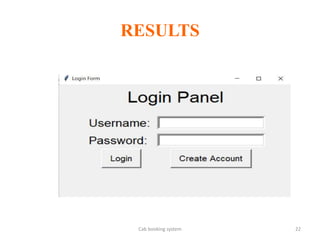
• In an overview of this app, the customer has to register and login in
order to use the system.
• Talking more about the project, the user simply has to fill up details
such as name, contact details, address information, select cabs, pick up
location, destination location, pooling, etc.
• The user can also view overall receipt of their details with receipt
reference number, date, cab number, total cost and other information.
Cab booking system
Cab booking system
 Last but not least, a clean and simple GUI is presented with
simple color combinations for a greater user experience while
using this simple cab booking system project in Python.
 For its UI elements, a standard GUI library; Tkinter is on
board.
 Presenting a new taxi, car booking system project in Python
which includes a user panel that contains all the essential features
to follow up, and a knowledgeable resource for learning
purposes.
PROBLEM STATEMENT
TITLE OF THE PROJECT
EXISTING SYSTEM WITH
DRAWBACKS
TITLE OF THE PROJECT
PROPOSED SYSTEM WITH
ADVANTAGES
TITLE OF THE PROJECT
SYSTEM REQUIREMENTS
TITLE OF THE PROJECT
MODULES DESCRIPTION
TITLE OF THE PROJECT
DESIGN MODELS
• UML
MY-ANURAG 12
USECASE DIAGRAM
MY-ANURAG 13
CLASS DIAGRAM
MY-ANURAG 14
SEQUENCE DIAGRAM
MY-ANURAG 15
ACTIVITY DIAGRAM
MY-ANURAG 16
IMPLEMENTATION
MY-ANURAG 17
TECHNOLOGIES
MY-ANURAG 18
TESTING
MY-ANURAG 19
TESTCASE-1
INPUTS EXPECTED OUTPUT ACTUAL OUTPUT RESULT
MY-ANURAG 20
TESTCASE-2
INPUTS EXPECTED OUTPUT ACTUAL OUTPUT RESULT
MY-ANURAG 21
RESULTS
Cab booking system 22
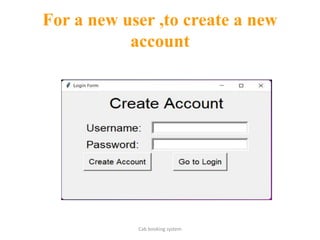
For a new user ,to create a new
account
Cab booking system
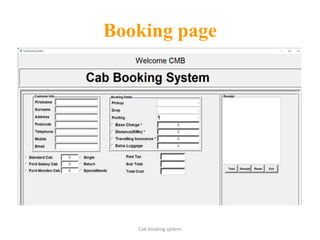
Booking page
Cab booking system
CONCLUSION
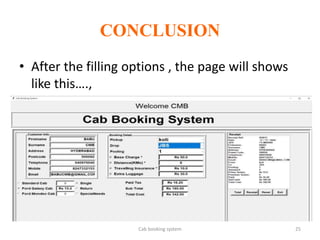
• After the filling options , the page will shows
like this….,
Cab booking system 25
FUTURE ENHANCEMENTS
MY-ANURAG 26
REFERENCES
MY-ANURAG 27
BIBLIOGRAPHY
MY-ANURAG 28
THANK YOU

cab booking system ppt.pptx