MAMS/UNIT 2 notes prepared by AAFREEN SHAIKH Page 1
AAFREEN SHAIKH(7666337605)
Unit -2: Introduction to C++ (Getting Started and Data Types)
C++ Character Set
Character set is a set of valid characters that a language can recognize.
Letters A-Z, a-z
Digits 0-9
Special
Characters
Space + - * / ^  () [] {} = != <> ‘ “ $ , ; :
% ! & ? _ # <= >= @
Formatting
characters
backspace, horizontal tab, vertical tab, form feed,
and carriage return
TOKENS – It is the smallest individual unit in a c++ program and is known as a token
c++ has the following tokens.
 Identifiers – It is an arbitrarily long sequence of letters and digits .the first
character of a identifier must be a letter and ‘_’ underscore can appear in
identifiers. Identifiers also start with an underscore. Uppercase and lower case
letter are different .all characters in an identifiers are significant .eg; int total; is
valid, int 9a ; is invalid.
 Keywords – These are the words that convey a special meaning to a language
compiler. These are reserved for special purpose and must not be used as
abnormal. eg : int, float , cin, if, for, while etc.
 Literals – These are the data items that never change their value during a
program run . C++ has several kinds of literals .
 Integer constants: These must have at least one digit and must not contain
any decimal point . it may contain a ‘ +’ or ‘ –‘ sign , a number with no sign is
assumed to be positive and commas cannot appear in an integer constant .
eg int a = 45 ;
 Character constants : A character constant in c++ must contain only one
character and must be enclosed in single quotes . the single character for eg :
‘ c’ or ‘A’ have the data type of character which is a c++ dataype eg – char a =
‘ c’ ; Every character has its equivalent ASCII code. A-Z ranges 65-90 , a-z
MAMS/UNIT 2 notes prepared by AAFREEN SHAIKH Page 2
AAFREEN SHAIKH(7666337605)
ranges 97-122 and digits ranges 48-57. Non printing characters can also be
used with escape sequence as ‘n’ , ‘t’ etc.
 Floating type constant – they are also known as real constant . A real constant in
fractional form must have at least one digit before the decimal point and atleast
one after the decimal point . it can also have ‘ +’ or ‘-‘ sign . a real constant with
no sign is assumed to have a positive sign . foreg – 7.1 is a floating point number
in c++ which has one digit before the decimal and one digit after the decimal. A
real constant in the exponent form has 2 parts the maintain is a must be either an
integer or a real constant. The mantissa is followed by letter ‘E’ or ‘ e’ as the
partition between the mantissa and the exponent . eg – 5.8 = 0.58*10 =0.58E01
 String literals - a string literal is a sequence of characters surrounded by double
quotes (“ “) each sting literal is by default added by special character known as
the null character (‘0’) which marks the end of the string . Thus, the size of the
string is the no. of characters in the string + 1 character for the null character . eg
– “abc”. In the given example the string has 3 characters + null character which is
automatically added by c++ .therefore total size of the string is 4.
 Operators - These are the tokens that performs same computation when applied
to variable and the other digits in the expression . for eg - + , - , *, /, %.
Input Output operation
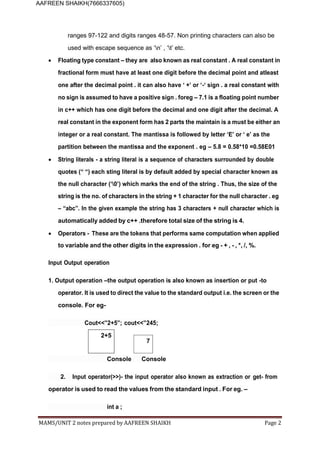
1. Output operation –the output operation is also known as insertion or put -to
operator. It is used to direct the value to the standard output i.e. the screen or the
console. For eg-
Cout<<”2+5”; cout<<”245;
2+5
7
Console Console
2. Input operator(>>)- the input operator also known as extraction or get- from
operator is used to read the values from the standard input . For eg. –
int a ;
MAMS/UNIT 2 notes prepared by AAFREEN SHAIKH Page 3
AAFREEN SHAIKH(7666337605)
cin >> a ;
cout << a ;
The header file <iostream.h > is included in every C++ program to implement the
input and output facilities . The line include <iostream.h> instruct the compiler to
include the declaration and definition of the standard input or output stream facilities
as found in <iostream . h> without this declaration cout statement will make no sense
.
Every C++ program must have a function main(). Program execution begins at the
main function and continues sequentially by executing the statements within the
main function . A program terminates normally following executing of the last
statement of the main function.
Every executable statement in C++ must be terminated by a semi-colon;
PREDEFINED STREAMS IN THE INPUT OUTPUT LIBRARY
(i) cin (console input) – It is a stream object of the istream class which is used to
take the values from the user .
(ii) cout (console output) – It is a stream object of the ostream class and is used to
print the message or values of the variable or identifiers on the screen.
CASCADING – Multiple use of single cout and cin statement with multiple
insertion/extraction operators . for example cin>>a>>b; , cout<<a<<b;
Header file - iomanip.h
This file contains input – output manipulators. For example:
1. endl – used to display blank line. cout<<a<<endl;
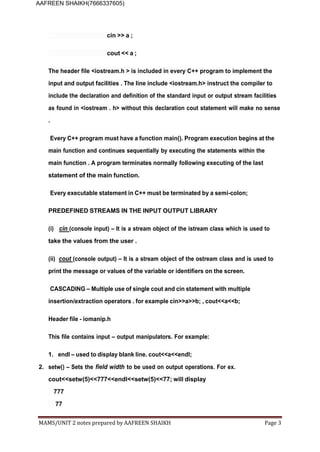
2. setw() – Sets the field width to be used on output operations. For ex.
cout<<setw(5)<<777<<endl<<setw(5)<<77; will display
777
77
MAMS/UNIT 2 notes prepared by AAFREEN SHAIKH Page 4
AAFREEN SHAIKH(7666337605)
C++ Compiler
A C++ compiler is itself a computer program job is to convert the C++ program from our
form to a form the computer can read and execute. The original C++ program is called
the “source code”, and the resulting compiled code produced by the compiler is usually
called an “object file”.
Before compilation the preprocessor performs preliminary operations on C++ source
files. Preprocessed form of the source code is sent to compiler.
After compilation object files are combined with predefined libraries by a linker,
sometimes called a binder, to produce the final complete file that can be executed by the
computer. A library is a collection of pre-compiled “object code” that provides operations
that are done repeatedly by many computer programs.
Using Turbo C++ Compiler
1. Now type sample program on Editor
2. Click on Compile menu choose Compile option or press Alt+F9
3. Click on Run menu choose Run option or press Ctrl+F9
4. If there is no error output will be displayed on User Screen
Types of Errors in C++
1. Syntax error - These errors occur when rules of a programming language are
misused or violated i.e. when a grammatical rule for C++ is not followed.
For e.g. - if semi-colon is missing in an executable statement of a C++ program the
error reported is a syntax error.
2. Semantic errors – These errors occur when statements are not meaningful.
Semantics refers to set of rules which give a meaning to a statement.
For e.g. - the expression X+Y=Z will result in a semantic error as the expression X+Y
cannot come to the left side of the assignment operator.
3. Type errors - Data in C++ has an associated data-type with it. The value 7 for
instance is an integer. ’a’ is a character. “abc” is a string in C++. If a function is given
wrong type of data-type error is signaled by the compiler.
MAMS/UNIT 2 notes prepared by AAFREEN SHAIKH Page 5
AAFREEN SHAIKH(7666337605)
For e.g. - int a = ’A’;
4. Logical errors - These are those errors which cause a program to produce incorrect
or undesired output.
For e.g. – in the following code program / fragment
int i = 1;
while(i>10) //the while loop will never execute because the expression in while loop
{cout<<i; // will never be true as the initial value of i is 1 whichiis not
greater than 10]
i++; }
5. Run-Time errors - It is that error which occurs during the execution of a program. It is
caused because of some illegal operations taking place. In availability of desired, or
required, conditions for the execution of a program.
For e.g. if a program is trying to open a file which does not exist or it could not be
opened, it results in an execution error or run-time error.
If we try to divide a number with 0, this type of error is a run-time error.
Comments – comments are the part of a program but not the part of execution. It is
of 2 types:-
1.Single line comments – Single line comments start with // . following is the example
of single line comment
//this is the very simple example of single line comments
2.Multi line comments – multi line comments are used to make a block as comment.
It begins with /* and ends with */
/*
This is the example of
MAMS/UNIT 2 notes prepared by AAFREEN SHAIKH Page 6
AAFREEN SHAIKH(7666337605)
multi line comment
*/
DATA TYPES
Fundamental or Basic data types : There are mainly 5 fundamental Data types in c++ which
are as follows :
1- Integer – Integer constant are used to store whole numbers .
2- Character – character constant are used to store a single character, escape
sequence like ‘n’, ‘t’ etc.
3- Float – floating constant can store decimal numbers with 6 digits of precision.
4- Double – double constant store high range of decimal values.
5- void – only used to specify return type and signify empty values.
Derived data types - These are constructed from fundamental data types.
Example-:
1- arrays 2. Function 3. Pointers 4. References 5.constants
User defined Derived Data Types – Composed of fundamental and derived data types and
are user defined.
1. Classes 2.structure 3.Union 4.Enumerators
Data type modifiers - A modifier is used to alter the meaning of the base type so that it more
precisely fits the needs of various situations.
1. short – same as int.
2. long – doubles the range of int and occupies 4 bytes.
3. signed – this is by default and only be used with char or int. It can store both +ve and
–ve values.
4. unsigned – this modifies the sign and can only store +ve values, hence can store the
values nearly to double range.
MAMS/UNIT 2 notes prepared by AAFREEN SHAIKH Page 7
AAFREEN SHAIKH(7666337605)
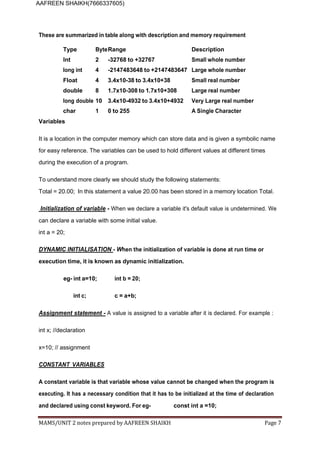
These are summarized in table along with description and memory requirement
Type ByteRange Description
Int 2 -32768 to +32767 Small whole number
long int 4 -2147483648 to +2147483647 Large whole number
Float 4 3.4x10-38 to 3.4x10+38 Small real number
double 8 1.7x10-308 to 1.7x10+308 Large real number
long double 10 3.4x10-4932 to 3.4x10+4932 Very Large real number
char 1 0 to 255 A Single Character
Variables
It is a location in the computer memory which can store data and is given a symbolic name
for easy reference. The variables can be used to hold different values at different times
during the execution of a program.
To understand more clearly we should study the following statements:
Total = 20.00; In this statement a value 20.00 has been stored in a memory location Total.
Initialization of variable - When we declare a variable it's default value is undetermined. We
can declare a variable with some initial value.
int a = 20;
DYNAMIC INITIALISATION - When the initialization of variable is done at run time or
execution time, it is known as dynamic initialization.
eg- int a=10; int b = 20;
int c; c = a+b;
Assignment statement - A value is assigned to a variable after it is declared. For example :
int x; //declaration
x=10; // assignment
CONSTANT VARIABLES
A constant variable is that variable whose value cannot be changed when the program is
executing. It has a necessary condition that it has to be initialized at the time of declaration
and declared using const keyword. For eg- const int a =10;
MAMS/UNIT 2 notes prepared by AAFREEN SHAIKH Page 8
AAFREEN SHAIKH(7666337605)
Sample Theory Questions
1. Differentiate between
a. Logical and Syntax Errors
b. Signed and Unsigned int
c. Fundamental and Derived Data Types
d. Single line and Multi line comments
2. What do you understand by Fundamental and Derived data types?
3. Why main() is so special? Give reasons.
4. What are pre-defined streams in C++ ?
5. Explain any two functions of iomanip.h.
6. What is dynamic initialization? Explain with example.
7. What is constant variable?
8. Why we include header file in a program?
9. What is cascading?
10. Name user defined and derived data types.

c++ notes.docx BASIC C++ PROGRAMMING NOTES

  • 1.
    MAMS/UNIT 2 notesprepared by AAFREEN SHAIKH Page 1 AAFREEN SHAIKH(7666337605) Unit -2: Introduction to C++ (Getting Started and Data Types) C++ Character Set Character set is a set of valid characters that a language can recognize. Letters A-Z, a-z Digits 0-9 Special Characters Space + - * / ^ () [] {} = != <> ‘ “ $ , ; : % ! & ? _ # <= >= @ Formatting characters backspace, horizontal tab, vertical tab, form feed, and carriage return TOKENS – It is the smallest individual unit in a c++ program and is known as a token c++ has the following tokens.  Identifiers – It is an arbitrarily long sequence of letters and digits .the first character of a identifier must be a letter and ‘_’ underscore can appear in identifiers. Identifiers also start with an underscore. Uppercase and lower case letter are different .all characters in an identifiers are significant .eg; int total; is valid, int 9a ; is invalid.  Keywords – These are the words that convey a special meaning to a language compiler. These are reserved for special purpose and must not be used as abnormal. eg : int, float , cin, if, for, while etc.  Literals – These are the data items that never change their value during a program run . C++ has several kinds of literals .  Integer constants: These must have at least one digit and must not contain any decimal point . it may contain a ‘ +’ or ‘ –‘ sign , a number with no sign is assumed to be positive and commas cannot appear in an integer constant . eg int a = 45 ;  Character constants : A character constant in c++ must contain only one character and must be enclosed in single quotes . the single character for eg : ‘ c’ or ‘A’ have the data type of character which is a c++ dataype eg – char a = ‘ c’ ; Every character has its equivalent ASCII code. A-Z ranges 65-90 , a-z
  • 2.
    MAMS/UNIT 2 notesprepared by AAFREEN SHAIKH Page 2 AAFREEN SHAIKH(7666337605) ranges 97-122 and digits ranges 48-57. Non printing characters can also be used with escape sequence as ‘n’ , ‘t’ etc.  Floating type constant – they are also known as real constant . A real constant in fractional form must have at least one digit before the decimal point and atleast one after the decimal point . it can also have ‘ +’ or ‘-‘ sign . a real constant with no sign is assumed to have a positive sign . foreg – 7.1 is a floating point number in c++ which has one digit before the decimal and one digit after the decimal. A real constant in the exponent form has 2 parts the maintain is a must be either an integer or a real constant. The mantissa is followed by letter ‘E’ or ‘ e’ as the partition between the mantissa and the exponent . eg – 5.8 = 0.58*10 =0.58E01  String literals - a string literal is a sequence of characters surrounded by double quotes (“ “) each sting literal is by default added by special character known as the null character (‘0’) which marks the end of the string . Thus, the size of the string is the no. of characters in the string + 1 character for the null character . eg – “abc”. In the given example the string has 3 characters + null character which is automatically added by c++ .therefore total size of the string is 4.  Operators - These are the tokens that performs same computation when applied to variable and the other digits in the expression . for eg - + , - , *, /, %. Input Output operation 1. Output operation –the output operation is also known as insertion or put -to operator. It is used to direct the value to the standard output i.e. the screen or the console. For eg- Cout<<”2+5”; cout<<”245; 2+5 7 Console Console 2. Input operator(>>)- the input operator also known as extraction or get- from operator is used to read the values from the standard input . For eg. – int a ;
  • 3.
    MAMS/UNIT 2 notesprepared by AAFREEN SHAIKH Page 3 AAFREEN SHAIKH(7666337605) cin >> a ; cout << a ; The header file <iostream.h > is included in every C++ program to implement the input and output facilities . The line include <iostream.h> instruct the compiler to include the declaration and definition of the standard input or output stream facilities as found in <iostream . h> without this declaration cout statement will make no sense . Every C++ program must have a function main(). Program execution begins at the main function and continues sequentially by executing the statements within the main function . A program terminates normally following executing of the last statement of the main function. Every executable statement in C++ must be terminated by a semi-colon; PREDEFINED STREAMS IN THE INPUT OUTPUT LIBRARY (i) cin (console input) – It is a stream object of the istream class which is used to take the values from the user . (ii) cout (console output) – It is a stream object of the ostream class and is used to print the message or values of the variable or identifiers on the screen. CASCADING – Multiple use of single cout and cin statement with multiple insertion/extraction operators . for example cin>>a>>b; , cout<<a<<b; Header file - iomanip.h This file contains input – output manipulators. For example: 1. endl – used to display blank line. cout<<a<<endl; 2. setw() – Sets the field width to be used on output operations. For ex. cout<<setw(5)<<777<<endl<<setw(5)<<77; will display 777 77
  • 4.
    MAMS/UNIT 2 notesprepared by AAFREEN SHAIKH Page 4 AAFREEN SHAIKH(7666337605) C++ Compiler A C++ compiler is itself a computer program job is to convert the C++ program from our form to a form the computer can read and execute. The original C++ program is called the “source code”, and the resulting compiled code produced by the compiler is usually called an “object file”. Before compilation the preprocessor performs preliminary operations on C++ source files. Preprocessed form of the source code is sent to compiler. After compilation object files are combined with predefined libraries by a linker, sometimes called a binder, to produce the final complete file that can be executed by the computer. A library is a collection of pre-compiled “object code” that provides operations that are done repeatedly by many computer programs. Using Turbo C++ Compiler 1. Now type sample program on Editor 2. Click on Compile menu choose Compile option or press Alt+F9 3. Click on Run menu choose Run option or press Ctrl+F9 4. If there is no error output will be displayed on User Screen Types of Errors in C++ 1. Syntax error - These errors occur when rules of a programming language are misused or violated i.e. when a grammatical rule for C++ is not followed. For e.g. - if semi-colon is missing in an executable statement of a C++ program the error reported is a syntax error. 2. Semantic errors – These errors occur when statements are not meaningful. Semantics refers to set of rules which give a meaning to a statement. For e.g. - the expression X+Y=Z will result in a semantic error as the expression X+Y cannot come to the left side of the assignment operator. 3. Type errors - Data in C++ has an associated data-type with it. The value 7 for instance is an integer. ’a’ is a character. “abc” is a string in C++. If a function is given wrong type of data-type error is signaled by the compiler.
  • 5.
    MAMS/UNIT 2 notesprepared by AAFREEN SHAIKH Page 5 AAFREEN SHAIKH(7666337605) For e.g. - int a = ’A’; 4. Logical errors - These are those errors which cause a program to produce incorrect or undesired output. For e.g. – in the following code program / fragment int i = 1; while(i>10) //the while loop will never execute because the expression in while loop {cout<<i; // will never be true as the initial value of i is 1 whichiis not greater than 10] i++; } 5. Run-Time errors - It is that error which occurs during the execution of a program. It is caused because of some illegal operations taking place. In availability of desired, or required, conditions for the execution of a program. For e.g. if a program is trying to open a file which does not exist or it could not be opened, it results in an execution error or run-time error. If we try to divide a number with 0, this type of error is a run-time error. Comments – comments are the part of a program but not the part of execution. It is of 2 types:- 1.Single line comments – Single line comments start with // . following is the example of single line comment //this is the very simple example of single line comments 2.Multi line comments – multi line comments are used to make a block as comment. It begins with /* and ends with */ /* This is the example of
  • 6.
    MAMS/UNIT 2 notesprepared by AAFREEN SHAIKH Page 6 AAFREEN SHAIKH(7666337605) multi line comment */ DATA TYPES Fundamental or Basic data types : There are mainly 5 fundamental Data types in c++ which are as follows : 1- Integer – Integer constant are used to store whole numbers . 2- Character – character constant are used to store a single character, escape sequence like ‘n’, ‘t’ etc. 3- Float – floating constant can store decimal numbers with 6 digits of precision. 4- Double – double constant store high range of decimal values. 5- void – only used to specify return type and signify empty values. Derived data types - These are constructed from fundamental data types. Example-: 1- arrays 2. Function 3. Pointers 4. References 5.constants User defined Derived Data Types – Composed of fundamental and derived data types and are user defined. 1. Classes 2.structure 3.Union 4.Enumerators Data type modifiers - A modifier is used to alter the meaning of the base type so that it more precisely fits the needs of various situations. 1. short – same as int. 2. long – doubles the range of int and occupies 4 bytes. 3. signed – this is by default and only be used with char or int. It can store both +ve and –ve values. 4. unsigned – this modifies the sign and can only store +ve values, hence can store the values nearly to double range.
  • 7.
    MAMS/UNIT 2 notesprepared by AAFREEN SHAIKH Page 7 AAFREEN SHAIKH(7666337605) These are summarized in table along with description and memory requirement Type ByteRange Description Int 2 -32768 to +32767 Small whole number long int 4 -2147483648 to +2147483647 Large whole number Float 4 3.4x10-38 to 3.4x10+38 Small real number double 8 1.7x10-308 to 1.7x10+308 Large real number long double 10 3.4x10-4932 to 3.4x10+4932 Very Large real number char 1 0 to 255 A Single Character Variables It is a location in the computer memory which can store data and is given a symbolic name for easy reference. The variables can be used to hold different values at different times during the execution of a program. To understand more clearly we should study the following statements: Total = 20.00; In this statement a value 20.00 has been stored in a memory location Total. Initialization of variable - When we declare a variable it's default value is undetermined. We can declare a variable with some initial value. int a = 20; DYNAMIC INITIALISATION - When the initialization of variable is done at run time or execution time, it is known as dynamic initialization. eg- int a=10; int b = 20; int c; c = a+b; Assignment statement - A value is assigned to a variable after it is declared. For example : int x; //declaration x=10; // assignment CONSTANT VARIABLES A constant variable is that variable whose value cannot be changed when the program is executing. It has a necessary condition that it has to be initialized at the time of declaration and declared using const keyword. For eg- const int a =10;
  • 8.
    MAMS/UNIT 2 notesprepared by AAFREEN SHAIKH Page 8 AAFREEN SHAIKH(7666337605) Sample Theory Questions 1. Differentiate between a. Logical and Syntax Errors b. Signed and Unsigned int c. Fundamental and Derived Data Types d. Single line and Multi line comments 2. What do you understand by Fundamental and Derived data types? 3. Why main() is so special? Give reasons. 4. What are pre-defined streams in C++ ? 5. Explain any two functions of iomanip.h. 6. What is dynamic initialization? Explain with example. 7. What is constant variable? 8. Why we include header file in a program? 9. What is cascading? 10. Name user defined and derived data types.