The document discusses computing fundamentals and strings in C programming. It covers that characters are the building blocks of programs and strings are arrays of characters that end with a null character. It provides examples of declaring and initializing strings, printing strings, accessing individual characters, and modifying strings.

![Strings
• Strings
– When we want to store and print text in C we use a string
– Series of characters treated as a single unit
• Can include letters, digits and special characters (*, /, $)
– char strname[5]="abcd";
– String literal - written in double quotes
“abcd“
A string is an array of type char which has '0'
(named as NULL) as the last character.
– Strings are arrays of characters
• String a pointer to first character
• Value of string is the address of first character (Later)
Dr. Yousaf, PIEAS](https://image.slidesharecdn.com/12-190312230012/85/C-Language-Lecture-12-7-320.jpg)
![String Declaration and Initialization
• String declarations
char c[5]={'a','b','c','d’};
char c[]={'a','b','c','d'}; // it works without mentioning the size
char c[5]="abcd";
char c[]="abcd";
– Declare as a character array or a variable of type char
char color[] = "blue";
– Remember that strings represented as character arrays end with
'0'
• color has 5 elements
• A string is an array of type char which has '0' as the last character.
• '0' is a special character (like 'n') which means "stop now".
– char s[10]="unix"; /* s[4] is '0'; */
– char s[ ]="unix"; /* s has five elements */
Dr. Yousaf, PIEAS](https://image.slidesharecdn.com/12-190312230012/85/C-Language-Lecture-12-8-320.jpg)
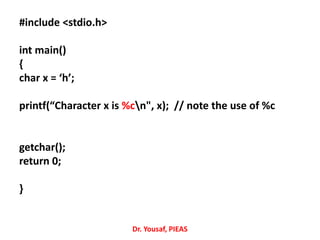
![Printing Strings
– printf("Long long ago.");
– Use printf
– char word[] = “Hello”
printf("%s", word); // note the use of %s
Example:
char str[ ] = "A message to display";
printf ("%sn", str);
printf expects to receive a string as an additional
parameter when it sees %s in the format string
printf knows how much to print out because of the
NULL character at the end of all strings.
When it finds a 0, it knows to stop.
Dr. Yousaf, PIEAS](https://image.slidesharecdn.com/12-190312230012/85/C-Language-Lecture-12-9-320.jpg)
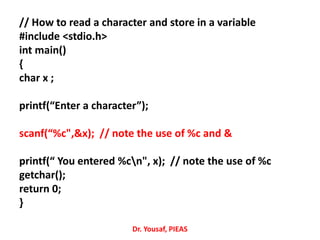
![Accessing Individual Characters
• The first element of any array in C is at index 0. The
second is at index 1, and so on ...
char s[6] =“Hello”;
printf("%c", s[2]; // note the use of %c
• This notation can be used in all kinds of statements and
expressions in C:
• For example: char c;
c = s[1];
if (s[0] == '-') …
switch (s[1]) ...
s [0] s[1] s [2] s[3] s[4]
Dr. Yousaf, PIEAS](https://image.slidesharecdn.com/12-190312230012/85/C-Language-Lecture-12-10-320.jpg)
![Example
#include<stdio.h>
int main()
{
char str[15] = "unix and c";
printf("%sn", str); // unix and c
getchar();
return 0;
}
Note: '0' is not printed in the output.
Dr. Yousaf, PIEAS](https://image.slidesharecdn.com/12-190312230012/85/C-Language-Lecture-12-11-320.jpg)
![Example
#include<stdio.h>
int main()
{
char str[15] = "unix and c";
printf("%sn", str);
str[6]='0';
printf("%sn", str);
str[2]='%';
printf("%sn", str);
printf("n");
getchar();
return 0;
}
Dr. Yousaf, PIEAS](https://image.slidesharecdn.com/12-190312230012/85/C-Language-Lecture-12-12-320.jpg)
![Example
#include<stdio.h>
int main()
{
char str[15] = "unix and c";
printf("%sn", str);
str[6]='0';
printf("%sn", str);
str[2]='%';
printf("%sn", str);
printf("n");
getchar();
return 0;
}
Dr. Yousaf, PIEAS](https://image.slidesharecdn.com/12-190312230012/85/C-Language-Lecture-12-13-320.jpg)
![Example
#include<stdio.h>
int main()
{
char str[15] = "unix and c";
printf("%sn", str); // unix and c
str[6]='0';
printf("%sn", str); // unix a
str[2]='%';
printf("%sn", str); // un%x a
printf("n");
getchar();
return 0;
}
Dr. Yousaf, PIEAS](https://image.slidesharecdn.com/12-190312230012/85/C-Language-Lecture-12-14-320.jpg)


![[ITP - Lecture 17] Strings in C/C++](https://cdn.slidesharecdn.com/ss_thumbnails/lecture-2627strings-171215173858-thumbnail.jpg?width=640&height=640&fit=bounds)


![C programming & data structure [character strings & string functions]](https://cdn.slidesharecdn.com/ss_thumbnails/cprogrammingdatastructure-characterstringsstringfunctions-150709232537-lva1-app6891-thumbnail.jpg?width=640&height=640&fit=bounds)


