Computing Fundamentals
Dr. Muhammad Yousaf Hamza
Deputy Chief Engineer, PIEAS
Automatic Versus Static Variables
Dr. Yousaf, PIEAS
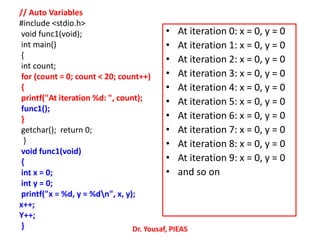
// Auto Variables
#include <stdio.h>
void func1(void);
int main()
{
int count;
for (count = 0; count < 20; count++)
{
printf("At iteration %d: ", count);
func1();
}
getchar(); return 0;
}
void func1(void)
{
int x = 0;
int y = 0;
printf("x = %d, y = %dn", x, y);
x++;
Y++;
} Dr. Yousaf, PIEAS
• At iteration 0: x = 0, y = 0
• At iteration 1: x = 0, y = 0
• At iteration 2: x = 0, y = 0
• At iteration 3: x = 0, y = 0
• At iteration 4: x = 0, y = 0
• At iteration 5: x = 0, y = 0
• At iteration 6: x = 0, y = 0
• At iteration 7: x = 0, y = 0
• At iteration 8: x = 0, y = 0
• At iteration 9: x = 0, y = 0
• and so on
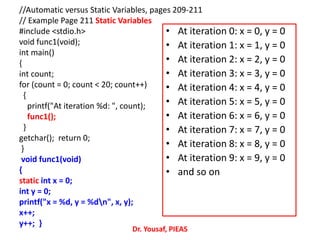
//Automatic versus Static Variables, pages 209-211
// Example Page 211 Static Variables
#include <stdio.h>
void func1(void);
int main()
{
int count;
for (count = 0; count < 20; count++)
{
printf("At iteration %d: ", count);
func1();
}
getchar(); return 0;
}
void func1(void)
{
static int x = 0;
int y = 0;
printf("x = %d, y = %dn", x, y);
x++;
y++; }
Dr. Yousaf, PIEAS
• At iteration 0: x = 0, y = 0
• At iteration 1: x = 1, y = 0
• At iteration 2: x = 2, y = 0
• At iteration 3: x = 3, y = 0
• At iteration 4: x = 4, y = 0
• At iteration 5: x = 5, y = 0
• At iteration 6: x = 6, y = 0
• At iteration 7: x = 7, y = 0
• At iteration 8: x = 8, y = 0
• At iteration 9: x = 9, y = 0
• and so on
Dr. Yousaf, PIEAS
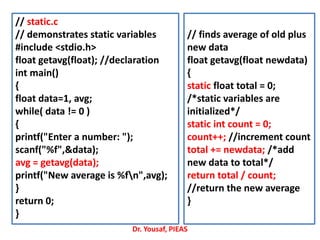
// static.c
// demonstrates static variables
#include <stdio.h>
float getavg(float); //declaration
int main()
{
float data=1, avg;
while( data != 0 )
{
printf("Enter a number: ");
scanf("%f",&data);
avg = getavg(data);
printf("New average is %fn",avg);
}
return 0;
}
// finds average of old plus
new data
float getavg(float newdata)
{
static float total = 0;
/*static variables are
initialized*/
static int count = 0;
count++; //increment count
total += newdata; /*add
new data to total*/
return total / count;
//return the new average
}
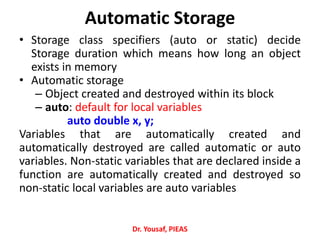
Automatic Storage
• Storage class specifiers (auto or static) decide
Storage duration which means how long an object
exists in memory
• Automatic storage
– Object created and destroyed within its block
– auto: default for local variables
auto double x, y;
Variables that are automatically created and
automatically destroyed are called automatic or auto
variables. Non‐static variables that are declared inside a
function are automatically created and destroyed so
non‐static local variables are auto variables
Dr. Yousaf, PIEAS
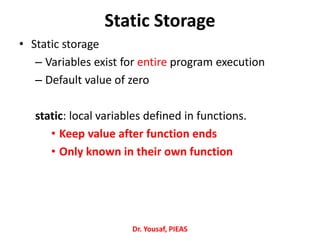
Static Storage
• Static storage
– Variables exist for entire program execution
– Default value of zero
static: local variables defined in functions.
• Keep value after function ends
• Only known in their own function
Dr. Yousaf, PIEAS
exit() function
Dr. Yousaf, PIEAS
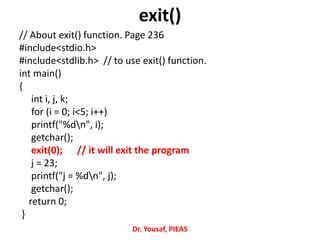
exit()
// About exit() function. Page 236
#include<stdio.h>
#include<stdlib.h> // to use exit() function.
int main()
{
int i, j, k;
for (i = 0; i<5; i++)
printf("%dn", i);
getchar();
exit(0); // it will exit the program
j = 23;
printf("j = %dn", j);
getchar();
return 0;
}
Dr. Yousaf, PIEAS
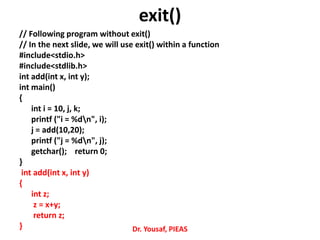
// Following program without exit()
// In the next slide, we will use exit() within a function
#include<stdio.h>
#include<stdlib.h>
int add(int x, int y);
int main()
{
int i = 10, j, k;
printf ("i = %dn", i);
j = add(10,20);
printf ("j = %dn", j);
getchar(); return 0;
}
int add(int x, int y)
{
int z;
z = x+y;
return z;
} Dr. Yousaf, PIEAS
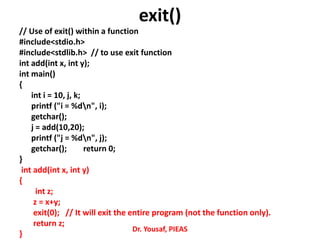
exit()
// Use of exit() within a function
#include<stdio.h>
#include<stdlib.h> // to use exit function
int add(int x, int y);
int main()
{
int i = 10, j, k;
printf ("i = %dn", i);
getchar();
j = add(10,20);
printf ("j = %dn", j);
getchar(); return 0;
}
int add(int x, int y)
{
int z;
z = x+y;
exit(0); // It will exit the entire program (not the function only).
return z;
}
Dr. Yousaf, PIEAS
exit()
Recursion
Dr. Yousaf, PIEAS
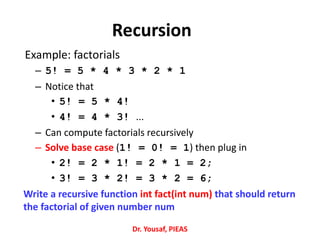
Recursion
Example: factorials
– 5! = 5 * 4 * 3 * 2 * 1
– Notice that
• 5! = 5 * 4!
• 4! = 4 * 3! ...
– Can compute factorials recursively
– Solve base case (1! = 0! = 1) then plug in
• 2! = 2 * 1! = 2 * 1 = 2;
• 3! = 3 * 2! = 3 * 2 = 6;
Write a recursive function int fact(int num) that should return
the factorial of given number num
Dr. Yousaf, PIEAS
Dr. Yousaf, PIEAS
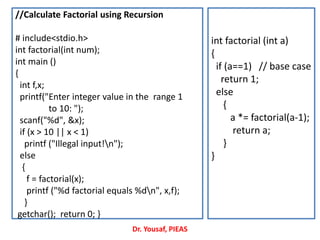
//Calculate Factorial using Recursion
# include<stdio.h>
int factorial(int num);
int main ()
{
int f,x;
printf("Enter integer value in the range 1
to 10: ");
scanf("%d", &x);
if (x > 10 || x < 1)
printf ("Illegal input!n");
else
{
f = factorial(x);
printf ("%d factorial equals %dn", x,f);
}
getchar(); return 0; }
int factorial (int a)
{
if (a==1) // base case
return 1;
else
{
a *= factorial(a-1);
return a;
}
}
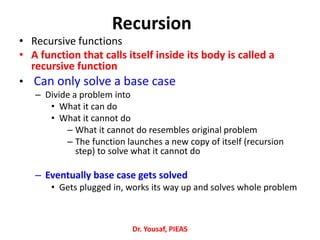
Recursion
• Recursive functions
• A function that calls itself inside its body is called a
recursive function
• Can only solve a base case
– Divide a problem into
• What it can do
• What it cannot do
– What it cannot do resembles original problem
– The function launches a new copy of itself (recursion
step) to solve what it cannot do
– Eventually base case gets solved
• Gets plugged in, works its way up and solves whole problem
Dr. Yousaf, PIEAS
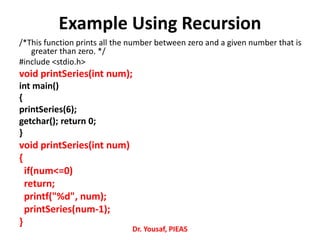
Example Using Recursion
/*This function prints all the number between zero and a given number that is
greater than zero. */
#include <stdio.h>
void printSeries(int num);
int main()
{
printSeries(6);
getchar(); return 0;
}
void printSeries(int num)
{
if(num<=0)
return;
printf("%d", num);
printSeries(num-1);
}
Dr. Yousaf, PIEAS
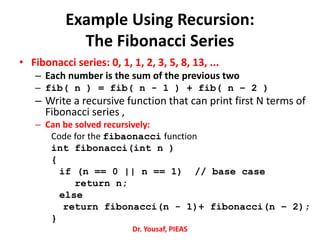
Example Using Recursion:
The Fibonacci Series
• Fibonacci series: 0, 1, 1, 2, 3, 5, 8, 13, ...
– Each number is the sum of the previous two
– fib( n ) = fib( n - 1 ) + fib( n – 2 )
– Write a recursive function that can print first N terms of
Fibonacci series ,
– Can be solved recursively:
Code for the fibaonacci function
int fibonacci(int n )
{
if (n == 0 || n == 1) // base case
return n;
else
return fibonacci(n - 1)+ fibonacci(n – 2);
}
Dr. Yousaf, PIEAS
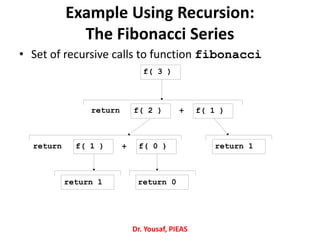
Example Using Recursion:
The Fibonacci Series
• Set of recursive calls to function fibonacci
f( 3 )
f( 1 )f( 2 )
f( 1 ) f( 0 ) return 1
return 1 return 0
return +
+return
Dr. Yousaf, PIEAS
Dr. Yousaf, PIEAS
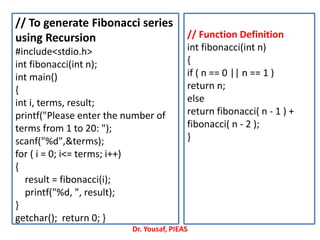
// To generate Fibonacci series
using Recursion
#include<stdio.h>
int fibonacci(int n);
int main()
{
int i, terms, result;
printf("Please enter the number of
terms from 1 to 20: ");
scanf("%d",&terms);
for ( i = 0; i<= terms; i++)
{
result = fibonacci(i);
printf("%d, ", result);
}
getchar(); return 0; }
// Function Definition
int fibonacci(int n)
{
if ( n == 0 || n == 1 )
return n;
else
return fibonacci( n - 1 ) +
fibonacci( n - 2 );
}
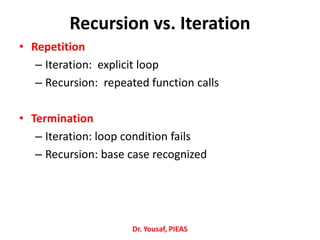
Recursion vs. Iteration
• Repetition
– Iteration: explicit loop
– Recursion: repeated function calls
• Termination
– Iteration: loop condition fails
– Recursion: base case recognized
Dr. Yousaf, PIEAS

C Language Lecture 18

  • 1.
    Computing Fundamentals Dr. MuhammadYousaf Hamza Deputy Chief Engineer, PIEAS
  • 2.
    Automatic Versus StaticVariables Dr. Yousaf, PIEAS
  • 3.
    // Auto Variables #include<stdio.h> void func1(void); int main() { int count; for (count = 0; count < 20; count++) { printf("At iteration %d: ", count); func1(); } getchar(); return 0; } void func1(void) { int x = 0; int y = 0; printf("x = %d, y = %dn", x, y); x++; Y++; } Dr. Yousaf, PIEAS • At iteration 0: x = 0, y = 0 • At iteration 1: x = 0, y = 0 • At iteration 2: x = 0, y = 0 • At iteration 3: x = 0, y = 0 • At iteration 4: x = 0, y = 0 • At iteration 5: x = 0, y = 0 • At iteration 6: x = 0, y = 0 • At iteration 7: x = 0, y = 0 • At iteration 8: x = 0, y = 0 • At iteration 9: x = 0, y = 0 • and so on
  • 4.
    //Automatic versus StaticVariables, pages 209-211 // Example Page 211 Static Variables #include <stdio.h> void func1(void); int main() { int count; for (count = 0; count < 20; count++) { printf("At iteration %d: ", count); func1(); } getchar(); return 0; } void func1(void) { static int x = 0; int y = 0; printf("x = %d, y = %dn", x, y); x++; y++; } Dr. Yousaf, PIEAS • At iteration 0: x = 0, y = 0 • At iteration 1: x = 1, y = 0 • At iteration 2: x = 2, y = 0 • At iteration 3: x = 3, y = 0 • At iteration 4: x = 4, y = 0 • At iteration 5: x = 5, y = 0 • At iteration 6: x = 6, y = 0 • At iteration 7: x = 7, y = 0 • At iteration 8: x = 8, y = 0 • At iteration 9: x = 9, y = 0 • and so on
  • 5.
    Dr. Yousaf, PIEAS //static.c // demonstrates static variables #include <stdio.h> float getavg(float); //declaration int main() { float data=1, avg; while( data != 0 ) { printf("Enter a number: "); scanf("%f",&data); avg = getavg(data); printf("New average is %fn",avg); } return 0; } // finds average of old plus new data float getavg(float newdata) { static float total = 0; /*static variables are initialized*/ static int count = 0; count++; //increment count total += newdata; /*add new data to total*/ return total / count; //return the new average }
  • 6.
    Automatic Storage • Storageclass specifiers (auto or static) decide Storage duration which means how long an object exists in memory • Automatic storage – Object created and destroyed within its block – auto: default for local variables auto double x, y; Variables that are automatically created and automatically destroyed are called automatic or auto variables. Non‐static variables that are declared inside a function are automatically created and destroyed so non‐static local variables are auto variables Dr. Yousaf, PIEAS
  • 7.
    Static Storage • Staticstorage – Variables exist for entire program execution – Default value of zero static: local variables defined in functions. • Keep value after function ends • Only known in their own function Dr. Yousaf, PIEAS
  • 8.
  • 9.
    exit() // About exit()function. Page 236 #include<stdio.h> #include<stdlib.h> // to use exit() function. int main() { int i, j, k; for (i = 0; i<5; i++) printf("%dn", i); getchar(); exit(0); // it will exit the program j = 23; printf("j = %dn", j); getchar(); return 0; } Dr. Yousaf, PIEAS
  • 10.
    // Following programwithout exit() // In the next slide, we will use exit() within a function #include<stdio.h> #include<stdlib.h> int add(int x, int y); int main() { int i = 10, j, k; printf ("i = %dn", i); j = add(10,20); printf ("j = %dn", j); getchar(); return 0; } int add(int x, int y) { int z; z = x+y; return z; } Dr. Yousaf, PIEAS exit()
  • 11.
    // Use ofexit() within a function #include<stdio.h> #include<stdlib.h> // to use exit function int add(int x, int y); int main() { int i = 10, j, k; printf ("i = %dn", i); getchar(); j = add(10,20); printf ("j = %dn", j); getchar(); return 0; } int add(int x, int y) { int z; z = x+y; exit(0); // It will exit the entire program (not the function only). return z; } Dr. Yousaf, PIEAS exit()
  • 12.
  • 13.
    Recursion Example: factorials – 5!= 5 * 4 * 3 * 2 * 1 – Notice that • 5! = 5 * 4! • 4! = 4 * 3! ... – Can compute factorials recursively – Solve base case (1! = 0! = 1) then plug in • 2! = 2 * 1! = 2 * 1 = 2; • 3! = 3 * 2! = 3 * 2 = 6; Write a recursive function int fact(int num) that should return the factorial of given number num Dr. Yousaf, PIEAS
  • 14.
    Dr. Yousaf, PIEAS //CalculateFactorial using Recursion # include<stdio.h> int factorial(int num); int main () { int f,x; printf("Enter integer value in the range 1 to 10: "); scanf("%d", &x); if (x > 10 || x < 1) printf ("Illegal input!n"); else { f = factorial(x); printf ("%d factorial equals %dn", x,f); } getchar(); return 0; } int factorial (int a) { if (a==1) // base case return 1; else { a *= factorial(a-1); return a; } }
  • 15.
    Recursion • Recursive functions •A function that calls itself inside its body is called a recursive function • Can only solve a base case – Divide a problem into • What it can do • What it cannot do – What it cannot do resembles original problem – The function launches a new copy of itself (recursion step) to solve what it cannot do – Eventually base case gets solved • Gets plugged in, works its way up and solves whole problem Dr. Yousaf, PIEAS
  • 16.
    Example Using Recursion /*Thisfunction prints all the number between zero and a given number that is greater than zero. */ #include <stdio.h> void printSeries(int num); int main() { printSeries(6); getchar(); return 0; } void printSeries(int num) { if(num<=0) return; printf("%d", num); printSeries(num-1); } Dr. Yousaf, PIEAS
  • 17.
    Example Using Recursion: TheFibonacci Series • Fibonacci series: 0, 1, 1, 2, 3, 5, 8, 13, ... – Each number is the sum of the previous two – fib( n ) = fib( n - 1 ) + fib( n – 2 ) – Write a recursive function that can print first N terms of Fibonacci series , – Can be solved recursively: Code for the fibaonacci function int fibonacci(int n ) { if (n == 0 || n == 1) // base case return n; else return fibonacci(n - 1)+ fibonacci(n – 2); } Dr. Yousaf, PIEAS
  • 18.
    Example Using Recursion: TheFibonacci Series • Set of recursive calls to function fibonacci f( 3 ) f( 1 )f( 2 ) f( 1 ) f( 0 ) return 1 return 1 return 0 return + +return Dr. Yousaf, PIEAS
  • 19.
    Dr. Yousaf, PIEAS //To generate Fibonacci series using Recursion #include<stdio.h> int fibonacci(int n); int main() { int i, terms, result; printf("Please enter the number of terms from 1 to 20: "); scanf("%d",&terms); for ( i = 0; i<= terms; i++) { result = fibonacci(i); printf("%d, ", result); } getchar(); return 0; } // Function Definition int fibonacci(int n) { if ( n == 0 || n == 1 ) return n; else return fibonacci( n - 1 ) + fibonacci( n - 2 ); }
  • 20.
    Recursion vs. Iteration •Repetition – Iteration: explicit loop – Recursion: repeated function calls • Termination – Iteration: loop condition fails – Recursion: base case recognized Dr. Yousaf, PIEAS