Business Process Automation using RPA
Simplify - Document - Automate
Initiative to improve End User Productivity
Feb 17, 2023
Agenda
Background
What’s & What’s NOT Robotic Process Automation
Key Benefits RPA can bring to business
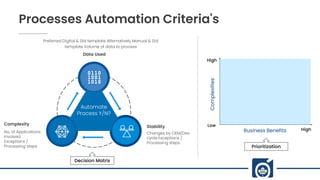
Processes Automation Criteria’s
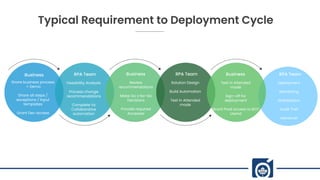
Typical Requirement – Deployment Cycle
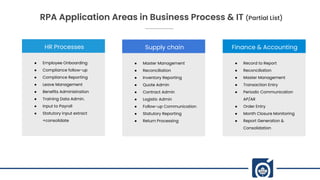
RPA Application Areas in Business Process & IT
Background
• Monitoring jobs
• Non value added tasks
• Info Security activities
• User Access Management
• License renewal management
• Backup - monitor / resubmit
• Monitor Support Queue
• Alert SLA window nearing to close
• Request additional info from requester
• Role Base Access (RBAC) creation
• Application job monitoring
• Support Ticket Audit
• Monitor Asset Scanning jobs
• Vulnerability tracking to closure
• Build Asset Health Reports
• License life cycle management
• Repetitive process [Statutory, Periodic,
Monitor]
• Skilled resources are blocked for low end
tasks
• Person dependent tasks (bottleneck)
• Odd hours / shift working
• Risk of human omissions (may be costly)
• Manpower budget constrains
Solution
IMPACT
Higher operational cost
Possible attrition of skilled
members
Under utilization of skilled
resources
Bottleneck of certain
process / individual
Audit NCs / Observations
Missing SLA / due dates /
license expiry
Robotic Process
Automation (RPA)
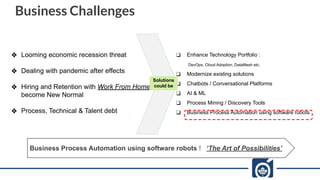
Business Challenges
ā– Looming economic recession threat
ā– Dealing with pandemic after effects
ā– Hiring and Retention with Work From Home
become New Normal
ā– Process, Technical & Talent debt
ā‘ Enhance Technology Portfolio :
DevOps, Cloud Adoption, DataMesh etc.
ā‘ Modernize existing solutions
ā‘ Chatbots / Conversational Platforms
ā‘ AI & ML
ā‘ Process Mining / Discovery Tools
ā‘ Business Process Automation using software robots
Solutions
could be
Business Process Automation using software robots ! ā€˜The Art of Possibilities’
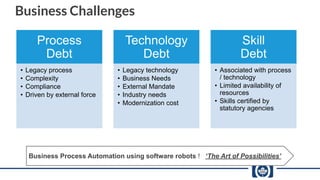
Business Challenges
Business Process Automation using software robots ! ā€˜The Art of Possibilities’
Process
Debt
• Legacy process
• Complexity
• Compliance
• Driven by external force
Technology
Debt
• Legacy technology
• Business Needs
• External Mandate
• Industry needs
• Modernization cost
Skill
Debt
• Associated with process
/ technology
• Limited availability of
resources
• Skills certified by
statutory agencies
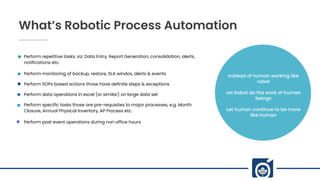
What’s Robotic Process Automation
Perform repetitive tasks, viz. Data Entry, Report Generation, consolidation, alerts,
notifications etc.
Perform monitoring of backup, restore, SLA windos, alerts & events
Perform SOPs based actions those have definite steps & exceptions
Perform data operations in excel (or similar) on large data set
Perform specific tasks those are pre-requisites to major processes, e.g. Month
Closure, Annual Physical Inventory, AP Process etc.
Perform post event operations during non office hours
Instead of human working like
robot
Let Robot do the work of human
beings
Let human continue to be more
like human
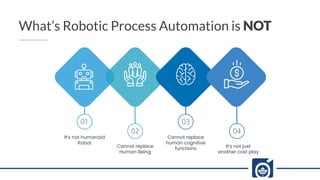
What’s Robotic Process Automation is NOT
It’s not humanoid
Robot
Cannot replace
Human Being
01
02 04
Cannot replace
human cognitive
functions
03
It’s not just
another cost play
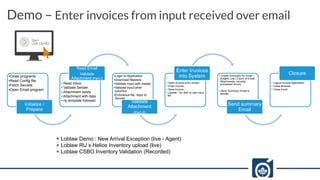
•Close programs
•Read Config file
•Fetch Secrets
•Open Email program
Initialize /
Prepare
• Read Inbox
• Validate Sender
• Attachment exists
• Attachment with data
• I/p template followed
Read Email
Validate
Attachment (Part-I)
•Login to Application
•Download Masters
•Validate Input with master
•Validate input other
columns
•Erroneous file, reply to
Sender
Validate
Attachment
(Part-II)
• Open Invoice entry screen
• Enter invoice
• Save Invoice
• Update ā€œInv Refā€ to user input
file
Enter Invoices
into System • Create Summary for Email –
Subject Line [ Count of Email,
Attachments, records,
processed, errors
• Send Summary Email to
Sender
Send summary
Email
• Logout Invoice Application
• Close Browser
• Close Excel
Closure
Demo – Enter invoices from input received over email
+ Loblaw Demo : New Arrival Exception (live - Agent)
+ Loblaw RU x Helios Inventory upload (live)
+ Loblaw CSBO Inventory Validation (Recorded)
Economics
Cost Saving between 20% -
50%
Improved End User
Productivity
Accuracy
Consistent execution of process, data
formats, communication etc.
Eliminate inconsistency in applying
business rules, exceptions etc.
Reduce error rate close to Zero
Speed
Perform 20-40 times faster than
user
50%+ reduction in cycle / waiting
time
Lessor time & cost of
implementation over standard
technologies
Transparency
Keep track of work done (audit log)
Easy to perform RCA of failures
Option to watch as it perform to
identify errors
Scalability
Available for 24 x 7 [ schedule work
by priority ]
Scalability on demand, Parallel
Execution
Applicability to all business domains
+ IT, Infra, Info Security functions
Customer
Experience
Accuracy
Predictability
Flexibility &
High Volume
Management
Effort & Errors
Dependency
Cycle Time
Cost
Key Benefits RPA can bring to business
RPA will help Human to
be more Human at Work
Processes Automation Criteria's
Automate
Process Y/N?
Data Used
Preferred Digital & Std template Alternatively Manual & Std
template Volume of data to process
Stability
Changes by OEM/Dev
cycle Exceptions /
Processing steps
Complexity
No. of Applications
involved
Exceptions /
Processing steps
Decision Matrix
High
Low
High
Business Benefits
Complexities
Prioritization
Typical Requirement to Deployment Cycle
Business
Share business process
+ Demo
Share all steps /
exceptions / Input
templates
Grant Dev access
RPA Team
Feasibility Analysis
Process change
recommendations
Complete Vs
Collaborative
automation
Business
Review
recommendations
Make Go x No-Go
Decisions
Provide required
Accesses
RPA Team
Solution Design
Build Automation
Test in Attended
mode
Business
Test in Attended
mode
Sign-off for
deployment
Grant Prod access to BOT
UserId
RPA Team
Deployment
Monitoring
Stabilization
Audit Trail
Handover
HR Processes
ā— Employee Onboarding
ā— Compliance follow-up
ā— Compliance Reporting
ā— Leave Management
ā— Benefits Administration
ā— Training Data Admin.
ā— Input to Payroll
ā— Statutory input extract
+consolidate
Supply chain
ā— Master Management
ā— Reconciliation
ā— Inventory Reporting
ā— Quote Admin
ā— Contract Admin
ā— Logistic Admin
ā— Follow-up Communication
ā— Statutory Reporting
ā— Return Processing
Finance & Accounting
ā— Record to Report
ā— Reconciliation
ā— Master Management
ā— Transaction Entry
ā— Periodic Communication
AP/AR
ā— Order Entry
ā— Month Closure Monitoring
ā— Report Generation &
Consolidation
RPA Application Areas in Business Process & IT (Partial List)
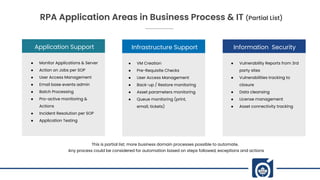
Application Support
ā— Monitor Applications & Server
ā— Action on Jobs per SOP
ā— User Access Management
ā— Email base events admin
ā— Batch Processing
ā— Pro-active monitoring &
Actions
ā— Incident Resolution per SOP
ā— Application Testing
Infrastructure Support
ā— VM Creation
ā— Pre-Requisite Checks
ā— User Access Management
ā— Back-up / Restore monitoring
ā— Asset parameters monitoring
ā— Queue monitoring (print,
email, tickets)
Information Security
ā— Vulnerability Reports from 3rd
party sites
ā— Vulnerabilities tracking to
closure
ā— Data cleansing
ā— License management
ā— Asset connectivity tracking
RPA Application Areas in Business Process & IT (Partial List)
This is partial list; more business domain processes possible to automate.
Any process could be considered for automation based on steps followed, exceptions and actions
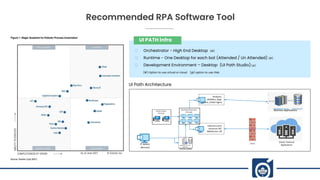
Recommended RPA Software Tool
Browsers,
MSOffice, Appl.
Client, UIPath Agent
Inbound comm
resources API,
WebService, DB
Business Applications
IT Admin
(Remote)
Cloud / External
Applications
Orche=stator
UI PATH infra
Orchestrator - High End Desktop (#)
Runtime - One Desktop for each bot (Attended / Un Attended) (#)
Development Environment – Desktop (UI Path Studio) (@)
(#) Option to use virtual or cloud (@) option to use VMs
UI Path Architecture
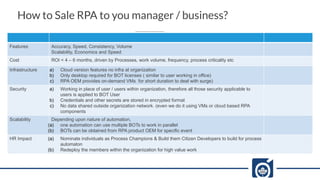
How to Sale RPA to you manager / business?
Features Accuracy, Speed, Consistency, Volume
Scalability, Economics and Speed
Cost ROI < 4 – 6 months, driven by Processes, work volume, frequency, process criticality etc
Infrastructure a) Cloud version features no infra at organization
b) Only desktop required for BOT licenses ( similar to user working in office)
c) RPA OEM provides on-demand VMs for short duration to deal with surge)
Security a) Working in place of user / users within organization, therefore all those security applicable to
users is applied to BOT User
b) Credentials and other secrets are stored in encrypted format
c) No data shared outside organization network. (even we do it using VMs or cloud based RPA
components
Scalability Depending upon nature of automation,
(a) one automation can use multiple BOTs to work in parallel
(b) BOTs can be obtained from RPA product OEM for specific event
HR Impact (a) Nominate individuals as Process Champions & Build them Citizen Developers to build for process
automaton
(b) Redeploy the members within the organization for high value work
Bouleverd of Good Dream, 89898
+6288 2546 0845
facebook.com/templateparade
@Temparade
Thank You!
Stay in Touch
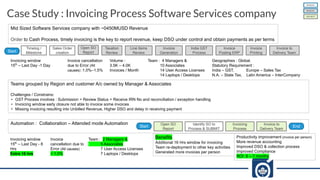
Case Study : Invoicing Process Software Services company
Invoicing window
15th
– Last Day -1 Day
Invoice cancellation
due to Error (All
causes) :1.0%–1.5%
Volume :
3.5K – 4.0K
Invoices / Month
Team : 4 Managers &
10 Associates
14 User Access Licenses
14 Laptops / Desktops
Geographies : Global.
Statutory Requirement :
India – GST, Europe – Sales Tax
N.A. – State Tax, Latin America – InterCompany
Mid Sized Software Services company with ~0450MUSD Revenue
Order to Cash Process, timely invoicing is the key to report revenue, keep DSO under control and obtain payments as per terms
Sales Order
creation
Timelog /
Milestone
Taxation
Review
Line Items
Review
Invoice
Generation
India GST
Process
Invoice
Posting ERP
Invoice
Printing
Invoice to
Delivery Team
Start
Teams grouped by Region and customer A/c owned by Manager & Associates
Challenges / Constrains:
• GST Process involves : Submission > Review Status > Receive IRN No and reconciliation / exception handling
• Invoicing window early closure not able to invoice some invoices
• Missing invoicing resulting into Unbilled Revenue, Higher DSO and delay in receiving payment
Automation : Collaboration – Attended mode Automation Open SO
Report
Identify SO to
Process & SUBMIT
Invoicing
Process
Start
Open SO
Report
Invoice to
Delivery Team
End
MANUAL
S/W BOT
MANUAL
Invoicing window
15th
– Last Day - 8
Hrs
Extra 16 hrs
Invoice
cancellation due to
Error (All causes) :
< 1.0%
Team : 2 Managers &
5 Associates
7 User Access Licenses
7 Laptops / Desktops
Benefits
Additional 16 Hrs window for invoicing
Team re-deployment to other key activities
Generated more invoices per person
Productivity improvement (invoice per person)
More revenue accounting
Improved DSO & collection process
Improved Compliance
ROI 6 – 7 months

Business Process Automation A Productivity Lever

  • 1.
    Business Process Automationusing RPA Simplify - Document - Automate Initiative to improve End User Productivity Feb 17, 2023
  • 2.
    Agenda Background What’s & What’sNOT Robotic Process Automation Key Benefits RPA can bring to business Processes Automation Criteria’s Typical Requirement – Deployment Cycle RPA Application Areas in Business Process & IT
  • 3.
    Background • Monitoring jobs •Non value added tasks • Info Security activities • User Access Management • License renewal management • Backup - monitor / resubmit • Monitor Support Queue • Alert SLA window nearing to close • Request additional info from requester • Role Base Access (RBAC) creation • Application job monitoring • Support Ticket Audit • Monitor Asset Scanning jobs • Vulnerability tracking to closure • Build Asset Health Reports • License life cycle management • Repetitive process [Statutory, Periodic, Monitor] • Skilled resources are blocked for low end tasks • Person dependent tasks (bottleneck) • Odd hours / shift working • Risk of human omissions (may be costly) • Manpower budget constrains Solution IMPACT Higher operational cost Possible attrition of skilled members Under utilization of skilled resources Bottleneck of certain process / individual Audit NCs / Observations Missing SLA / due dates / license expiry Robotic Process Automation (RPA)
  • 4.
    Business Challenges ā– Loomingeconomic recession threat ā– Dealing with pandemic after effects ā– Hiring and Retention with Work From Home become New Normal ā– Process, Technical & Talent debt ā‘ Enhance Technology Portfolio : DevOps, Cloud Adoption, DataMesh etc. ā‘ Modernize existing solutions ā‘ Chatbots / Conversational Platforms ā‘ AI & ML ā‘ Process Mining / Discovery Tools ā‘ Business Process Automation using software robots Solutions could be Business Process Automation using software robots ! ā€˜The Art of Possibilities’
  • 5.
    Business Challenges Business ProcessAutomation using software robots ! ā€˜The Art of Possibilities’ Process Debt • Legacy process • Complexity • Compliance • Driven by external force Technology Debt • Legacy technology • Business Needs • External Mandate • Industry needs • Modernization cost Skill Debt • Associated with process / technology • Limited availability of resources • Skills certified by statutory agencies
  • 6.
    What’s Robotic ProcessAutomation Perform repetitive tasks, viz. Data Entry, Report Generation, consolidation, alerts, notifications etc. Perform monitoring of backup, restore, SLA windos, alerts & events Perform SOPs based actions those have definite steps & exceptions Perform data operations in excel (or similar) on large data set Perform specific tasks those are pre-requisites to major processes, e.g. Month Closure, Annual Physical Inventory, AP Process etc. Perform post event operations during non office hours Instead of human working like robot Let Robot do the work of human beings Let human continue to be more like human
  • 7.
    What’s Robotic ProcessAutomation is NOT It’s not humanoid Robot Cannot replace Human Being 01 02 04 Cannot replace human cognitive functions 03 It’s not just another cost play
  • 8.
    •Close programs •Read Configfile •Fetch Secrets •Open Email program Initialize / Prepare • Read Inbox • Validate Sender • Attachment exists • Attachment with data • I/p template followed Read Email Validate Attachment (Part-I) •Login to Application •Download Masters •Validate Input with master •Validate input other columns •Erroneous file, reply to Sender Validate Attachment (Part-II) • Open Invoice entry screen • Enter invoice • Save Invoice • Update ā€œInv Refā€ to user input file Enter Invoices into System • Create Summary for Email – Subject Line [ Count of Email, Attachments, records, processed, errors • Send Summary Email to Sender Send summary Email • Logout Invoice Application • Close Browser • Close Excel Closure Demo – Enter invoices from input received over email + Loblaw Demo : New Arrival Exception (live - Agent) + Loblaw RU x Helios Inventory upload (live) + Loblaw CSBO Inventory Validation (Recorded)
  • 9.
    Economics Cost Saving between20% - 50% Improved End User Productivity Accuracy Consistent execution of process, data formats, communication etc. Eliminate inconsistency in applying business rules, exceptions etc. Reduce error rate close to Zero Speed Perform 20-40 times faster than user 50%+ reduction in cycle / waiting time Lessor time & cost of implementation over standard technologies Transparency Keep track of work done (audit log) Easy to perform RCA of failures Option to watch as it perform to identify errors Scalability Available for 24 x 7 [ schedule work by priority ] Scalability on demand, Parallel Execution Applicability to all business domains + IT, Infra, Info Security functions Customer Experience Accuracy Predictability Flexibility & High Volume Management Effort & Errors Dependency Cycle Time Cost Key Benefits RPA can bring to business RPA will help Human to be more Human at Work
  • 10.
    Processes Automation Criteria's Automate ProcessY/N? Data Used Preferred Digital & Std template Alternatively Manual & Std template Volume of data to process Stability Changes by OEM/Dev cycle Exceptions / Processing steps Complexity No. of Applications involved Exceptions / Processing steps Decision Matrix High Low High Business Benefits Complexities Prioritization
  • 11.
    Typical Requirement toDeployment Cycle Business Share business process + Demo Share all steps / exceptions / Input templates Grant Dev access RPA Team Feasibility Analysis Process change recommendations Complete Vs Collaborative automation Business Review recommendations Make Go x No-Go Decisions Provide required Accesses RPA Team Solution Design Build Automation Test in Attended mode Business Test in Attended mode Sign-off for deployment Grant Prod access to BOT UserId RPA Team Deployment Monitoring Stabilization Audit Trail Handover
  • 12.
    HR Processes ā— EmployeeOnboarding ā— Compliance follow-up ā— Compliance Reporting ā— Leave Management ā— Benefits Administration ā— Training Data Admin. ā— Input to Payroll ā— Statutory input extract +consolidate Supply chain ā— Master Management ā— Reconciliation ā— Inventory Reporting ā— Quote Admin ā— Contract Admin ā— Logistic Admin ā— Follow-up Communication ā— Statutory Reporting ā— Return Processing Finance & Accounting ā— Record to Report ā— Reconciliation ā— Master Management ā— Transaction Entry ā— Periodic Communication AP/AR ā— Order Entry ā— Month Closure Monitoring ā— Report Generation & Consolidation RPA Application Areas in Business Process & IT (Partial List)
  • 13.
    Application Support ā— MonitorApplications & Server ā— Action on Jobs per SOP ā— User Access Management ā— Email base events admin ā— Batch Processing ā— Pro-active monitoring & Actions ā— Incident Resolution per SOP ā— Application Testing Infrastructure Support ā— VM Creation ā— Pre-Requisite Checks ā— User Access Management ā— Back-up / Restore monitoring ā— Asset parameters monitoring ā— Queue monitoring (print, email, tickets) Information Security ā— Vulnerability Reports from 3rd party sites ā— Vulnerabilities tracking to closure ā— Data cleansing ā— License management ā— Asset connectivity tracking RPA Application Areas in Business Process & IT (Partial List) This is partial list; more business domain processes possible to automate. Any process could be considered for automation based on steps followed, exceptions and actions
  • 14.
    Recommended RPA SoftwareTool Browsers, MSOffice, Appl. Client, UIPath Agent Inbound comm resources API, WebService, DB Business Applications IT Admin (Remote) Cloud / External Applications Orche=stator UI PATH infra Orchestrator - High End Desktop (#) Runtime - One Desktop for each bot (Attended / Un Attended) (#) Development Environment – Desktop (UI Path Studio) (@) (#) Option to use virtual or cloud (@) option to use VMs UI Path Architecture
  • 15.
    How to SaleRPA to you manager / business? Features Accuracy, Speed, Consistency, Volume Scalability, Economics and Speed Cost ROI < 4 – 6 months, driven by Processes, work volume, frequency, process criticality etc Infrastructure a) Cloud version features no infra at organization b) Only desktop required for BOT licenses ( similar to user working in office) c) RPA OEM provides on-demand VMs for short duration to deal with surge) Security a) Working in place of user / users within organization, therefore all those security applicable to users is applied to BOT User b) Credentials and other secrets are stored in encrypted format c) No data shared outside organization network. (even we do it using VMs or cloud based RPA components Scalability Depending upon nature of automation, (a) one automation can use multiple BOTs to work in parallel (b) BOTs can be obtained from RPA product OEM for specific event HR Impact (a) Nominate individuals as Process Champions & Build them Citizen Developers to build for process automaton (b) Redeploy the members within the organization for high value work
  • 16.
    Bouleverd of GoodDream, 89898 +6288 2546 0845 facebook.com/templateparade @Temparade Thank You! Stay in Touch
  • 17.
    Case Study :Invoicing Process Software Services company Invoicing window 15th – Last Day -1 Day Invoice cancellation due to Error (All causes) :1.0%–1.5% Volume : 3.5K – 4.0K Invoices / Month Team : 4 Managers & 10 Associates 14 User Access Licenses 14 Laptops / Desktops Geographies : Global. Statutory Requirement : India – GST, Europe – Sales Tax N.A. – State Tax, Latin America – InterCompany Mid Sized Software Services company with ~0450MUSD Revenue Order to Cash Process, timely invoicing is the key to report revenue, keep DSO under control and obtain payments as per terms Sales Order creation Timelog / Milestone Taxation Review Line Items Review Invoice Generation India GST Process Invoice Posting ERP Invoice Printing Invoice to Delivery Team Start Teams grouped by Region and customer A/c owned by Manager & Associates Challenges / Constrains: • GST Process involves : Submission > Review Status > Receive IRN No and reconciliation / exception handling • Invoicing window early closure not able to invoice some invoices • Missing invoicing resulting into Unbilled Revenue, Higher DSO and delay in receiving payment Automation : Collaboration – Attended mode Automation Open SO Report Identify SO to Process & SUBMIT Invoicing Process Start Open SO Report Invoice to Delivery Team End MANUAL S/W BOT MANUAL Invoicing window 15th – Last Day - 8 Hrs Extra 16 hrs Invoice cancellation due to Error (All causes) : < 1.0% Team : 2 Managers & 5 Associates 7 User Access Licenses 7 Laptops / Desktops Benefits Additional 16 Hrs window for invoicing Team re-deployment to other key activities Generated more invoices per person Productivity improvement (invoice per person) More revenue accounting Improved DSO & collection process Improved Compliance ROI 6 – 7 months