Part of the Nelson and Colne College Group
Business Administration
Level 1
Waterside
Tutor: Michelle Walsh
mwalsh@accross.ac.uk
01254 354423 - Reception
Induction - Reminder
• Fire evacuation / Toilets / Smoking
• Code of Conduct / ICT Acceptable Use Policy
• Phone calls / appointments
• 8 sessions (including enrolment session) – Always AIM for 100%
• Absences are to be reported (01254354423) and you are required to
catch up in your own time, with resources provided by your tutor
• Brews – 25p per session
SESSION AIM
To use office equipment appropriately
and safely, learn how to format a formal
letter, produce a formal letter and know
the importance of confidentiality of
information
What can we expect in session 1
of the Lv 1?
• LO 1: Take the literacy assessment
• LO 2: Use key equipment according to organisational
procedures (2.2)
• LO 3: Follow instructions to complete Admin task 1 –
Formal letter writing (2.1)
• LO 4: Give examples of information that should be kept
confidential
• LO 5: Submit your learning mat
• LO 6: Discuss independent learning requirements
Any questions so far?
What else you can expect in this
session?
Key terminology: Procedure, formal
Key English skills: Following written and verbal instructions
to complete tasks, sharing ideas, formal written
communication, proof reading
Key British Values: Respect – Following group rules to help
form mutual respect and comfortable learning environment
for everyone. Rule of Law – Confidentiality of information
(GDPR), Health & Safety at Work Act 1974 and how these
relate to the working environment
E-Learning: MOODLE for resources, Google for research if
needed & Microsoft Word to type letter
Icebreaker
• Follow instructions activity
• Let’s see how well we do 
Independent Learning discussion
• Identify at least 5 different ACTIVITIES that the administrator
may be expected to do in their role and describe how each one
may be done, using your own words.
• Example: (Activity) Answering telephone calls -
(Description) The administrator may get a call from a customer,
their colleague or a manager. This could be an enquiry or an
instruction. They made need to take notes whilst they are on
the telephone to ensure they have the full information. The
administrator would be polite when using the telephone and
clarify what the message is or what they are required to do.
How did you get on?
Literacy assessment
• Access your ‘Learn My Way’ account and
complete the literacy assessment
• Remember – Headphones are needed
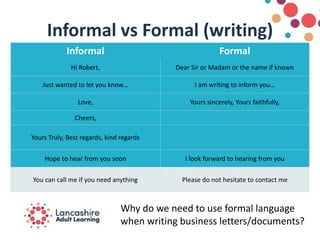
Informal vs Formal (writing)
Informal Formal
Hi Robert, Dear Sir or Madam or the name if known
Just wanted to let you know… I am writing to inform you…
Love, Yours sincerely, Yours faithfully,
Cheers,
Yours Truly, Best regards, kind regards
Hope to hear from you soon I look forward to hearing from you
You can call me if you need anything Please do not hesitate to contact me
Why do we need to use formal language
when writing business letters/documents?
Formal letter writing
• There is a hand-out available to those
who are unfamiliar with the layout of a
formal letter
• This can be used as a guide to help you
when typing up your own formal letter
• How should a formal letter be written?
ADMIN TASK 1
• You have 5 minutes to read through your instruction sheet,
2 minutes to ask questions/take notes
• You can complete the task using Microsoft Word
• Create a folder on your pen drive called Business Administration. Inside that
folder, create another folder called Admin Task 1
• Save the file on to your memory stick with an appropriate file name.
• Ask me to look over it after you have proof-read the document and checked for
spelling and grammar errors.
If you complete before the end of the 30 minutes – Offer your
assistance to someone else.
During the practical tasks you
will meet the following criteria;
Working in business and Administration Unit
• AC 2.1 Follow instructions to complete
routine administrative tasks
• AC 4.1 Use simple tools to organise their
time
Creating business documents Unit
• AC 3.1 Produce routine business documents
using the appropriate communication style
• AC 3.2 Check documents for accuracy
Confidentiality of information
Work in small groups to discuss confidentiality of
information. Use the questions below to help you. Take
notes to prepare you for completing this in your workbook
In a business administration role…..
1. What different types of information should be kept
confidential? Try to list 10 things
2. How would you keep this information confidential?
3. Why is it important to keep things confidential?
Consider the different roles in administration which were
identified in session 1 & 2
ADMIN TASK 2
1. Follow instructions to complete routine administrative tasks - ADMIN TASK 2
(handout) – this will usually take 2 or 3 sessions
2. You need to create 3 separate documents from the Task sheet – These need to
be different types of documents but you can choose them (for those learners
who are able, choose the more difficult documents to challenge yourself)
3. Proof read each document – Look for errors in layout, spellings, capital letters,
information is accurate, formatting is correct and professional
4. Save each file with an appropriate file name to your pen drive (Ask if you are
unsure)
If you have completed this for all 3 documents, ask me to check before printing –
Check Moodle for extension activities on Word Processing and Word tables
Independent learning - You need to…..
• Research (or ask around) about what
administrative/reception staff would generally
wear to work.
• Write some information down about what
you/others could do to dress appropriately – Not
just about what you should wear
When you come in next week, you need to dress
appropriately for the role of welcoming visitors in a
business environment.
This will be your dress code for the rest of the course.
HOMEWORK - MOODLE
• Access MOODLE to have a look through some of the
resources available to you (Introductory session 1&2 is
available now and Lv 1 session 1)
• There are many resources that will help you to further your
knowledge and improve your skills as an administrator.
• You have a log in sheet – Take this home and login to
Moodle. You will find your homework there so please do log
in to check
Did you..?
• LO 1: Take the literacy assessment
• LO 2: Use key equipment according to
organisational procedures (2.2)
• LO 3: Follow instructions to complete Admin task 1
– Formal letter writing (2.1)
• LO 4: Give examples of information that should be
kept confidential
• LO 5: Submit your learning mat
• LO 6: Discuss independent learning requirements
Next week…..
Prioritising tasks
Time management
Using equipment
Welcoming visitors

Business Admin - Session 3 LAL

  • 1.
    Part of theNelson and Colne College Group
  • 2.
    Business Administration Level 1 Waterside Tutor:Michelle Walsh mwalsh@accross.ac.uk 01254 354423 - Reception
  • 3.
    Induction - Reminder •Fire evacuation / Toilets / Smoking • Code of Conduct / ICT Acceptable Use Policy • Phone calls / appointments • 8 sessions (including enrolment session) – Always AIM for 100% • Absences are to be reported (01254354423) and you are required to catch up in your own time, with resources provided by your tutor • Brews – 25p per session
  • 4.
    SESSION AIM To useoffice equipment appropriately and safely, learn how to format a formal letter, produce a formal letter and know the importance of confidentiality of information
  • 5.
    What can weexpect in session 1 of the Lv 1? • LO 1: Take the literacy assessment • LO 2: Use key equipment according to organisational procedures (2.2) • LO 3: Follow instructions to complete Admin task 1 – Formal letter writing (2.1) • LO 4: Give examples of information that should be kept confidential • LO 5: Submit your learning mat • LO 6: Discuss independent learning requirements
  • 6.
  • 7.
    What else youcan expect in this session? Key terminology: Procedure, formal Key English skills: Following written and verbal instructions to complete tasks, sharing ideas, formal written communication, proof reading Key British Values: Respect – Following group rules to help form mutual respect and comfortable learning environment for everyone. Rule of Law – Confidentiality of information (GDPR), Health & Safety at Work Act 1974 and how these relate to the working environment E-Learning: MOODLE for resources, Google for research if needed & Microsoft Word to type letter
  • 8.
    Icebreaker • Follow instructionsactivity • Let’s see how well we do 
  • 9.
    Independent Learning discussion •Identify at least 5 different ACTIVITIES that the administrator may be expected to do in their role and describe how each one may be done, using your own words. • Example: (Activity) Answering telephone calls - (Description) The administrator may get a call from a customer, their colleague or a manager. This could be an enquiry or an instruction. They made need to take notes whilst they are on the telephone to ensure they have the full information. The administrator would be polite when using the telephone and clarify what the message is or what they are required to do. How did you get on?
  • 10.
    Literacy assessment • Accessyour ‘Learn My Way’ account and complete the literacy assessment • Remember – Headphones are needed
  • 11.
    Informal vs Formal(writing) Informal Formal Hi Robert, Dear Sir or Madam or the name if known Just wanted to let you know… I am writing to inform you… Love, Yours sincerely, Yours faithfully, Cheers, Yours Truly, Best regards, kind regards Hope to hear from you soon I look forward to hearing from you You can call me if you need anything Please do not hesitate to contact me Why do we need to use formal language when writing business letters/documents?
  • 12.
    Formal letter writing •There is a hand-out available to those who are unfamiliar with the layout of a formal letter • This can be used as a guide to help you when typing up your own formal letter • How should a formal letter be written?
  • 13.
    ADMIN TASK 1 •You have 5 minutes to read through your instruction sheet, 2 minutes to ask questions/take notes • You can complete the task using Microsoft Word • Create a folder on your pen drive called Business Administration. Inside that folder, create another folder called Admin Task 1 • Save the file on to your memory stick with an appropriate file name. • Ask me to look over it after you have proof-read the document and checked for spelling and grammar errors. If you complete before the end of the 30 minutes – Offer your assistance to someone else.
  • 15.
    During the practicaltasks you will meet the following criteria; Working in business and Administration Unit • AC 2.1 Follow instructions to complete routine administrative tasks • AC 4.1 Use simple tools to organise their time Creating business documents Unit • AC 3.1 Produce routine business documents using the appropriate communication style • AC 3.2 Check documents for accuracy
  • 16.
    Confidentiality of information Workin small groups to discuss confidentiality of information. Use the questions below to help you. Take notes to prepare you for completing this in your workbook In a business administration role….. 1. What different types of information should be kept confidential? Try to list 10 things 2. How would you keep this information confidential? 3. Why is it important to keep things confidential? Consider the different roles in administration which were identified in session 1 & 2
  • 17.
    ADMIN TASK 2 1.Follow instructions to complete routine administrative tasks - ADMIN TASK 2 (handout) – this will usually take 2 or 3 sessions 2. You need to create 3 separate documents from the Task sheet – These need to be different types of documents but you can choose them (for those learners who are able, choose the more difficult documents to challenge yourself) 3. Proof read each document – Look for errors in layout, spellings, capital letters, information is accurate, formatting is correct and professional 4. Save each file with an appropriate file name to your pen drive (Ask if you are unsure) If you have completed this for all 3 documents, ask me to check before printing – Check Moodle for extension activities on Word Processing and Word tables
  • 18.
    Independent learning -You need to….. • Research (or ask around) about what administrative/reception staff would generally wear to work. • Write some information down about what you/others could do to dress appropriately – Not just about what you should wear When you come in next week, you need to dress appropriately for the role of welcoming visitors in a business environment. This will be your dress code for the rest of the course.
  • 19.
    HOMEWORK - MOODLE •Access MOODLE to have a look through some of the resources available to you (Introductory session 1&2 is available now and Lv 1 session 1) • There are many resources that will help you to further your knowledge and improve your skills as an administrator. • You have a log in sheet – Take this home and login to Moodle. You will find your homework there so please do log in to check
  • 20.
    Did you..? • LO1: Take the literacy assessment • LO 2: Use key equipment according to organisational procedures (2.2) • LO 3: Follow instructions to complete Admin task 1 – Formal letter writing (2.1) • LO 4: Give examples of information that should be kept confidential • LO 5: Submit your learning mat • LO 6: Discuss independent learning requirements
  • 21.
    Next week….. Prioritising tasks Timemanagement Using equipment Welcoming visitors