1
TOPIC
Building reliable
web applications
using Cypress
@mauricedb
Who am I?
@mauricedb
@mauricedb
@mauricedebeijer
Maurice de Beijer
@cloudgen_verona
#CodeGen2021
4
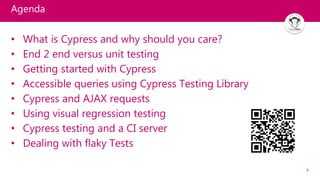
Agenda
• What is Cypress and why should you care?
• End 2 end versus unit testing
• Getting started with Cypress
• Accessible queries using Cypress Testing Library
• Cypress and AJAX requests
• Using visual regression testing
• Cypress testing and a CI server
• Dealing with flaky Tests
5
What is Cypress and why should you care?
6
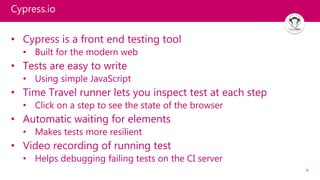
Cypress.io
• Cypress is a front end testing tool
• Built for the modern web
• Tests are easy to write
• Using simple JavaScript
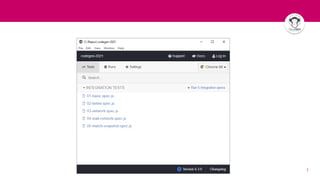
• Time Travel runner lets you inspect test at each step
• Click on a step to see the state of the browser
• Automatic waiting for elements
• Makes tests more resilient
• Video recording of running test
• Helps debugging failing tests on the CI server
7
8
Cypress.io
• Lets you fake the network
• Or use the real backend as appropriate
• Automatically retry
• Run flaky tests multiple times
• Many standard and 3rd party extensions
• Or write your own in JavaScript
• Can run in Docker containers
• Consistent cross platform behavior
• Runs inside the browser
• Not based on Selenium
9
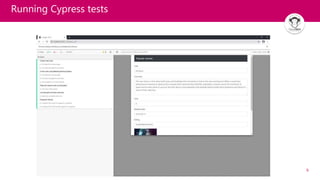
Running Cypress tests
10
End to End versus Unit testing
11
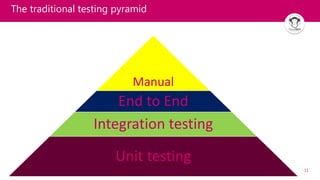
The traditional testing pyramid
Manual
End to End
Integration testing
Unit testing
12
Both windows are fine

Source
13
A sturdy latch
Source
14
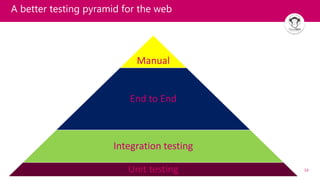
A better testing pyramid for the web
Manual
End to End
Integration testing
Unit testing
15
Getting started with Cypress
16
Getting started with
Cypress
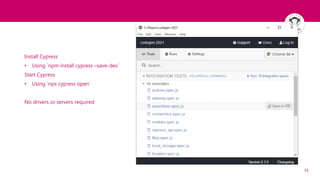
Install Cypress
• Using `npm install cypress –save-dev`
Start Cypress
• Using `npx cypress open`
No drivers or servers required
17
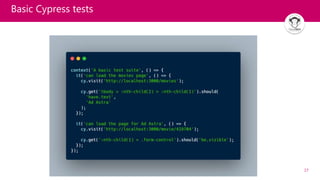
Basic Cypress tests
19
Cypress Testing Library
20
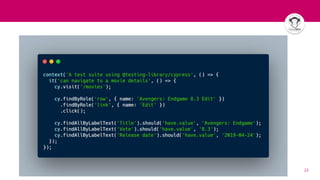
Accessible queries using Cypress Testing Library
The more your tests resemble the way your software
is used, the more confidence they can give you.
(Kent C. Dobbs)
• Test the application like a user would use it
• Avoid implementation details in your tests
• Adds commands to select elements based on:
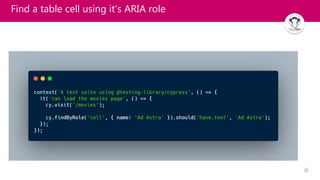
• Aria roles & labels of elements
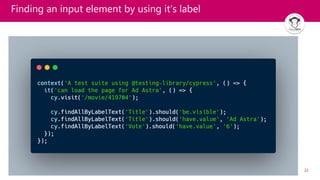
• Labels associated with input elements
• Placeholder text
• ARIA = Accessible Rich Internet Applications
21
Find a table cell using it’s ARIA role
22
Finding an input element by using it’s label
23
25
Improve tests with ARIA attributes
• Some elements don’t have a useful label
• For example a movie row
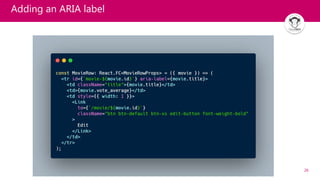
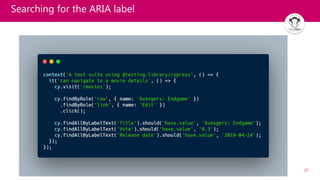
• Add an `aria-label` to query it as needed
• Often better then a selector class, id or data-testid
26
Adding an ARIA label
27
Searching for the ARIA label
29
Cypress and AJAX requests
30
Cypress and AJAX requests
• By default the application will run as normal
• The real backend services will be called
• Using `cy.intercept()` you can change that
• Either call the API and use the same result in your test
• Or intercept and mock the whole request
31
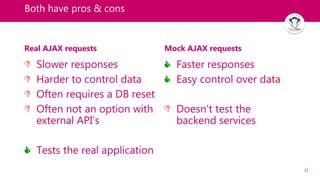
Both have pros & cons
Real AJAX requests
Slower responses
Harder to control data
Often requires a DB reset
Often not an option with
external API’s
Tests the real application
Mock AJAX requests
Faster responses
Easy control over data
Doesn’t test the
backend services
33
Visual Regression Testing
34
Using Visual Regression Testing
Visual regression testing ensures the UI is unchanged
• Testing by selecting/manipulating elements proves the
application works
• But not that a user can actually use it
• You might have a white button on a white background
• The button is there and works
• But the user can’t see it
35
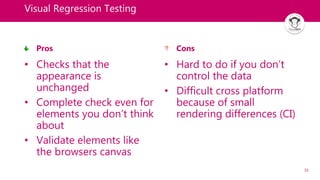
Visual Regression Testing
Pros
• Checks that the
appearance is
unchanged
• Complete check even for
elements you don’t think
about
• Validate elements like
the browsers canvas
Cons
• Hard to do if you don’t
control the data
• Difficult cross platform
because of small
rendering differences (CI)
37
Faking standard functions
• Stubs allow you to modify functions
• Including standard JavaScript functions
• Using the cy.stub()
• Control how time passes
• For setInterval(), setTimeout, Date.now() or new Date()
• Using the cy.clock()
38
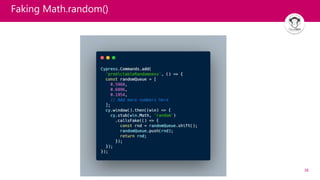
Faking Math.random()
40
Continuous Integration
41
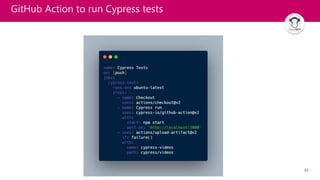
Cypress testing and a CI server
• Execute the `cypress run` command
• GitHub actions make testing the application easy
• Use cypress-io/github-action@2
• For CI servers that are not directly supported
• Use the start-server-and-test NPM package
42
GitHub Action to run Cypress tests
43
Visual Regression Testing and the CI Server
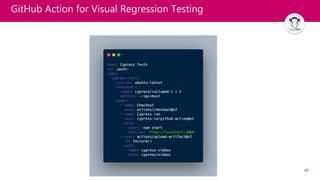
• The best way is to use a Docker container
• Standard container images like cypress/included:6.3.0
• Works cross platform and on the CI server
• Tip: Add --env failOnSnapshotDiff=false to cypress open
• Avoids a local run from failing on snapshot differences
44
GitHub Action for Visual Regression Testing
46
Flaky Tests
47
Flaky Tests
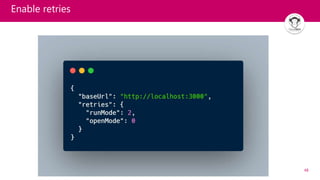
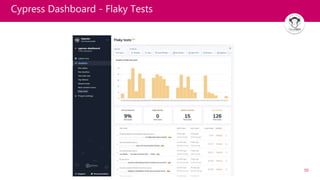
• Sometimes tests are not as reliable as you would like
• The same test fails occasionally
• Automatic retries will help pass the test
• Retry a failing test one or more times
• Often a sign that there is an issue
• Can be the test or the application
48
Enable retries
49
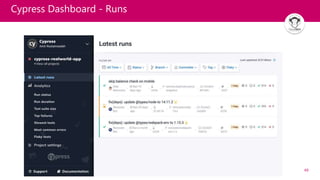
Cypress Dashboard - Runs
50
Cypress Dashboard - Flaky Tests
51
Conclusion
• Cypress is a great tool for End to End testing
• More reliable then relying on unit testing and manual testing
• Great infrastructure
• Useful dashboard to record runs
• Many plugins and extensions
• Write tests that use the application as users would
• Cypress Testing Library helps a lot
• Use visual regression tests where appropriate
• But don’t forget to test the application behavior
Thank you
Any questions?
@mauricedb @mauricedb @mauricedebeijer

Building reliable web applications using Cypress

  • 1.
  • 2.
  • 3.
  • 4.
    4 Agenda • What isCypress and why should you care? • End 2 end versus unit testing • Getting started with Cypress • Accessible queries using Cypress Testing Library • Cypress and AJAX requests • Using visual regression testing • Cypress testing and a CI server • Dealing with flaky Tests
  • 5.
    5 What is Cypressand why should you care?
  • 6.
    6 Cypress.io • Cypress isa front end testing tool • Built for the modern web • Tests are easy to write • Using simple JavaScript • Time Travel runner lets you inspect test at each step • Click on a step to see the state of the browser • Automatic waiting for elements • Makes tests more resilient • Video recording of running test • Helps debugging failing tests on the CI server
  • 7.
  • 8.
    8 Cypress.io • Lets youfake the network • Or use the real backend as appropriate • Automatically retry • Run flaky tests multiple times • Many standard and 3rd party extensions • Or write your own in JavaScript • Can run in Docker containers • Consistent cross platform behavior • Runs inside the browser • Not based on Selenium
  • 9.
  • 10.
    10 End to Endversus Unit testing
  • 11.
    11 The traditional testingpyramid Manual End to End Integration testing Unit testing
  • 12.
  • 13.
  • 14.
    14 A better testingpyramid for the web Manual End to End Integration testing Unit testing
  • 15.
  • 16.
    16 Getting started with Cypress InstallCypress • Using `npm install cypress –save-dev` Start Cypress • Using `npx cypress open` No drivers or servers required
  • 17.
  • 19.
  • 20.
    20 Accessible queries usingCypress Testing Library The more your tests resemble the way your software is used, the more confidence they can give you. (Kent C. Dobbs) • Test the application like a user would use it • Avoid implementation details in your tests • Adds commands to select elements based on: • Aria roles & labels of elements • Labels associated with input elements • Placeholder text • ARIA = Accessible Rich Internet Applications
  • 21.
    21 Find a tablecell using it’s ARIA role
  • 22.
    22 Finding an inputelement by using it’s label
  • 23.
  • 25.
    25 Improve tests withARIA attributes • Some elements don’t have a useful label • For example a movie row • Add an `aria-label` to query it as needed • Often better then a selector class, id or data-testid
  • 26.
  • 27.
  • 29.
  • 30.
    30 Cypress and AJAXrequests • By default the application will run as normal • The real backend services will be called • Using `cy.intercept()` you can change that • Either call the API and use the same result in your test • Or intercept and mock the whole request
  • 31.
    31 Both have pros& cons Real AJAX requests Slower responses Harder to control data Often requires a DB reset Often not an option with external API’s Tests the real application Mock AJAX requests Faster responses Easy control over data Doesn’t test the backend services
  • 33.
  • 34.
    34 Using Visual RegressionTesting Visual regression testing ensures the UI is unchanged • Testing by selecting/manipulating elements proves the application works • But not that a user can actually use it • You might have a white button on a white background • The button is there and works • But the user can’t see it
  • 35.
    35 Visual Regression Testing Pros •Checks that the appearance is unchanged • Complete check even for elements you don’t think about • Validate elements like the browsers canvas Cons • Hard to do if you don’t control the data • Difficult cross platform because of small rendering differences (CI)
  • 37.
    37 Faking standard functions •Stubs allow you to modify functions • Including standard JavaScript functions • Using the cy.stub() • Control how time passes • For setInterval(), setTimeout, Date.now() or new Date() • Using the cy.clock()
  • 38.
  • 40.
  • 41.
    41 Cypress testing anda CI server • Execute the `cypress run` command • GitHub actions make testing the application easy • Use cypress-io/github-action@2 • For CI servers that are not directly supported • Use the start-server-and-test NPM package
  • 42.
    42 GitHub Action torun Cypress tests
  • 43.
    43 Visual Regression Testingand the CI Server • The best way is to use a Docker container • Standard container images like cypress/included:6.3.0 • Works cross platform and on the CI server • Tip: Add --env failOnSnapshotDiff=false to cypress open • Avoids a local run from failing on snapshot differences
  • 44.
    44 GitHub Action forVisual Regression Testing
  • 46.
  • 47.
    47 Flaky Tests • Sometimestests are not as reliable as you would like • The same test fails occasionally • Automatic retries will help pass the test • Retry a failing test one or more times • Often a sign that there is an issue • Can be the test or the application
  • 48.
  • 49.
  • 50.
  • 51.
    51 Conclusion • Cypress isa great tool for End to End testing • More reliable then relying on unit testing and manual testing • Great infrastructure • Useful dashboard to record runs • Many plugins and extensions • Write tests that use the application as users would • Cypress Testing Library helps a lot • Use visual regression tests where appropriate • But don’t forget to test the application behavior
  • 52.
    Thank you Any questions? @mauricedb@mauricedb @mauricedebeijer

Editor's Notes

  • #5 https://forms.gle/k3C3rnWpJ1LNVzrg8 https://docs.google.com/forms/d/10DfiJbLmoAaPkWhL8DU3zwciH1U8zdqAnQ5GB-Zm8Ik/edit#responses