Integration Testing with Selenium
Hans Buwalda
©2015 LogiGear Corporation
www.logigear.com
www.testarchitect.com
www.happytester.com
@hansbuwalda
hans@logigear.com
hans@happytester.com
©2015 LogiGear Corporation
• Topics:
– position of functional/integration testing
– domain language approaches
– test design as driver for automation
– automation friendly test design techniques and
examples
– special cases: data driven, multi-station, graphics, etc
• What this talk is not:
– specific to Selenium only
– a technical class on automation
– about component based development
– introduction to unit testing
Scope
©2015 LogiGear Corporation
• A combination of open source products and standards, aimed at
web testing (including a Firefox based IDE)
• In the later versions it works with an interface called “WebDriver”,
implemented with drivers in browsers
• WebDriver has been implemented in open source libraries, but is
now also becoming implemented in browsers
• For example Microsoft Edge can only be accessed programmatically
via WebDriver
• Products like Appium try to implement WebDriver for mobile
browsing and even mobile apps
• Our product (TestArchitect) is moving to WebDriver, expect this to be
a common practice
Selenium
©2015 LogiGear Corporation
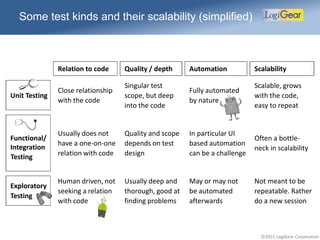
Relation to code Quality / depth Automation Scalability
Unit Testing
Close relationship
with the code
Singular test
scope, but deep
into the code
Fully automated
by nature
Scalable, grows
with the code,
easy to repeat
Functional/
Integration
Testing
Usually does not
have a one-on-one
relation with code
Quality and scope
depends on test
design
In particular UI
based automation
can be a challenge
Often a bottle-
neck in scalability
Exploratory
Testing
Human driven, not
seeking a relation
with code
Usually deep and
thorough, good at
finding problems
May or may not
be automated
afterwards
Not meant to be
repeatable. Rather
do a new session
Some test kinds and their scalability (simplified)
©2015 LogiGear Corporation
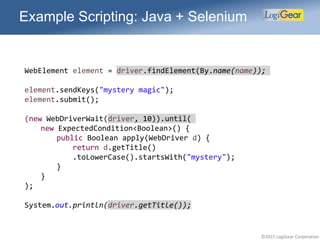
Example Scripting: Java + Selenium
WebElement element = driver.findElement(By.name(name));
element.sendKeys("mystery magic");
element.submit();
(new WebDriverWait(driver, 10)).until(
new ExpectedCondition<Boolean>() {
public Boolean apply(WebDriver d) {
return d.getTitle()
.toLowerCase().startsWith("mystery");
}
}
);
System.out.println(driver.getTitle());
©2015 LogiGear Corporation
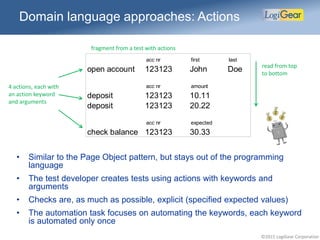
Domain language approaches: Actions
4 actions, each with
an action keyword
and arguments
read from top
to bottom
fragment from a test with actions
acc nr first last
open account 123123 John Doe
acc nr amount
deposit 123123 10.11
deposit 123123 20.22
acc nr expected
check balance 123123 30.33
• Similar to the Page Object pattern, but stays out of the programming
language
• The test developer creates tests using actions with keywords and
arguments
• Checks are, as much as possible, explicit (specified expected values)
• The automation task focuses on automating the keywords, each keyword
is automated only once
©2015 LogiGear Corporation
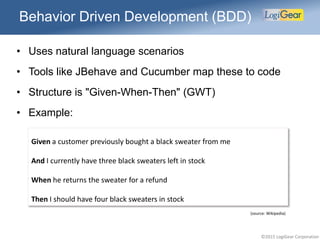
Behavior Driven Development (BDD)
• Uses natural language scenarios
• Tools like JBehave and Cucumber map these to code
• Structure is "Given-When-Then" (GWT)
• Example:
Given a customer previously bought a black sweater from me
And I currently have three black sweaters left in stock
When he returns the sweater for a refund
Then I should have four black sweaters in stock
(source: Wikipedia)
©2015 LogiGear Corporation
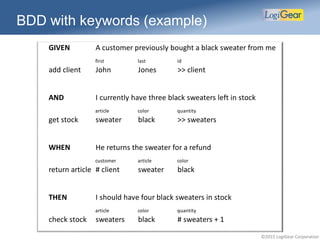
BDD with keywords (example)
GIVEN A customer previously bought a black sweater from me
first last id
add client John Jones >> client
AND I currently have three black sweaters left in stock
article color quantity
get stock sweater black >> sweaters
WHEN He returns the sweater for a refund
customer article color
return article # client sweater black
THEN I should have four black sweaters in stock
article color quantity
check stock sweaters black # sweaters + 1
©2015 LogiGear Corporation
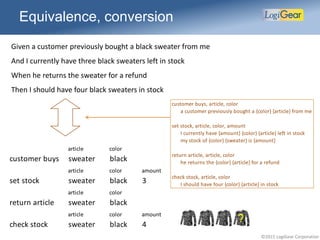
Equivalence, conversion
Given a customer previously bought a black sweater from me
And I currently have three black sweaters left in stock
When he returns the sweater for a refund
Then I should have four black sweaters in stock
customer buys, article, color
a customer previously bought a {color} {article} from me
set stock, article, color, amount
I currently have {amount} {color} {article} left in stock
my stock of {color} {sweater} is {amount}
return article, article, color
he returns the {color} {article} for a refund
check stock, article, color
I should have four {color} {article} in stock
article color
customer buys sweater black
article color amount
set stock sweater black 3
article color
return article sweater black
article color amount
check stock sweater black 4
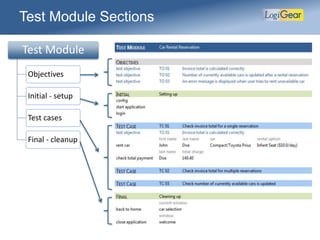
Test Module Sections
Test Module
Objectives
Initial - setup
Test cases
Final - cleanup
©2015 LogiGear Corporation
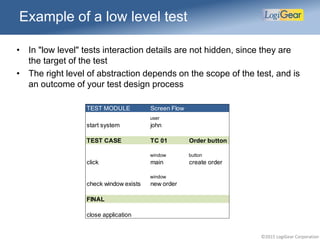
• In "low level" tests interaction details are not hidden, since they are
the target of the test
• The right level of abstraction depends on the scope of the test, and is
an outcome of your test design process
TEST MODULE Screen Flow
user
start system john
TEST CASE TC 01 Order button
window button
click main create order
window
check window exists new order
FINAL
close application
Example of a low level test
©2015 LogiGear Corporation
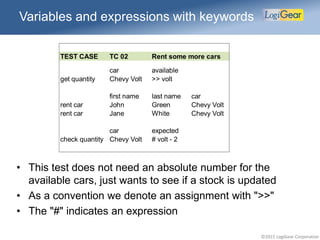
Variables and expressions with keywords
• This test does not need an absolute number for the
available cars, just wants to see if a stock is updated
• As a convention we denote an assignment with ">>"
• The "#" indicates an expression
TEST CASE TC 02 Rent some more cars
car available
get quantity Chevy Volt >> volt
first name last name car
rent car John Green Chevy Volt
rent car Jane White Chevy Volt
car expected
check quantity Chevy Volt # volt - 2
©2015 LogiGear Corporation
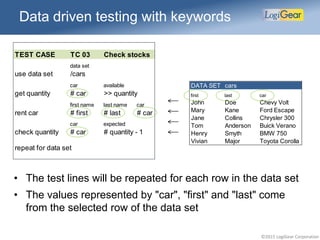
Data driven testing with keywords
• The test lines will be repeated for each row in the data set
• The values represented by "car", "first" and "last" come
from the selected row of the data set
TEST CASE TC 03 Check stocks
data set
use data set /cars
car available
get quantity # car >> quantity
first name last name car
rent car # first # last # car
car expected
check quantity # car # quantity - 1
repeat for data set
DATA SET cars
first last car
John Doe Chevy Volt
Mary Kane Ford Escape
Jane Collins Chrysler 300
Tom Anderson Buick Verano
Henry Smyth BMW 750
Vivian Major Toyota Corolla
©2015 LogiGear Corporation
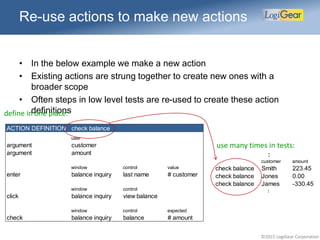
ACTION DEFINITION check balance
user
argument customer
argument amount
window control value
enter balance inquiry last name # customer
window control
click balance inquiry view balance
window control expected
check balance inquiry balance # amount
Re-use actions to make new actions
• In the below example we make a new action
• Existing actions are strung together to create new ones with a
broader scope
• Often steps in low level tests are re-used to create these action
definitions
:
customer amount
check balance Smith 223.45
check balance Jones 0.00
check balance James -330.45
:
use many times in tests:
define in one place:
©2015 LogiGear Corporation
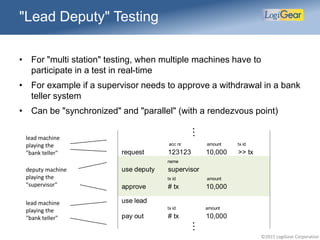
"Lead Deputy" Testing
• For "multi station" testing, when multiple machines have to
participate in a test in real-time
• For example if a supervisor needs to approve a withdrawal in a bank
teller system
• Can be "synchronized" and "parallel" (with a rendezvous point)
lead machine
playing the
"bank teller"
deputy machine
playing the
"supervisor"
acc nr amount tx id
request 123123 10,000 >> tx
name
use deputy supervisor
tx id amount
approve # tx 10,000
use lead
tx id amount
pay out # tx 10,000
lead machine
playing the
"bank teller"
...
...
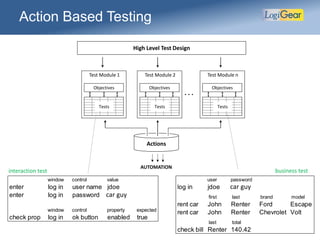
High Level Test Design
Tests
Objectives
Test Module 1
Actions
. . .
AUTOMATION
user password
log in jdoe StarEast
first last brand model
rent car John Renter Ford Escape
rent car John Renter Chevrolet Volt
last total
check bill Renter 140.42
interaction test business test
window control value
enter log in user name jdoe
enter log in password StarEast
window control property expected
check prop log in ok button enabled true
car guy
car guy
Action Based Testing
Tests
Objectives
Test Module 2
Tests
Objectives
Test Module n
©2015 LogiGear Corporation
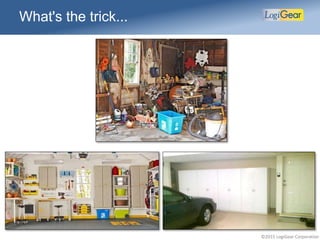
What's the trick...
©2015 LogiGear Corporation
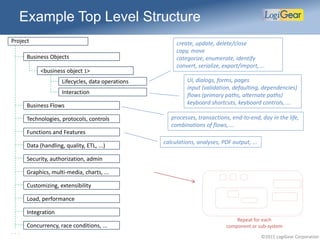
• Business objects and business flows
– objects are like cars, invoices, locations, etc
– flows are like create, fulfill, pay and close an order
• Other tests
– functions and features, like premium calculation or PDF output
– administration, users, security, authorizations
– graphics
– technologies, protocols, ...
– customization, extensibility
– . . .
• Business versus interaction
– differentiate within business objects and other categories
– interaction can be further differentiated into: values, UI, keyboard,
etc
Example of considerations
©2015 LogiGear Corporation
Example Top Level Structure
Project create, update, delete/close
copy, move
categorize, enumerate, identify
convert, serialize, export/import, ...
UI, dialogs, forms, pages
input (validation, defaulting, dependencies)
flows (primary paths, alternate paths)
keyboard shortcuts, keyboard controls, ...
. . .
<business object 1>
Lifecycles, data operations
Interaction
Functions and Features
Technologies, protocols, controls
Data (handling, quality, ETL, ...)
Security, authorization, admin
Graphics, multi-media, charts, ...
Load, performance
Integration
Customizing, extensibility
Business Flows
Concurrency, race conditions, ...
Business Objects
processes, transactions, end-to-end, day in the life,
combinations of flows, ...
calculations, analyses, PDF output, ...
Repeat for each
component or sub-system
©2015 LogiGear Corporation
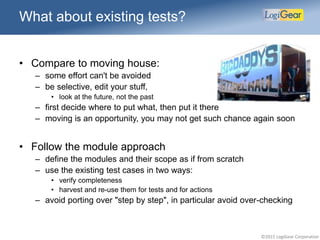
What about existing tests?
• Compare to moving house:
– some effort can't be avoided
– be selective, edit your stuff,
• look at the future, not the past
– first decide where to put what, then put it there
– moving is an opportunity, you may not get such chance again soon
• Follow the module approach
– define the modules and their scope as if from scratch
– use the existing test cases in two ways:
• verify completeness
• harvest and re-use them for tests and for actions
– avoid porting over "step by step", in particular avoid over-checking
©2015 LogiGear Corporation
Eye on the ball, Scope
• Always know the scope of the test module
• The scope should be unambiguous
• The scope determines many things:
– what the test objectives are
– which test cases to expect
– what level of actions to use
– what the checks are about and which events should generate a
warning or error (if a “lower” functionality is wrong)
©2015 LogiGear Corporation
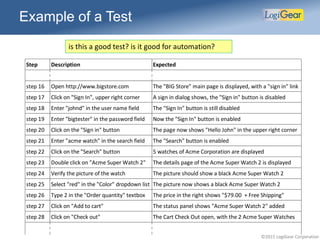
Example of a Test
Step Description Expected
step 16 Open http://www.bigstore.com The "BIG Store" main page is displayed, with a "sign in" link
step 17 Click on "Sign In", upper right corner A sign in dialog shows, the "Sign in" button is disabled
step 18 Enter "johnd" in the user name field The "Sign In" button is still disabled
step 19 Enter "bigtester" in the password field Now the "Sign In" button is enabled
step 20 Click on the "Sign in" button The page now shows "Hello John" in the upper right corner
step 21 Enter "acme watch" in the search field The "Search" button is enabled
step 22 Click on the "Search" button 5 watches of Acme Corporation are displayed
step 23 Double click on "Acme Super Watch 2" The details page of the Acme Super Watch 2 is displayed
step 24 Verify the picture of the watch The picture should show a black Acme Super Watch 2
step 25 Select "red" in the "Color" dropdown list The picture now shows a black Acme Super Watch 2
step 26 Type 2 in the "Order quantity" textbox The price in the right shows "$79.00 + Free Shipping"
step 27 Click on "Add to cart" The status panel shows "Acme Super Watch 2" added
step 28 Click on "Check out" The Cart Check Out open, with the 2 Acme Super Watches
is this a good test? is it good for automation?
©2015 LogiGear Corporation
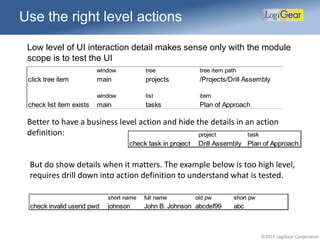
Use the right level actions
Low level of UI interaction detail makes sense only with the module
scope is to test the UI
window tree tree item path
click tree item main projects /Projects/Drill Assembly
window list item
check list item exists main tasks Plan of Approach
Better to have a business level action and hide the details in an action
definition:
But do show details when it matters. The example below is too high level,
requires drill down into action definition to understand what is tested.
©2015 LogiGear Corporation
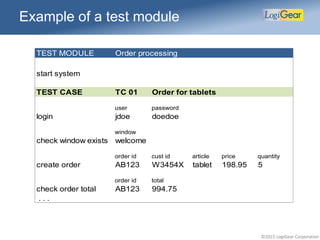
Example of a test module
TEST MODULE Order processing
start system
TEST CASE TC 01 Order for tablets
user password
login jdoe doedoe
window
check window exists welcome
order id cust id article price quantity
create order AB123 W3454X tablet 198.95 5
order id total
check order total AB123 994.75
. . .
©2015 LogiGear Corporation
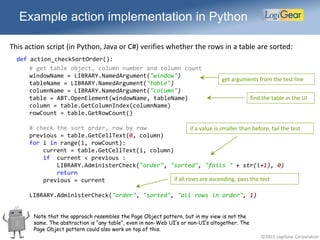
Example action implementation in Python
This action script (in Python, Java or C#) verifies whether the rows in a table are sorted:
# get table object, column number and column count
windowName = LIBRARY.NamedArgument("window")
tableName = LIBRARY.NamedArgument("table")
columnName = LIBRARY.NamedArgument("column")
table = ABT.OpenElement(windowName, tableName)
column = table.GetColumnIndex(columnName)
rowCount = table.GetRowCount()
# check the sort order, row by row
previous = table.GetCellText(0, column)
for i in range(1, rowCount):
current = table.GetCellText(i, column)
if current < previous :
LIBRARY.AdministerCheck("order", "sorted", "fails " + str(i+1), 0)
return
previous = current
LIBRARY.AdministerCheck("order", "sorted", "all rows in order", 1)
find the table in the UI
if a value is smaller than before, fail the test
if all rows are ascending, pass the test
get arguments from the test line
def action_checkSortOrder():
Note that the approach resembles the Page Object pattern, but in my view is not the
same. The abstraction is “any table”, even in non-Web UI’s or non-UI’s altogether. The
Page Object pattern could also work on top of this.
©2015 LogiGear Corporation
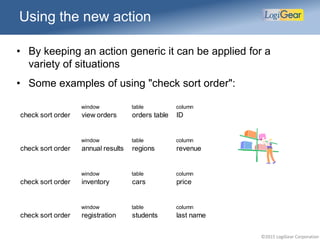
Using the new action
• By keeping an action generic it can be applied for a
variety of situations
• Some examples of using "check sort order":
window table column
check sort order view orders orders table ID
window table column
check sort order annual results regions revenue
window table column
check sort order inventory cars price
window table column
check sort order registration students last name
©2015 LogiGear Corporation
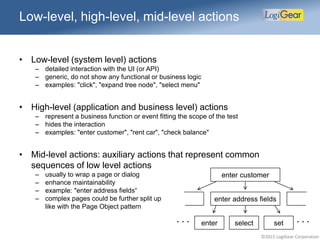
Low-level, high-level, mid-level actions
• Low-level (system level) actions
– detailed interaction with the UI (or API)
– generic, do not show any functional or business logic
– examples: "click", "expand tree node", "select menu"
• High-level (application and business level) actions
– represent a business function or event fitting the scope of the test
– hides the interaction
– examples: "enter customer", "rent car", "check balance"
• Mid-level actions: auxiliary actions that represent common
sequences of low level actions
– usually to wrap a page or dialog
– enhance maintainability
– example: "enter address fields“
– complex pages could be further split up
like with the Page Object pattern
enter customer
enter address fields
enter select set . . .. . .
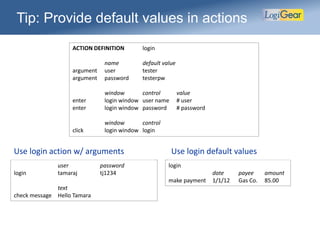
Tip: Provide default values in actions
ACTION DEFINITION login
name default value
argument user tester
argument password testerpw
window control value
enter login window user name # user
enter login window password # password
window control
click login window login
user password
login tamaraj tj1234
text
check message Hello Tamara
login
date payee amount
make payment 1/1/12 Gas Co. 85.00
Use login action w/ arguments Use login default values
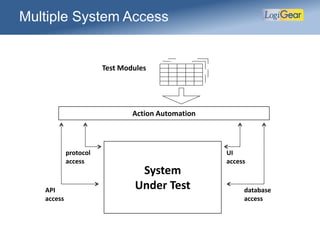
Multiple System Access
System
Under Test
Action Automation
API
access
protocol
access
UI
access
database
access
Test Modules
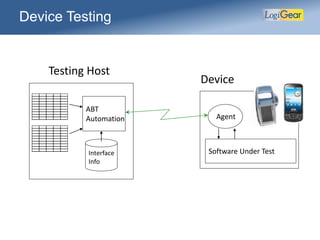
Device Testing
Software Under Test
Agent
ABT
Automation
Interface
Info
Testing Host
Device
Androi
d
©2015 LogiGear Corporation
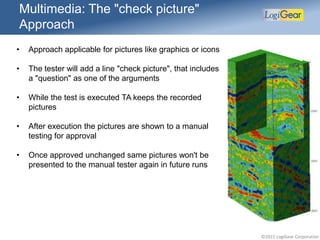
• Approach applicable for pictures like graphics or icons
• The tester will add a line "check picture", that includes
a "question" as one of the arguments
• While the test is executed TA keeps the recorded
pictures
• After execution the pictures are shown to a manual
testing for approval
• Once approved unchanged same pictures won't be
presented to the manual tester again in future runs
Multimedia: The "check picture"
Approach
©2015 LogiGear Corporation
• Automation is not as much a technical challenge as it is
a test design challenge
• Domain language based approaches like BDD and
Actions can make tests are accessible, and easier to
maintain
• However, some kind of systematic approach, like the
ABT method, is necessary to keep the tests manageable
• From a test design perspective approaches for non-UI
and UI driven testing are very similar
Summary hans@logigear.com
That’s all folks for this talk. However, I have
much more stuff, please let me know any
questions.

Integration Testing with Selenium

  • 1.
    Integration Testing withSelenium Hans Buwalda ©2015 LogiGear Corporation www.logigear.com www.testarchitect.com www.happytester.com @hansbuwalda hans@logigear.com hans@happytester.com
  • 2.
    ©2015 LogiGear Corporation •Topics: – position of functional/integration testing – domain language approaches – test design as driver for automation – automation friendly test design techniques and examples – special cases: data driven, multi-station, graphics, etc • What this talk is not: – specific to Selenium only – a technical class on automation – about component based development – introduction to unit testing Scope
  • 3.
    ©2015 LogiGear Corporation •A combination of open source products and standards, aimed at web testing (including a Firefox based IDE) • In the later versions it works with an interface called “WebDriver”, implemented with drivers in browsers • WebDriver has been implemented in open source libraries, but is now also becoming implemented in browsers • For example Microsoft Edge can only be accessed programmatically via WebDriver • Products like Appium try to implement WebDriver for mobile browsing and even mobile apps • Our product (TestArchitect) is moving to WebDriver, expect this to be a common practice Selenium
  • 4.
    ©2015 LogiGear Corporation Relationto code Quality / depth Automation Scalability Unit Testing Close relationship with the code Singular test scope, but deep into the code Fully automated by nature Scalable, grows with the code, easy to repeat Functional/ Integration Testing Usually does not have a one-on-one relation with code Quality and scope depends on test design In particular UI based automation can be a challenge Often a bottle- neck in scalability Exploratory Testing Human driven, not seeking a relation with code Usually deep and thorough, good at finding problems May or may not be automated afterwards Not meant to be repeatable. Rather do a new session Some test kinds and their scalability (simplified)
  • 5.
    ©2015 LogiGear Corporation ExampleScripting: Java + Selenium WebElement element = driver.findElement(By.name(name)); element.sendKeys("mystery magic"); element.submit(); (new WebDriverWait(driver, 10)).until( new ExpectedCondition<Boolean>() { public Boolean apply(WebDriver d) { return d.getTitle() .toLowerCase().startsWith("mystery"); } } ); System.out.println(driver.getTitle());
  • 6.
    ©2015 LogiGear Corporation Domainlanguage approaches: Actions 4 actions, each with an action keyword and arguments read from top to bottom fragment from a test with actions acc nr first last open account 123123 John Doe acc nr amount deposit 123123 10.11 deposit 123123 20.22 acc nr expected check balance 123123 30.33 • Similar to the Page Object pattern, but stays out of the programming language • The test developer creates tests using actions with keywords and arguments • Checks are, as much as possible, explicit (specified expected values) • The automation task focuses on automating the keywords, each keyword is automated only once
  • 7.
    ©2015 LogiGear Corporation BehaviorDriven Development (BDD) • Uses natural language scenarios • Tools like JBehave and Cucumber map these to code • Structure is "Given-When-Then" (GWT) • Example: Given a customer previously bought a black sweater from me And I currently have three black sweaters left in stock When he returns the sweater for a refund Then I should have four black sweaters in stock (source: Wikipedia)
  • 8.
    ©2015 LogiGear Corporation BDDwith keywords (example) GIVEN A customer previously bought a black sweater from me first last id add client John Jones >> client AND I currently have three black sweaters left in stock article color quantity get stock sweater black >> sweaters WHEN He returns the sweater for a refund customer article color return article # client sweater black THEN I should have four black sweaters in stock article color quantity check stock sweaters black # sweaters + 1
  • 9.
    ©2015 LogiGear Corporation Equivalence,conversion Given a customer previously bought a black sweater from me And I currently have three black sweaters left in stock When he returns the sweater for a refund Then I should have four black sweaters in stock customer buys, article, color a customer previously bought a {color} {article} from me set stock, article, color, amount I currently have {amount} {color} {article} left in stock my stock of {color} {sweater} is {amount} return article, article, color he returns the {color} {article} for a refund check stock, article, color I should have four {color} {article} in stock article color customer buys sweater black article color amount set stock sweater black 3 article color return article sweater black article color amount check stock sweater black 4
  • 10.
    Test Module Sections TestModule Objectives Initial - setup Test cases Final - cleanup
  • 11.
    ©2015 LogiGear Corporation •In "low level" tests interaction details are not hidden, since they are the target of the test • The right level of abstraction depends on the scope of the test, and is an outcome of your test design process TEST MODULE Screen Flow user start system john TEST CASE TC 01 Order button window button click main create order window check window exists new order FINAL close application Example of a low level test
  • 12.
    ©2015 LogiGear Corporation Variablesand expressions with keywords • This test does not need an absolute number for the available cars, just wants to see if a stock is updated • As a convention we denote an assignment with ">>" • The "#" indicates an expression TEST CASE TC 02 Rent some more cars car available get quantity Chevy Volt >> volt first name last name car rent car John Green Chevy Volt rent car Jane White Chevy Volt car expected check quantity Chevy Volt # volt - 2
  • 13.
    ©2015 LogiGear Corporation Datadriven testing with keywords • The test lines will be repeated for each row in the data set • The values represented by "car", "first" and "last" come from the selected row of the data set TEST CASE TC 03 Check stocks data set use data set /cars car available get quantity # car >> quantity first name last name car rent car # first # last # car car expected check quantity # car # quantity - 1 repeat for data set DATA SET cars first last car John Doe Chevy Volt Mary Kane Ford Escape Jane Collins Chrysler 300 Tom Anderson Buick Verano Henry Smyth BMW 750 Vivian Major Toyota Corolla
  • 14.
    ©2015 LogiGear Corporation ACTIONDEFINITION check balance user argument customer argument amount window control value enter balance inquiry last name # customer window control click balance inquiry view balance window control expected check balance inquiry balance # amount Re-use actions to make new actions • In the below example we make a new action • Existing actions are strung together to create new ones with a broader scope • Often steps in low level tests are re-used to create these action definitions : customer amount check balance Smith 223.45 check balance Jones 0.00 check balance James -330.45 : use many times in tests: define in one place:
  • 15.
    ©2015 LogiGear Corporation "LeadDeputy" Testing • For "multi station" testing, when multiple machines have to participate in a test in real-time • For example if a supervisor needs to approve a withdrawal in a bank teller system • Can be "synchronized" and "parallel" (with a rendezvous point) lead machine playing the "bank teller" deputy machine playing the "supervisor" acc nr amount tx id request 123123 10,000 >> tx name use deputy supervisor tx id amount approve # tx 10,000 use lead tx id amount pay out # tx 10,000 lead machine playing the "bank teller" ... ...
  • 16.
    High Level TestDesign Tests Objectives Test Module 1 Actions . . . AUTOMATION user password log in jdoe StarEast first last brand model rent car John Renter Ford Escape rent car John Renter Chevrolet Volt last total check bill Renter 140.42 interaction test business test window control value enter log in user name jdoe enter log in password StarEast window control property expected check prop log in ok button enabled true car guy car guy Action Based Testing Tests Objectives Test Module 2 Tests Objectives Test Module n
  • 17.
  • 18.
    ©2015 LogiGear Corporation •Business objects and business flows – objects are like cars, invoices, locations, etc – flows are like create, fulfill, pay and close an order • Other tests – functions and features, like premium calculation or PDF output – administration, users, security, authorizations – graphics – technologies, protocols, ... – customization, extensibility – . . . • Business versus interaction – differentiate within business objects and other categories – interaction can be further differentiated into: values, UI, keyboard, etc Example of considerations
  • 19.
    ©2015 LogiGear Corporation ExampleTop Level Structure Project create, update, delete/close copy, move categorize, enumerate, identify convert, serialize, export/import, ... UI, dialogs, forms, pages input (validation, defaulting, dependencies) flows (primary paths, alternate paths) keyboard shortcuts, keyboard controls, ... . . . <business object 1> Lifecycles, data operations Interaction Functions and Features Technologies, protocols, controls Data (handling, quality, ETL, ...) Security, authorization, admin Graphics, multi-media, charts, ... Load, performance Integration Customizing, extensibility Business Flows Concurrency, race conditions, ... Business Objects processes, transactions, end-to-end, day in the life, combinations of flows, ... calculations, analyses, PDF output, ... Repeat for each component or sub-system
  • 20.
    ©2015 LogiGear Corporation Whatabout existing tests? • Compare to moving house: – some effort can't be avoided – be selective, edit your stuff, • look at the future, not the past – first decide where to put what, then put it there – moving is an opportunity, you may not get such chance again soon • Follow the module approach – define the modules and their scope as if from scratch – use the existing test cases in two ways: • verify completeness • harvest and re-use them for tests and for actions – avoid porting over "step by step", in particular avoid over-checking
  • 21.
    ©2015 LogiGear Corporation Eyeon the ball, Scope • Always know the scope of the test module • The scope should be unambiguous • The scope determines many things: – what the test objectives are – which test cases to expect – what level of actions to use – what the checks are about and which events should generate a warning or error (if a “lower” functionality is wrong)
  • 22.
    ©2015 LogiGear Corporation Exampleof a Test Step Description Expected step 16 Open http://www.bigstore.com The "BIG Store" main page is displayed, with a "sign in" link step 17 Click on "Sign In", upper right corner A sign in dialog shows, the "Sign in" button is disabled step 18 Enter "johnd" in the user name field The "Sign In" button is still disabled step 19 Enter "bigtester" in the password field Now the "Sign In" button is enabled step 20 Click on the "Sign in" button The page now shows "Hello John" in the upper right corner step 21 Enter "acme watch" in the search field The "Search" button is enabled step 22 Click on the "Search" button 5 watches of Acme Corporation are displayed step 23 Double click on "Acme Super Watch 2" The details page of the Acme Super Watch 2 is displayed step 24 Verify the picture of the watch The picture should show a black Acme Super Watch 2 step 25 Select "red" in the "Color" dropdown list The picture now shows a black Acme Super Watch 2 step 26 Type 2 in the "Order quantity" textbox The price in the right shows "$79.00 + Free Shipping" step 27 Click on "Add to cart" The status panel shows "Acme Super Watch 2" added step 28 Click on "Check out" The Cart Check Out open, with the 2 Acme Super Watches is this a good test? is it good for automation?
  • 23.
    ©2015 LogiGear Corporation Usethe right level actions Low level of UI interaction detail makes sense only with the module scope is to test the UI window tree tree item path click tree item main projects /Projects/Drill Assembly window list item check list item exists main tasks Plan of Approach Better to have a business level action and hide the details in an action definition: But do show details when it matters. The example below is too high level, requires drill down into action definition to understand what is tested.
  • 24.
    ©2015 LogiGear Corporation Exampleof a test module TEST MODULE Order processing start system TEST CASE TC 01 Order for tablets user password login jdoe doedoe window check window exists welcome order id cust id article price quantity create order AB123 W3454X tablet 198.95 5 order id total check order total AB123 994.75 . . .
  • 25.
    ©2015 LogiGear Corporation Exampleaction implementation in Python This action script (in Python, Java or C#) verifies whether the rows in a table are sorted: # get table object, column number and column count windowName = LIBRARY.NamedArgument("window") tableName = LIBRARY.NamedArgument("table") columnName = LIBRARY.NamedArgument("column") table = ABT.OpenElement(windowName, tableName) column = table.GetColumnIndex(columnName) rowCount = table.GetRowCount() # check the sort order, row by row previous = table.GetCellText(0, column) for i in range(1, rowCount): current = table.GetCellText(i, column) if current < previous : LIBRARY.AdministerCheck("order", "sorted", "fails " + str(i+1), 0) return previous = current LIBRARY.AdministerCheck("order", "sorted", "all rows in order", 1) find the table in the UI if a value is smaller than before, fail the test if all rows are ascending, pass the test get arguments from the test line def action_checkSortOrder(): Note that the approach resembles the Page Object pattern, but in my view is not the same. The abstraction is “any table”, even in non-Web UI’s or non-UI’s altogether. The Page Object pattern could also work on top of this.
  • 26.
    ©2015 LogiGear Corporation Usingthe new action • By keeping an action generic it can be applied for a variety of situations • Some examples of using "check sort order": window table column check sort order view orders orders table ID window table column check sort order annual results regions revenue window table column check sort order inventory cars price window table column check sort order registration students last name
  • 27.
    ©2015 LogiGear Corporation Low-level,high-level, mid-level actions • Low-level (system level) actions – detailed interaction with the UI (or API) – generic, do not show any functional or business logic – examples: "click", "expand tree node", "select menu" • High-level (application and business level) actions – represent a business function or event fitting the scope of the test – hides the interaction – examples: "enter customer", "rent car", "check balance" • Mid-level actions: auxiliary actions that represent common sequences of low level actions – usually to wrap a page or dialog – enhance maintainability – example: "enter address fields“ – complex pages could be further split up like with the Page Object pattern enter customer enter address fields enter select set . . .. . .
  • 28.
    Tip: Provide defaultvalues in actions ACTION DEFINITION login name default value argument user tester argument password testerpw window control value enter login window user name # user enter login window password # password window control click login window login user password login tamaraj tj1234 text check message Hello Tamara login date payee amount make payment 1/1/12 Gas Co. 85.00 Use login action w/ arguments Use login default values
  • 29.
    Multiple System Access System UnderTest Action Automation API access protocol access UI access database access Test Modules
  • 30.
    Device Testing Software UnderTest Agent ABT Automation Interface Info Testing Host Device Androi d
  • 31.
    ©2015 LogiGear Corporation •Approach applicable for pictures like graphics or icons • The tester will add a line "check picture", that includes a "question" as one of the arguments • While the test is executed TA keeps the recorded pictures • After execution the pictures are shown to a manual testing for approval • Once approved unchanged same pictures won't be presented to the manual tester again in future runs Multimedia: The "check picture" Approach
  • 32.
    ©2015 LogiGear Corporation •Automation is not as much a technical challenge as it is a test design challenge • Domain language based approaches like BDD and Actions can make tests are accessible, and easier to maintain • However, some kind of systematic approach, like the ABT method, is necessary to keep the tests manageable • From a test design perspective approaches for non-UI and UI driven testing are very similar Summary hans@logigear.com That’s all folks for this talk. However, I have much more stuff, please let me know any questions.