Topic:-
Deep Dive
into Software
Testing
By:-
Swapnil Narayan
Software Engineer at Microsoft
Got offers from Amazon and Oracle
Facebook HackerCup Quarter-Finalist
About the
Speaker
Hey there,
I’m Swapnil Narayan, a graduate from
IIT(ISM) Dhanbad with Computer Science
majors.
I’m a Software Engineer at Microsoft India,
and have also got offers from Amazon and
Oracle for Software Engineering roles.
I’m a very passionate Programming
Instructor and have a decent experience
for the same at various popular edtech
platforms, and have taken sessions with
IITs, NITs, and other engineering colleges .
I will be your mentor for this session and
will walk you through the topics the
following slides.
About the
Session
In this Session, I will be delivering
all possible guidance for end to end
automation testing and will make
sure for you to inculcate and master
them with ease.
We will be discussing ideas on the
best tool for writing e2e tests our
major objective will be to develop
your testing skills.
Curious how we gonna do that?
Let’s dive into the world of Testing.
What is Automation?
Automation testing is a software testing methodology that aims to
simulate real user scenarios by testing an application's flow from
start to finish. It involves testing the entire software system,
including all its components, subsystems, and dependencies, to
ensure that they function correctly together.
Overall, end-to-end testing helps ensure that all components of a
software system work together harmoniously, providing a
seamless and reliable user experience. By validating the complete
flow of an application, it helps identify issues that may not be
caught by individual component tests, thereby improving the
overall quality and reliability of the software.
Automation: Key Pointers
● Scope: E2E testing focuses on testing the application as a whole,
including its user interface, backend services, APIs, databases,
integrations, and external dependencies.
● User Scenarios: E2E tests replicate real-world user interactions and
workflows, covering multiple steps or use cases. These tests validate
the application's behavior and functionality from a user's
perspective.
● System Integration: E2E testing verifies the interactions between
different components and systems to ensure smooth integration
and interoperability. It helps identify issues that arise due to
dependencies between different parts of the system.
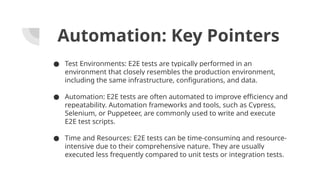
Automation: Key Pointers
● Test Environments: E2E tests are typically performed in an
environment that closely resembles the production environment,
including the same infrastructure, configurations, and data.
● Automation: E2E tests are often automated to improve efficiency and
repeatability. Automation frameworks and tools, such as Cypress,
Selenium, or Puppeteer, are commonly used to write and execute
E2E test scripts.
● Time and Resources: E2E tests can be time-consuming and resource-
intensive due to their comprehensive nature. They are usually
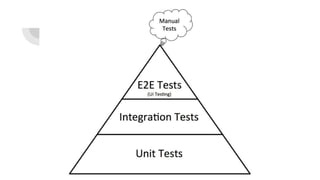
executed less frequently compared to unit tests or integration tests.
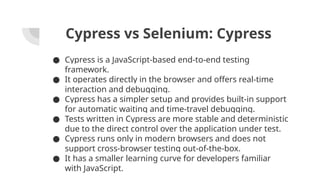
Cypress vs Selenium: Cypress
● Cypress is a JavaScript-based end-to-end testing
framework.
● It operates directly in the browser and offers real-time
interaction and debugging.
● Cypress has a simpler setup and provides built-in support
for automatic waiting and time-travel debugging.
● Tests written in Cypress are more stable and deterministic
due to the direct control over the application under test.
● Cypress runs only in modern browsers and does not
support cross-browser testing out-of-the-box.
● It has a smaller learning curve for developers familiar
with JavaScript.
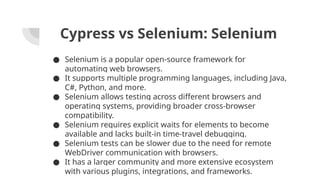
Cypress vs Selenium: Selenium
● Selenium is a popular open-source framework for
automating web browsers.
● It supports multiple programming languages, including Java,
C#, Python, and more.
● Selenium allows testing across different browsers and
operating systems, providing broader cross-browser
compatibility.
● Selenium requires explicit waits for elements to become
available and lacks built-in time-travel debugging.
● Selenium tests can be slower due to the need for remote
WebDriver communication with browsers.
● It has a larger community and more extensive ecosystem
with various plugins, integrations, and frameworks.
Deep Dive into Cypress
Key Pointers
● Time Travel: Cypress takes snapshots of the application's
state at each step, allowing you to easily navigate and
debug.
● Automatic Waiting: Cypress automatically waits for
elements to become available, eliminating the need for
explicit waits.
● Real-Time Reloads: Changes to the code are automatically
reloaded in the browser, providing a smooth developer
experience.
● Easy Debugging: Cypress offers built-in debugging tools,
including console logs and element inspection.
● Network Stubbing: Cypress allows you to intercept and
Setting up Cypress
● Install Node.js and npm (Node Package Manager) from
https://nodejs.org.
● Create a new directory for your Cypress project.
● Open the command line and navigate to your project
directory.
● Run the following command to initialize a new npm project:
npm init -y.
● Install Cypress using the command: npm install cypress --
save-dev.
● Once installed, you can open Cypress with the command:
npx cypress open.
● Cypress Test Runner will launch, allowing you to select and
run your tests.
Writing Cypress Tests
● Cypress tests are written in JavaScript and run in the
browser.
● Tests are organized into files and folders within the
"cypress" directory.
● Cypress provides a powerful API for interacting with
web elements and making assertions.
● The API includes commands for navigating, selecting
elements, interacting with forms, and making
assertions.
● Cypress supports different test styles, including
behavior-driven development (BDD) with describe and
it blocks.
Example: Login Test
● Visit the login page.
● Enter valid credentials.
● Click the "Login" button.
● Assert that the user is successfully logged in.
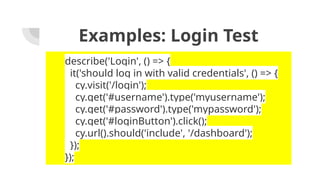
Examples: Login Test
describe('Login', () => {
it('should log in with valid credentials', () => {
cy.visit('/login');
cy.get('#username').type('myusername');
cy.get('#password').type('mypassword');
cy.get('#loginButton').click();
cy.url().should('include', '/dashboard');
});
});
Example: Form Validation Test
● Visit the registration page.
● Enter invalid data into the form fields.
● Submit the form.
● Assert that appropriate validation messages
are displayed.
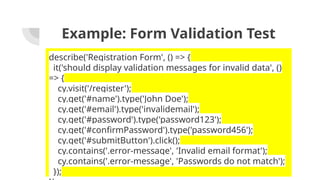
Example: Form Validation Test
describe('Registration Form', () => {
it('should display validation messages for invalid data', ()
=> {
cy.visit('/register');
cy.get('#name').type('John Doe');
cy.get('#email').type('invalidemail');
cy.get('#password').type('password123');
cy.get('#confirmPassword').type('password456');
cy.get('#submitButton').click();
cy.contains('.error-message', 'Invalid email format');
cy.contains('.error-message', 'Passwords do not match');
});
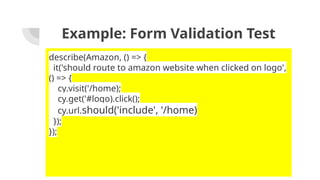
Example: Form Validation Test
describe(Amazon, () => {
it('should route to amazon website when clicked on logo',
() => {
cy.visit('/home);
cy.get('#logo).click();
cy.url.should('include', '/home)
});
});
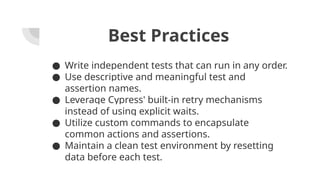
Best Practices
● Write independent tests that can run in any order.
● Use descriptive and meaningful test and
assertion names.
● Leverage Cypress' built-in retry mechanisms
instead of using explicit waits.
● Utilize custom commands to encapsulate
common actions and assertions.
● Maintain a clean test environment by resetting
data before each test.
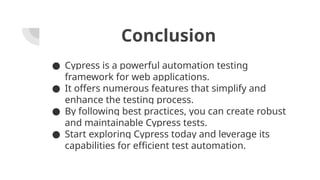
Conclusion
● Cypress is a powerful automation testing
framework for web applications.
● It offers numerous features that simplify and
enhance the testing process.
● By following best practices, you can create robust
and maintainable Cypress tests.
● Start exploring Cypress today and leverage its
capabilities for efficient test automation.
Liked it?
Thank you for attending the session!
Lets connect over LinkedIn and share success
stories

Automation Testing and New Ways to test Software using AI

  • 1.
    Topic:- Deep Dive into Software Testing By:- SwapnilNarayan Software Engineer at Microsoft Got offers from Amazon and Oracle Facebook HackerCup Quarter-Finalist
  • 2.
    About the Speaker Hey there, I’mSwapnil Narayan, a graduate from IIT(ISM) Dhanbad with Computer Science majors. I’m a Software Engineer at Microsoft India, and have also got offers from Amazon and Oracle for Software Engineering roles. I’m a very passionate Programming Instructor and have a decent experience for the same at various popular edtech platforms, and have taken sessions with IITs, NITs, and other engineering colleges . I will be your mentor for this session and will walk you through the topics the following slides.
  • 3.
    About the Session In thisSession, I will be delivering all possible guidance for end to end automation testing and will make sure for you to inculcate and master them with ease. We will be discussing ideas on the best tool for writing e2e tests our major objective will be to develop your testing skills. Curious how we gonna do that? Let’s dive into the world of Testing.
  • 5.
    What is Automation? Automationtesting is a software testing methodology that aims to simulate real user scenarios by testing an application's flow from start to finish. It involves testing the entire software system, including all its components, subsystems, and dependencies, to ensure that they function correctly together. Overall, end-to-end testing helps ensure that all components of a software system work together harmoniously, providing a seamless and reliable user experience. By validating the complete flow of an application, it helps identify issues that may not be caught by individual component tests, thereby improving the overall quality and reliability of the software.
  • 6.
    Automation: Key Pointers ●Scope: E2E testing focuses on testing the application as a whole, including its user interface, backend services, APIs, databases, integrations, and external dependencies. ● User Scenarios: E2E tests replicate real-world user interactions and workflows, covering multiple steps or use cases. These tests validate the application's behavior and functionality from a user's perspective. ● System Integration: E2E testing verifies the interactions between different components and systems to ensure smooth integration and interoperability. It helps identify issues that arise due to dependencies between different parts of the system.
  • 7.
    Automation: Key Pointers ●Test Environments: E2E tests are typically performed in an environment that closely resembles the production environment, including the same infrastructure, configurations, and data. ● Automation: E2E tests are often automated to improve efficiency and repeatability. Automation frameworks and tools, such as Cypress, Selenium, or Puppeteer, are commonly used to write and execute E2E test scripts. ● Time and Resources: E2E tests can be time-consuming and resource- intensive due to their comprehensive nature. They are usually executed less frequently compared to unit tests or integration tests.
  • 8.
    Cypress vs Selenium:Cypress ● Cypress is a JavaScript-based end-to-end testing framework. ● It operates directly in the browser and offers real-time interaction and debugging. ● Cypress has a simpler setup and provides built-in support for automatic waiting and time-travel debugging. ● Tests written in Cypress are more stable and deterministic due to the direct control over the application under test. ● Cypress runs only in modern browsers and does not support cross-browser testing out-of-the-box. ● It has a smaller learning curve for developers familiar with JavaScript.
  • 9.
    Cypress vs Selenium:Selenium ● Selenium is a popular open-source framework for automating web browsers. ● It supports multiple programming languages, including Java, C#, Python, and more. ● Selenium allows testing across different browsers and operating systems, providing broader cross-browser compatibility. ● Selenium requires explicit waits for elements to become available and lacks built-in time-travel debugging. ● Selenium tests can be slower due to the need for remote WebDriver communication with browsers. ● It has a larger community and more extensive ecosystem with various plugins, integrations, and frameworks.
  • 10.
  • 11.
    Key Pointers ● TimeTravel: Cypress takes snapshots of the application's state at each step, allowing you to easily navigate and debug. ● Automatic Waiting: Cypress automatically waits for elements to become available, eliminating the need for explicit waits. ● Real-Time Reloads: Changes to the code are automatically reloaded in the browser, providing a smooth developer experience. ● Easy Debugging: Cypress offers built-in debugging tools, including console logs and element inspection. ● Network Stubbing: Cypress allows you to intercept and
  • 12.
    Setting up Cypress ●Install Node.js and npm (Node Package Manager) from https://nodejs.org. ● Create a new directory for your Cypress project. ● Open the command line and navigate to your project directory. ● Run the following command to initialize a new npm project: npm init -y. ● Install Cypress using the command: npm install cypress -- save-dev. ● Once installed, you can open Cypress with the command: npx cypress open. ● Cypress Test Runner will launch, allowing you to select and run your tests.
  • 13.
    Writing Cypress Tests ●Cypress tests are written in JavaScript and run in the browser. ● Tests are organized into files and folders within the "cypress" directory. ● Cypress provides a powerful API for interacting with web elements and making assertions. ● The API includes commands for navigating, selecting elements, interacting with forms, and making assertions. ● Cypress supports different test styles, including behavior-driven development (BDD) with describe and it blocks.
  • 14.
    Example: Login Test ●Visit the login page. ● Enter valid credentials. ● Click the "Login" button. ● Assert that the user is successfully logged in.
  • 15.
    Examples: Login Test describe('Login',() => { it('should log in with valid credentials', () => { cy.visit('/login'); cy.get('#username').type('myusername'); cy.get('#password').type('mypassword'); cy.get('#loginButton').click(); cy.url().should('include', '/dashboard'); }); });
  • 16.
    Example: Form ValidationTest ● Visit the registration page. ● Enter invalid data into the form fields. ● Submit the form. ● Assert that appropriate validation messages are displayed.
  • 17.
    Example: Form ValidationTest describe('Registration Form', () => { it('should display validation messages for invalid data', () => { cy.visit('/register'); cy.get('#name').type('John Doe'); cy.get('#email').type('invalidemail'); cy.get('#password').type('password123'); cy.get('#confirmPassword').type('password456'); cy.get('#submitButton').click(); cy.contains('.error-message', 'Invalid email format'); cy.contains('.error-message', 'Passwords do not match'); });
  • 18.
    Example: Form ValidationTest describe(Amazon, () => { it('should route to amazon website when clicked on logo', () => { cy.visit('/home); cy.get('#logo).click(); cy.url.should('include', '/home) }); });
  • 19.
    Best Practices ● Writeindependent tests that can run in any order. ● Use descriptive and meaningful test and assertion names. ● Leverage Cypress' built-in retry mechanisms instead of using explicit waits. ● Utilize custom commands to encapsulate common actions and assertions. ● Maintain a clean test environment by resetting data before each test.
  • 20.
    Conclusion ● Cypress isa powerful automation testing framework for web applications. ● It offers numerous features that simplify and enhance the testing process. ● By following best practices, you can create robust and maintainable Cypress tests. ● Start exploring Cypress today and leverage its capabilities for efficient test automation.
  • 21.
    Liked it? Thank youfor attending the session! Lets connect over LinkedIn and share success stories