From the Trenches: Effectively
Scaling Your Cloud Infrastructure and
Optimizing Your Code For Speed
ALLAN MANGUN
E

Aquila Big Data Insight
Agenda
• Optimizing Source Code


• Optimizing Infrastructure


• Optimization Checklist (version .1)
Source Code Optimization
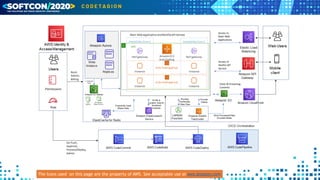
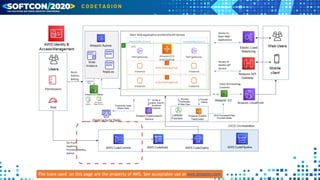
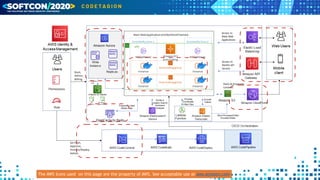
The Icons used on this page are the property of AWS. See acceptable use at aws.amazon.com
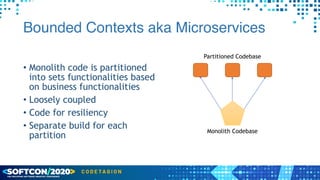
Bounded Contexts aka Microservices
• Monolith code is partitioned
into sets functionalities based
on business functionalities


• Loosely coupled


• Code for resiliency


• Separate build for each
partition
Monolith Codebase
Partitioned Codebase
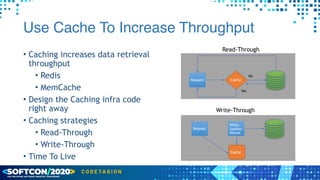
Use Cache To Increase Throughput
• Caching increases data retrieval
throughput


• Redis


• MemCache


• Design the Caching infra code
right away


• Caching strategies


• Read-Through


• Write-Through


• Time To Live
Request
Yes
Cache
No
Read-Through
Write-Through
Write,


Update,


Delete
Cache
Request
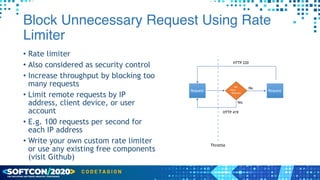
Block Unnecessary Request Using Rate
Limiter
• Rate limiter


• Also considered as security control


• Increase throughput by blocking too
many requests


• Limit remote requests by IP
address, client device, or user
account


• E.g. 100 requests per second for
each IP address


• Write your own custom rate limiter
or use any existing free components
(visit Github)
Request
Yes
Too


Many


Requests
No
Request
Throttle
HTTP 220
HTTP 419
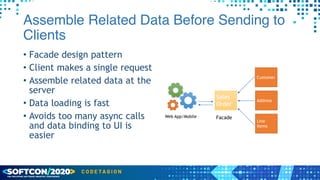
Assemble Related Data Before Sending to
Clients
• Facade design pattern


• Client makes a single request


• Assemble related data at the
server


• Data loading is fast


• Avoids too many async calls
and data binding to UI is
easier
Sales
Order
Facade
Customer
Address
Line
Items
Web App/Mobile
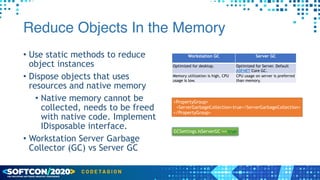
Reduce Objects In the Memory
• Use static methods to reduce
object instances


• Dispose objects that uses
resources and native memory


• Native memory cannot be
collected, needs to be freed
with native code. Implement
IDisposable interface.


• Workstation Server Garbage
Collector (GC) vs Server GC
Workstation GC Server GC
Optimized for desktop. Optimized for Server. Default
ASP.NET Core GC.
Memory utilization is high, CPU
usage is low.
CPU usage on server is preferred
than memory.
<PropertyGroup>


<ServerGarbageCollection>true</ServerGarbageCollection>


</PropertyGroup>
GCSettings.IsServerGC == true
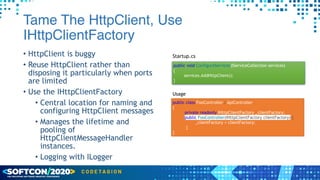
Tame The HttpClient, Use
IHttpClientFactory
• HttpClient is buggy


• Reuse HttpClient rather than
disposing it particularly when ports
are limited


• Use the IHttpClientFactory


• Central location for naming and
configuring HttpClient messages


• Manages the lifetime and
pooling of
HttpClientMessageHandler
instances.


• Logging with ILogger
public void ConfigureServices(IServiceCollection services)


{


services.AddHttpClient();


}
Startup.cs
public class FooController : ApiController


{


private readonly IHttpClientFactory _clientFactory;


public FooController(IHttpClientFactory clientFactory) {


_clientFactory = clientFactory;


}


}
Usage
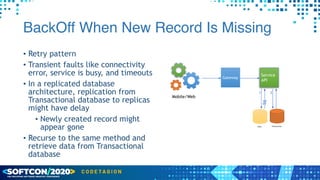
BackOff When New Record Is Missing
• Retry pattern


• Transient faults like connectivity
error, service is busy, and timeouts


• In a replicated database
architecture, replication from
Transactional database to replicas
might have delay


• Newly created record might
appear gone


• Recurse to the same method and
retrieve data from Transactional
database
Mobile/Web
Gateway
Service
API
Read
1 2
Transactional
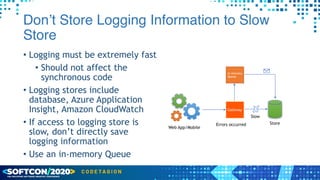
Don’t Store Logging Information to Slow
Store
• Logging must be extremely fast


• Should not affect the
synchronous code


• Logging stores include
database, Azure Application
Insight, Amazon CloudWatch


• If access to logging store is
slow, don’t directly save
logging information


• Use an in-memory Queue
Web App/Mobile
Gateway
Errors occurred Store
In-memory


Queue
Slow
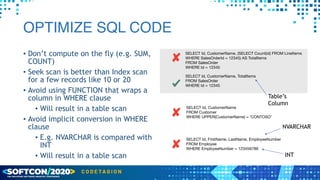
OPTIMIZE SQL CODE
• Don’t compute on the fly (e.g. SUM,
COUNT)


• Seek scan is better than Index scan
for a few records like 10 or 20


• Avoid using FUNCTION that wraps a
column in WHERE clause


• Will result in a table scan


• Avoid implicit conversion in WHERE
clause


• E.g. NVARCHAR is compared with
INT


• Will result in a table scan
SELECT Id, CustomerName, (SELECT Count(id) FROM LineItems 

WHERE SalesOrderId = 12345) AS TotalItems

FROM SalesOrder

WHERE Id = 12345
SELECT Id, CustomerName

FROM Customer

WHERE UPPER(CustomerName) = ‘CONTOSO’
SELECT Id, FirstName, LastName, EmployeeNumber

FROM Employee

WHERE EmployeeNumber = 123456789
NVARCHAR
INT
SELECT Id, CustomerName, TotalItems

FROM SalesOrder

WHERE Id = 12345
Table’s


Column
The Icons used on this page are the property of AWS. See acceptable use at aws.amazon.com
Infrastructure Optimization
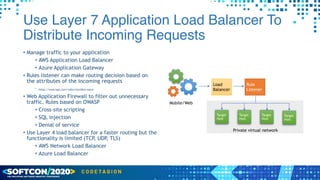
Use Layer 7 Application Load Balancer To
Distribute Incoming Requests
• Manage traffic to your application


• AWS Application Load Balancer


• Azure Application Gateway


• Rules listener can make routing decision based on
the attributes of the incoming requests


• https://www.app.com/video/myvideo/name


• Web Application Firewall to filter out unnecessary
traffic. Rules based on OWASP


• Cross-site scripting


• SQL injection


• Denial of service


• Use Layer 4 load balancer for a faster routing but the
functionality is limited (TCP, UDP, TLS)


• AWS Network Load Balancer


• Azure Load Balancer
Load
Balancer
Mobile/Web
Rule
Listener
Target
Host
Target
Host
Target
Host
Target
Host
Private virtual network
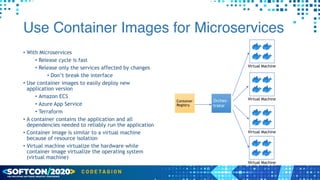
Use Container Images for Microservices
• With Microservices


• Release cycle is fast


• Release only the services affected by changes


• Don’t break the interface


• Use container images to easily deploy new
application version


• Amazon ECS


• Azure App Service


• Terraform


• A container contains the application and all
dependencies needed to reliably run the application


• Container image is similar to a virtual machine
because of resource isolation


• Virtual machine virtualize the hardware while
container image virtualize the operating system
(virtual machine)
Container
Registry
Orches-
trator
Virtual Machine
Virtual Machine
Virtual Machine
Virtual Machine
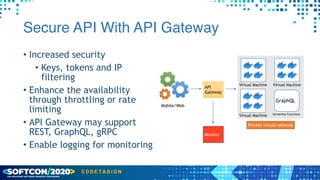
Secure API With API Gateway
• Increased security


• Keys, tokens and IP
filtering


• Enhance the availability
through throttling or rate
limiting


• API Gateway may support
REST, GraphQL, gRPC


• Enable logging for monitoring
Virtual Machine
Virtual Machine Serverless Functions
Virtual Machine
API
Gateway
Monitor
Mobile/Web
Private virtual network
GraphQL
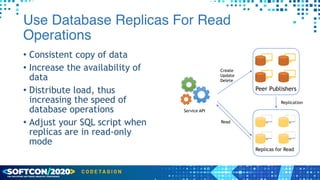
Use Database Replicas For Read
Operations
• Consistent copy of data


• Increase the availability of
data


• Distribute load, thus
increasing the speed of
database operations


• Adjust your SQL script when
replicas are in read-only
mode
Peer Publishers
Replicas for Read
Service API
Create


Update


Delete
Read
Replication
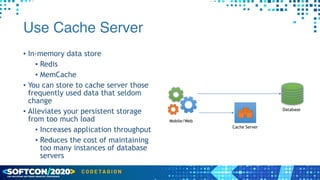
Use Cache Server
• In-memory data store


• Redis


• MemCache


• You can store to cache server those
frequently used data that seldom
change


• Alleviates your persistent storage
from too much load


• Increases application throughput


• Reduces the cost of maintaining
too many instances of database
servers
Mobile/Web
Database
Cache Server
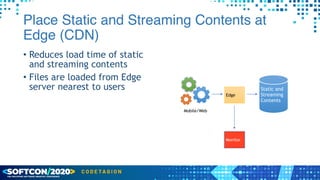
Place Static and Streaming Contents at
Edge (CDN)
• Reduces load time of static
and streaming contents


• Files are loaded from Edge
server nearest to users
Edge
Monitor
Static and
Streaming
Contents
Mobile/Web
The AWS Icons used on this page are the property of AWS. See acceptable use at aws.amazon.com
Q and A
For updated version of
the document, please
visit my site at
allanmangune.com

From the Trenches: Effectively Scaling Your Cloud Infrastructure and Optimizing Your Code For Speed (Softcon 2020)

  • 1.
    From the Trenches:Effectively Scaling Your Cloud Infrastructure and Optimizing Your Code For Speed ALLAN MANGUN E Aquila Big Data Insight
  • 2.
    Agenda • Optimizing SourceCode • Optimizing Infrastructure • Optimization Checklist (version .1)
  • 3.
  • 4.
    The Icons usedon this page are the property of AWS. See acceptable use at aws.amazon.com
  • 5.
    Bounded Contexts akaMicroservices • Monolith code is partitioned into sets functionalities based on business functionalities • Loosely coupled • Code for resiliency • Separate build for each partition Monolith Codebase Partitioned Codebase
  • 6.
    Use Cache ToIncrease Throughput • Caching increases data retrieval throughput • Redis • MemCache • Design the Caching infra code right away • Caching strategies • Read-Through • Write-Through • Time To Live Request Yes Cache No Read-Through Write-Through Write, Update, Delete Cache Request
  • 7.
    Block Unnecessary RequestUsing Rate Limiter • Rate limiter • Also considered as security control • Increase throughput by blocking too many requests • Limit remote requests by IP address, client device, or user account • E.g. 100 requests per second for each IP address • Write your own custom rate limiter or use any existing free components (visit Github) Request Yes Too Many Requests No Request Throttle HTTP 220 HTTP 419
  • 8.
    Assemble Related DataBefore Sending to Clients • Facade design pattern • Client makes a single request • Assemble related data at the server • Data loading is fast • Avoids too many async calls and data binding to UI is easier Sales Order Facade Customer Address Line Items Web App/Mobile
  • 9.
    Reduce Objects Inthe Memory • Use static methods to reduce object instances • Dispose objects that uses resources and native memory • Native memory cannot be collected, needs to be freed with native code. Implement IDisposable interface. • Workstation Server Garbage Collector (GC) vs Server GC Workstation GC Server GC Optimized for desktop. Optimized for Server. Default ASP.NET Core GC. Memory utilization is high, CPU usage is low. CPU usage on server is preferred than memory. <PropertyGroup> <ServerGarbageCollection>true</ServerGarbageCollection> </PropertyGroup> GCSettings.IsServerGC == true
  • 10.
    Tame The HttpClient,Use IHttpClientFactory • HttpClient is buggy • Reuse HttpClient rather than disposing it particularly when ports are limited • Use the IHttpClientFactory • Central location for naming and configuring HttpClient messages • Manages the lifetime and pooling of HttpClientMessageHandler instances. • Logging with ILogger public void ConfigureServices(IServiceCollection services) { services.AddHttpClient(); } Startup.cs public class FooController : ApiController { private readonly IHttpClientFactory _clientFactory; public FooController(IHttpClientFactory clientFactory) { _clientFactory = clientFactory; } } Usage
  • 11.
    BackOff When NewRecord Is Missing • Retry pattern • Transient faults like connectivity error, service is busy, and timeouts • In a replicated database architecture, replication from Transactional database to replicas might have delay • Newly created record might appear gone • Recurse to the same method and retrieve data from Transactional database Mobile/Web Gateway Service API Read 1 2 Transactional
  • 12.
    Don’t Store LoggingInformation to Slow Store • Logging must be extremely fast • Should not affect the synchronous code • Logging stores include database, Azure Application Insight, Amazon CloudWatch • If access to logging store is slow, don’t directly save logging information • Use an in-memory Queue Web App/Mobile Gateway Errors occurred Store In-memory Queue Slow
  • 13.
    OPTIMIZE SQL CODE •Don’t compute on the fly (e.g. SUM, COUNT) • Seek scan is better than Index scan for a few records like 10 or 20 • Avoid using FUNCTION that wraps a column in WHERE clause • Will result in a table scan • Avoid implicit conversion in WHERE clause • E.g. NVARCHAR is compared with INT • Will result in a table scan SELECT Id, CustomerName, (SELECT Count(id) FROM LineItems WHERE SalesOrderId = 12345) AS TotalItems FROM SalesOrder WHERE Id = 12345 SELECT Id, CustomerName FROM Customer WHERE UPPER(CustomerName) = ‘CONTOSO’ SELECT Id, FirstName, LastName, EmployeeNumber FROM Employee WHERE EmployeeNumber = 123456789 NVARCHAR INT SELECT Id, CustomerName, TotalItems FROM SalesOrder WHERE Id = 12345 Table’s Column
  • 14.
    The Icons usedon this page are the property of AWS. See acceptable use at aws.amazon.com
  • 15.
  • 16.
    Use Layer 7Application Load Balancer To Distribute Incoming Requests • Manage traffic to your application • AWS Application Load Balancer • Azure Application Gateway • Rules listener can make routing decision based on the attributes of the incoming requests • https://www.app.com/video/myvideo/name • Web Application Firewall to filter out unnecessary traffic. Rules based on OWASP • Cross-site scripting • SQL injection • Denial of service • Use Layer 4 load balancer for a faster routing but the functionality is limited (TCP, UDP, TLS) • AWS Network Load Balancer • Azure Load Balancer Load Balancer Mobile/Web Rule Listener Target Host Target Host Target Host Target Host Private virtual network
  • 17.
    Use Container Imagesfor Microservices • With Microservices • Release cycle is fast • Release only the services affected by changes • Don’t break the interface • Use container images to easily deploy new application version • Amazon ECS • Azure App Service • Terraform • A container contains the application and all dependencies needed to reliably run the application • Container image is similar to a virtual machine because of resource isolation • Virtual machine virtualize the hardware while container image virtualize the operating system (virtual machine) Container Registry Orches- trator Virtual Machine Virtual Machine Virtual Machine Virtual Machine
  • 18.
    Secure API WithAPI Gateway • Increased security • Keys, tokens and IP filtering • Enhance the availability through throttling or rate limiting • API Gateway may support REST, GraphQL, gRPC • Enable logging for monitoring Virtual Machine Virtual Machine Serverless Functions Virtual Machine API Gateway Monitor Mobile/Web Private virtual network GraphQL
  • 19.
    Use Database ReplicasFor Read Operations • Consistent copy of data • Increase the availability of data • Distribute load, thus increasing the speed of database operations • Adjust your SQL script when replicas are in read-only mode Peer Publishers Replicas for Read Service API Create Update Delete Read Replication
  • 20.
    Use Cache Server •In-memory data store • Redis • MemCache • You can store to cache server those frequently used data that seldom change • Alleviates your persistent storage from too much load • Increases application throughput • Reduces the cost of maintaining too many instances of database servers Mobile/Web Database Cache Server
  • 21.
    Place Static andStreaming Contents at Edge (CDN) • Reduces load time of static and streaming contents • Files are loaded from Edge server nearest to users Edge Monitor Static and Streaming Contents Mobile/Web
  • 22.
    The AWS Iconsused on this page are the property of AWS. See acceptable use at aws.amazon.com
  • 23.
  • 24.
    For updated versionof the document, please visit my site at allanmangune.com