Building Windows
Phone Applications
with Visual Studio
2010
Topics

   Application Platform Introduction
   Windows Phone Developer Tools
   Visual Studio 2010
   Windows Phone Emulator
   Windows Phone Profiler


    Windows Phone
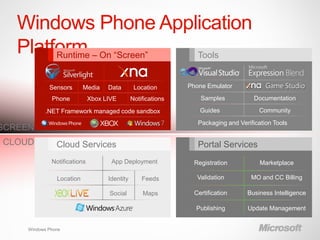
Windows Phone Application
   Platform – On “Screen”
        Runtime           Tools


             Sensors       Media    Data        Location       Phone Emulator

              Phone           Xbox LIVE        Notifications       Samples            Documentation

           .NET Framework managed code sandbox                     Guides              Community
                                                                  Packaging and Verification Tools
SCREEN
CLOUD           Cloud Services                                    Portal Services
              Notifications          App Deployment              Registration           Marketplace

                Location            Identity       Feeds          Validation         MO and CC Billing

                                    Social         Maps          Certification     Business Intelligence

                                                                 Publishing        Update Management


     Windows Phone
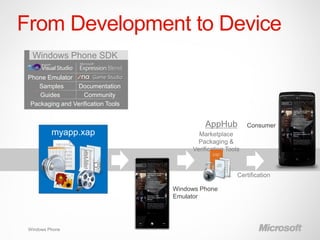
From Development to Device
  Windows Phone SDK

 Phone Emulator
    Samples       Documentation
     Guides         Community
  Packaging and Verification Tools


                                              AppHub   Consumer
          myapp.xap


                                     Windows Phone
                                     Emulator


 Windows Phone
Windows Phone SDK
Free Download!:
http://create.msdn.com

 WPSDK Includes:
     Visual Studio 2010 Express Edition
     Expression Blend 4 for Windows Phone
     Windows Phone Developer Registration Tool
     Application Deployment Tool
 Visual Studio is an Integrated Development
  Environment for creating Applications and Games
 Expression Blend 4 is a visual design tool
     Build user experiences, animations, configure data
      bindings, and create sample data
    Windows Phone                   5
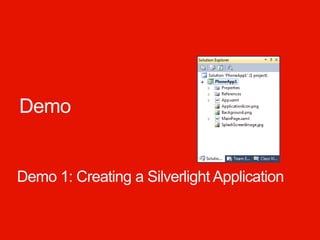
Demo


Demo 1: Creating a Silverlight Application
XNA Framework Game Projects

 XNA Framework used to build 2D and 3D games
 XNA Framework targets Xbox, PC, and Windows
  Phone
    Same APIs, different input mechanisms
 Three projects make up an XNA Framework Solution
    Two projects support compile-time integration of
     Content


    Windows Phone
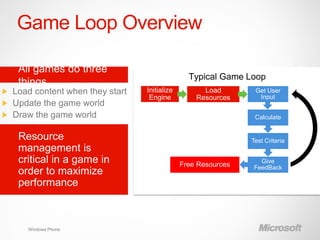
Game Loop Overview


                 Initialize         Load        Get User
                  Engine          Resources      Input


                                                Calculate


                                               Test Criteria


                                                 Give
                              Free Resources   FeedBack


 Windows Phone
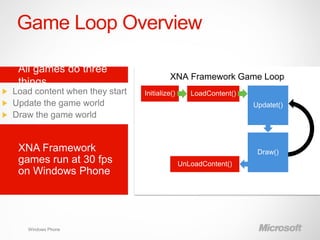
Game Loop Overview

                           XNA Framework Game Loop
                 Initialize()      LoadContent()
                                                   Updatet()


                                                    Draw()
                                UnLoadContent()


 Windows Phone
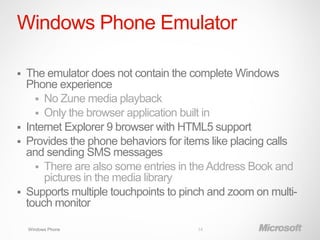
Windows Phone Emulator

   The emulator does not contain the complete Windows
    Phone experience
       No Zune media playback
       Only the browser application built in
   Internet Explorer 9 browser with HTML5 support
   Provides the phone behaviors for items like placing calls
    and sending SMS messages
       There are also some entries in the Address Book and
        pictures in the media library
   Supports multiple touchpoints to pinch and zoom on multi-
    touch monitor

    Windows Phone                       14
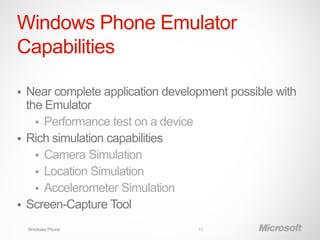
Windows Phone Emulator
Capabilities

 Near complete application development possible with
  the Emulator
     Performance test on a device
 Rich simulation capabilities
     Camera Simulation
     Location Simulation
     Accelerometer Simulation
 Screen-Capture Tool

    Windows Phone                 15
Visual Studio Debugging

 Visual Studio provides an exceptional debugging
  experience
 This experience extends to Windows Phone
 You can do all the debugging actions in Windows
  Phone that you can do with a Windows PC application
     Breakpoints
     Single Stepping
     Viewing and modifying variables


    Windows Phone
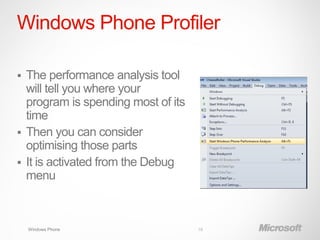
Windows Phone Profiler

 The performance analysis tool
  will tell you where your
  program is spending most of its
  time
 Then you can consider
  optimising those parts
 It is activated from the Debug
  menu


    Windows Phone                   18
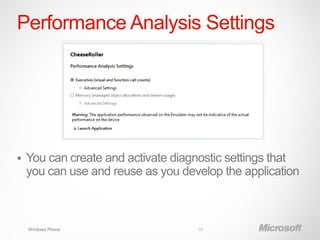
Performance Analysis Settings


   You can create and activate diagnostic settings that
    you can use and reuse as you develop the application


    Windows Phone                   19
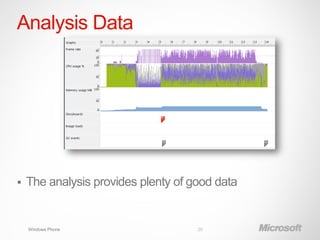
Analysis Data


   The analysis provides plenty of good data


    Windows Phone                    20
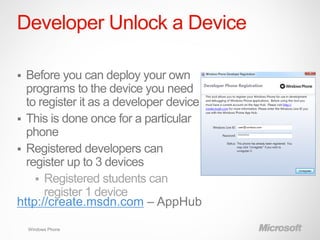
Developer Unlock a Device

 Before you can deploy your own
  programs to the device you need
  to register it as a developer device
 This is done once for a particular
  phone
 Registered developers can
  register up to 3 devices
     Registered students can
      register 1 device
http://create.msdn.com – AppHub

    Windows Phone
Deploying Applications to a
Device


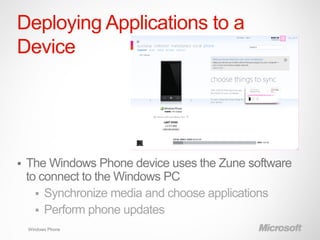
   The Windows Phone device uses the Zune software
    to connect to the Windows PC
       Synchronize media and choose applications
       Perform phone updates
    Windows Phone
Demo


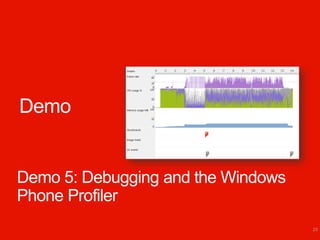
Demo 5: Debugging and the Windows
Phone Profiler
                                    23
Summary

 Visual Studio brings together code and assets and
  tools to help you be productive right away
 The emulator provides similar capabilities to a
  Windows Phone device, but it does not emulate the
  actual hardware speed
     It can emulate the camera, GPS and
      accelerometer sensors
 You can also use the emulator to capture screenshots
  of active applications and games
 The Windows Phone Developer Tools includes
  powerful debugging and profiling tools
    Windows Phone                 24

follow-app BOOTCAMP 2: Building windows phone applications with visual studio 2010

  • 1.
  • 2.
    Topics  Application Platform Introduction  Windows Phone Developer Tools  Visual Studio 2010  Windows Phone Emulator  Windows Phone Profiler Windows Phone
  • 3.
    Windows Phone Application Platform – On “Screen” Runtime Tools Sensors Media Data Location Phone Emulator Phone Xbox LIVE Notifications Samples Documentation .NET Framework managed code sandbox Guides Community Packaging and Verification Tools SCREEN CLOUD Cloud Services Portal Services Notifications App Deployment Registration Marketplace Location Identity Feeds Validation MO and CC Billing Social Maps Certification Business Intelligence Publishing Update Management Windows Phone
  • 4.
    From Development toDevice Windows Phone SDK Phone Emulator Samples Documentation Guides Community Packaging and Verification Tools AppHub Consumer myapp.xap Windows Phone Emulator Windows Phone
  • 5.
    Windows Phone SDK FreeDownload!: http://create.msdn.com  WPSDK Includes:  Visual Studio 2010 Express Edition  Expression Blend 4 for Windows Phone  Windows Phone Developer Registration Tool  Application Deployment Tool  Visual Studio is an Integrated Development Environment for creating Applications and Games  Expression Blend 4 is a visual design tool  Build user experiences, animations, configure data bindings, and create sample data Windows Phone 5
  • 6.
    Demo Demo 1: Creatinga Silverlight Application
  • 7.
    XNA Framework GameProjects  XNA Framework used to build 2D and 3D games  XNA Framework targets Xbox, PC, and Windows Phone  Same APIs, different input mechanisms  Three projects make up an XNA Framework Solution  Two projects support compile-time integration of Content Windows Phone
  • 8.
    Game Loop Overview Initialize Load Get User Engine Resources Input Calculate Test Criteria Give Free Resources FeedBack Windows Phone
  • 9.
    Game Loop Overview XNA Framework Game Loop Initialize() LoadContent() Updatet() Draw() UnLoadContent() Windows Phone
  • 10.
    Windows Phone Emulator  The emulator does not contain the complete Windows Phone experience  No Zune media playback  Only the browser application built in  Internet Explorer 9 browser with HTML5 support  Provides the phone behaviors for items like placing calls and sending SMS messages  There are also some entries in the Address Book and pictures in the media library  Supports multiple touchpoints to pinch and zoom on multi- touch monitor Windows Phone 14
  • 11.
    Windows Phone Emulator Capabilities Near complete application development possible with the Emulator  Performance test on a device  Rich simulation capabilities  Camera Simulation  Location Simulation  Accelerometer Simulation  Screen-Capture Tool Windows Phone 15
  • 12.
    Visual Studio Debugging Visual Studio provides an exceptional debugging experience  This experience extends to Windows Phone  You can do all the debugging actions in Windows Phone that you can do with a Windows PC application  Breakpoints  Single Stepping  Viewing and modifying variables Windows Phone
  • 13.
    Windows Phone Profiler The performance analysis tool will tell you where your program is spending most of its time  Then you can consider optimising those parts  It is activated from the Debug menu Windows Phone 18
  • 14.
    Performance Analysis Settings  You can create and activate diagnostic settings that you can use and reuse as you develop the application Windows Phone 19
  • 15.
    Analysis Data  The analysis provides plenty of good data Windows Phone 20
  • 16.
    Developer Unlock aDevice  Before you can deploy your own programs to the device you need to register it as a developer device  This is done once for a particular phone  Registered developers can register up to 3 devices  Registered students can register 1 device http://create.msdn.com – AppHub Windows Phone
  • 17.
    Deploying Applications toa Device  The Windows Phone device uses the Zune software to connect to the Windows PC  Synchronize media and choose applications  Perform phone updates Windows Phone
  • 18.
    Demo Demo 5: Debuggingand the Windows Phone Profiler 23
  • 19.
    Summary  Visual Studiobrings together code and assets and tools to help you be productive right away  The emulator provides similar capabilities to a Windows Phone device, but it does not emulate the actual hardware speed  It can emulate the camera, GPS and accelerometer sensors  You can also use the emulator to capture screenshots of active applications and games  The Windows Phone Developer Tools includes powerful debugging and profiling tools Windows Phone 24