Agenda


•10:00-11:15 The Microsoft Client Continuum – Ronan Geraghty

•11:30-13:00 Introducing WPF – Max Knor

•14:00-15:30 Building WPF composite smart clients – Max Knor

•15:45-17:00 Building RIAs with Silverlight 2 – Martha Rotter
The Microsoft Client Continuum

            Ronan Geraghty
    Developer and Platform Group
    http://blogs.msdn.com/ronang
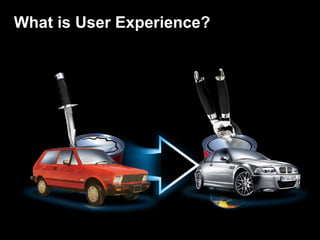
What is User Experience?
User Experience
all aspects of the end-user's interaction
  with the company, its services, and its
                 products
User Experience in Software?
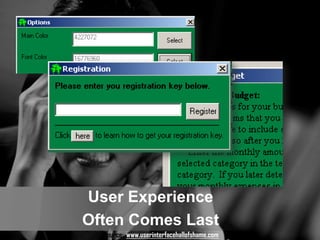
User Experience
Often Comes Last
  Source: www.userinterfacehallofshame.com
User Experience
Often Comes Last
  Source: www.userinterfacehallofshame.com
Why is this the case?


    Well understood environment


    Dedicated development staff


    Stable business capabilities
Why is this the case?

    Difficult to justify investment
       •LOB Apps:
       •Applications are not revenue drivers
       •Applications are not customer-facing
       •Focus is on the cost of doing business

    Optimizing for look and feel


    Thin gloss over poor experience
User Experience in Software?


             Measuring UX ROI
                 Success
                Productivity
                 Retention
              Comprehension
                Conversion
                Satisfaction
                Excitement
                Repeat Use
lessons around User Experience
UX
Matters
Design
Matters
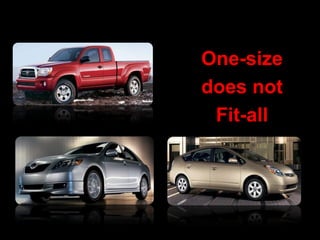
One-size
does not
 Fit-all
Introducing…


    The Microsoft Client
      Continuum
    .NET platform choices for
      creating compelling user
      experiences
Microsoft Client Continuum
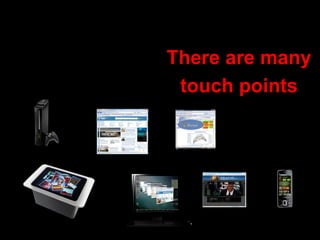
There are many
 touch points
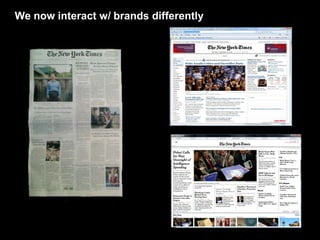
We now interact w/ brands differently
We work differently…
Client continuum capabilities

     Sandboxed     Extended sandbox   No sandbox
     HTML + AJAX   Coded in .NET      Coded .NET
     In-browser    In-browser         Out-of browser


    Reach                                     Rich
                            Mac
                            OSX
Client continuum capabilities

               Full
               Trust


              Extended
Permissions


              sandbox


                                            Richness
              sandbox


                         Any OS   Mac OSX

              In browser
Client continuum tenets…


     Design matters
     One Size does not fit all
     Common foundation
Client continuum tenets…


     Design matters
     One Size does not fit all
     Common foundation
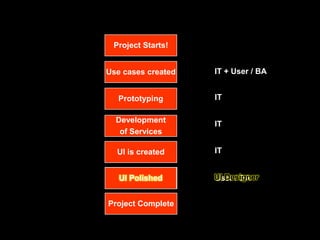
Project Starts!


Use cases created   IT + User / BA


   Prototyping      IT


  Development
                    IT
   of Services

  UI is created     IT


  User Testing      User / BA


Project Complete
I know what we’ll do…
Project Starts!


Use cases created   IT + User / BA


   Prototyping      IT

  Development       IT
   of Services

  UI is created     IT


  User Testing
  UI Polished       UI Designer
                    User / BA


Project Complete
Designer / Developer
Collaboration
Developers and designers collaborating
    designer                                          developer


                     designers & developers can
                    streamline their collaboration


 designers design                            developers add business logic
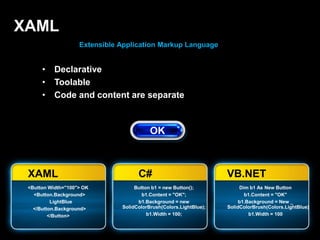
XAML
                    Extensible Application Markup Language


      •    Declarative
      •    Toolable
      •    Code and content are separate


 XAML                                C#                             VB.NET
 <Button Width="100"> OK            Button b1 = new Button();            Dim b1 As New Button
   <Button.Background>                 b1.Content = "OK";                  b1.Content = "OK"
          LightBlue                  b1.Background = new                 b1.Background = New _
   </Button.Background>        SolidColorBrush(Colors.LightBlue);   SolidColorBrush(Colors.LightBlue)
         </Button>                       b1.Width = 100;                     b1.Width = 100
Client continuum tenets…


     Design matters
     One Size does not fit all
     Common foundation
One-size
does not
 Fit-all
One size can not address all scenarios
• Platform capabilities
  • Hardware acceleration?
  • Shell/native integration?
  • Form factor?
• Security
  • Browser Sandbox?
• Download size
  • Refactoring
• Off-line?
ASP.NET AJAX
                       benefits
                        • increased productivity and enhanced
                          browsing experience
                        • ubiquitous, cross-platform, standards-
                          based
                        • zero installation
                        • rich tool support, improved developer-
                          designer workflow
                        • seamless access to asp.net application
                          services


    lower latency, rich interactivity, x-browser,
        tools for ajax-style development
Silverlight

•    Microsoft's platform for rich, highly interactive Web experiences and RIAs

    • Cross-platform (browsers and OSes)
      • Windows, Mac OS, Linux ("Moonlight")
      • Internet Explorer, Firefox, Safari, and more

    • XAML-based rendering (subset of WPF XAML)
•    Implemented as browser plug-in

    • Quick, easy install experience
Silverlight Installation Experience
Silverlight
                       benefits
                        • Richer web experience
                           • Media & RIA
                        • Cross-platform, cross-browser support
                        • increase developer productivity
                        • leverage existing code base and skills


              MSCUINBC Olympics
               Hard Rock Memorabilia
                     Patient Monitor
Deep Zoom
• Bandwidth optimized navigation of large
  images
• Smooth Zoom and pan transitions


               http://memorabilia.hardrock.com
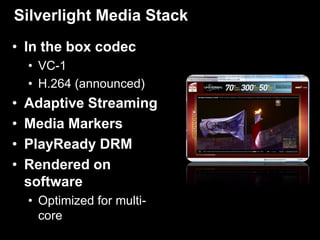
Silverlight Media Stack
• In the box codec
    • VC-1
    • H.264 (announced)
•   Adaptive Streaming
•   Media Markers
•   PlayReady DRM
•   Rendered on
    software
    • Optimized for multi-
      core
HTML integration
• Two way data
• Events
• DOM inspection
Demo - Silverlight
• Unify UI, media, graphics and
  documents
• Take full advantage of the graphical
  power of the PC
• Easy, low-impact deployment options
• Integration with Office and Windows
• Compatibility with Silverlight for web
  and devices


 Within twelve months of launch, 20% of
 Global ISVs had already adopted WPF
 for at least one production application
Framework


Engine      Integration
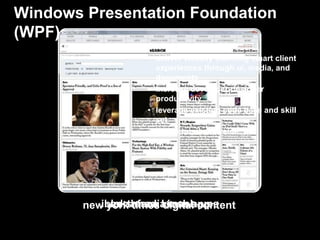
Windows Presentation Foundation
(WPF)
                   benefits
                    • deliver visually stunning smart client
                      experiences through ui, media, and
                      documents
                    • increase developer-designer
                      productivity
                    • leverage existing code base and skill
                      set
                    • derive business value


           ibloks media mash-ups
        new york times kiosk app
             northface digital content
AutoCAD 2009
Using WPF for application chrome: ribbon, action recorder and QuickView Status:
                                                Shipping
     Trial:        http://usa.autodesk.com/adsk/servlet/index?siteID=123112&id=2704278
Lawson M3 Smart Client
Lawson’s flagship application for manufacturing and distribution companies
                            Status: Shipping
   Case study: http://www.frogdesign.com/pdf/frog_design_lawson.pdf
WPF Strengths

  Windows                Office          Full Hardware
                                                              Offline Support    Other Scenarios
 Integration          Integration           Access


 Shell (Gadgets,
                                              DirectX
Sideshow, System                                                Disconnected
                                            Acceleration                                 3D
      Tray)                                                      Scenarios
                         Outlook
                                         Full Threading And
 File Associations
                                          Scheduling APIs

Desktop Stickiness                        Tablet, Touch,       Sync Frameworks     Rich Typography
  (Start Menu,                           Webcam and other
  System Tray)                             Input Modes
                          OBAs
  Local Search
                                         Accessibility Aids
    Provider                                                                        International
                                                                   Caching
                                                                                   Character Sets

                                            Security and
   Native APIs
                                             Encryption
                     Phone Integration
                                                                 File System
 Instrumentation                             Power                                 Flow Documents
                                                                    Access
   and Logging                             Management
Demo - WPF
Client continuum tenets…


     Design matters
     One Size does not fit all
     Common foundation
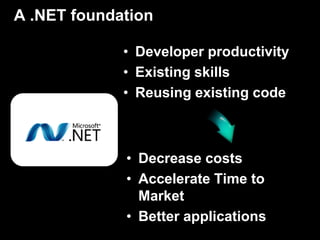
A .NET foundation

             • Developer productivity
             • Existing skills
             • Reusing existing code


             • Decrease costs
             • Accelerate Time to
               Market
             • Better applications
From .NET to Silverlight
   Deep Zoom     WMV       Silverlight        HTML interop

                .NET Framework 3.5
                                                      Language
     LINQ       ASP .NET 3.5        CLR Add-ins     Enhancements

                 .NET Framework 3.0
  Windows          Windows           Windows        Windows
 Presentation   Communication        Workflow
 Foundation
                                                   CardSpace
                  Foundation        Foundation


                  .NET Framework 2.0
  Windows                                Web       Networking
                ASP      ADO.NET       Services
   Forms                                          Socket/HTTP


                      Base Class Library
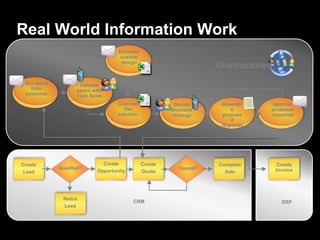
Real World Information Work
                                    Estimate
                                    custom
                                     design
                                                                    Unstructured
 Get specs           Validate
   from             specs with
 customer           Tech Sales
                                    Cost out             Decide      Assembl     Approve
                                      the               discount         e      proposed
                                    solution            strategy      propose   response
                                                                         d
                                                                     response


Create                        Create           Create               Complete        Create
             Qualified?                                   Closed?                  Invoice
 Lead                       Opportunity        Quote                  Sale


              Retire
                                          CRM                                        ERP
              Lead
Office Business Applications (OBAs)


            LOB Apps    Office
                       Business
                       Applicatio
                          ns
Office As A Web Service Client
Dassault PLM Integration
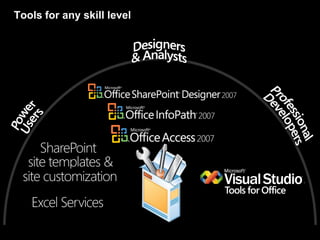
Tools for any skill level
Demo - OBA
Deploying .NET Applications
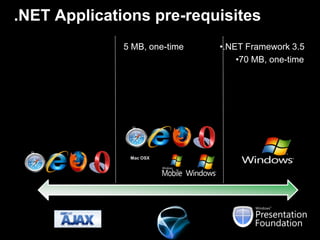
.NET Applications pre-requisites
              5 MB, one-time   •.NET Framework 3.5
                                   •70 MB, one-time


               Mac OSX
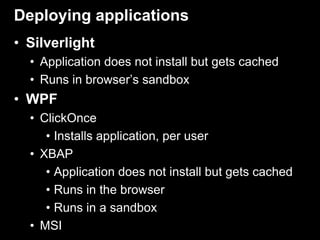
Deploying applications
• Silverlight
  • Application does not install but gets cached
  • Runs in browser’s sandbox
• WPF
  • ClickOnce
     • Installs application, per user
  • XBAP
     • Application does not install but gets cached
     • Runs in the browser
     • Runs in a sandbox
  • MSI
.NET Client profile SKU
      Full .NET           .NET Client Only
     Framework              Framework
     .NET 3.5 SP1           3.5 SPI
                            subset

     .NET 3.0 SP2          3.0 SP2
                           subset .

     .NET 2.0 SP2             2.0 SP2
                              subset


    60 MB download        28 MB download
   20+ mins install       < 8 mins to install
ClickOnce

     A technology for deploying and versioning
   applications with the power of the client and the
                simplicity of the web
                               Web    Click     MSI
                                      Once     Client
   Reach                       
   “No Touch” Deployment              
   Low System Impact                  
   Install / Run Per-User             
   Rich / Interactive                           
   Offline Access                               
   Windows Shell Integration                    
   Per-Machine / Shared                          
   Components
   Unrestricted Install                          
Conclusion
• UX Matters!
• User Experience and how we engage with
  ‘customers’ evolves every day.
  • Embracing UX as a competitive advantage.
• Think about how the platform choice,
  productivity, and performance will affect
  the user
  • Look at existing experiences to see if there is an
    extensibility option
• Enjoy the cool demos, but don’t forget
  the business angle / opportunity
© 2006 microsoft corporation. all rights reserved.
this presentation is for informational purposes only. microsoft makes no warranties, express or implied, in this summary.

Client Continuum Dec Fy09

  • 1.
    Agenda •10:00-11:15 The MicrosoftClient Continuum – Ronan Geraghty •11:30-13:00 Introducing WPF – Max Knor •14:00-15:30 Building WPF composite smart clients – Max Knor •15:45-17:00 Building RIAs with Silverlight 2 – Martha Rotter
  • 2.
    The Microsoft ClientContinuum Ronan Geraghty Developer and Platform Group http://blogs.msdn.com/ronang
  • 3.
    What is UserExperience?
  • 4.
    User Experience all aspectsof the end-user's interaction with the company, its services, and its products
  • 5.
  • 7.
    User Experience Often ComesLast Source: www.userinterfacehallofshame.com
  • 8.
    User Experience Often ComesLast Source: www.userinterfacehallofshame.com
  • 9.
    Why is thisthe case? Well understood environment Dedicated development staff Stable business capabilities
  • 10.
    Why is thisthe case? Difficult to justify investment •LOB Apps: •Applications are not revenue drivers •Applications are not customer-facing •Focus is on the cost of doing business Optimizing for look and feel Thin gloss over poor experience
  • 11.
    User Experience inSoftware? Measuring UX ROI Success Productivity Retention Comprehension Conversion Satisfaction Excitement Repeat Use
  • 12.
  • 13.
  • 14.
  • 15.
  • 16.
    Introducing… The Microsoft Client Continuum .NET platform choices for creating compelling user experiences
  • 17.
  • 18.
    There are many touch points
  • 19.
    We now interactw/ brands differently
  • 20.
  • 21.
    Client continuum capabilities Sandboxed Extended sandbox No sandbox HTML + AJAX Coded in .NET Coded .NET In-browser In-browser Out-of browser Reach Rich Mac OSX
  • 22.
    Client continuum capabilities Full Trust Extended Permissions sandbox Richness sandbox Any OS Mac OSX In browser
  • 23.
    Client continuum tenets… Design matters One Size does not fit all Common foundation
  • 24.
    Client continuum tenets… Design matters One Size does not fit all Common foundation
  • 25.
    Project Starts! Use casescreated IT + User / BA Prototyping IT Development IT of Services UI is created IT User Testing User / BA Project Complete
  • 26.
    I know whatwe’ll do…
  • 27.
    Project Starts! Use casescreated IT + User / BA Prototyping IT Development IT of Services UI is created IT User Testing UI Polished UI Designer User / BA Project Complete
  • 28.
  • 29.
    Developers and designerscollaborating designer developer designers & developers can streamline their collaboration designers design developers add business logic
  • 30.
    XAML Extensible Application Markup Language • Declarative • Toolable • Code and content are separate XAML C# VB.NET <Button Width="100"> OK Button b1 = new Button(); Dim b1 As New Button <Button.Background> b1.Content = "OK"; b1.Content = "OK" LightBlue b1.Background = new b1.Background = New _ </Button.Background> SolidColorBrush(Colors.LightBlue); SolidColorBrush(Colors.LightBlue) </Button> b1.Width = 100; b1.Width = 100
  • 31.
    Client continuum tenets… Design matters One Size does not fit all Common foundation
  • 32.
  • 33.
    One size cannot address all scenarios • Platform capabilities • Hardware acceleration? • Shell/native integration? • Form factor? • Security • Browser Sandbox? • Download size • Refactoring • Off-line?
  • 34.
    ASP.NET AJAX benefits • increased productivity and enhanced browsing experience • ubiquitous, cross-platform, standards- based • zero installation • rich tool support, improved developer- designer workflow • seamless access to asp.net application services lower latency, rich interactivity, x-browser, tools for ajax-style development
  • 36.
    Silverlight • Microsoft's platform for rich, highly interactive Web experiences and RIAs • Cross-platform (browsers and OSes) • Windows, Mac OS, Linux ("Moonlight") • Internet Explorer, Firefox, Safari, and more • XAML-based rendering (subset of WPF XAML) • Implemented as browser plug-in • Quick, easy install experience
  • 37.
  • 38.
    Silverlight benefits • Richer web experience • Media & RIA • Cross-platform, cross-browser support • increase developer productivity • leverage existing code base and skills MSCUINBC Olympics Hard Rock Memorabilia Patient Monitor
  • 39.
    Deep Zoom • Bandwidthoptimized navigation of large images • Smooth Zoom and pan transitions http://memorabilia.hardrock.com
  • 40.
    Silverlight Media Stack •In the box codec • VC-1 • H.264 (announced) • Adaptive Streaming • Media Markers • PlayReady DRM • Rendered on software • Optimized for multi- core
  • 41.
    HTML integration • Twoway data • Events • DOM inspection
  • 42.
  • 44.
    • Unify UI,media, graphics and documents • Take full advantage of the graphical power of the PC • Easy, low-impact deployment options • Integration with Office and Windows • Compatibility with Silverlight for web and devices Within twelve months of launch, 20% of Global ISVs had already adopted WPF for at least one production application
  • 45.
    Framework Engine Integration
  • 46.
    Windows Presentation Foundation (WPF) benefits • deliver visually stunning smart client experiences through ui, media, and documents • increase developer-designer productivity • leverage existing code base and skill set • derive business value ibloks media mash-ups new york times kiosk app northface digital content
  • 47.
    AutoCAD 2009 Using WPFfor application chrome: ribbon, action recorder and QuickView Status: Shipping Trial: http://usa.autodesk.com/adsk/servlet/index?siteID=123112&id=2704278
  • 48.
    Lawson M3 SmartClient Lawson’s flagship application for manufacturing and distribution companies Status: Shipping Case study: http://www.frogdesign.com/pdf/frog_design_lawson.pdf
  • 49.
    WPF Strengths Windows Office Full Hardware Offline Support Other Scenarios Integration Integration Access Shell (Gadgets, DirectX Sideshow, System Disconnected Acceleration 3D Tray) Scenarios Outlook Full Threading And File Associations Scheduling APIs Desktop Stickiness Tablet, Touch, Sync Frameworks Rich Typography (Start Menu, Webcam and other System Tray) Input Modes OBAs Local Search Accessibility Aids Provider International Caching Character Sets Security and Native APIs Encryption Phone Integration File System Instrumentation Power Flow Documents Access and Logging Management
  • 50.
  • 51.
    Client continuum tenets… Design matters One Size does not fit all Common foundation
  • 52.
    A .NET foundation • Developer productivity • Existing skills • Reusing existing code • Decrease costs • Accelerate Time to Market • Better applications
  • 53.
    From .NET toSilverlight Deep Zoom WMV Silverlight HTML interop .NET Framework 3.5 Language LINQ ASP .NET 3.5 CLR Add-ins Enhancements .NET Framework 3.0 Windows Windows Windows Windows Presentation Communication Workflow Foundation CardSpace Foundation Foundation .NET Framework 2.0 Windows Web Networking ASP ADO.NET Services Forms Socket/HTTP Base Class Library
  • 55.
    Real World InformationWork Estimate custom design Unstructured Get specs Validate from specs with customer Tech Sales Cost out Decide Assembl Approve the discount e proposed solution strategy propose response d response Create Create Create Complete Create Qualified? Closed? Invoice Lead Opportunity Quote Sale Retire CRM ERP Lead
  • 56.
    Office Business Applications(OBAs) LOB Apps Office Business Applicatio ns
  • 57.
    Office As AWeb Service Client
  • 58.
  • 59.
    Tools for anyskill level
  • 60.
  • 61.
  • 62.
    .NET Applications pre-requisites 5 MB, one-time •.NET Framework 3.5 •70 MB, one-time Mac OSX
  • 63.
    Deploying applications • Silverlight • Application does not install but gets cached • Runs in browser’s sandbox • WPF • ClickOnce • Installs application, per user • XBAP • Application does not install but gets cached • Runs in the browser • Runs in a sandbox • MSI
  • 64.
    .NET Client profileSKU Full .NET .NET Client Only Framework Framework .NET 3.5 SP1 3.5 SPI subset .NET 3.0 SP2 3.0 SP2 subset . .NET 2.0 SP2 2.0 SP2 subset  60 MB download  28 MB download 20+ mins install  < 8 mins to install
  • 65.
    ClickOnce A technology for deploying and versioning applications with the power of the client and the simplicity of the web Web Click MSI Once Client Reach  “No Touch” Deployment   Low System Impact   Install / Run Per-User   Rich / Interactive   Offline Access   Windows Shell Integration   Per-Machine / Shared  Components Unrestricted Install 
  • 66.
    Conclusion • UX Matters! •User Experience and how we engage with ‘customers’ evolves every day. • Embracing UX as a competitive advantage. • Think about how the platform choice, productivity, and performance will affect the user • Look at existing experiences to see if there is an extensibility option • Enjoy the cool demos, but don’t forget the business angle / opportunity
  • 67.
    © 2006 microsoftcorporation. all rights reserved. this presentation is for informational purposes only. microsoft makes no warranties, express or implied, in this summary.