Workshop - Building a cart
Aishwarya Venkataraman
Software Engineer
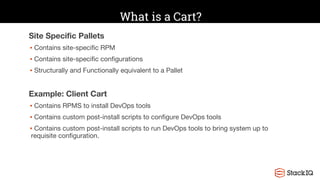
What is a Cart?
Site Specific Pallets
▪ Contains site-specific RPM
▪ Contains site-specific configurations
▪ Structurally and Functionally equivalent to a Pallet
Example: Client Cart
▪ Contains RPMS to install DevOps tools
▪ Contains custom post-install scripts to configure DevOps tools
▪ Contains custom post-install scripts to run DevOps tools to bring system up to
requisite configuration.
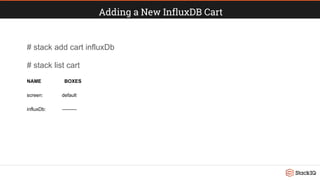
Adding a New InfluxDB Cart
# stack add cart influxDb
# stack list cart
NAME BOXES
screen: default
influxDb: ---------
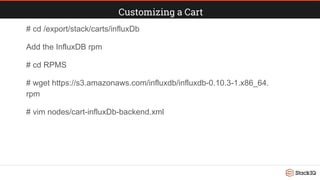
Customizing a Cart
# cd /export/stack/carts/influxDb
Add the InfluxDB rpm
# cd RPMS
# wget https://s3.amazonaws.com/influxdb/influxdb-0.10.3-1.x86_64.
rpm
# vim nodes/cart-influxDb-backend.xml
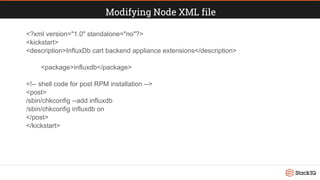
Modifying Node XML file
<?xml version="1.0" standalone="no"?>
<kickstart>
<description>InfluxDb cart backend appliance extensions</description>
<package>influxdb</package>
<!-- shell code for post RPM installation -->
<post>
/sbin/chkconfig --add influxdb
/sbin/chkconfig influxdb on
</post>
</kickstart>
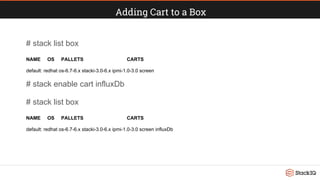
Adding Cart to a Box
# stack list box
NAME OS PALLETS CARTS
default: redhat os-6.7-6.x stacki-3.0-6.x ipmi-1.0-3.0 screen
# stack enable cart influxDb
# stack list box
NAME OS PALLETS CARTS
default: redhat os-6.7-6.x stacki-3.0-6.x ipmi-1.0-3.0 screen influxDb
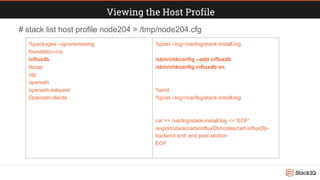
Viewing the Host Profile
%packages --ignoremissing
foundation-rcs
influxdb
libcap
ntp
openssh
openssh-askpass
Openssh-clients
%post --log=/var/log/stack-install.log
/sbin/chkconfig --add influxdb
/sbin/chkconfig influxdb on
%end
%post --log=/var/log/stack-install.log
cat >> /var/log/stack-install.log << 'EOF'
/export/stack/carts/influxDb/nodes/cart-influxDb-
backend.xml: end post section
EOF
# stack list host profile node204 > /tmp/node204.cfg
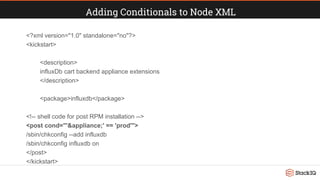
Adding Conditionals to Node XML
<?xml version="1.0" standalone="no"?>
<kickstart>
<description>
influxDb cart backend appliance extensions
</description>
<package>influxdb</package>
<!-- shell code for post RPM installation -->
<post cond="'&appliance;' == 'prod'">
/sbin/chkconfig --add influxdb
/sbin/chkconfig influxdb on
</post>
</kickstart>
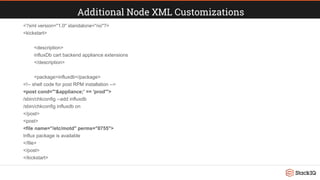
Additional Node XML Customizations
<?xml version="1.0" standalone="no"?>
<kickstart>
<description>
influxDb cart backend appliance extensions
</description>
<package>influxdb</package>
<!-- shell code for post RPM installation -->
<post cond="'&appliance;' == 'prod'">
/sbin/chkconfig --add influxdb
/sbin/chkconfig influxdb on
</post>
<post>
<file name="/etc/motd" perms="0755">
Influx package is available
</file>
</post>
</kickstart>
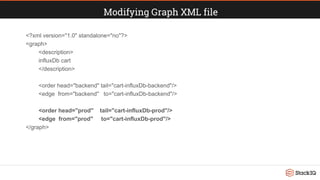
Modifying Graph XML file
<?xml version="1.0" standalone="no"?>
<graph>
<description>
influxDb cart
</description>
<order head="backend" tail="cart-influxDb-backend"/>
<edge from="backend" to="cart-influxDb-backend"/>
<order head="prod" tail="cart-influxDb-prod"/>
<edge from="prod" to="cart-influxDb-prod"/>
</graph>
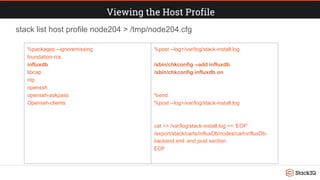
Viewing the Host Profile
stack list host profile node204 > /tmp/node204.cfg
%packages --ignoremissing
foundation-rcs
influxdb
libcap
ntp
openssh
openssh-askpass
Openssh-clients
%post --log=/var/log/stack-install.log
/sbin/chkconfig --add influxdb
/sbin/chkconfig influxdb on
%end
%post --log=/var/log/stack-install.log
cat >> /var/log/stack-install.log << 'EOF'
/export/stack/carts/influxDb/nodes/cart-influxDb-
backend.xml: end post section
EOF
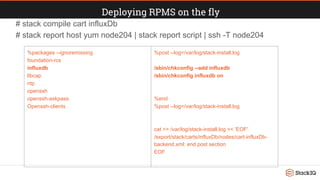
Deploying RPMS on the fly
# stack compile cart influxDb
# stack report host yum node204 | stack report script | ssh -T node204
%packages --ignoremissing
foundation-rcs
influxdb
libcap
ntp
openssh
openssh-askpass
Openssh-clients
%post --log=/var/log/stack-install.log
/sbin/chkconfig --add influxdb
/sbin/chkconfig influxdb on
%end
%post --log=/var/log/stack-install.log
cat >> /var/log/stack-install.log << 'EOF'
/export/stack/carts/influxDb/nodes/cart-influxDb-
backend.xml: end post section
EOF
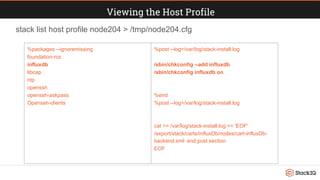
Viewing the Host Profile
stack list host profile node204 > /tmp/node204.cfg
%packages --ignoremissing
foundation-rcs
influxdb
libcap
ntp
openssh
openssh-askpass
Openssh-clients
%post --log=/var/log/stack-install.log
/sbin/chkconfig --add influxdb
/sbin/chkconfig influxdb on
%end
%post --log=/var/log/stack-install.log
cat >> /var/log/stack-install.log << 'EOF'
/export/stack/carts/influxDb/nodes/cart-influxDb-
backend.xml: end post section
EOF
Cart is ready to roll!

StackiFest16: Building a Cart

  • 1.
    Workshop - Buildinga cart Aishwarya Venkataraman Software Engineer
  • 2.
    What is aCart? Site Specific Pallets ▪ Contains site-specific RPM ▪ Contains site-specific configurations ▪ Structurally and Functionally equivalent to a Pallet Example: Client Cart ▪ Contains RPMS to install DevOps tools ▪ Contains custom post-install scripts to configure DevOps tools ▪ Contains custom post-install scripts to run DevOps tools to bring system up to requisite configuration.
  • 3.
    Adding a NewInfluxDB Cart # stack add cart influxDb # stack list cart NAME BOXES screen: default influxDb: ---------
  • 4.
    Customizing a Cart #cd /export/stack/carts/influxDb Add the InfluxDB rpm # cd RPMS # wget https://s3.amazonaws.com/influxdb/influxdb-0.10.3-1.x86_64. rpm # vim nodes/cart-influxDb-backend.xml
  • 5.
    Modifying Node XMLfile <?xml version="1.0" standalone="no"?> <kickstart> <description>InfluxDb cart backend appliance extensions</description> <package>influxdb</package> <!-- shell code for post RPM installation --> <post> /sbin/chkconfig --add influxdb /sbin/chkconfig influxdb on </post> </kickstart>
  • 6.
    Adding Cart toa Box # stack list box NAME OS PALLETS CARTS default: redhat os-6.7-6.x stacki-3.0-6.x ipmi-1.0-3.0 screen # stack enable cart influxDb # stack list box NAME OS PALLETS CARTS default: redhat os-6.7-6.x stacki-3.0-6.x ipmi-1.0-3.0 screen influxDb
  • 7.
    Viewing the HostProfile %packages --ignoremissing foundation-rcs influxdb libcap ntp openssh openssh-askpass Openssh-clients %post --log=/var/log/stack-install.log /sbin/chkconfig --add influxdb /sbin/chkconfig influxdb on %end %post --log=/var/log/stack-install.log cat >> /var/log/stack-install.log << 'EOF' /export/stack/carts/influxDb/nodes/cart-influxDb- backend.xml: end post section EOF # stack list host profile node204 > /tmp/node204.cfg
  • 8.
    Adding Conditionals toNode XML <?xml version="1.0" standalone="no"?> <kickstart> <description> influxDb cart backend appliance extensions </description> <package>influxdb</package> <!-- shell code for post RPM installation --> <post cond="'&appliance;' == 'prod'"> /sbin/chkconfig --add influxdb /sbin/chkconfig influxdb on </post> </kickstart>
  • 9.
    Additional Node XMLCustomizations <?xml version="1.0" standalone="no"?> <kickstart> <description> influxDb cart backend appliance extensions </description> <package>influxdb</package> <!-- shell code for post RPM installation --> <post cond="'&appliance;' == 'prod'"> /sbin/chkconfig --add influxdb /sbin/chkconfig influxdb on </post> <post> <file name="/etc/motd" perms="0755"> Influx package is available </file> </post> </kickstart>
  • 10.
    Modifying Graph XMLfile <?xml version="1.0" standalone="no"?> <graph> <description> influxDb cart </description> <order head="backend" tail="cart-influxDb-backend"/> <edge from="backend" to="cart-influxDb-backend"/> <order head="prod" tail="cart-influxDb-prod"/> <edge from="prod" to="cart-influxDb-prod"/> </graph>
  • 11.
    Viewing the HostProfile stack list host profile node204 > /tmp/node204.cfg %packages --ignoremissing foundation-rcs influxdb libcap ntp openssh openssh-askpass Openssh-clients %post --log=/var/log/stack-install.log /sbin/chkconfig --add influxdb /sbin/chkconfig influxdb on %end %post --log=/var/log/stack-install.log cat >> /var/log/stack-install.log << 'EOF' /export/stack/carts/influxDb/nodes/cart-influxDb- backend.xml: end post section EOF
  • 12.
    Deploying RPMS onthe fly # stack compile cart influxDb # stack report host yum node204 | stack report script | ssh -T node204 %packages --ignoremissing foundation-rcs influxdb libcap ntp openssh openssh-askpass Openssh-clients %post --log=/var/log/stack-install.log /sbin/chkconfig --add influxdb /sbin/chkconfig influxdb on %end %post --log=/var/log/stack-install.log cat >> /var/log/stack-install.log << 'EOF' /export/stack/carts/influxDb/nodes/cart-influxDb- backend.xml: end post section EOF
  • 13.
    Viewing the HostProfile stack list host profile node204 > /tmp/node204.cfg %packages --ignoremissing foundation-rcs influxdb libcap ntp openssh openssh-askpass Openssh-clients %post --log=/var/log/stack-install.log /sbin/chkconfig --add influxdb /sbin/chkconfig influxdb on %end %post --log=/var/log/stack-install.log cat >> /var/log/stack-install.log << 'EOF' /export/stack/carts/influxDb/nodes/cart-influxDb- backend.xml: end post section EOF
  • 14.
    Cart is readyto roll!