PROGRAM MA EDUCATION
SEMESTER 4
Brochure is one of the most popular marketing tools to help
organizations quickly draw the attention of prospective
customers. Brochures can be distributed manually, via mail or
email, or placed in brochure racks. Usually, brochures are
printed on a single tri-fold sheet of thick glossy paper.
Brochures are divided into many types by their format, content
and distribution.
By format brochures are:
 Bi fold brochures
 Tri fold brochures
 Multi page bi fold/ booklets/ catalogs
 Flayers
 Folders
 Gate fold brochure
 Inserts etc
Types of brochures by content are:
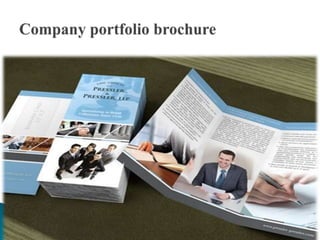
 Company portfolio brochure
 Sales brochure
 Product catalog
 Event brochure
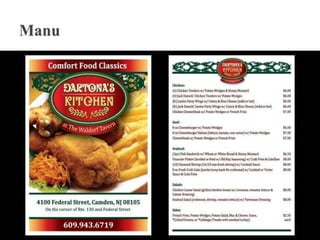
 Menus
 Forms
 Pamphlets
 Data sheets
Types of brochure by distribution are:
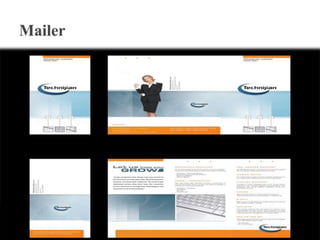
 Mailers
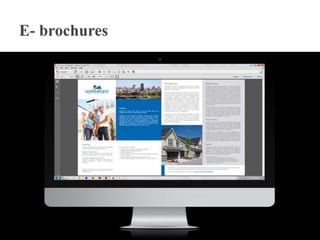
 E- brochures
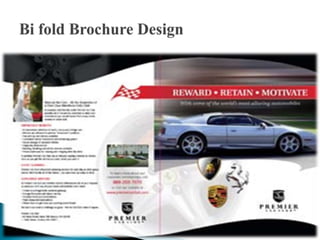
 Bi-fold brochures are found among us every day: they are one
of the most popular brochure types around.
 Bi-fold brochures are made out from one or more sheets of
paper that is folded once, in two halves. Most of the times, the
fold line runs perpendicular to the longest side of the sheet.
This folding forms 4 panels out of a single sheet of paper: a
front-cover, a back-cover, and two internal pages.
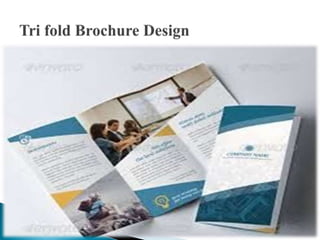
 Tri-fold brochures are one of the most common brochures
worldwide.
 Tri-fold brochures are made out from a sheet of paper that is folded
two times. Looking at the brochure inside, you fold the right panel
inwards first, and then you fold the left panel, inwards as well, so
that it sits on top of the right panel.
 Tri-folds have 6 panels to place information on - 3 "outside" panels
and 3 "inside" panels. The 6 panels are almost the same size.
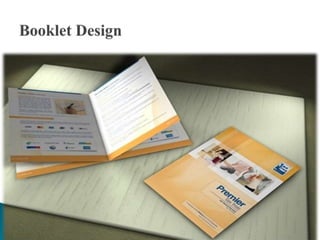
 A booklet is, technically speaking, a set of multi-page bi-fold brochures that are bound
together. The term "booklet" implies more than one sheet of paper.
 A way to see it is that booklets are created by binding bi-fold brochures together -
usually by stacking and stapling them. By stacking and binding bi-fold brochures, you
can create an 8-page booklet (2 bi-folds), a 12-page booklet (3 bi-folds), and on. Each
bi-fold brochure adds 4 new pages to the page count.
 Booklets are usually printed on high quality stock, and their morphology allows eye-
catching, impressive designs. The front and back covers are sometimes printed on a
thicker stock.
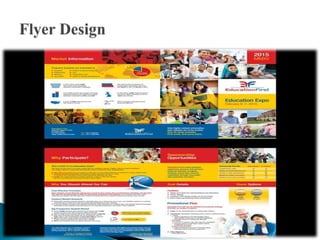
 Flyers are communication pieces created to achieve mass
distribution at low cost, similar to pamphlets, leaflets or circulars.
Flyers are usually a plain single sheet of paper without any fold.
They are usually small in size - a LTR page or smaller. While some
of them are printed in full color, some others are printed in just one
or two colors to keep costs down. They can be single- or double-
sided.
 Flyers are ideal for promotions or campaigns where the target
audience is vast.
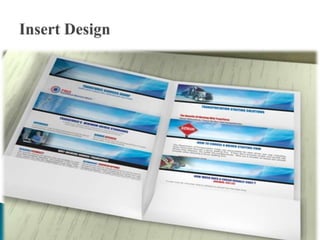
 Graphic designers call inserts to the sheets that are placed
inside a presentation folder.
 Inserts allow the folders to be configured for each particular
client, giving emphasis in a certain topic, service or product.
 Inserts are usually used as sales sheets, spec sheets, or just as
informative or promotional pieces.
 Inserts are the best companions to folders.
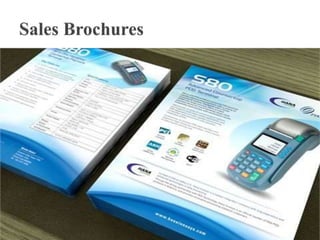
A sales brochure is a middle point between a company profile
and a product catalog. It should introduce the company briefly.
However, its main focus is selling a product or service.
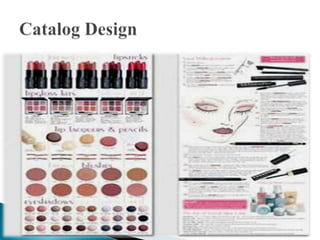
Catalogs are brochures that allow you to show products and
services right in the hands of your clients. They are excellent
for both prospective and recurring buyers. Prospective buyers
will be delighted to see your products or services in detail,
while recurring clients will use your catalog as a list of all
your products and services you carry.
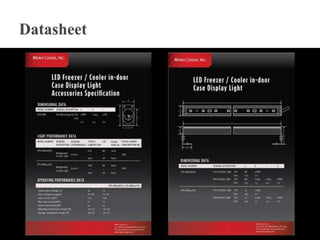
A datasheet is a flat piece of paper that includes technical
specs of a given product. Datasheets usually come in the form
of an insert to be distributed inside a folder, or as a stand alone
flyer. Datasheets usually include graphics like pie charts, data
tables, histograms, pictograms, diagrams, etc.
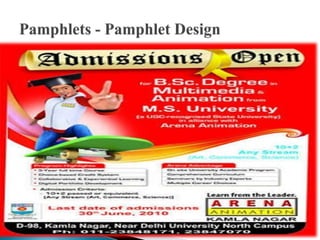
 A pamphlet is a small book consisting of a few sheets of printed
paper -usually one or more pages that are stitched together with an
unbound paper cover- which informs of a subject of current interest.
 Pamphlets are small in size, not bigger than a LTR page in most
cases. Their aim is to achieve mass distribution. This term is usually
interchangeable with "flyer" or "leaflet".
 Their meaning is also associated with political propaganda, or big
announcements.
 Every company needs a company profile - a document that
describes the past, present and future activities of the company.
 A typical company profile brochure contains some of these sections:
introduction/about us, history, mission, vision, member profiles,
company divisions if any, products and/or services sold, industries
and locations served, portfolio/company record, financial data,
incorporation information, office locations, contact methods, etc.
A brochure has three functions:
 Informative function
 Advertising function
 Identification function
Step one- Narrowing down your topic
 Decide on the purpose of your brochure
 Get specific
 Determine your audience
 Stress the benefits of your product
 Exclude irrelevant information
 Choose a lay out
 Use front cover or panel to entice readers
 Breakup information in sections
 Speak directly to your audience
 Keep your brochure content focused
 Use testimonials
 End the brochure with a call to action
 Write in short sentences. The format of a brochure does not allow you
to be verbose.
 Use bulleted lists when possible.
 Try to make your brochure as helpful as possible.
 Leave some space, free from any text or graphics in your brochure.
This is called “white space” and according to numerous research
studies, it helps readers separate important points in the brochure by
giving their eyes so-called momentary breaks.
 Use only quality paper. In most cases, glossy thick paper
works best, although there can be exceptions.
 Keep it relatively simple. Using too many fonts and bold
lettering and color will make your brochure look
unprofessional.
 Don’t create a complicated design. In most cases, a simple design is
more efficient and easier to perceive.
 Include only graphical and textual information that directly refers to
what you are selling.
 Don’t write in passive voice. Active voice sounds more vivid, which
attracts customers. For example, compare these two sentences:
 “The following services are available through The Company,”
 “The Company offers you the following services.”
 Don’t combine colors just because you like them. They can be bright and
rich but totally inappropriate together. One of the best options is to use
colors that are complimentary or even the same as on your company’s logo.
 Don’t try to cram all the information you can onto a single sheet of paper.
 Don’t make your brochure too thick. It would not make it look more solid
instead, it will chase customers away. Also, the brochure must be easy to
carry, so don’t use heavy stock.
 Don’t forget to add contact information at the end of the brochure.
To conclude, we can say that brochures are the tools which an
organization used to provide information about organization
and its facilities and for this purpose different layout of
brochures are used in order to get the readers’ attention. So a
brochure should be design in a way that can communicate
your message in an attractive style

Brochure

  • 1.
  • 2.
    Brochure is oneof the most popular marketing tools to help organizations quickly draw the attention of prospective customers. Brochures can be distributed manually, via mail or email, or placed in brochure racks. Usually, brochures are printed on a single tri-fold sheet of thick glossy paper.
  • 3.
    Brochures are dividedinto many types by their format, content and distribution. By format brochures are:  Bi fold brochures  Tri fold brochures  Multi page bi fold/ booklets/ catalogs  Flayers  Folders  Gate fold brochure  Inserts etc
  • 4.
    Types of brochuresby content are:  Company portfolio brochure  Sales brochure  Product catalog  Event brochure  Menus  Forms  Pamphlets  Data sheets
  • 5.
    Types of brochureby distribution are:  Mailers  E- brochures
  • 6.
     Bi-fold brochuresare found among us every day: they are one of the most popular brochure types around.  Bi-fold brochures are made out from one or more sheets of paper that is folded once, in two halves. Most of the times, the fold line runs perpendicular to the longest side of the sheet. This folding forms 4 panels out of a single sheet of paper: a front-cover, a back-cover, and two internal pages.
  • 8.
     Tri-fold brochuresare one of the most common brochures worldwide.  Tri-fold brochures are made out from a sheet of paper that is folded two times. Looking at the brochure inside, you fold the right panel inwards first, and then you fold the left panel, inwards as well, so that it sits on top of the right panel.  Tri-folds have 6 panels to place information on - 3 "outside" panels and 3 "inside" panels. The 6 panels are almost the same size.
  • 10.
     A bookletis, technically speaking, a set of multi-page bi-fold brochures that are bound together. The term "booklet" implies more than one sheet of paper.  A way to see it is that booklets are created by binding bi-fold brochures together - usually by stacking and stapling them. By stacking and binding bi-fold brochures, you can create an 8-page booklet (2 bi-folds), a 12-page booklet (3 bi-folds), and on. Each bi-fold brochure adds 4 new pages to the page count.  Booklets are usually printed on high quality stock, and their morphology allows eye- catching, impressive designs. The front and back covers are sometimes printed on a thicker stock.
  • 12.
     Flyers arecommunication pieces created to achieve mass distribution at low cost, similar to pamphlets, leaflets or circulars. Flyers are usually a plain single sheet of paper without any fold. They are usually small in size - a LTR page or smaller. While some of them are printed in full color, some others are printed in just one or two colors to keep costs down. They can be single- or double- sided.  Flyers are ideal for promotions or campaigns where the target audience is vast.
  • 14.
     Graphic designerscall inserts to the sheets that are placed inside a presentation folder.  Inserts allow the folders to be configured for each particular client, giving emphasis in a certain topic, service or product.  Inserts are usually used as sales sheets, spec sheets, or just as informative or promotional pieces.  Inserts are the best companions to folders.
  • 16.
    A sales brochureis a middle point between a company profile and a product catalog. It should introduce the company briefly. However, its main focus is selling a product or service.
  • 18.
    Catalogs are brochuresthat allow you to show products and services right in the hands of your clients. They are excellent for both prospective and recurring buyers. Prospective buyers will be delighted to see your products or services in detail, while recurring clients will use your catalog as a list of all your products and services you carry.
  • 20.
    A datasheet isa flat piece of paper that includes technical specs of a given product. Datasheets usually come in the form of an insert to be distributed inside a folder, or as a stand alone flyer. Datasheets usually include graphics like pie charts, data tables, histograms, pictograms, diagrams, etc.
  • 22.
     A pamphletis a small book consisting of a few sheets of printed paper -usually one or more pages that are stitched together with an unbound paper cover- which informs of a subject of current interest.  Pamphlets are small in size, not bigger than a LTR page in most cases. Their aim is to achieve mass distribution. This term is usually interchangeable with "flyer" or "leaflet".  Their meaning is also associated with political propaganda, or big announcements.
  • 25.
     Every companyneeds a company profile - a document that describes the past, present and future activities of the company.  A typical company profile brochure contains some of these sections: introduction/about us, history, mission, vision, member profiles, company divisions if any, products and/or services sold, industries and locations served, portfolio/company record, financial data, incorporation information, office locations, contact methods, etc.
  • 29.
    A brochure hasthree functions:  Informative function  Advertising function  Identification function
  • 30.
    Step one- Narrowingdown your topic  Decide on the purpose of your brochure  Get specific  Determine your audience  Stress the benefits of your product  Exclude irrelevant information
  • 31.
     Choose alay out  Use front cover or panel to entice readers  Breakup information in sections
  • 32.
     Speak directlyto your audience  Keep your brochure content focused  Use testimonials  End the brochure with a call to action
  • 33.
     Write inshort sentences. The format of a brochure does not allow you to be verbose.  Use bulleted lists when possible.  Try to make your brochure as helpful as possible.  Leave some space, free from any text or graphics in your brochure. This is called “white space” and according to numerous research studies, it helps readers separate important points in the brochure by giving their eyes so-called momentary breaks.
  • 34.
     Use onlyquality paper. In most cases, glossy thick paper works best, although there can be exceptions.  Keep it relatively simple. Using too many fonts and bold lettering and color will make your brochure look unprofessional.
  • 35.
     Don’t createa complicated design. In most cases, a simple design is more efficient and easier to perceive.  Include only graphical and textual information that directly refers to what you are selling.  Don’t write in passive voice. Active voice sounds more vivid, which attracts customers. For example, compare these two sentences:  “The following services are available through The Company,”  “The Company offers you the following services.”
  • 36.
     Don’t combinecolors just because you like them. They can be bright and rich but totally inappropriate together. One of the best options is to use colors that are complimentary or even the same as on your company’s logo.  Don’t try to cram all the information you can onto a single sheet of paper.  Don’t make your brochure too thick. It would not make it look more solid instead, it will chase customers away. Also, the brochure must be easy to carry, so don’t use heavy stock.  Don’t forget to add contact information at the end of the brochure.
  • 37.
    To conclude, wecan say that brochures are the tools which an organization used to provide information about organization and its facilities and for this purpose different layout of brochures are used in order to get the readers’ attention. So a brochure should be design in a way that can communicate your message in an attractive style