BOUNCING CIRCLE
OBJECTIVE:
By placing a circle at some random point within the space bounded by 4 sides forming a rectangle, moving diagonally, we
determine the number iterations needed in order for the ball to touch, at least once, all 4 sides of the rectangle.
DETAILS:
A circle with some radius is placed at random at an initial X, Y position within the space bounded by a rectangle, with
dimensions Width and Height.
Since the dimension of the bounding rectangle can vary, and the initial (X,Y) position and direction of the circle vary an
indefinite loop is used to increment the movement of the circle's position, and allow the circle to trace its path until the
condition to end the iteration is met (all 4 sides are touched at least once).
The circle travels in a diagonal path, where at each iteration its (X,Y) position is incremented by some value called StepX
and Step Y. StepX and StepY have the same value, (but can have different signs), so the circle always travel at a 45 degree
angle.
StepX and StepY is used to scale the increment to allow the ball to move faster than it would when the StepX and StepY
value is 1.
The displayed view is a vertically inverted Cartesian system, where coordinates (0, 0) is at the top, left corner of the
rectangle. The X-axis increases from left to right of the screen while the Y-axis increases from top to bottom of the screen.
If StepX > 0, the circle is moving to the right; if StepX < 0, it is moving to the left.
If StepY > 0, the circle is moving to the bottom; if StepY < 0, it is moving to the top.
Contact is detected by checking the current X and Y position +/- the radius if it touches a side. If it touches a vertical side
(left/right), the circle's horizontal StepX changes sign. Similarly, if it touches a horizontal side (top/bottom), the circle's
vertical StepY changes sign. Changing the sign of StepX and StepY reverses the direction of the circle's movement.
Left side extends from (0,0) to (0,Height-1).
Right side extends from (Width-1,0) to (Width-1,Height-1).
Top side extends from (0,0) to (Width-1,0)
Bottom side extends from (0, Height-1) to (Width-1,Height-1).
COUNTING ITERATIONS
Since the displacement of the movement of the circle depends on StepX and StepY, and both StepX and StepY are always
the same in magnitude, the number of iterations before the circle touches a side depends on its current (X,Y) position and
the side closest to it. We can state the number of iterations to reach the nearest side as Min(distV, distH).
(X,Y) distH =
Width-1 - x
distV =
Height-1 - y
For this particular instance, distV < distH, then the number iterations the circle travels before it touches the bottom side is
distV, or (Height - 1 - y). As it touches the side, it reverses direction, in this case, it goes StepY becomes negative and the
circle moves upwards.
The iteration function is shown:
1
2
3
4
5
6
7
8
9
10
11
12
13
14
15
16
17
18
19
20
21
22
23
24
25
26
27
28
29
30
31
32
33
34
35
36
37
38
39
40
41
42
43
44
45
46
47
function iterate()
{
if (touch_left && touch_right && touch_bottom && touch_top)
{
clearInterval(time_interval);
return;
}
linestat2.innerHTML = "Iterations: ...";
if ((this.x-ball_radius) <= 0)
{
this.stepx = -this.stepx;
touch_left = true;
linestat3.innerHTML += " Left (" + this.kstep + ")";
this.kstep=0;
}
if ((this.x+ball_radius) >= (screen_width-1))
{
this.stepx = -this.stepx;
touch_right = true;
linestat3.innerHTML += " Right (" + this.kstep + ")";
this.kstep=0;
}
if ((this.y-ball_radius) <= 0)
{
this.stepy = -this.stepy;
touch_top = true;
linestat3.innerHTML += " Top (" + this.kstep + ")";
this.kstep=0;
}
if ((this.y+ball_radius) >= (screen_height-1))
{
this.stepy = -this.stepy;
touch_bottom = true;
linestat3.innerHTML += " Bottom (" + this.kstep + ")";
this.kstep=0;
}
this.x += this.stepx;
this.y += this.stepy;
this.iterations += Math.abs(step_x);
this.kstep+=Math.abs(step_x);
}
This iteration function is placed inside an asynchronous function that is called repeatedly every 16 milliseconds,
effectively placing the iteration function inside an indefinite loop, whose terminal condition is the IF statement in lines 3-
7. There are a total of 28 statements inside this iteration function.
While it's possible to predict the path of the circle as it bounces around the rectangle, since the iteration occur inside an
indefinite loop, we cannot determine by looking at the steps occurring inside the loop the number of iterations needed for
the loop to end. However, we can determine the number of iterations based on the given initial (X,Y) position, direction,
and Width and Height of the rectangle. The number of iterations is effectively a function of width, height, direction and
initial position.
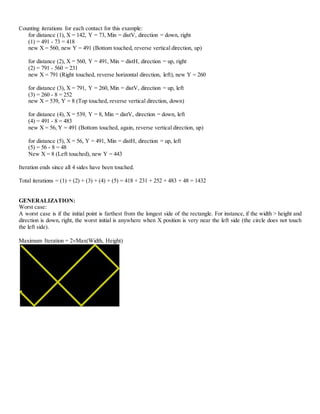
Consider the following example shown.
Here, initial position is (142,73).
(1)-(5) are the distances nearest a side at a certain point (X,Y) of the circle.
The total number of iterations is the sum of the distances (1) + (2) + (3) + (4) + (5).
As it touches a side, the circle bounces and reverses direction either horizontally or vertically.
The initial parameters are as follows:
Height - 1 = 799
Width -1 = 499
The value of radius, 8, offset the boundary values as follows:
Left Boundary = 0 + 8 = 8
Right Boundary = 799 - 8 = 791
Top Boundary = 0 + 8 = 8
Bottom Boundary = 499 - 8 = 491
1
2
3
4
5
Counting iterations for each contact for this example:
for distance (1), X = 142, Y = 73, Min = distV, direction = down, right
(1) = 491 - 73 = 418
new X = 560, new Y = 491 (Bottom touched, reverse vertical direction, up)
for distance (2), X = 560, Y = 491, Min = distH, direction = up, right
(2) = 791 - 560 = 231
new X = 791 (Right touched, reverse horizontal direction, left), new Y = 260
for distance (3), X = 791, Y = 260, Min = distV, direction = up, left
(3) = 260 - 8 = 252
new X = 539, Y = 8 (Top touched, reverse vertical direction, down)
for distance (4), X = 539, Y = 8, Min = distV, direction = down, left
(4) = 491 - 8 = 483
new X = 56, Y = 491 (Bottom touched, again, reverse vertical direction, up)
for distance (5), X = 56, Y = 491, Min = distH, direction = up, left
(5) = 56 - 8 = 48
New X = 8 (Left touched), new Y = 443
Iteration ends since all 4 sides have been touched.
Total iterations = (1) + (2) + (3) + (4) + (5) = 418 + 231 + 252 + 483 + 48 = 1432
GENERALIZATION:
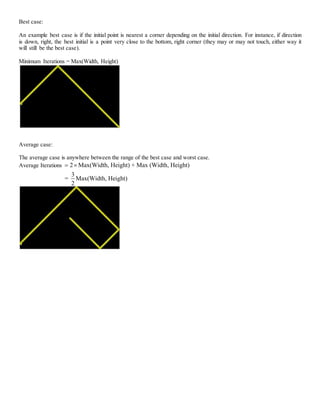
Worst case:
A worst case is if the initial point is farthest from the longest side of the rectangle. For instance, if the width > height and
direction is down, right, the worst initial is anywhere when X position is very near the left side (the circle does not touch
the left side).
Maximum Iteration = 2Max(Width, Height)
Best case:
An example best case is if the initial point is nearest a corner depending on the initial direction. For instance, if direction
is down, right, the best initial is a point very close to the bottom, right corner (they may or may not touch, either way it
will still be the best case).
Minimum Iterations = Max(Width, Height)
Average case:
The average case is anywhere between the range of the best case and worst case.
Average Iterations 2 Max(Width, Height) + Max (Width, Height)
3
= Max(Width, Height)
2
 

Bouncing circle

  • 1.
    BOUNCING CIRCLE OBJECTIVE: By placinga circle at some random point within the space bounded by 4 sides forming a rectangle, moving diagonally, we determine the number iterations needed in order for the ball to touch, at least once, all 4 sides of the rectangle. DETAILS: A circle with some radius is placed at random at an initial X, Y position within the space bounded by a rectangle, with dimensions Width and Height. Since the dimension of the bounding rectangle can vary, and the initial (X,Y) position and direction of the circle vary an indefinite loop is used to increment the movement of the circle's position, and allow the circle to trace its path until the condition to end the iteration is met (all 4 sides are touched at least once). The circle travels in a diagonal path, where at each iteration its (X,Y) position is incremented by some value called StepX and Step Y. StepX and StepY have the same value, (but can have different signs), so the circle always travel at a 45 degree angle. StepX and StepY is used to scale the increment to allow the ball to move faster than it would when the StepX and StepY value is 1. The displayed view is a vertically inverted Cartesian system, where coordinates (0, 0) is at the top, left corner of the rectangle. The X-axis increases from left to right of the screen while the Y-axis increases from top to bottom of the screen. If StepX > 0, the circle is moving to the right; if StepX < 0, it is moving to the left. If StepY > 0, the circle is moving to the bottom; if StepY < 0, it is moving to the top. Contact is detected by checking the current X and Y position +/- the radius if it touches a side. If it touches a vertical side (left/right), the circle's horizontal StepX changes sign. Similarly, if it touches a horizontal side (top/bottom), the circle's vertical StepY changes sign. Changing the sign of StepX and StepY reverses the direction of the circle's movement. Left side extends from (0,0) to (0,Height-1). Right side extends from (Width-1,0) to (Width-1,Height-1). Top side extends from (0,0) to (Width-1,0) Bottom side extends from (0, Height-1) to (Width-1,Height-1). COUNTING ITERATIONS Since the displacement of the movement of the circle depends on StepX and StepY, and both StepX and StepY are always the same in magnitude, the number of iterations before the circle touches a side depends on its current (X,Y) position and the side closest to it. We can state the number of iterations to reach the nearest side as Min(distV, distH). (X,Y) distH = Width-1 - x distV = Height-1 - y
  • 2.
    For this particularinstance, distV < distH, then the number iterations the circle travels before it touches the bottom side is distV, or (Height - 1 - y). As it touches the side, it reverses direction, in this case, it goes StepY becomes negative and the circle moves upwards. The iteration function is shown: 1 2 3 4 5 6 7 8 9 10 11 12 13 14 15 16 17 18 19 20 21 22 23 24 25 26 27 28 29 30 31 32 33 34 35 36 37 38 39 40 41 42 43 44 45 46 47 function iterate() { if (touch_left && touch_right && touch_bottom && touch_top) { clearInterval(time_interval); return; } linestat2.innerHTML = "Iterations: ..."; if ((this.x-ball_radius) <= 0) { this.stepx = -this.stepx; touch_left = true; linestat3.innerHTML += " Left (" + this.kstep + ")"; this.kstep=0; } if ((this.x+ball_radius) >= (screen_width-1)) { this.stepx = -this.stepx; touch_right = true; linestat3.innerHTML += " Right (" + this.kstep + ")"; this.kstep=0; } if ((this.y-ball_radius) <= 0) { this.stepy = -this.stepy; touch_top = true; linestat3.innerHTML += " Top (" + this.kstep + ")"; this.kstep=0; } if ((this.y+ball_radius) >= (screen_height-1)) { this.stepy = -this.stepy; touch_bottom = true; linestat3.innerHTML += " Bottom (" + this.kstep + ")"; this.kstep=0; } this.x += this.stepx; this.y += this.stepy; this.iterations += Math.abs(step_x); this.kstep+=Math.abs(step_x); } This iteration function is placed inside an asynchronous function that is called repeatedly every 16 milliseconds, effectively placing the iteration function inside an indefinite loop, whose terminal condition is the IF statement in lines 3- 7. There are a total of 28 statements inside this iteration function. While it's possible to predict the path of the circle as it bounces around the rectangle, since the iteration occur inside an indefinite loop, we cannot determine by looking at the steps occurring inside the loop the number of iterations needed for the loop to end. However, we can determine the number of iterations based on the given initial (X,Y) position, direction,
  • 3.
    and Width andHeight of the rectangle. The number of iterations is effectively a function of width, height, direction and initial position. Consider the following example shown. Here, initial position is (142,73). (1)-(5) are the distances nearest a side at a certain point (X,Y) of the circle. The total number of iterations is the sum of the distances (1) + (2) + (3) + (4) + (5). As it touches a side, the circle bounces and reverses direction either horizontally or vertically. The initial parameters are as follows: Height - 1 = 799 Width -1 = 499 The value of radius, 8, offset the boundary values as follows: Left Boundary = 0 + 8 = 8 Right Boundary = 799 - 8 = 791 Top Boundary = 0 + 8 = 8 Bottom Boundary = 499 - 8 = 491 1 2 3 4 5
  • 4.
    Counting iterations foreach contact for this example: for distance (1), X = 142, Y = 73, Min = distV, direction = down, right (1) = 491 - 73 = 418 new X = 560, new Y = 491 (Bottom touched, reverse vertical direction, up) for distance (2), X = 560, Y = 491, Min = distH, direction = up, right (2) = 791 - 560 = 231 new X = 791 (Right touched, reverse horizontal direction, left), new Y = 260 for distance (3), X = 791, Y = 260, Min = distV, direction = up, left (3) = 260 - 8 = 252 new X = 539, Y = 8 (Top touched, reverse vertical direction, down) for distance (4), X = 539, Y = 8, Min = distV, direction = down, left (4) = 491 - 8 = 483 new X = 56, Y = 491 (Bottom touched, again, reverse vertical direction, up) for distance (5), X = 56, Y = 491, Min = distH, direction = up, left (5) = 56 - 8 = 48 New X = 8 (Left touched), new Y = 443 Iteration ends since all 4 sides have been touched. Total iterations = (1) + (2) + (3) + (4) + (5) = 418 + 231 + 252 + 483 + 48 = 1432 GENERALIZATION: Worst case: A worst case is if the initial point is farthest from the longest side of the rectangle. For instance, if the width > height and direction is down, right, the worst initial is anywhere when X position is very near the left side (the circle does not touch the left side). Maximum Iteration = 2Max(Width, Height)
  • 5.
    Best case: An examplebest case is if the initial point is nearest a corner depending on the initial direction. For instance, if direction is down, right, the best initial is a point very close to the bottom, right corner (they may or may not touch, either way it will still be the best case). Minimum Iterations = Max(Width, Height) Average case: The average case is anywhere between the range of the best case and worst case. Average Iterations 2 Max(Width, Height) + Max (Width, Height) 3 = Max(Width, Height) 2  