
   What is animation
   Attributes can be varied
    ›   Position
    ›   Velocity
    ›   Accelration
    ›   Width, height
    ›   Rotation
    ›   Alpha
    ›   Time interval
    ›   Color
   Easing
   Bounce
   Spring
   Tweener
    ›   Performance issue
   Creating Curve / Shapes / Volume
    ›   Application of curve
   Using Vector
    ›   Optimizing ball collision demo
   What is animation?

    › Particle System Demo
   Change of Object’s Properties over time

    › What properties to change?


    › What objects to apply?


    › How to trigger the animation?
Visible properties                Invisible properties
Position                          Velocity


Scale                             Angular Velocity
(width and height)
Rotation                          Acceleration
Alpha                             Angular Acceleration
Color                             Loop interval
(brightness, saturation, tone…)
Depth                             Sound Volume
Appearance
(e.g. blur filter, shape)
 Movieclips
 Text Box
 Sound Object
 Camera (in 3D application)
   Static animation
    › Timeline
    › Pre-programmed animation


   Dynamic animation
    › Mouse actions
    › Keyboard actions
    › Web Cam (Augmented Reality)
    › Microphone
Initialization

                  Animation
                    Loop
 Update
properties

                 No
Animation
 Ended?

    Yes

Animation
 Ended
   We will go through…
    › Velocity
    › Acceleration
    › Friction
    › Boundaries
    › Easing and Springing
    › Angular Motion
    › Collision Detection
    › Frame-based VS Time-based
   Velocity
    › Rate of change of position over time


   Acceleration
    › Rate of change of velocity over time


   Useful formulae
    vx = vx + ax,   vy = vy + ay

     x = x + vx,    y = y + vy
   There can be energy loss when an
    object moves

    › Causing the object to slow down


   An easy way to implement friction:
    vx *= friction factor
    vy *= friction factor

    where friction factor is from 0 to 1
   The previous method is only an approximation
    because:
     › In real physics, friction of a moving object has
       no relationship on velocity

   Real Physics (acceleration = -0.2)
     t     0     1     2      3      4       5
     v     10    8     6      4      2       0

   Approximation (friction factor = 0.3):
     t     0     1     2      3      4       5
     v     10    4     1.6    0.64   0.256   0.1024
   However, with the previous method:
    › Normal user should not be able to discover
    › No change of the sign of velocity
       Write less “if then else” statements in code

   The correct method:
    var speed:Number = Math.sqrt(vx * vx + vy * vy);
    var angle:Number = Math.atan2(vy, vx);
    if (speed > friction) {
               speed -= friction;
    }
    else {
               speed = 0;
    }
    vx = Math.cos(angle) * speed;
    vy = Math.sin(angle) * speed;
   Bouncing


    If (ball.x + ball.width / 2 > right || ball.x – ball.width / 2 < left) {
                 ball.vx = -ball.vx;
    }

    If (ball.y + ball.height / 2 > bottom || ball.y – ball.height / 2 < top) {
                 ball.vy = -ball.vy;
    }
   Bouncing with energy loss                                                  Without Energy loss


                                                                                        With Energy loss


    If (ball.x + ball.width / 2 > right || ball.x – ball.width / 2 < left) {
                 ball.vx = -ball.vx * friction;
    }

    If (ball.y + ball.height / 2 > bottom || ball.y – ball.height / 2 < top) {
                 ball.vy = -ball.vy * friction;
    }
   Screen wrapping


                      Re-appear in the
                      other side!
If (ball.x - ball.width / 2 > right ) {
              ball.x = left – ball.width / 2;
}
else if (ball.x _+ ball.width / 2 < left) {
              ball.x = right + ball.width / 2;
}

If (ball.y - ball.height / 2 > bottom) {
              ball.y = top – ball.height / 2;
}
else if (ball.y _+ ball.height / 2 < top) {
              ball.y = bottom + ball.height / 2;
}
   Demo showing
    › Friction
    › Boundary
    › Energy loss hitting wall
    › throwing
 Velocity is proportional to target distance
 Object moves smoothly and decelerate to the
  target position
displacement


    Target pos


                                       time
   Formula for easing

    x += (targetX – x) * easingFactor;;
    y += (targetY – y) * easingFactor;;
 Acceleration is proportional to target distance
 Objects move smoothly, vibrate and then slow
  down through the target position
displacement


    Target pos


                                           time
   Formula for springing
    vx += (targetX – x) * springFactor;
    vy += (targetY – y) * springFactor;

    //add friction, otherwise the object will never stop
    vx *= frictionFactor;
    vy *= frictionFactor;

    x += vx;
    y += vy;
   In real world,
     › Objects usually move along an arced trajectory
     › Objects usually accelerates when start and
        decelerate when stop
     › This kind of motion create “natural” feeling to us
     › Easing is used entired in Mac OS / iPhone!
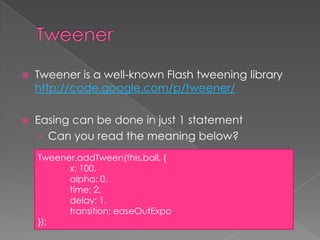
   Tweener is a well-known Flash tweening library
    http://code.google.com/p/tweener/

   Easing can be done in just 1 statement
     › Can you read the meaning below?
    Tweener.addTween(this.ball, {
          x: 100,
          alpha: 0,
          time: 2,
          delay: 1,
          transition: easeOutExpo
    });
   Some famous tweening libraries
    ›   Tweener
    ›   TweenLite
    ›   Boostworthy Animation System
    ›   FuseKit
    ›   Go
    ›   KitchenSync

   A comparison of these tweening libraries can
    be found at:
    http://dispatchevent.org/wp-
    content/uploads/2008/04/Tween-Engine-
    Comparisons.pdf
   Think in polar co-ordinate and then
    transform into the Cartesian Plane

                        (x,y)   x = r * Math.cos(θ);
                r               y = r * Math.sin(θ);
                    θ
   Angular Velocity
    › Rate of change of θ over time


   Angular Acceleration
    › Rate of change of angular velocity over time

 Angular Friction
 Angular easing
 Angular Springing
   Sine curve

   Circle
   First person shooter game
    › Move up and down when walk


   Biased Value Mapping
    › Random number biasing
    › My Website’s wallpaper rotator
   Rectangular Plane

   Circular Plane

   Cylinder

   Cone

   Helix

   Sphere
 Make code simpler
 Same thinking in 2D and 3D space
 Add
 Subtraction
 Scale
 Dot production
 Normalize
 Get Length
   Collision Detection of a group of sphere

   Explosion Effect in 3D space

Animation programming

  • 2.
    What is animation  Attributes can be varied › Position › Velocity › Accelration › Width, height › Rotation › Alpha › Time interval › Color  Easing  Bounce  Spring  Tweener › Performance issue  Creating Curve / Shapes / Volume › Application of curve  Using Vector › Optimizing ball collision demo
  • 4.
    What is animation? › Particle System Demo
  • 5.
    Change of Object’s Properties over time › What properties to change? › What objects to apply? › How to trigger the animation?
  • 6.
    Visible properties Invisible properties Position Velocity Scale Angular Velocity (width and height) Rotation Acceleration Alpha Angular Acceleration Color Loop interval (brightness, saturation, tone…) Depth Sound Volume Appearance (e.g. blur filter, shape)
  • 7.
     Movieclips  TextBox  Sound Object  Camera (in 3D application)
  • 8.
    Static animation › Timeline › Pre-programmed animation  Dynamic animation › Mouse actions › Keyboard actions › Web Cam (Augmented Reality) › Microphone
  • 9.
    Initialization Animation Loop Update properties No Animation Ended? Yes Animation Ended
  • 11.
    We will go through… › Velocity › Acceleration › Friction › Boundaries › Easing and Springing › Angular Motion › Collision Detection › Frame-based VS Time-based
  • 12.
    Velocity › Rate of change of position over time  Acceleration › Rate of change of velocity over time  Useful formulae vx = vx + ax, vy = vy + ay x = x + vx, y = y + vy
  • 13.
    There can be energy loss when an object moves › Causing the object to slow down  An easy way to implement friction: vx *= friction factor vy *= friction factor where friction factor is from 0 to 1
  • 14.
    The previous method is only an approximation because: › In real physics, friction of a moving object has no relationship on velocity  Real Physics (acceleration = -0.2) t 0 1 2 3 4 5 v 10 8 6 4 2 0  Approximation (friction factor = 0.3): t 0 1 2 3 4 5 v 10 4 1.6 0.64 0.256 0.1024
  • 15.
    However, with the previous method: › Normal user should not be able to discover › No change of the sign of velocity  Write less “if then else” statements in code  The correct method: var speed:Number = Math.sqrt(vx * vx + vy * vy); var angle:Number = Math.atan2(vy, vx); if (speed > friction) { speed -= friction; } else { speed = 0; } vx = Math.cos(angle) * speed; vy = Math.sin(angle) * speed;
  • 16.
    Bouncing If (ball.x + ball.width / 2 > right || ball.x – ball.width / 2 < left) { ball.vx = -ball.vx; } If (ball.y + ball.height / 2 > bottom || ball.y – ball.height / 2 < top) { ball.vy = -ball.vy; }
  • 17.
    Bouncing with energy loss Without Energy loss With Energy loss If (ball.x + ball.width / 2 > right || ball.x – ball.width / 2 < left) { ball.vx = -ball.vx * friction; } If (ball.y + ball.height / 2 > bottom || ball.y – ball.height / 2 < top) { ball.vy = -ball.vy * friction; }
  • 18.
    Screen wrapping Re-appear in the other side!
  • 19.
    If (ball.x -ball.width / 2 > right ) { ball.x = left – ball.width / 2; } else if (ball.x _+ ball.width / 2 < left) { ball.x = right + ball.width / 2; } If (ball.y - ball.height / 2 > bottom) { ball.y = top – ball.height / 2; } else if (ball.y _+ ball.height / 2 < top) { ball.y = bottom + ball.height / 2; }
  • 20.
    Demo showing › Friction › Boundary › Energy loss hitting wall › throwing
  • 21.
     Velocity isproportional to target distance  Object moves smoothly and decelerate to the target position displacement Target pos time
  • 22.
    Formula for easing x += (targetX – x) * easingFactor;; y += (targetY – y) * easingFactor;;
  • 23.
     Acceleration isproportional to target distance  Objects move smoothly, vibrate and then slow down through the target position displacement Target pos time
  • 24.
    Formula for springing vx += (targetX – x) * springFactor; vy += (targetY – y) * springFactor; //add friction, otherwise the object will never stop vx *= frictionFactor; vy *= frictionFactor; x += vx; y += vy;
  • 25.
    In real world, › Objects usually move along an arced trajectory › Objects usually accelerates when start and decelerate when stop › This kind of motion create “natural” feeling to us › Easing is used entired in Mac OS / iPhone!
  • 26.
    Tweener is a well-known Flash tweening library http://code.google.com/p/tweener/  Easing can be done in just 1 statement › Can you read the meaning below? Tweener.addTween(this.ball, { x: 100, alpha: 0, time: 2, delay: 1, transition: easeOutExpo });
  • 28.
    Some famous tweening libraries › Tweener › TweenLite › Boostworthy Animation System › FuseKit › Go › KitchenSync  A comparison of these tweening libraries can be found at: http://dispatchevent.org/wp- content/uploads/2008/04/Tween-Engine- Comparisons.pdf
  • 29.
    Think in polar co-ordinate and then transform into the Cartesian Plane (x,y) x = r * Math.cos(θ); r y = r * Math.sin(θ); θ
  • 30.
    Angular Velocity › Rate of change of θ over time  Angular Acceleration › Rate of change of angular velocity over time  Angular Friction  Angular easing  Angular Springing
  • 32.
    Sine curve  Circle
  • 33.
    First person shooter game › Move up and down when walk  Biased Value Mapping › Random number biasing › My Website’s wallpaper rotator
  • 34.
    Rectangular Plane  Circular Plane  Cylinder  Cone  Helix  Sphere
  • 35.
     Make codesimpler  Same thinking in 2D and 3D space
  • 36.
     Add  Subtraction Scale  Dot production  Normalize  Get Length
  • 37.
    Collision Detection of a group of sphere  Explosion Effect in 3D space