Acknowledgement
First of all we thank our dear Lord for giving us the strength and
inspiration to accomplish this project. For the moments when we seemed
out of good ideas yet somehow we always found solutions to our problems.
We also extend our most sincere appreciation to our very generous
instructor, Engr. Cielito Conti Olegario, for giving us all the time we
needed, including time we no longer deserved in completing this project,
for her guidance to ensure we did things correctly, but more importantly
for her patience, tolerance, and understanding with our mistakes.
We also acknowledge our parents who supported us with all our needs
despite the hard times we gave them, for our classmates who were very
kind to share their tips and ideas, and to those individuals, who in one
way or another, whether directly or indirectly, influenced the progress of
our project.
Table of Contents CEEPEE BRICKS GAME SYSTEM
Table of Contents
Contents Page
System Overview 1
Scopes and Limitations 2
System Requirements 3
Degrees of Difficulty 4
Requirements Document 5
Work Breakdown 11
Project Milestones 14
Activity Graph 16
Project Costing 20
Context Diagram 21
Data Flow Diagram 22
HIPO Chart 23
Input-Process Output 24
Sample Outputs 29
Future Enhancements 32
Biography 33
Degrees of Difficulty CEEPEE BRICKS GAME SYSTEM 4
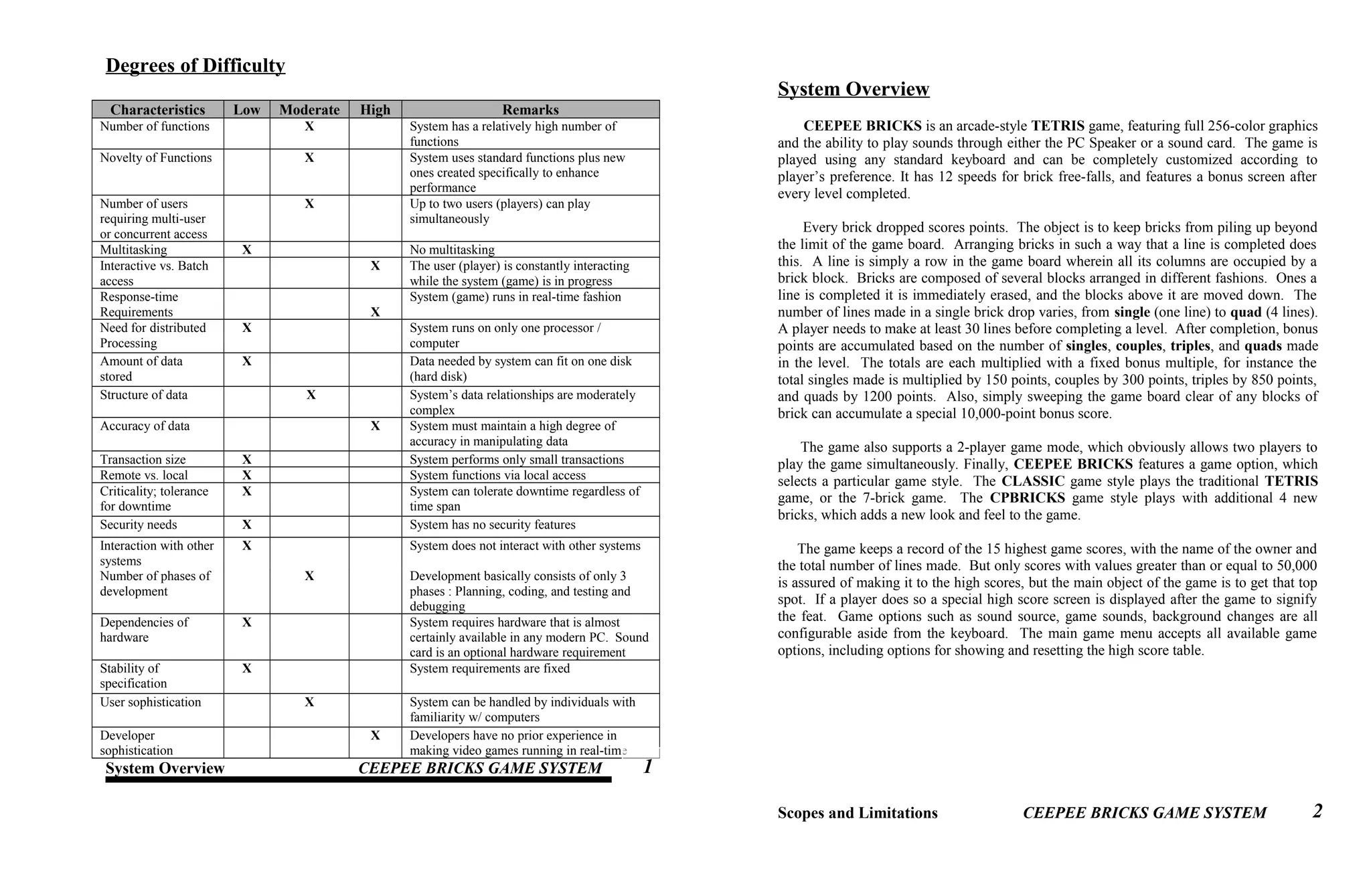
Degrees of Difficulty
Characteristics Low Moderate High Remarks
Number of functions X System has a relatively high number of
functions
Novelty of Functions X System uses standard functions plus new
ones created specifically to enhance
performance
Number of users
requiring multi-user
or concurrent access
X Up to two users (players) can play
simultaneously
Multitasking X No multitasking
Interactive vs. Batch
access
X The user (player) is constantly interacting
while the system (game) is in progress
Response-time
Requirements X
System (game) runs in real-time fashion
Need for distributed
Processing
X System runs on only one processor /
computer
Amount of data
stored
X Data needed by system can fit on one disk
(hard disk)
Structure of data X System’s data relationships are moderately
complex
Accuracy of data X System must maintain a high degree of
accuracy in manipulating data
Transaction size X System performs only small transactions
Remote vs. local X System functions via local access
Criticality; tolerance
for downtime
X System can tolerate downtime regardless of
time span
Security needs X System has no security features
Interaction with other
systems
X System does not interact with other systems
Number of phases of
development
X Development basically consists of only 3
phases : Planning, coding, and testing and
debugging
Dependencies of
hardware
X System requires hardware that is almost
certainly available in any modern PC. Sound
card is an optional hardware requirement
Stability of
specification
X System requirements are fixed
User sophistication X System can be handled by individuals with
familiarity w/ computers
Developer
sophistication
X Developers have no prior experience in
making video games running in real-time
System Overview CEEPEE BRICKS GAME SYSTEM
System Overview
CEEPEE BRICKS is an arcade-style TETRIS game, featuring full 256-color graphics
and the ability to play sounds through either the PC Speaker or a sound card. The game is
played using any standard keyboard and can be completely customized according to
player’s preference. It has 12 speeds for brick free-falls, and features a bonus screen after
every level completed.
Every brick dropped scores points. The object is to keep bricks from piling up beyond
the limit of the game board. Arranging bricks in such a way that a line is completed does
this. A line is simply a row in the game board wherein all its columns are occupied by a
brick block. Bricks are composed of several blocks arranged in different fashions. Ones a
line is completed it is immediately erased, and the blocks above it are moved down. The
number of lines made in a single brick drop varies, from single (one line) to quad (4 lines).
A player needs to make at least 30 lines before completing a level. After completion, bonus
points are accumulated based on the number of singles, couples, triples, and quads made
in the level. The totals are each multiplied with a fixed bonus multiple, for instance the
total singles made is multiplied by 150 points, couples by 300 points, triples by 850 points,
and quads by 1200 points. Also, simply sweeping the game board clear of any blocks of
brick can accumulate a special 10,000-point bonus score.
The game also supports a 2-player game mode, which obviously allows two players to
play the game simultaneously. Finally, CEEPEE BRICKS features a game option, which
selects a particular game style. The CLASSIC game style plays the traditional TETRIS
game, or the 7-brick game. The CPBRICKS game style plays with additional 4 new
bricks, which adds a new look and feel to the game.
The game keeps a record of the 15 highest game scores, with the name of the owner and
the total number of lines made. But only scores with values greater than or equal to 50,000
is assured of making it to the high scores, but the main object of the game is to get that top
spot. If a player does so a special high score screen is displayed after the game to signify
the feat. Game options such as sound source, game sounds, background changes are all
configurable aside from the keyboard. The main game menu accepts all available game
options, including options for showing and resetting the high score table.
Scopes and Limitations CEEPEE BRICKS GAME SYSTEM
1
2
Scopes and Limitations
Due to the shortness of the period available in completing this project, as well as the
limited programming knowledge of the developers, the game lacks some important
elements that could have made the game more fun and enjoyable. One of these important
elements is music.
The game also suffers a significant drop in performance when it runs under Windows
environment, since CEEPEE BRICKS is a pure DOS-based program that runs in real-
mode graphics mode. Windows also somehow affects the timing mechanisms of the game,
which tends to cause the programs performance to vary from satisfactory to unplayable.
Also, it does not support all kinds of sound cards. It is designed to recognize only Adlib-
compatible or Sound Blaster-compatible sound cards, since these were the only sound cards
available for testing by the developers. The graphics data are only kept as is, no
compressions or whatever, therefore the package requires almost 2 MB of disk space. Lack
of compression also makes displaying graphics rather slow.
CEEPEE BRICKS also hasn’t been fully tested on every available PCs, and the
developers can only assume that this program runs best on a 486DX4 with a VGA card.
System Requirements CEEPEE BRICKS GAME SYSTEM
System Requirements
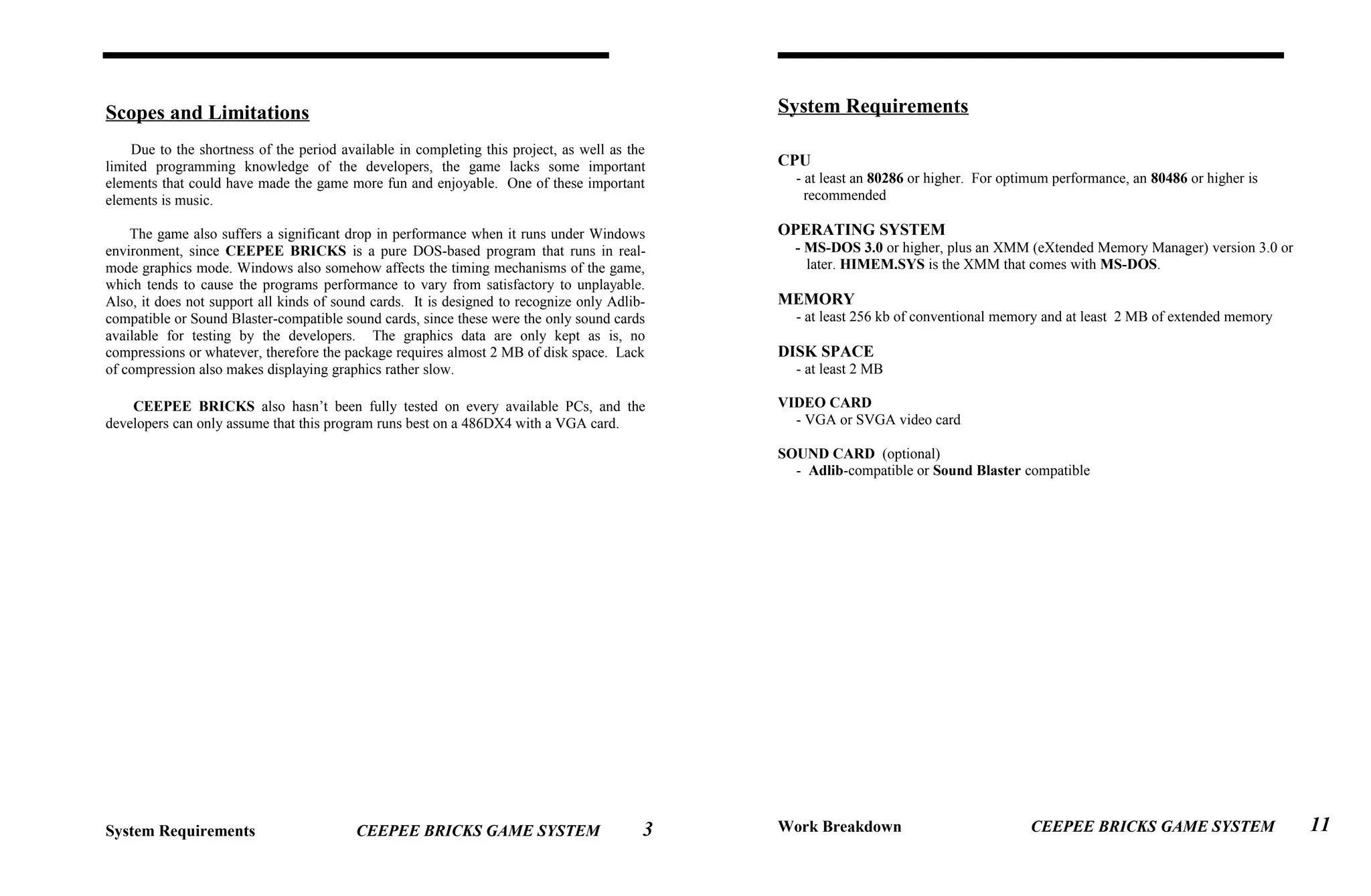
CPU
- at least an 80286 or higher. For optimum performance, an 80486 or higher is
recommended
OPERATING SYSTEM
- MS-DOS 3.0 or higher, plus an XMM (eXtended Memory Manager) version 3.0 or
later. HIMEM.SYS is the XMM that comes with MS-DOS.
MEMORY
- at least 256 kb of conventional memory and at least 2 MB of extended memory
DISK SPACE
- at least 2 MB
VIDEO CARD
- VGA or SVGA video card
SOUND CARD (optional)
- Adlib-compatible or Sound Blaster compatible
Work Breakdown CEEPEE BRICKS GAME SYSTEM3 11
Work Breakdown
Estimated Time
Phase 1 : Determining and analyzing initial
requirements to build the game
Step 1 : Studying game mechanics 1 day, Aug. 14
Activity 1.1 : Outlining game rules and events 2 hrs., Aug. 14
Activity 1.2 : Analyzing game scoring system 2 hrs., Aug. 14
Activity 1.3 : Analyzing brick patterns 2 hrs., Aug. 14
Activity 1.4 : Determining player commands 2 hrs., Aug. 14
Step 2 : Gathering information and source codes
to design and build game features 3 days, Aug. 16-18
Activity 2.1 : Getting information and source code
for VGA card programming 1 day, Aug. 16
Activity 2.2 : Getting source codes for keyboard
and system timer programming 1 day, Aug. 16
Activity 2.3 : Getting information on using
extended memory 1 day, Aug. 17
Activity 2.4 : Getting information on programming
sound card 1 day, Aug. 18
Step 3 : Creating and designing time-based routines 3 days, Aug. 19-21
Activity 3.1 : Designing and creating routine for
playing background sounds 1 day, Aug. 19
Activity 3.2 : Designing and creating routine for
timing key presses 1 day, Aug. 20
Activity 3.3 : Designing and creating routine for
enabling real-time animations 1 day, Aug. 21
Phase 2 : Designing game system
Step 1 : Designing game engine and other game
elements 7 days, Aug. 22-28
Activity 1.1 : Designing game board 2 days, Aug. 22-23
Activity 1.2 : Designing brick pieces 1 day , Aug. 24
Activity 1.3 : Designing game events 2 days, Aug. 25-26
Activity 1.4 : Designing timing mechanism of
brick free-fall 1 day, Aug. 27
Activity 1.5 : Designing controls on the brick pieces 1 day, Aug. 28
Work Breakdown CEEPEE BRICKS GAME SYSTEM
Estimated Time
Step 2 : Designing sound and graphics features 6 days, Aug. 22-27
Activity 2.1 : Designing sound effects 2 days, Aug. 22-23
Activity 2.2 : Designing the graphic blocks 1 day, Aug. 24
Activity 2.3 : Designing background bitmaps 2 days, Aug. 25-26
Activity 2.4 : Designing the graphic animations 1 day, Aug. 27
Step 3 : Designing the main game menu 4 days, Aug. 28-31
Activity 3.1 : Designing routines for creating
screen boxes 1 day, Aug. 28
Activity 3.2 : Designing routines for switching
menu selections 1 day, Aug. 28
Activity 3.3 : Designing the keyboard configuration
module 2 days, Aug. 29-30
Activity 3.4 : Designing menu and submenu screens 1 day, Aug. 31
Step 4 : Designing the score table 1 day, Sept. 1
Activity 4.1 : Designing data structure of score table 1 hr., Sept. 1
Activity 4.2 : Designing functions for loading and
saving score table from and to a file 2 hrs., Sept. 1
Activity 4.3 : Designing function for inserting
entries into score table 3 hrs., Sept. 1
Step 5 : Designing other miscellaneous functions 3 days, Sept. 2-4
Activity 5.1 : Designing game initialization and
termination 1 day , Sept.2
Activity 5.2 : Designing the 2-player mode 2 days, Sept. 3-4
Phase 3 : Program coding
Step 1 : Coding the main game engine 5 days, Sept. 5-9
Activity 1.1 : Coding a prototype in text mode 1 day, Sept. 5
Activity 1.2 : Coding the control routines 1 day, Sept. 6
Activity 1.3 : Coding the game events 1 day, Sept. 7
Activity 1.4 : Implementing sound events 1 day, Sept. 8
Activity 1.5 : Implementing the two player game mode 1 day, Sept. 9
1 day, Sept. 9
Step 2 : Coding miscellaneous game features 5 days, Sept.10-14
Activity 2.1 : Coding game statistics functions 1 day, Sept. 10
Activity 2.2 : Coding score table structure and
functions 1 day, Sept. 11
Activity 2.3 : Coding game initializing and
terminating functions 1 day, Sept. 12
Activity 2.4 : Coding main menu 1 day, Sept. 13
Activity 2.5 : Coding submenu modules 1 day, Sept. 14
12
Work Breakdown CEEPEE BRICKS GAME SYSTEM
Estimated Time
Step 3 : Porting to graphics 2 day, Sept. 15-16
Activity 3.1 : Replacing text mode functions
with the graphics functions 3 hrs., Sept. 15
Activity 3.2 : Implementing graphical bricks
and background bitmaps 2 hrs., Sept. 15
Activity 3.3 : Implementing animation events 1 day, Sept. 16
Phase 4 : Testing individual game modules
Step 1 : Testing game engine 2 days, Sept. 17-18
Activity 1.1 : Testing controls 2 day, Sept. 17-18
Activity 1.2 : Testing game sounds and graphics 2 day, Sept. 17-18
Step 2 : Testing game events and other functions 5 days, Sept. 17-21
Activity 2.1 : Testing “Lines made” event 2 hrs., Sept. 17
Activity 2.2 : Testing “New level” event 2 hrs., Sept. 17
Activity 2.3 : Testing statistics functions 2 hrs., Sept. 18
Activity 2.4 : Testing bonus events 2 hrs., Sept. 18
Activity 2.5 : Testing “Game over” event 1 day, Sept. 19
Activity 2.6 : Testing “New High Score” event 1 day, Sept. 20
Activity 2.7 : Testing game pause and reset 1 day, Sept. 21
Step 3 : Testing game menu 4 days, Sept. 22-25
Activity 3.1 : Testing game initialization and
termination 4 days, Sept. 22-25
Activity 3.1 : Testing main menu options 4 days, Sept. 22-25
Activity 3.2 : Testing game option switches 4 days, Sept. 22-25
Activity 3.3 : Testing key configure module 4 days, Sept. 22-25
Phase 5 : Testing, debugging, and correcting program
Step 1 : Running and evaluating game 8 days, Sept. 26-Oct. 3
Activity 1.1 : Testing one-player game mode 4 days, Sept. 26-29
Activity 1.2 : Testing two-player game mode 4 days, Sept. 30-Oct.3
Step 2 : Correcting errors found 5 days, Oct. 4-8
Phase 6 : System delivery
Step 1 : Creating necessary documentation 3 days, Oct. 9-11
Activity 1.1 : Documenting source code 2 days, Oct. 9-10
Activity 1.2 : Creating game manual 3 days, Oct. 9-11
Step 2 : Create installation module 1 day, Oct. 12
Step 3 : Deliver the game system 1 day, Oct. 13
Project Milestones CEEPEE BRICKS GAME SYSTEM
Project Milestones
1.1 : Studied game mechanics
1.2.1 : Collected information and source code on VGA card programming
1.2.2 : Collected source codes for keyboard and system timer programming
1.2.3 : Collected information on using extended memory
1.2.4 : Collected information on programming sound card
1.3.1 : Designed and created routine for playing background sounds
1.3.2 : Designed and created routine for timing key presses
1.3.3 : Designed and created routine for enabling real-time animations
2.1.1 : Designed game board
2.1.2 : Designed brick pieces
2.1.3 : Designed game events
2.1.4 : Designed timing mechanism of brick free-fall
2.1.5 : Designed controls on the brick pieces
2.2.1 : Designed sound effects
2.2.2 : Designed the graphic blocks
2.2.3 : Designed background bitmaps
2.2.4 : Designed graphic animations
2.3.1 : Designed routines for creating screen boxes
2.3.2 : Designed routines for switching menu selections
2.3.3 : Designed keyboard configuration module
2.3.4 : Designed menu and submenu screens
2.4 : Designed score table
2.5.1 : Designed game initialization and termination
2.5.2 : Designed 2-player mode
3.1.1 : Coded prototype in text mode
3.1.2 : Coded control routines
3.1.3 : Coded game events
3.1.4 : Implemented sound events
3.1.5 : Implemented two player game mode
3.2.1 : Coded game statistics functions
3.2.2 : Coded score table structure and functions
3.2.3 : Coded game initializing and terminating functions
3.2.4 : Coded main menu
3.2.5 : Coded submenu modules
3.3.1 : Replaced text mode functions with the graphics functions
3.3.2 : Implemented graphical bricks and background bitmaps
3.3.3 : Implemented animation events
4.1.1 : Tested controls
4.1.2 : Tested game sounds and graphics
4.2 : Tested game events and other functions
4.3.1 : Tested main menu options
13 14
Project Milestones CEEPEE BRICKS GAME SYSTEM
4.3.2 : Tested game option switches
4.3.3 : Tested key configure module
5.1.1 : Tested one-player game mode
5.1.2 : Tested two-player game mode
5.2 : Corrected errors found
6.1.1 : Documented source code
6.1.2 : Created game manual
6.2 : Created installation module
6.3 : Delivered the game system
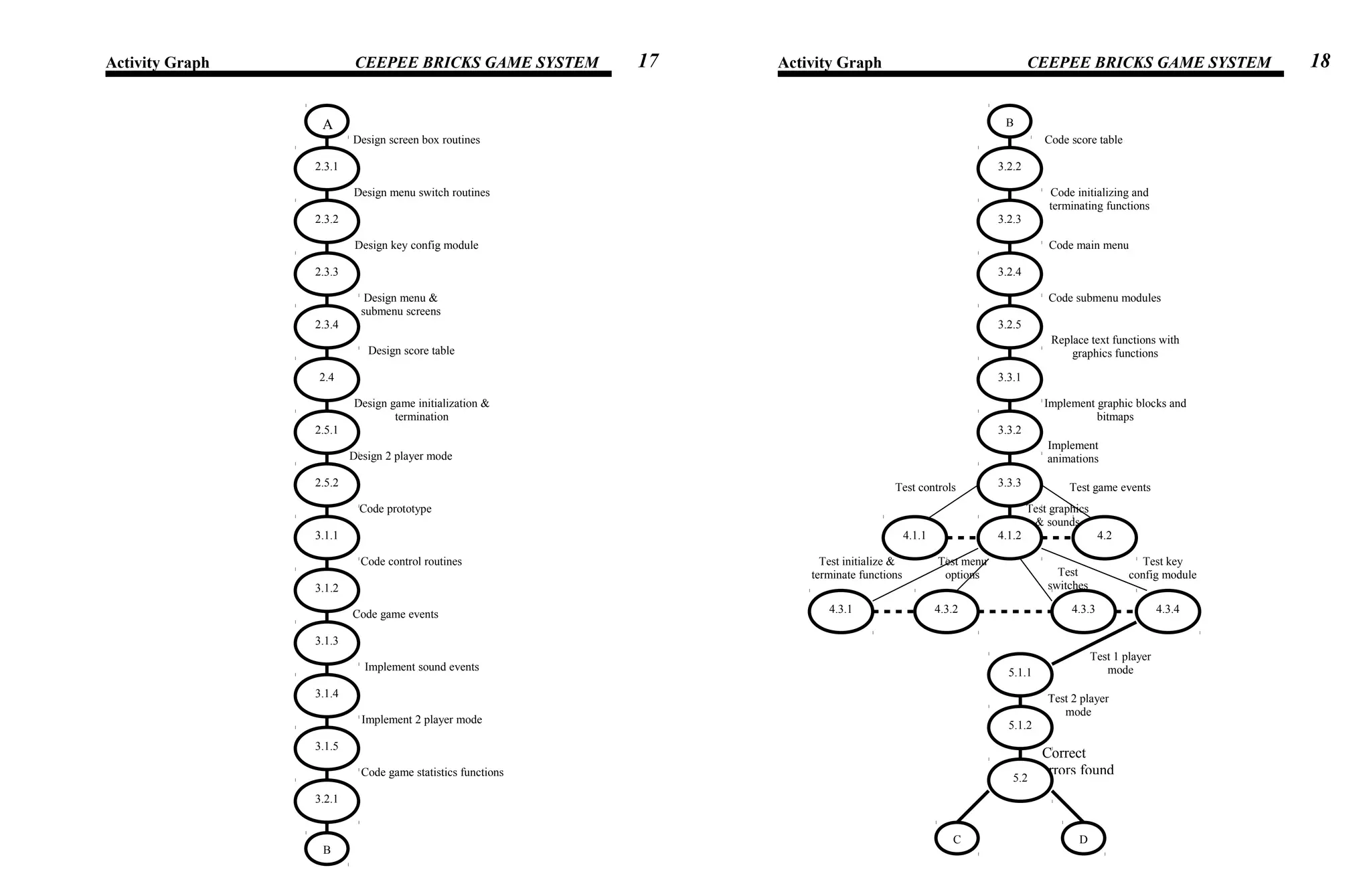
Activity Graph CEEPEE BRICKS GAME SYSTEM
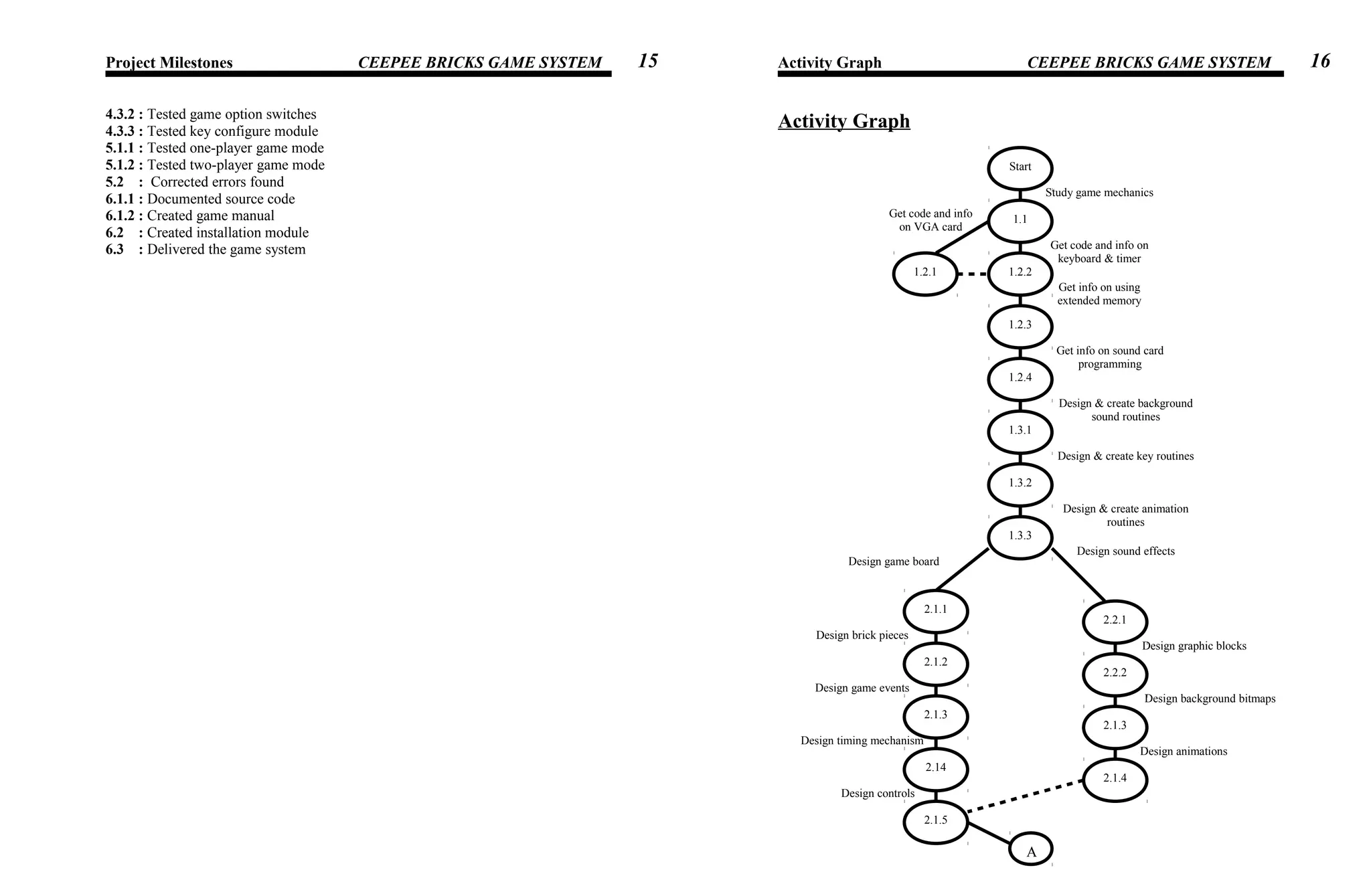
Activity Graph
15
Design animations
Design background bitmaps
Design graphic blocks
Design controls
Design sound effects
Design timing mechanism
Design game events
Design brick pieces
Design game board
Design & create animation
routines
Design & create key routines
Design & create background
sound routines
Get info on sound card
programming
Get info on using
extended memory
Get code and info on
keyboard & timer
Get code and info
on VGA card
Study game mechanics
Start
1.1
1.2.1 1.2.2
1.2.3
1.2.4
1.3.1
1.3.2
1.3.3
2.1.1
2.2.1
2.1.2
2.1.3
2.2.2
2.1.3
2.1.4
2.14
2.1.5
A
16
Activity Graph CEEPEE BRICKS GAME SYSTEM Activity Graph CEEPEE BRICKS GAME SYSTEM
Correct
errors found
Test 2 player
mode
Test 1 player
mode
Implement
animations
Implement graphic blocks and
bitmaps
Replace text functions with
graphics functions
Code submenu modules
Code main menu
Code initializing and
terminating functions
Test key
config moduleTest
switches
Test menu
options
Test initialize &
terminate functions
Test controls Test game events
Test graphics
& sounds
Code score table
Code game statistics functions
Implement 2 player mode
Implement sound events
Code game events
Code control routines
Code prototype
Design 2 player mode
Design game initialization &
termination
Design score table
Design menu &
submenu screens
Design key config module
Design menu switch routines
Design screen box routines
A
2.3.1
2.3.2
2.3.3
2.3.4
2.4
2.5.1
2.5.2
3.1.1
3.1.2
3.1.3
3.1.4
3.1.5
3.2.1
B
B
3.2.2
3.2.3
3.2.4
3.2.5
3.3.1
3.3.2
3.3.3
4.1.1 4.1.2 4.2
4.3.1 4.3.2 4.3.3 4.3.4
5.1.1
5.1.2
5.2
DC
17 18
Activity Graph CEEPEE BRICKS GAME SYSTEM Input-Process Output CEEPEE BRICKS GAME SYSTEM
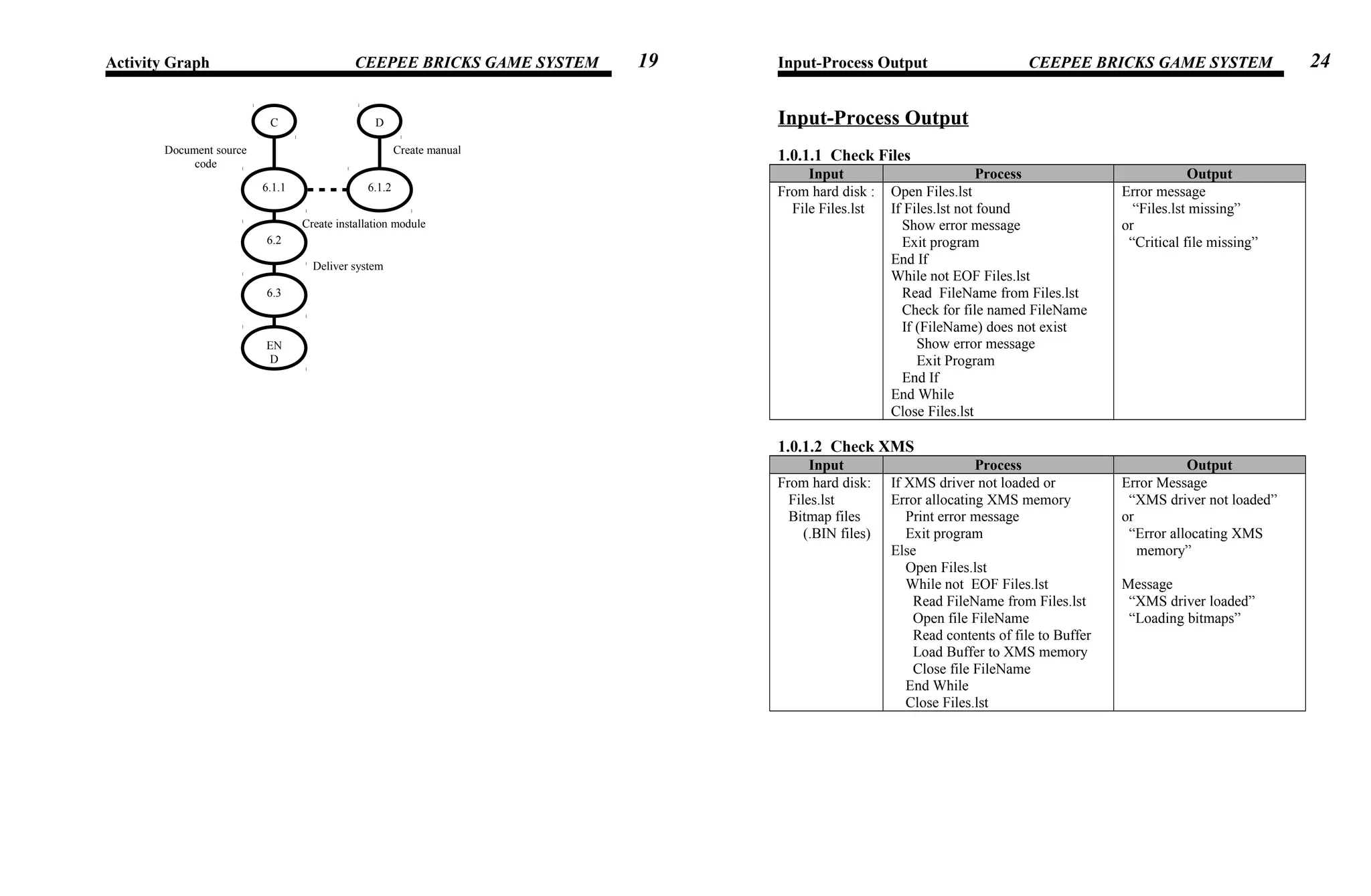
Input-Process Output
1.0.1.1 Check Files
Input Process Output
From hard disk :
File Files.lst
Open Files.lst
If Files.lst not found
Show error message
Exit program
End If
While not EOF Files.lst
Read FileName from Files.lst
Check for file named FileName
If (FileName) does not exist
Show error message
Exit Program
End If
End While
Close Files.lst
Error message
“Files.lst missing”
or
“Critical file missing”
1.0.1.2 Check XMS
Input Process Output
From hard disk:
Files.lst
Bitmap files
(.BIN files)
If XMS driver not loaded or
Error allocating XMS memory
Print error message
Exit program
Else
Open Files.lst
While not EOF Files.lst
Read FileName from Files.lst
Open file FileName
Read contents of file to Buffer
Load Buffer to XMS memory
Close file FileName
End While
Close Files.lst
Error Message
“XMS driver not loaded”
or
“Error allocating XMS
memory”
Message
“XMS driver loaded”
“Loading bitmaps”
Deliver system
Create installation module
Create manualDocument source
code
C D
6.1.26.1.1
6.2
6.3
EN
D
19 24
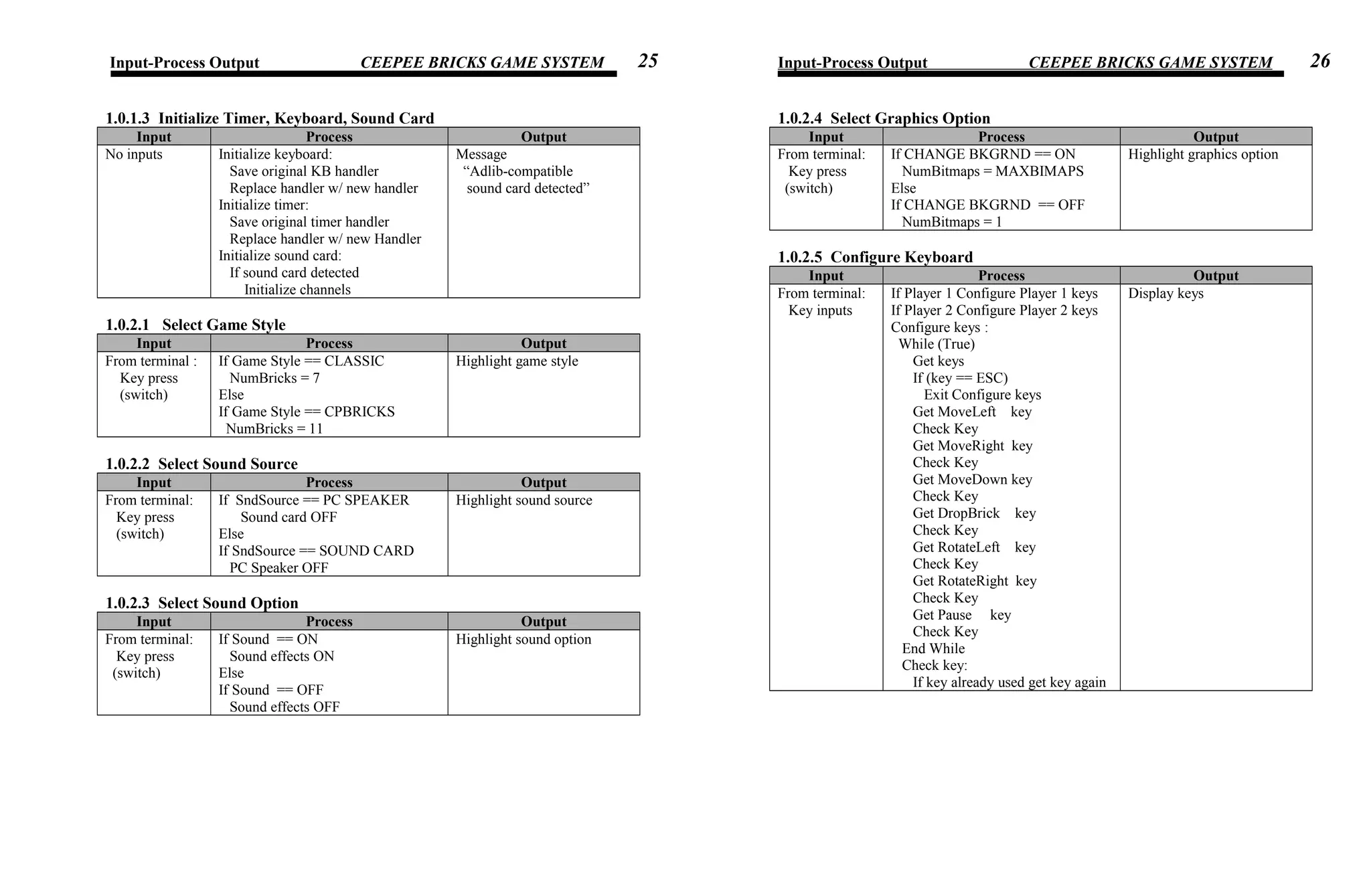
Input-Process Output CEEPEE BRICKS GAME SYSTEM
1.0.1.3 Initialize Timer, Keyboard, Sound Card
Input Process Output
No inputs Initialize keyboard:
Save original KB handler
Replace handler w/ new handler
Initialize timer:
Save original timer handler
Replace handler w/ new Handler
Initialize sound card:
If sound card detected
Initialize channels
Message
“Adlib-compatible
sound card detected”
1.0.2.1 Select Game Style
Input Process Output
From terminal :
Key press
(switch)
If Game Style == CLASSIC
NumBricks = 7
Else
If Game Style == CPBRICKS
NumBricks = 11
Highlight game style
1.0.2.2 Select Sound Source
Input Process Output
From terminal:
Key press
(switch)
If SndSource == PC SPEAKER
Sound card OFF
Else
If SndSource == SOUND CARD
PC Speaker OFF
Highlight sound source
1.0.2.3 Select Sound Option
Input Process Output
From terminal:
Key press
(switch)
If Sound == ON
Sound effects ON
Else
If Sound == OFF
Sound effects OFF
Highlight sound option
Input-Process Output CEEPEE BRICKS GAME SYSTEM
1.0.2.4 Select Graphics Option
Input Process Output
From terminal:
Key press
(switch)
If CHANGE BKGRND == ON
NumBitmaps = MAXBIMAPS
Else
If CHANGE BKGRND == OFF
NumBitmaps = 1
Highlight graphics option
1.0.2.5 Configure Keyboard
Input Process Output
From terminal:
Key inputs
If Player 1 Configure Player 1 keys
If Player 2 Configure Player 2 keys
Configure keys :
While (True)
Get keys
If (key == ESC)
Exit Configure keys
Get MoveLeft key
Check Key
Get MoveRight key
Check Key
Get MoveDown key
Check Key
Get DropBrick key
Check Key
Get RotateLeft key
Check Key
Get RotateRight key
Check Key
Get Pause key
Check Key
End While
Check key:
If key already used get key again
Display keys
25 26
Input-Process Output CEEPEE BRICKS GAME SYSTEM
1.0.3 Show Score Table
Input Process Output
From terminal:
Key press
(menu)
If Score Table empty
Show empty
Else
For reccount = 1 to NumItems
Show Score, Lines, Owner
Show score table contents
1.0.4 Reset Score Table
Input Process Output
From terminal:
Key press
(menu)
If Score Table empty return
Else
Reset Score Table values to 0
Set HISCORE == DEFHISCORE
NumItems = 0
Message
“Score table reset”
1.0.5.1.1 Begin Game
Input Process Output
From memory:
Game options
Graphics data
Animation data
Sound data
From terminal:
Key inputs
While not Game Over
While Brick not collide bottom or
block
free-fall brick
If MoveLeft move brick left
If MoveRight move brick right
If MoveDown push brick
If DropBrick brick collide
bottom or block
if BrickRotate rotate brick
if Paused pause game
End While
CheckLinesMade
If (NewLevel) show BonusScreen
Spawn New brick
Continue
End While
If (Reset Game) repeat game
Graphic game board
Animations
Sound effects
Player Name, Score, Level,
Lines made
Bonus Screen
Message “PAUSE”
Message “GAME OVER”
Input-Process Output CEEPEE BRICKS GAME SYSTEM
1.0.6.1 Deinitialize Game
Input Process Output
From terminal:
Key press
(menu)
Restore Keyboard Handler
Restore Timer Handler
Free memory
Clear sound card channels
Clear PC Speaker sounds
Save score table
27 28
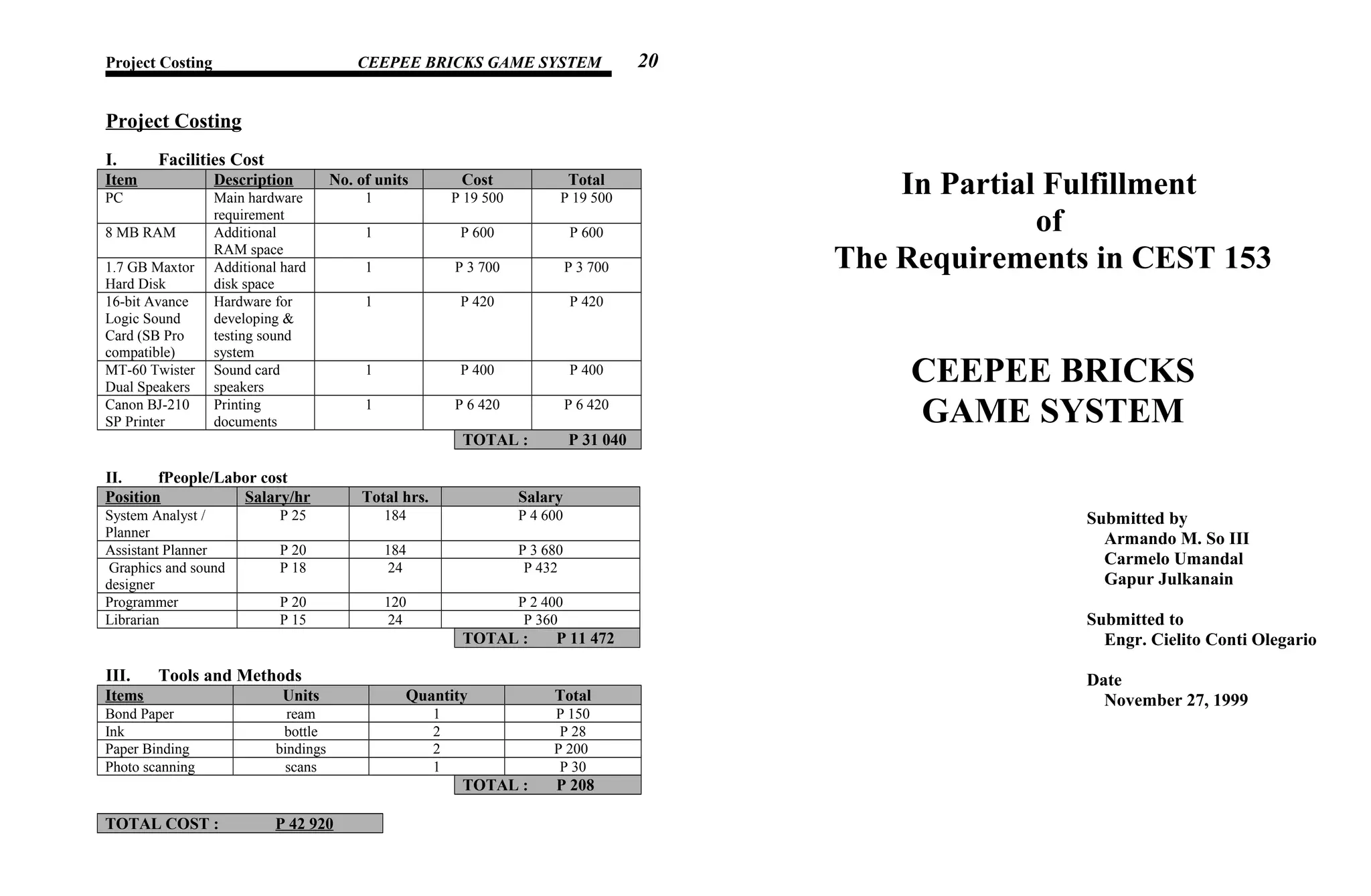
Project Costing CEEPEE BRICKS GAME SYSTEM
Project Costing
I. Facilities Cost
Item Description No. of units Cost Total
PC Main hardware
requirement
1 P 19 500 P 19 500
8 MB RAM Additional
RAM space
1 P 600 P 600
1.7 GB Maxtor
Hard Disk
Additional hard
disk space
1 P 3 700 P 3 700
16-bit Avance
Logic Sound
Card (SB Pro
compatible)
Hardware for
developing &
testing sound
system
1 P 420 P 420
MT-60 Twister
Dual Speakers
Sound card
speakers
1 P 400 P 400
Canon BJ-210
SP Printer
Printing
documents
1 P 6 420 P 6 420
TOTAL : P 31 040
II. fPeople/Labor cost
Position Salary/hr Total hrs. Salary
System Analyst /
Planner
P 25 184 P 4 600
Assistant Planner P 20 184 P 3 680
Graphics and sound
designer
P 18 24 P 432
Programmer P 20 120 P 2 400
Librarian P 15 24 P 360
TOTAL : P 11 472
III. Tools and Methods
Items Units Quantity Total
Bond Paper ream 1 P 150
Ink bottle 2 P 28
Paper Binding bindings 2 P 200
Photo scanning scans 1 P 30
TOTAL : P 208
TOTAL COST : P 42 920
In Partial Fulfillment
of
The Requirements in CEST 153
CEEPEE BRICKS
GAME SYSTEM
Submitted by
Armando M. So III
Carmelo Umandal
Gapur Julkanain
Submitted to
Engr. Cielito Conti Olegario
Date
November 27, 1999
20
Requirements Document CEEPEE BRICKS GAME SYSTEM Requirements Document CEEPEE BRICKS GAME SYSTEM
Requirements Document
Where is the equipment to function?
Technical Conceptual
The system will function independent of
the actual physical location of the
computer
The system will function wherever a
computer is available
Is there one location or several?
Technical Conceptual
System runs on a local computer System runs only on one computer
Are there any environment restrictions such as humidity, temperature, or
magnetic interference?
Technical Conceptual
The system will function independent of
factors that may affect the actual
hardware for running it
System is not restricted by such
environmental factors
Is the input coming from one or more systems?
Technical Conceptual
System is not required to be designed to
accept inputs from other systems
System runs independently
Is the output going to one or more systems?
Technical Conceptual
System is not required to be designed to
direct outputs to other systems
System runs independently
Is there a prescribed medium that the data must be used?
Technical Conceptual
Data that are directly loaded into
memory are left in binary form to
optimize loading speed and requires no
need for any type conversion
Data such as graphics are stored and
loaded as is
What will the system do?
Technical Conceptual
The system lets the user play the TETRIS
game on the PC, using the PCs ability to
work on graphics and sounds as well as
use the keyboard for controls
System plays the TETRIS video game,
and saves the top 15 highest scores of the
game
When will the system do it?
Technical Conceptual
The system will do it the moment the user
prefers to it
When someone wants to play TETRIS
How and when can the system be changed or enhanced?
Technical Conceptual
System can be changed or enhanced by
modifying the original source code by
either improving some routines or adding
new ones, perhaps when the developers
are ready to implement the current non-
existing features such as music, higher
video resolution, color palette greater than
256, and better support in using the sound
card
System can be changed or enhanced by
adding music and improving graphics
Are there constraints on execution speed, response time, or throughput?
Technical Conceptual
Execution speed is constrained by factors
such as running in V86 mode under
Windows which affects both the timing
and graphical mechanisms of the
program, And also when running under
on untested processors lower than 486
Game slows down when ran under
Windows although performance may vary,
and it was tested to run best on 486
computers or higher
How much documentation is required?
Technical Conceptual
There is very little documentation
required with regards to the functionality
of the system
The system requires very little
documentation regarding how to use and
run it
5 6
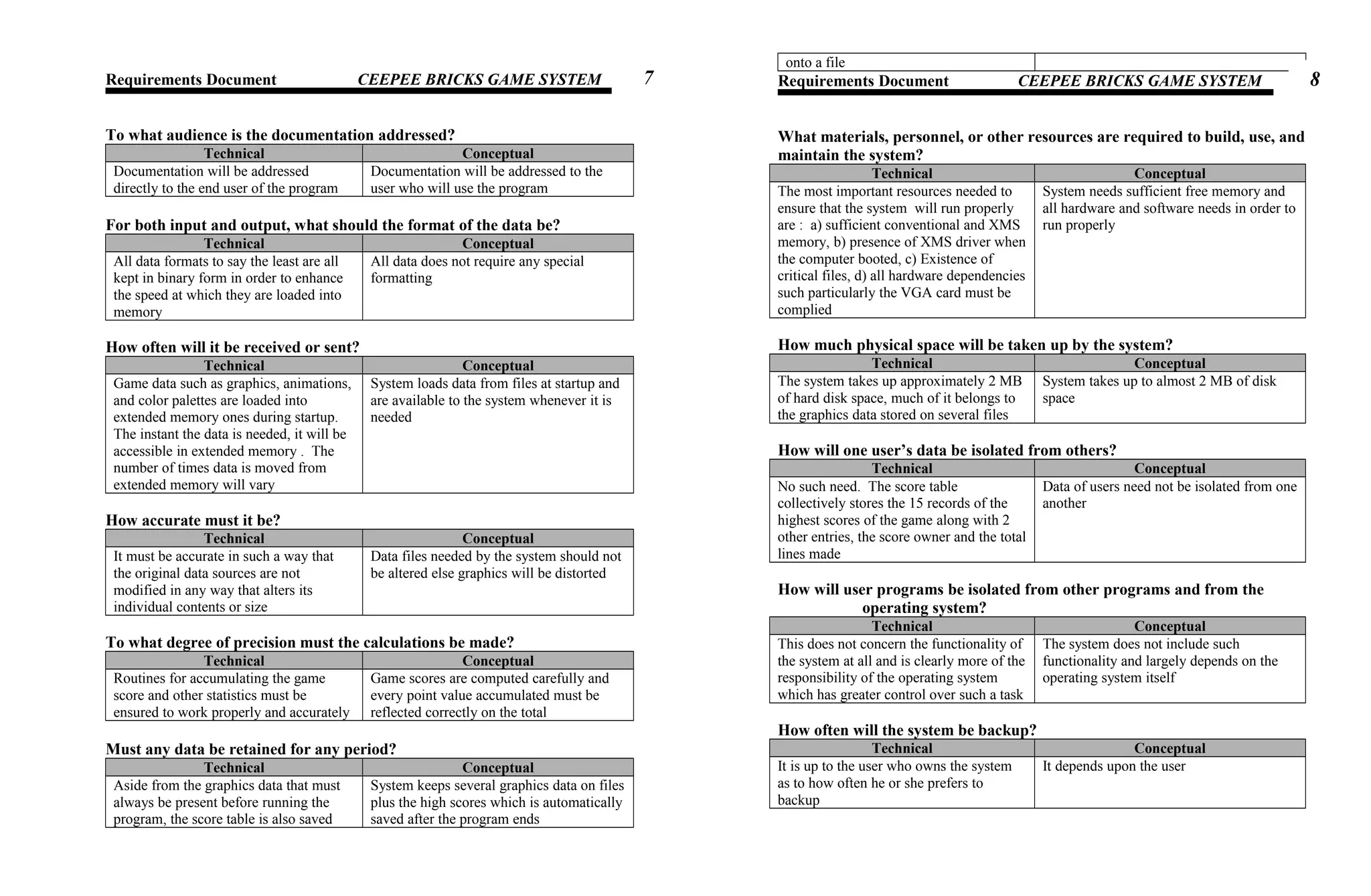
Requirements Document CEEPEE BRICKS GAME SYSTEM
To what audience is the documentation addressed?
Technical Conceptual
Documentation will be addressed
directly to the end user of the program
Documentation will be addressed to the
user who will use the program
For both input and output, what should the format of the data be?
Technical Conceptual
All data formats to say the least are all
kept in binary form in order to enhance
the speed at which they are loaded into
memory
All data does not require any special
formatting
How often will it be received or sent?
Technical Conceptual
Game data such as graphics, animations,
and color palettes are loaded into
extended memory ones during startup.
The instant the data is needed, it will be
accessible in extended memory . The
number of times data is moved from
extended memory will vary
System loads data from files at startup and
are available to the system whenever it is
needed
How accurate must it be?
Technical Conceptual
It must be accurate in such a way that
the original data sources are not
modified in any way that alters its
individual contents or size
Data files needed by the system should not
be altered else graphics will be distorted
To what degree of precision must the calculations be made?
Technical Conceptual
Routines for accumulating the game
score and other statistics must be
ensured to work properly and accurately
Game scores are computed carefully and
every point value accumulated must be
reflected correctly on the total
Must any data be retained for any period?
Technical Conceptual
Aside from the graphics data that must
always be present before running the
program, the score table is also saved
System keeps several graphics data on files
plus the high scores which is automatically
saved after the program ends
onto a file
Requirements Document CEEPEE BRICKS GAME SYSTEM
What materials, personnel, or other resources are required to build, use, and
maintain the system?
Technical Conceptual
The most important resources needed to
ensure that the system will run properly
are : a) sufficient conventional and XMS
memory, b) presence of XMS driver when
the computer booted, c) Existence of
critical files, d) all hardware dependencies
such particularly the VGA card must be
complied
System needs sufficient free memory and
all hardware and software needs in order to
run properly
How much physical space will be taken up by the system?
Technical Conceptual
The system takes up approximately 2 MB
of hard disk space, much of it belongs to
the graphics data stored on several files
System takes up to almost 2 MB of disk
space
How will one user’s data be isolated from others?
Technical Conceptual
No such need. The score table
collectively stores the 15 records of the
highest scores of the game along with 2
other entries, the score owner and the total
lines made
Data of users need not be isolated from one
another
How will user programs be isolated from other programs and from the
operating system?
Technical Conceptual
This does not concern the functionality of
the system at all and is clearly more of the
responsibility of the operating system
which has greater control over such a task
The system does not include such
functionality and largely depends on the
operating system itself
How often will the system be backup?
Technical Conceptual
It is up to the user who owns the system
as to how often he or she prefers to
backup
It depends upon the user
7 8
Requirements Document CEEPEE BRICKS GAME SYSTEM
Must the backup copies be stored at a different location?
Technical Conceptual
It is up to the user where he or she
prefers to store the backup
It depends upon the user
Should precautions be taken against fire or theft?
Technical Conceptual
No No, except the user should be smarter and
careful next time if such events occur
What are the requirements for reliability?
Technical Conceptual
Essentially 3 things :
a. Completeness of data files
b. Availability of hardware and
software requirements
c. Speed of the CPU running it
Data files must be complete, all
requirements must be complied upon, and
a good CPU for running the system
How much the characteristic of the system be demonstrated to others?
Technical Conceptual
The system has only a few
characteristics that requires
demonstrations since most of them are
easy to understand, such as the menus
and playing the actual game
Very few, if not, none at all is necessary
Must the system detect and isolate faults?
Technical Conceptual
Yes. Faults such as insufficient memory
can cause the program to terminate
abnormally and cause the system to hang
sometimes, therefore the system must
check for errors every time it requests
for memory and respond appropriately if
any errors occur
Yes. The system needs to isolate faults in
order not to cause the computer to operate
abnormally
What is the prescribed mean time against failures?
Technical Conceptual
It depends if the user prefers to try
running the program again after it just
No prescribed mean time is necessary,
since running the program is completely
failed the last time under the control and preference of the
user
Requirements Document CEEPEE BRICKS GAME SYSTEM
Is there a maximum time allowed for restarting the system after failure?
Technical Conceptual
None None
How can the system incorporate changes to the design?
Technical Conceptual
Original source code has to be modified
and recompiled
Original source code has to be modified
and recompiled
Will maintenance merely correct errors, or will it also include improving the
system?
Technical Conceptual
Either it can be corrected and improved,
or just corrected or improved
Either both or just or just one
109
Sample Outputs CEEPEE BRICKS GAME SYSTEM
Sample Outputs
1. Intro screen
2. Main menu
Sample Outputs CEEPEE BRICKS GAME SYSTEM
3. Game configuration screen
4. Game environment
29 30
Sample Outputs CEEPEE BRICKS GAME SYSTEM
5. Level bonus screen
6. New High Score screen
Future Enhancement CEEPEE BRICKS GAME SYSTEM
Future Enhancement
As enhancement plans for a future CEEPEE BRICKS version, new
features will be added particularly background music, most probably in
MIDI format, and sampled sound effects. Improved graphics will also be
included, along with new game styles.
31
32
Biography CEEPEE BRICKS GAME SYSTEM
Biography
him up on top of
27

cpbricks project document

  • 1.
    Acknowledgement First of allwe thank our dear Lord for giving us the strength and inspiration to accomplish this project. For the moments when we seemed out of good ideas yet somehow we always found solutions to our problems. We also extend our most sincere appreciation to our very generous instructor, Engr. Cielito Conti Olegario, for giving us all the time we needed, including time we no longer deserved in completing this project, for her guidance to ensure we did things correctly, but more importantly for her patience, tolerance, and understanding with our mistakes. We also acknowledge our parents who supported us with all our needs despite the hard times we gave them, for our classmates who were very kind to share their tips and ideas, and to those individuals, who in one way or another, whether directly or indirectly, influenced the progress of our project. Table of Contents CEEPEE BRICKS GAME SYSTEM Table of Contents Contents Page System Overview 1 Scopes and Limitations 2 System Requirements 3 Degrees of Difficulty 4 Requirements Document 5 Work Breakdown 11 Project Milestones 14 Activity Graph 16 Project Costing 20 Context Diagram 21 Data Flow Diagram 22 HIPO Chart 23 Input-Process Output 24 Sample Outputs 29 Future Enhancements 32 Biography 33 Degrees of Difficulty CEEPEE BRICKS GAME SYSTEM 4
  • 2.
    Degrees of Difficulty CharacteristicsLow Moderate High Remarks Number of functions X System has a relatively high number of functions Novelty of Functions X System uses standard functions plus new ones created specifically to enhance performance Number of users requiring multi-user or concurrent access X Up to two users (players) can play simultaneously Multitasking X No multitasking Interactive vs. Batch access X The user (player) is constantly interacting while the system (game) is in progress Response-time Requirements X System (game) runs in real-time fashion Need for distributed Processing X System runs on only one processor / computer Amount of data stored X Data needed by system can fit on one disk (hard disk) Structure of data X System’s data relationships are moderately complex Accuracy of data X System must maintain a high degree of accuracy in manipulating data Transaction size X System performs only small transactions Remote vs. local X System functions via local access Criticality; tolerance for downtime X System can tolerate downtime regardless of time span Security needs X System has no security features Interaction with other systems X System does not interact with other systems Number of phases of development X Development basically consists of only 3 phases : Planning, coding, and testing and debugging Dependencies of hardware X System requires hardware that is almost certainly available in any modern PC. Sound card is an optional hardware requirement Stability of specification X System requirements are fixed User sophistication X System can be handled by individuals with familiarity w/ computers Developer sophistication X Developers have no prior experience in making video games running in real-time System Overview CEEPEE BRICKS GAME SYSTEM System Overview CEEPEE BRICKS is an arcade-style TETRIS game, featuring full 256-color graphics and the ability to play sounds through either the PC Speaker or a sound card. The game is played using any standard keyboard and can be completely customized according to player’s preference. It has 12 speeds for brick free-falls, and features a bonus screen after every level completed. Every brick dropped scores points. The object is to keep bricks from piling up beyond the limit of the game board. Arranging bricks in such a way that a line is completed does this. A line is simply a row in the game board wherein all its columns are occupied by a brick block. Bricks are composed of several blocks arranged in different fashions. Ones a line is completed it is immediately erased, and the blocks above it are moved down. The number of lines made in a single brick drop varies, from single (one line) to quad (4 lines). A player needs to make at least 30 lines before completing a level. After completion, bonus points are accumulated based on the number of singles, couples, triples, and quads made in the level. The totals are each multiplied with a fixed bonus multiple, for instance the total singles made is multiplied by 150 points, couples by 300 points, triples by 850 points, and quads by 1200 points. Also, simply sweeping the game board clear of any blocks of brick can accumulate a special 10,000-point bonus score. The game also supports a 2-player game mode, which obviously allows two players to play the game simultaneously. Finally, CEEPEE BRICKS features a game option, which selects a particular game style. The CLASSIC game style plays the traditional TETRIS game, or the 7-brick game. The CPBRICKS game style plays with additional 4 new bricks, which adds a new look and feel to the game. The game keeps a record of the 15 highest game scores, with the name of the owner and the total number of lines made. But only scores with values greater than or equal to 50,000 is assured of making it to the high scores, but the main object of the game is to get that top spot. If a player does so a special high score screen is displayed after the game to signify the feat. Game options such as sound source, game sounds, background changes are all configurable aside from the keyboard. The main game menu accepts all available game options, including options for showing and resetting the high score table. Scopes and Limitations CEEPEE BRICKS GAME SYSTEM 1 2
  • 3.
    Scopes and Limitations Dueto the shortness of the period available in completing this project, as well as the limited programming knowledge of the developers, the game lacks some important elements that could have made the game more fun and enjoyable. One of these important elements is music. The game also suffers a significant drop in performance when it runs under Windows environment, since CEEPEE BRICKS is a pure DOS-based program that runs in real- mode graphics mode. Windows also somehow affects the timing mechanisms of the game, which tends to cause the programs performance to vary from satisfactory to unplayable. Also, it does not support all kinds of sound cards. It is designed to recognize only Adlib- compatible or Sound Blaster-compatible sound cards, since these were the only sound cards available for testing by the developers. The graphics data are only kept as is, no compressions or whatever, therefore the package requires almost 2 MB of disk space. Lack of compression also makes displaying graphics rather slow. CEEPEE BRICKS also hasn’t been fully tested on every available PCs, and the developers can only assume that this program runs best on a 486DX4 with a VGA card. System Requirements CEEPEE BRICKS GAME SYSTEM System Requirements CPU - at least an 80286 or higher. For optimum performance, an 80486 or higher is recommended OPERATING SYSTEM - MS-DOS 3.0 or higher, plus an XMM (eXtended Memory Manager) version 3.0 or later. HIMEM.SYS is the XMM that comes with MS-DOS. MEMORY - at least 256 kb of conventional memory and at least 2 MB of extended memory DISK SPACE - at least 2 MB VIDEO CARD - VGA or SVGA video card SOUND CARD (optional) - Adlib-compatible or Sound Blaster compatible Work Breakdown CEEPEE BRICKS GAME SYSTEM3 11
  • 4.
    Work Breakdown Estimated Time Phase1 : Determining and analyzing initial requirements to build the game Step 1 : Studying game mechanics 1 day, Aug. 14 Activity 1.1 : Outlining game rules and events 2 hrs., Aug. 14 Activity 1.2 : Analyzing game scoring system 2 hrs., Aug. 14 Activity 1.3 : Analyzing brick patterns 2 hrs., Aug. 14 Activity 1.4 : Determining player commands 2 hrs., Aug. 14 Step 2 : Gathering information and source codes to design and build game features 3 days, Aug. 16-18 Activity 2.1 : Getting information and source code for VGA card programming 1 day, Aug. 16 Activity 2.2 : Getting source codes for keyboard and system timer programming 1 day, Aug. 16 Activity 2.3 : Getting information on using extended memory 1 day, Aug. 17 Activity 2.4 : Getting information on programming sound card 1 day, Aug. 18 Step 3 : Creating and designing time-based routines 3 days, Aug. 19-21 Activity 3.1 : Designing and creating routine for playing background sounds 1 day, Aug. 19 Activity 3.2 : Designing and creating routine for timing key presses 1 day, Aug. 20 Activity 3.3 : Designing and creating routine for enabling real-time animations 1 day, Aug. 21 Phase 2 : Designing game system Step 1 : Designing game engine and other game elements 7 days, Aug. 22-28 Activity 1.1 : Designing game board 2 days, Aug. 22-23 Activity 1.2 : Designing brick pieces 1 day , Aug. 24 Activity 1.3 : Designing game events 2 days, Aug. 25-26 Activity 1.4 : Designing timing mechanism of brick free-fall 1 day, Aug. 27 Activity 1.5 : Designing controls on the brick pieces 1 day, Aug. 28 Work Breakdown CEEPEE BRICKS GAME SYSTEM Estimated Time Step 2 : Designing sound and graphics features 6 days, Aug. 22-27 Activity 2.1 : Designing sound effects 2 days, Aug. 22-23 Activity 2.2 : Designing the graphic blocks 1 day, Aug. 24 Activity 2.3 : Designing background bitmaps 2 days, Aug. 25-26 Activity 2.4 : Designing the graphic animations 1 day, Aug. 27 Step 3 : Designing the main game menu 4 days, Aug. 28-31 Activity 3.1 : Designing routines for creating screen boxes 1 day, Aug. 28 Activity 3.2 : Designing routines for switching menu selections 1 day, Aug. 28 Activity 3.3 : Designing the keyboard configuration module 2 days, Aug. 29-30 Activity 3.4 : Designing menu and submenu screens 1 day, Aug. 31 Step 4 : Designing the score table 1 day, Sept. 1 Activity 4.1 : Designing data structure of score table 1 hr., Sept. 1 Activity 4.2 : Designing functions for loading and saving score table from and to a file 2 hrs., Sept. 1 Activity 4.3 : Designing function for inserting entries into score table 3 hrs., Sept. 1 Step 5 : Designing other miscellaneous functions 3 days, Sept. 2-4 Activity 5.1 : Designing game initialization and termination 1 day , Sept.2 Activity 5.2 : Designing the 2-player mode 2 days, Sept. 3-4 Phase 3 : Program coding Step 1 : Coding the main game engine 5 days, Sept. 5-9 Activity 1.1 : Coding a prototype in text mode 1 day, Sept. 5 Activity 1.2 : Coding the control routines 1 day, Sept. 6 Activity 1.3 : Coding the game events 1 day, Sept. 7 Activity 1.4 : Implementing sound events 1 day, Sept. 8 Activity 1.5 : Implementing the two player game mode 1 day, Sept. 9 1 day, Sept. 9 Step 2 : Coding miscellaneous game features 5 days, Sept.10-14 Activity 2.1 : Coding game statistics functions 1 day, Sept. 10 Activity 2.2 : Coding score table structure and functions 1 day, Sept. 11 Activity 2.3 : Coding game initializing and terminating functions 1 day, Sept. 12 Activity 2.4 : Coding main menu 1 day, Sept. 13 Activity 2.5 : Coding submenu modules 1 day, Sept. 14 12
  • 5.
    Work Breakdown CEEPEEBRICKS GAME SYSTEM Estimated Time Step 3 : Porting to graphics 2 day, Sept. 15-16 Activity 3.1 : Replacing text mode functions with the graphics functions 3 hrs., Sept. 15 Activity 3.2 : Implementing graphical bricks and background bitmaps 2 hrs., Sept. 15 Activity 3.3 : Implementing animation events 1 day, Sept. 16 Phase 4 : Testing individual game modules Step 1 : Testing game engine 2 days, Sept. 17-18 Activity 1.1 : Testing controls 2 day, Sept. 17-18 Activity 1.2 : Testing game sounds and graphics 2 day, Sept. 17-18 Step 2 : Testing game events and other functions 5 days, Sept. 17-21 Activity 2.1 : Testing “Lines made” event 2 hrs., Sept. 17 Activity 2.2 : Testing “New level” event 2 hrs., Sept. 17 Activity 2.3 : Testing statistics functions 2 hrs., Sept. 18 Activity 2.4 : Testing bonus events 2 hrs., Sept. 18 Activity 2.5 : Testing “Game over” event 1 day, Sept. 19 Activity 2.6 : Testing “New High Score” event 1 day, Sept. 20 Activity 2.7 : Testing game pause and reset 1 day, Sept. 21 Step 3 : Testing game menu 4 days, Sept. 22-25 Activity 3.1 : Testing game initialization and termination 4 days, Sept. 22-25 Activity 3.1 : Testing main menu options 4 days, Sept. 22-25 Activity 3.2 : Testing game option switches 4 days, Sept. 22-25 Activity 3.3 : Testing key configure module 4 days, Sept. 22-25 Phase 5 : Testing, debugging, and correcting program Step 1 : Running and evaluating game 8 days, Sept. 26-Oct. 3 Activity 1.1 : Testing one-player game mode 4 days, Sept. 26-29 Activity 1.2 : Testing two-player game mode 4 days, Sept. 30-Oct.3 Step 2 : Correcting errors found 5 days, Oct. 4-8 Phase 6 : System delivery Step 1 : Creating necessary documentation 3 days, Oct. 9-11 Activity 1.1 : Documenting source code 2 days, Oct. 9-10 Activity 1.2 : Creating game manual 3 days, Oct. 9-11 Step 2 : Create installation module 1 day, Oct. 12 Step 3 : Deliver the game system 1 day, Oct. 13 Project Milestones CEEPEE BRICKS GAME SYSTEM Project Milestones 1.1 : Studied game mechanics 1.2.1 : Collected information and source code on VGA card programming 1.2.2 : Collected source codes for keyboard and system timer programming 1.2.3 : Collected information on using extended memory 1.2.4 : Collected information on programming sound card 1.3.1 : Designed and created routine for playing background sounds 1.3.2 : Designed and created routine for timing key presses 1.3.3 : Designed and created routine for enabling real-time animations 2.1.1 : Designed game board 2.1.2 : Designed brick pieces 2.1.3 : Designed game events 2.1.4 : Designed timing mechanism of brick free-fall 2.1.5 : Designed controls on the brick pieces 2.2.1 : Designed sound effects 2.2.2 : Designed the graphic blocks 2.2.3 : Designed background bitmaps 2.2.4 : Designed graphic animations 2.3.1 : Designed routines for creating screen boxes 2.3.2 : Designed routines for switching menu selections 2.3.3 : Designed keyboard configuration module 2.3.4 : Designed menu and submenu screens 2.4 : Designed score table 2.5.1 : Designed game initialization and termination 2.5.2 : Designed 2-player mode 3.1.1 : Coded prototype in text mode 3.1.2 : Coded control routines 3.1.3 : Coded game events 3.1.4 : Implemented sound events 3.1.5 : Implemented two player game mode 3.2.1 : Coded game statistics functions 3.2.2 : Coded score table structure and functions 3.2.3 : Coded game initializing and terminating functions 3.2.4 : Coded main menu 3.2.5 : Coded submenu modules 3.3.1 : Replaced text mode functions with the graphics functions 3.3.2 : Implemented graphical bricks and background bitmaps 3.3.3 : Implemented animation events 4.1.1 : Tested controls 4.1.2 : Tested game sounds and graphics 4.2 : Tested game events and other functions 4.3.1 : Tested main menu options 13 14
  • 6.
    Project Milestones CEEPEEBRICKS GAME SYSTEM 4.3.2 : Tested game option switches 4.3.3 : Tested key configure module 5.1.1 : Tested one-player game mode 5.1.2 : Tested two-player game mode 5.2 : Corrected errors found 6.1.1 : Documented source code 6.1.2 : Created game manual 6.2 : Created installation module 6.3 : Delivered the game system Activity Graph CEEPEE BRICKS GAME SYSTEM Activity Graph 15 Design animations Design background bitmaps Design graphic blocks Design controls Design sound effects Design timing mechanism Design game events Design brick pieces Design game board Design & create animation routines Design & create key routines Design & create background sound routines Get info on sound card programming Get info on using extended memory Get code and info on keyboard & timer Get code and info on VGA card Study game mechanics Start 1.1 1.2.1 1.2.2 1.2.3 1.2.4 1.3.1 1.3.2 1.3.3 2.1.1 2.2.1 2.1.2 2.1.3 2.2.2 2.1.3 2.1.4 2.14 2.1.5 A 16
  • 7.
    Activity Graph CEEPEEBRICKS GAME SYSTEM Activity Graph CEEPEE BRICKS GAME SYSTEM Correct errors found Test 2 player mode Test 1 player mode Implement animations Implement graphic blocks and bitmaps Replace text functions with graphics functions Code submenu modules Code main menu Code initializing and terminating functions Test key config moduleTest switches Test menu options Test initialize & terminate functions Test controls Test game events Test graphics & sounds Code score table Code game statistics functions Implement 2 player mode Implement sound events Code game events Code control routines Code prototype Design 2 player mode Design game initialization & termination Design score table Design menu & submenu screens Design key config module Design menu switch routines Design screen box routines A 2.3.1 2.3.2 2.3.3 2.3.4 2.4 2.5.1 2.5.2 3.1.1 3.1.2 3.1.3 3.1.4 3.1.5 3.2.1 B B 3.2.2 3.2.3 3.2.4 3.2.5 3.3.1 3.3.2 3.3.3 4.1.1 4.1.2 4.2 4.3.1 4.3.2 4.3.3 4.3.4 5.1.1 5.1.2 5.2 DC 17 18
  • 8.
    Activity Graph CEEPEEBRICKS GAME SYSTEM Input-Process Output CEEPEE BRICKS GAME SYSTEM Input-Process Output 1.0.1.1 Check Files Input Process Output From hard disk : File Files.lst Open Files.lst If Files.lst not found Show error message Exit program End If While not EOF Files.lst Read FileName from Files.lst Check for file named FileName If (FileName) does not exist Show error message Exit Program End If End While Close Files.lst Error message “Files.lst missing” or “Critical file missing” 1.0.1.2 Check XMS Input Process Output From hard disk: Files.lst Bitmap files (.BIN files) If XMS driver not loaded or Error allocating XMS memory Print error message Exit program Else Open Files.lst While not EOF Files.lst Read FileName from Files.lst Open file FileName Read contents of file to Buffer Load Buffer to XMS memory Close file FileName End While Close Files.lst Error Message “XMS driver not loaded” or “Error allocating XMS memory” Message “XMS driver loaded” “Loading bitmaps” Deliver system Create installation module Create manualDocument source code C D 6.1.26.1.1 6.2 6.3 EN D 19 24
  • 9.
    Input-Process Output CEEPEEBRICKS GAME SYSTEM 1.0.1.3 Initialize Timer, Keyboard, Sound Card Input Process Output No inputs Initialize keyboard: Save original KB handler Replace handler w/ new handler Initialize timer: Save original timer handler Replace handler w/ new Handler Initialize sound card: If sound card detected Initialize channels Message “Adlib-compatible sound card detected” 1.0.2.1 Select Game Style Input Process Output From terminal : Key press (switch) If Game Style == CLASSIC NumBricks = 7 Else If Game Style == CPBRICKS NumBricks = 11 Highlight game style 1.0.2.2 Select Sound Source Input Process Output From terminal: Key press (switch) If SndSource == PC SPEAKER Sound card OFF Else If SndSource == SOUND CARD PC Speaker OFF Highlight sound source 1.0.2.3 Select Sound Option Input Process Output From terminal: Key press (switch) If Sound == ON Sound effects ON Else If Sound == OFF Sound effects OFF Highlight sound option Input-Process Output CEEPEE BRICKS GAME SYSTEM 1.0.2.4 Select Graphics Option Input Process Output From terminal: Key press (switch) If CHANGE BKGRND == ON NumBitmaps = MAXBIMAPS Else If CHANGE BKGRND == OFF NumBitmaps = 1 Highlight graphics option 1.0.2.5 Configure Keyboard Input Process Output From terminal: Key inputs If Player 1 Configure Player 1 keys If Player 2 Configure Player 2 keys Configure keys : While (True) Get keys If (key == ESC) Exit Configure keys Get MoveLeft key Check Key Get MoveRight key Check Key Get MoveDown key Check Key Get DropBrick key Check Key Get RotateLeft key Check Key Get RotateRight key Check Key Get Pause key Check Key End While Check key: If key already used get key again Display keys 25 26
  • 10.
    Input-Process Output CEEPEEBRICKS GAME SYSTEM 1.0.3 Show Score Table Input Process Output From terminal: Key press (menu) If Score Table empty Show empty Else For reccount = 1 to NumItems Show Score, Lines, Owner Show score table contents 1.0.4 Reset Score Table Input Process Output From terminal: Key press (menu) If Score Table empty return Else Reset Score Table values to 0 Set HISCORE == DEFHISCORE NumItems = 0 Message “Score table reset” 1.0.5.1.1 Begin Game Input Process Output From memory: Game options Graphics data Animation data Sound data From terminal: Key inputs While not Game Over While Brick not collide bottom or block free-fall brick If MoveLeft move brick left If MoveRight move brick right If MoveDown push brick If DropBrick brick collide bottom or block if BrickRotate rotate brick if Paused pause game End While CheckLinesMade If (NewLevel) show BonusScreen Spawn New brick Continue End While If (Reset Game) repeat game Graphic game board Animations Sound effects Player Name, Score, Level, Lines made Bonus Screen Message “PAUSE” Message “GAME OVER” Input-Process Output CEEPEE BRICKS GAME SYSTEM 1.0.6.1 Deinitialize Game Input Process Output From terminal: Key press (menu) Restore Keyboard Handler Restore Timer Handler Free memory Clear sound card channels Clear PC Speaker sounds Save score table 27 28
  • 11.
    Project Costing CEEPEEBRICKS GAME SYSTEM Project Costing I. Facilities Cost Item Description No. of units Cost Total PC Main hardware requirement 1 P 19 500 P 19 500 8 MB RAM Additional RAM space 1 P 600 P 600 1.7 GB Maxtor Hard Disk Additional hard disk space 1 P 3 700 P 3 700 16-bit Avance Logic Sound Card (SB Pro compatible) Hardware for developing & testing sound system 1 P 420 P 420 MT-60 Twister Dual Speakers Sound card speakers 1 P 400 P 400 Canon BJ-210 SP Printer Printing documents 1 P 6 420 P 6 420 TOTAL : P 31 040 II. fPeople/Labor cost Position Salary/hr Total hrs. Salary System Analyst / Planner P 25 184 P 4 600 Assistant Planner P 20 184 P 3 680 Graphics and sound designer P 18 24 P 432 Programmer P 20 120 P 2 400 Librarian P 15 24 P 360 TOTAL : P 11 472 III. Tools and Methods Items Units Quantity Total Bond Paper ream 1 P 150 Ink bottle 2 P 28 Paper Binding bindings 2 P 200 Photo scanning scans 1 P 30 TOTAL : P 208 TOTAL COST : P 42 920 In Partial Fulfillment of The Requirements in CEST 153 CEEPEE BRICKS GAME SYSTEM Submitted by Armando M. So III Carmelo Umandal Gapur Julkanain Submitted to Engr. Cielito Conti Olegario Date November 27, 1999 20
  • 12.
    Requirements Document CEEPEEBRICKS GAME SYSTEM Requirements Document CEEPEE BRICKS GAME SYSTEM Requirements Document Where is the equipment to function? Technical Conceptual The system will function independent of the actual physical location of the computer The system will function wherever a computer is available Is there one location or several? Technical Conceptual System runs on a local computer System runs only on one computer Are there any environment restrictions such as humidity, temperature, or magnetic interference? Technical Conceptual The system will function independent of factors that may affect the actual hardware for running it System is not restricted by such environmental factors Is the input coming from one or more systems? Technical Conceptual System is not required to be designed to accept inputs from other systems System runs independently Is the output going to one or more systems? Technical Conceptual System is not required to be designed to direct outputs to other systems System runs independently Is there a prescribed medium that the data must be used? Technical Conceptual Data that are directly loaded into memory are left in binary form to optimize loading speed and requires no need for any type conversion Data such as graphics are stored and loaded as is What will the system do? Technical Conceptual The system lets the user play the TETRIS game on the PC, using the PCs ability to work on graphics and sounds as well as use the keyboard for controls System plays the TETRIS video game, and saves the top 15 highest scores of the game When will the system do it? Technical Conceptual The system will do it the moment the user prefers to it When someone wants to play TETRIS How and when can the system be changed or enhanced? Technical Conceptual System can be changed or enhanced by modifying the original source code by either improving some routines or adding new ones, perhaps when the developers are ready to implement the current non- existing features such as music, higher video resolution, color palette greater than 256, and better support in using the sound card System can be changed or enhanced by adding music and improving graphics Are there constraints on execution speed, response time, or throughput? Technical Conceptual Execution speed is constrained by factors such as running in V86 mode under Windows which affects both the timing and graphical mechanisms of the program, And also when running under on untested processors lower than 486 Game slows down when ran under Windows although performance may vary, and it was tested to run best on 486 computers or higher How much documentation is required? Technical Conceptual There is very little documentation required with regards to the functionality of the system The system requires very little documentation regarding how to use and run it 5 6
  • 13.
    Requirements Document CEEPEEBRICKS GAME SYSTEM To what audience is the documentation addressed? Technical Conceptual Documentation will be addressed directly to the end user of the program Documentation will be addressed to the user who will use the program For both input and output, what should the format of the data be? Technical Conceptual All data formats to say the least are all kept in binary form in order to enhance the speed at which they are loaded into memory All data does not require any special formatting How often will it be received or sent? Technical Conceptual Game data such as graphics, animations, and color palettes are loaded into extended memory ones during startup. The instant the data is needed, it will be accessible in extended memory . The number of times data is moved from extended memory will vary System loads data from files at startup and are available to the system whenever it is needed How accurate must it be? Technical Conceptual It must be accurate in such a way that the original data sources are not modified in any way that alters its individual contents or size Data files needed by the system should not be altered else graphics will be distorted To what degree of precision must the calculations be made? Technical Conceptual Routines for accumulating the game score and other statistics must be ensured to work properly and accurately Game scores are computed carefully and every point value accumulated must be reflected correctly on the total Must any data be retained for any period? Technical Conceptual Aside from the graphics data that must always be present before running the program, the score table is also saved System keeps several graphics data on files plus the high scores which is automatically saved after the program ends onto a file Requirements Document CEEPEE BRICKS GAME SYSTEM What materials, personnel, or other resources are required to build, use, and maintain the system? Technical Conceptual The most important resources needed to ensure that the system will run properly are : a) sufficient conventional and XMS memory, b) presence of XMS driver when the computer booted, c) Existence of critical files, d) all hardware dependencies such particularly the VGA card must be complied System needs sufficient free memory and all hardware and software needs in order to run properly How much physical space will be taken up by the system? Technical Conceptual The system takes up approximately 2 MB of hard disk space, much of it belongs to the graphics data stored on several files System takes up to almost 2 MB of disk space How will one user’s data be isolated from others? Technical Conceptual No such need. The score table collectively stores the 15 records of the highest scores of the game along with 2 other entries, the score owner and the total lines made Data of users need not be isolated from one another How will user programs be isolated from other programs and from the operating system? Technical Conceptual This does not concern the functionality of the system at all and is clearly more of the responsibility of the operating system which has greater control over such a task The system does not include such functionality and largely depends on the operating system itself How often will the system be backup? Technical Conceptual It is up to the user who owns the system as to how often he or she prefers to backup It depends upon the user 7 8
  • 14.
    Requirements Document CEEPEEBRICKS GAME SYSTEM Must the backup copies be stored at a different location? Technical Conceptual It is up to the user where he or she prefers to store the backup It depends upon the user Should precautions be taken against fire or theft? Technical Conceptual No No, except the user should be smarter and careful next time if such events occur What are the requirements for reliability? Technical Conceptual Essentially 3 things : a. Completeness of data files b. Availability of hardware and software requirements c. Speed of the CPU running it Data files must be complete, all requirements must be complied upon, and a good CPU for running the system How much the characteristic of the system be demonstrated to others? Technical Conceptual The system has only a few characteristics that requires demonstrations since most of them are easy to understand, such as the menus and playing the actual game Very few, if not, none at all is necessary Must the system detect and isolate faults? Technical Conceptual Yes. Faults such as insufficient memory can cause the program to terminate abnormally and cause the system to hang sometimes, therefore the system must check for errors every time it requests for memory and respond appropriately if any errors occur Yes. The system needs to isolate faults in order not to cause the computer to operate abnormally What is the prescribed mean time against failures? Technical Conceptual It depends if the user prefers to try running the program again after it just No prescribed mean time is necessary, since running the program is completely failed the last time under the control and preference of the user Requirements Document CEEPEE BRICKS GAME SYSTEM Is there a maximum time allowed for restarting the system after failure? Technical Conceptual None None How can the system incorporate changes to the design? Technical Conceptual Original source code has to be modified and recompiled Original source code has to be modified and recompiled Will maintenance merely correct errors, or will it also include improving the system? Technical Conceptual Either it can be corrected and improved, or just corrected or improved Either both or just or just one 109
  • 15.
    Sample Outputs CEEPEEBRICKS GAME SYSTEM Sample Outputs 1. Intro screen 2. Main menu Sample Outputs CEEPEE BRICKS GAME SYSTEM 3. Game configuration screen 4. Game environment 29 30
  • 16.
    Sample Outputs CEEPEEBRICKS GAME SYSTEM 5. Level bonus screen 6. New High Score screen Future Enhancement CEEPEE BRICKS GAME SYSTEM Future Enhancement As enhancement plans for a future CEEPEE BRICKS version, new features will be added particularly background music, most probably in MIDI format, and sampled sound effects. Improved graphics will also be included, along with new game styles. 31 32
  • 17.
    Biography CEEPEE BRICKSGAME SYSTEM Biography him up on top of 27