Eliminating Texture
Waste: Borderless Ptex
John McDonald, NVIDIA
Corporation
NVIDIA Corporation © 2013
Memory Consumption
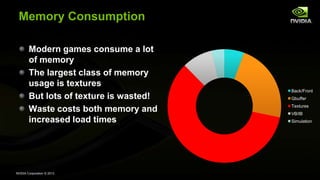
Modern games consume a lot
of memory
The largest class of memory
usage is textures
But lots of texture is wasted!
Waste costs both memory and
increased load times
Back/Front
Gbuffer
Textures
VB/IB
Simulation
NVIDIA Corporation © 2013
Wasted?!
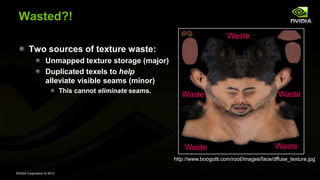
Two sources of texture waste:
Unmapped texture storage (major)
Duplicated texels to help
alleviate visible seams (minor)
This cannot eliminate seams.
http://www.boogotti.com/root/images/face/dffuse_texture.jpg
Waste Waste
Waste
Waste
Waste
NVIDIA Corporation © 2013
Wasted?!
Two sources of texture waste:
Unmapped texture storage (major)
Duplicated texels to help
alleviate visible seams (minor)
This cannot eliminate seams.
http://www.boogotti.com/root/images/face/dffuse_texture.jpg
NVIDIA Corporation © 2013
How much waste are we talking?
Nearly 60% of memory usage in a modern game* is texture usage
And up to 30% of that is waste.
That’s 18% of your total application footprint.
NVIDIA Corporation © 2013
Memory Waste
18% of your memory is useless.
18% of your load time is wasted.
NVIDIA Corporation © 2013
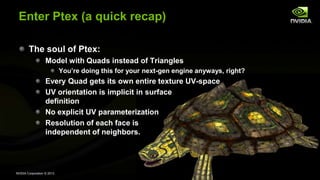
Enter Ptex (a quick recap)
The soul of Ptex:
Model with Quads instead of Triangles
You’re doing this for your next-gen engine anyways, right?
Every Quad gets its own entire texture UV-space
UV orientation is implicit in surface
definition
No explicit UV parameterization
Resolution of each face is
independent of neighbors.
NVIDIA Corporation © 2013
Ptex (cont’d)
Invented by Brent Burley at Walt Disney Animation Studios
Used in every animated film at Disney since 2007
6 features and all shorts, plus everything in
production now and for the foreseeable
future
Used on ~100% of surfaces
Rapid adoption in DCC tools
Widespread usage throughout
the film industry
NVIDIA Corporation © 2013
Ptex benefits
No UV unwraps
Allow artists to work at any resolution they want
Perform an offline pass on assets to decide what to ship for each
platform based on capabilities
Ship a texture pack later for tail revenue
Reduce your load times. And your memory footprint. Improve
your visual fidelity.
Reduce the cost of production’s long pole—art.
NVIDIA Corporation © 2013
Demo
Demo is running on a Titan.
Sorry, it’s what we have at the show. 
I’ve run on 430-680—perf scales linearly with Texture/FB.
Could run on any Dx11 capable GPU.
Could also run on Dx10 capable GPUs with small adaptations.
OpenGL 4—no vendor-specific extensions.
NVIDIA Corporation © 2013
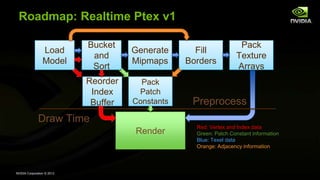
Roadmap: Realtime Ptex v1
Load
Model
Render
Preprocess
Draw Time
Bucket
and
Sort
Generate
Mipmaps
Fill
Borders
Pack
Texture
Arrays
Reorder
Index
Buffer
Pack
Patch
Constants
Red: Vertex and Index data
Green: Patch Constant information
Blue: Texel data
Orange: Adjacency information
NVIDIA Corporation © 2013
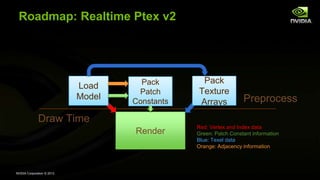
Roadmap: Realtime Ptex v2
Load
Model
Render
Preprocess
Draw Time
Pack
Texture
Arrays
Pack
Patch
Constants
Red: Vertex and Index data
Green: Patch Constant information
Blue: Texel data
Orange: Adjacency information
NVIDIA Corporation © 2013
Realtime Ptex v2
Instead of copying texels into a border region, just go look at
them.
Use clamp to edge (border color), with a border color of (0,0,0,0)
This makes those lookups fast.
Also lets you know how close to the edge you are
We’ll need to transform our UVs into their UV space
And accumulate the results
Waste factor? 0*.
NVIDIA Corporation © 2013
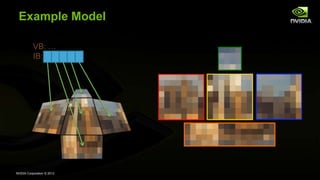
Example Model
VB: …
IB:
NVIDIA Corporation © 2013
Load Model
Vertex Data
Any geometry arranged as a quad-based mesh
Example: Wavefront OBJ
Patch Texture
Power-of-two texture images
Adjacency Information
4 Neighbors of each quad patch
Easily load texture and adjacency with OSS library available from
http://ptex.us/
NVIDIA Corporation © 2013
Texture Arrays
Like 3D / Volume Textures, except:
No filtering between 2D slices
Only X and Y decrease with mipmap level (Z doesn’t)
Z indexed by integer index, not [0,1]
E.g. (0.5, 0.5, 4) would be (0.5, 0.5) from the 5th slice
API Support
Direct3D 10+: Texture2DArray
OpenGL 3.0+: GL_TEXTURE_2D_ARRAY
NVIDIA Corporation © 2013
Arrays of Texture Arrays
Both GLSL and HLSL* support arrays of TextureArrays.
This allows for stupidly powerful abuse of texturing.
Texture2DArray albedo[32]; // D3D
uniform sampler2DArray albedo[32]; // OpenGL
* HLSL support requires a little codegen—but it’s entirely a compile-time
exercise, no runtime impact.
NVIDIA Corporation © 2013
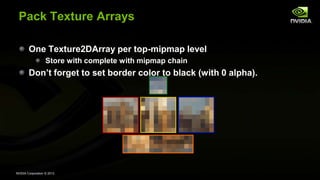
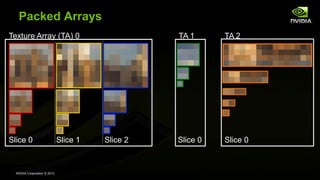
Pack Texture Arrays
One Texture2DArray per top-mipmap level
Store with complete with mipmap chain
Don’t forget to set border color to black (with 0 alpha).
NVIDIA Corporation © 2013
Packed Arrays
Texture Array (TA) 0 TA 1 TA 2
Slice 0 Slice 1 Slice 2 Slice 0 Slice 0
NVIDIA Corporation © 2013
Pack Patch Constants
Create a constant-buffer indexed by
PrimitiveID. Each entry contains:
Your Array Index and Slice in the
Texture2DArrays
Your four neighbors across the edges
Each neighbor’s UV orientation
(Again, can be prepared at baking time)
If rendering too many primitives
to fit into a constant buffer,
you can use Structured Buffers / SSBO for storage.
struct PTexParameters {
ushort usNgbrIndex[4];
ushort usNgbrXform[4];
ushort usTexIndex;
ushort usTexSlice;
};
uniform ptxDiffuseUBO {
PTexParameters ptxDiffuse[PRIMS];
};
NVIDIA Corporation © 2013
Rendering time (CPU)
Bind Texture2DArrays
(If you’re in GL, consider Bindless)
Select Shader
Setup Constants
NVIDIA Corporation © 2013
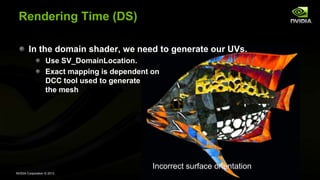
Rendering Time (DS)
In the domain shader, we need to generate our UVs.
Use SV_DomainLocation.
Exact mapping is dependent on
DCC tool used to generate
the mesh
Incorrect surface orientation
NVIDIA Corporation © 2013
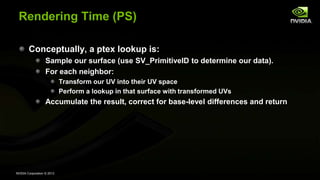
Rendering Time (PS)
Conceptually, a ptex lookup is:
Sample our surface (use SV_PrimitiveID to determine our data).
For each neighbor:
Transform our UV into their UV space
Perform a lookup in that surface with transformed UVs
Accumulate the result, correct for base-level differences and return
NVIDIA Corporation © 2013
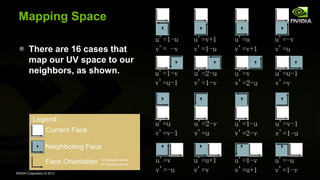
Mapping Space
There are 16 cases that
map our UV space to our
neighbors, as shown.
NVIDIA Corporation © 2013
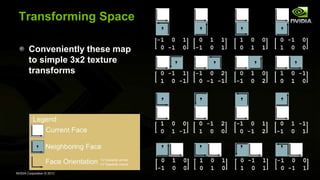
Transforming Space
Conveniently these map
to simple 3x2 texture
transforms
NVIDIA Corporation © 2013
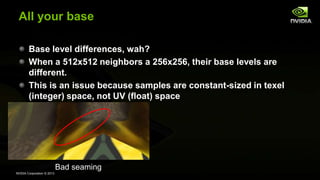
Bad seaming
All your base
Base level differences, wah?
When a 512x512 neighbors a 256x256, their base levels are
different.
This is an issue because samples are constant-sized in texel
(integer) space, not UV (float) space
NVIDIA Corporation © 2013
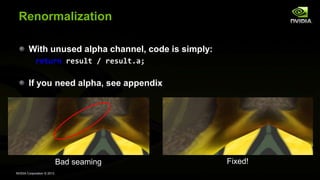
Renormalization
With unused alpha channel, code is simply:
return result / result.a;
If you need alpha, see appendix
Bad seaming Fixed!
NVIDIA Corporation © 2013
0% Waste?
Okay, not quite 0.
Need a global set of textures that match ptex resolutions used.
“Standard Candles”
But they are one-channel, and can be massively compressed (4 bits
per pixel)
<5 megs of overhead, regardless of texture footprint
For actual games, more like 1K of overhead.
Could be eliminated, but at the cost of some shader complexity.
Not needed for:
Textures without alpha
Textures used for Normal Maps
Textures less than 32 bytes per pixel
NVIDIA Corporation © 2013
A brief interlude on the expense of retrieving
texels from textured surfaces
Texture lookups by themselves are not expensive.
There are fundamentally two types of lookups:
Independent reads
Dependent reads
Independent reads can be pipelined.
The first lookup “costs” ~150 clocks
The second costs ~5 clocks.
Dependent reads must wait for previous results
The first lookup costs ~150 clocks
The second costs ~150 clocks.
Try to have no more than 2-3 “levels” of dependent reads in a single
shader
NVIDIA Corporation © 2013
Performance Impact
In this demo, Ptex costs < 30% versus no texturing at all
Costs < 20% compared to repeat texturing.
~15% versus an UV-unwrapped mesh
NVIDIA Corporation © 2013
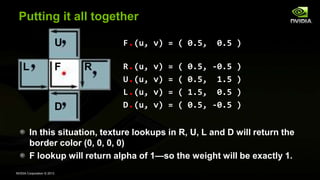
Putting it all together
F
U
D
RL
F.(u, v) = ( 0.5, 0.5 )
R.(u, v) = ( 0.5, -0.5 )
U.(u, v) = ( 0.5, 1.5 )
L.(u, v) = ( 1.5, 0.5 )
D.(u, v) = ( 0.5, -0.5 )
In this situation, texture lookups in R, U, L and D will return the
border color (0, 0, 0, 0)
F lookup will return alpha of 1—so the weight will be exactly 1.
NVIDIA Corporation © 2013
Putting it all together
F
U
D
RL
F.(u, v) = ( 1.0, 0.5 )
R.(u, v) = ( 0.5, 0.0 )
U.(u, v) = ( 0.0, 1.5 )
L.(u, v) = ( 2.0, 0.5 )
D.(u, v) = ( 0.0, -0.5 )
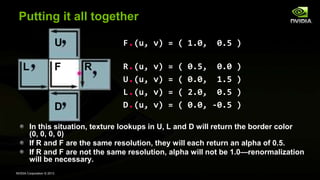
In this situation, texture lookups in U, L and D will return the border color
(0, 0, 0, 0)
If R and F are the same resolution, they will each return an alpha of 0.5.
If R and F are not the same resolution, alpha will not be 1.0—renormalization
will be necessary.
NVIDIA Corporation © 2013
Questions?
jmcdonald at nvidia dot com
Demo Thanks: Johnny Costello and Timothy Lottes!
NVIDIA Corporation © 2013
In the demo
Ptex
AA
Vignetting
Lighting
Spectral Simulation (7 data points)
Volumetric Caustics (128 taps per pixel)

Borderless Per Face Texture Mapping

  • 1.
    Eliminating Texture Waste: BorderlessPtex John McDonald, NVIDIA Corporation
  • 2.
    NVIDIA Corporation ©2013 Memory Consumption Modern games consume a lot of memory The largest class of memory usage is textures But lots of texture is wasted! Waste costs both memory and increased load times Back/Front Gbuffer Textures VB/IB Simulation
  • 3.
    NVIDIA Corporation ©2013 Wasted?! Two sources of texture waste: Unmapped texture storage (major) Duplicated texels to help alleviate visible seams (minor) This cannot eliminate seams. http://www.boogotti.com/root/images/face/dffuse_texture.jpg Waste Waste Waste Waste Waste
  • 4.
    NVIDIA Corporation ©2013 Wasted?! Two sources of texture waste: Unmapped texture storage (major) Duplicated texels to help alleviate visible seams (minor) This cannot eliminate seams. http://www.boogotti.com/root/images/face/dffuse_texture.jpg
  • 5.
    NVIDIA Corporation ©2013 How much waste are we talking? Nearly 60% of memory usage in a modern game* is texture usage And up to 30% of that is waste. That’s 18% of your total application footprint.
  • 6.
    NVIDIA Corporation ©2013 Memory Waste 18% of your memory is useless. 18% of your load time is wasted.
  • 7.
    NVIDIA Corporation ©2013 Enter Ptex (a quick recap) The soul of Ptex: Model with Quads instead of Triangles You’re doing this for your next-gen engine anyways, right? Every Quad gets its own entire texture UV-space UV orientation is implicit in surface definition No explicit UV parameterization Resolution of each face is independent of neighbors.
  • 8.
    NVIDIA Corporation ©2013 Ptex (cont’d) Invented by Brent Burley at Walt Disney Animation Studios Used in every animated film at Disney since 2007 6 features and all shorts, plus everything in production now and for the foreseeable future Used on ~100% of surfaces Rapid adoption in DCC tools Widespread usage throughout the film industry
  • 9.
    NVIDIA Corporation ©2013 Ptex benefits No UV unwraps Allow artists to work at any resolution they want Perform an offline pass on assets to decide what to ship for each platform based on capabilities Ship a texture pack later for tail revenue Reduce your load times. And your memory footprint. Improve your visual fidelity. Reduce the cost of production’s long pole—art.
  • 10.
    NVIDIA Corporation ©2013 Demo Demo is running on a Titan. Sorry, it’s what we have at the show.  I’ve run on 430-680—perf scales linearly with Texture/FB. Could run on any Dx11 capable GPU. Could also run on Dx10 capable GPUs with small adaptations. OpenGL 4—no vendor-specific extensions.
  • 11.
    NVIDIA Corporation ©2013 Roadmap: Realtime Ptex v1 Load Model Render Preprocess Draw Time Bucket and Sort Generate Mipmaps Fill Borders Pack Texture Arrays Reorder Index Buffer Pack Patch Constants Red: Vertex and Index data Green: Patch Constant information Blue: Texel data Orange: Adjacency information
  • 12.
    NVIDIA Corporation ©2013 Roadmap: Realtime Ptex v2 Load Model Render Preprocess Draw Time Pack Texture Arrays Pack Patch Constants Red: Vertex and Index data Green: Patch Constant information Blue: Texel data Orange: Adjacency information
  • 13.
    NVIDIA Corporation ©2013 Realtime Ptex v2 Instead of copying texels into a border region, just go look at them. Use clamp to edge (border color), with a border color of (0,0,0,0) This makes those lookups fast. Also lets you know how close to the edge you are We’ll need to transform our UVs into their UV space And accumulate the results Waste factor? 0*.
  • 14.
    NVIDIA Corporation ©2013 Example Model VB: … IB:
  • 15.
    NVIDIA Corporation ©2013 Load Model Vertex Data Any geometry arranged as a quad-based mesh Example: Wavefront OBJ Patch Texture Power-of-two texture images Adjacency Information 4 Neighbors of each quad patch Easily load texture and adjacency with OSS library available from http://ptex.us/
  • 16.
    NVIDIA Corporation ©2013 Texture Arrays Like 3D / Volume Textures, except: No filtering between 2D slices Only X and Y decrease with mipmap level (Z doesn’t) Z indexed by integer index, not [0,1] E.g. (0.5, 0.5, 4) would be (0.5, 0.5) from the 5th slice API Support Direct3D 10+: Texture2DArray OpenGL 3.0+: GL_TEXTURE_2D_ARRAY
  • 17.
    NVIDIA Corporation ©2013 Arrays of Texture Arrays Both GLSL and HLSL* support arrays of TextureArrays. This allows for stupidly powerful abuse of texturing. Texture2DArray albedo[32]; // D3D uniform sampler2DArray albedo[32]; // OpenGL * HLSL support requires a little codegen—but it’s entirely a compile-time exercise, no runtime impact.
  • 18.
    NVIDIA Corporation ©2013 Pack Texture Arrays One Texture2DArray per top-mipmap level Store with complete with mipmap chain Don’t forget to set border color to black (with 0 alpha).
  • 19.
    NVIDIA Corporation ©2013 Packed Arrays Texture Array (TA) 0 TA 1 TA 2 Slice 0 Slice 1 Slice 2 Slice 0 Slice 0
  • 20.
    NVIDIA Corporation ©2013 Pack Patch Constants Create a constant-buffer indexed by PrimitiveID. Each entry contains: Your Array Index and Slice in the Texture2DArrays Your four neighbors across the edges Each neighbor’s UV orientation (Again, can be prepared at baking time) If rendering too many primitives to fit into a constant buffer, you can use Structured Buffers / SSBO for storage. struct PTexParameters { ushort usNgbrIndex[4]; ushort usNgbrXform[4]; ushort usTexIndex; ushort usTexSlice; }; uniform ptxDiffuseUBO { PTexParameters ptxDiffuse[PRIMS]; };
  • 21.
    NVIDIA Corporation ©2013 Rendering time (CPU) Bind Texture2DArrays (If you’re in GL, consider Bindless) Select Shader Setup Constants
  • 22.
    NVIDIA Corporation ©2013 Rendering Time (DS) In the domain shader, we need to generate our UVs. Use SV_DomainLocation. Exact mapping is dependent on DCC tool used to generate the mesh Incorrect surface orientation
  • 23.
    NVIDIA Corporation ©2013 Rendering Time (PS) Conceptually, a ptex lookup is: Sample our surface (use SV_PrimitiveID to determine our data). For each neighbor: Transform our UV into their UV space Perform a lookup in that surface with transformed UVs Accumulate the result, correct for base-level differences and return
  • 24.
    NVIDIA Corporation ©2013 Mapping Space There are 16 cases that map our UV space to our neighbors, as shown.
  • 25.
    NVIDIA Corporation ©2013 Transforming Space Conveniently these map to simple 3x2 texture transforms
  • 26.
    NVIDIA Corporation ©2013 Bad seaming All your base Base level differences, wah? When a 512x512 neighbors a 256x256, their base levels are different. This is an issue because samples are constant-sized in texel (integer) space, not UV (float) space
  • 27.
    NVIDIA Corporation ©2013 Renormalization With unused alpha channel, code is simply: return result / result.a; If you need alpha, see appendix Bad seaming Fixed!
  • 28.
    NVIDIA Corporation ©2013 0% Waste? Okay, not quite 0. Need a global set of textures that match ptex resolutions used. “Standard Candles” But they are one-channel, and can be massively compressed (4 bits per pixel) <5 megs of overhead, regardless of texture footprint For actual games, more like 1K of overhead. Could be eliminated, but at the cost of some shader complexity. Not needed for: Textures without alpha Textures used for Normal Maps Textures less than 32 bytes per pixel
  • 29.
    NVIDIA Corporation ©2013 A brief interlude on the expense of retrieving texels from textured surfaces Texture lookups by themselves are not expensive. There are fundamentally two types of lookups: Independent reads Dependent reads Independent reads can be pipelined. The first lookup “costs” ~150 clocks The second costs ~5 clocks. Dependent reads must wait for previous results The first lookup costs ~150 clocks The second costs ~150 clocks. Try to have no more than 2-3 “levels” of dependent reads in a single shader
  • 30.
    NVIDIA Corporation ©2013 Performance Impact In this demo, Ptex costs < 30% versus no texturing at all Costs < 20% compared to repeat texturing. ~15% versus an UV-unwrapped mesh
  • 31.
    NVIDIA Corporation ©2013 Putting it all together F U D RL F.(u, v) = ( 0.5, 0.5 ) R.(u, v) = ( 0.5, -0.5 ) U.(u, v) = ( 0.5, 1.5 ) L.(u, v) = ( 1.5, 0.5 ) D.(u, v) = ( 0.5, -0.5 ) In this situation, texture lookups in R, U, L and D will return the border color (0, 0, 0, 0) F lookup will return alpha of 1—so the weight will be exactly 1.
  • 32.
    NVIDIA Corporation ©2013 Putting it all together F U D RL F.(u, v) = ( 1.0, 0.5 ) R.(u, v) = ( 0.5, 0.0 ) U.(u, v) = ( 0.0, 1.5 ) L.(u, v) = ( 2.0, 0.5 ) D.(u, v) = ( 0.0, -0.5 ) In this situation, texture lookups in U, L and D will return the border color (0, 0, 0, 0) If R and F are the same resolution, they will each return an alpha of 0.5. If R and F are not the same resolution, alpha will not be 1.0—renormalization will be necessary.
  • 33.
    NVIDIA Corporation ©2013 Questions? jmcdonald at nvidia dot com Demo Thanks: Johnny Costello and Timothy Lottes!
  • 34.
    NVIDIA Corporation ©2013 In the demo Ptex AA Vignetting Lighting Spectral Simulation (7 data points) Volumetric Caustics (128 taps per pixel)

Editor's Notes

  • #6 * Based on a survey of memory usage from 5 currently shipping AAA titles.
  • #12 Used Border TexelsCons:Load time preparationBorder depended on maximum anisoChanging texture quality required restart (redo expensive border prep)High levels of texture waste for game-resolution assets when high aniso used
  • #15 Each texture already has complete mipmap chain
  • #17 Introduced in Direct3D 10
  • #21 gl_PrimitiveID
  • #22 Standard Model rendering stuff
  • #25 Explain bottom-&gt;bottom.
  • #26 Derive bottom-&gt;bottom again
  • #27 Go through 4x4 adjoinging 16x16 image
  • #30 Note that cost here is really just an increase in latency, which itself is only significant if latency is what’s preventing you from running faster. TLDR; Profile, Profile, Profile.
  • #31 Completelyunoptimized