Bootstrap v3 研究分享
by Vincent Chang
Agenda
 Bootstrap
◦ CSS
◦ Component
◦ UI Customization
 Responsive Web Design(RWD)
 Less
 Reference
BOOTSTRAP
Bootstrap v3
 HTML5
◦ <!DOCTYPE html>
 CSS
◦ CSS3
◦ Grid System
◦ Normalize.css, a project by Nicolas Gailagher and
Jonathan Neal
◦ LESS
 Components
◦ A dozen reusable components
◦ Glyphicons
 JavaScript
◦ Uses jQuery framework
◦ The data attribute
Bootstrap Grid System
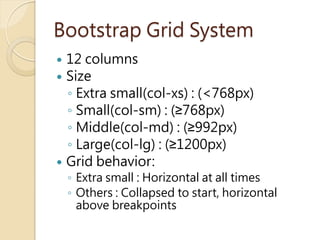
 12 columns
 Size
◦ Extra small(col-xs) : (<768px)
◦ Small(col-sm) : (≥768px)
◦ Middle(col-md) : (≥992px)
◦ Large(col-lg) : (≥1200px)
 Grid behavior:
◦ Extra small : Horizontal at all times
◦ Others : Collapsed to start, horizontal
above breakpoints
Bootstrap Grid System
 Include Bootstrap.css
 Usage
◦ Row : row as the div class name
◦ Column : (col-xs-/col-sm-/col-md-/col-
lg-)%d as the div class name
Col-md-6 Col-md-6
Grid system sample
Normalize.css
 Cross-browser consistency in HTML
elements
margin => 0
border => 0
padding => 0
Bootstrap Components
 Pre-define a couple of components
◦ Dropdowns
◦ Button, Button Groups
◦ Navbar
◦ Labels
◦ Progress bars
◦ Alerts
◦ Etc.
 Component usage:
1. Apply style
2. Enable component logic
 Via javascript.
 Via markup API
Via javascript(Model)
 Example
◦ Modal
 $('#myModal').modal(‘show’)
 $('#myModal').modal({backdrop:’static’,
show:true})
◦ Button
 $('.btn').button()
◦ Tooltip
 $('#example').tooltip(options)
Via markup API(Modal)
GlyphIcons
GlyphIcons
 Usage :
◦ <span class="glyphicon glyphicon-
star"></span>
◦ Don't mix with other components
 X:<button class=“btn glyphicon glyphicon-star”>button</button>
 O:<button class=“btn”><span class=“glyphicon xxx”></span>button<button>
Bootstrap UI Customization
 All UI style sheet can be set on
official website
 http://bootswatch.com/
 CSS part
◦ Able to be included partially.
 Javascript/jQuery plugin part
◦ Able to be included partially.
 Less Variables
RESPONSIVE WEB
DESIGN
Desktop, Tablet, Mobile and etc.
Responsive Web Design
 Fluid Grid Concept
 Flexible Image
 Media Queries
Responsive, Fluid Grid Concept
 Grid system
◦ Is derived from the graphic design.
◦ Make alignment.
◦ Standardize layout design.
◦ 960 Grid system
 Fluid Grid
◦ Web design
12 grid
12 grid
Flexible Image
 CSS
◦ max-width: 100%; height: auto;
 Bootstrap way
◦ class .img-responsive
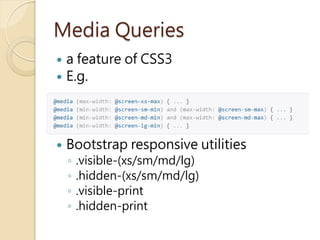
Media Queries
 a feature of CSS3
 E.g.
 Bootstrap responsive utilities
◦ .visible-(xs/sm/md/lg)
◦ .hidden-(xs/sm/md/lg)
◦ .visible-print
◦ .hidden-print
CSS3 Media Queries Browser
Support
 Desktop platform : doesn’t
support IE 8
 Mobile platform : support all
browsers.
 Reference : http://caniuse.com/css-
mediaqueries
LESS
The dynamic stylesheet language
What is LESS
 CSS extension
 .LESS files compile to CSS files
 Variable
 Mixin
 Nested Rules
 Functions & Operations
Variables
Mixin
Nested Rules
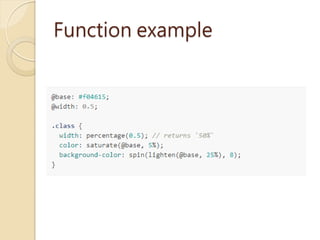
Functions
 String
 Misc
 List
 Math
 Type
 Color
 Color Definition
 Color Channel
 Color Operations
 Color Blending
 Reference : less functions
Function example
Reference
 Bootstrap website :
◦ http://getbootstrap.com/
◦ http://bootswatch.com/
◦ http://www.layoutit.com/
 LESS : http://www.lesscss.org/
 RWD Wiki :
http://en.wikipedia.org/wiki/Respon
sive_web_design

Bootstrap Study Share

  • 1.
  • 2.
    Agenda  Bootstrap ◦ CSS ◦Component ◦ UI Customization  Responsive Web Design(RWD)  Less  Reference
  • 3.
  • 4.
    Bootstrap v3  HTML5 ◦<!DOCTYPE html>  CSS ◦ CSS3 ◦ Grid System ◦ Normalize.css, a project by Nicolas Gailagher and Jonathan Neal ◦ LESS  Components ◦ A dozen reusable components ◦ Glyphicons  JavaScript ◦ Uses jQuery framework ◦ The data attribute
  • 5.
    Bootstrap Grid System 12 columns  Size ◦ Extra small(col-xs) : (<768px) ◦ Small(col-sm) : (≥768px) ◦ Middle(col-md) : (≥992px) ◦ Large(col-lg) : (≥1200px)  Grid behavior: ◦ Extra small : Horizontal at all times ◦ Others : Collapsed to start, horizontal above breakpoints
  • 6.
    Bootstrap Grid System Include Bootstrap.css  Usage ◦ Row : row as the div class name ◦ Column : (col-xs-/col-sm-/col-md-/col- lg-)%d as the div class name Col-md-6 Col-md-6
  • 7.
  • 8.
    Normalize.css  Cross-browser consistencyin HTML elements margin => 0 border => 0 padding => 0
  • 9.
    Bootstrap Components  Pre-definea couple of components ◦ Dropdowns ◦ Button, Button Groups ◦ Navbar ◦ Labels ◦ Progress bars ◦ Alerts ◦ Etc.  Component usage: 1. Apply style 2. Enable component logic  Via javascript.  Via markup API
  • 10.
    Via javascript(Model)  Example ◦Modal  $('#myModal').modal(‘show’)  $('#myModal').modal({backdrop:’static’, show:true}) ◦ Button  $('.btn').button() ◦ Tooltip  $('#example').tooltip(options)
  • 11.
  • 12.
  • 13.
    GlyphIcons  Usage : ◦<span class="glyphicon glyphicon- star"></span> ◦ Don't mix with other components  X:<button class=“btn glyphicon glyphicon-star”>button</button>  O:<button class=“btn”><span class=“glyphicon xxx”></span>button<button>
  • 14.
    Bootstrap UI Customization All UI style sheet can be set on official website  http://bootswatch.com/  CSS part ◦ Able to be included partially.  Javascript/jQuery plugin part ◦ Able to be included partially.  Less Variables
  • 15.
  • 16.
    Responsive Web Design Fluid Grid Concept  Flexible Image  Media Queries
  • 17.
    Responsive, Fluid GridConcept  Grid system ◦ Is derived from the graphic design. ◦ Make alignment. ◦ Standardize layout design. ◦ 960 Grid system  Fluid Grid ◦ Web design
  • 18.
  • 19.
  • 20.
    Flexible Image  CSS ◦max-width: 100%; height: auto;  Bootstrap way ◦ class .img-responsive
  • 21.
    Media Queries  afeature of CSS3  E.g.  Bootstrap responsive utilities ◦ .visible-(xs/sm/md/lg) ◦ .hidden-(xs/sm/md/lg) ◦ .visible-print ◦ .hidden-print
  • 22.
    CSS3 Media QueriesBrowser Support  Desktop platform : doesn’t support IE 8  Mobile platform : support all browsers.  Reference : http://caniuse.com/css- mediaqueries
  • 24.
  • 25.
    What is LESS CSS extension  .LESS files compile to CSS files  Variable  Mixin  Nested Rules  Functions & Operations
  • 26.
  • 27.
  • 28.
  • 29.
    Functions  String  Misc List  Math  Type  Color  Color Definition  Color Channel  Color Operations  Color Blending  Reference : less functions
  • 30.
  • 31.
    Reference  Bootstrap website: ◦ http://getbootstrap.com/ ◦ http://bootswatch.com/ ◦ http://www.layoutit.com/  LESS : http://www.lesscss.org/  RWD Wiki : http://en.wikipedia.org/wiki/Respon sive_web_design