Жесточайшая
Дима Дудин @nedudi
Оптимизация скорости
загрузки веб-страниц
Зачем ?
… неужели это так важно
1секунда?
1 секунда в WEB
11% - потеря количества
просмотров.
16% - потеря удовлетворенности
клиентов
7% - потеря конверсии
Конверсия магазинов
увеличивается на
74%
при уменьшении
времени загрузки
с 8 до 2 секунд
Деньги - не главное
Как понять ?
… анализы, анализы
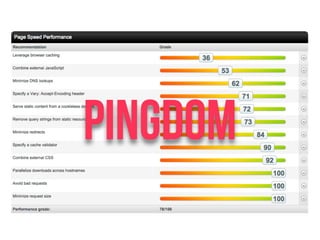
Pingdom
Pingdom
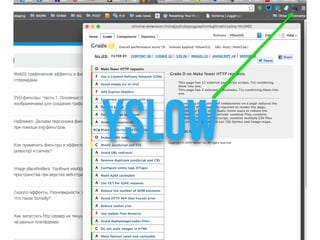
YSLOW
WEBPAGETEST
pagespeed
pagespeed
pagespeed
Типовые проблемы
… тяжко жить веб-разработчику
РАЗМЕР
ИЗОБРАЖЕНИЙ
авто
Сжималки
разрезалки
спрайты и тп…
grunt-contrib-imagemin
grunt-imageoptim
grunt-webp
grunt-imageNormalize
grunt-image-resize
grunt-spritefiles
grunt-montage
…….
addyosmani.com/blog/image-optimization-tools
<Picture>
vimeo.com/108326836
<picture>
<source
media="(min-width: 650px)"
srcset="images/kitten-stretching.png">
<source
media="(min-width: 465px)"
srcset="images/kitten-sitting.png">
<img
src="images/kitten-curled.png"
alt="a cute kitten">
</picture>
И еще …
<img src=“hi.png"
height="100" width=“100”
/>
ФОРМАТЫ
ИЗОБРАЖЕНИЙ
JPEG
PNG
SVG
Lazy
loading…
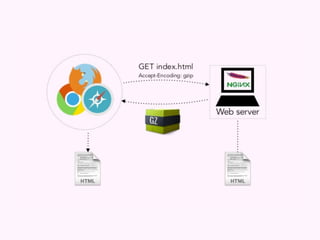
GZIP
Cache
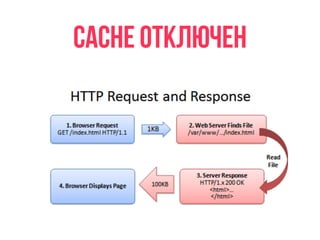
CACHE отключен
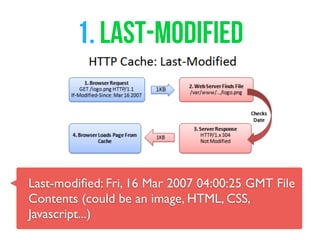
1. Last-Modified
Last-modified: Fri, 16 Mar 2007 04:00:25 GMT File
Contents (could be an image, HTML, CSS,
Javascript...)
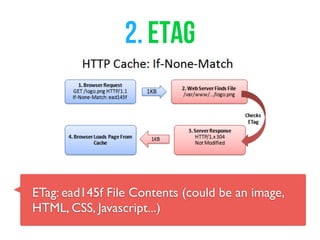
2. ETag
ETag: ead145f File Contents (could be an image,
HTML, CSS, Javascript...)
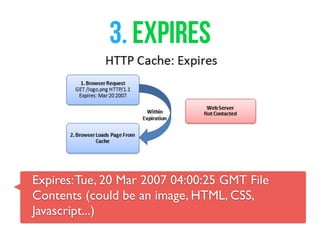
3. EXPIRES
Expires:Tue, 20 Mar 2007 04:00:25 GMT File
Contents (could be an image, HTML, CSS,
Javascript...)
<IfModule mod_expires.c>
ExpiresActive On
ExpiresByType image/jpg "access plus 1 year"
ExpiresByType image/jpeg "access plus 1 year"
ExpiresByType image/gif "access plus 1 year"
ExpiresByType image/png "access plus 1 year"
ExpiresByType text/css "access plus 1 month"
ExpiresByType application/pdf "access plus 1 month"
ExpiresByType text/x-javascript "access plus 1 month"
ExpiresByType image/x-icon "access plus 1 year"
ExpiresDefault "access plus 2 days"
</IfModule>
server {
...
location ~* .(gif|ico|jpe?g|png)(?[0-9]+)?$ {
expires 1w;
}
location ~* .(css|js)$ {
expires 1d;
}
...
}
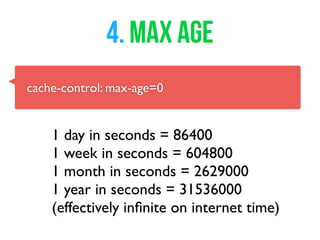
4. MAX AGE
cache-control: max-age=0
1 day in seconds = 86400
1 week in seconds = 604800
1 month in seconds = 2629000
1 year in seconds = 31536000
(effectively infinite on internet time)
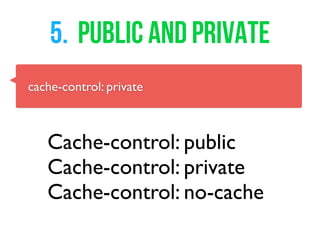
5. Public and Private
cache-control: private
Cache-control: public
Cache-control: private
Cache-control: no-cache
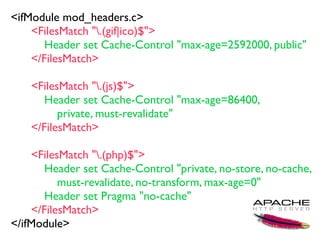
<ifModule mod_headers.c>
<FilesMatch ".(gif|ico)$">
Header set Cache-Control "max-age=2592000, public"
</FilesMatch>
<FilesMatch ".(js)$">
Header set Cache-Control "max-age=86400,
private, must-revalidate"
</FilesMatch>
<FilesMatch ".(php)$">
Header set Cache-Control "private, no-store, no-cache,
must-revalidate, no-transform, max-age=0"
Header set Pragma "no-cache"
</FilesMatch>
</ifModule>
server {
...
location ~* .(?:ico|css|js|gif|jpe?g|png)$ {
add_header Cache-Control "max-age=86400, public";
}
...
}
обфускация
js сss html
Сборка
js сss
JavaScript
в конец документа
CSS
в начало документа
?
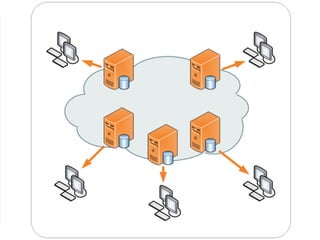
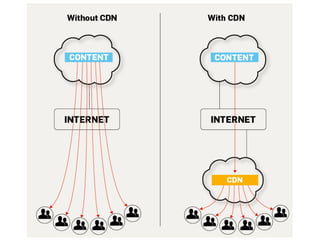
CDN
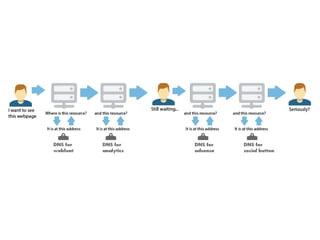
DNS
Lookup time
feedthebot.com/tools/requests
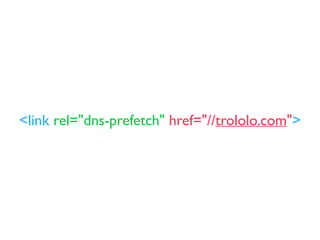
<link rel="dns-prefetch" href="//trololo.com">
Enable
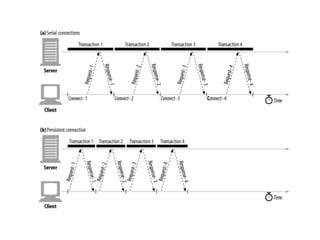
Keep-AlivE
избегаем
javascript
редиректов
Google Pagespeed
… xoчу все сразу
хочу
все
и
сразу
developers.google.com/speed/pagespeed/module/filters
pagespeed
Apache
ModPagespeedEnableFilters collapse_whitespace
Nginx
pagespeed EnableFilters collapse_whitespace;
Collapse Whitespace
Apache
ModPagespeedEnableFilters insert_dns_prefetch
Nginx
pagespeed EnableFilters insert_dns_prefetch;
Pre-Resolve DNS
Apache
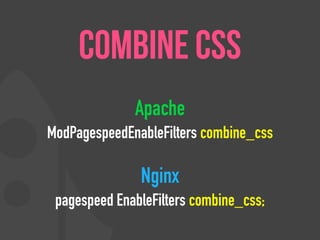
ModPagespeedEnableFilters combine_css
Nginx
pagespeed EnableFilters combine_css;
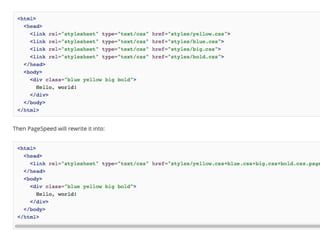
combine css
Apache
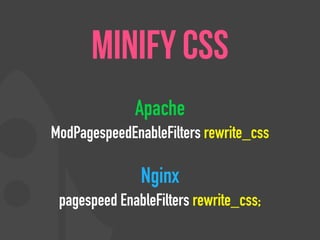
ModPagespeedEnableFilters rewrite_css
Nginx
pagespeed EnableFilters rewrite_css;
Minify CSS
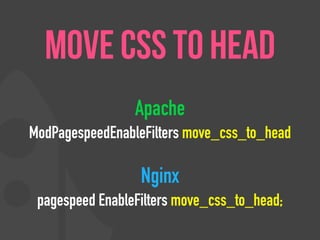
Apache
ModPagespeedEnableFilters move_css_to_head
Nginx
pagespeed EnableFilters move_css_to_head;
Move CSS to Head
Apache
ModPagespeedEnableFilters prioritize_critical_css
Nginx
pagespeed EnableFilters prioritize_critical_css;
Prioritize Critical CSS
Apache
ModPagespeedEnableFilters combine_javascript
Nginx
pagespeed EnableFilters combine_javascript;
combine js
Apache
ModPagespeedEnableFilters rewrite_javascript
Nginx
pagespeed EnableFilters rewrite_javascript;
Minify Js
Apache
ModPagespeedEnableFilters
canonicalize_javascript_libraries
Nginx
pagespeed EnableFilters
canonicalize_javascript_libraries;
Canonicalize JavaScript Libraries
Apache
ModPagespeedEnableFilters
include_js_source_maps
Nginx
pagespeed EnableFilters
include_js_source_maps;
Include JavaScript Source Maps
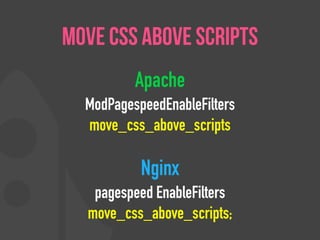
Apache
ModPagespeedEnableFilters
move_css_above_scripts
Nginx
pagespeed EnableFilters
move_css_above_scripts;
Move CSS Above Scripts
Apache
ModPagespeedEnableFilters defer_javascript
Nginx
pagespeed EnableFilters defer_javascript;
Defer JavaScript
Apache
ModPagespeedEnableFilters dedup_inlined_images
Nginx
pagespeed EnableFilters dedup_inlined_images;
Deduplicate Inlined Images
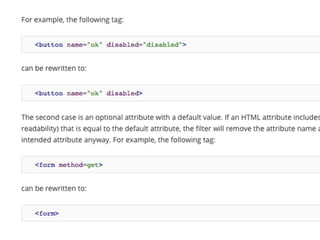
Apache
ModPagespeedEnableFilters elide_attributes
Nginx
pagespeed EnableFilters elide_attributes;
Elide Attributes
Apache
ModPagespeedEnableFilters extend_cache
Nginx
pagespeed EnableFilters extend_cache;
Extend Cache
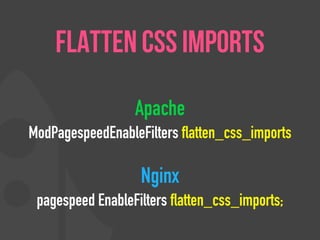
Apache
ModPagespeedEnableFilters flatten_css_imports
Nginx
pagespeed EnableFilters flatten_css_imports;
Flatten CSS Imports
Apache
ModPagespeedEnableFilters lazyload_images
Nginx
pagespeed EnableFilters lazyload_images;
Lazyload Images
Apache
ModPagespeedEnableFilters sprite_images
Nginx
pagespeed EnableFilters sprite_images;
Sprite Images
Apache
ModPagespeedEnableFilters rewrite_images
Nginx
pagespeed EnableFilters rewrite_images;
Optimize Images
inline_images +
recompress_images +
convert_png_to_jpeg +
resize_images
Apache
ModPagespeedEnableFilters local_storage_cache
Nginx
pagespeed EnableFilters local_storage_cache;
Local Storage Cache
ЭКСПЕРИМЕНТИРУЙТЕ
НИКОМУ НЕ ВЕРЬТЕ
@nedud @html5by
Вопросы ? nedudi@gmail.com
html5.by
vk.com/html5by
facebook.com/html5by
twitter.com/html5by

Web page load speed optimization

Editor's Notes

  • #5 1-секундная задержка в загрузке веб-страницы влечет за собой: 11% - потеря количества просмотров. 16% - потеря удовлетворенности клиентов 7% - потеря конверсии
  • #6 Иногда мы не знаем, что будет через 1 сек
  • #7 Иногда 1 сек все тотально решает
  • #8 According to the Guinness Book of World Records, Steven Petrosino is the Beer Chugging World Champion. On June 22, 1977, he drank 1 liter of beer in 1.3 seconds at the Gingerbreadman in Carlise, PA, a 56% improvement over the previous world record set several years earlier by Peter Dowdeswell of England (2.3 seconds for 1 liter)
  • #9 1-секундная задержка в загрузке веб-страницы влечет за собой: 11% - потеря количества просмотров. 16% - потеря удовлетворенности клиентов 7% - потеря конверсии
  • #10 1-секундная задержка в загрузке веб-страницы влечет за собой: 11% - потеря количества просмотров. 16% - потеря удовлетворенности клиентов 7% - потеря конверсии
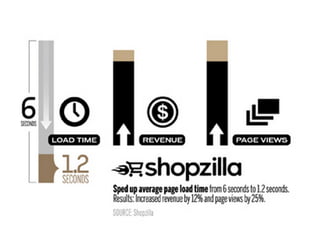
  • #11 Shopzilla ускорить среднее время загрузки страницы из 6 секунд до 1,2 секунд, а увеличение доходов на 12% и просмотров страниц на 25%. Amazon увеличил выручку на 1% за каждые 100 мс улучшения (так же, как Walmart). Yahoo увеличение трафика на 9% за каждые 400 мс улучшения. Наконец, Mozilla получили 60 миллионов больше Firefox загрузок в год, делая свои страницы 2,2 секунды быстрее.
  • #16 мы все ждем такой реакции пользователя
  • #17 а что мы зачастую получаем
  • #26 информационно-развлекательных систем
  • #27 http://addyosmani.com/blog/image-optimization-tools/ As we saw a few weeks ago, the weight of an average web page is now almost 1.5MB (median ~1MB), with > 50% of this being images указывайте аттрибуты юзайте спратйы
  • #44 . Why GZIP? • GZIP is not the best compression method, but there are a few good reasons to use it. • Provides a good tradeoff between speed and ratio. • Difficulty to add newer compression methods. The "Content-Encoding"/"Accept-Encoding" and "Transfer-Encoding"/"TE" headers in HTTP/1.1 allow clients to optionally receive compressed HTTP responses and (less commonly) to send compressed requests. The specification for HTTP/1.1 (RFC 2616) specifies three compression methods: "gzip" (RFC 1952; the content wrapped in a gzip stream), "deflate" (RFC 1950; the content wrapped in a zlib-formatted stream), and "compress" (explained in RFC 2616 section 3.5 as "The encoding format produced by the common UNIX file compression program compress. This format is an adaptive Lempel-Ziv-Welch coding (LZW)."). Many client libraries, browsers, and server platforms (including Apache and Microsoft IIS) support gzip. Many agents also support deflate, although several important players incorrectly implement deflate support using the format specified by RFC 1951 instead of the correct format specified by RFC 1950 (which encapsulates RFC 1951). Notably, Internet Explorer versions 6, 7, and 8 report deflate support but do not actually accept RFC 1950 format, making actual use of deflate highly unusual. Many clients accept both RFC 1951 and RFC 1950-formatted data for the "deflate" compressed method, but a server has no way to detect whether a client will correctly handle RFC 1950 format.[9]
  • #45 Accept-Encoding: gzip
  • #46 What is GZIP? Web server GET index.html Accept-Encoding: gzip
  • #47  Add an Expires header
  • #48 http://betterexplained.com/articles/how-to-optimize-your-site-with-http-caching/ http://www.mobify.com/blog/beginners-guide-to-http-cache-headers/
  • #49 Browser: Hey, give me logo.png, but only if it’s been modified since Mar 16, 2007. Server: (Checking the modification date) Server: Hey, you’re in luck! It was not modified since that date. You have the latest version. Browser: Great! I’ll show the user the cached version. Sending the short “Not Modified” message is a lot faster than needing to download the file again, especially for giant javascript or image files. Caching saves the day (err… the bandwidth).
  • #50 Сравнивая версии с временем изменения обычно работает, но может привести к проблемам. Что делать, если часы сервера изначально неправильно, а затем устроился? Что делать, если летнее время наступает рано и сервер не обновляется? В тайниках может быть неточным. Browser: Can I get logo.png, if nothing matches tag “ead145f”? Server: (Checking fingerprint on logo.png) Server: You’re in luck! The version here is “ead145f”. It was not modified. Browser: Score! I’ll show the user my cached version.
  • #51 Browser: Self, is it before the expiration date of Mar 20, 2007? (Assume it is). Browser: Verily, I will show the user the cached version.
  • #61 Avoid CSS @import
  • #63 Но на самом деле все не так просто. У Tizen есть длинная предистория. Выглядит она приблизительно так:
  • #64 Но на самом деле все не так просто. У Tizen есть длинная предистория. Выглядит она приблизительно так:
  • #65 Но на самом деле все не так просто. У Tizen есть длинная предистория. Выглядит она приблизительно так:
  • #66 Но на самом деле все не так просто. У Tizen есть длинная предистория. Выглядит она приблизительно так:
  • #67 Но на самом деле все не так просто. У Tizen есть длинная предистория. Выглядит она приблизительно так:
  • #68 Reduce DNS Lookups: DNS (Domain Name System) Lookup occurs when a URL (hostname) is typed in a browser and a DNS resolver returns that server’s IP address. The time needed for this process is around 20 – 120 milliseconds, however, multiple hostnames can be used for various elements on a website, which includes the URL, images, script files, style sheets and flash elements. With multiple unique hostnames the DNS lookup also increases thus increasing the page load time. Reducing the number of unique hostnames will reduce the number of parallel downloads, which may increase the page loading time. It is thus ideal to use one host when you have less than six resources. You can also use URL paths instead of hostnames. This means that if you have a blog page that is hosted on blog.yoursite.com, you can instead host it on www.yoursite.com/blog.
  • #69 Know what your webpage is doing. Decide what is important to your page.
  • #70 Know what your webpage is doing. Decide what is important to your page.
  • #71 Know what your webpage is doing. Decide what is important to your page.
  • #72 Reduce DNS Lookups: DNS (Domain Name System) Lookup occurs when a URL (hostname) is typed in a browser and a DNS resolver returns that server’s IP address. The time needed for this process is around 20 – 120 milliseconds, however, multiple hostnames can be used for various elements on a website, which includes the URL, images, script files, style sheets and flash elements. With multiple unique hostnames the DNS lookup also increases thus increasing the page load time. Reducing the number of unique hostnames will reduce the number of parallel downloads, which may increase the page loading time. It is thus ideal to use one host when you have less than six resources. You can also use URL paths instead of hostnames. This means that if you have a blog page that is hosted on blog.yoursite.com, you can instead host it on www.yoursite.com/blog.
  • #73 Know what your webpage is doing. Decide what is important to your page.
  • #74 Know what your webpage is doing. Decide what is important to your page.
  • #76 информационно-развлекательных систем
  • #77 MaxCombinedCssBytes MaxSegmentLength
  • #78 MaxCombinedCssBytes MaxSegmentLength
  • #79 MaxCombinedCssBytes MaxSegmentLength
  • #82 MaxCombinedCssBytes MaxSegmentLength
  • #83 MaxCombinedCssBytes MaxSegmentLength
  • #84 MaxCombinedCssBytes MaxSegmentLength
  • #85 MaxCombinedCssBytes MaxSegmentLength
  • #86 MaxCombinedCssBytes MaxSegmentLength
  • #87 MaxCombinedCssBytes MaxSegmentLength
  • #88 MaxCombinedCssBytes MaxSegmentLength
  • #89 defer_javascript tries to defer JavaScript execution until page load. It defers this by changing the type and src attributes of <script> elements on the HTML page to pagespeed_orig_type and pagespeed_orig_src respectively. It also adds a new type attribute whose value is set to text/psajs. A window.onload handler is added to the HTML, which executes all the deferred scripts. defer_javascript doesn't defer a script tag if it has the pagespeed_no_defer attribute. This is useful when a script tag needs to be executed while loading the page. For example, a script tag may be updating the main content dynamically as a slideshow of images in the visible content of the page. Usage:
  • #90 defer_javascript tries to defer JavaScript execution until page load. It defers this by changing the type and src attributes of <script> elements on the HTML page to pagespeed_orig_type and pagespeed_orig_src respectively. It also adds a new type attribute whose value is set to text/psajs. A window.onload handler is added to the HTML, which executes all the deferred scripts. defer_javascript doesn't defer a script tag if it has the pagespeed_no_defer attribute. This is useful when a script tag needs to be executed while loading the page. For example, a script tag may be updating the main content dynamically as a slideshow of images in the visible content of the page. Usage:
  • #91 defer_javascript tries to defer JavaScript execution until page load. It defers this by changing the type and src attributes of <script> elements on the HTML page to pagespeed_orig_type and pagespeed_orig_src respectively. It also adds a new type attribute whose value is set to text/psajs. A window.onload handler is added to the HTML, which executes all the deferred scripts. defer_javascript doesn't defer a script tag if it has the pagespeed_no_defer attribute. This is useful when a script tag needs to be executed while loading the page. For example, a script tag may be updating the main content dynamically as a slideshow of images in the visible content of the page. Usage:
  • #92 defer_javascript tries to defer JavaScript execution until page load. It defers this by changing the type and src attributes of <script> elements on the HTML page to pagespeed_orig_type and pagespeed_orig_src respectively. It also adds a new type attribute whose value is set to text/psajs. A window.onload handler is added to the HTML, which executes all the deferred scripts. defer_javascript doesn't defer a script tag if it has the pagespeed_no_defer attribute. This is useful when a script tag needs to be executed while loading the page. For example, a script tag may be updating the main content dynamically as a slideshow of images in the visible content of the page. Usage:
  • #93 Description dedup_inlined_images replaces repeated inlined images with JavaScript that loads the image from the first occurence of the image. If the first image doesn't have an id, one is generated and added to it. Operation dedup_inlined_images rewrites inlined images: If the image's data URL has not appeared earlier in the page then, if it doesn't already have one an id attribute is generated and added to the tag, then the existing/added id is recorded along with the data URL for comparison with subsequent inlined images. Otherwise, the <img> tag is replaced with an inline <script> tag that replaces itself with an <img> tag, loading the data URL from the preceding <img> tag with the id matching this tag's data URL.

  • #94 defer_javascript tries to defer JavaScript execution until page load. It defers this by changing the type and src attributes of <script> elements on the HTML page to pagespeed_orig_type and pagespeed_orig_src respectively. It also adds a new type attribute whose value is set to text/psajs. A window.onload handler is added to the HTML, which executes all the deferred scripts. defer_javascript doesn't defer a script tag if it has the pagespeed_no_defer attribute. This is useful when a script tag needs to be executed while loading the page. For example, a script tag may be updating the main content dynamically as a slideshow of images in the visible content of the page. Usage:
  • #95 MaxCombinedCssBytes MaxSegmentLength
  • #96 'Extend Cache' seeks to improve the cacheability of a web page's resources without compromising the ability of site owners to change the resources and have those changes propagate to users' browsers. This filter is based on the best practice to optimize caching, as applied to the browser.
  • #97 Reduce the number of HTTP round-trips by combining multiple CSS resources into one.
  • #98 Reduce the number of HTTP round-trips by combining multiple CSS resources into one.
  • #99 Reduce the number of HTTP round-trips by combining multiple CSS resources into one.
  • #100 Reduce the number of HTTP round-trips by combining multiple CSS resources into one.
  • #101 Reduce the number of HTTP round-trips by combining multiple CSS resources into one.
  • #102 информационно-развлекательных систем
  • #103 MaxCombinedCssBytes MaxSegmentLength