Let’s Begin…
How many of you…
 …have heard of blog/blogging before?
 …regularly read a blog?
 …contribute to a blog?
 …use it in your classroom?
 …make use of RSS?
Blog?
• Web Logs
• A form of micro-publishing or documenting
 your thoughts about any topic on the Web
• a personal, chronologically ordered set of
 entries, each having a title, description and
 unique URL, in a web-based ‘log’ or journal
Terminology
• Blogging: The act of contributing to blogs

• Blogosphere: All blogs, or the blogging community

• Blogroll: A list of other blogs

• Permalink: The unique URL of a single post

• Post: An entry written and published to a blog
Terminology
• RSS: URL that can be used to subscribe to your
  blog and get automatic notifications of new posts

• TrackBack: automated means for notifying another
  blog when you have referenced them

• Pingback: The alert in the TrackBack system
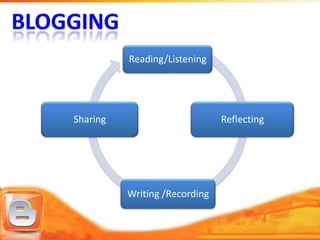
Reading/Listening


Sharing                        Reflecting


          Writing /Recording
Characteristics
• Posts are in reverse chronological order…most
  recent first

• Searchable archives

• Updated on a regular basis, sometimes daily

• Most Web logs are written in an informal, first person
  style
Characteristics
• Hyperlink to or reference news and information from
  other sites

• Set of tools supporting simple creation of XML-
  based content

• Primarily text, but Web logs can include all sorts of
  multimedia files

• Rely on RSS technology – Really Simple Syndication
  or Rich Site Summary
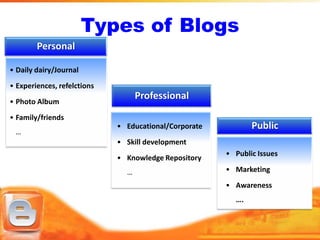
Types of Blogs
        Personal

• Daily dairy/Journal
• Experiences, refelctions
• Photo Album
                                   Professional
• Family/friends
                             • Educational/Corporate          Public
 …
                             • Skill development
                                                       • Public Issues
                             • Knowledge Repository
                               …                       • Marketing
                                                       • Awareness
                                                         ….
The Advantages
 Free or low-cost         Chronological, categorised
 Easy to create, use &     content
  maintain                 Encourages          personal
 Access anywhere           reflections

 Interactive              original ideas and stimulate

 Wide audience             discussions

 Many Blog services       Knowledge management and
                            archiving
The Disadvantages
• Large number of blog services

• Template and layout editing

• Integration of multimedia

• Authenticity

• No censorship

• Needs regular updating
TEACHERS
• As Writer/Contributor
    Collaborate and share ideas and resources world-wide

    Maintain a personal journal

    Knowledge management tool

    Post class room announcements, project, assignment,
     reading lists, Instructions, tips and tutorials

    Create selected web resources for students

    Communication to parents

    Collaborative blog with students
TEACHERS
• As Reader
   Discipline specific blogs to keep up-to-date

   Access to teaching resources/lesson plans

   Assess student’s projects/assignments

   Professional growth

   Peer interaction
STUDENTS
 Document their class works online

 Reflections on their learning

 Informal medium for submission of projects/assignments

 Outside classroom interaction with peers and experts
 May motivate those who might not participate in class room
  discussions
 Self learning – access to wide variety of study tips/materials

 Stay in touch with teachers and other students during

   vacations
Benefits
• Motivating to students
• Encourage learners engagement and participation
• Provide individual environment for them to study
• Provides a platform for showcasing creativity and skills
• Effective interaction
• Multidisciplinary and multidirectional learning
• Reaching out masses
Skill Development
• Reading and Comprehension

• Sharing — thoughts, concepts, experiences, knowledge

• Analyzing

• Reflecting — Critiquing, Writing, Questioning, Reacting

• Communicating

• Collaboration – with peers, experts, public

• Record Keeping – thoughts, experiences, concepts, ideas
Issues
Acceptable content
Netiquette
Plagiarism/Copyright
Online safety
Responsible behaviour              Teachers as
 Offtrack discussions             Moderators
 Inappropriate language or tone
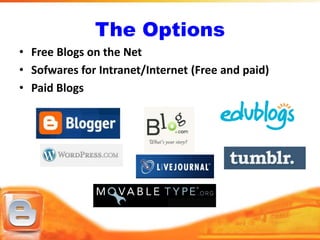
The Options
• Free Blogs on the Net
• Sofwares for Intranet/Internet (Free and paid)
• Paid Blogs
Considerations
          Selecting the platform

Intended Use            Free/Low Cost
Ease of Use             Intranet/Internet
Easy Access             Technical Knowledge
Collaboration
Content
Privacy
RSS/Atom Feeds
• Better alternative to bookmarking

• RSS originally RDF Site Summary commonly called
  Really Simple Syndication

• Web feed formats used to publish frequently updated
  works—such as blog entries, news headlines, audio, and
  video—in a standardized format

• Need an Feed Reader like Google Reader or Bloglines
Wiki
• An extremely flexible kind of blog
• supports collaborative web-editing
• A wiki is a piece of server software that
  allows users to freely create and edit Web
  page content using any Web browser (from
  wiki.org)
• A wiki can also be used as a discussion
  medium, a repository, a mail system, and a
  chat room
•   Hosted by Google
•   Subdomain blogspot.com; blogspot.in
•   Simple to use interface
•   All basic facilities offered
•   Group/Team Blogging
•   Mail to blog
•   and many more …
Blog: Enahancing Education

Blog: Enahancing Education

  • 2.
    Let’s Begin… How manyof you… …have heard of blog/blogging before? …regularly read a blog? …contribute to a blog? …use it in your classroom? …make use of RSS?
  • 3.
    Blog? • Web Logs •A form of micro-publishing or documenting your thoughts about any topic on the Web • a personal, chronologically ordered set of entries, each having a title, description and unique URL, in a web-based ‘log’ or journal
  • 4.
    Terminology • Blogging: Theact of contributing to blogs • Blogosphere: All blogs, or the blogging community • Blogroll: A list of other blogs • Permalink: The unique URL of a single post • Post: An entry written and published to a blog
  • 5.
    Terminology • RSS: URLthat can be used to subscribe to your blog and get automatic notifications of new posts • TrackBack: automated means for notifying another blog when you have referenced them • Pingback: The alert in the TrackBack system
  • 6.
    Reading/Listening Sharing Reflecting Writing /Recording
  • 7.
    Characteristics • Posts arein reverse chronological order…most recent first • Searchable archives • Updated on a regular basis, sometimes daily • Most Web logs are written in an informal, first person style
  • 8.
    Characteristics • Hyperlink toor reference news and information from other sites • Set of tools supporting simple creation of XML- based content • Primarily text, but Web logs can include all sorts of multimedia files • Rely on RSS technology – Really Simple Syndication or Rich Site Summary
  • 9.
    Types of Blogs Personal • Daily dairy/Journal • Experiences, refelctions • Photo Album Professional • Family/friends • Educational/Corporate Public … • Skill development • Public Issues • Knowledge Repository … • Marketing • Awareness ….
  • 10.
    The Advantages  Freeor low-cost  Chronological, categorised  Easy to create, use & content maintain  Encourages personal  Access anywhere reflections  Interactive  original ideas and stimulate  Wide audience discussions  Many Blog services  Knowledge management and archiving
  • 11.
    The Disadvantages • Largenumber of blog services • Template and layout editing • Integration of multimedia • Authenticity • No censorship • Needs regular updating
  • 13.
    TEACHERS • As Writer/Contributor  Collaborate and share ideas and resources world-wide  Maintain a personal journal  Knowledge management tool  Post class room announcements, project, assignment, reading lists, Instructions, tips and tutorials  Create selected web resources for students  Communication to parents  Collaborative blog with students
  • 14.
    TEACHERS • As Reader  Discipline specific blogs to keep up-to-date  Access to teaching resources/lesson plans  Assess student’s projects/assignments  Professional growth  Peer interaction
  • 15.
    STUDENTS  Document theirclass works online  Reflections on their learning  Informal medium for submission of projects/assignments  Outside classroom interaction with peers and experts  May motivate those who might not participate in class room discussions  Self learning – access to wide variety of study tips/materials  Stay in touch with teachers and other students during vacations
  • 16.
    Benefits • Motivating tostudents • Encourage learners engagement and participation • Provide individual environment for them to study • Provides a platform for showcasing creativity and skills • Effective interaction • Multidisciplinary and multidirectional learning • Reaching out masses
  • 17.
    Skill Development • Readingand Comprehension • Sharing — thoughts, concepts, experiences, knowledge • Analyzing • Reflecting — Critiquing, Writing, Questioning, Reacting • Communicating • Collaboration – with peers, experts, public • Record Keeping – thoughts, experiences, concepts, ideas
  • 18.
    Issues Acceptable content Netiquette Plagiarism/Copyright Online safety Responsiblebehaviour Teachers as  Offtrack discussions Moderators  Inappropriate language or tone
  • 20.
    The Options • FreeBlogs on the Net • Sofwares for Intranet/Internet (Free and paid) • Paid Blogs
  • 21.
    Considerations Selecting the platform Intended Use Free/Low Cost Ease of Use Intranet/Internet Easy Access Technical Knowledge Collaboration Content Privacy
  • 22.
    RSS/Atom Feeds • Betteralternative to bookmarking • RSS originally RDF Site Summary commonly called Really Simple Syndication • Web feed formats used to publish frequently updated works—such as blog entries, news headlines, audio, and video—in a standardized format • Need an Feed Reader like Google Reader or Bloglines
  • 23.
    Wiki • An extremelyflexible kind of blog • supports collaborative web-editing • A wiki is a piece of server software that allows users to freely create and edit Web page content using any Web browser (from wiki.org) • A wiki can also be used as a discussion medium, a repository, a mail system, and a chat room
  • 24.
    Hosted by Google • Subdomain blogspot.com; blogspot.in • Simple to use interface • All basic facilities offered • Group/Team Blogging • Mail to blog • and many more …